



News & Updates


Will AI replace lawyers? Artificial intelligence (AI) will not replace lawyers, but it is fundamentally changing how they get legal work done. As AI becomes more embedded in research, document review, and client intake, firms are increasingly automating many traditional legal tasks. This article examines whether AI can truly replace lawyers, which legal functions are most affected, how law firms are using AI today, and what these trends mean for associate attorneys navigating an AI-driven legal industry.
AI is already reshaping how your firm gets work done. It’s changing how you handle research, drafting, intake, billing pressure, and the future of associate work.
For many firms, the real question is how to use AI without disrupting the way they already work. Firms are figuring out where AI adds value and where attorneys still need to stay hands-on, while navigating how these tools change the work without changing who’s ultimately responsible.
In this guide, we’ll examine where AI affects legal tasks, why associate attorneys feel the most pressure, how firms are using AI today, and what the next 12-24 months are likely to bring.
Will AI Replace Lawyers or Just Change the Job?
The short answer is no: AI will not replace lawyers. What it can do is automate or accelerate certain tasks lawyers have traditionally handled manually, and that distinction matters.
When people ask, "Will lawyers be replaced by AI?" or "Can AI replace lawyers?" they are usually reacting to how quickly these tools have improved at summarizing information, reviewing documents, and generating draft language.
But those capabilities are not the same as practicing law. Lawyers are still responsible for legal judgment, ethical obligations, advocacy, and client outcomes. And courts, clients, and regulators continue to hold licensed attorneys accountable.
A better question is: “Which parts of your work is AI already automating, and what does that mean for you?”
Why Associate Attorneys Feel Most at Risk
If any group in the profession feels exposed by AI, it is associate attorneys. Associates often spend a large share of their time on high-volume, repeatable work:
- Document review
- Contract comparison
- Drafting from templates
- Follow-up tied to matters in progress
Those are also the kinds of tasks AI is taking on.
It’s no surprise that many associates feel pressure as these tasks shift. Many associates are already under pressure to be faster, more accurate, and easier to justify to cost-conscious clients.
But "most exposed" does not mean associates are the most likely to be replaced. It means the tasks that make up their role are among the first to be reshaped by AI, while expectations for more substantive work rise earlier.
Legal Tasks AI Can Replace or Automate
AI is most effective at handling structured, repetitive, text-heavy, and rules-based work that slows your team down.
Legal research and case summarization
AI is already changing the first layer of legal research. Attorneys can use it for a faster first pass to:
- Scan cases, statutes, and regulations quickly
- Summarize large volumes of text
- Highlight recurring themes
- Spot potential issues faster
That means less time gathering information and more time testing whether the output is accurate, relevant, and persuasive. These are the kinds of outputs that actually move cases forward.
Contract review and document analysis
Contract review is another area where AI can help. AI can be useful in due diligence, compliance review, procurement workflows, and any matter involving large volumes of contracts or standard language, including:
- Identifying clauses
- Comparing language across document sets
- Flagging deviations from standard terms
- Surfacing inconsistencies that manual review might otherwise miss
Many firms are also exploring legal document automation software to streamline repetitive drafting and review tasks while keeping attorneys in control of the final output.
Intake, qualification, and administrative work
Some of the fastest wins come from automating intake and follow-up with predefined criteria, so no potential client gets lost. These are areas where automation and AI can reduce a major administrative burden:
- Client intake
- Lead qualification and routing
- Follow-up
- Automated scheduling and reminders
Legal Tasks AI Cannot Replace
For all the attention on automation, there are still core parts of legal practice that AI cannot replace.
AI cannot replace certain legal tasks
Legal work often involves high-stakes decisions where the details matter, and the right call isn’t always obvious. Many matters require attorneys to navigate uncertainty, emotional dynamics, and practical risk in ways that go beyond pattern recognition.
Lawyers do more than surface information. They interpret ambiguity, weigh tradeoffs, and make recommendations when the answer is not obvious. AI can help organize information and support analysis, but legal judgment still depends on attorneys.
Advocacy and negotiation
Legal advocacy is deeply human. Whether in court, at a mediation table, or in a negotiation, persuasion depends on judgment, timing, credibility, listening, and adaptation.
Strong advocates read tone, pressure, resistance, leverage, and opportunity. AI can assist with preparation, but it cannot respond to the human dynamics that shape negotiation and advocacy in the moment.
Ethical responsibility and accountability
The biggest boundary in legal practice around AI use is accountability. Lawyers have ethical duties to clients, courts, and the profession, including competence, confidentiality, candor, supervision, and professional judgment.
Those duties still rest with attorneys. They must verify the work, protect client information, exercise judgment, and stand behind the advice they give.
How Law Firms Are Using AI Today
Law firms are using AI in several practical ways today. It supports legal work by improving intake and connecting workflows inside a legal client relationship management (CRM) system.
AI as an assistant, not a replacement
In many firms, AI is being used to accelerate research, support drafting, improve consistency, and reduce time spent on routine tasks. It helps attorneys work more efficiently, but they still have to review outputs, make decisions, and stand behind the final work product.
AI in client intake, lead qualification, and routing
One of the clearest applications of AI for law firms is in client intake. AI can help firms improve the quality of information they collect, apply qualification criteria more consistently, and move leads through the right next steps with less manual effort.
For example, AI can:
- Evaluate urgency: Identify inquiries that may need faster attention based on timing, case type, or stated circumstances.
- Screen for practice fit: Help determine whether a matter aligns with the firm’s services before teams spend time reviewing it.
- Assess lead quality: Apply defined qualification standards consistently to help teams focus on stronger opportunities. Tools like QualifyAI support this process by helping firms automate intake screening and matter qualification without crossing into the realm of legal advice.
- Collect intake information: Use custom forms and structured workflows to gather client details and create more complete records from the start.
- Route inquiries intelligently: Sort leads by priority, stage, or next step and direct them to the right person or process.
- Automate follow-up: Trigger responses, reminders, and outreach to ensure promising leads do not stall due to delayed communication.
- Support scheduling: Move qualified leads into consultations with less back-and-forth and fewer manual touchpoints.
- Reduce administrative drag: Improve upstream intake so attorneys spend less time on triage and more time on billable work.
AI paired with legal CRM workflows
AI becomes more useful when it works inside a broader system. That works best when legal CRM software and legal software integrations connect intake, follow-up, and client information into a single centralized system.
When intake data flows directly into a centralized CRM, follow-up can happen automatically, and attorneys can work from more complete, organized information.
What Will Actually Change for Associate Attorneys in the Next 12-24 Months
The table below illustrates which legal tasks firms are already automating, which are likely to change in the next 12-24 months, and which still depend on human judgment.
| Legal task category | Examples of tasks | Level of AI impact | Timeline |
|---|---|---|---|
| Intake and administrative work | Intake data collection, lead qualification, follow-up, and scheduling | High | Already happening |
| Legal research and summarization | First-pass case law research, statute summaries, issue spotting | High | Already happening |
| Contract review and analysis | Clause identification, risk flagging, document comparison | High | Already happening |
| Drafting standard legal documents | Routine motions, template-based agreements with attorney review | Medium | 12-24 months |
| Litigation prep and discovery support | Document organization, evidence tagging, timeline creation | Medium | 12-24 months |
| Intake decision support | Applying firm-defined qualification rules without legal advice | Medium | Already happening |
| Legal judgment and strategy | Case strategy, risk assessment, application of law to facts | Low | Unlikely to be replaced |
| Client counseling and advocacy | Client advice, negotiation, courtroom advocacy | Low | Unlikely to be replaced |
| Ethical and professional accountability | Malpractice liability, ethical judgment, licensing responsibility | None | Not replaceable |
Fewer low-value tasks, higher expectations
Associates will likely spend less time on intake administration, document work, and other repetitive tasks that can be standardized. As a result, firms may expect associates to handle more substantive work earlier.
As routine work takes up less of the role, firms may place greater value on analytical skills, precision, and the ability to take on client-facing responsibility.
Faster feedback loops
AI-assisted systems can make performance more visible. When workflows are digitized and standardized, firms can see turnaround times, follow-up completion, response rates, matter progression, and other indicators sooner.
Faster feedback loops help strong associates stand out while also making expectations around consistency and execution clearer across the board.
Increased leverage for AI-literate associates
The associates who benefit most from AI will be the ones who adopt it quickly and use it responsibly. That starts with understanding how to prompt, review, verify, and refine outputs. It also involves knowing where automation adds value and where it introduces risk.
The real advantage comes from turning saved time into stronger work, not just faster work.
The real risks of AI in legal practice
AI can create leverage, but only if you understand the risks that come with it. Key concerns include:
- Hallucinations and inaccurate outputs: AI can produce confident-sounding errors, including fabricated citations, misread authority, or oversimplified legal distinctions. In legal work, every output requires attorney verification.
- Confidentiality and data privacy: Firms must handle client information carefully, and not every AI tool is appropriate for legal workflows. Tools can create risk when firms do not understand how data is processed, stored, or reused. That is why firms need clear policies, controlled workflows, and tools built for legal use cases.
- Unauthorized practice of law: AI cannot independently provide legal advice. Firms can use AI to support intake, qualification, and internal workflows, but if implementation crosses into unsupervised legal advice, the risk becomes regulatory exposure.
- Over-reliance and skill atrophy: Attorneys still need to build judgment, pattern recognition, and analytical strength. If AI is responsible for too much thinking, it can result in weaker legal reasoning over time.
How Associate Attorneys Can Future-Proof Their Careers
The strongest position is knowing where AI supports your legal work and where your judgment still matters most.
Focus on high-judgment legal work
The more your value depends on strategy, counseling, nuanced analysis, negotiation, and client communication, the harder you are to replace. Look for opportunities to build skills in asking better questions, improving communication, and taking ownership of recommendations.
Become AI-literate, not AI-dependent
Lawyers do not need to become AI experts. They need to understand how AI fits into their day-to-day workflows.
Learning how to evaluate outputs, identify weak reasoning, spot missing context, and supervise automated processes will better equip you to leverage AI without becoming dependent on it.
Use AI to protect billable work
AI should protect time for more meaningful work. When firms automate low-value administrative steps, intake bottlenecks, or repetitive drafting processes, you can focus your time where it adds the most value: analysis, advocacy, and client service.
The Future of Law in an AI-Driven Legal Profession
AI isn’t changing who’s responsible for legal work. It’s changing how efficiently you can get that work done.
For attorneys, AI is most useful when it automates administrative tasks and streamlines intake, follow-up, and qualification, allowing them to spend more time on substantive legal work.
As a legal CRM, Lawmatics helps firms automate intake, follow-up, and qualification through custom automations. You receive better information and fewer administrative bottlenecks, so you can spend more time practicing law.
To see how AI-supported intake fits into a modern Legal CRM, request a demo.
FAQ
Will AI replace lawyers entirely?
No. AI can automate parts of legal work, but it cannot replace legal judgment, ethical accountability, or advocacy. Lawyers are still responsible for advising clients, applying the law to specific facts, and standing behind the decisions and filings.
Are associate attorneys more vulnerable to AI?
Associate attorneys are more affected by AI-driven task automation because early-career roles often include more routine, document-heavy, and process-driven work. With AI, the structure of their work is changing, with more emphasis on analysis, judgment, and client-facing readiness.
Can AI practice law on its own?
No. AI cannot practice law independently or provide legal advice without attorney oversight. It can support research, intake, and administrative workflows, but licensed attorneys are still responsible for verifying outputs, protecting client information, and exercising professional judgment.
What legal work is safest from AI?
Legal work that depends on strategy, advocacy, negotiation, and client counseling is the least likely to be automated. These responsibilities require judgment, persuasion, relationship management, and the ability to respond to nuanced facts and human dynamics.
Should lawyers be worried about AI?
Lawyers should prepare for change, but not assume AI is replacing the profession. Firms and attorneys who learn how to use AI responsibly will be in a stronger position than those who ignore it.
We know running a law firm means juggling a ton of software. And while each tool is supposed to make things easier, sometimes it feels like they just add more to your plate with duplicate data entry, wasted time, and clients who feel neglected.That’s exactly why we’d like to spotlight our Lawmatics integration with MyCase, one of the leading case management platforms. With this powerful connection, you can manage the entire client lifecycle — from initial inquiry to case resolution and beyond — without the hassle of manual data transfers.
What this integration does for you
Your team shouldn’t have to spend time manually copying client details from one system to another. Technology should lighten the administrative load, not add to it. By linking Lawmatics with MyCase, you get a frictionless transition from client intake to case management, ensuring a more efficient workflow and a better experience for both clients and your team.
A smooth connection from Lawmatics to MyCase
Lawmatics users can automatically or manually sync matters over to MyCase. Any records that have been created in Lawmatics as matters will be pushed into MyCase along with corresponding details like notes and files.
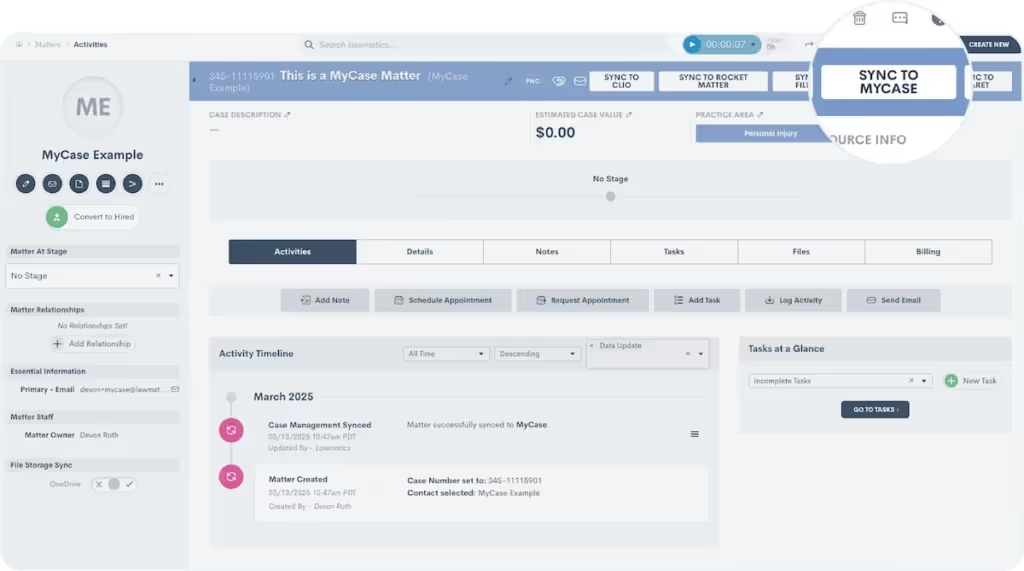
Activating the integration takes just moments. From there, you can define triggers that automatically transfer matter details to MyCase. For example, once a client signs an engagement agreement in Lawmatics, their case file can instantly sync to MyCase, keeping everything up to date without extra effort from your team.
Sync matter details and files automatically
When integrating MyCase with Lawmatics, you can map custom fields from Lawmatics to custom fields in MyCase. Plus, when a matter syncs or converts from Potential New Client to Hired, any files attached to the existing matter in Lawmatics will also move over to MyCase.
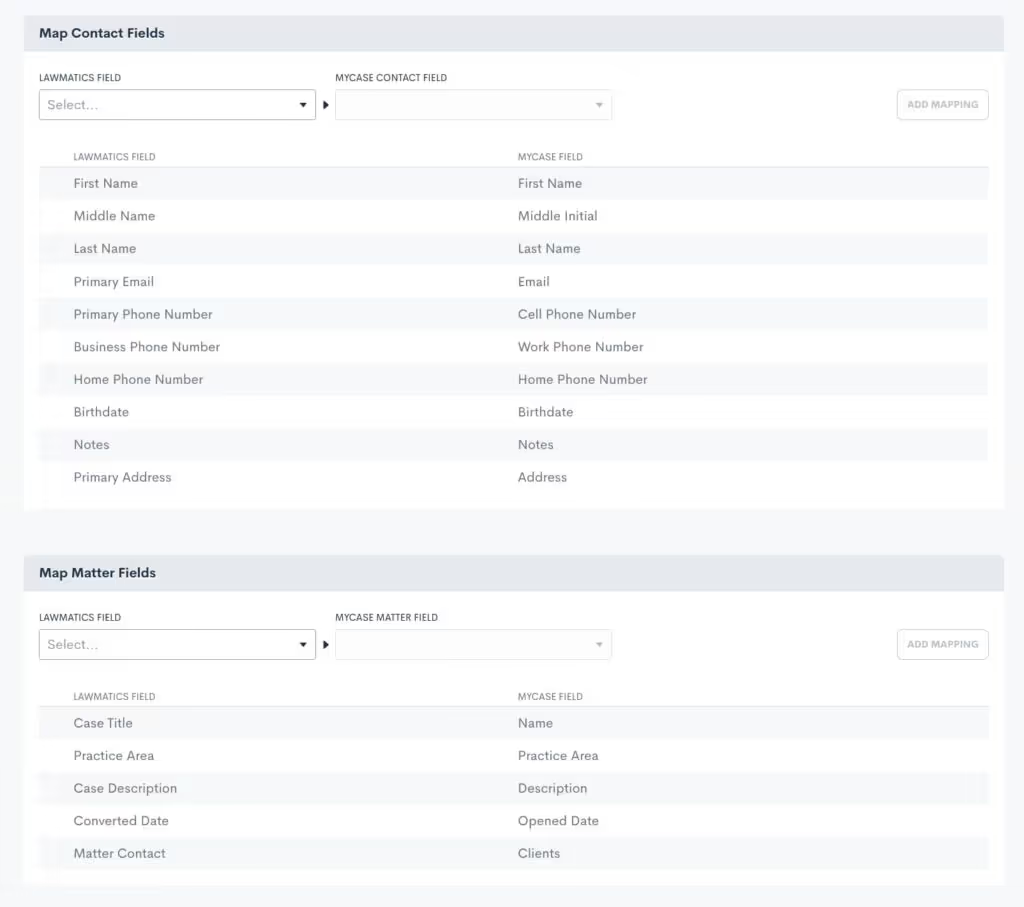
All of the manual work of making sure all details and relevant files get moved over to MyCase will be taken care of on the Lawmatics integration page.
How to integrate Lawmatics and MyCase
Already using both platforms? Setting up the integration is quick and easy. Just head to the integration settings page in Lawmatics, click the MyCase icon, and follow the simple connection steps. You’ll need your MyCase login credentials, so have those handy. For more information, please visit our Help Center.

Get started with Lawmatics + MyCase
If you’re a MyCase user looking for a better way to manage client intake, schedule a demo with Lawmatics today and see how our growth platform can take your firm to the next level.For more details on this and other Lawmatics integrations, check out our dedicated integrations page.
Running a law firm means juggling a lot of moving pieces — client communications, case details, marketing efforts, and scheduling, just to name a few. Without the right tools working together, things can get messy fast. That’s where Lawmatics integrations come in. Instead of wasting time on duplicate data entry or switching between disconnected platforms, you can automate key processes and keep everything in sync.In our latest Deep Dive Webinar, Lawmaticians Devon and Clare walked through how these integrations make day-to-day operations smoother, from keeping calendars updated to tracking marketing performance. Let’s break it down.
Time Stamps of Key Takeaways
0:00 — Why integrate?
Devon and Clare kick things off with an overview of how integrations generally work, and a glimpse at the full library of native Lawmatics integrations. They outline how integrations can really take the busywork out of your day to day, keeping everything in sync, from case management and marketing to client communication.
9:39 — User integrations
Devon and Clare dive into user integrations, which sync applications with Lawmatics for individual users within your firm. Email sync automatically logs client messages and attachments in Lawmatics, reducing inbox clutter and keeping communications organized. Calendar sync prevents scheduling conflicts by updating availability in real time. The Zoom integration ensures virtual meetings are seamless by generating and embedding links directly into invites. Since these are user-specific, each person needs to enable them individually, but once set up, they make day-to-day tasks far more efficient.
20:44 — Call integrations
Law firms handling high call volumes can track and manage inbound and outbound calls directly within Lawmatics. The RingCentral integration enables outbound calls directly from a matter, while also logging inbound calls for easy reference. CallRail takes tracking a step further by offering recorded call playback and marketing insights, allowing firms to analyze call performance.
28:23 — Case management integrations
Lawmatics integrates with leading case management platforms to ensure a smooth transition from intake to ongoing case work. Our hosts took a closer look at how Lawmatics syncs with Clio Manage, automatically transferring client and matter details, documents, and notes at the point of conversion. They also discuss some of the differences between our integrations with some of the other popular case management systems.
37:42 — Marketing integrations
Law firms need clear insights into where their best leads are coming from, and Lawmatics integrations make that easy. The Google Ads integration pulls campaign data and ad spend directly into Lawmatics, helping firms measure return on investment without jumping between platforms. (Devon also teased upcoming improvements to this integration!) CallRail plays a role here, too, by tracking call sources so firms know exactly which campaigns are driving inquiries.
41:00 — For everything else, there’s Zapier
When a direct integration isn’t available, Zapier fills the gap by connecting Lawmatics to thousands of additional applications. Whether linking with Calendly for scheduling, Google Sheets for tracking, or various case management and payment platforms, Zapier automations work like Lawmatics workflows — triggering actions to keep data in sync.Check out our entire catalogue of integrations at lawmatics.com/integrations.
Webinar slide deck
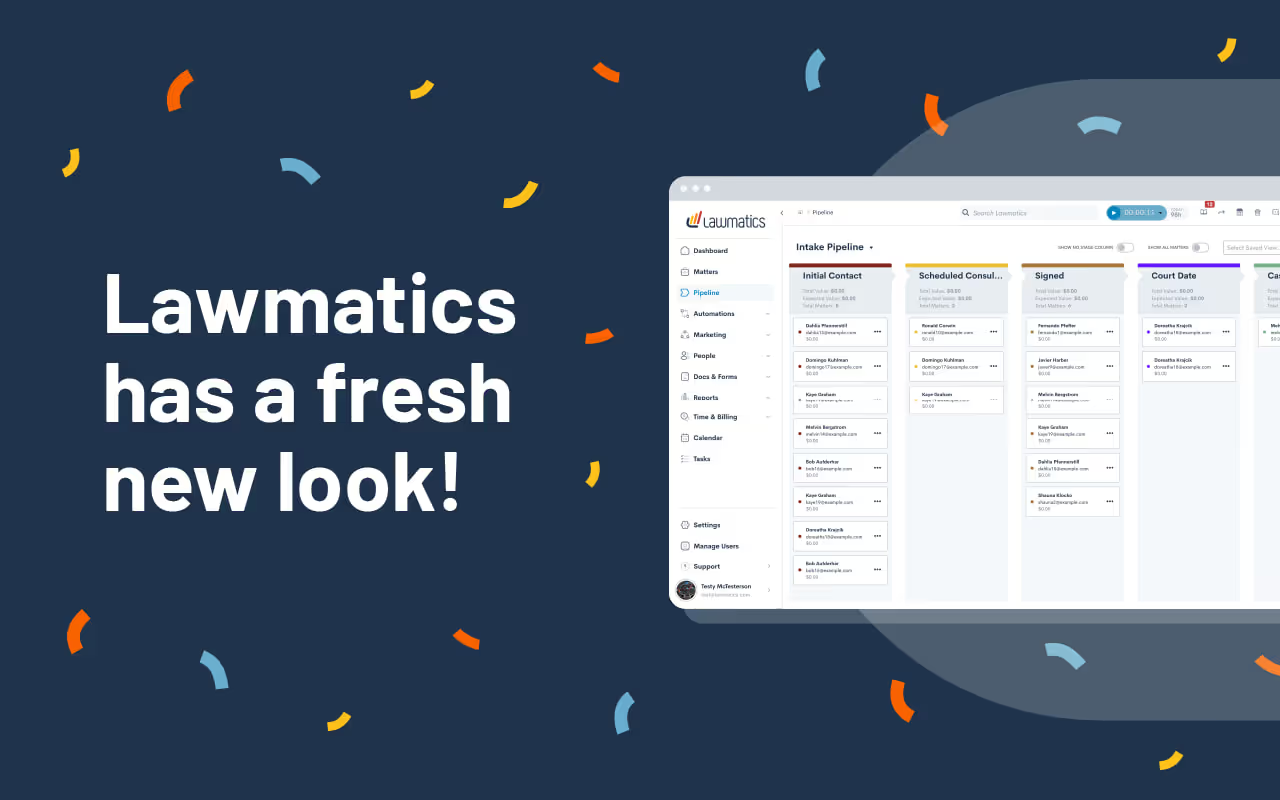
Big changes are here, and we couldn’t be more excited to share them with you! We decided there was no better way to start the year than by giving Lawmatics a refresh — one designed to make your experience smoother and more straightforward.This isn’t just a facelift; we made these updates based on extensive research into how our users access different features throughout their day. A new layout, smarter organization, and refined workflows mean you’ll spend less time clicking through menus and more time on revenue-generating tasks.
Welcome to the new navigation panel

The first thing you’ll notice is that the navigation bar has moved — from the top of the screen to a sleek sidebar on the left. Here’s what’s new:
- Simplified menu structure. We’ve grouped related tools and tabs to better reflect your workflow. Some of our previous groups were a bit broad, so we created labels that are more intuitive.
- Persistent access. Now, when you open a tab, it stays open, making it easier to navigate without losing your place. This update builds on the previous design by keeping key menus readily accessible as you work.
- Collapsible design. Prefer more screen space? Collapse the sidebar for a cleaner, distraction-free view — perfect for reviewing matters or data.
- One-click buttons. New navigation buttons now take you straight to frequently used pages in the app, like the Calendar and Dashboard, making it even easier to get where you need to go.
Automations and reminders
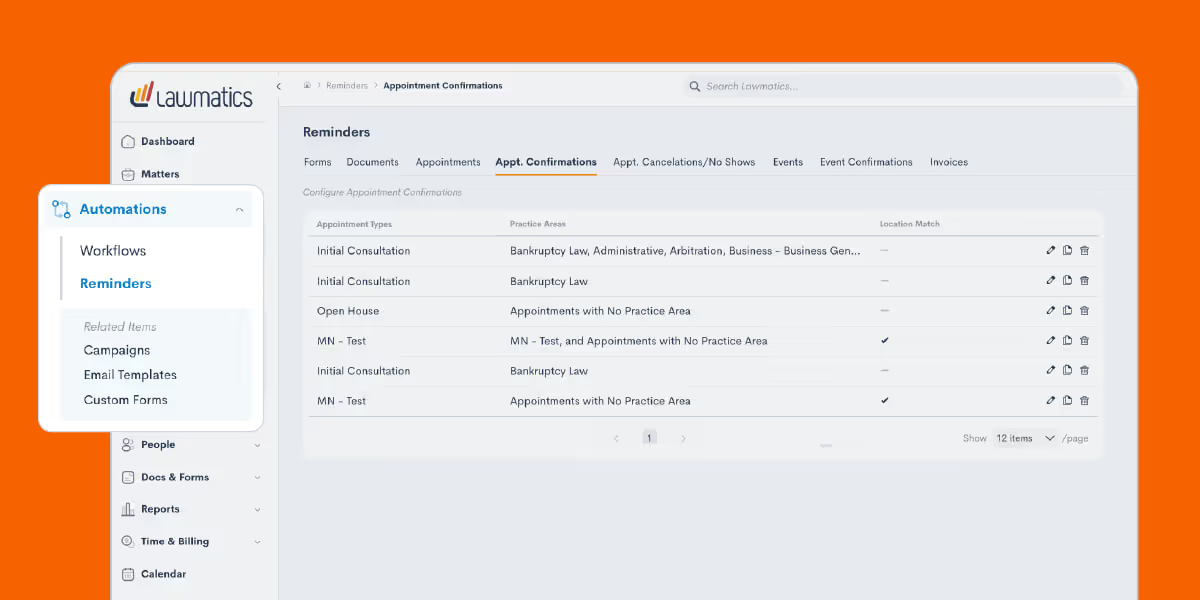
To make automation management and reminders more accessible, we’ve reorganized these tools into a centralized location. Your automation builds are now called Workflows, a name that better represents their function and simplifies navigation. This group now also consolidates all of your reminders, from forms to invoices, into one place. Now, instead of being spread across different features, reminders are all housed in a single hub, making them easier to track and manage than ever.
One marketing hub for client engagement
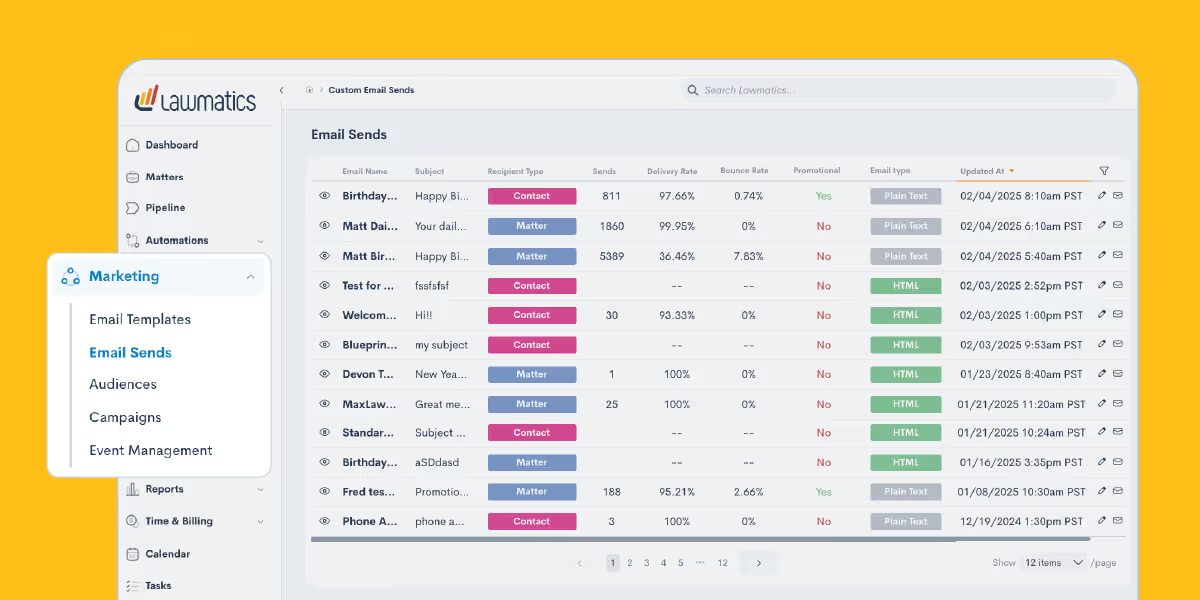
Your Marketing tab has been reimagined to create a seamless journey from initial contact to lasting engagement. Now, everything is structured to help you connect with potential clients, nurture relationships, and drive conversions in a way that feels natural and intuitive.
Emails
Start with Email Templates, where you can craft messages that resonate every time. Save your best-performing content and repurpose it effortlessly, ensuring consistency in your outreach. When it’s time to send, head to Email Sends, your go-to for delivering targeted messages to leads and existing clients with just a few clicks.
Audiences
To ensure your emails land with the right audience, the Audiences tab allows you to organize contacts into meaningful groups. A personal injury firm, for instance, might segment contacts by case type — auto accidents, slip-and-fall claims, or workplace injuries — so each message is hyper-relevant. This way, every email is not just sent but resonates with recipients, guiding them toward the next step in their legal journey.
Campaigns & event management
With your emails in motion, the Campaigns tab becomes your control center. Here, you can track performance, tweak messaging based on real-time insights, and optimize engagement. But what happens when an email sparks interest, and a lead wants to learn more? That’s where Event Management comes in. Whether it’s a live webinar, an educational lunch-and-learn, or an in-person networking event, you can manage registrations, track attendees, and follow up afterward. This keeps potential clients engaged and strengthens your connection with them before they even step into your office.By organizing the Marketing tab around the natural flow of client engagement, Lawmatics turns your outreach efforts into a well-oiled machine — attracting, nurturing, and converting leads with ease.
Contacts and matters
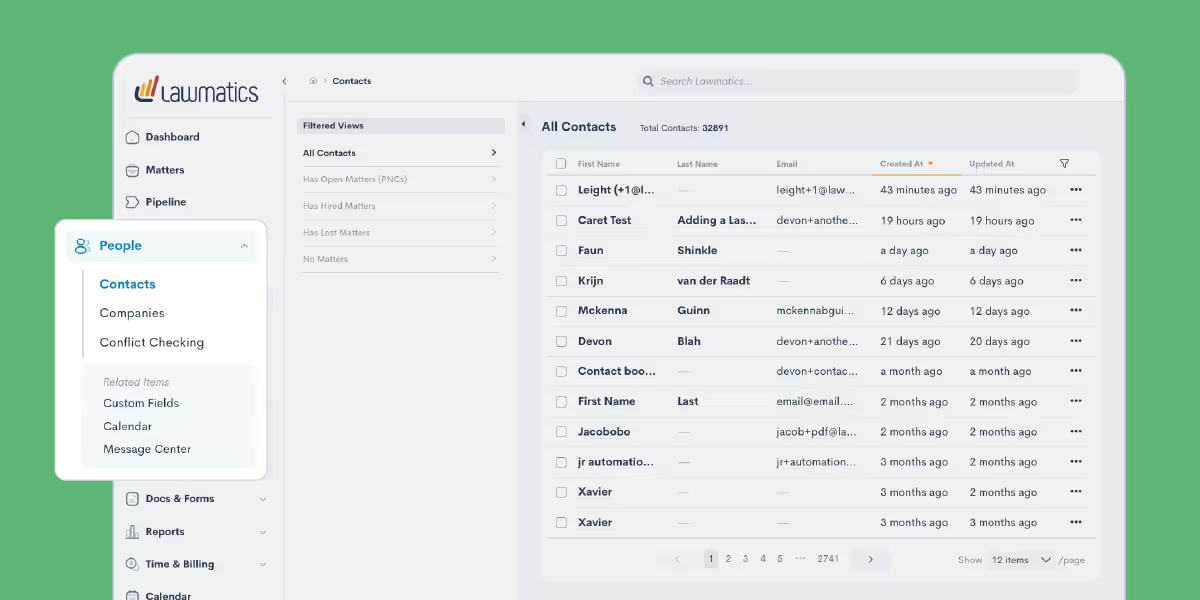
Most of the features previously found under the CRM group are now housed in the new People tab, the central hub for everything related to your clients. Here, you’ll find key details like contact information, company associations, and conflict checking.But managing client relationships isn’t just about storing information; it’s about meaningful engagement. That’s why we’ve also included tools that help you take action. For instance, after reviewing a client’s personal details, you may want to follow up with them directly. To make that next step as simple as possible, we’ve added a direct link to the Message Center under the People tab, allowing you to send an email without disrupting your workflow.
Documents and forms

The first change here is that we relabeled this group from Assets to Docs & Forms, your one-stop shop for information sharing. Emails have moved to the Marketing tab, while most other features remain in this section for easy access.To streamline navigation, we’ve separated some existing functions. Document Templates, for example, have their own page, and we’ve added a new E-Signatures section for you to monitor your document signing requests. While new e-signature documents can’t be created from this page, you can monitor when requests were sent and whether they’ve been completed.We applied this same approach further down in this section — File Request Templates and File Requests are now distinct, making it easier to manage each separately. You’ll also find Firm Files here, a central space for storing welcome packets, images, and other attachments you regularly use with clients.
Recap
The brand-new Lawmatics interface is about giving you a platform that works the way you do. Every one of these changes is based on user feedback and real-world usage patterns. We are pumped for how these upgrades will make your daily workflow even smoother and more efficient. And we’ve got even more updates planned — so stay tuned throughout the year!If you haven’t used Lawmatics yet and want a firsthand look at the platform, now is the perfect time to check it out. Get a fully personalized demo and see for yourself how we’ve built our platform with legal professionals like you in mind.
Kicking off the year with a bang, we’ve introduced a fresh, intuitive user interface built for you! From reorganizing your favorite tools to creating a more intuitive workflow, this redesign is designed to save you time and simplify your day-to-day. We know change can be exciting — and maybe a little daunting — which is why we couldn’t wait to walk you through the new Lawmatics interface. Let’s get straight into it.
Time Stamps of Key Takeaways
0:00 — Why the new look?
Your host, Lawmatics Product Manager Devon Roth, kicked things off with a walkthrough of why we’ve revamped the UI. This redesign is all about making things easier for you. We’ve streamlined the layout, made the interface more intuitive, and focused on functionality — so you can spend less time clicking and more time doing.
9:39 — New tabs on the side navigation
Dashboards, Matters, and Pipelines are now just a click away with new tabs on the side navigation — no more digging through menus! We also gave Dashboards its own special tab outside of the Lawmatics logo, so it’s quicker than ever to check in on your numbers.
12:58 — Automations and reminders reorganized
Our previous interface sometimes required users to hunt through different locations in the app to set reminders for specific moments in the client journey. But good news: You can now manage all your reminders in one place under the new Reminders tab. You'll also notice that all of your automations can now be found under the new Workflows subtab.
16:22 — Marketing made more intuitive
The new Marketing tab is organized to follow the flow of your campaigns, from building email templates to selecting audiences and launching your outreach. We also regrouped event management tools here since seminars and webinars are often key to attracting new clients. Previously, these tools were part of the CRM tab, but this update brings together all marketing-related features into one place.
27:43 — People at the center
Just like Marketing, the People tab includes features that were previously grouped under the old CRM heading. We’ve restructured and decluttered this section, making it easier to navigate. Whether you’re adding new contacts or updating existing ones, the streamlined layout helps you quickly find what you need.
29:09 — Docs & Forms
This tab is your one-stop shop for receiving and sharing information with your clients, whether it’s intake forms, e-signatures, or file requests. It’s also the home of other firm files that were previously grouped under the old Assets tab, like premade welcome packets for new clients.
32:13 — Q&A and recap
We left plenty of time to talk through questions about all the changes in the new interface. Devon touched on the Reports and Time & Billing tabs, which remain largely unchanged, and clarified where to find tools that might have moved. It’s a great segment to watch if you’re wondering, “Wait, where did that feature go?” We also shared tips to help you make the most of the updates and collected feedback for future improvements.
Webinar slide deck
For law firms, managing client data across multiple platforms has always been a headache. Entering details into multiple systems, making new typos at every turn, wasting precious time that could be better spent helping clients — juggling data like this is frustrating, inefficient, and frankly, risky.The good news? We’re continuing to build solutions to meet legal professionals where they are.Our recently announced integration with CARET Legal is designed to eliminate hassle, minimize risk, and save administrative hours that tend to add up.Watch the webinar below to see the integration in action, or keep reading for a full breakdown of how it works and what it means for your firm.
Why integrate with CARET Legal?
Transferring data from intake to case management systems is a time-sucking ordeal for most firms. This process pulls focus away from serving clients and generating revenue. In many law firms, this kind of data work is how nearly half of a lawyer’s non-billable time gets spent on administrative tasks.Every manual keystroke introduces a new chance for entry errors, omissions, and other costly mistakes. Data mishaps can have serious repercussions like miscommunication, erroneous invoices, and shaken client trust.By connecting our CRM to CARET Legal, we’re lifting this burden off law firms, while providing complete control over data management. With this integration, you’re not just streamlining your processes — you’re gaining peace of mind.
Seamless data transfer between systems
Forget fumbling between platforms and re-entering the same matter details over and over again. Our integration takes care of that for you. With just a few clicks — or a pre-set automation — your client data hops seamlessly from Lawmatics to CARET Legal. This instant sync keeps your information flowing from intake to case management, making those cumbersome transfer processes a relic of the past.
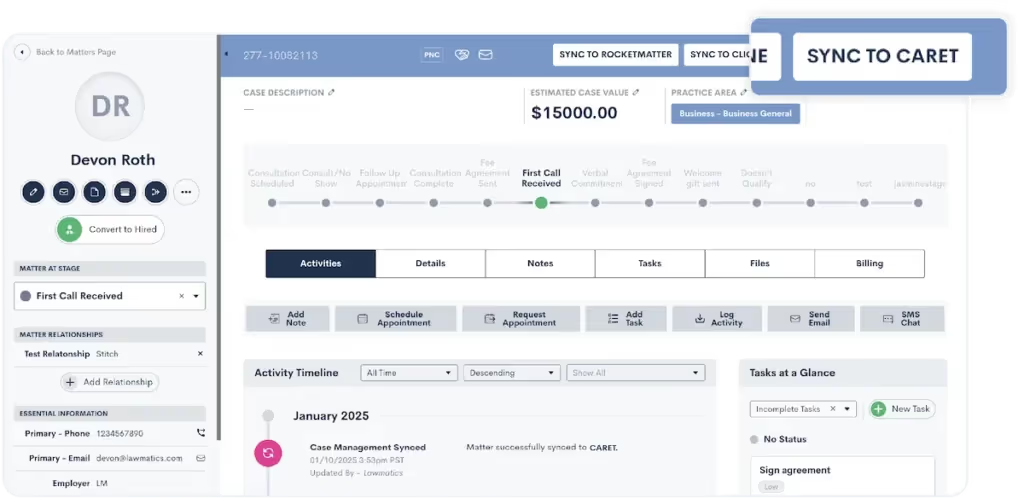
Here are your options for how to sync matters:
- Sync manually: When a matter is ready to sync to CARET Legal, just click on the “Sync to CARET” button on the top right of your screen and confirm your choice.
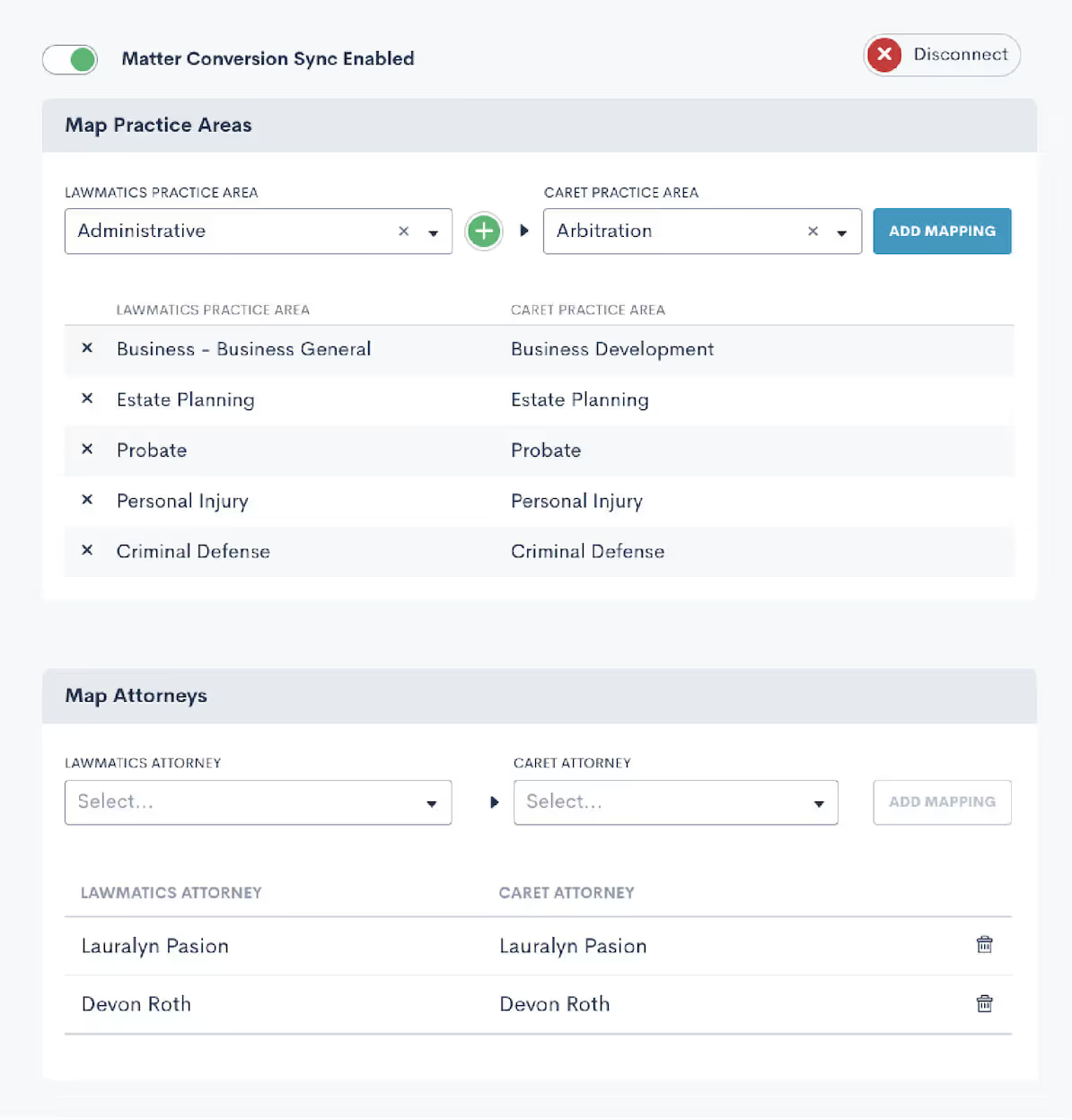
- Sync automatically: Set up an automation that triggers the matter to sync to CARET Legal upon the matter converting to a Hired status.
Maintain data integrity with confidence
The phrase “garbage in, garbage out” haunts every intake manager. And inconsistent data can spell trouble faster than you can remember how to spell “certiorari.” In fact, an ABA study found that administrative errors, like clerical errors and lost files, accounted for 23% of all malpractice claims a few years ago.But now, with this integration, you can rest easy knowing that data integrity is maintained at every step. With a simple transition from one stage to the next, you can be confident that your data is always clean, consistent, and accurate. Say goodbye to typos and discrepancies.
Save time on administrative hassle
Time is your most valuable resource, and every minute wasted on repetitive tasks is a minute you can’t dedicate to clients. The Lawmatics + CARET Legal integration takes tedious tasks off your plate, creating more time for clients and building your business. In a nutshell: more productivity, less busywork. Refocus those energies into client service or tasks that actually generate revenue.

Get started with Lawmatics + CARET Legal
It’s time to reclaim your day from the clutches of inefficient processes and redundant data entry. The Lawmatics + CARET Legal integration is here to make your workflows smoother, your data more reliable, and your practice more efficient. Current Lawmatics users can log in to set up your integration today.If you’re a CARET Legal user looking to revolutionize intake for your firm, book a Lawmatics demo to check out our CRM for yourself.If you’re interested in learning more about CARET Legal, visit our dedicated integration page.

Using Lawmatics is like owning a high-performance sports car—it’s engineered to deliver speed, precision, and efficiency. And the real magic happens when you push the limits and discover just how much it’s capable of. This month’s webinar zeroed in on five features that can elevate your workflows, helping you go faster, work smarter, and drive greater profitability at your firm.From automated conflict checking to ROI tracking and targeted marketing campaigns, these tools aren’t bells and whistles; they’re the difference between coasting and cruising at full throttle. Whether you’re looking to simplify day-to-day operations or rapidly grow your firm, this session was packed with strategies to make it happen.
Time Stamps of Key Takeaways
5:39 — Manual and automated conflict checking
To kick things off, Devon breaks down how both manual and automated conflict-checking options can safeguard your client intake and case management processes. Through clear, real-world examples, she shows how automations not only reduce risk but also save you hours of repetitive work
17:48 — Document templates and one-offs
Next, Devon introduces the powerful document creation tools within Lawmatics. From building time-saving templates to sending one-off documents, she highlights how these features help to maintain consistency and save time in your client communications.
31:31 — Tracking return on investment (ROI)
Devon highlights the ROI tracker, a powerful tool that turns your data into actionable insights. With a clear view of your return on investment, you’ll gain the upper hand in evaluating your marketing efforts and driving smarter business decisions.
37:17 — Create targeted market campaigns
Devon then dives into the marketing suite in Lawmatics, emphasizing the creation of targeted marketing campaigns that resonate with your audience. With practical tips on leveraging data and built-in features, she demonstrates how to refine your strategies and connect with your ideal audience more effectively.
45:48 — Event management
Devon wraps up this webinar by going over event management capabilities within Lawmatics. She details how users can organize and manage events seamlessly, leveraging tools that allow for event tracking and integration with other features to ensure smooth operation.
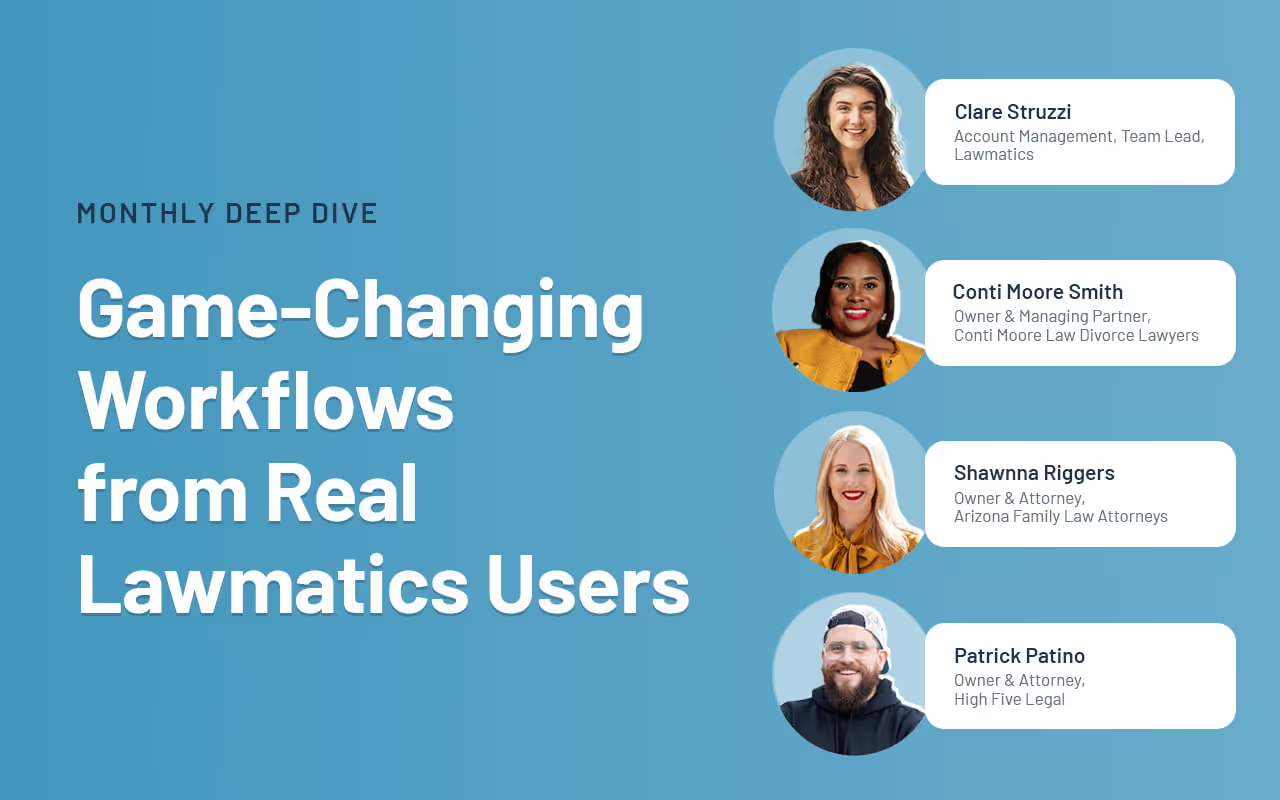
This month, we’re pulling back the curtain on the workflows and go-to tools that help three attorneys — and Lawmatics power users — run their firms with efficiency. These experts share their secrets to mastering three critical stages of the client journey: attracting qualified leads, nurturing them into clients, and onboarding new clients seamlessly.In this exclusive roundtable, our panelists dive deep into what’s driving results for their firms, offering practical insights and actionable tips that any attorney can use to streamline operations and accelerate growth.
Panelists

Clare Struzzi
Account Management Team Lead,Lawmatics

Conti Moore Smith
Owner & Managing Partner,Conti Moore Law Divorce Lawyers

Shawnna Riggers
Owner & Attorney,Arizona Family Law Attorneys

Patrick Patino
Owner & Attorney,High Five Legal
Time Stamps of Key Takeaways
3:55 — Attracting quality leads with precision
When it comes to client intake, precision is the name of the game. The self-styled ‘MacGuyver of Law Firms’ Patrick Patino shares how High Five Legal leverages the Lawbrokr integration with Lawmatics, in conjunction with Lawmatics custom forms, to ensure only the most qualified leads make their way to his desk. Think of it as a finely-tuned filter, separating the gold from the gravel.
14:30 — Nurturing leads and sealing the deal
Once the custom forms have filtered through qualified leads, it's time for automation to take over. Patrick showcases how Lawmatics automations keep leads engaged through timely follow-ups, personalized communication, and relevant content. This nurturing process ensures that leads stay warm and continue to move seamlessly through your pipeline, ultimately leading to that important final step — hiring your firm.
20:00 — Automatic engagement and data population
Shawnna presents the custom form her team uses to capture comprehensive client data and personalize the intake process. Once submitted, Lawmatics automatically generates and sends engagement agreements, streamlining the initial client onboarding. For clients still deciding, the system enrolls them into an email nurture campaign featuring informative videos and resources to guide their next steps.
28:26 — Phone intake and booking calendars
Shawnna hands things over to Jordan Douglas, the firm’s new client coordinator. She sheds light on features used by the intake team, beginning with an internal intake form used during phone consultations. One of Jordan's favorite features is the self-serve booking option on these forms, which helps set client expectations in real-time during the intake call regarding attorney availability. This form also includes fields essential for operations, such as referral source tracking and space for additional notes.
37:28 — Onboarding made excellent and efficient
Conti Moore dives into her process for onboarding clients after they’ve decided to hire the firm. It all starts with an automated fee agreement and extends to paying retainers, sending final onboarding forms, and generating invoices. This considered approach ensures a smooth onboarding experience for new clients who are still learning to trust their new attorneys.
48:56 — Adapting automations for client journeys
Conti is joined by Marko Skarica, a digital marketer and developer who helped set up the firm’s automations, who demonstrates how the firm can adapt and build new automations to accommodate every step toward retaining the firm — regardless of the client journey. For example, Conti Moore Law offers DIY courses for prospective clients who may not currently afford an attorney. These leads are supported with their own automated drip campaigns designed to transition them into paying clients should they later decide to hire an attorney.
Let's face it: A disorganized practice can feel like herding cats while juggling flaming torches. Missed appointments, paper trails that go nowhere, and potential clients slipping through the cracks are common stress points that keep you up at night. Our recent Deep Dive webinar was all about how we can tackle these challenges together.Whether you're new to Lawmatics or just looking to sharpen your skills, this webinar showed how mastering the basics of our CRM can make a monumental impact on your practice. Imagine slashing intake times in half, reducing no-show rates, and converting leads twice as fast. That's the kind of game-changing efficiency we’re talking about!
Time Stamps of Key Takeaways
0:00 — Getting started
Meet your host, Clare Struzzi! Clare is our account management team lead, and an expert at getting law firms up and running on Lawmatics. Here, she outlines the agenda for the session, which is to recreate a typical first onboarding session for new Lawmatics customers.
5:47 — General settings
The general settings page is always the place to start with a new account. Clare starts with user settings like creating your email signature and connecting your calendar. Then, she moves into firm settings, where your firm’s chief Lawmatics user can fill in practice-specific information, like office locations and branded document headers.
18:55 — Organizing the pipeline
The pipeline is what keeps a prospect moving through the intake process, from marketing all the way to signing their engagement agreement and beyond — so it’s important to spend time making sure it’s built for your firm’s needs. Clare shows how to create each stage of your pipeline, and even create different pipelines for each of your firm’s practice areas.
29:39 — Appointments and events
Next, Clare walks through how to create appointment types, from setting the duration of each meeting type to the default rate the firm will charge for each. Then, she uses the email builder to write reminder and confirmation messages for these appointments, incorporating custom fields that tailor each message to each client.
44:00 — Phone intake form
Forms are an invaluable tool for collecting information about your clients and matters. In this final section, Clare builds an example of a form an intake specialist would use for intake by phone. She explains the differences between standard and custom fields, as well as how to make forms dynamic by incorporating options like a self-service booking calendar at the end of the form.

You wouldn’t set sail without a course—so why run a law firm without any clear KPIs? Custom dashboards are your navigational charts, guiding you through the sea of data toward smarter, more strategic decisions.In the latest Deep Dive Webinar, Product Manager Devon Roth delves into how these custom dashboard data visualizations can revolutionize your law firm's efficiency. This session covers everything from building new custom dashboards for immediate data access to tailoring them for showcasing the metrics that matter most, all aimed at enabling better operational decisions with actionable data insights.
Time Stamps of Key Takeaways
0:00 — Getting started
The webinar kicks off with an explanation of how custom dashboards differ from our legacy dashboard, and how you can alternate between the two. Devon also outlines some of the key (and surprising!) benefits of customizing your dashboard layout, from boosting client engagement to tailoring your marketing strategy.
6:17 — Choose your panel types
Devon first surveys all of the different panels firms can use to organize their information. Firms use these panel types to review things like notes, tasks, upcoming appointments, outstanding e-signatures, and more. She then offers a demonstration of how to format the page, resize panels, and even divide your dashboard layout by practice area.
18:55 — Understanding panel visualizations
Next, Devon focuses specifically on the data panel. From conversion rates to the value of cases in your pipeline, these analytical indicators are the cornerstone of guiding your firm toward increased profitability. She demonstrates a few panel setups that enable you to keep an eye on the intake pipeline, ensuring no potential client gets stuck between stages.
24:08 — How to use reports on dashboards
While some of the other panel types only show standard fields, data panels can pull insights from any of your custom matter reports. In this section, Devon walks through how to set up data visualizations that show the specific granular criteria you need to keep front and center for your firm.
42:31 — Organizing group panels
Finally, Devon quickly shows the click-and-drag customization options with the group panel type. You can select any panels already on your custom dashboards and bunch them together, grouping insights by practice area, matter type, or time period.
Marketing and reporting are the key drivers of a law firm's profitability. But how do you ensure your marketing efforts hit the mark and your reports provide actionable insights? Join Lawmatics Product Manager Devon as she guides you through the essentials of optimizing your marketing efforts using Lawmatics. From creating stunning HTML emails that captivate clients to precisely segmenting your audience for targeted campaigns, Devon provides a step-by-step guide to revolutionize your approach.
Webinar Timestamps
0:00 — Why use Lawmatics for marketing and reporting?
Devon kicks off the webinar with an overview of why Lawmatics stands out as a game-changer for law firms when it comes to marketing and data insights.
4:54 — How to build and edit an email using HTML templates
Devon’s first product demonstration focuses on the HTML email builder and editor. She shows how users can start with a blank canvas or customize pre-built templates to meet the specific design and branding needs of any firm.
10:00 — Create audiences based on types of marketing emails
Next, Devon discusses how creating specific audiences enables better-targeted marketing campaigns. This segmentation ensures your content reaches the most relevant audience, boosting engagement and conversion rates.
15:34 — Schedule campaigns to be sent out
Effective marketing is often about timing. In this segment, Devon walks through the step-by-step process of scheduling emails to be sent at optimal times, ensuring your message hits your audience when they’re most likely to engage.
21:05 — Create custom reports
Understanding your marketing performance is crucial, and Lawmatics custom reports let you dive into the metrics that matter most. Devon shows how to generate these reports based on different fields, offering insights that help you track success and pinpoint areas for improvement.
41:45 — Add custom reports to your custom dashboards
To wrap up this month’s Deep Dive, Devon incorporates the custom reports into a personalized dashboard. This fully customizable data hub gives you a comprehensive view of your firm’s performance, from marketing ROI to task management efficiency.

In the high-stakes world of criminal defense, where every move can change a client's future, streamlining your workflows is more than essential—it's critical. Imagine being able to respond promptly to every client's needs without pulling focus from their matters or that of your other clients. Our latest Deep Dive Webinar showcases the power of criminal defense workflows in Lawmatics, making it easy to disengage unqualified leads and win more clients with impactful marketing campaigns. Host and Lawmatics Product Manager Devon Roth demonstrates how to build and implement this workflow in your own practice, ensuring you take timely action and accurate insights.
Webinar Timestamps
0:00 - Introduction and overview
Devon opens the webinar by outlining the focus on mastering criminal defense workflows in Lawmatics, covering housekeeping items, and briefly introducing herself and Erika from the customer success team.
5:36 — Criminal defense Automations
Devon gives an overview of the Automations typically used in a criminal defense practice. Her example workflow includes drip campaigns for leads who haven’t scheduled a consultation, appointment reminders and follow ups, and exit conditions to end follow up campaigns.
15:16 — How to automatically disengage unqualified leads
Not every lead is going to fit your firm’s client profile. In this section, Devon demonstrates how to use Automations to swiftly disengage those disqualified leads after a consultation. She also previews how to build Automations for clients who are undecided, may wish to retain your services at a later date, or are referred out to a law firm better suited to handle their matter.
27:38 — Tailor marketing campaigns for maximum impact
Targeted campaigns for segmented audiences are an effective way to engage prospects and both old and new clients. Here, Devon shows how to create branded HTML emails and incorporate them into drip campaigns to keep your firm top of mind no matter the stage of the client journey.
33:23 — Analyze and report on firm metrics
Understanding your data is critical to running an efficient and profitable criminal defense practice. This section exhibits how to build custom reports based on any field in your Lawmatics CRM and how to incorporate these helpful reports into custom dashboards for actionable visualizations.
35:50 — Create follow ups based on court dates
Automations are key to staying on top of court dates and ensuring no deadlines are missed. Devon wraps up this Deep Dive with a guide to creating date-based Automations, like reminders based on court appearance dates or other key points in your client’s matter.
Personal injury cases are more than legal battles—they're a pivotal chapter in a client’s life, often fraught with physical, emotional, and financial turmoil. With that in mind, the latest installment of our Deep Dive Webinar series showcases a fully automated workflow tailored for personal injury practices. Host and Lawmatics Product Manager, Devon Roth, demonstrates how to build and implement this workflow in your own practice to not only boost efficiency and reduce errors but also ensure that every client receives best-in-class care and support throughout their legal journey.
Webinar Timestamps
0:00 - Introduction and overview
Devon opens the webinar, introduces the focus on mastering personal injury workflows in Lawmatics, covers housekeeping items, and provides brief personal introductions for herself and Erika from the customer success team.
4:50 - Personal injury law automations
Devon gives an overview of the Automations typically used in a personal injury practice. Her example workflow includes intake processes for leads that contact your firm both through the web and phone. She also demonstrates how to use custom forms to collect practice-area-specific fields, like insurance documentation or incident photos.
18:00 — Appointments, emails, and e-signature
Continuing down the intake process, Devon shows the next steps in the personal injury client journey after they’ve been contacted by the firm. She uses Automations to prompt leads to schedule consultations, notify leads that they may not qualify to work with the practice, and share the engagement agreement.
30:48 — Staff review, undecided status, and welcome emails
Next, Devon demonstrates how Lawmatics is adaptable to different client situations. Successfully hired clients can be welcomed with an automated email welcoming them to the firm, and outlining next steps. Lawmatics can also flag matters in need of staff review, and monitor the status of potential clients who have yet to make a decision on representation.
35:30 — How to track referrals in and out
Devon discusses setting up Automation for tracking referrals of potential clients. By updating specific custom fields, users can ensure that referrals are accurately tracked in their records. This system can provide valuable insights for reports and help monitor the success of referral partnerships.
40:15 — Reporting on matters and referrals
In this section, Devon breaks down the analytics page, and demonstrates how to create custom reports for referrals. Filters can be applied to show matters specific to a practice area, such as personal injury, and to track referrals from specific sources. The report can also include additional columns for tracking status, substatus, and grouping referrals by the person making the referral.

As the May flowers bloom, we’re excited to unveil our latest feature release! From customizable headers and footers to tailored event management and personalized matter table columns, our slate of updates will help you thrive in this season of growth.
Enhance your brand with document headers and footers
Personalize your Start Fresh documents with our new header and footer templates. Under Settings > Firm Settings > Document Headers And Footers, you’ll find a new tab to easily create professional headers and footers for any Start Fresh document. Once you've created your custom templates, applying them is a breeze — simply select the desired template when creating or editing a document and let Lawmatics handle the rest. Take the tedium out of drafting documents, and impress your clients with polished paperwork every time.

Click here to learn more.
Limit event registrants
Make managing every event stress-free with our new registrant limit feature. Ideal for small gatherings and exclusive events, you can now customize attendance limits for individual events or set default limits for each event type through your event settings page. Once the limit is reached, this functionality automatically prevents further registrations. With Lawmatics holding the velvet rope, enjoy peace of mind and the freedom to craft engaging experiences for the clients, partners, and community members in attendance.

Click here to learn more about event management.
Choose which columns appear on your matter table
In our previous release, we introduced the flexibility of filtering your matter table views. This month, we’ve unleashed even more customizability by allowing any of your Lawmatics fields to display as columns in your matter table. This enhancement gives you complete control over your data presentation, making it easier to organize and access the information that matters most to you.

Click here to learn how to create filtered views.
Assign roles based on appointment host
If the host can vary for each potential client’s appointment, you need accurate records of which team members were involved with each case. Our upgrade to the “Change Attributes” effortlessly automates this attribution record. With this feature, you can automatically update user fields to reflect the appointment host. Previously, assigning user roles, like Lead Attorney or Salesperson, based on the appointment host could only be done manually. This addition ensures that your user roles are accurately assigned, saving you time and reducing manual updates.

Click here to learn more about automation action nodes.
Create email templates for each invoice type
Upgrade your invoice email communication with our new templates. Previously, firms were limited to a single generic invoice email template. Now, by navigating Settings > Invoices > Invoice Types, you can create distinct email templates for each invoice type, both online and offline. Simply click the icon next to each invoice type to set up your customized templates. This feature delivers professional, personalized, and consistent invoices that meet the unique billing needs of your firm.

NOTE: This feature is only available for Time & Billing users.To learn more about invoices and time tracking click here.As always, we love your feedback and encourage you to reach out with any questions or suggestions. Thank you for being a valued member of our community. Together, we continue to push the boundaries of what's possible for law firms.Sign in or sign up to get started with Lawmatics today.
April Fools’ Day may have been last week, but these new features are no joke. We’ve got a trio of updates for managing your matters, calendars, and finances. You’ll also find some quality-of-life tweaks that’ll simplify things for our intake coordinators and office managers out there.
Filter and sort your table of matters
We've revamped our classic matter table for a smoother user experience. Now, you can place your important data front and center by creating custom filtered views of all your matters with any contact, company, or matter fields that exist in your Lawmatics account. Easily customize your views to match your workflow. Navigate to CRM > Matters to get started. More customization abilities coming soon!
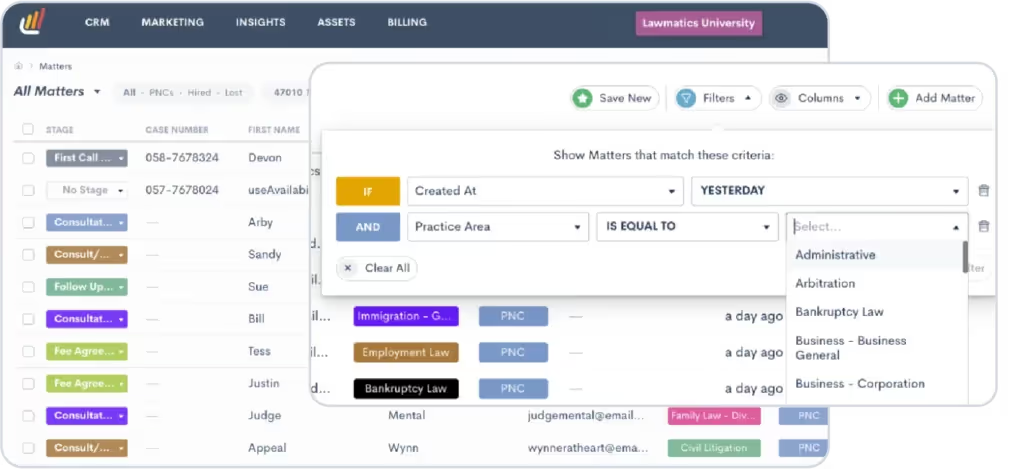
Learn how to create filtered views here.
Confirm availability for all staff appointments
Schedule consultations and follow-up meetings without fear of double-booking any of your team members. Previously, the calendar availability of other Lawmatics users at your firm could only be previewed when scheduling via a custom form. Now, users can check the availability of event hosts at their firm upon creating an appointment from anywhere in Lawmatics — whether it be on the calendar page, a matter’s page, or from the quick use menu. Coordinating staff calendars just got a whole lot easier.
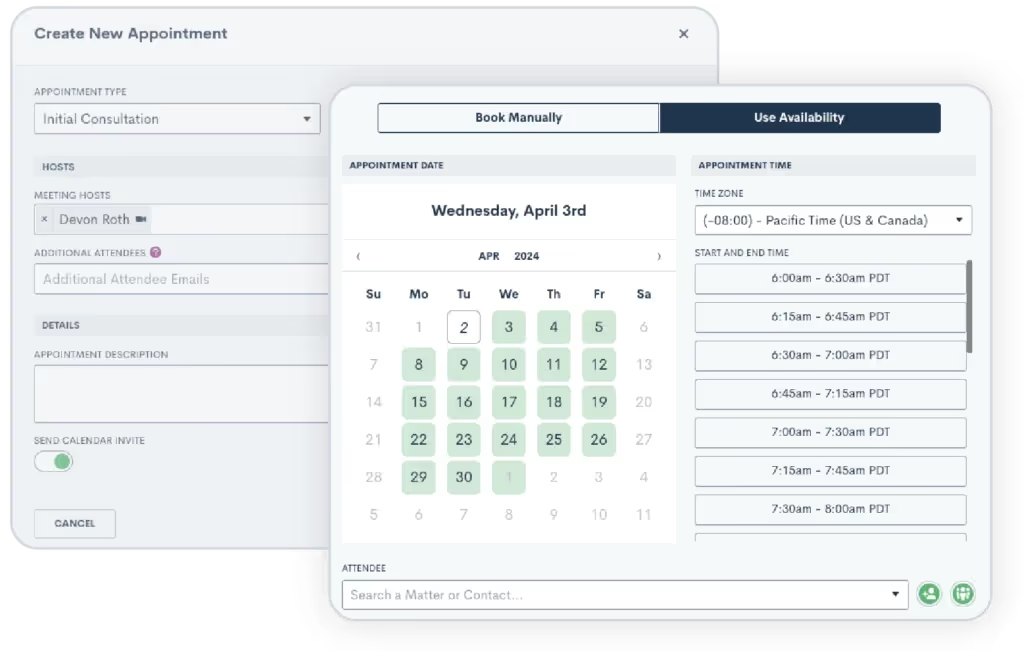
Learn more about booking appointments here.
Sophisticated financial tracking with custom transaction reports
Effortlessly analyze your firm’s financial health by mixing and matching the data you need. In addition to our existing invoice and time entry reports, you can now generate custom transaction reports. With customizable columns and filters, you can extract insights on line items like invoice numbers and payment methods that are as granular or broad as you need them to be. Plus, you can add these transaction reports to your custom dashboard should your firm need these numbers top of mind.
NOTE: This feature is only available to our Time & Billing users.
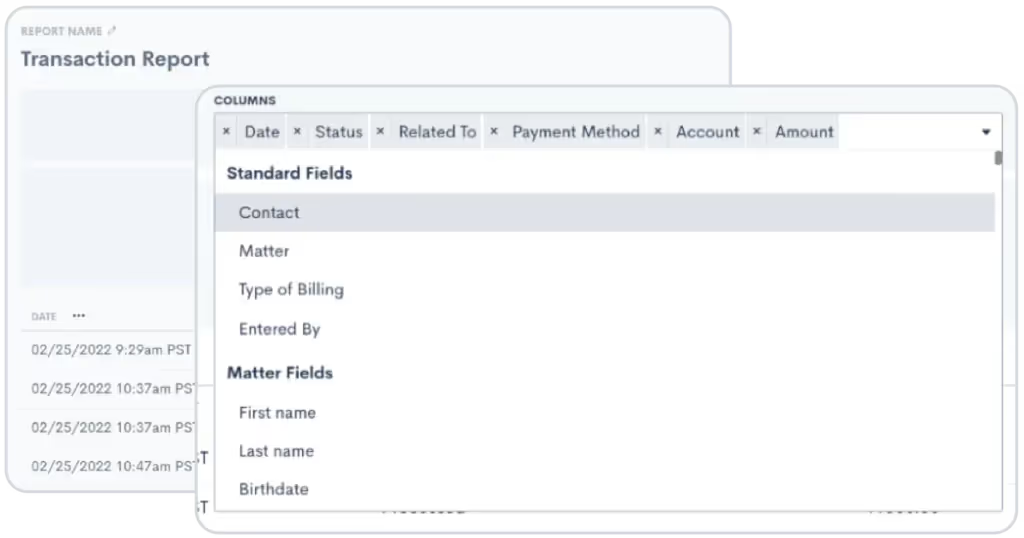
Learn more about time & billing reports here.
Send calendar invites on behalf of appointment host seamlessly
For those of you who set appointments for colleagues, you can now send calendar invites on behalf of the appointment host with greater ease, provided said host has their personal calendar (such as Google or Outlook) linked to Lawmatics. Previously, creating appointments for other users was done via the “Send Calendar Invite” toggle in the scheduling module and only if your personal Lawmatics user account had a calendar connected. This update means you can effortlessly dispatch invites on behalf of others without needing your personal calendar connected, simplifying your planning process and facilitating smoother coordination.
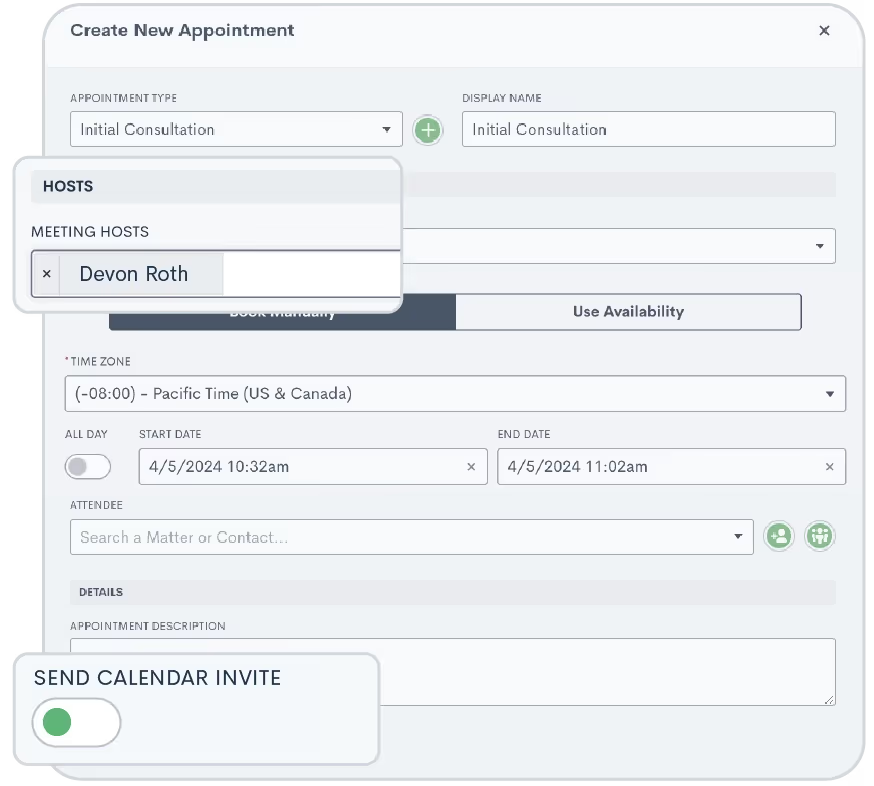
Click here to learn about appointments.
Create Zoom appointments on behalf of appointment host seamlessly
While we’re at it, you can now also set Zoom as the location when scheduling meetings for colleagues through Lawmatics, without requiring your personal user to be integrated with Zoom. The appointment host just needs to have Zoom linked to their own Lawmatics account. This update simplifies setting up video consultations and remote meetings, making coordination smooth for intake coordinators and office managers.
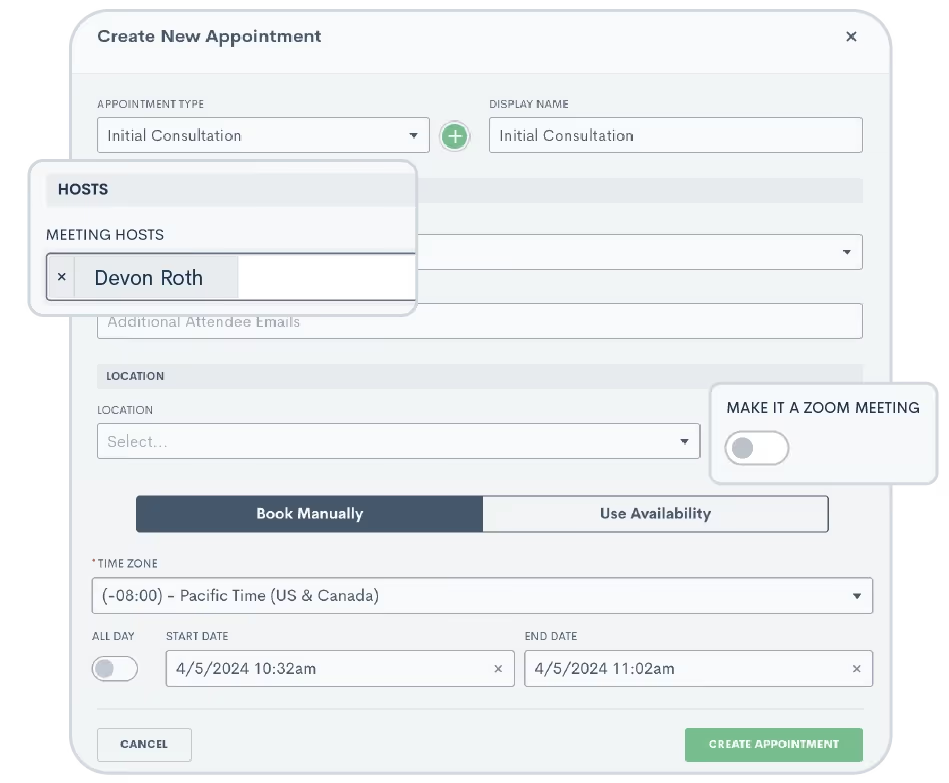
Learn more about our Zoom integration here.As always, we love your feedback and encourage you to reach out with any questions or suggestions. Thank you for being a valued member of our community. Together, we continue to push the boundaries of what's possible for law firms.Sign in or sign up to get started with Lawmatics today.

In the intricate domain of family law, where emotions run high and the stakes are personal, mastering your workflows is more than a strategy; it’s a commitment to excellence and empathy. Our latest Deep Dive Webinar peeled back the layers of family law workflows in Lawmatics, revealing a wealth of strategies for automation, personalization, and seamless client interaction.This recap offers a distilled view of our comprehensive webinar, guiding you through the pivotal stages of automating client onboarding, executing conflict checks with precision, and nurturing client relationships with automated yet heartfelt communication. Watch as our product manager, Devon, explores the unique benefits for family law practices using Lawmatics, illustrating practical applications that can revolutionize your approach to client intake.
Webinar Timestamps
0:00 - Introduction and Overview
Lawmatics product manager, Devon Roth, welcomes participants and sets the stage for exploring family law workflows with Lawmatics, highlighting the webinar's goal to enhance process efficiency through automation and custom dashboards.
4:30 - Family Law Automations and Conflict Checking
Devon delves into family law automations, emphasizing their role in streamlining communication and conflict checking. She goes on to showcase how automations ensure accurate and timely management of leads and clients.
4:54 Pipeline and Initial Contact Form Automation
Devon details on automating the client journey from initial contact, focusing on moving new leads through the pipeline and initiating templated emails, alongside automated conflict checks based on lead information.
10: 16 Drip Campaigns and Client Engagement
A thorough explanation of drip campaigns in maintaining potential client engagement, with insights on automated communications to prompt consultation scheduling and the use of conditional logic for personalized email and SMS communications.
17:38 Consultation Scheduling, Confirmation, and Follow-up
Devon outlines the automation process for moving leads to the 'consult scheduled' stage and setting up appointment confirmations and reminders. Also addresses handling no-shows and cancellations to ensure rescheduling.
31:01 Post-Consultation Engagement and Retainer Agreement
The presentation wraps with post-consultation steps including sending retainer agreements via automation, utilizing e-signature documents, and the process of converting a potential new client to a hired status, emphasizing continued engagement and relationship formalization.