



The Lawmatics Blog
Insights on legal marketing, automating the law practice, and legal tech in general


Last month, we walked through how to set up custom matter views. But building views is only half the equation — the real value comes from putting them to work. When intake staff, attorneys, and admins are all looking at the same long list of fields, it's easy to miss what matters, waste time hunting for the right information, or forget to fill out a field before firing off a contract.
In this Deep Dive webinar, Devon Butler, product manager at Lawmatics, and Clare Struzzi, who leads the account management team, showed how firms can use custom matter views to trigger automations, surface reporting fields, and tailor layouts by role and practice area.
Time stamps of key takeaways
5:53 – Why customize your Matter pages
Devon kicked off with four reasons to invest in custom matter views: cutting through the noise so each role only sees what they need, supporting cleaner reporting, strengthening team handoffs between intake and attorneys, and working faster directly from the Matter page without having to search for fields.
9:48 – Building practice-area-specific views
Clare walked through an estate planning intake view built specifically for intake specialists, showing how organized sections replace the old starred-fields approach. She highlighted how a field like "Next Steps Pre-Consult" can live right at the top of the view so the intake team can trigger automations directly from the details page — no need to reopen a form.
14:58 – Creating role-specific views
Devon and Clare showed how the attorney view for the same estate planning practice area includes different fields at the top — like "Next Steps Post-Consult" and a dedicated contract fields section where merge fields for engagement agreements can be reviewed and completed before sending. Clare also pointed out that sensitive information like Social Security numbers can be placed in sections that default to a collapsed view.
25:00 – Triggering automations and managing contract workflows
Devon walked through a live example of building an automation that fires when the "Next Steps Post-Consult" field is updated — automatically moving the matter to the correct pipeline stage and sending the engagement agreement. She also showed how duplicating automations makes it simple to handle variations, like sending a single-signer versus a joint estate plan document.
35:09 – Surfacing fields for cleaner reporting
The session wrapped with a look at how the reporting fields on custom views — source, campaign, estimated value, actual value — feed directly into the analytics page and custom reports. Devon demonstrated grouping a report by source to quickly see which referral sources are converting and where data gaps need attention.
Webinar slide deck
In personal injury law, evidence is everything. Personal injury clients count on attorneys to help them recover losses from the harm they’ve suffered. There are numerous ways that personal injury attorneys gather evidence, and technology such as case management software or CRM for law firms helps them:
- Gather data. Mobile phones are helpful to those injured in a motor vehicle crash by allowing them to call 911 – the phone records the time of the call, which can be valuable evidence in a personal injury case.
- Record evidence. When a dashcam captures the scene of a motor vehicle accident, this video can be shown at trial to establish how the crash happened and who was at fault.
- Prove liability. When law enforcement takes a photograph of a license plate, the photo can be used as identifying information to prove liability.
- Manage cases. Personal injury case management software organizes client information, manages workflows, generates documents, handles billing, keeps files secure, and performs many other essential functions.
Case management software is a valuable tool for personal injury law firms of all sizes. It replaces paper files and client tracking in a spreadsheet on Excel, reduces human error, automates manual processes and repetitive tasks, establishes and maintains client engagement, and ensures that vital information is securely stored and easily accessible.
What is case management software for personal injury?
Personal injury case management software is technology customized to help personal injury attorneys manage their firms and build solid cases. Personal injury-specific platforms typically include custom forms and templates for various types of personal injury cases – medical malpractice, slip and falls, automobile accidents, workplace injuries, and more – as well as specific features like:
- Conflict checking
- Client intake automation
- Task management
- Appointments scheduling
- Automated appointment reminders
Because personal injury is a document-heavy area of practice, many of these platforms provide robust document management functionality and the ability to track deadlines and run reports that offer an overview of each case as it progresses. However, since most personal injury attorneys accept cases on a contingency basis, these systems may not include time-tracking functionality, instead focusing on tools to manage all stages of a case, including litigation.
What is the difference between CRM and case management software?
The main difference between case management software and legal CRM (customer relationship management) is that case management software is intended to streamline the internal operations of a law firm. At the same time, CRMs are professional marketing tools that focus on external communications, allowing attorneys to communicate with potential clients. However, some case management tools include lead management and customer relationship management features.Case management software helps firms automate and build systems around things like:
- Invoicing and bookkeeping
- Case records
- Client contact information
- Files and documents
- Critical deadlines
- Calendaring and appointments
CRMs are professional marketing tools that allow firms to:
- Build lists of prospects
- Categorize prospective clients
- Conduct drip email campaigns
- Track interactions with potential clients
- Use their website to collect contact information
- Visualize and manage their sales funnel
As law firms grow, they might eventually need both tools. However, case management software is typically a priority for growing firms.
Why do personal injury lawyers need case management software?
Case management software helps personal injury attorneys operate more efficiently. In general, these systems can help law firms:
- Reduce the risk of defending a legal malpractice claim
- Lower the firm’s malpractice insurance rate
- Streamline attorney-client communications
- Eliminate missed deadlines
- Reduce staff workload
Generally speaking, If a law firm isn’t using case management software, it might be wasting time and money compared to firms that have digitized their practice.
Features and benefits of personal injury case management software
Personal injury case management software automates repeatable processes, enabling firms to focus on clients. Here are some of the features and benefits of the most agile, cloud-based systems:
- Client intake forms allow users to capture intake data based on the type of case to save time and money and to reduce human error.
- Document automation that utilizes custom fields to merge data and contacts, then auto-fill directly into boilerplate legal forms with one click.
- Secure communication platforms to help attorneys find and send critical client information quickly and easily.
- E-signature capability to enable lawyers to quickly generate and securely deliver fee and retainer agreements to clients from anywhere to eliminate costly delays.
- File request builders that make it easy to find and send vital case files in seconds.
What software does a law firm need?
Lawmatics personal injury case management software gives clients the experience they deserve. Considered by many to be the premier legal CRM on the market, Lawmatics integrates with platforms like Clio and automates client follow-ups, email workflows, appointment scheduling, legal documents, client intake, and more for growing personal injury firms. To learn more, request a demo today.

Customer relationship management (CRM) systems can benefit businesses of all types, including law firms. These platforms can perform numerous critical activities that will streamline operations, improve efficiency, and keep everyone on track. In addition, CRMs play a major role in improving relationships with clients, leads, and customers.
Why do law firms need CRM, particularly personal injury firms?
Personal injury is a fast-moving, highly detailed, and document-heavy area of law. As a result, it can be easy to lose client information, important paperwork, and critical emails, leading to a scramble to locate essential data. However, legal CRM software helps personal injury law firms manage their interactions with current and potential clients. These platforms can do the following and much more:
- Automate client engagement to provide high-level customer service
- Eliminate the busy work that keeps teams from focusing on substantive legal work
- Streamline the intake process with customizable forms and welcome messages
- Update client data in real-time to eliminate errors
- Track tasks and deadlines to keep everyone on the same page
- Appointment reminders, to eliminate no-shows and delays
- Generate performance reports that track progress and identify areas for improvement
In today’s competitive legal environment, a CRM can benefit almost any law practice, particularly personal injury firms.
What exactly does a CRM do for personal injury lawyers?
A personal injury CRM automates repetitive processes to help legal teams focus on clients and their needs rather than push paper. The top personal injury CRMs typically provide the following:
- Custom intake forms that allow users to determine how they want to capture intake data based on the type of personal injury case. Customized forms create a clear and consistent system that saves time and human error to provide the firm and its clients much-needed reassurance.
- Contact management features that enable personal injury firms to keep track of clients in one central location. This capability provides transparency that keeps the entire team organized, up-to-date, and aware of the status of each matter.
- Sign-anywhere documents and automated scheduling that provide personal injury clients with the convenience they need and deserve. Automated file requests, e-signatures, and scheduling allow them to do whatever they need to do remotely, saving everyone time and letting you focus on building a solid case.
- Marketing automation that helps you avoid tedious administrative work that distracts you from seizing new client opportunities and growing your business. Law firm automation software keeps everyone moving along as scheduled by eliminating costly bumps and accounting for every single detail.
- Audience segmentation allows you to group your clients based on criteria important to them so that you can deliver tailored messaging and personalized email campaigns to custom groups. Each interaction will be more valuable and build stronger client connections.
Personal injury cases can be complex, but managing them doesn’t have to be. A legal CRM is a comprehensive solution to case management that prioritizes efficiency and excellent customer service at every stage of a matter.
What are the benefits of having a CRM in the industry?
While generic CRMs satisfy the needs of many businesses, CRM platforms designed exclusively for personal injury law firms provide specialized, end-to-end solutions for client intake, marketing automation, customizable campaigns, industry-specific app integrations, and more. Such solutions include:
- A straightforward, user-friendly experience
- Full automation of the entire intake process, from prospect to client
- Online form builders able to manage the most complex intakes
- Custom reminders to keep legal teams on the same page
- Built-in scheduling tools that make setting up meetings easy for clients
- Custom forms to collect and update client information
- Document creation and e-signature capabilities
- Secure two-way communication with clients via text and email
- Advanced data & analytics, including source reporting to track marketing campaigns
- Open API to connect third-party platforms easily
While legal CRM tools can be scaled to meet the needs of a solo practitioner, these systems also automate the manual tasks that keep small firms from focusing on billable work and help midsize and large firms deliver personalized, high-quality legal services to clients.
What CRM do lawyers use for personal injury?
Your injury clients are counting on you to capture all the data you need to help them recover losses after they’ve suffered harm. Lawmatics offers personal injury law solutions and document automation software that automate repeatable processes, so your job is less chaos management and more client-focused. Are you ready to take your personal injury practice to the next level? Schedule your demo today.
Email communications are a cornerstone of running a modern law firm. According to the American Bar Association, 41% of law firms use email marketing. As one of the most commonly used law firm marketing tools, emails are expected by clients as part of their legal experience. If you’re competing against other firms for clients, your firm’s email strategy needs to stand out. Here are six emails your law firm should be sending, and why they matter.
Why do law firms need email marketing?
Email campaigns should be one component of a broader marketing strategy that employs varied channels and outlets. The more people who see and interact with your marketing content, the more leads you’ll have. Your law firm might have access to hundreds or even thousands of email addresses from current, former, and prospective clients. Don’t let them gather dust. Building a comprehensive email campaign is often a process of trial and error. While every firm has unique needs, a legal marketing email campaign generally has the following goals in mind:
- Attract new clients by showcasing your firm’s legal services
- Improve your law firm’s visibility by building brand awareness
- Stay top-of-mind with current, former, and prospective clients.
81% of legal consumers seek referrals before retaining an attorney or firm. Consistent, targeted emails will keep your firm top-of-mind for potential referral sources.
Who should my law firm email?
The ‘who’ will inform the ‘what’ and ‘when’ of your email strategy. Before deciding what emails your law firm should send, identify the audiences your law firm wants to reach. For example, if your firm handles both family law and bankruptcy law, you might want to segment your family law and bankruptcy leads so that you can send targeted content based on subject matter.
What emails should my law firm send?
No matter the size or practice area of your law firm, these five legal marketing emails will immediately elevate your email marketing and communications strategy:
1 Law firm welcome email
Keep your firm top of mind for longer by automatically sending a welcome email immediately after contact information is captured. This welcome email will be the first communication a prospective client receives from your firm after, say, submitting an inquiry form on your website. First impressions are incredibly important in attorney-client relationships because legal business requires a major element of trust. If you fail to make a strong impression out of the gate, you’ll lose viable clients at this step. Set your client’s expectations about your firm’s personality and the type of communications they’ll receive in the future as their matter progresses. Leave clear instructions for any action a lead may want to take after receiving this email.
2 Appointment reminders
After a potential client schedules a consultation, send appointment reminder emails in the days preceding their appointment. These proactive reminders will reduce the number of no-shows, especially if your firm schedules appointments far in advance. Improving the attendance rate of your appointment will also reduce the administrative burden on your firm because fewer appointments will need to be rescheduled.Reminders are a small but effective way to create a positive client experience. These emails demonstrate your organization and attentiveness to client needs. Consider including information clients will need before their appointment, like parking directions for an in-person consultation. Reminders will also improve peace-of-mind by providing a convenient way for clients to confirm, cancel, or reschedule before their appointment.
3 Law firm newsletter
Create a templated newsletter to circulate at predetermined intervals (e.g. once a month). The goal of this newsletter is to keep your law firm top-of-mind for prospective and former clients. Your newsletter can feature firm updates, like if you launch a new practice area or open a new office location. It is also a good place to showcase your bona fides. Provide case studies, blogs, or news clippings that demonstrate your firm’s effectiveness in delivering for your clients.Newsletters are a powerful and versatile vehicle to deliver a consistent message and grow your firm profile. Strengthen your authority and trustworthiness by showing how you deliver results. Encourage subscribers to follow your firm’s social media accounts (81% of lawyers say their firms are on social networks, according to the ABA). Direct traffic to your website by sharing links and resources hosted on your domain.
4 Legal subject expertise email
Blogs and case studies are also part of a strategy to establish your subject matter expertise. Dedicated emails for these topics allow you to dive deeper than short newsletter blurbs allow. Do you have an anecdote that exemplifies how you like to work with clients? Do you have five rules you tell every client who hires your family law firm to handle their divorce? If so, you have what you need to demonstrate your firm’s authority in your practice area.
5 Client engagement emails
The engagement email asks your audience to take some kind of action. Rather than speaking from the top down, you get to listen from the bottom up. Show your clients that their opinion matters. Solicit input or feedback from your audience to keep them engaged with your firm. Share a satisfaction survey after a matter has concluded. Ask clients to share personal stories relevant to your practice area. This input can feed into blogs or newsletter topics, like “Things I Wish I Knew Before Filing for Bankruptcy.”
6 Holiday greetings
A lot of holiday greetings from law firms are simple necessities. They’re often just a notification that your office will be closed on a certain date. This achieves a practical goal and keeps your firm front-of-mind for your mailing list throughout the year. However, most law firms omit the single most powerful holiday greeting: the happy birthday message. If you have a CRM that stores client information like birthdays, you can automate a personalized greeting to send to a client on their special day. This email is different from the other holiday greetings because, by definition, you can’t send this email to your entire list at once. It shows that you think about your clients as individuals, and see them as people. If you can delight a former client by remembering their birthday, you can dramatically increase the likelihood of that client recommending your firm to people they know.
Tips for law firm marketing emails
As with any aspect of law firm marketing, keep yourself updated on the latest ethical rules and best practices for email marketing. Having an easily visible ‘Unsubscribe’ button in your marketing emails may seem like a small thing, but it makes a huge difference. Also, make sure the content of your email marketing is client-centered. Although these emails provide ample opportunity to brag about yourself or your firm, law firm marketing ultimately tells the story of how attorneys deliver for their clients.Effective emails are consistent and address a specific audience. Stay consistent while relieving yourself of busywork by using templates and automating as many emails as you can. If you don’t have a legal CRM to do this work for you, schedule a demo of Lawmatics. We have everything you need to get started.
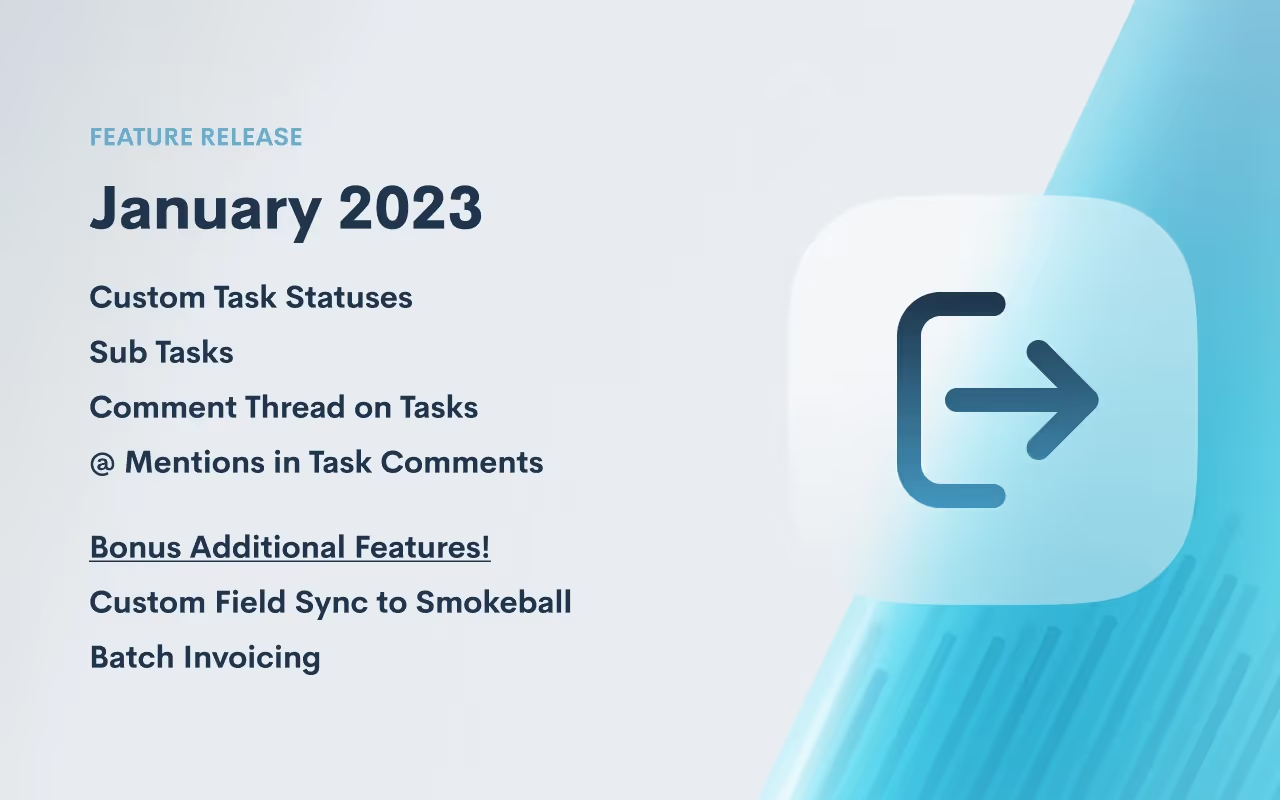
New year, new features! 2023 is here and so is a massive upgrade to Lawmatics Tasks! We are delighted to share our exciting new Task functionality with you.
Custom Task Statuses
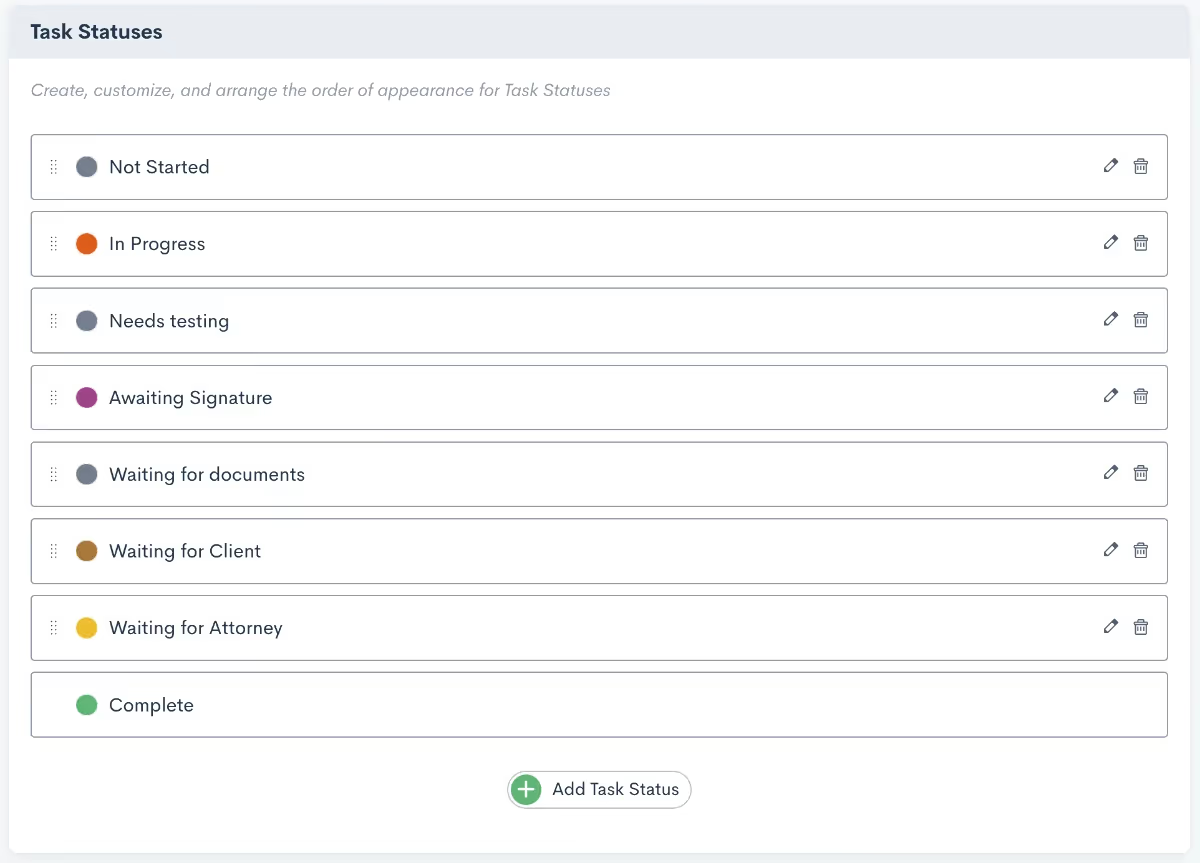
You can now create custom Task statuses in Lawmatics to further organize your Tasks in alignment with your unique operational processes. This update comes on the heels of our newest default Task Statuses such as Not Started and Waiting on Client. To create a custom Task Status, navigate to the Tasks page from the Settings menu.Learn more about custom task statuses here.
Sub Tasks
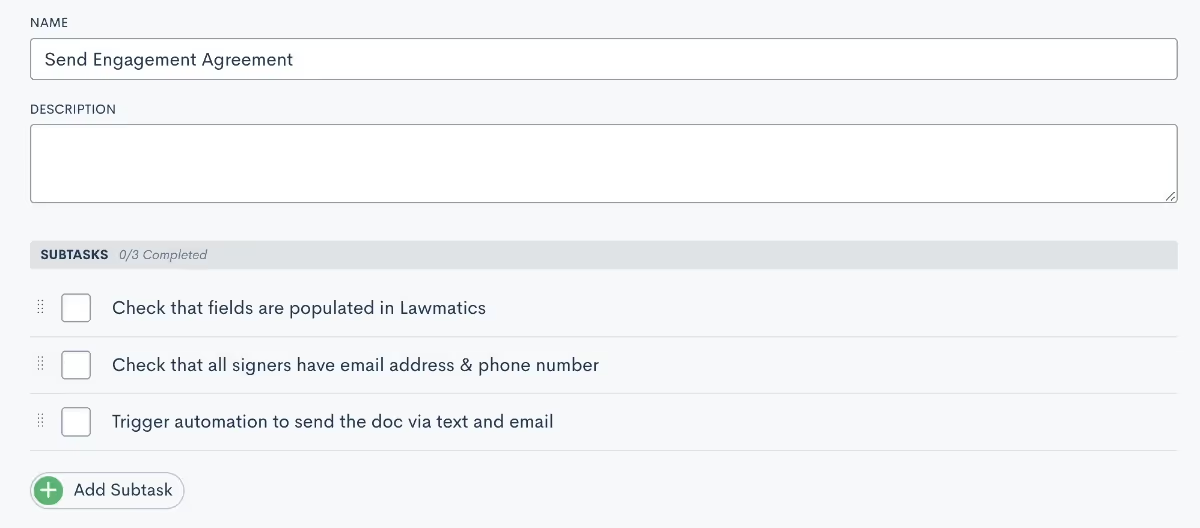
Any Task for which the work needs to be divided into smaller parts can now be broken up into Sub Tasks. Within any Task, simply click + Add Subtask and enter a brief task description. This enables your staff to easily check off each step as they work their way through a Task. Firms also have the option to toggle a setting so that automatically marks a Task as complete once all Sub Tasks are completed.Click here to read all about creating tasks.
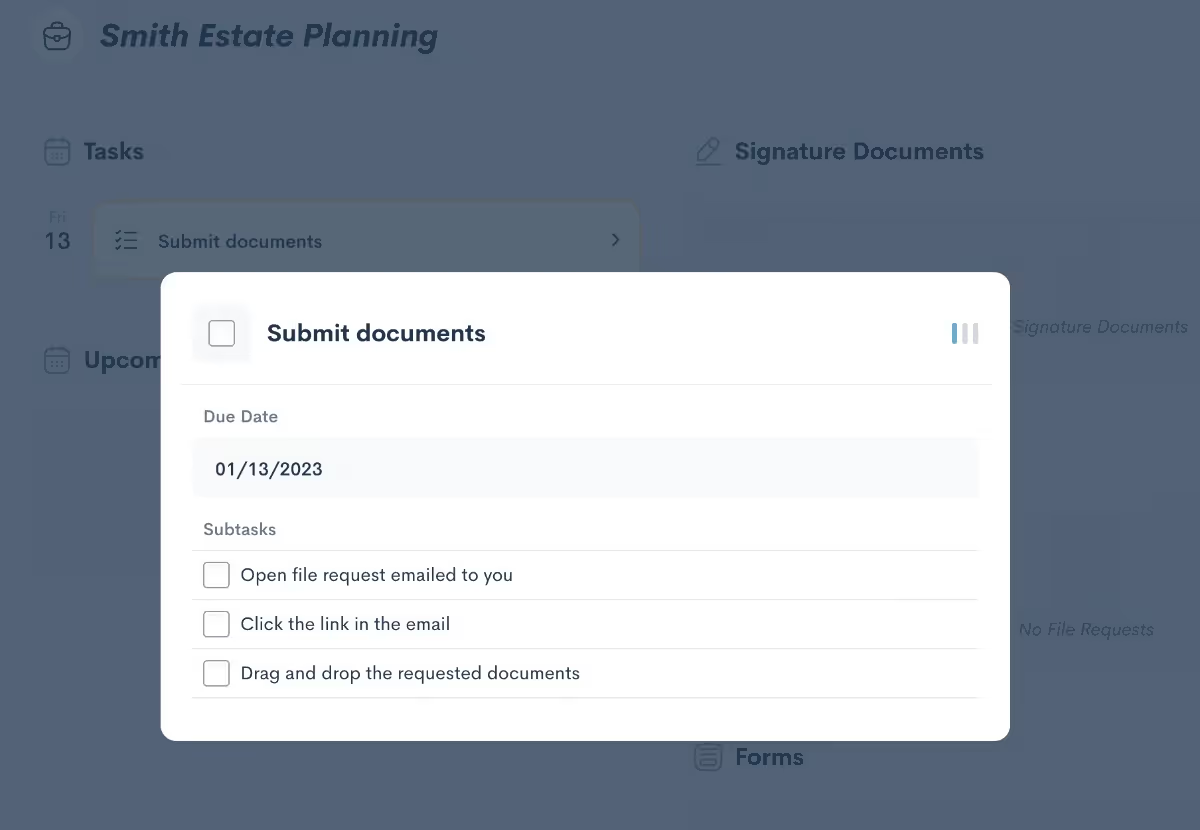
Get a refresher on using the client portal here.
Comment Thread on Tasks
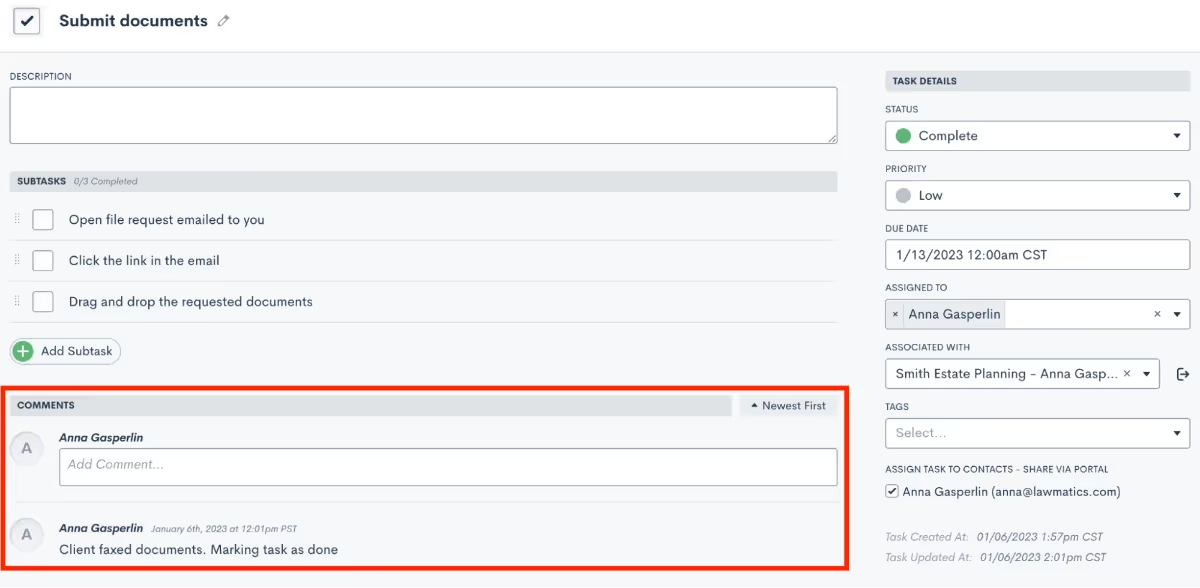
To ask questions, request extra information, or offer insight on an open Task, you can now add comments. Each comment logged within a Task is timestamped for future reference. Comments also denote which user left the comment, which comes in handy for Tasks that involve multiple collaborators. In addition, new notification options are available for Task comments so that no critical updates slip through the cracks.
@ Mentions in Task Comments
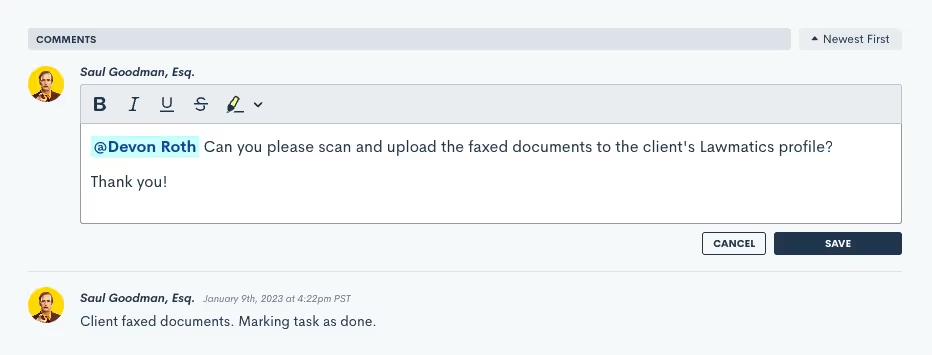
Want to leave a comment that pertains to a specific colleague? Simply type the @ symbol to select any users you’d like to tag in the comment. This is a great tool for making sure the correct person doesn’t miss any updates on action items that involve them specifically.Learn more about task comments and mentions here.
Notifications for @ Mentions in Tasks
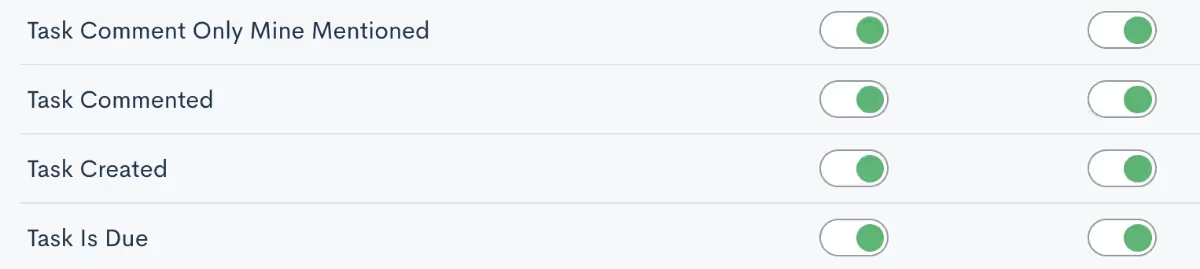
In tandem with @ mentions in Tasks, we’ve also added a new notification option for Task comment mentions. Toggle on notifications to be notified when a fellow staff member tags you in a comment.Click here to learn about all of the notification options in Lawmatics.
Bonus Additional Features!
Custom Field Sync to Smokeball
We are thrilled to share an update to one of our most popular integrations. You can now sync Custom Fields to Smokeball via the Lawmatics integration. Whereas previously only a selection of default standard fields could be mapped from one platform to the other, you can now select any of your custom fields to map to a Smokeball field.Learn all about the Smokeball integration here.
Batch Invoicing
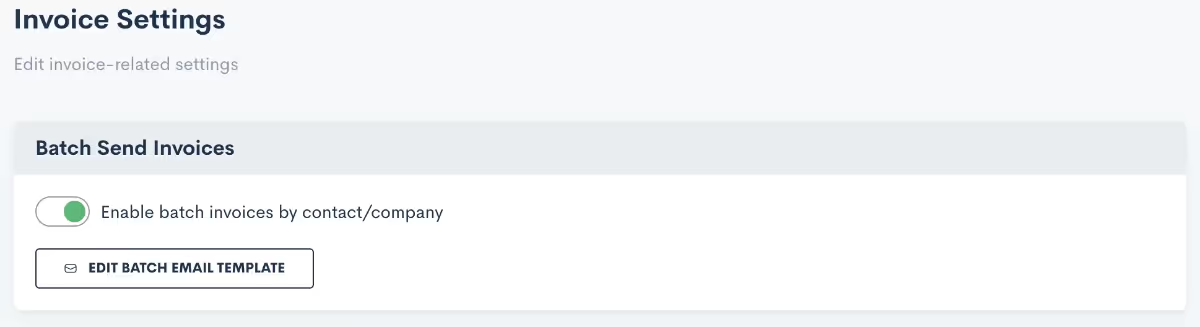
Collecting payments just got even easier with the addition of Batch Invoicing. For clients who have more than one ongoing matter with your firm, you can now send invoices for all of their matters in one batch. This allows them to receive all of their invoices for multiple matters in one email, making it easy for them (and you) to manage all invoices. We’ve also given you the option to create a custom email template specifically for batched invoices, providing extra clarity to the billing process for your clients.Read up on Lawmatics time tracking & billing here.
Even more new features we’re excited about!
- Subscribe to reports and receive an automatic email containing a summary of the report as well as an exported CSV file of said report
- Create matter file folders via automation
- Audiences will now automatically filter out contacts who don't have an email or have unsubscribed
If better organized internal communication is a new year’s resolution for your firm, this latest feature release will help you do just that. We’d love to hear your thoughts on how tasks have helped your firm, share with us at support@lawmatics.com!
CRM (customer relationship management) platforms are designed for businesses to organize, track, and analyze data related to their customers. Most CRM platforms are designed to be used by businesses in a range of verticals. As with any ‘one-size-fits-all’ solution, these platforms may lack features you need and include confusing extras you don’t. So, what kind of software do lawyers use? What is a legal CRM? If you’re looking for help with law firm automation, here are the tools you’ll find at different levels of CRM.
Legal CRM tool for prospect & client communication
A legal CRM helps you manage all your client communications from one central location. Capture and store client contact information, including phone numbers, addresses, and personal details that may be relevant to your work. As a matter progresses through your intake process, reach out to clients through email or SMS to provide updates or request action. This can be particularly helpful if your client has to fill out a lot of forms or submit documents. With law firm automation, your firm can build intake pipelines that handle some communications for you. For example, a lead may automatically receive a confirmation email after booking an appointment on your website. These inputs create a CRM database of contacts, making it the starting point of law firm client management.
Legal CRM tool for internal & external collaboration
Legal CRM tools can improve collaboration between clients, attorneys, and law firm staff. A legal CRM with a client portal provides an easily accessible space to share documents, deadlines, messages, and tasks. The CRM may also include an internal-facing task feature to facilitate the behind-the-scenes process. For example, you can create reminders for your law firm’s intake staff to follow-up with a prospect to ask clarifying questions about their matter. By running communications and collaboration through one platform, law firm automation can create a seamless transition from intake to case management for both clients and staff.
Legal CRM tool for billing & invoicing
Time is a law firm’s most precious commodity. The best CRM for law firms saves time while enabling firms to understand where they spend time. Simple time tracking features ensure you always accurately bill clients. Billing and invoicing features generate and send to clients easily digestible invoices, including options to charge rates or flat fees and itemize any expenses. A robust legal CRM utilizes the data captured from these features to create detailed reports about staff hours, and statistics about time spent on different types of cases.
Legal CRM tool for marketing
The intake process starts before a potential new client contacts your law firm. In fact, it really starts when that lead first identifies your firm as an option to handle their legal matter. That’s why a comprehensive legal CRM contains features to help with law firm marketing. A legal CRM tracks digital ad campaigns through UTM codes so you can monitor the messages and media that generate the most business for your firm. It also allows you to tailor your marketing efforts for different practice areas or geographic locations by segmenting your contacts into distinct audiences. A legal CRM can include features of analytical CRM, like reports and visualizations that form the basis of new marketing strategy.All of the above legal CRM tools are focused on facilitating the client intake process. Depending on the software, some legal CRM platforms may have even more expansive features that overlap with, say, case management or client management platforms. Here are some of the things you might find in CRM and other legal software:
Client management
A legal CRM captures data important to client management, like client information, case history, and communication history. As a matter progresses, you may transition from a legal CRM to a law firm client management platform. It’s important that transition is simple and efficient, but the information also needs to be accurate and complete. One simple mistake of human error could derail an otherwise straightforward intake process.
Document management
A legal CRM’s document tools are focused on the documents necessary for a client to retain a firm. For example, you can save templates of engagement agreements for different case areas. Custom fields will then complete the template with information relevant to a given matter. A client portal allows for clients to share documents with their attorneys, but a legal CRM is primarily concerned with documents a firm shares with its leads and prospects.
Why do law firms need CRM?
If a legal CRM is just one component of your law firm’s tech stack, integrations between platforms can automate a seamless transition from one stage to the next. Ultimately, the best CRM for law firms should create a great client experience. No matter the outcome of a case, you can always control how you communicate and collaborate with clients, how you spend your time, and how you market your firm to potential new clients.It’s one thing to see these features in a list. It’s another thing to see them in action, understanding how they work in concert to create a client experience. If you want to see the most comprehensive attorney-client customer relationship management platform on the market, schedule a demo of Lawmatics today.


We’ve had a momentous year here at Lawmatics when it comes to feature releases. From our new Time & Billing module to our MyCase Integration, you may have already implemented many of these into your practice.There may also be some enhancements and additions that you missed or have since forgotten about. This deep dive into the year’s features will give you a refresher on how you can utilize these to their fullest potential!Register for upcoming Lawmatics Monthly Deep Dives.
Matters & CRM
Client Portal Messaging
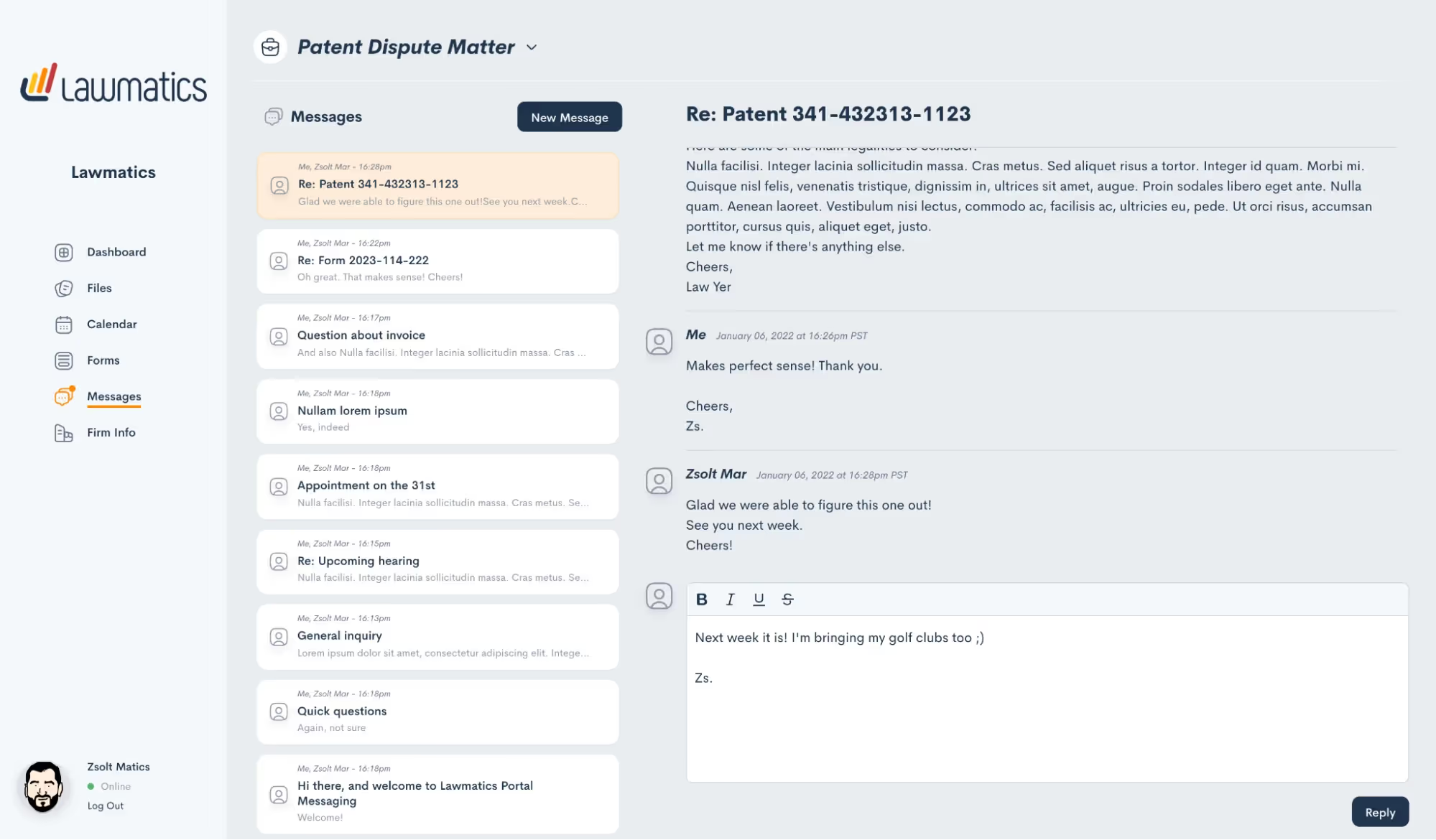
In lieu of flooding your inbox with client emails containing sensitive case information, 2-way messaging via the Client Portal conveniently centralizes all your client communications in one easily accessible place. All incoming and outgoing messages are stored in your account as part of a message thread, automatically generating a historical record of any interaction for future reference.Creating and replying to a message thread in Lawmatics is easy for both you and your clients. A new “Messages” menu item gives you a top-down view of all message threads wherein you can see all incoming and outgoing communications as well as the manner associated.On the client end, their unique Client Portal now features a “Messages” section to easily correspond with firm members assigned to their case. And to ensure no messages slip through the cracks, you can activate email or text notifications to be alerted of any incoming client messages.
Conflict Checking
It is now easy to use Lawmatics to perform your firm’s conflict checks. Simply select the matter you wish to check a conflict for, enter your search terms, and Lawmatics will handle the rest. The system will search against all data entered into your law firm CRM, including fields and notes, and instantly alerts you if it finds a match.From there, you’re able to review any possible matches, and choose to approve, flag, or fail the conflict check.In addition to manual Conflict Checking, we’ve also added the ability to automate this process entirely and trigger further automation based on the outcome. Now you can be out enjoying time away from the office while Lawmatics handles this tedious task for you.
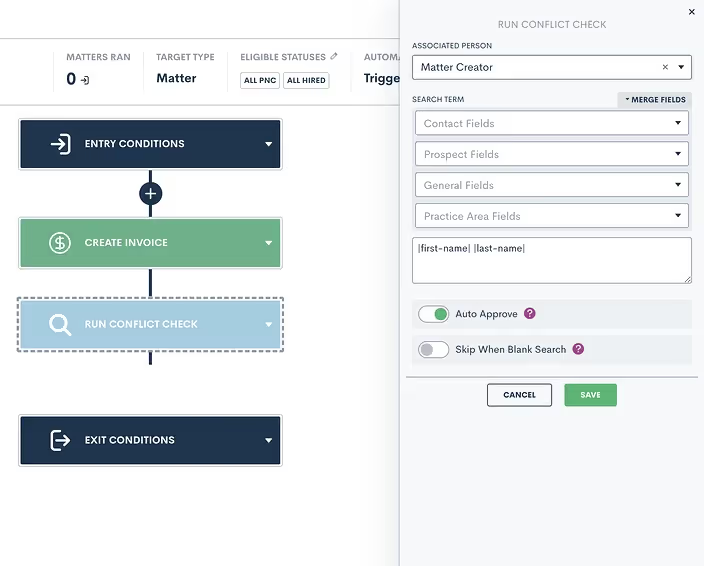
Adding to the conflict check capabilities in Lawmatics, users can now opt to receive notifications for approved, denied, and/or undecided conflict checks.
Change Main Contact/ Compact Matter
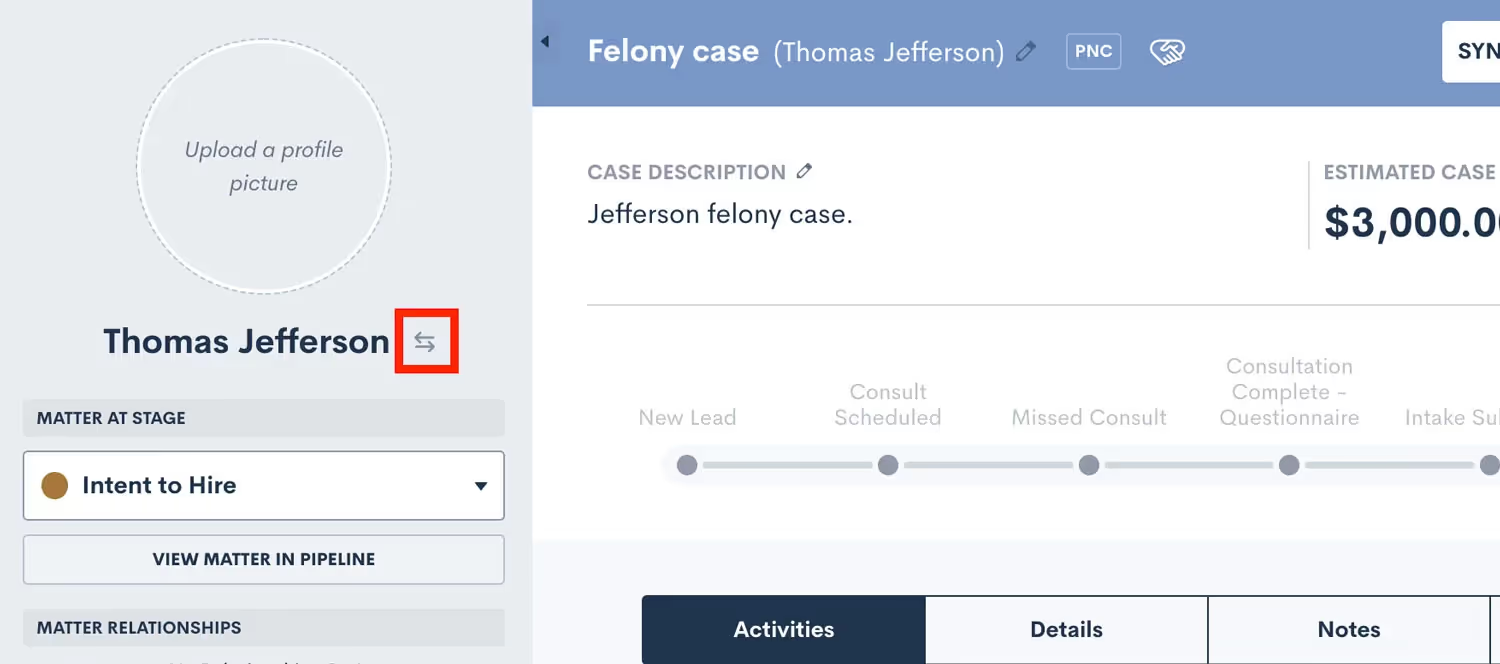
If your firm often works with matters that have more than one contact, such as a married couple, you may prefer one contact or the other to be listed as the primary name on the matter in your CRM. To that end, you can now easily swap the main contact on a matter from within Lawmatics. Simply click the arrow icon adjacent to a contact's name in their profile, and then select an alternate contact from within your CRM. The same functionality is applicable to company matters. This new feature helps you keep your CRM organized and accurate so that you can always find your matters with ease.
File Folders & Bulk Actions
Lawmatics is a great tool for securely storing important files and documents from your firm’s many matters. With this huge improvement to our file storage system you can now create custom folders within a matter’s files tab and move files between folders as needed.In addition to creating folders for your matter files, you can now bulk select files with the option to download or delete multiple files at once, saving you the time of managing files one by one. It’s easy. Simply select the box adjacent to the file name and click on the action of your choice.

Matter Auto-Numbering
To easily track down and reference cases in your docket, you can now auto-generate a case number and custom title into a matter’s title field as unique identifiers. Further refine your case numbering sequence by adding custom text or database fields such as practice area, lead attorney, client’s last name, etc.
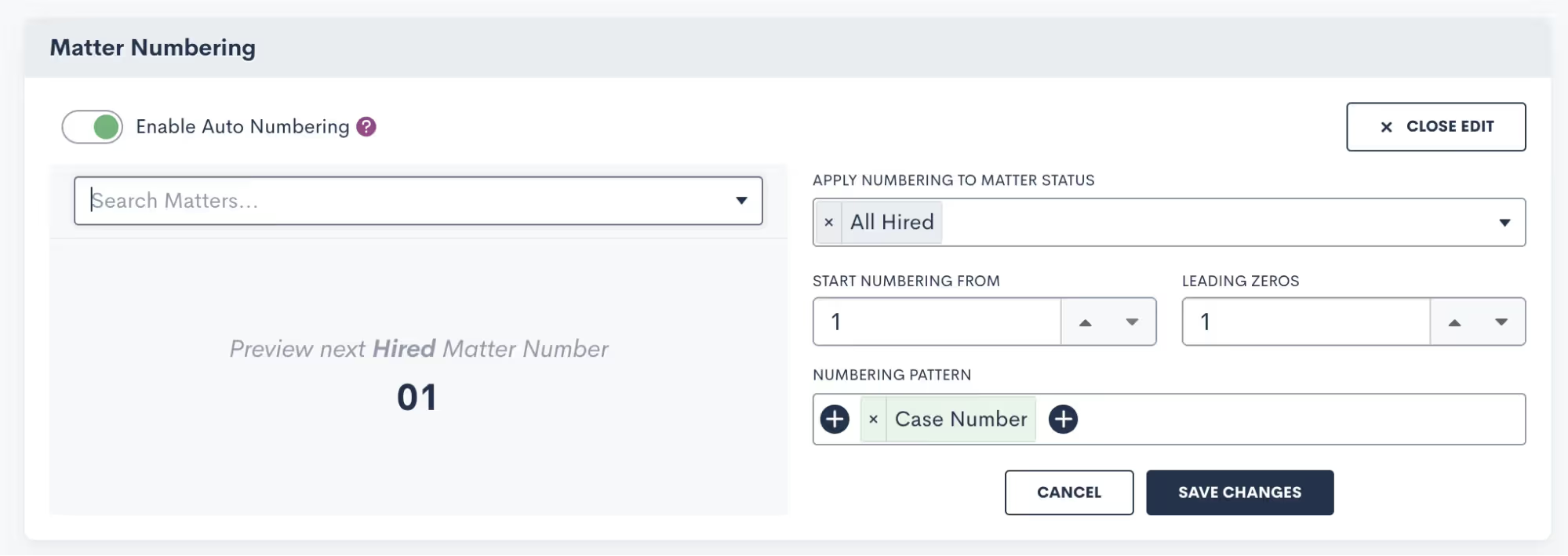
Once saved, the resulting case title format will automatically be applied to each of your matters moving forward. Begin auto-numbering your cases by navigating to the Matters page within settings, scrolling down on the page and toggling on “Enable Auto Numbering”.
Emails
Scheduled Email Sends
By popular demand, you now have the ability to control when your email messages are sent and arrive in your recipient’s inbox. In addition to sending automated and immediate one-off emails to matters, any email created either from a template or from scratch can now be scheduled to go out at a future date and time.

User Permission Options for Viewing Emails
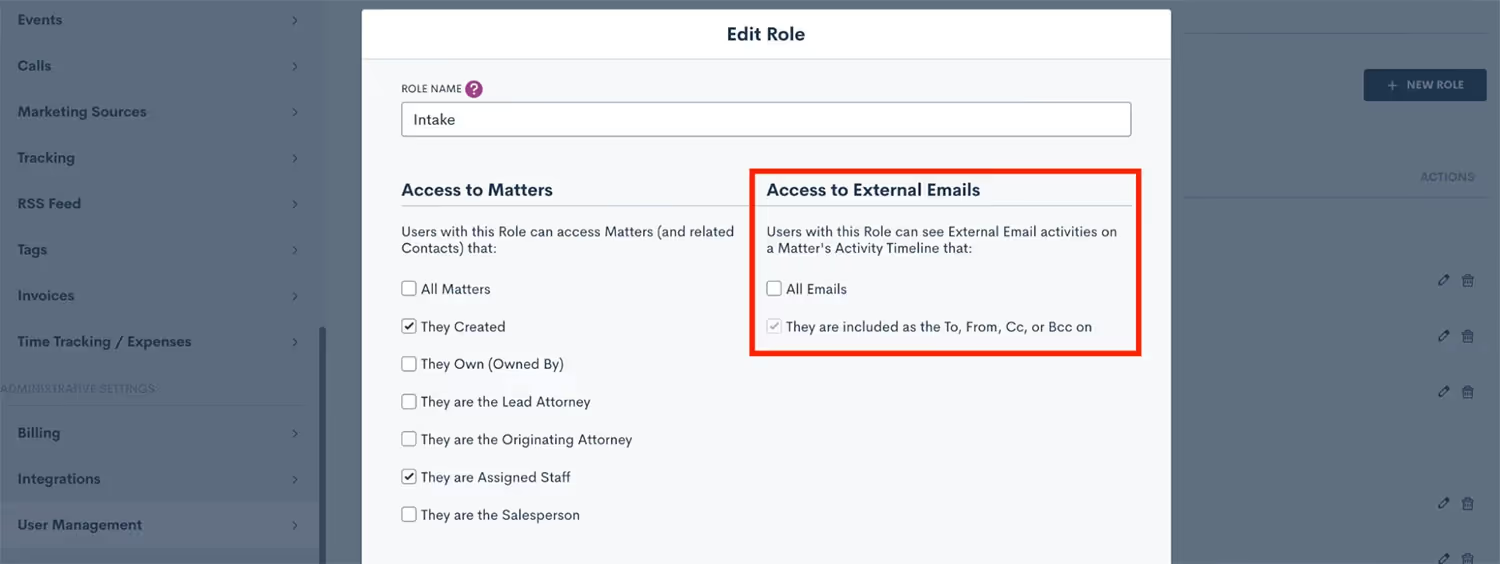
Confidentiality and discretion are paramount when dealing with sensitive client information. While logging your external emails in Lawmatics can be helpful, you may not want the entirety of your staff to have view access to these emails on a matter’s timeline. With our new External Email Role Permission you can now easily limit any user’s access to view email communications, without limiting their access to the matter all together. To use this new permission, go to the User Management page in your Admin Settings, Click Manage Roles, edit the role you wish to apply this restriction to, and then uncheck the All Emails option, as shown below.
Send From Outbox
A highly anticipated feature among Lawmatics users, any emails sent via Lawmatics can now be set to appear in the outbox of your preferred email client. This update will help improve your firm’s email organization by storing all email correspondences in one central place — alongside your other communications.
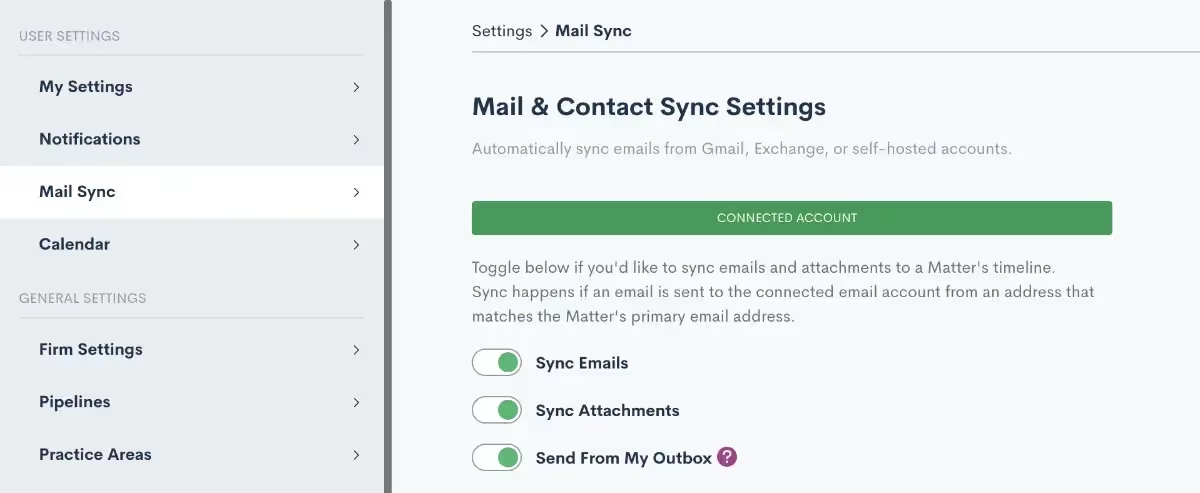
Once activated, any email sent to or received from an email address that is tied to a matter in Lawmatics is automatically logged in the timeline for that matter. And for quick reference, you can easily go to your outbox to see all emails sent from your address, including those sent via Lawmatics.
Documents
Resend Expired Signature Requests
Delays happen; it’s the nature of the business. What you don’t want is for those delays to translate into lost time for you or your staff. For that reason, we’ve rolled out a new shortcut in Lawmatics that allows you to resend any expired documents requiring e-signature.Any document with a status of “Expired” is eligible for a resend, with the added option to extend the e-signature link deadline. No need to send a new e-signature required document from scratch.
Add Page Breaks to Custom Docs
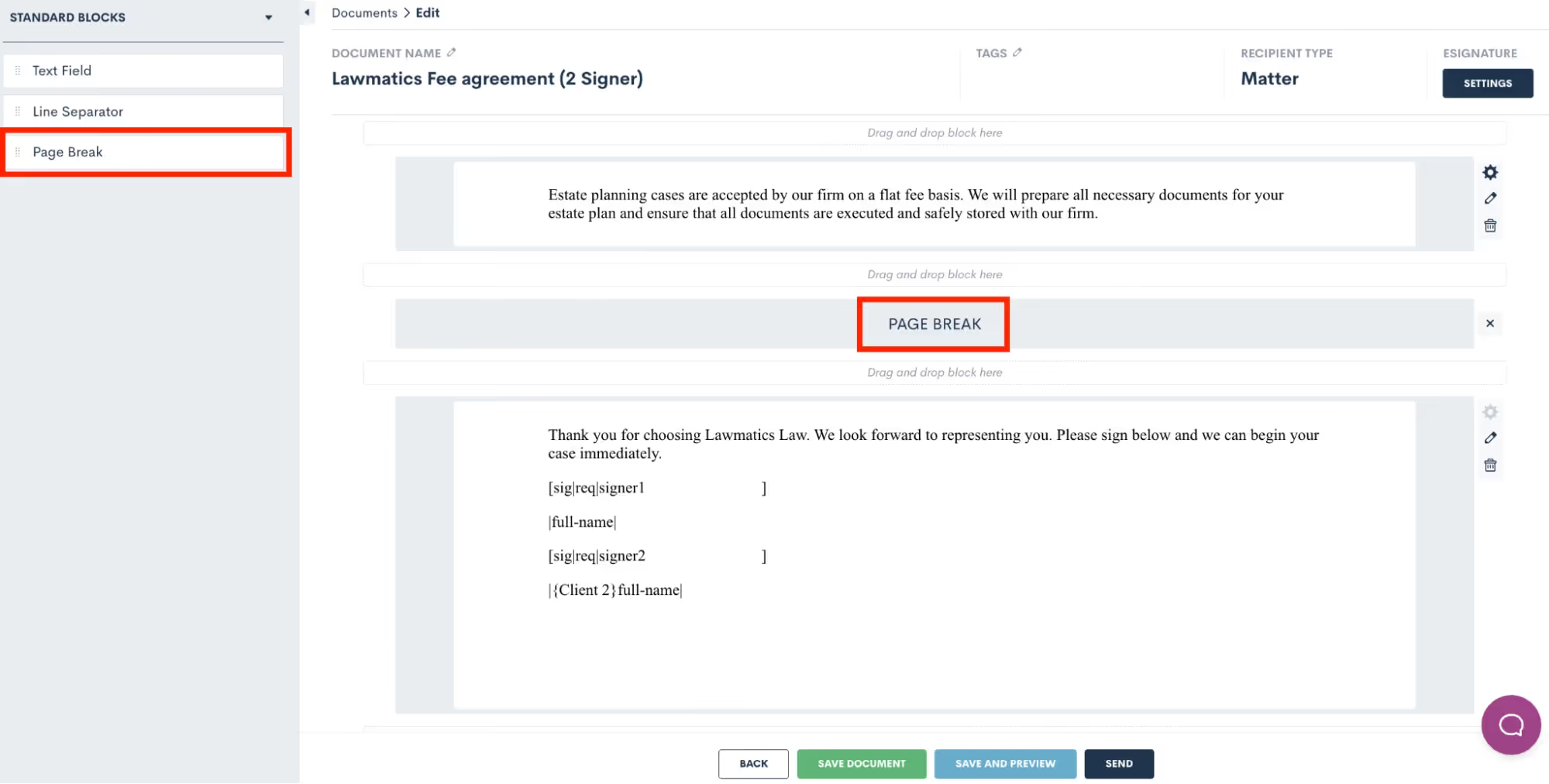
Custom Documents, with their conditional logic and dynamic e-signature capabilities, have long been a Lawmatics staple for fee agreements and other important firm documents. With the new addition of page breaks, we’ve made it much easier to maintain the look and layout of your new and existing document templates.To add a page break, simply edit the document, and drag over a page break from the Standard Blocks menu. Any text below the page break will automatically be placed at the start of a new page when the document is previewed and/or sent.
Forms
Set Conditional Logic Multiple Conditions
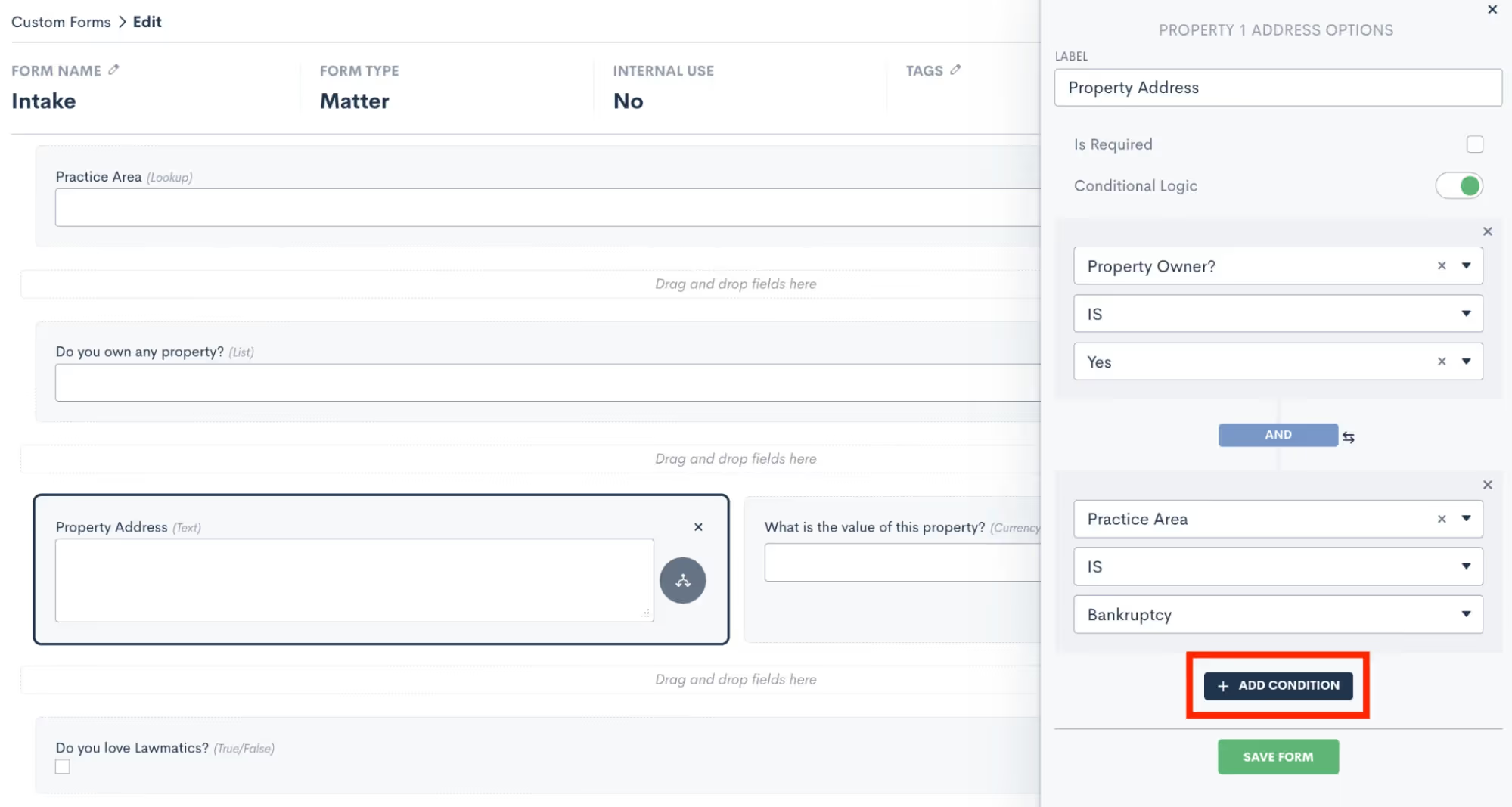
Onboarding should be a seamless process for all prospective clients, regardless of the circumstances of their inquiry. This update in Lawmatics allows you to add multiple conditional fields to your intake forms using AND or OR logic. These fields then only appear based on the responses entered into previous fields.
Hidden Form Fields & Default Value
Did you know that you can trigger automatic updates to a client’s contact information, matter information or even stage in your sales pipeline whenever they fill out a form? Hidden form fields do just that.This feature allows you to set form defaults by making any field on a custom form ‘hidden’. You will add the field to your form, select the “Is Hidden” option, and then enter your default value. Your lead or client will not see that field on their form, but when the form is submitted it will auto-submit the hidden value along with the rest of their information to trigger any actions or changes to their information in your Lawmatics account.
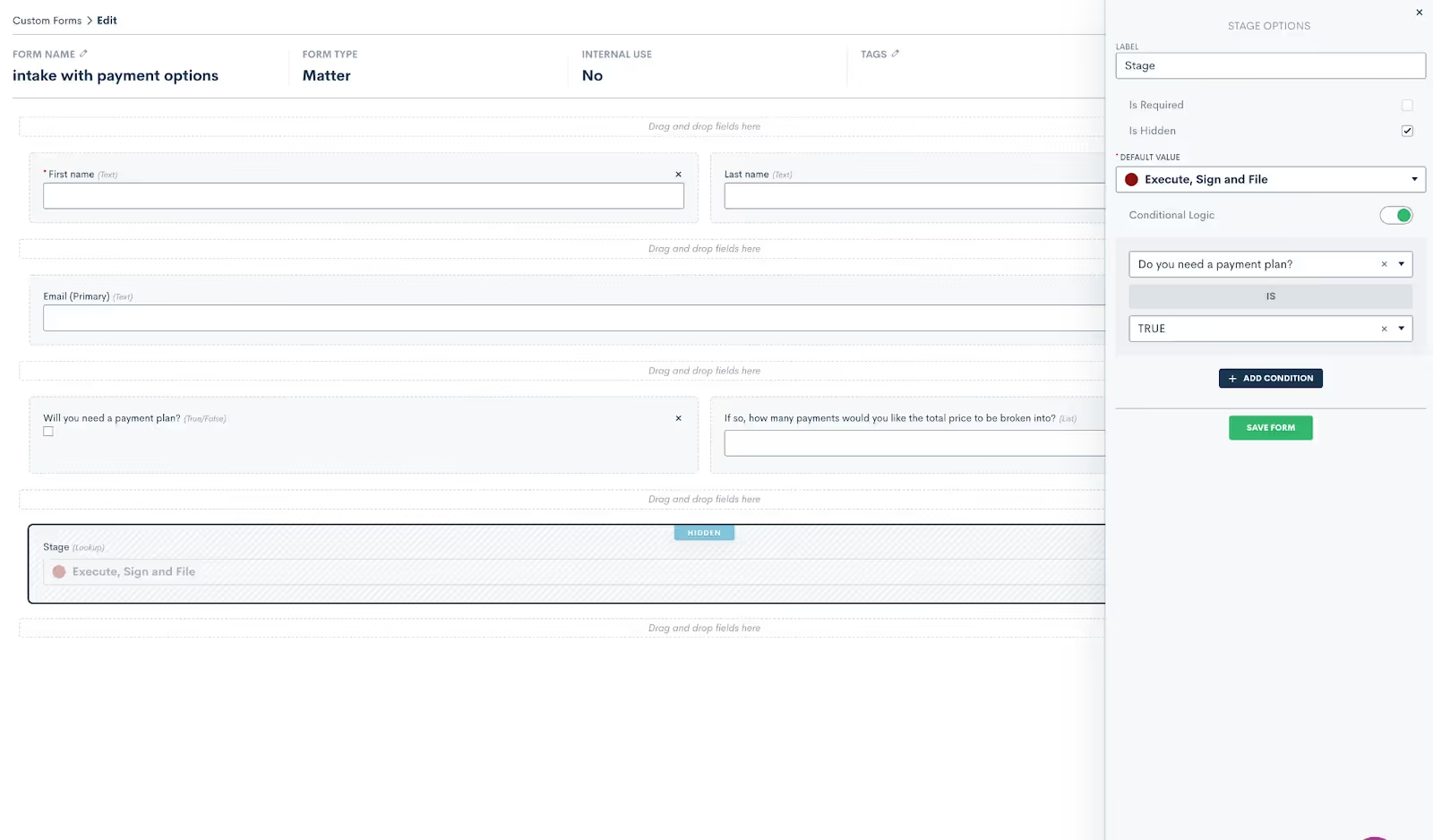
This helps you efficiently track your intake pipeline as simply as possible while eliminating the need for certain Automations previously set to update default values, the sales pipeline stage of a matter, their tag, practice area, etc.
reCaptcha on Embedded Forms
Lawmatics Custom Forms make it easy to capture new prospective client inquiries from your website, and we’ve now made this feature even better with the addition of reCaptcha. This technology prevents spam bots from entering your Lawmatics contact database via the ‘Contact Us’ form embedded on your website, ensuring that your account is protected against disruptive spam leads.reCaptcha can be added to any embedded form via the form Settings menu in the left sidebar. Simply toggle on the reCaptcha option the reCaptcha will be activated anywhere this form is embedded - no further steps need to be taken.

Access Existing Contact from Internal Form
Internal forms have long been a user-preferred way to create new matters for new contacts in Lawmatics. A new dropdown menu option in our internal forms feature now lets you create a new matter for an existing contact or company when filling out a form.
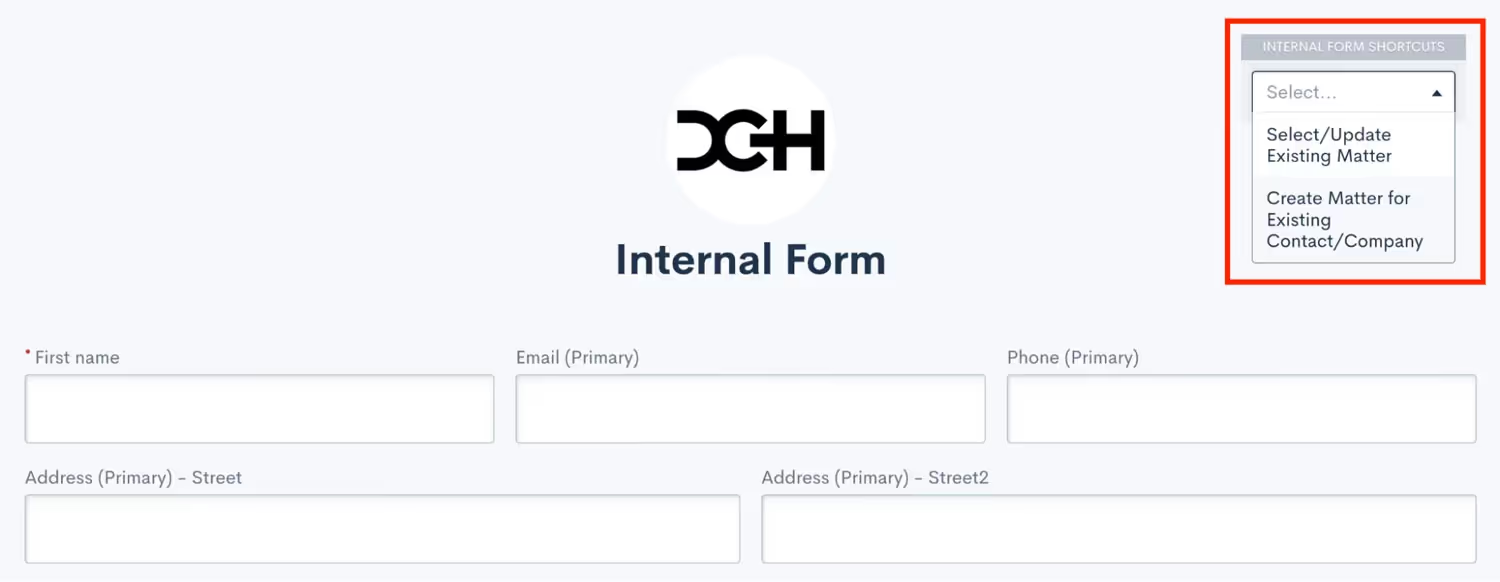
Simply select the contact for which you wish to create a new matter and Lawmatics will pre-fill the form with their existing contact information. Upon form submission, a new matter will be created for said contact.
Booking Form Updates
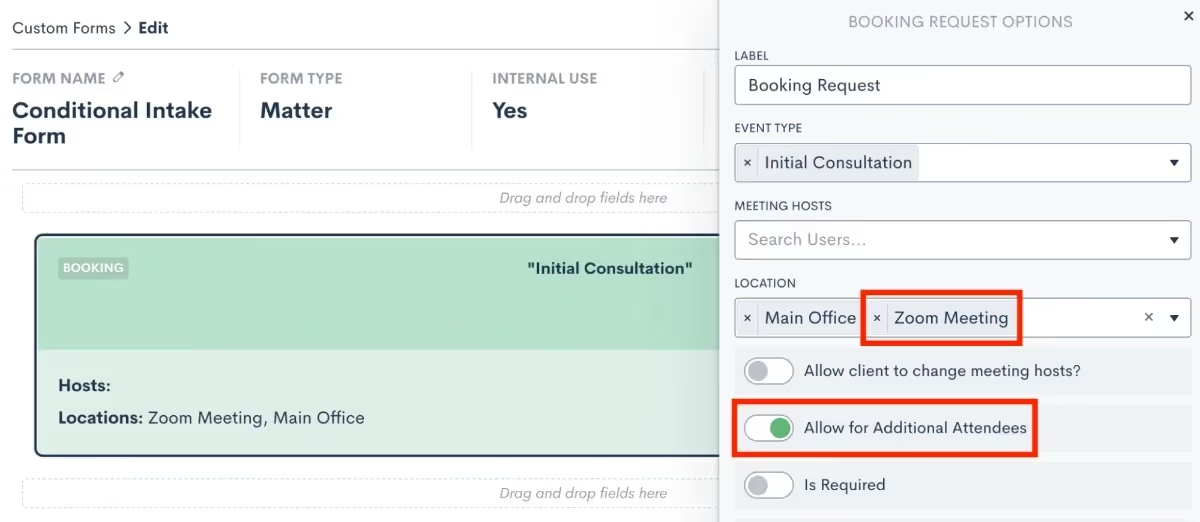
Automatic scheduling is a favorite feature of many Lawmatics users, and this year it got even better. To accommodate virtual meetings in addition to face-to-face meetings, you can now select Zoom as a meeting location option, along with any of your physical office locations on your Booking Forms. Furthermore, we added the ability to allow multiple attendees in one event. If any of your matters involve the representation of multiple clients, easily add them both to the meeting invite. With the growing popularity of virtual meetings, these upgrades grant your clients the flexibility to choose which option works for them, and have the zoom link added in automatically when needed.
Automations
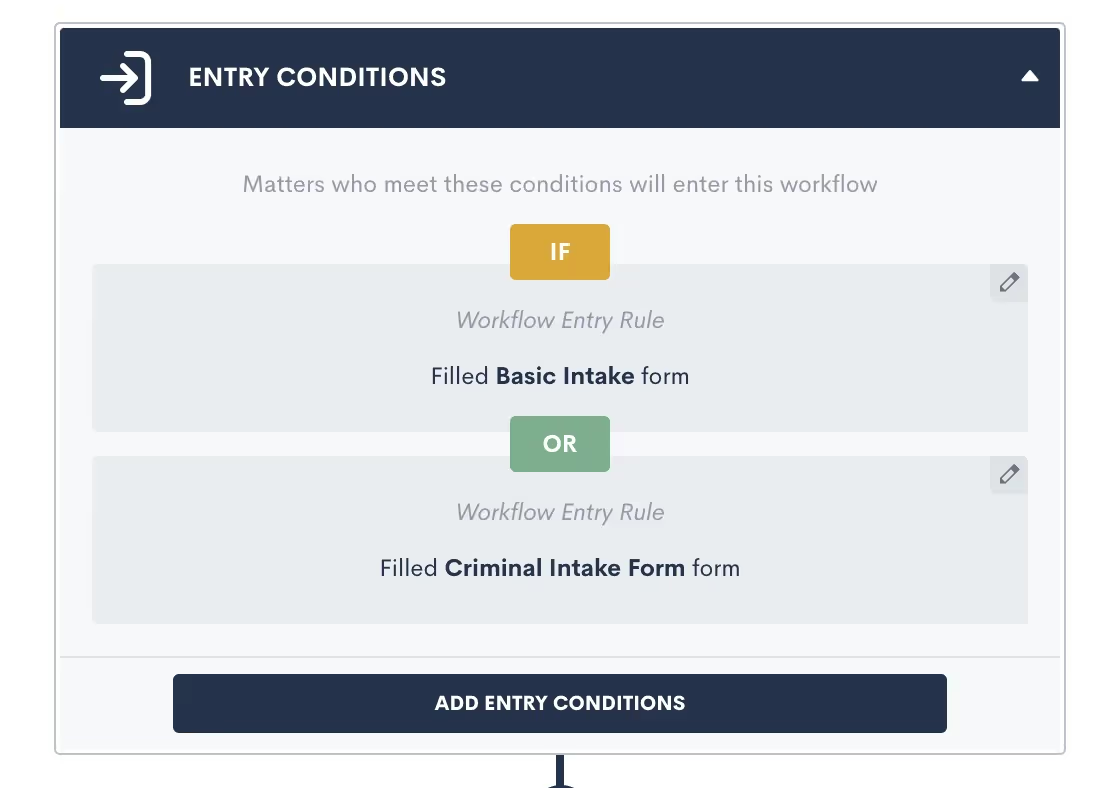
Set Multiple Entry Conditions with And/Or Relationship
You can now designate multiple entry conditions (or triggers) that add contacts to an Automation workflow, automatically. Using AND or OR logic, triggers such as form fills and eSignature completions can be paired or conditional.Entry conditions can be added easily within Automations in Lawmatics by clicking on and toggling the AND /OR labels, after which you can select your Workflow Entry Rules.
Date Field-Based Automations
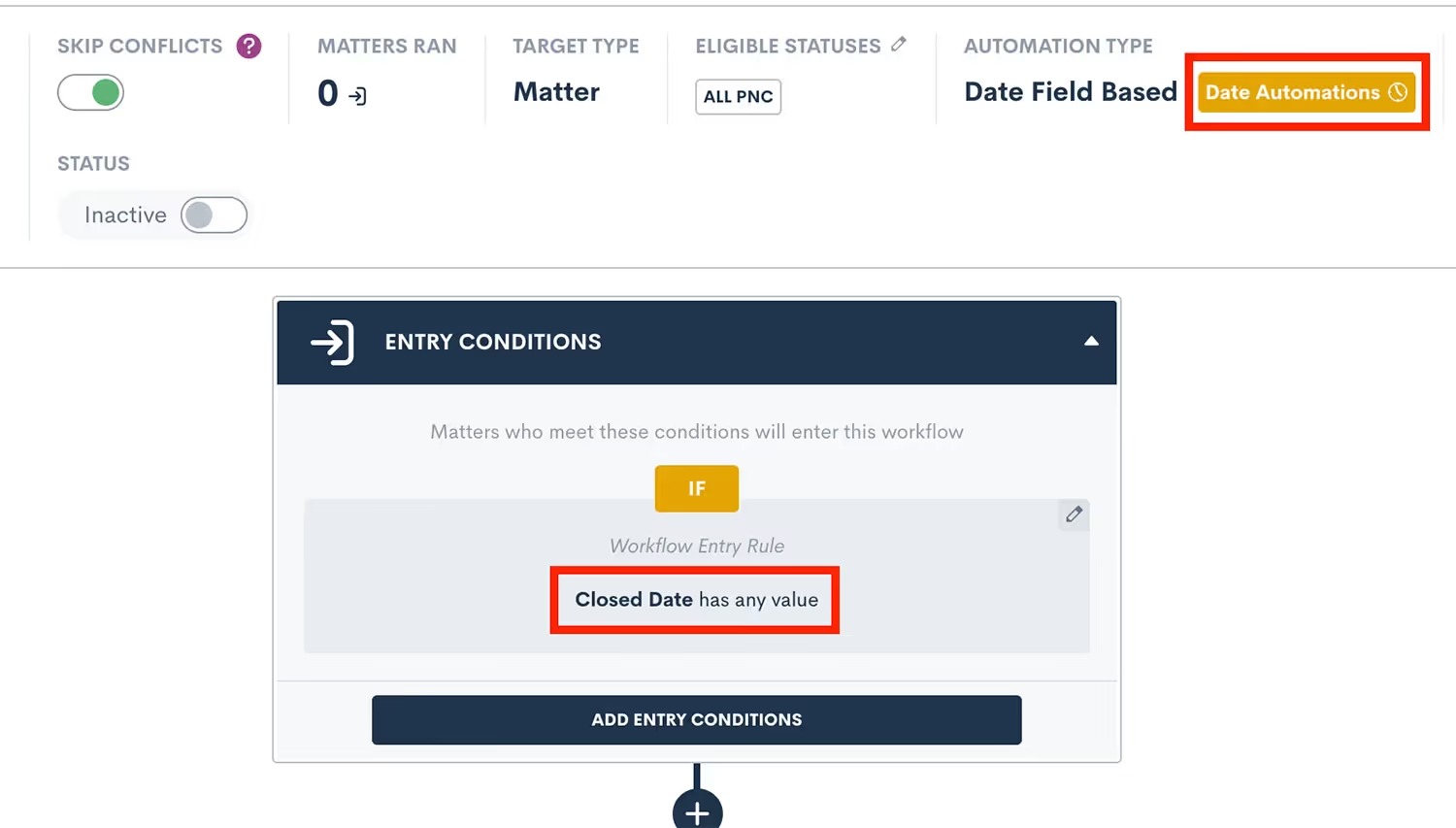
You can now create time-relative automations (one hour before, two days after, etc.) for any date type field in Lawmatics. Our new Date Field-Based Automations take the existing concept of event-based automations and apply it to date fields. This new functionality allows you to trigger automated reminders or check-ins relative to a client’s court date, filing date, anniversary, or any other custom date field you may use in your practice — all from simply populating the date into a date type field.When creating a new automation you’ll select the Date Field option, then select from any of your firm’s date type fields as your target field to create a Date Field-Based Automation. You can then add your time-relative automations by clicking on the yellow label at the top of your page (highlighted below).
Time & Billing
Invoice Automation
You can now automate the delivery of your flat fee invoices! Automations in Lawmatics feature a new Create Invoice automation action that generates an invoice for any matter with a balance due that it runs on. Doing so enables you to accelerate your billing process in a manner that gets you paid faster while freeing up time to focus on other priorities needing your attention.
Payment Plans
For firms who want to offer their clients more flexibility of payment, use this new feature to set up invoice installments to be paid over time on a fixed cadence.
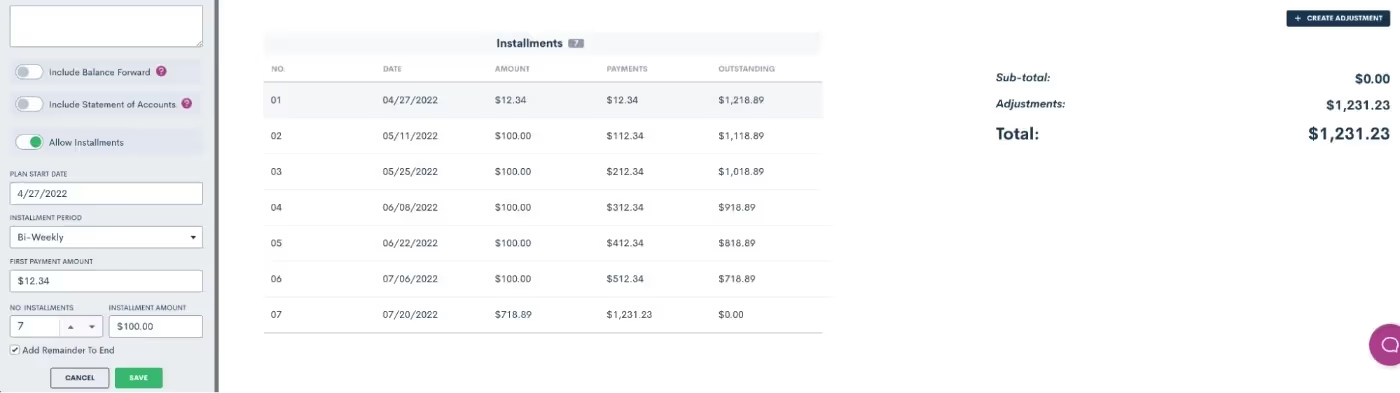
Of course we’ve made this feature highly customizable, allowing you to create unique terms for each individual payment plan as needed. This includes setting an initial payment amount, interval length, and the number of installments.
Custom Forms Payment Gateway
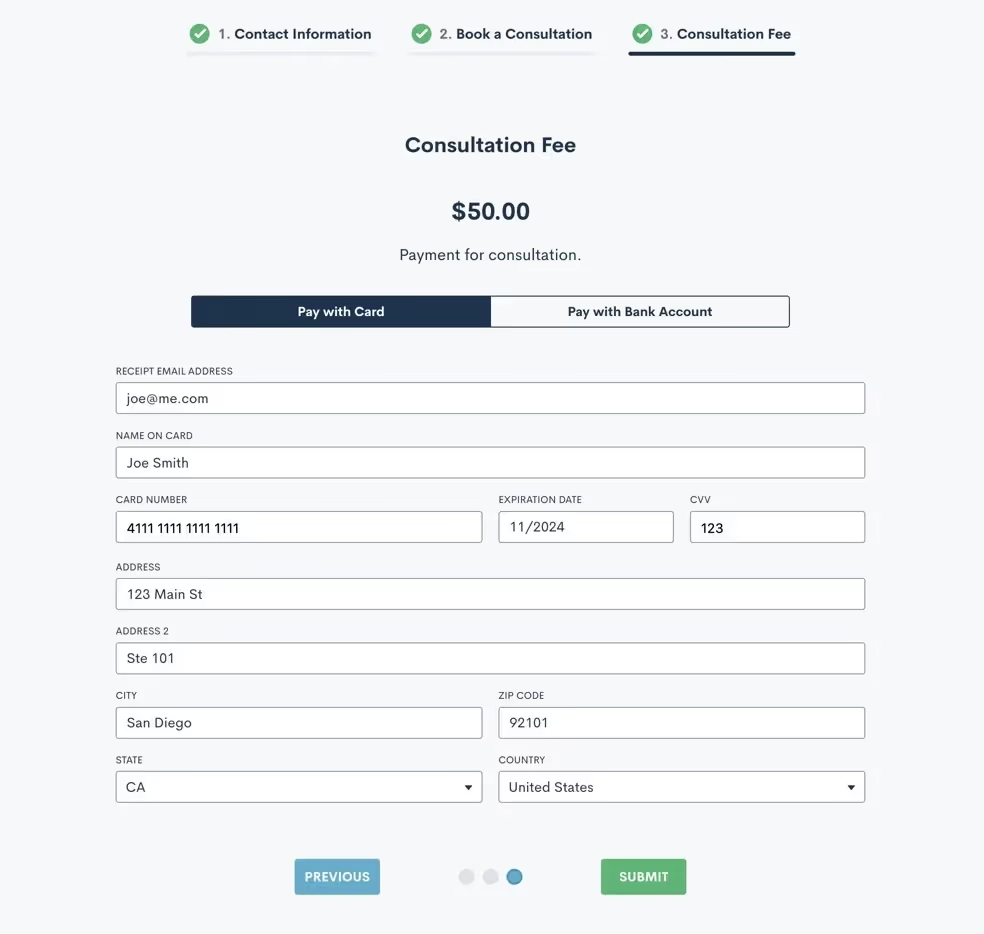
Collecting payment for consultation fees just got a whole lot easier with the addition of the LMPay Gateway in custom forms and booking forms. Add this advanced field to your consultation forms to make it easy for clients to schedule an appointment and pay for a consultation in one fell swoop.
Hours Billed & Payment Activity Reports
Our new Hours Billed Report provides a real-time snapshot of billable hours based on criteria of your choice, so you can make business decisions accordingly. Get as granular as you need with your report by selecting one or more of the following search criteria: date range, user, and practice area.
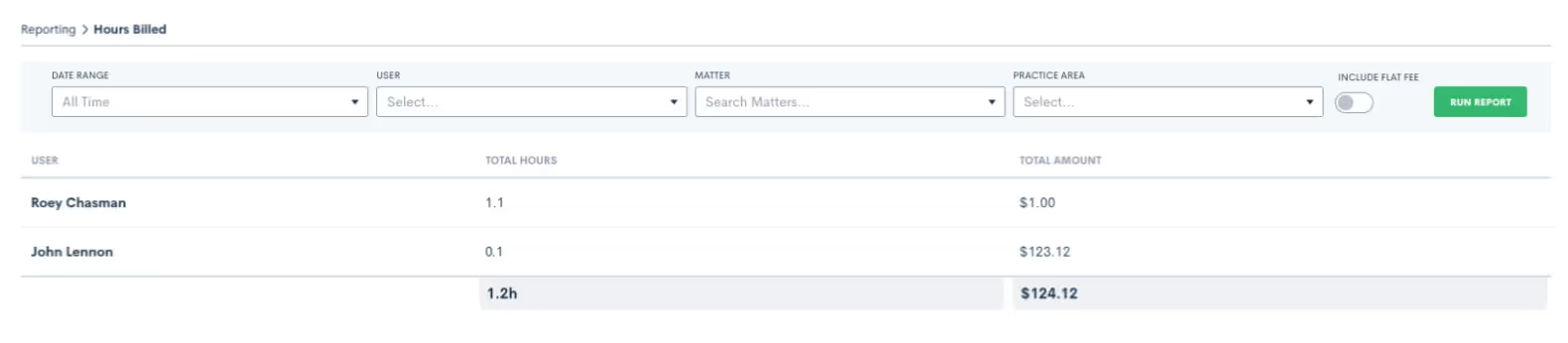
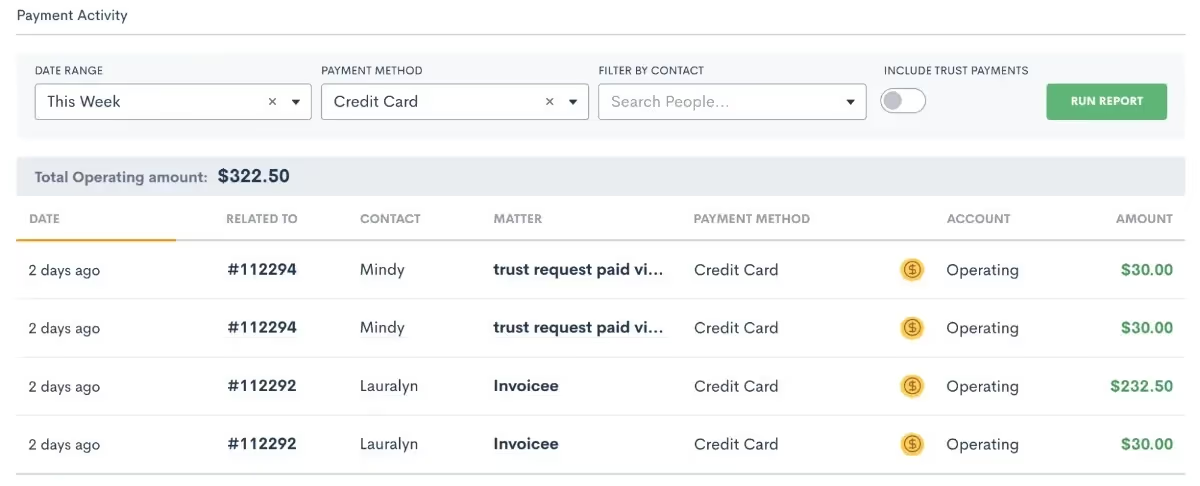
Use the Payment Activity report to set custom filters for the date, payment method, and/or contact. Run the report to see a snapshot view of the payments that meet your criteria, making it even easier to keep an eye on your firm’s incoming cash flows.
Evergreen Trust Alerts & Request Funds for Trust
Our new Evergreen Trust Alerts give you the option to set a minimum trust balance notification, making it easy to take action when a matter’s trust balance dips below the minimum you have specified.
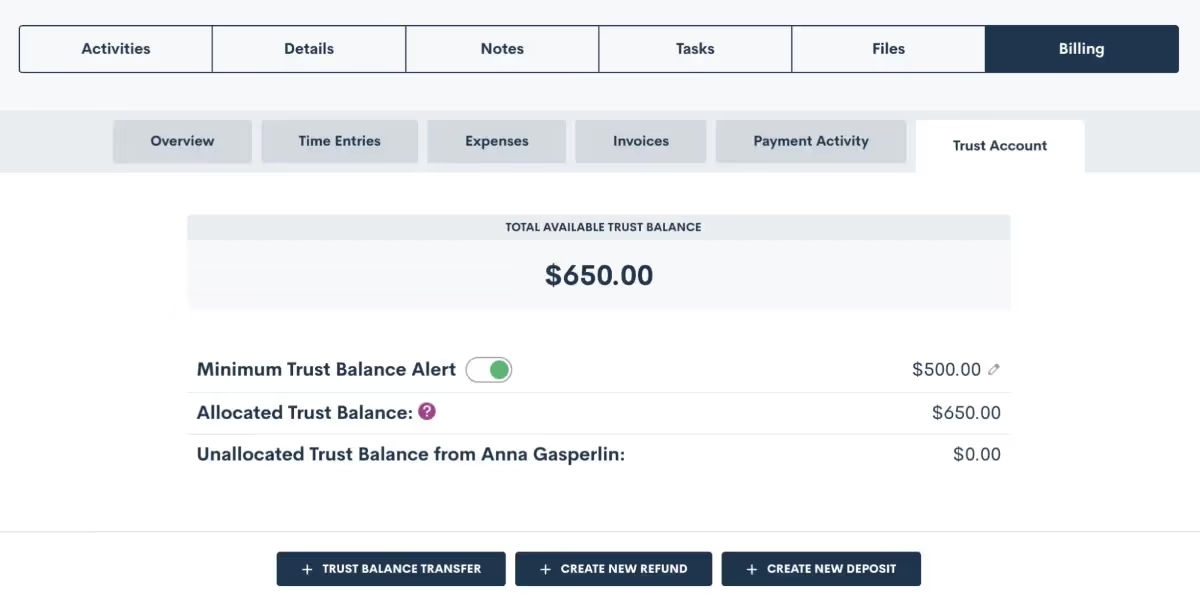
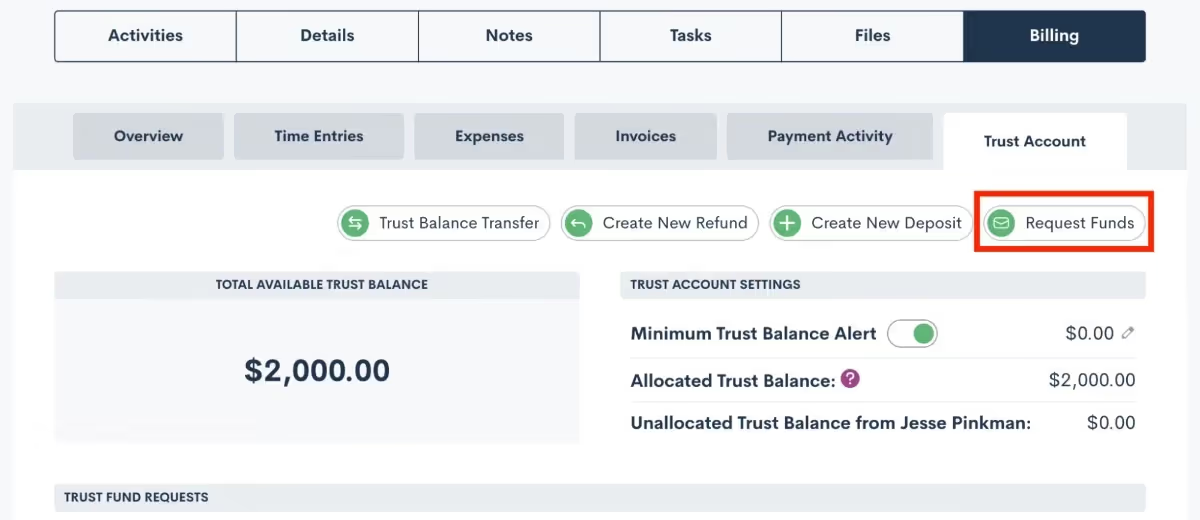
To use this feature, turn on the toggle on the ‘Minimum Trust Balance Alert’, as shown above, and then click the edit pencil on the far right to set the minimum balance for a particular matter.Another addition to our Time & Billing system allows you to request funds from a matter for their trust account with the option to let them pay via credit card. Paired with your minimum balance alerts, this will help ensure that a client’s trust balance stays above your designated minimum amount.
Custom Invoice Reminders
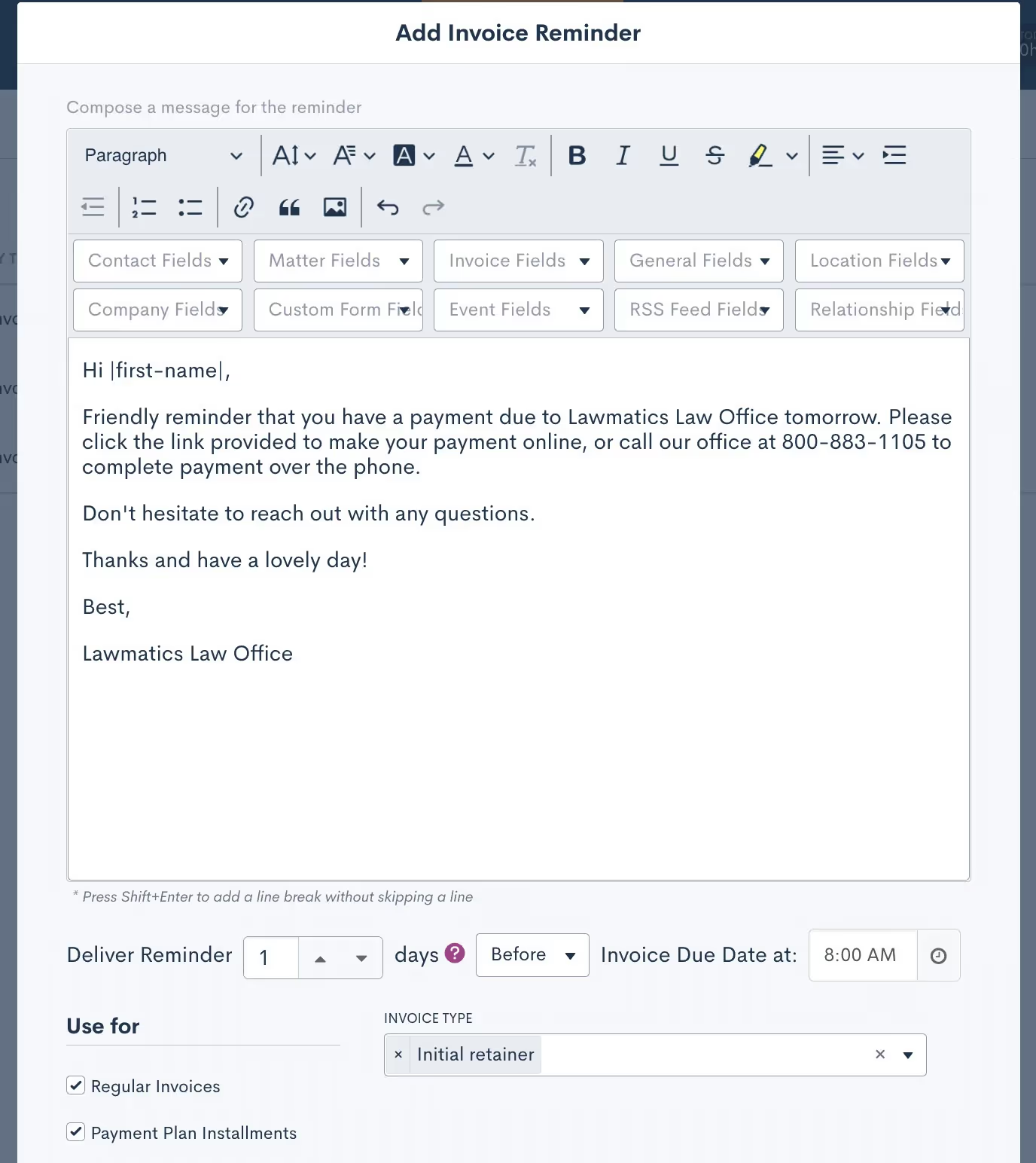
Avoid the frustration of seeing past due invoices go unpaid by notifying clients of an impending due date or past due balance. Reminders can be sent relative to the invoice due date, such as the week before or the day before, or anytime after. Customize each invoice reminder by using merge fields in your email reminder template and even create different templates for your different invoice types.
Settings
Update Contacts and Matters Via Import
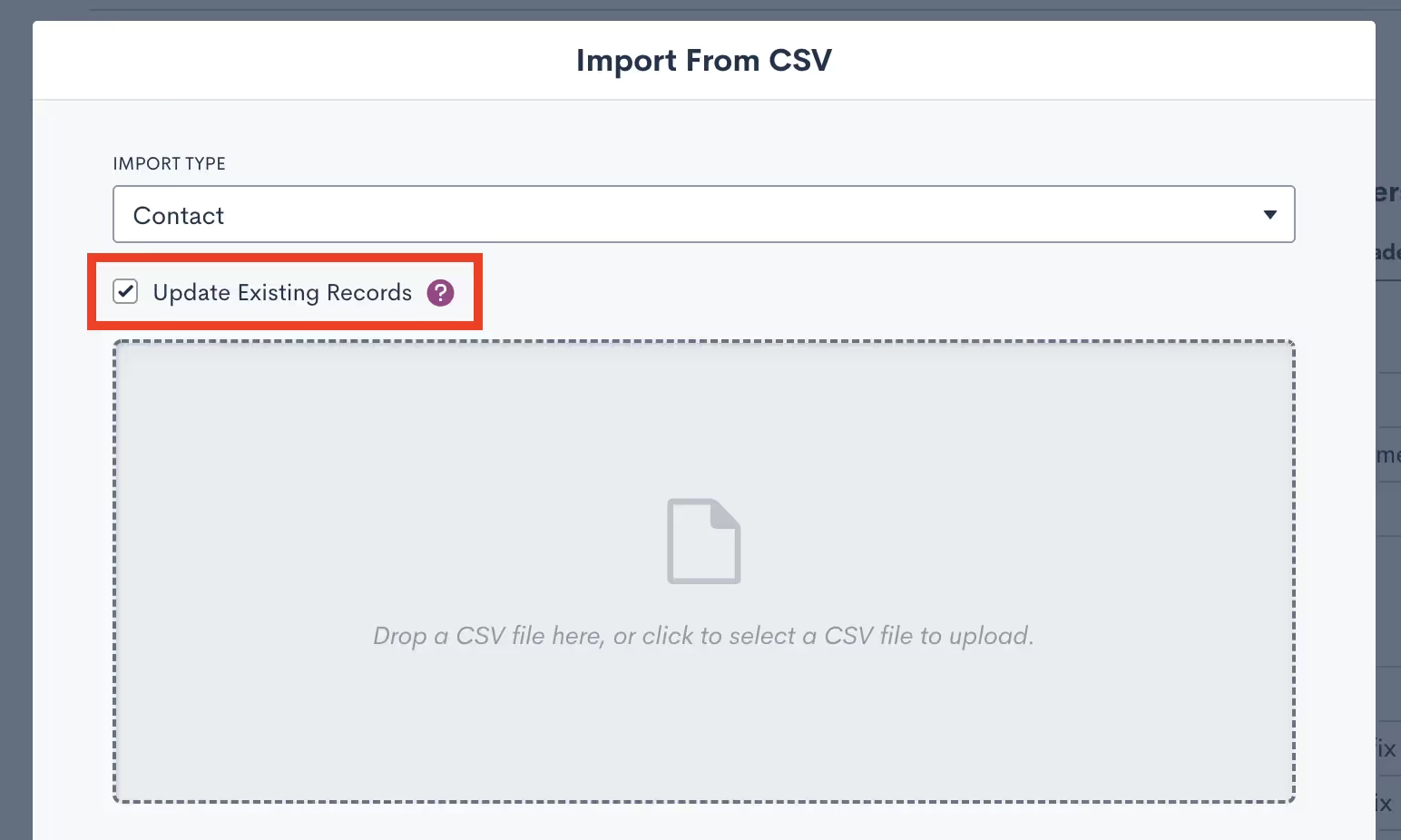
In addition to importing contacts and clients into your Lawmatics database for the purpose of data migration, you can now use imports to update existing records in Lawmatics with new information. This is especially useful if you are migrating data from multiple software solutions or if you erroneously imported a contact list with missing information.When importing a list of contacts into Lawmatics, a new option appears to Update Existing Records in your database. Simply select .CSV file to upload, check the box, and all existing records with matching email addresses will be populated with any new field information.
Appointment Availability Settings Improvements
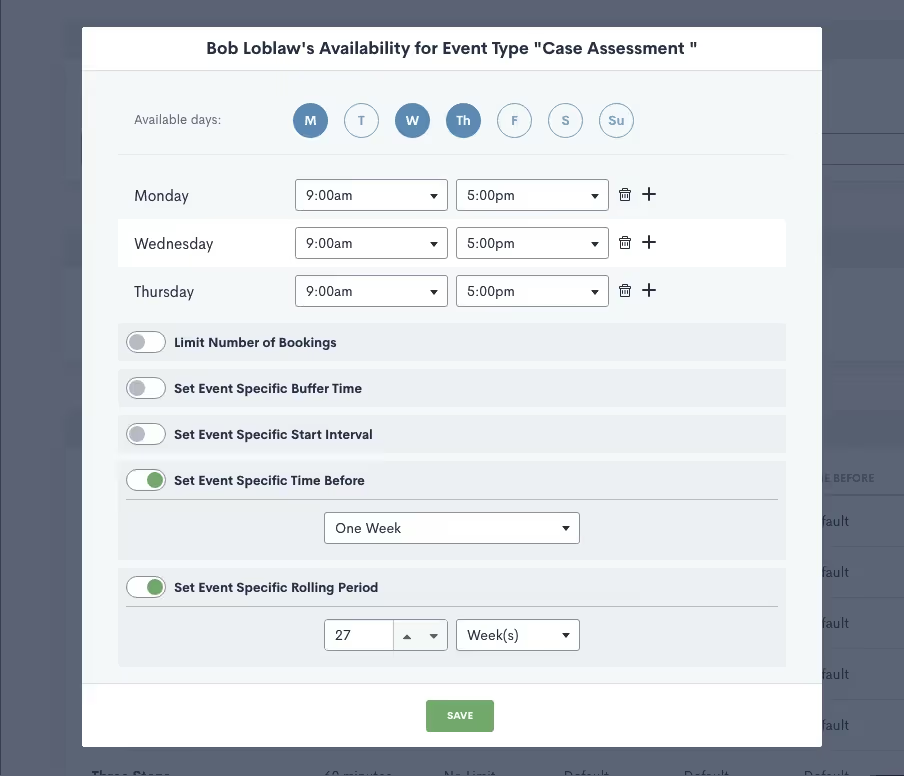
Several new upgrades to one of our most beloved time-saving features, Booking Links, help you further customize your calendar availability so that you can ensure you and your staff are booked automatically and appropriately for each of your firm's event types.First, specify at which intervals you’d like to be available for people to book a meeting with you. For instance, if you select 15-minute intervals, people are able to book you at 9:00, 9:15, 9:30, 9:45, etc, based on your availabilityYou can now also customize your “time before” as well as your “rolling period” for all custom event types. “Time Before” refers to how soon you can be booked by someone whereas your “rolling period” refers to how far in advance you can be booked, allowing you to specify an ideal booking window per lead or client.
Integrations
MyCase
Lawmatics users can now automatically or manually sync matters over to MyCase. Any records that have been created in Lawmatics as matters will be pushed into MyCase along with corresponding details like notes and files. The integration, which takes only moments to activate, saves users time by eliminating redundant tasks and matter creation.
QuickBooks
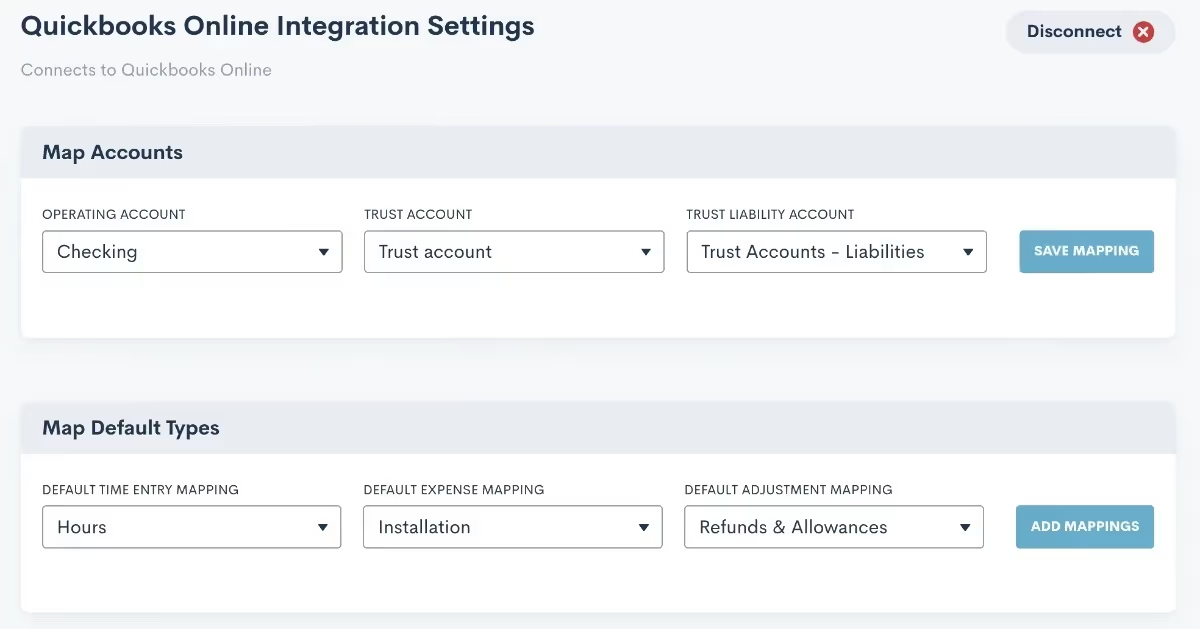
Automatically create a customer and invoice in Quickbooks when an invoice is sent to a matter via Lawmatics. Map your accounts, field types, time entries, and expenses to ensure that pertinent matter data syncs from Lawmatics to Quickbooks. Whether you or a fellow staff member manage your firm’s books, this integration is sure to make invoice generation a breeze.
New Zapier Trigger
For any software that Lawmatics doesn’t directly integrate with, there’s Zapier. This powerful third party tool enables you to connect the robust features of Lawmatics to any of the thousands of other applications available within the Zapier platform.While you may already know and love our popular Zapier triggers such as ‘Matter Converted’, ‘Filled Out a Form’, among many others; we are happy to add yet another trigger, ‘Appointment Created’.Here at Lawmatics, we couldn’t be more excited for all we have in store for 2023, but we are also thrilled at this retrospective of features that have been released this year. We are privileged to be working with so many wonderful firms who use Lawmatics and share new feature ideas and incredible feedback with us.Thanks for following along as we continue to develop and grow Lawmatics. Wishing happy holidays and a wonderful new year to all of you!
Subscribe to get our best content in your inbox
Law firms love Lawmatics
Our customers give their clients the client-focused experience they deserve. Learn how they do it all with Lawmatics.
.avif)
.avif)

.avif)

Ready to grow your law firm with Lawmatics?
Schedule a demo of legal’s most trusted growth platform.
