



News & Updates


Will AI replace lawyers? Artificial intelligence (AI) will not replace lawyers, but it is fundamentally changing how they get legal work done. As AI becomes more embedded in research, document review, and client intake, firms are increasingly automating many traditional legal tasks. This article examines whether AI can truly replace lawyers, which legal functions are most affected, how law firms are using AI today, and what these trends mean for associate attorneys navigating an AI-driven legal industry.
AI is already reshaping how your firm gets work done. It’s changing how you handle research, drafting, intake, billing pressure, and the future of associate work.
For many firms, the real question is how to use AI without disrupting the way they already work. Firms are figuring out where AI adds value and where attorneys still need to stay hands-on, while navigating how these tools change the work without changing who’s ultimately responsible.
In this guide, we’ll examine where AI affects legal tasks, why associate attorneys feel the most pressure, how firms are using AI today, and what the next 12-24 months are likely to bring.
Will AI Replace Lawyers or Just Change the Job?
The short answer is no: AI will not replace lawyers. What it can do is automate or accelerate certain tasks lawyers have traditionally handled manually, and that distinction matters.
When people ask, "Will lawyers be replaced by AI?" or "Can AI replace lawyers?" they are usually reacting to how quickly these tools have improved at summarizing information, reviewing documents, and generating draft language.
But those capabilities are not the same as practicing law. Lawyers are still responsible for legal judgment, ethical obligations, advocacy, and client outcomes. And courts, clients, and regulators continue to hold licensed attorneys accountable.
A better question is: “Which parts of your work is AI already automating, and what does that mean for you?”
Why Associate Attorneys Feel Most at Risk
If any group in the profession feels exposed by AI, it is associate attorneys. Associates often spend a large share of their time on high-volume, repeatable work:
- Document review
- Contract comparison
- Drafting from templates
- Follow-up tied to matters in progress
Those are also the kinds of tasks AI is taking on.
It’s no surprise that many associates feel pressure as these tasks shift. Many associates are already under pressure to be faster, more accurate, and easier to justify to cost-conscious clients.
But "most exposed" does not mean associates are the most likely to be replaced. It means the tasks that make up their role are among the first to be reshaped by AI, while expectations for more substantive work rise earlier.
Legal Tasks AI Can Replace or Automate
AI is most effective at handling structured, repetitive, text-heavy, and rules-based work that slows your team down.
Legal research and case summarization
AI is already changing the first layer of legal research. Attorneys can use it for a faster first pass to:
- Scan cases, statutes, and regulations quickly
- Summarize large volumes of text
- Highlight recurring themes
- Spot potential issues faster
That means less time gathering information and more time testing whether the output is accurate, relevant, and persuasive. These are the kinds of outputs that actually move cases forward.
Contract review and document analysis
Contract review is another area where AI can help. AI can be useful in due diligence, compliance review, procurement workflows, and any matter involving large volumes of contracts or standard language, including:
- Identifying clauses
- Comparing language across document sets
- Flagging deviations from standard terms
- Surfacing inconsistencies that manual review might otherwise miss
Many firms are also exploring legal document automation software to streamline repetitive drafting and review tasks while keeping attorneys in control of the final output.
Intake, qualification, and administrative work
Some of the fastest wins come from automating intake and follow-up with predefined criteria, so no potential client gets lost. These are areas where automation and AI can reduce a major administrative burden:
- Client intake
- Lead qualification and routing
- Follow-up
- Automated scheduling and reminders
Legal Tasks AI Cannot Replace
For all the attention on automation, there are still core parts of legal practice that AI cannot replace.
AI cannot replace certain legal tasks
Legal work often involves high-stakes decisions where the details matter, and the right call isn’t always obvious. Many matters require attorneys to navigate uncertainty, emotional dynamics, and practical risk in ways that go beyond pattern recognition.
Lawyers do more than surface information. They interpret ambiguity, weigh tradeoffs, and make recommendations when the answer is not obvious. AI can help organize information and support analysis, but legal judgment still depends on attorneys.
Advocacy and negotiation
Legal advocacy is deeply human. Whether in court, at a mediation table, or in a negotiation, persuasion depends on judgment, timing, credibility, listening, and adaptation.
Strong advocates read tone, pressure, resistance, leverage, and opportunity. AI can assist with preparation, but it cannot respond to the human dynamics that shape negotiation and advocacy in the moment.
Ethical responsibility and accountability
The biggest boundary in legal practice around AI use is accountability. Lawyers have ethical duties to clients, courts, and the profession, including competence, confidentiality, candor, supervision, and professional judgment.
Those duties still rest with attorneys. They must verify the work, protect client information, exercise judgment, and stand behind the advice they give.
How Law Firms Are Using AI Today
Law firms are using AI in several practical ways today. It supports legal work by improving intake and connecting workflows inside a legal client relationship management (CRM) system.
AI as an assistant, not a replacement
In many firms, AI is being used to accelerate research, support drafting, improve consistency, and reduce time spent on routine tasks. It helps attorneys work more efficiently, but they still have to review outputs, make decisions, and stand behind the final work product.
AI in client intake, lead qualification, and routing
One of the clearest applications of AI for law firms is in client intake. AI can help firms improve the quality of information they collect, apply qualification criteria more consistently, and move leads through the right next steps with less manual effort.
For example, AI can:
- Evaluate urgency: Identify inquiries that may need faster attention based on timing, case type, or stated circumstances.
- Screen for practice fit: Help determine whether a matter aligns with the firm’s services before teams spend time reviewing it.
- Assess lead quality: Apply defined qualification standards consistently to help teams focus on stronger opportunities. Tools like QualifyAI support this process by helping firms automate intake screening and matter qualification without crossing into the realm of legal advice.
- Collect intake information: Use custom forms and structured workflows to gather client details and create more complete records from the start.
- Route inquiries intelligently: Sort leads by priority, stage, or next step and direct them to the right person or process.
- Automate follow-up: Trigger responses, reminders, and outreach to ensure promising leads do not stall due to delayed communication.
- Support scheduling: Move qualified leads into consultations with less back-and-forth and fewer manual touchpoints.
- Reduce administrative drag: Improve upstream intake so attorneys spend less time on triage and more time on billable work.
AI paired with legal CRM workflows
AI becomes more useful when it works inside a broader system. That works best when legal CRM software and legal software integrations connect intake, follow-up, and client information into a single centralized system.
When intake data flows directly into a centralized CRM, follow-up can happen automatically, and attorneys can work from more complete, organized information.
What Will Actually Change for Associate Attorneys in the Next 12-24 Months
The table below illustrates which legal tasks firms are already automating, which are likely to change in the next 12-24 months, and which still depend on human judgment.
| Legal task category | Examples of tasks | Level of AI impact | Timeline |
|---|---|---|---|
| Intake and administrative work | Intake data collection, lead qualification, follow-up, and scheduling | High | Already happening |
| Legal research and summarization | First-pass case law research, statute summaries, issue spotting | High | Already happening |
| Contract review and analysis | Clause identification, risk flagging, document comparison | High | Already happening |
| Drafting standard legal documents | Routine motions, template-based agreements with attorney review | Medium | 12-24 months |
| Litigation prep and discovery support | Document organization, evidence tagging, timeline creation | Medium | 12-24 months |
| Intake decision support | Applying firm-defined qualification rules without legal advice | Medium | Already happening |
| Legal judgment and strategy | Case strategy, risk assessment, application of law to facts | Low | Unlikely to be replaced |
| Client counseling and advocacy | Client advice, negotiation, courtroom advocacy | Low | Unlikely to be replaced |
| Ethical and professional accountability | Malpractice liability, ethical judgment, licensing responsibility | None | Not replaceable |
Fewer low-value tasks, higher expectations
Associates will likely spend less time on intake administration, document work, and other repetitive tasks that can be standardized. As a result, firms may expect associates to handle more substantive work earlier.
As routine work takes up less of the role, firms may place greater value on analytical skills, precision, and the ability to take on client-facing responsibility.
Faster feedback loops
AI-assisted systems can make performance more visible. When workflows are digitized and standardized, firms can see turnaround times, follow-up completion, response rates, matter progression, and other indicators sooner.
Faster feedback loops help strong associates stand out while also making expectations around consistency and execution clearer across the board.
Increased leverage for AI-literate associates
The associates who benefit most from AI will be the ones who adopt it quickly and use it responsibly. That starts with understanding how to prompt, review, verify, and refine outputs. It also involves knowing where automation adds value and where it introduces risk.
The real advantage comes from turning saved time into stronger work, not just faster work.
The real risks of AI in legal practice
AI can create leverage, but only if you understand the risks that come with it. Key concerns include:
- Hallucinations and inaccurate outputs: AI can produce confident-sounding errors, including fabricated citations, misread authority, or oversimplified legal distinctions. In legal work, every output requires attorney verification.
- Confidentiality and data privacy: Firms must handle client information carefully, and not every AI tool is appropriate for legal workflows. Tools can create risk when firms do not understand how data is processed, stored, or reused. That is why firms need clear policies, controlled workflows, and tools built for legal use cases.
- Unauthorized practice of law: AI cannot independently provide legal advice. Firms can use AI to support intake, qualification, and internal workflows, but if implementation crosses into unsupervised legal advice, the risk becomes regulatory exposure.
- Over-reliance and skill atrophy: Attorneys still need to build judgment, pattern recognition, and analytical strength. If AI is responsible for too much thinking, it can result in weaker legal reasoning over time.
How Associate Attorneys Can Future-Proof Their Careers
The strongest position is knowing where AI supports your legal work and where your judgment still matters most.
Focus on high-judgment legal work
The more your value depends on strategy, counseling, nuanced analysis, negotiation, and client communication, the harder you are to replace. Look for opportunities to build skills in asking better questions, improving communication, and taking ownership of recommendations.
Become AI-literate, not AI-dependent
Lawyers do not need to become AI experts. They need to understand how AI fits into their day-to-day workflows.
Learning how to evaluate outputs, identify weak reasoning, spot missing context, and supervise automated processes will better equip you to leverage AI without becoming dependent on it.
Use AI to protect billable work
AI should protect time for more meaningful work. When firms automate low-value administrative steps, intake bottlenecks, or repetitive drafting processes, you can focus your time where it adds the most value: analysis, advocacy, and client service.
The Future of Law in an AI-Driven Legal Profession
AI isn’t changing who’s responsible for legal work. It’s changing how efficiently you can get that work done.
For attorneys, AI is most useful when it automates administrative tasks and streamlines intake, follow-up, and qualification, allowing them to spend more time on substantive legal work.
As a legal CRM, Lawmatics helps firms automate intake, follow-up, and qualification through custom automations. You receive better information and fewer administrative bottlenecks, so you can spend more time practicing law.
To see how AI-supported intake fits into a modern Legal CRM, request a demo.
FAQ
Will AI replace lawyers entirely?
No. AI can automate parts of legal work, but it cannot replace legal judgment, ethical accountability, or advocacy. Lawyers are still responsible for advising clients, applying the law to specific facts, and standing behind the decisions and filings.
Are associate attorneys more vulnerable to AI?
Associate attorneys are more affected by AI-driven task automation because early-career roles often include more routine, document-heavy, and process-driven work. With AI, the structure of their work is changing, with more emphasis on analysis, judgment, and client-facing readiness.
Can AI practice law on its own?
No. AI cannot practice law independently or provide legal advice without attorney oversight. It can support research, intake, and administrative workflows, but licensed attorneys are still responsible for verifying outputs, protecting client information, and exercising professional judgment.
What legal work is safest from AI?
Legal work that depends on strategy, advocacy, negotiation, and client counseling is the least likely to be automated. These responsibilities require judgment, persuasion, relationship management, and the ability to respond to nuanced facts and human dynamics.
Should lawyers be worried about AI?
Lawyers should prepare for change, but not assume AI is replacing the profession. Firms and attorneys who learn how to use AI responsibly will be in a stronger position than those who ignore it.

What is your role at Lawmatics, and what does your job entail?
I’m an Implementation Specialist here at Lawmatics. After a law firm signs up with our software, I’m responsible for setting up their new account with them and familiarizing myself with their intake process. With that knowledge, we create automations within Lawmatics based on their unique business needs and objectives.
How did you end up working for Lawmatics?
I’ve always worked in customer service and was eager to branch out into technology, so I started looking for a customer success position in my area. When I saw the description for the position at Lawmatics, it seemed like a perfect fit. I applied and spoke to Sarah Bottorff, our SVP of Growth, after which I knew I would love it!
What’s the best part of your job?
The best part of my job is the amazing team I work with and the incredible culture fostered by our company. Everyone does a great job of making sure each employee feels welcome and cared for, and heard; I have never felt more at home being in an office!
What new thing did you discover about yourself during the pandemic?
During the pandemic, I discovered that I am the type of person who will stay up until 4 AM to finish a puzzle they had no intention of starting, while watching a show about a corrupt tiger zoo.
Where are you originally from, and how did you end up in San Diego?
I’m originally from Niskayuna, which is a small town in Upstate New York. I went to school at the University of Delaware and graduated with a degree in Hospitality Business Management. Obviously, the pandemic hit that industry hard, so I figured it was a perfect time to explore a new place! My best friend, who was currently living in San Diego, flew back East and we took my trusty Camry across the country together in September 2020.

What do you like to do when you aren’t working?
Outside working hours I love spending time with friends, trying new restaurants, hiking, and going to the beach. I also love to draw and paint, so I teach “paint and sip” classes on the side. It was my first job in San Diego, but now I just do it for fun, when I can.
What is a fun fact most people may not know about you?
I played the violin for 10 years when I was younger. I always played by ear, and didn’t learn how to read sheet music until 5 years in.
Tell us about one of your craziest SFW experiences.
My friends, family and I fully believe that the house I grew up in is haunted - so I have quite a few crazy experiences with that!
What is the one thing you can’t live without and why?
I could not live without music! It can be so powerful in affecting your mood and creating a perfect environment for validating your feelings. I listen whenever I can and love finding new songs, going to concerts, and dancing (poorly)!
Do you have a favorite saying, quote, or personal mantra and if so, what is it and why?
There’s a long quote I love by Anthony Hopkins, “None of us are getting out of here alive, so stop treating yourself like an afterthought. Eat the delicious food. Walk in the sunshine. Jump in the ocean. Say the truth that you’re carrying in your heart like hidden treasure. Be silly. Be kind. Be weird. There’s no time for anything else.”
Can you walk us through your "Aha" moment - the moment when you realized how powerful the Lawmatics platform is for lawyers and law firms?
I absolutely love getting on a call and going over functionality that the firm didn’t know the platform was capable of. Seeing them come to the realization that they’re going to save so much time never gets old! They are so appreciative, and it really shows how much an automated process can change some people's lives.
Based on your experience, what words of wisdom or advice do you have for legal professionals looking to help their law firms win more business, impress clients, and be more efficient?
I believe that following up with a client is very important. Making sure they know you care can truly build rapport and keep clients coming back - not to mention that if they have a good experience, they are likely to recommend your firm to someone they know!
Summer is heating up and so is the latest batch of feature releases from Lawmatics! You’ll be delighted to see these new additions and improvements from our team to yours.
Date Field-Based Automations
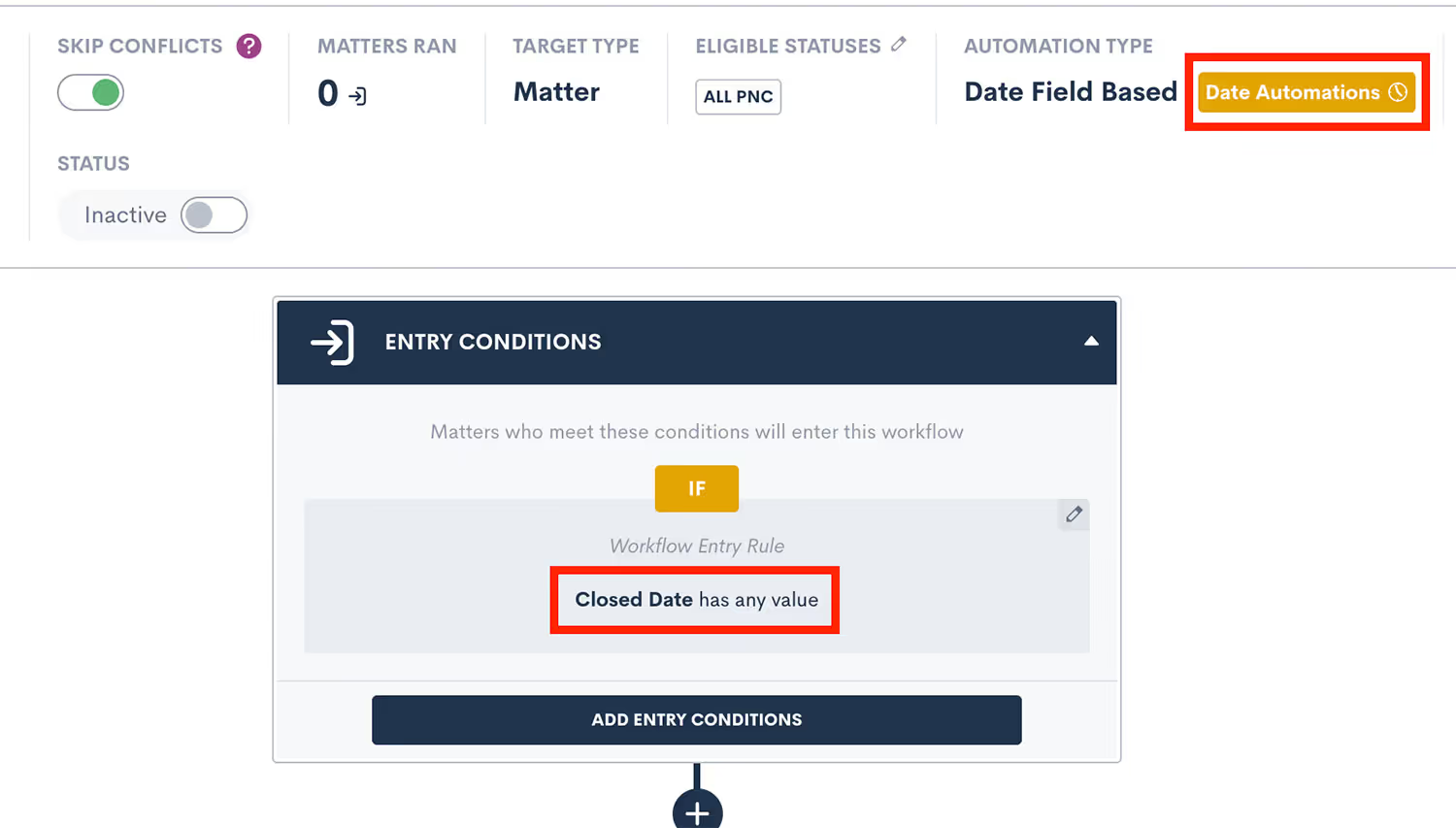
We are thrilled to announce that you can now create time-relative automations (one hour before, two days after, etc.) for any date type field in Lawmatics. Our new Date Field-Based Automations take the existing concept of event-based automations and apply it to date fields. This new functionality allows you to trigger automated reminders or check-ins relative to a client’s court date, filing date, anniversary, or any other custom date field you may use in your practice — all from simply populating the date into a date type field.When creating a new automation you’ll select the Date Field option, then select from any of your firm’s date type fields as your target field to create a Date Field-Based Automation. You can then add your time-relative automations by clicking on the yellow label at the top of your page (highlighted below).To learn more about Date-Field Based Automations, click here.
Custom User Permissions for Viewing Email Communications
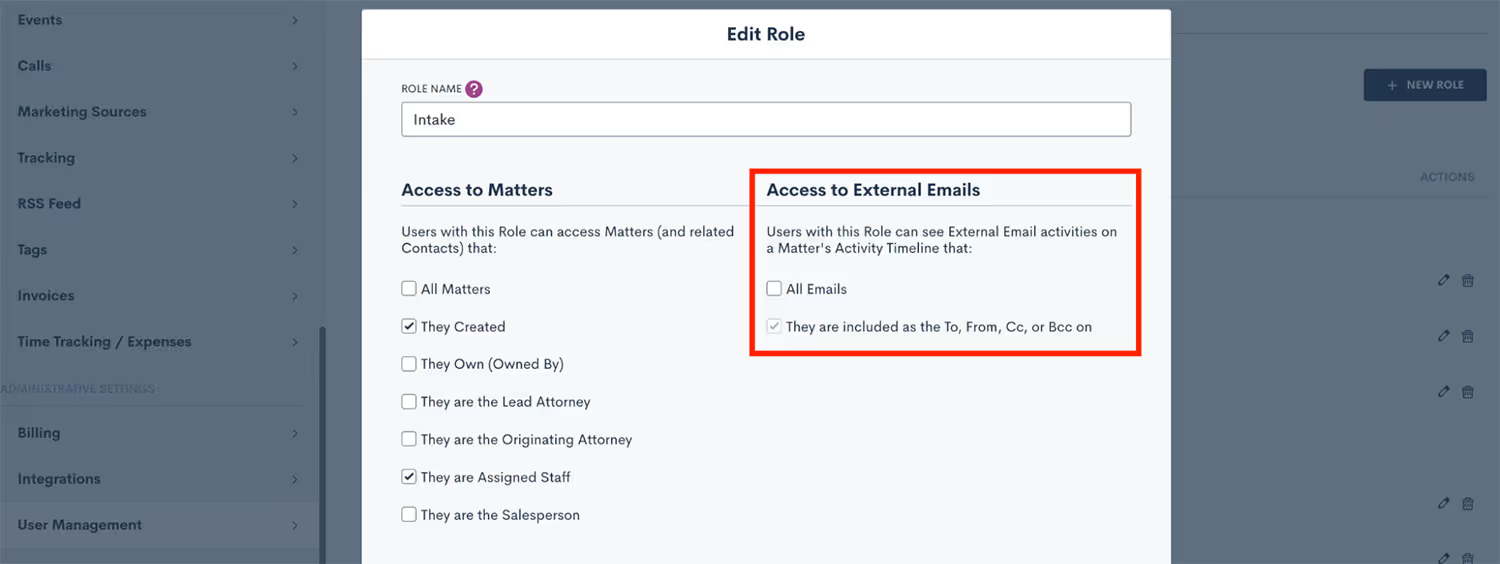
Confidentiality and discretion are paramount when dealing with sensitive client information. While logging your external emails in Lawmatics can be helpful, you may not want the entirety of your staff to have view access to these emails on a matter’s timeline. With our new External Email Role Permission you can now easily limit any user’s access to view email communications, without limiting their access to the matter all together. To use this new permission, go to the User Management page in your Admin Settings, Click Manage Roles, edit the role you wish to apply this restriction to, and then uncheck the All Emails option, as shown below.
Not yet using custom user roles? Learn all about that option here.
Set Default Tax Adjustment
With this latest update to Lawmatics Payments, you can now set a default percentage or flat amount for tax adjustments. While the default can be overridden when creating an invoice if necessary, setting a default will save you the time of entering a tax amount on each invoice if your firm does have a standard rate or amount. This adjustment can be applied to the invoice subtotal, expenses, or time entries, as shown in the example below.

Find this option on your firm’s Invoices settings page. If you are not yet using the Time & Billing feature in Lawmatics, email us at support@lawmatics.com to add it to your account.As always, we hope you enjoy these latest updates from Lawmatics and stay tuned for another round of releases in August.
Happy summer to all! We’ve been cranking here at Lawmatics and it’s about to get hot in here. Our engineering team has doubled over the last couple of months and because of that our pace has drastically increased. This is one of our largest releases to date and encompasses many different areas of the platform. Check it out!
Conflict Check Automation
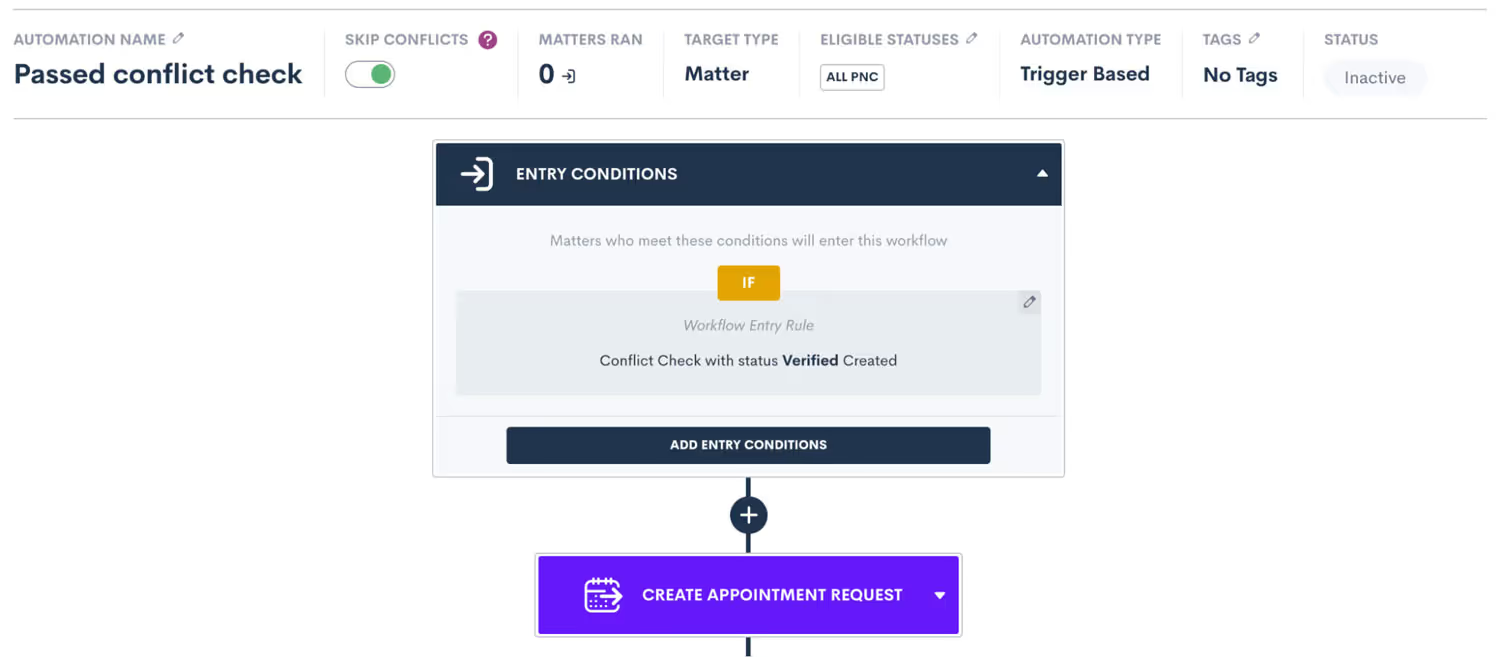
With the recent addition of Conflict Checking in Lawmatics, we have made it easy to streamline this important step by automating your conflict check process. You can now use the results of that conflict check to trigger an automation, initiating the next step in your process. Depending on whether or not a conflict check passes, you are able to trigger a particular sequence of automations for each outcome. Each of these next steps can now be automated accordingly. We have also added the ability to exclude any targets who did not pass a conflict check from your automations, simply use the “Skip Conflicts” toggle at the top of your automations.To learn more about how to use our brand new Conflict Checking feature, click here.
Conflict Check Notifications
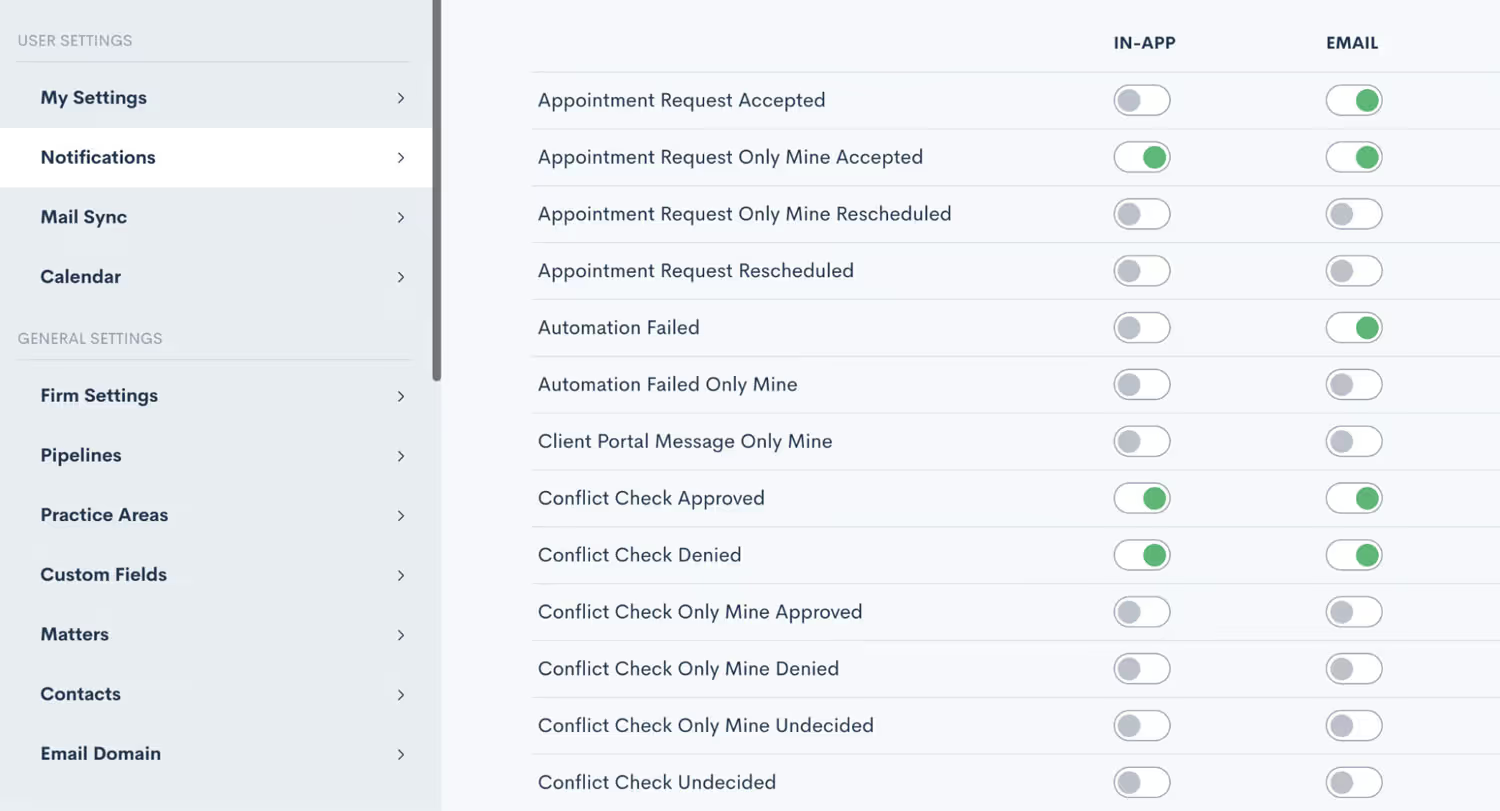
Adding to the conflict check capabilities in Lawmatics, users can now opt to receive notifications for approved, denied, and/or undecided conflict checks. These email notifications provide yet another way to stay up to date on your firm’s PNCs without needing to be sitting in front of your computer screen. Each user can customize their unique notification options with the ability to toggle both account-wide and user-specific notifications on and off.
Multi-pick List in Custom Form Conditionals
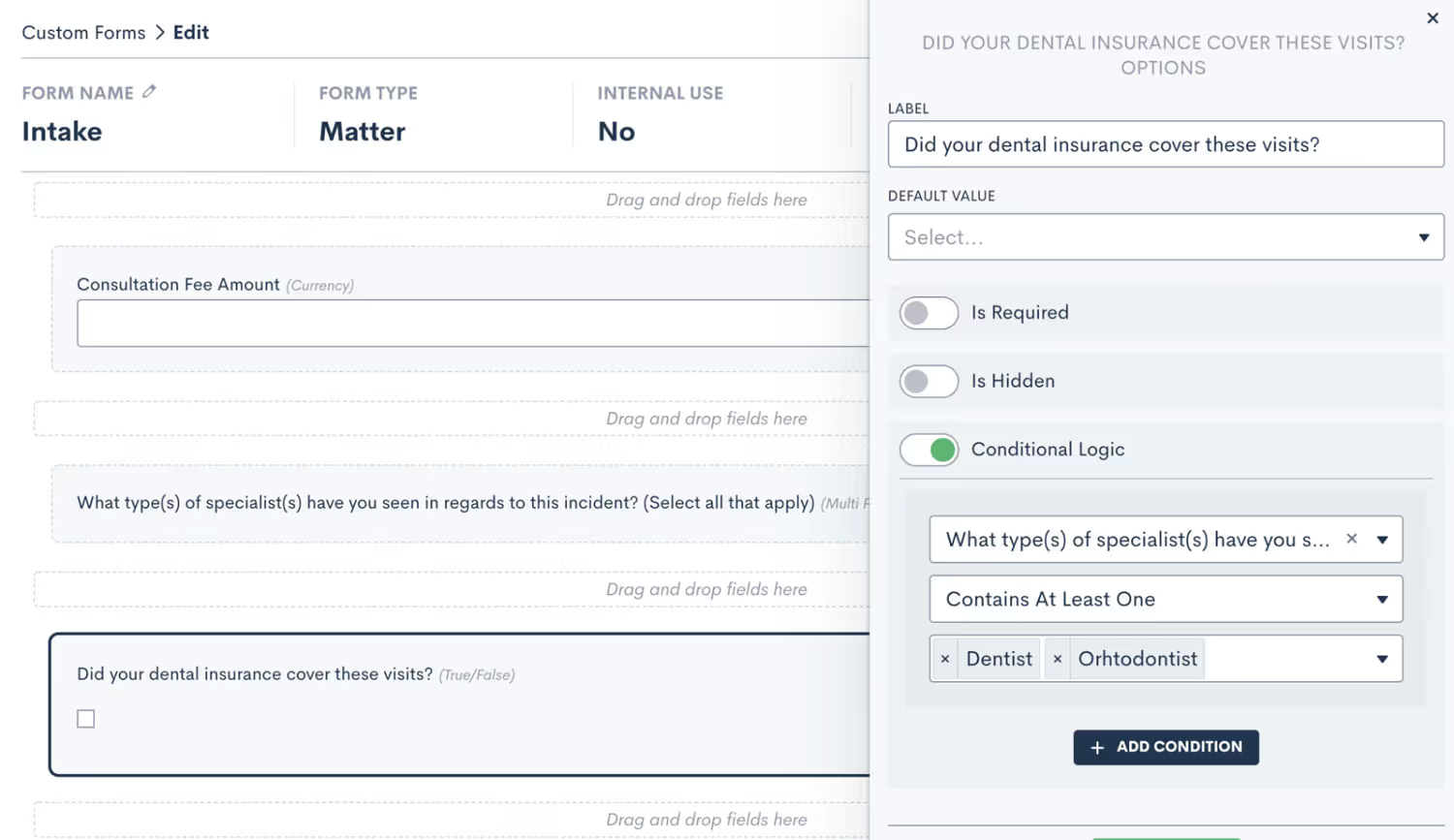
A highly requested feature, you can now use multi-picklist fields to set conditional logic within your Lawmatics Custom Forms. Previously, this ability was limited to true/false fields and generic picklist fields. This addition allows for even more customization and automation to the custom forms feature that you already know and love. To learn more about how to use conditional logic in Lawmatics Custom Forms, click here.
Change Main Contact/Company on a Matter
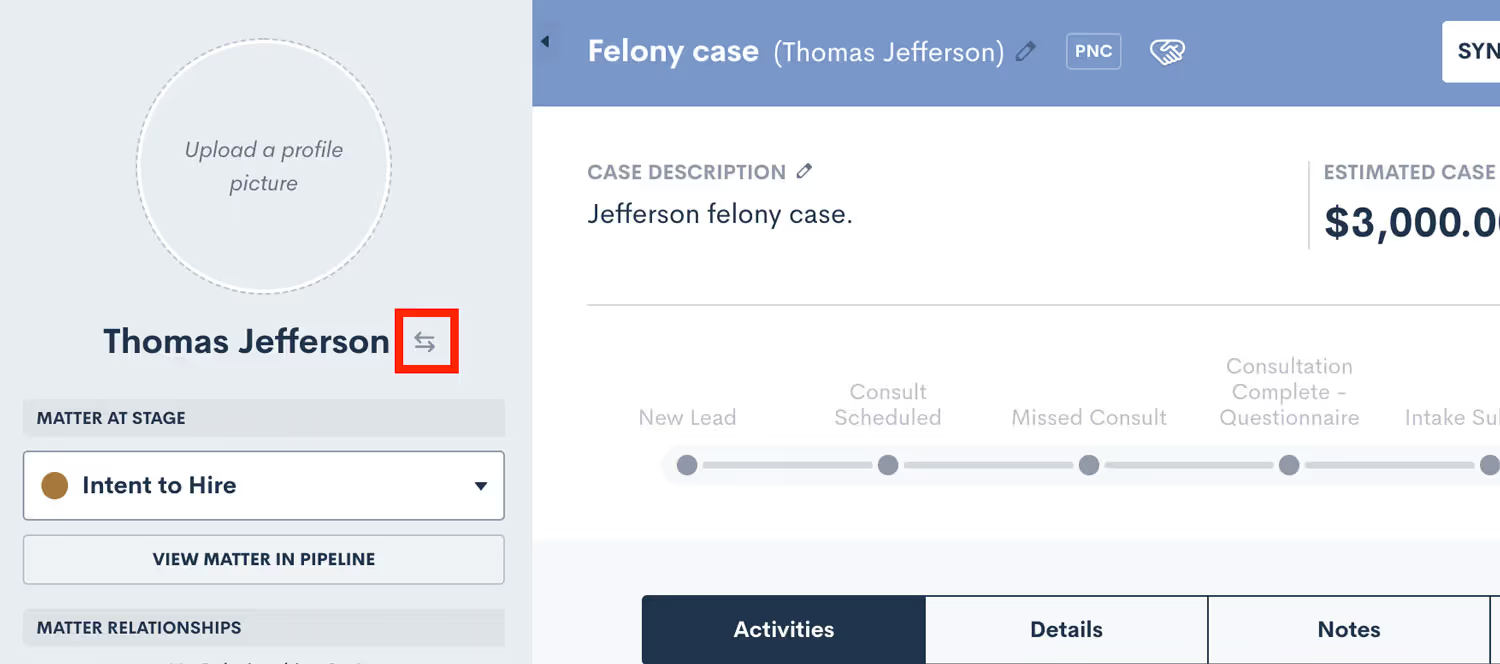
If your firm often works with matters that have more than one contact, such as a married couple, you may prefer one contact or the other to be listed as the primary name on the matter in your CRM. To that end, you can now easily swap the main contact on a matter from within Lawmatics. Simply click the arrow icon adjacent to a contact's name in their profile, and then select an alternate contact from within your CRM. The same functionality is applicable to company matters. This new feature helps you keep your CRM organized and accurate so that you can always find your matters with ease.
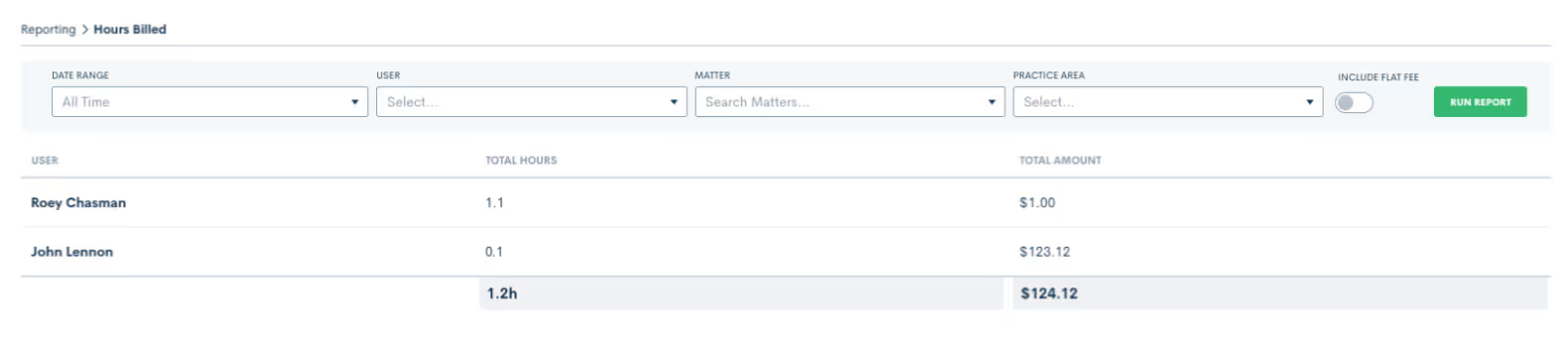
Hours Billed Report
Our new Hours Billed Report provides a real-time snapshot of billable hours based on criteria of your choice, so you can make business decisions accordingly. Get as granular as you need with your report by selecting one or more of the following search criteria: date range, user, and practice area. Once you’ve made your selection, the Hours Billed Report will display the total amount of hours billed per user.To learn more about using this report, click here. If you are not yet using the Time & Billing feature in Lawmatics, email us at support@lawmatics.com to learn more or to add it to your account.
Lawmatics Payments - Successful Notifications
Collecting payment is an essential step in the client lifecycle. Consequently, you can now receive an email or in-app notification when a client payment is submitted and successfully processed via Lawmatics Payments. Each user can select their notification preferences as they see fit, so that all parties responsible for client payment stay in the loop.

Log Trust Balance Refund
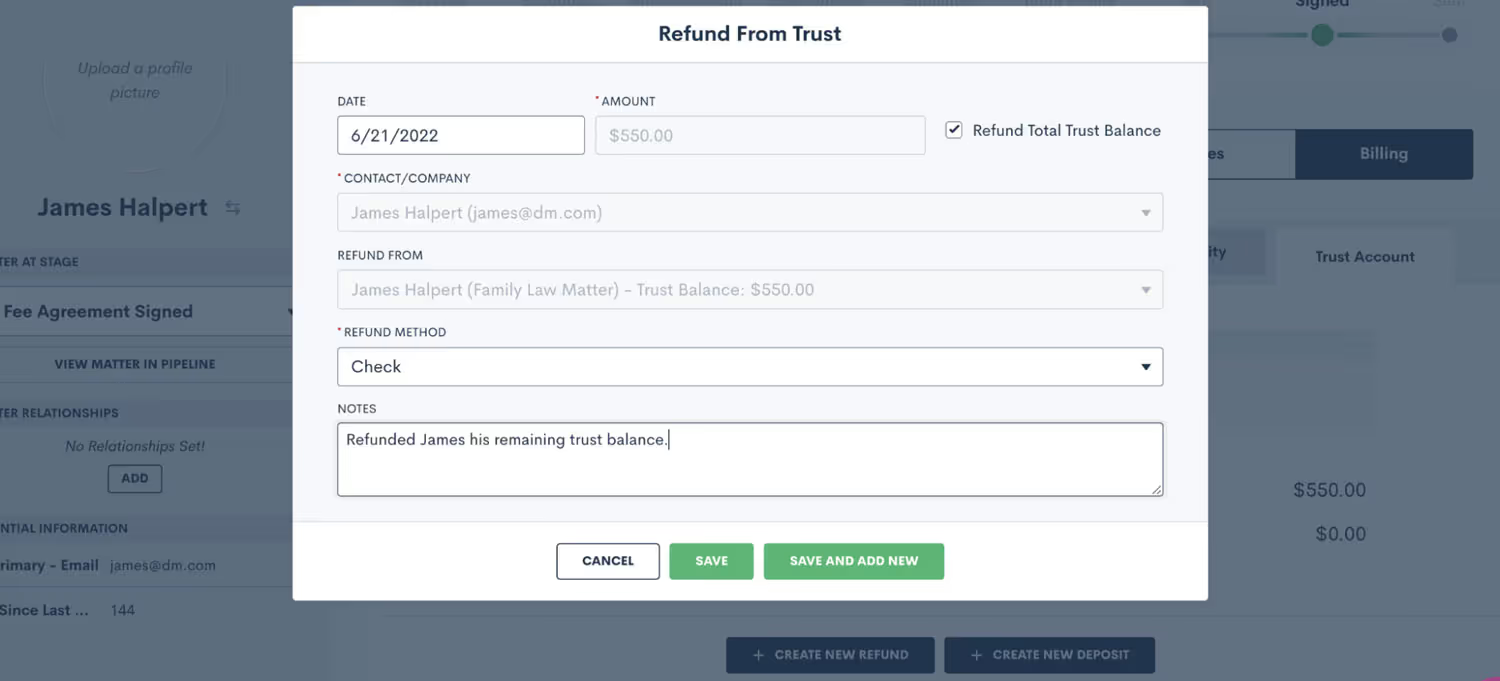
Lawmatics Billing is your firm’s one-stop-shop for all things payment-related, including your firm’s trust accounting. In the event of a remaining trust balance or an accidental overpayment, you can now manually log a refund of a client’s trust balance from within the client’s contact record, their matter or in the Trust Account tab.To learn more about managing trust account activity in Lawmatics, click here
In-app File Preview
You can now easily view a preview of files saved to a matter, including .docx and .xls file types. This improvement to our file storage system makes it much more convenient to locate and view files without any extra tedious steps or waiting for a download.

This release also includes many bug fixes and behind the scenes improvements to optimize your Lawmatics experience. We hope that you enjoy these new features and put them to good use. See you back here with more new features and enhancements very soon :wink: 👋 ! P.S. Not using Lawmatics yet? Book a personalized demo to learn how we can help you grow your law firm!

There’s no reason why it should be a hassle to get paid for every hour of work your attorneys have put in. So why do so many law firms struggle to close the billing gap? Odds are, any contention around your billing process didn’t begin when you sent your invoice, it was in place long before the client signed your fee or retainer agreement.For this presentation, Host of Financially Legal Podcast, Dan Lear, and Lawmatics CEO Matt Spiegel joined forces to reveal the six essential rules towards creating a seamless and frictionless billing process for both you and your clients.
Webinar slide deck

What is your role at Lawmatics, and what does your job entail?
I am an implementation specialist at Lawmatics! Once the sale closes I am assigned a customer to help them throughout the onboarding process. I guide them through setting up their account to fit the needs of their firm and help them realize how powerful and amazing Lawmatics is.
How did you end up working for Lawmatics?
I was scrolling on LinkedIn one day and a customer success position for Lawmatics popped up on my feed. I submitted an application and not long after that I got a message from our very own Sarah — and the rest is history!
What’s the best part of your job?
The best part of my job is at the end of onboarding a customer when they are truly excited about getting their account live because they see how much the product is going to help their firm and how much potential Lawmatics has for them.
What new thing did you discover about yourself during the pandemic?
One new thing that I discovered about myself during the pandemic is that I needed a puppy. Because of that realization, I now have my corgi puppy, Stitch!
Where are you originally from, and how did you end up in San Diego?
I was born and raised in Seattle, Washington (Go Seahawks)! I visited my friend who was going to school at San Diego State one weekend and decided that I needed to move to San Diego ASAP. I ended up going to and graduating from San Diego State University and then just ended up staying here because what’s not to like about San Diego.

What do you like to do when you aren’t working?
I LOVE going out to restaurants and finding new spots to eat, whether they are hole in the wall spots or higher-end places. Food is something I am always okay with spending money on. I also love cooking meals, when I feel like I have the time. Taking that first bite of a meal that you’re really looking forward to is so rewarding.
What is a fun fact most people may not know about you?
I once went to Chris Cornell’s house when I was a kid for a family friend's birthday party. If you know you know.
Tell us about one of your craziest SFW experiences.
A few years ago I went to a “The Weeknd” concert and my friends and I were invited to go down to the VIP section. On top of that, after the concert was over we got to go backstage and to the afterparty where I got to meet another musical artist. It was also sponsored by Grey Goose so we got unlimited free drinks (Cheers!).
What is the one thing you can’t live without and why?
Cheeseburgers. I feel like I don’t even need to explain why.
Do you have a favorite saying, quote, or personal mantra and if so, what is it and why?
One of my favorite quotes is from Audrey Hepburn because she is one of my favorite actresses ever. The quote is “For beautiful eyes, look for the good in others; for beautiful lips, speak only words of kindness; and for poise, walk with the knowledge that you are never alone.”
Can you walk us through your "Aha" moment - the moment when you realized how powerful the Lawmatics platform is for lawyers and law firms?
My “Aha” moment was probably on my third day of working at the company. I was blown away with the infinite amount of possibilities that a firm could benefit from Lawmatics. I had never seen a software so powerful.
Based on your experience, what words of wisdom or advice do you have for legal professionals looking to help their law firms win more business, impress clients, and be more efficient?
It’s all about the drip campaigns. What seems to be a real pain point for firms is having to worry about the manual follow-up to close a lead. Why should you add one more thing to your plate when you can have a software do it for you?
Announcing our second round of Lawmatics feature releases this May — we can’t be stopped! 🔥 This collection of product updates introduces new capabilities for automating Lawmatics Payments, our suite of billing & payments features, as well as added functionality to two of our most-beloved features: Custom Forms and Documents.
Invoice Automation
We are delighted to announce the most recent enhancement to Lawmatics Payments. You can now automate the delivery of your flat fee invoices! Automations in Lawmatics feature a new Create Invoice automation action that generates an invoice for any matter with a balance due that it runs on. Doing so enables you to accelerate your billing process in a manner that gets you paid faster while freeing up time to focus on other priorities needing your attention.

To learn more about how to use our brand new Invoice Automation feature, click here.Not yet using Lawmatics Payments? Email us at support@lawmatics.com to add these features to your active Lawmatics account.
Payment Plans
Payment Plans are an incredibly useful and time-saving addition to Lawmatics Payments. For firms who want to offer their clients more flexibility of payment, use this new feature to set up invoice installments to be paid over time on a fixed cadence.Of course we’ve made this feature highly customizable, allowing you to create unique terms for each individual payment plan as needed. This includes setting an initial payment amount, interval length, and the number of installments.
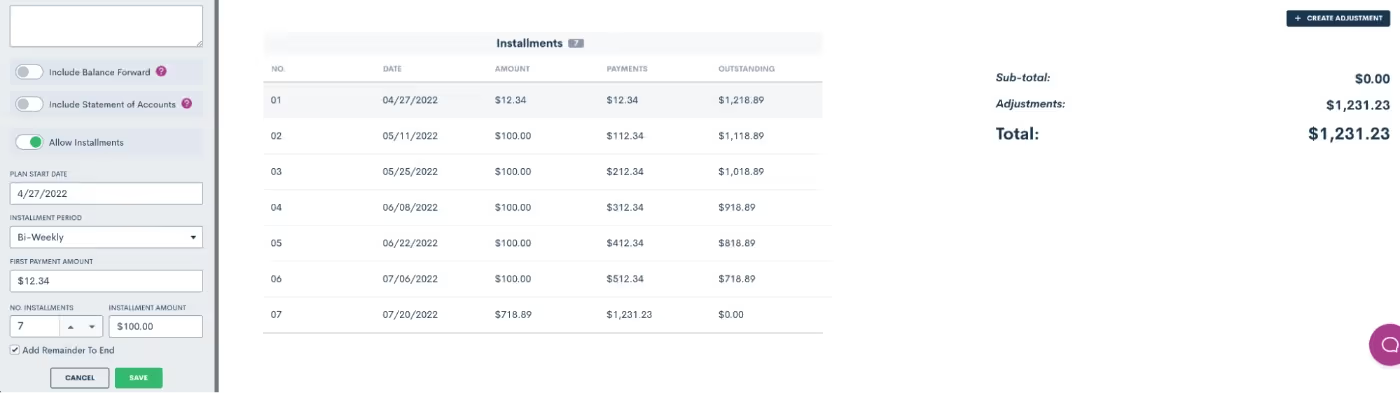
Should a client decide to submit a payment larger than the balance due per installment, the difference will be applied towards the total invoice amount and be reflected in the final installment(s).Any payments towards a Payment Plan can be entered manually, or collected via Lawmatics Pay.Not yet using Lawmatics Payments? Email us at support@lawmatics.com to add these features to your active Lawmatics account.
reCaptcha for Embedded Forms
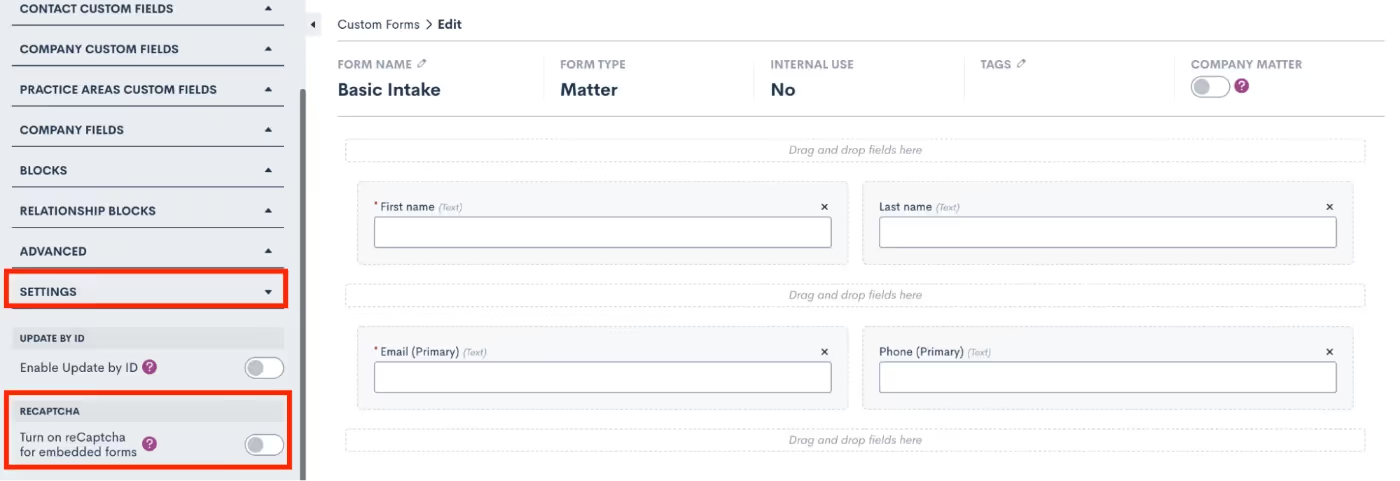
Lawmatics Custom Forms make it easy to capture new prospective client inquiries from your website, and we’ve now made this feature even better with the addition of reCaptcha. This technology prevents spam bots from entering your Lawmatics contact database via the ‘Contact Us’ form embedded on your website, ensuring that your account is protected against disruptive spam leads.reCaptcha can be added to any embedded form via the form Settings menu in the left sidebar. Simply toggle on the reCaptcha option the reCaptcha will be activated anywhere this form is embedded - no further steps need to be taken.
Add Page Breaks to Custom Built Documents
Custom Documents, with their conditional logic and dynamic e-signature capabilities, have long been a Lawmatics staple for fee agreements and other important firm documents. With the new addition of page breaks, we’ve made it much easier to maintain the look and layout of your new and existing document templates.To add a page break, simply edit the document, and drag over a page break from the Standard Blocks menu. Any text below the page break will automatically be placed at the start of a new page when the document is previewed and/or sent.
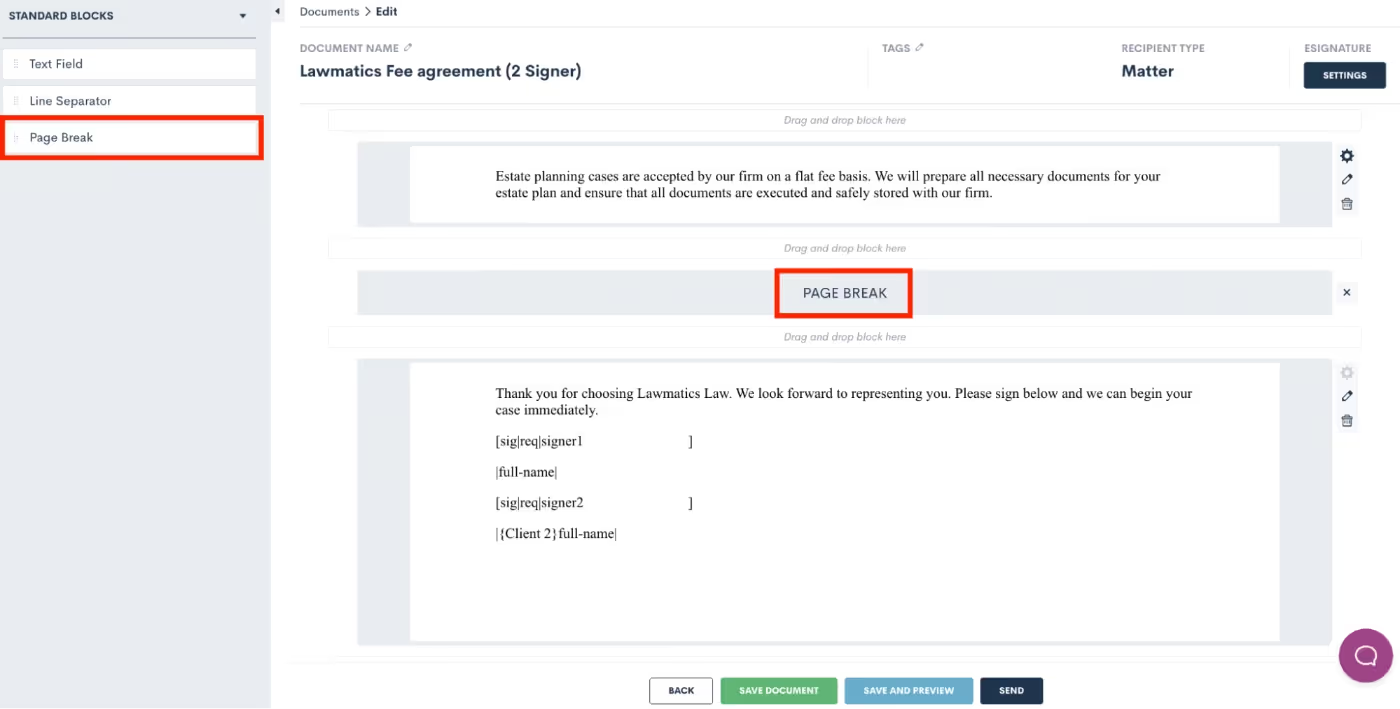
This simple but important addition is a game changer for sending out automated documents maintaining both a professional yet personalized look for each client.Need a refresher on how to create custom documents? We’ve got you covered!
New Zapier Trigger - Appointment Created
Lawmatics features a suite of direct integrations with many of your favorite legal technologies. And for software Lawmatics doesn’t directly integrate with, there’s Zapier. This powerful third party tool enables you to connect the robust features of Lawmatics to any of the thousands of other applications available within the Zapier platform.While you may already know and love our popular Zapier triggers such as ‘Matter Converted’, ‘Filled Out a Form’, among many others; we are happy to add yet another trigger, ‘Appointment Created’.This new trigger adds yet another tool to your automation toolbox, by allowing you to initiate actions in other software systems upon the creation of a calendar appointment using Lawmatics. The possibilities are endless. Use this trigger to “Zap” the appointment to another platform, or take any other action available to you from your other Zapier apps.
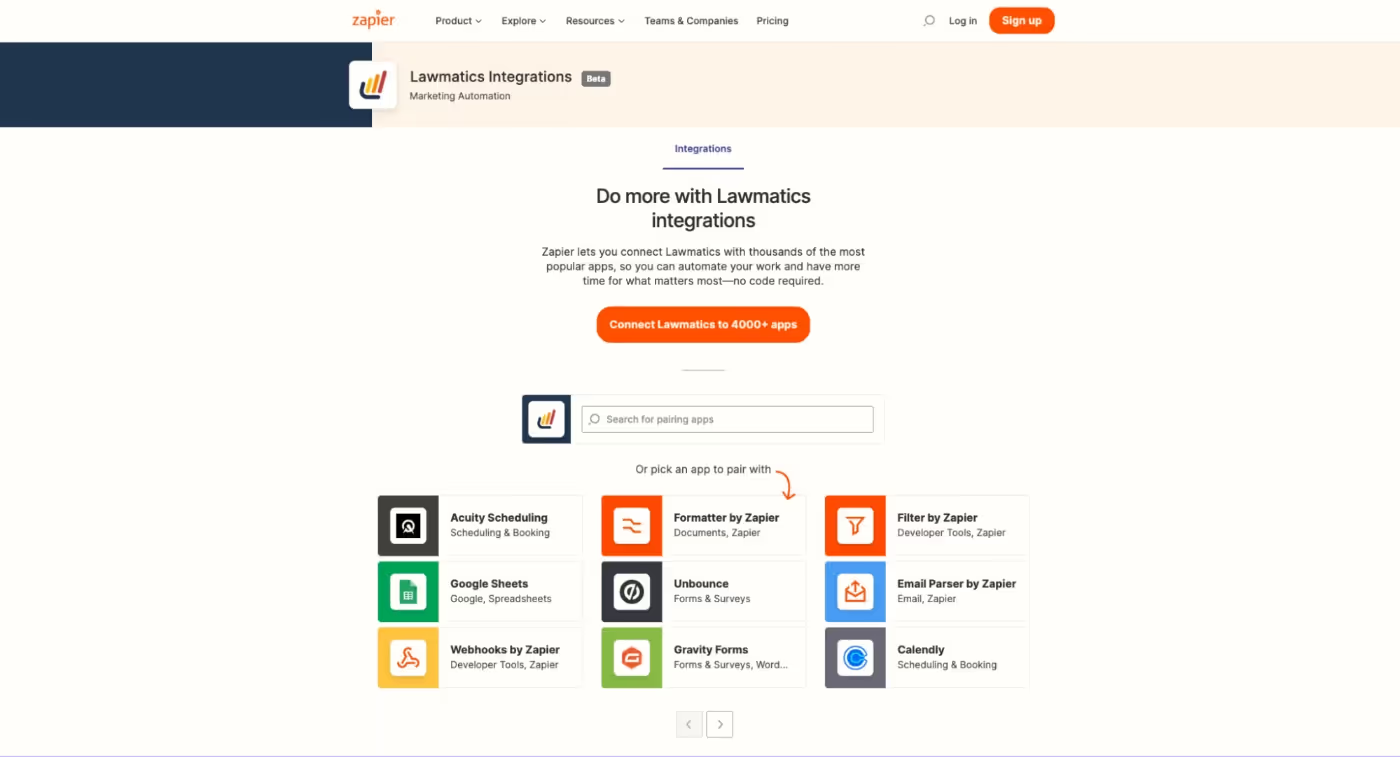
Ready to start integrating your favorite tech tools with Lawmatics? Access our Zapier app here.—Thanks for checking out our latest features and stay tuned for more exciting updates to come!
Spring is here and so is the latest new feature release from the Lawmaticians! We’re excited to deliver some incredibly powerful new functionality that will surely brighten your day.
Conflict Checking
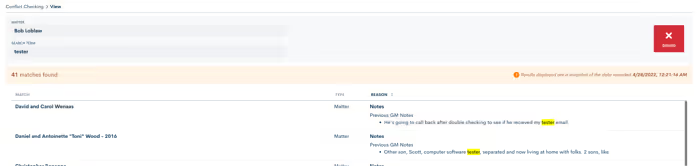
We are thrilled to announce that you can now use Lawmatics to perform your firm’s conflict checks. Simply select the matter you wish to check a conflict for, enter your search terms, and Lawmatics will handle the rest. The system will search against all data entered into your law firm CRM, including fields and notes, and instantly alerts you if it finds a match.From there, you’re able to review any possible matches, and choose to approve, flag, or fail the conflict check.
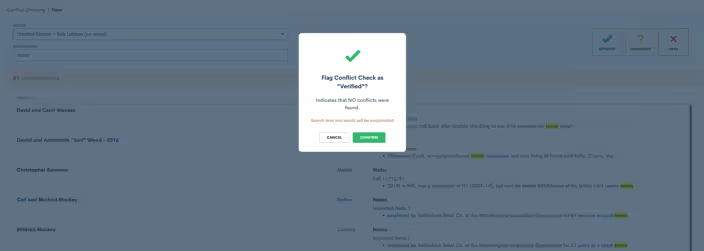
In addition to manual Conflict Checking, we’ve also added this action item to Automations. Now you can be out enjoying time away from the office while Lawmatics handles this tedious task for you.All you need to do is configure your Automations to auto-approve the conflict check when no match is found, or opt to review them yourself at a later time.

To learn more about how to use our brand new Conflict Checking feature, click here.
Hidden Form Fields
Did you know that you can now trigger automatic updates to a client’s contact information, matter information or even stage in your sales pipeline whenever they fill out a form? You can now do just that all with hidden form fields.
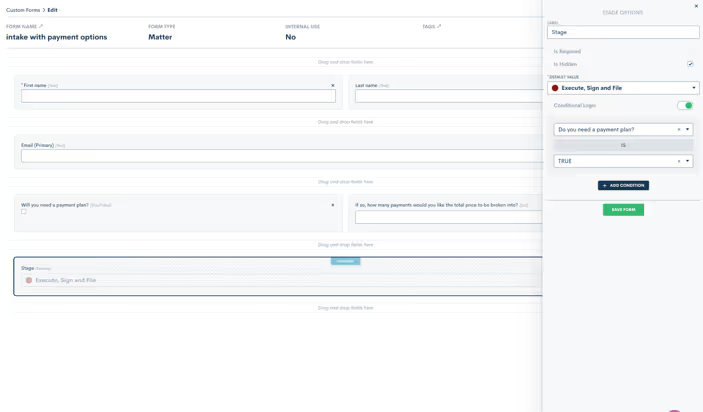
This feature allows you to set form defaults by making any field on a custom form ‘hidden’. You will add the field to your form, select the “Is Hidden” option, and then enter your default value. Your lead or client will not see that field on their form, but when the form is submitted it will auto-submit the hidden value along with the rest of their information to trigger any actions or changes to their information in your Lawmatics account.This helps you efficiently track your intake pipeline as simply as possible while eliminating the need for certain Automations previously set to update default values, the sales pipeline stage of a matter, their tag, practice area, etc.But we didn’t stop there. We also made sure you can access this feature when using conditional logic, as well as within blocks and relationship blocks.Learn more about Hidden Form Fieldshere.
Form Field Default Values
Hidden fields with default values isn’t the only form enhancement we have made. We figured why not also give you the ability to create default values for any field that you have on a form!We are happy to announce that you can now set a default value for all fields on Custom Forms, whether they are hidden fields or not. These default values will show up as pre-populated values on the form when the user opens it to fill out.
Event Type Settings Enhancements
A new upgrade to one of our most beloved time-saving features, booking links, helps you further customize your calendar availability so that you can ensure you and your staff are booked automatically and appropriately for each of your firm's event types.You can now customize your “time before” as well as your “rolling period” for all custom event types. “Time Before” refers to how soon you can be booked by someone whereas your “rolling period” refers to how far in advance you can be booked, allowing you to specify an ideal booking window per lead or client.For instance, should you want a prospective client to book you no sooner than 1 day out but no later than 2 weeks in advance, these two settings allow you to create that booking window.
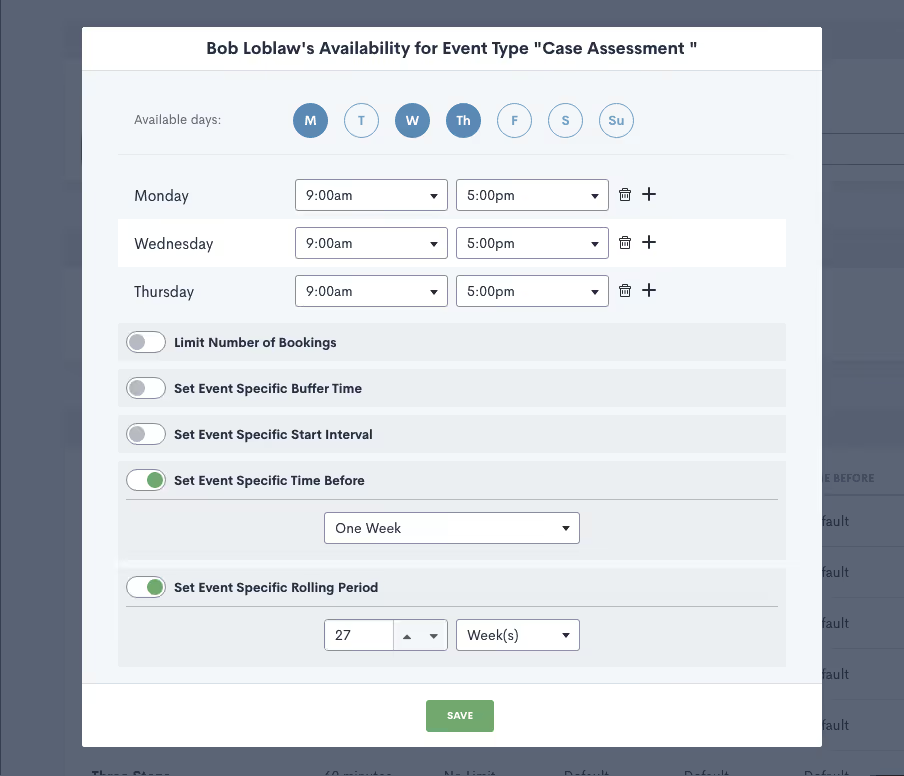
Since you may have different specifications for different event types, such as consultations or signing meetings, we are happy to now give you the ability to customize these settings for each unique event type.Learn more about these new event type settings here.—Nothing makes us happier here at Lawmatics than delivering features that allow you to spend more time with your feet in the sand and sunshine in your face (or whatever else it is you enjoy most) and less time bogged down by menial tasks. We hope that we’ve done just that with our Spring 2022 feature releases. As always, there’s much more in the works so keep your eyes peeled for loads of new releases and enhancements just around the corner.
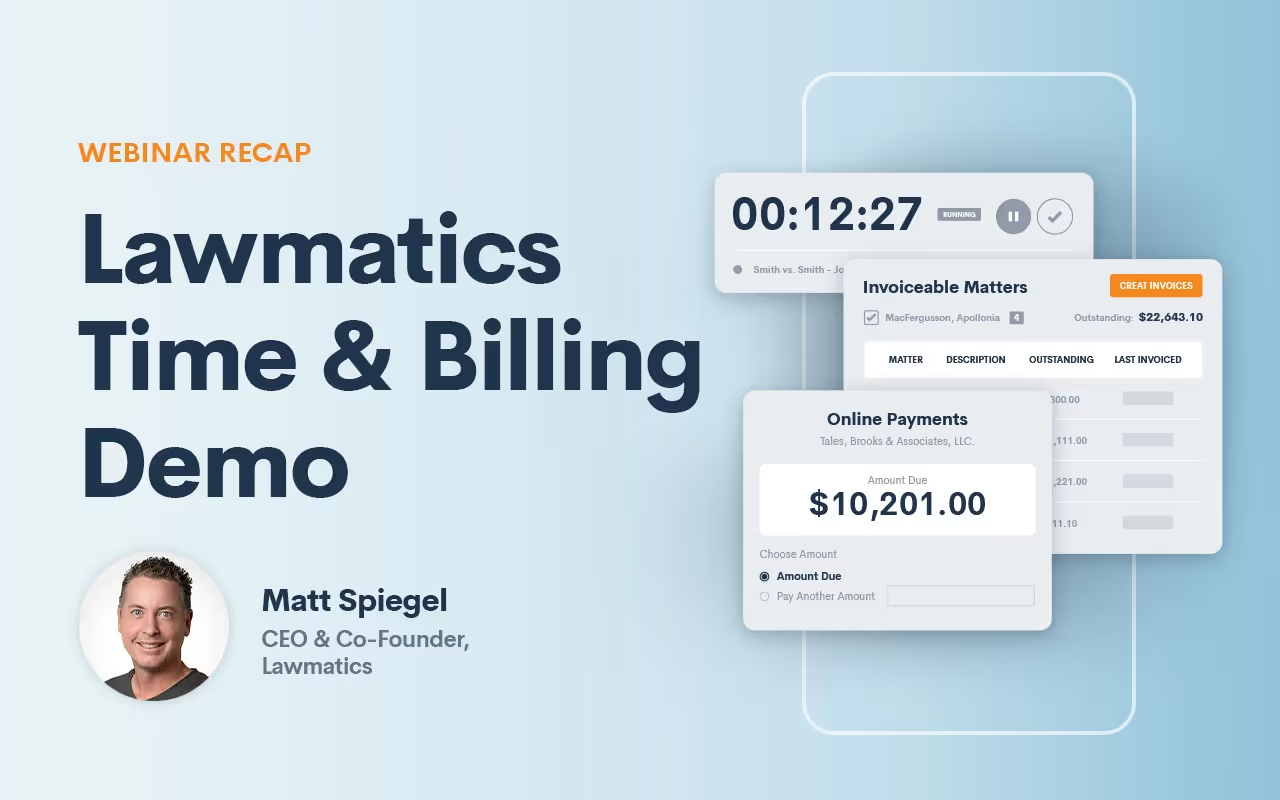
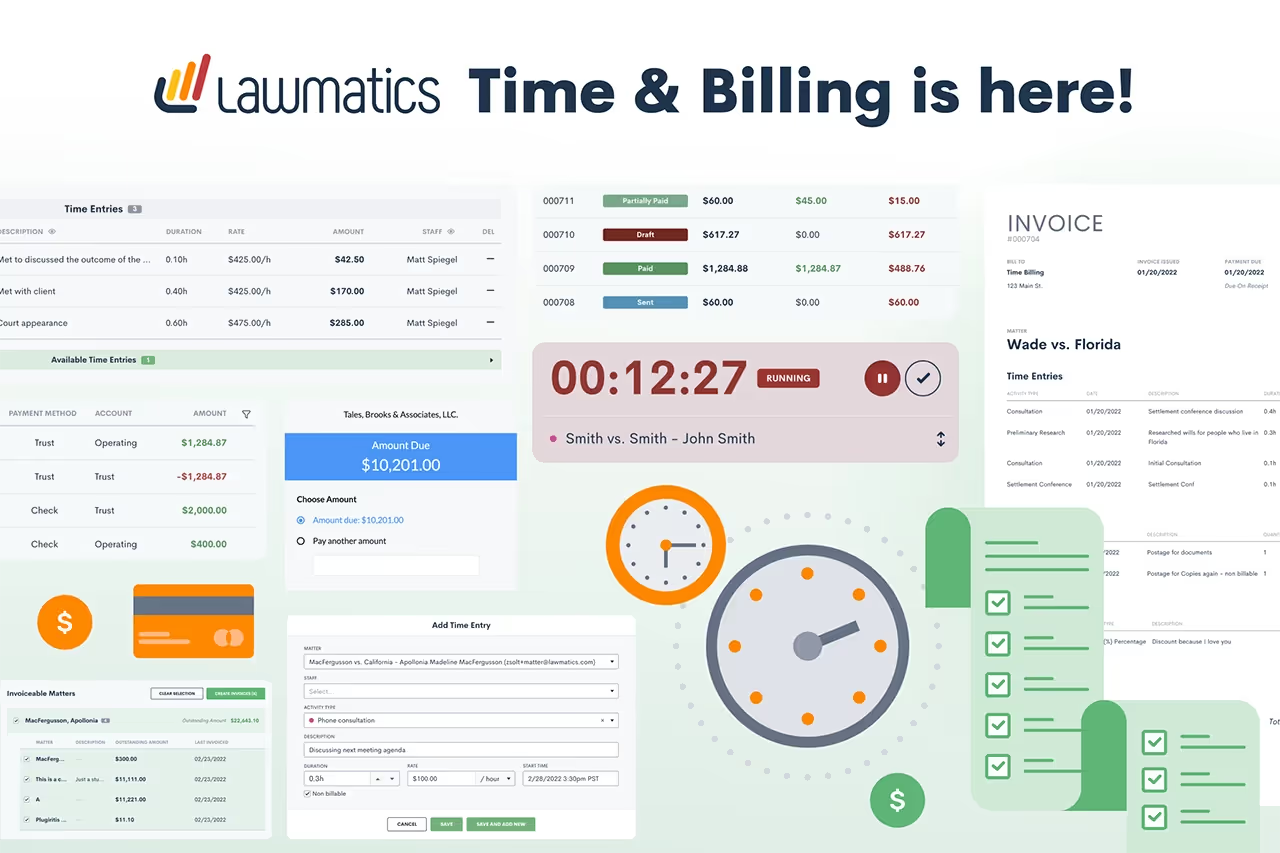
Lawmatics Time and Billing software is officially here! Whether you have an hourly or flat fee structure, our platform doesn’t just make tracking time, logging expenses, and invoicing clients easy— it can be a total game changer for your law practice.Earlier this week Lawmatics CEO, Matt Spiegel hosted a demo webinar with a full tour of the platform’s new features. For those of you who weren’t able to make it, here is a recap of what the webinar covered:
How to track all of your time and log expenses
One of the most exciting features of Lawmatics new Time & Billing software is the timer function. Whenever you start a billable activity, simply launch the timer and select an activity type, from a consultation to a phone call. The timer will continue to run in the background until the task is complete, and once completed will be added to your matter’s time entry list.Logging your expenses is equally as simple. It’s as easy as clicking on the expenses tab and choosing an item from the drop-down menu and adding the cost accordingly.
How to generate invoices fast, and in bulk
Easily track all of your unpaid balances due in one simple and condensed view. From there you can create invoices individually or in bulk by selecting as many as you want and clicking on “create invoice.” Create invoices with criteria of your choosing from date range to lead attorney, batching however you see fit. Once created, adjust your invoice as needed: Add discounts, include balances forwarded, and specify which columns of information you’d like to appear on the final bill, making it easy to bill your way.
How to manage and track all trust account fund transactions
Tracking and reconciling trust account transactions has never been more straightforward. Whether you want to see a matter-by-matter trust balance or your firm’s overall trust balance, you can see it all in one easy-to-read layout giving you total peace of mind. Paying invoices from trust accounts deduct funds from your overall balance, after which your total trust balance is updated accordingly.
All-new Automations to make invoicing even more seamless
Automations are the core of what we do. Over the next coming weeks, Lawmatics is rolling out a new feature allowing you to automatically bill from the trust account. The instant an invoice is sent, it will automatically be paid from any available balance.We’re also excited to announce that you’ll soon be able to automate flat fee invoices, and allow clients to pay invoices directly from a payment link. Doing so will trigger further automations post-payment. Not only will you be able to trigger automations but also create invoices and send them out. Note: Digital payment options in Lawmatics will require you to use Lawmatics’ own payment processing service, LM Pay. With Lawmatics payments you will receive free ACH, and there are no monthly fees, making credit card processing more affordable for your law firm.
Coming soon: payment plans
Lawmatics users will soon be able to add payment plans to their invoices to bill on a weekly, bi-weekly or monthly cadence. Simply select your preferred cadence, the number of installments, amount billed, and first payment amount — the rest happens behind the scenes.
Coming soon: accounting software integration
Stay tuned for integration with Quickbooks accounting software which should be available to you over the next coming weeks, helping you keep your books accurate without hassle. As you can see we are only scratching the surface of all of the exciting new features that will continue to emerge from Lawmatics' powerful platform. Stay tuned for more exciting updates!

As Abraham Lincoln once said, “A lawyer’s time and advice are his stock in trade.” Attorneys provide their clients with their knowledge of the law, and in turn, clients pay them. Unlike buying something from the store which is a simple transaction, paying for legal services come with much more detailed line items. And although many lawyers are turning towards alternative billing methods like a flat-rate billing system, plenty of lawyers still bill by the hour. As you well know, legal advice doesn’t always come in neat one-hour slices. Sometimes it can be a 37 second phone call, or a 17-minute consultation. A client’s final bill must break down these intervals of legal counsel into an easy-to-read, detailed format so that the client knows exactly what they’re paying for.While this may sound simple in theory, billing clients can be extremely lengthy and exasperating for lawyers. From preparing the invoices to sending them out to getting paid, the entire process can take weeks to complete. And unfortunately, since administrative tasks like billing are non-billable, lawyers find themselves dwindling precious time and resources that they could be dedicating to billable work.There’s a better way. Say hello to Lawmatics' new legal time and billing systems.
Spend less time on billing and more time on billable work
Every second counts when increasing your law firm’s profitability and Lawmatics is committed to providing the tools that make it possible to focus on the bigger picture of your practice. Instead of losing time on the time-draining administrative side of your job, our legal invoicing technology makes it possible to turn your attention towards what you do best — practicing law.Lawmatics’ new Time & Billing software refines your billing technique in ways that result in less work for you and make a lasting impression on your clients. Easily create beautiful customized invoices that deploy within minutes and wow your clients with your modern and swift approach to accepting payments.
Batch invoices
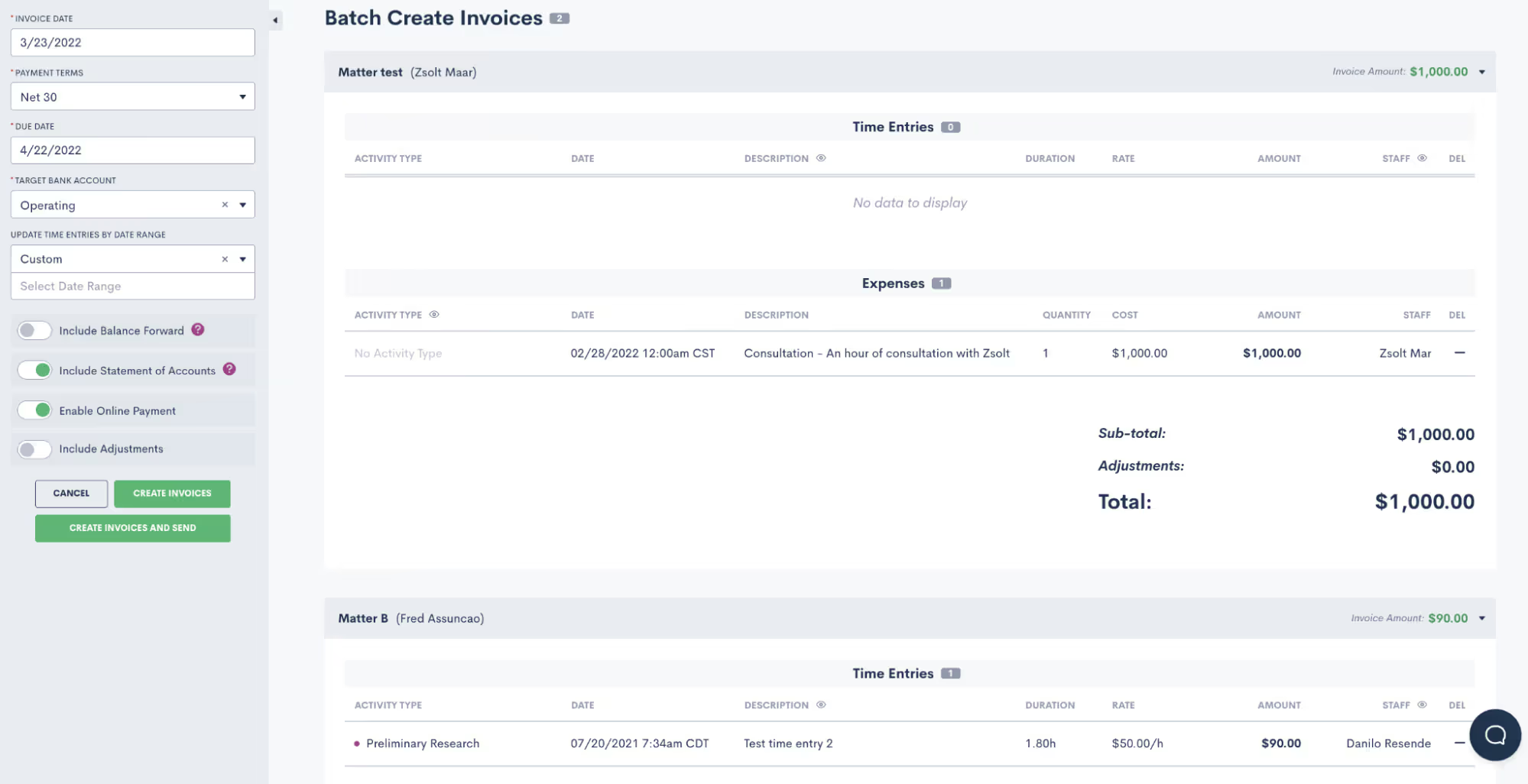
Generating bills one by one is as time-consuming as it gets. With Lawmatics, you can batch create invoices for multiple clients simultaneously. All you need to do is select clients from your list of matters whose statuses show as ‘unpaid.’ In a few clicks, all selected clients with balances due receive a digital invoice. You can also create invoices based on criteria of your choosing from date range of a matter to lead attorney, selecting and batching clients as needed.All of your invoices can go out in one sitting instead of having to prepare and send out individually, significantly saving your law firm time. Cue angelic voices singing!
Deliver polished, customizable invoices

Not only can you customize branded invoices with your law firm’s unique look, feel, and logo but you can also customize which columns of information you want to appear on the final bill. Add your own activity and expense types, whether it’s trial prep or copies and faxes, non-billable activity, or forwarded balances. Should you want to apply a discount or make a tax adjustment, It’s easy to make changes to the final invoice as needed — in other words, you can create your bill your way. You can even set your own default billing rates per user and per activity type, which means less time lost on data entry — simply click, select, and send.
Easily track your time
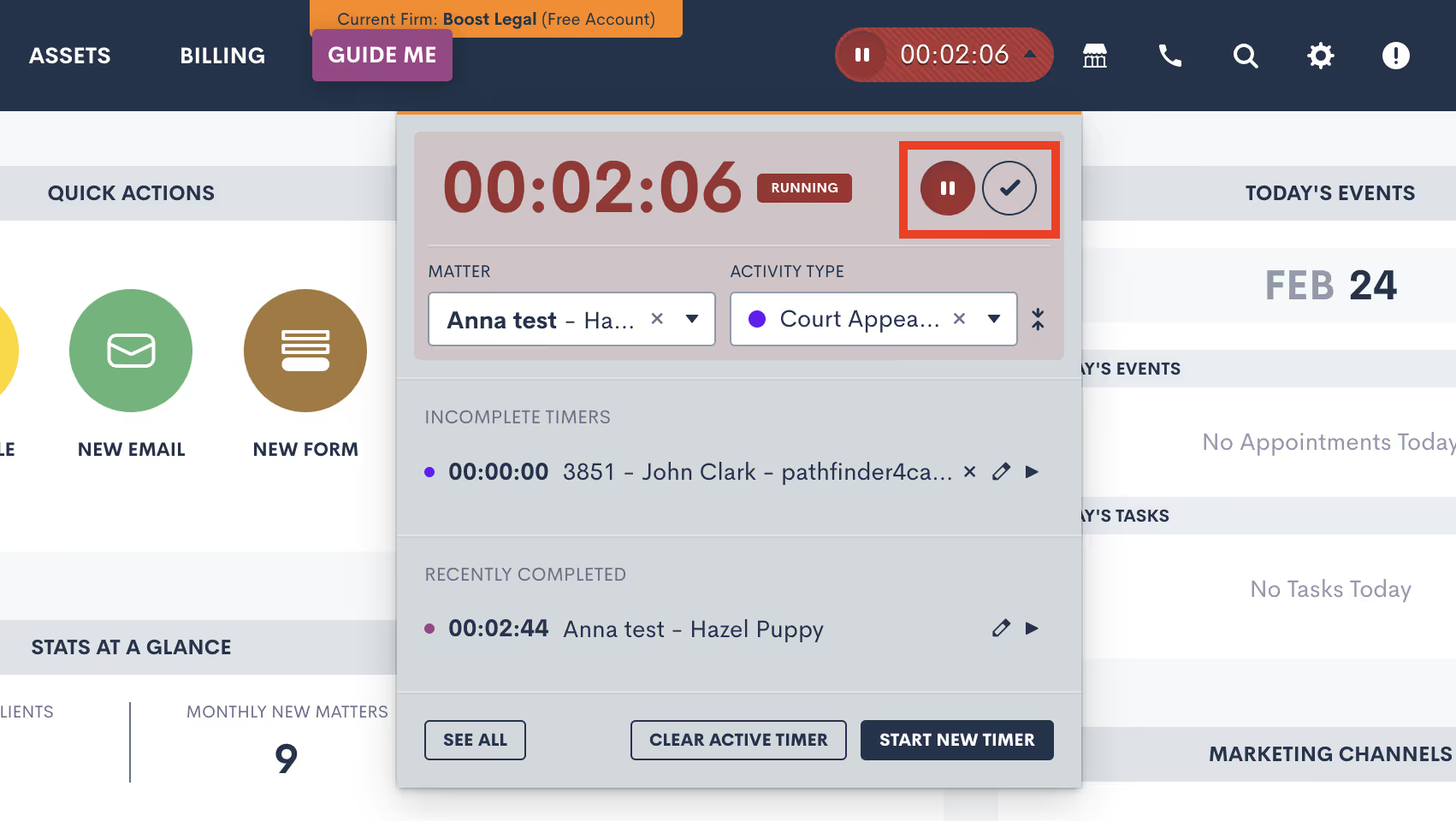
Perhaps one of the most exciting parts of Lawmatics' new Time & Billing software is the timer function that makes it easy to track your time. The minute you start a billable activity, simply launch a timer in one click and select an activity type from the drop-down menu. Whether you’re on a call or in a consultation, the timer will continue running in the background as you navigate the platform as you complete the task, ensuring you never miss a second of billable work.Once your activity is finished, simply mark it as complete and it will neatly file itself into your time entry list within the matter. How’s that for simplicity?
Makes it easy to track client trust accounts
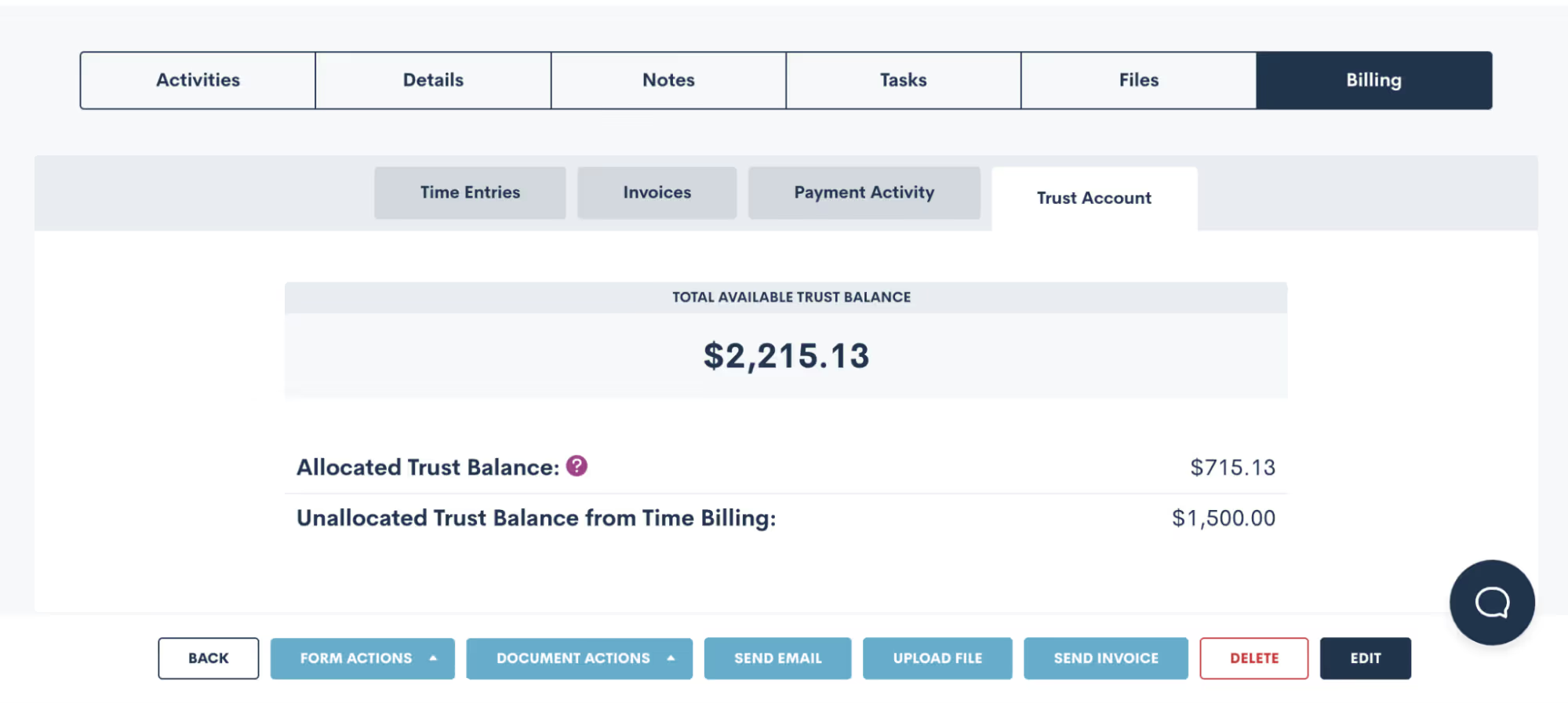
A lawyer’s worst nightmare is facing potential disbarment as a result of a mismanaged attorney trust account. Yet tracking incoming and outgoing trust account transactions isn’t always easy with non-legal-specific software. With Lawmatics, which was made for lawyers by lawyers, you can sleep peacefully knowing that all funds submitted into trust and transferred to your operating account are carefully tracked and reconciled with detailed notes.Easily run reports by matter to verify that your total balance matches your IOLTA account for the same time range. If you’re ever audited, you can be confident that Lawmatics can produce your trust balances matter by matter in a clean and easy-to-read format.
Get paid faster
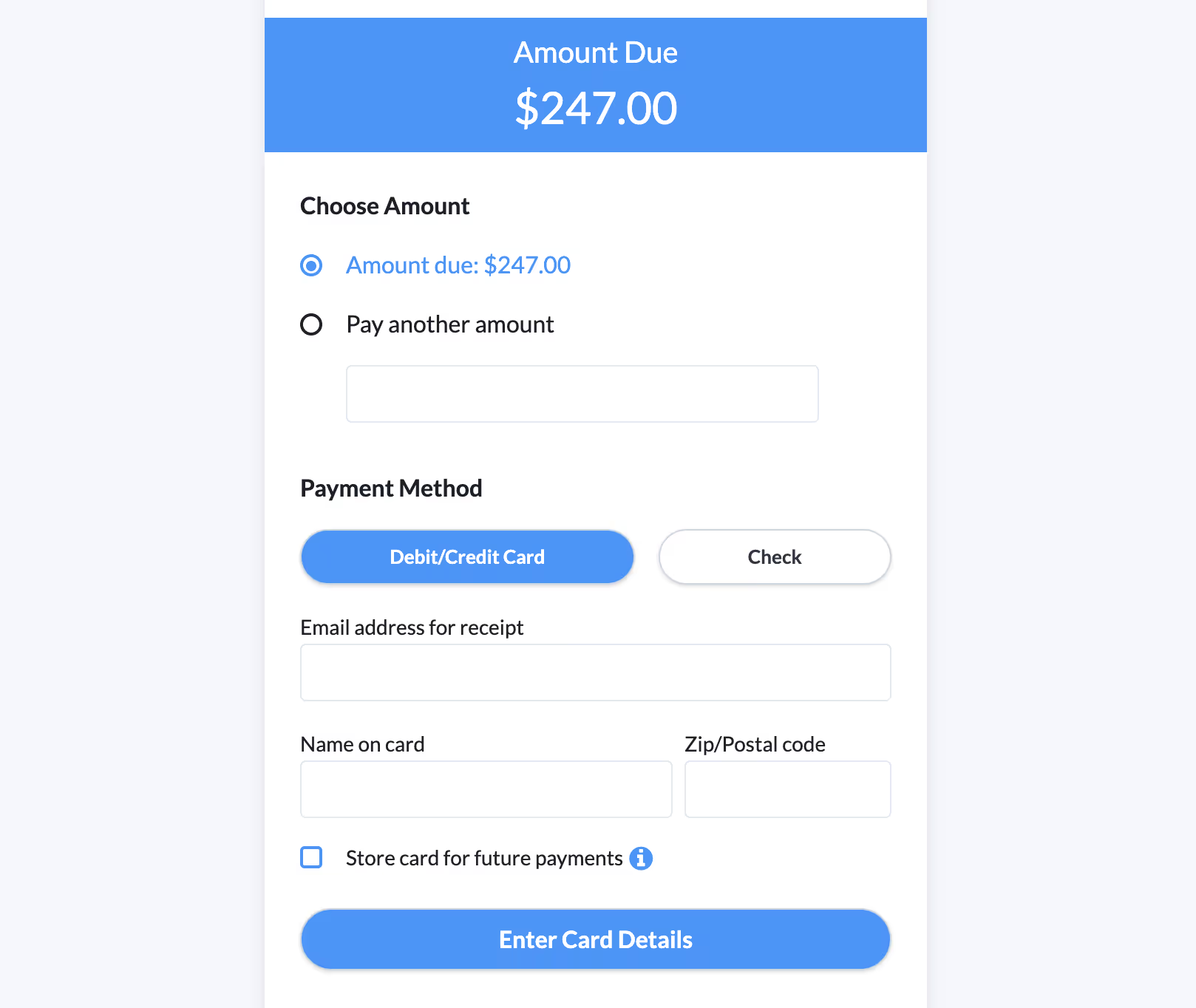
Outstanding balances can be an issue when you’re relying on an outdated billing system. Lawmatics lets your clients access a payment link directly from their invoice and pay instantly. No more bothering with checks, or mailing out paper bills — with Lawmatics you can streamline your billing and collect your money faster.Clients can pay with their preferred form of payment, whether by credit card, debit, or ACH, all from the palm of their hand. When you make it so easy for your clients to pay you, the less you have to worry about being paid.
Run data-driven reports
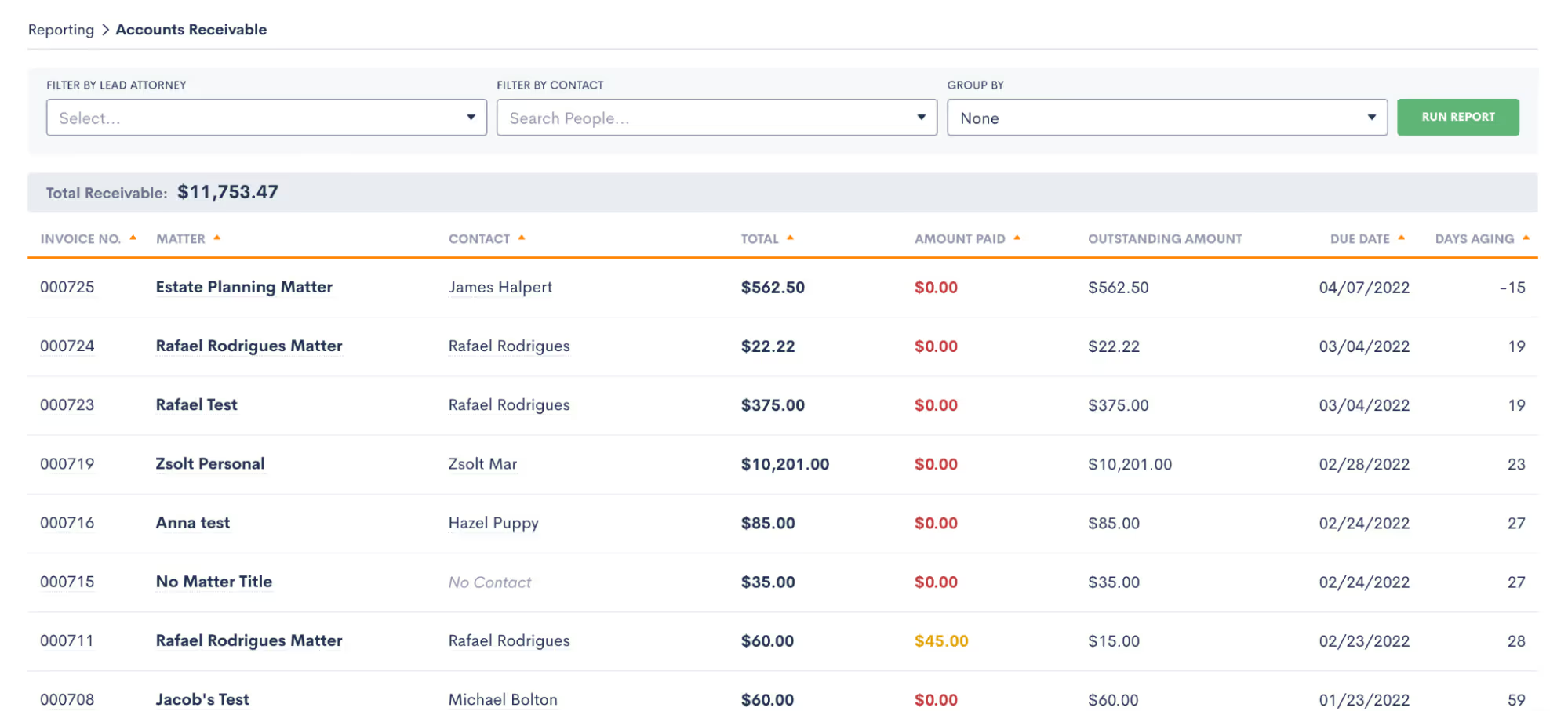
Keeping your finances on track is easy thanks to data-driven reports that show your law firm’s most important insights. Rather than bouncing around between multiple programs that conflate your financial data, Lawmatics is your all-in-one solution. See who your most profitable clients are, which attorneys among your legal team are the most productive, and track your balance collected versus balance billed. You can even monitor your average fee per matter, and make better-informed decisions based on data, not guesswork.
Tips for streamlining your law firm’s billing process
Create a standardized billing process
A 2019 Trends Report found that 14% of hours invoiced to clients never get paid. While there are a few factors that contribute to this statistic, it usually boils down to the same core problem: a lack of a standardized billing process.To avoid wasted time and other billing bottlenecks, it helps to get everyone on your team thoroughly acquainted with this process. Create a standardized billing process that specifies everything from when invoices are deployed, what expenses and activities should be billed for, and any additional communications and reminders that should go out with invoices and post-delivery.The more thorough your document around your billing process, the higher the accountability and lower the chances of human error. Regardless of the size of your law firm, a well-documented billing process facilitates a better understanding and recollection of your workflow to the benefit of your entire practice.
Be as specific as possible in your billing descriptions
Billing descriptions can be a lawyer’s catch 22 — create too brief of a billing description and you could find yourself with a dissatisfied client that feels cheated. However, add an overly verbose description that takes up three pages of an invoice, and you'll have your office manager working overtime. Instead, it’s considered a best practice to aim for a specific, detailed, yet concise description that leaves your client feeling satisfied with the number they're paying.Ideally, your activity descriptions should look something like “met with client to go over real estate assets” or “ telephone call from opposing counsel” — keep it short and sweet, yet anything but vague.
Be forthright and transparent about your billing process
One of your first action items upon initial consultation is confirmation from your clients that they understand your fee agreement and billing process. Consider this an essential component of lawyer billing ethics. The best way to do this is to put it all in writing to assure that you and your client understand each other. You should go over the total amount of money you charge, your hourly rates, anyone else on your team who will be working on the case, when your invoices will be sent out, a detailed description of an estimate of total expenses, and when you expect to be paid.Putting this in writing doesn't just make this easier for you and your team, but it also helps your clients better plan for paying their bill. Better planning means less likelihood of having to chase your clients around to settle up.
Formally train your team to use your billing software
Whether you're a small firm, or you're a larger one with an office manager and paralegals handling your billing, it's important that everyone on your team fully understands the inner workings of your billing software to get the most out of it. Appoint someone in your firm — whether that be you yourself or a team member — to take point on getting all staff members trained on your billing solution. This person will be in charge of communicating with onboarding representatives of your billing platform and schedule training sessions with your staff as time permits.Lawmatics' full platform comes with a thorough onboarding program designed to help your firm get off to a running start. At the end of the Lawmatics onboarding program, your team will be well versed on every feature of the Lawmatics law firm CRM, client intake marketing automation and billing platform. Following onboarding, your team will continue to have access to our knowledgeable support team to answer any questions and concerns.
Track time contemporaneously
If you hope to keep a steady cash flow, you must stay on top of your time tracking. Doing so contemporaneously — or as billable work happens — is a method experienced attorneys swear by to hit your billable hours goals. With so many things going on at once in your law practice, it’s easy to forget to log your billable work later on, or worse, overestimate the length of an activity on your invoice and infuriate your clients, leading to billing disputes. Use the Lawmatics timer function to ensure that you stay on top of every minute of billable work, and you might just be surprised to find that you’ve been working more than previously estimated.
Consider alternative billing methods
More and more lawyers are turning towards alternative billing arrangements given the stigma of the term “billable hour” and its frequent association with astronomical and unaffordable legal bills. Consideration of alternative billing arrangements may help you tap into a greater legal market of clients that may not have otherwise hired you on an hourly billing system. On top of that it can also create a more straightforward billing process for you and your team.Flat fees, for instance, are easy to invoice, and rarely result in billing disputes. If you haven't at least begun to consider introducing alternative billing methods into your law firm, now may be a great time to start. Since more and more lawyers are charging for their legal services in alternative ways, failing to keep up could put your competition at an advantage.
Use automation whenever possible
Automating your law firm’s routine tasks is the best way to streamline your practice, and dedicate your time to what can’t be automated — like strategizing or attending hearings. Above all, automation helps boost your law firm's productivity, so your workday isn't bogged down with administrative tasks like invoice preparation, or data entry.By harnessing the power of legal technology like Lawmatics you can make time for your law firm's most valuable work, and let automation handle the rest. From invoice reminders to generating a fee agreement in a matter of seconds, automation is here to make your billing process go much smoother.
The future of legal billing technology is here
A recent report shows that the average legal professional logs less than 3 billable hours a day on average since they're so inundated with non-billable administrative work like billing clients.Legal technology is evolving every minute, so there's no reason why your billing system shouldn't evolve alongside it in pursuit of your profitability goals. And when it comes to profitability, time is your most important asset. Not only in billing but law firm performance management and new client intake can all be streamlined to give you more time. The more you can accelerate day-to-day processes with modern solutions, the higher your caseload allotment, and the more revenue you can generate.Whether your law firm bills hourly, on contingency, or by fixed fee, Lawmaticslegal billing software is a clear-cut billing solution for thorough invoicing that makes it easy to get paid. Are you ready to see how Lawmatics’ new time and billing feature can level up your billing process? Sign up for a free demo today!Sources CitedClio, 2019 Legal Trends Report, 2019https://www.clio.com/resources/legal-trends/2019-report/Clio, 2021 Legal Trends Report, 2021https://www.clio.com/resources/legal-trends/
Referrals are a goldmine for successful law practices. Why? Referred clients are more inclined to trust you, sign a fee agreement, and spread the word about your service, effectively marketing your firm for you. But good service alone isn’t enough to secure a steady stream of referral-based business in today’s competitive landscape.For this presentation, President of AttorneySync Gyi Tsakalakis and Lawmatics CEO Matt Spiegel joined forces to reveal how successful law practices are growing their referral relationships and client base in 2022. Watch the full webinar above!
Webinar slide deck
Use the accompanying Google Slide Deck to follow along with the webinar to get the most out of the presentation. (Any interactive features of the webinar are no longer active)To view Webinar Slide Deck on a different page: Click Here
We just released a surprise feature in Lawmatics that you didn’t see coming: significant enhancements to our appointment booking platform.
We pride ourselves on the value of Lawmatics being an all-in-one platform for all your legal CRM needs. To that end, we work hard to develop new modules that are intended to fully replace stand-alone, third party services offering the same functionality. Appointment booking is one of those modules.
That said, we are very proud to announce a number of changes to our appointment booking system that now put us exactly on par with, if not ahead of, other leading stand alone booking products. If you are still using a separate tool to manage bookings, we highly recommend giving Lawmatics appointment scheduling a try…it could save you some money. :)
Buffer Times
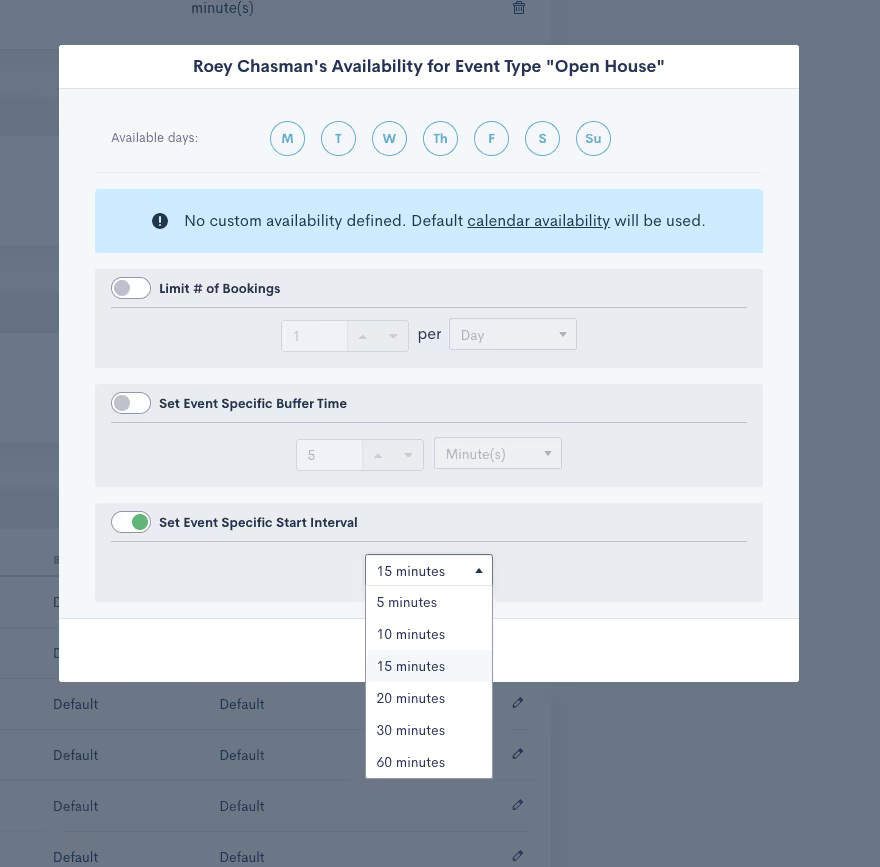
Buffer times now function exactly as expected. Instead of buffer times being included on available time slots by default, they’re now only added to meetings upon appointment booking. Calendar availability is thereupon immediately updated with the buffer time included.
Meeting Intervals
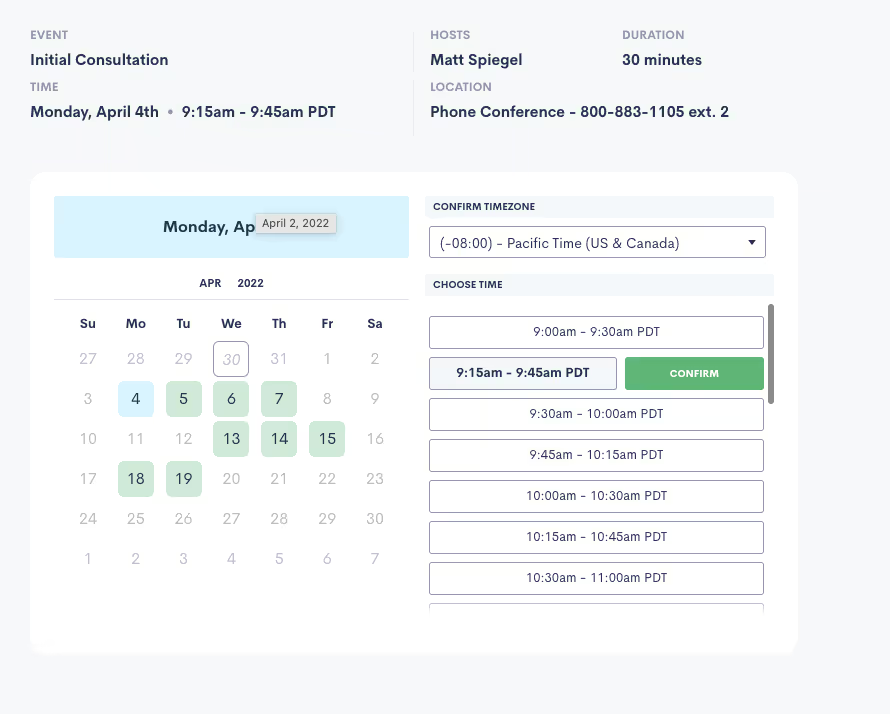
Perhaps the biggest addition that we could have made to our booking system is meeting intervals. This upgrade allows you to specify at which intervals you’d like to be available for people to book a meeting with you. For instance, if you select 15-minute intervals, people are able to book you at 9:00, 9:15, 9:30, 9:45, etc, based on your availability.
Learn how to configure your appointment booking calendar in Lawmatics here.
These feature updates should significantly improve the booking experience on your end and that of your clients. Furthermore, if you’re able to cut down on the list of systems you use as a result of this release, that’s a big win. As always, stick with us for many more exciting announcements coming down the pipe real soon.
You may have thought that all of our attention has been on our new Time and Billing release announced two weeks ago, however, we are extremely proud to release several new highly requested features to the Lawmatics platform.While Time and Billing is a focus of ours and has already been an extremely popular feature in the platform, we remain fixed on making Lawmatics the leading CRM in the legal market. This means listening to our customers and developing features and functionality that make their day-to-day easier. The features we’re announcing today go a long way towards that goal. So, without further ado, here’s what we’ve been up to!
Multi-Condition Automation Rules
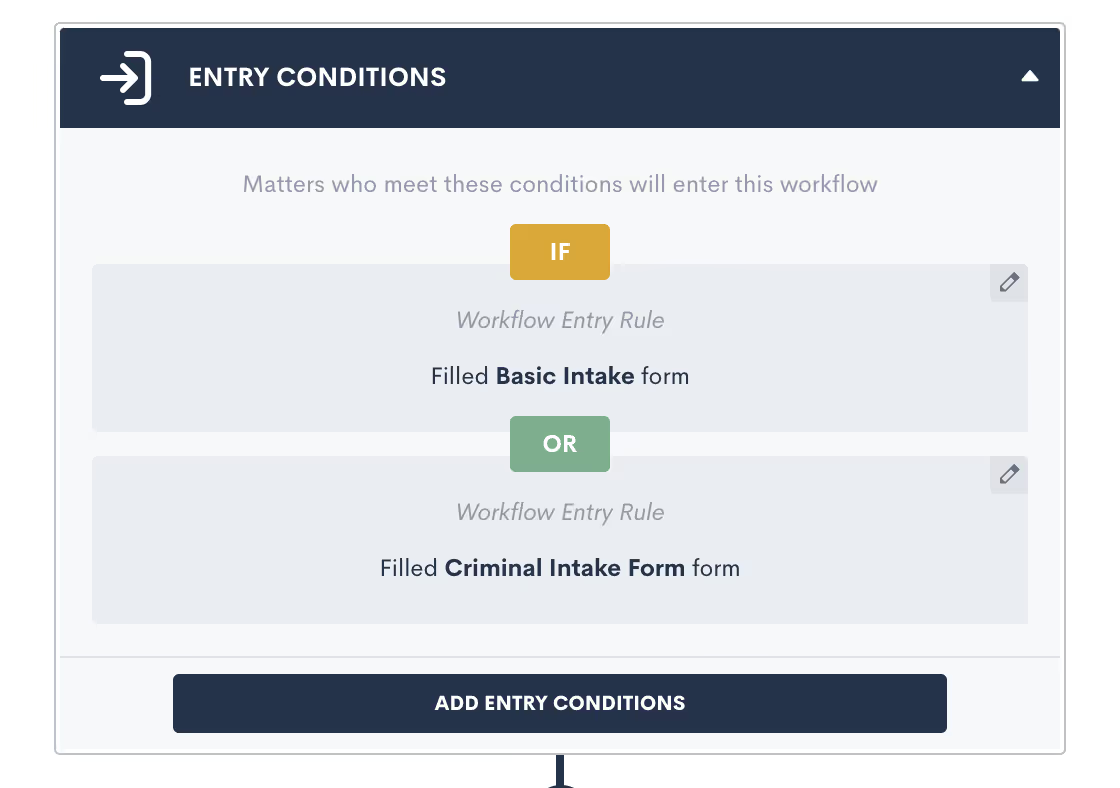
New customization options for Automations in Lawmatics, make building new automated workflow in your law firm CRM even faster and easier. You can now designate multiple entry conditions (or triggers) that add contacts to an Automation workflow, automatically. Using AND or OR logic, triggers such as form fills and eSignature completions can be paired or conditional.Suppose you have a single intake workflow in your law firm that’s applicable to multiple practice areas. You can now tie each of your various intake forms to a single automation workflow in lieu of creating redundant automations for each existing intake form.Entry conditions can be added easily within Automations in Lawmatics by clicking on and toggling the AND /OR labels, after which you can select your Workflow Entry Rules.
Custom Form Conditions (Multiple)
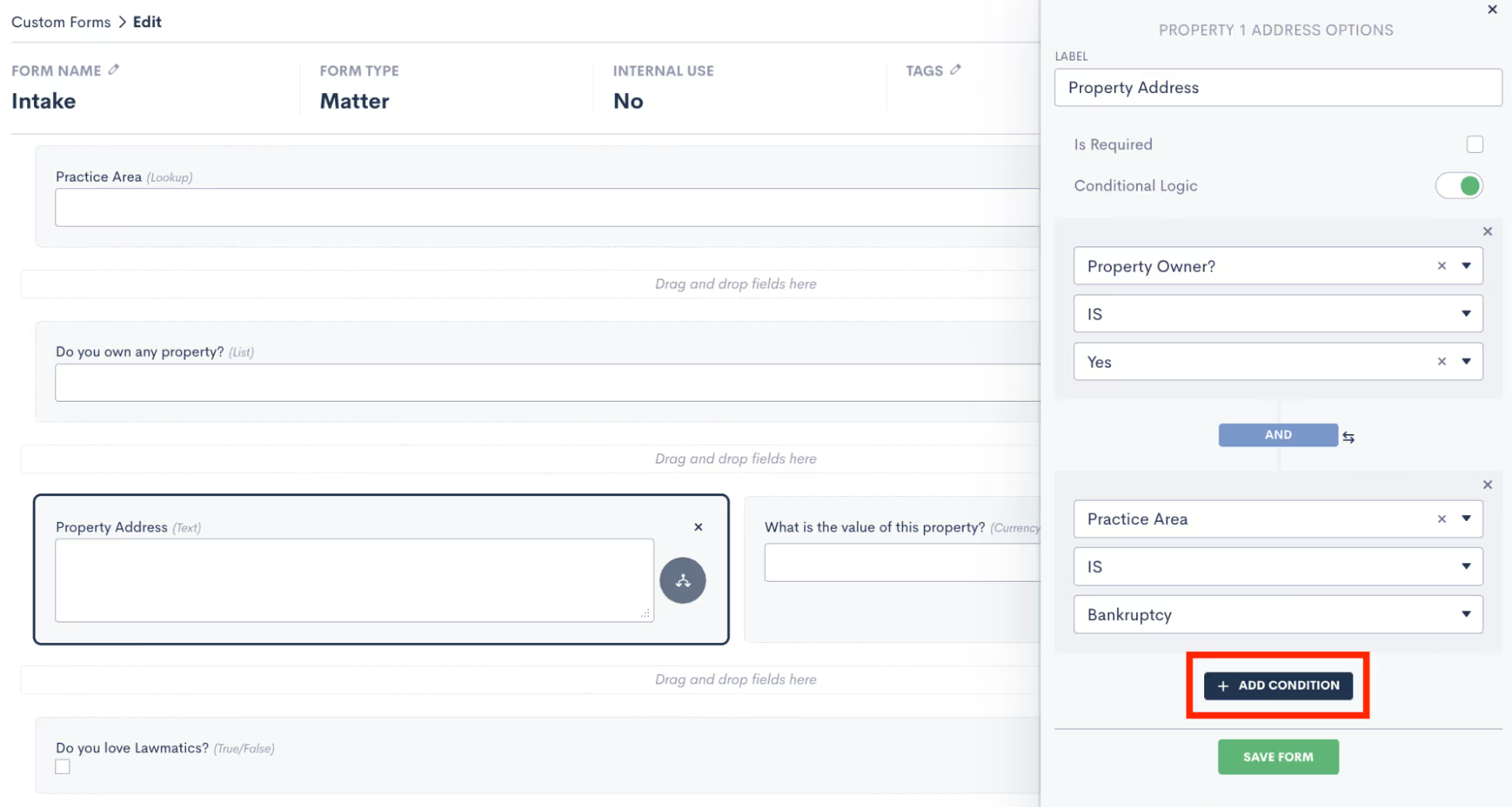
Onboarding should be a seamless process for all prospective clients, regardless of the circumstances of their inquiry. A recent update in Lawmatics allows you to add multiple conditional fields to your intake forms using AND or OR logic. These fields then only appear based on the responses entered into previous fields.Suppose a property owner intends to sue a tenant for damages. As a real estate attorney, you could easily build a ‘Property Address’ field into their intake form that appears only if the prospective client indicates that they’re a property owner . Said intake form can also be used internally by your staff to add prospective clients into Lawmatics without delay.Suppose a spouse seeking divorce intends to sue for custody. As a law firm that spans multiple practice areas, I could easily build a custody dispute field into my intake form that appears only when divorce is selected as a practice area and the prospect indicates that they have children who are minors. Said intake form can also be used internally by your staff to add prospective clients into Lawmatics without delay.
Update Contacts & Matters Via Import
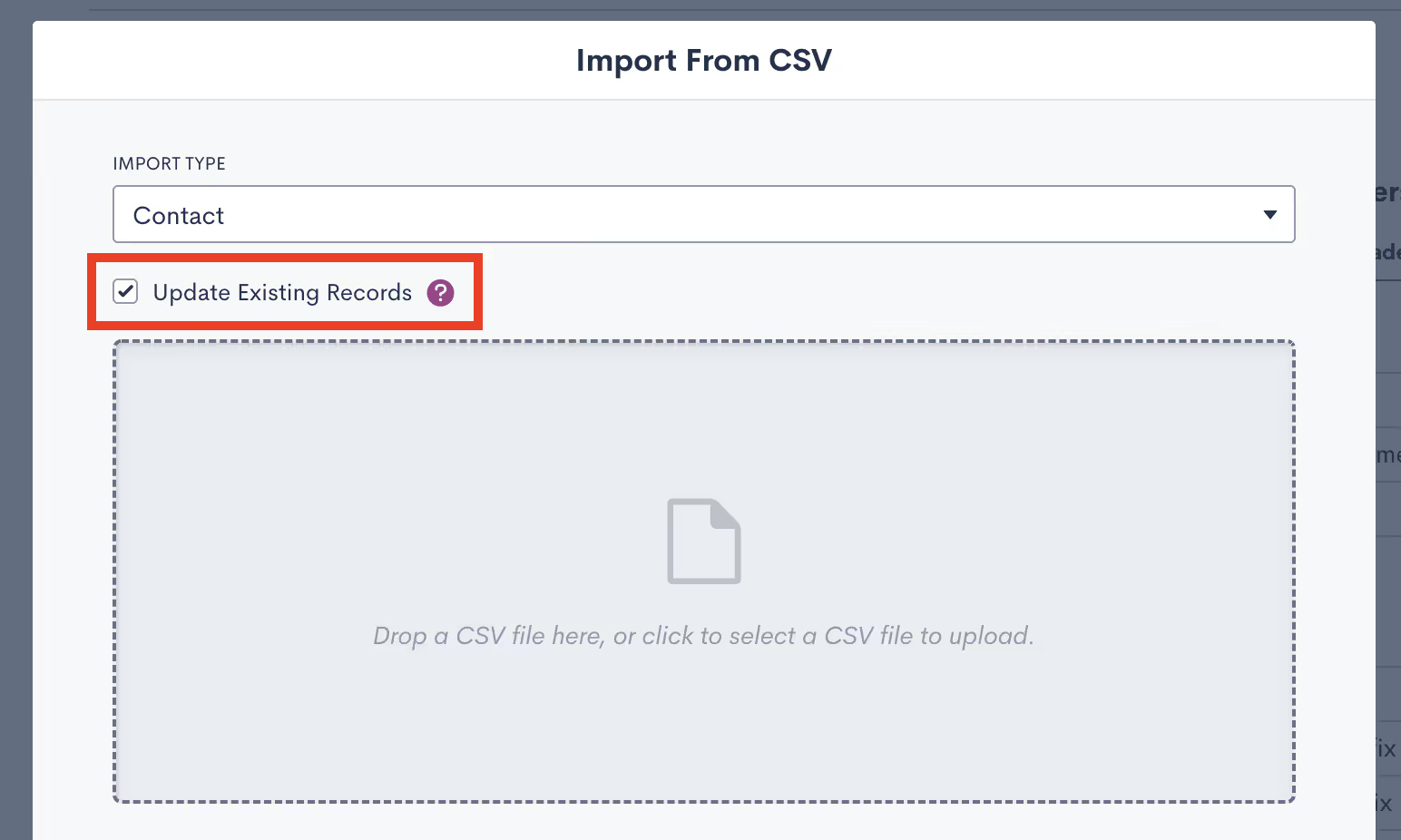
With Lawmatics' powerful reporting, the more complete your contact database in the platform regarding your firm's contacts, clients, past clients, old leads, friends & family, referral partners, etc, the better equipped you are to work your cases.In addition to importing contacts and clients into your Lawmatics database for the purpose of data migration, you can now use imports to update existing records in Lawmatics with new information. This is especially useful if you are migrating data from multiple software solutions or if you erroneously imported a contact list with missing information.When importing a list of contacts into Lawmatics, a new option appears to Update Existing Records in your database. Simply select .CSV file to upload, check the box, and all existing records with matching email addresses will be populated with any new field information.
Custom Email Template Tags
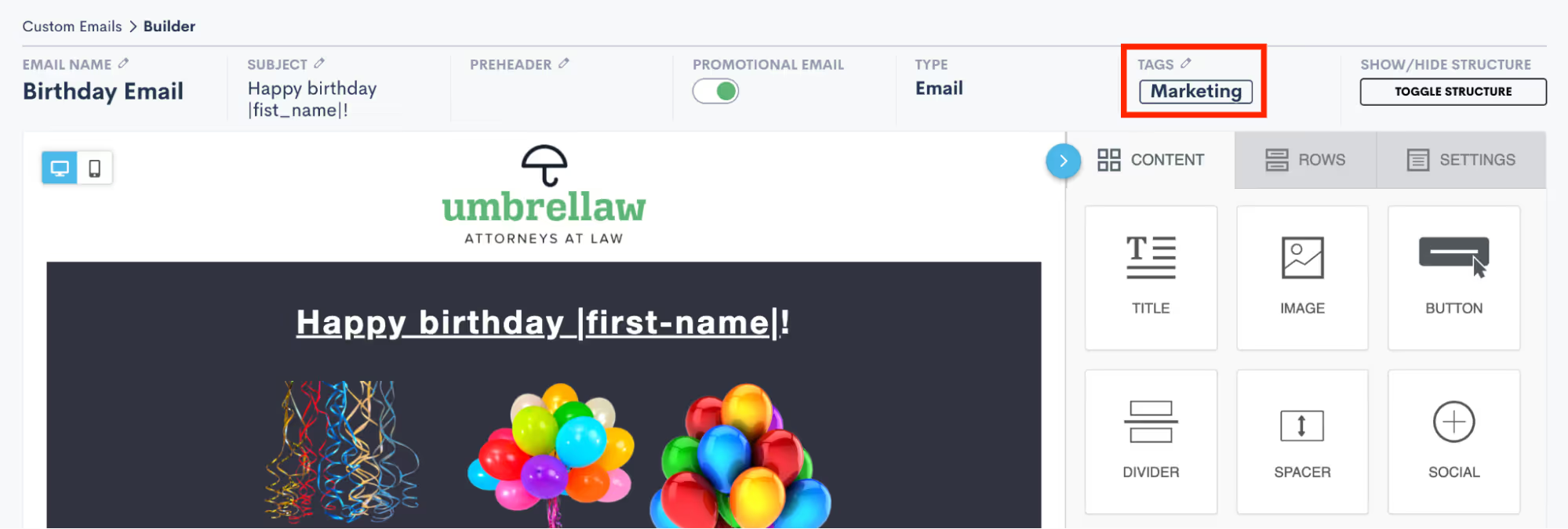
Email organization in Lawmatics just got more sophisticated. You can now easily filter all new and existing emails based on tags of your choosing. Tag your emails as a particular type, such as marketing, intake, follow up, scheduling, internal, etc, or specify the target audience for easy reference. Once tagged, it’s easy to track down and make copies of important emails as templates rather than depending on naming conventions to do so.When editing an email in Lawmatics, simply navigate to the Tags section to either select from existing tags or start typing to create a new tag. That email can then be filtered by the chosen tag. Easy.
Custom Invoice Email

When using our new Time & Billing feature, you can now create a custom email template for sending invoices to your clients. Simply enter your own custom message with a unique greeting or information pertaining to your billing process to be delivered with your attached invoice. If, for instance, you’d like to include the contact information of your billing person and/or thank the client for their business you can do so here. The added personal touch serves as an opportunity to offer additional detail and let your firm’s personality shine through, increasing client affinity to your brand.If you’re not yet using Time & Billing in Lawmatics, get started here.
Plain Text Emails Appear in Matter Timeline

When working a matter for a client, a paper trail of contact communications is absolutely critical to protect yourself from any accusations of malpractice or negligence. And the more meticulous your records, the better.To that end, anytime a plain text email is sent to your prospects or clients via Lawmatics, the exact email content will automatically appear in their activity timeline, as seen by the recipient. This will let you view at-a-glance precisely what was sent to a contact and when.—As always, this release also comes with many bug fixes and performance improvements to the platform. There’s plenty more to come so buckle up and stay tuned for more releases and enhancements to come. ;)
About 4 years ago, Roey Chasman (CTO) and I set out on a journey to build something transformative for the legal industry. Law firms were changing. They were beginning to recognize that being a good lawyer wasn’t enough. In order to be successful they had to focus on their business; they had to start to think like a CEO and not just as a lawyer.
Filling a major gap in the industry
As an entire industry began to shift, we realized that while there are so many tools out there to help lawyers be lawyers, there was nothing designed to help them run and, more importantly, grow their business. This is where Lawmatics was born. Designed to provide lawyers with the tools and data they need to run head first into the increasingly competitive landscape that is the legal industry, Lawmatics has helped thousands of lawyers by automating their firms, from intake to email marketing and so much more.As a tech company, we are obsessed with our product. Our exceptionally enthusiastic customer base is a rich source of ideas on improving and updating said product. And ultimately, what matters most to us is building a product roadmap to address their unique needs. To that end, it’s incumbent upon us to solve the problems legal professionals experience in their day-to-day business operations. Pair the feedback of our customers with our team’s vast experience in the legal software space and you get a pretty magical vision for where Lawmatics can grow.
An unexpected turn of events
A strange and unexpected thing happened not long ago: Our customers started clamoring for something we never thought we would do. But we could not jump into this without further investigation — so investigate we did. Here’s what we uncovered.Traditionally, the big software platforms for law firms — particularly practice management platforms — have been built around one thing…time and billing. And this makes sense. After all, lawyers have to bill and get paid. However, something profound came to light. While lawyers have to track time and invoice, this isn’t what they want to do at all.This is where it gets interesting. Lawmatics helps lawyers with the things they want to do: They want to grow their business; they want to market more and convert more leads; they want to understand their business data more. Lawmatics helps them with what they want to do, not necessarily what they have to do. But it’s this recurring “have to” that we could no longer avoid. Our customers professed, “if you could just give us some time and billing we can just live in Lawmatics for everything.”
Introducing Time & Billing in Lawmatics
We are so proud to announce that we are adding a time and billing module to the Lawmatics platform. Unlike in other practice management systems, time and billing software for lawyers in Lawmatics is an optional, out of the box component of the platform. If you don’t want it, you don’t have to use it; it does not fundamentally change the platform as you know it. We also still maintain all the robust integrations with other time and billing platforms that you love.By adding time and billing, we become the first end-to-end, lifecycle CRM platform for legal. Think ACRM, your Attorney-Client Relationship Management platform. Time and billing is part of the attorney-client relationship, as is intake, document management, calendaring, and post-case follow up.We hope that you find value in having time and billing built into the Lawmatics platform. If you’ve read this far, and you are intrigued to learn more about this new addition to the Lawmatics platform, let us know here and we will give you early access. You can also access the full press release here.At Lawmatics, we are committed to building the best product that legal tech has ever seen. We will continue to listen to our loyal customer base and evolve the platform to meet that lofty goal. Thank you for taking this journey with us.

What is your role at Lawmatics, and what does your job entail?
I’m a Software Engineer at Lawmatics, specifically, a Full-Stack Web Developer. I basically develop new features, extend the existing ones, or fix bugs — because bugs are the eternal crusade in the life of any professional programmer.
How did you end up working for Lawmatics?
Through Fred (Frederico), a friend of mine from a friendship that has existed since 2005. We met in college. I wasn’t properly considering leaving my previous job back then, but Lawmatics was expanding and he invited me to join the team.
What’s the best part of your job?
I really love programming and writing better code that is easily comprehensible to every other programmer in the company and to my future self. I’m also very passionate about what we call DX (Developer Experience), and writing intelligible code is one of its premises. At the end of the day, I love building useful features and products for our customers. It’s always very heart-warming to get nice feedback from customers after a new feature is released.
What challenges have you faced or opportunities you’ve uncovered working remotely during COVID-19?
COVID didn’t change much for me in that context since I’ve worked remotely since 2011. But I confess that the first pandemic months were tougher. Not having a coffee shop nor any coworking space to flee to when working solely at home felt a bit excruciating.
Where are you originally from, and where do you live now? What do you love about where you live?
I am originally from Goiânia (in the state of Goiás, Brazil) and I still live there today. For a brief time I lived and worked in São Paulo. Although I have considered living in other cities in Brazil (or even in other countries), I like how peaceful Goiânia can be sometimes despite its 1.5M inhabitants. I’m not so much a fan of the weather, however; it’s always hot over here and the closest bodies of water are rivers and waterfalls 50 to 100 miles away — no beaches sadly.
What do you like to do when you aren’t working?
Since the beginning of the pandemic, I’ve had to push pause on most of my hobbies. I used to take Pilates classes and play soccer with friends semi-regularly but have yet to resume due to COVID. Nonetheless, I spend my spare time with my girlfriend Isadora watching series like The Office and This Is Us, or playing Stardew Valley on Nintendo Switch. That or I take care of a side project of mine, which is a URL shortening service, called abre.ai (which basically means “open it” in Brazilian Portuguese).
What is a fun fact most people may not know about you?
I’m very worried about recycling and sustainability, so I take charge of waste management at home, separating recyclable materials from organic ones and whatnot. I go as far as washing all food residue and grease from recyclable materials before discarding them.
What is the one thing you can’t live without and why?
That’s funny, because the first thing that came to my mind when I read this question was paper towels. I use them for lots of things at home, especially in the kitchen: drying liquids that accidentally get spilled or wiping down my dining table after hosting some friends, etc.
Do you have a favorite saying, quote, or personal mantra and if so, what is it and why?
There is a stoic quote from Seneca that I like a lot, and that I try to constantly apply in my life: “We suffer more often in imagination than in reality”. Fun fact, it’s also tattooed on my leg.
Can you walk us through your "Aha" moment - the moment when you realized how powerful the Lawmatics platform is for lawyers and law firms?
That’s a tough one; there were a few of those for me. The ability to autofill documents with customer data and signatures in Lawmatics is magical. Custom forms with conditional blocks and integrated automations that help law firms and lawyers guide their clients through functional pipelines to improve their client experience is simply awesome.
Based on your experience, what words of wisdom or advice do you have for legal professionals looking to help their law firms win more business, impress clients, and be more efficient?
If they aren’t using Lawmatics yet, I’d start sooner rather than later. Our product roadmap is rife with goodies and improvements we aim to release soon. They will help these professionals provide a great service quality to their clients. And it’ll only get better and better over time.

Happy New Year! We hope that despite the circumstance of yet another COVID strain that you enjoyed the holiday season and were able to ring in the new year safely — maybe even with close family and friends.Right out of the gate in 2022, we’re excited to announce new functionality that enhances a number of our key Lawmatics features. We hope these make your day-to-day business operations that much easier.
Client Portal Messaging
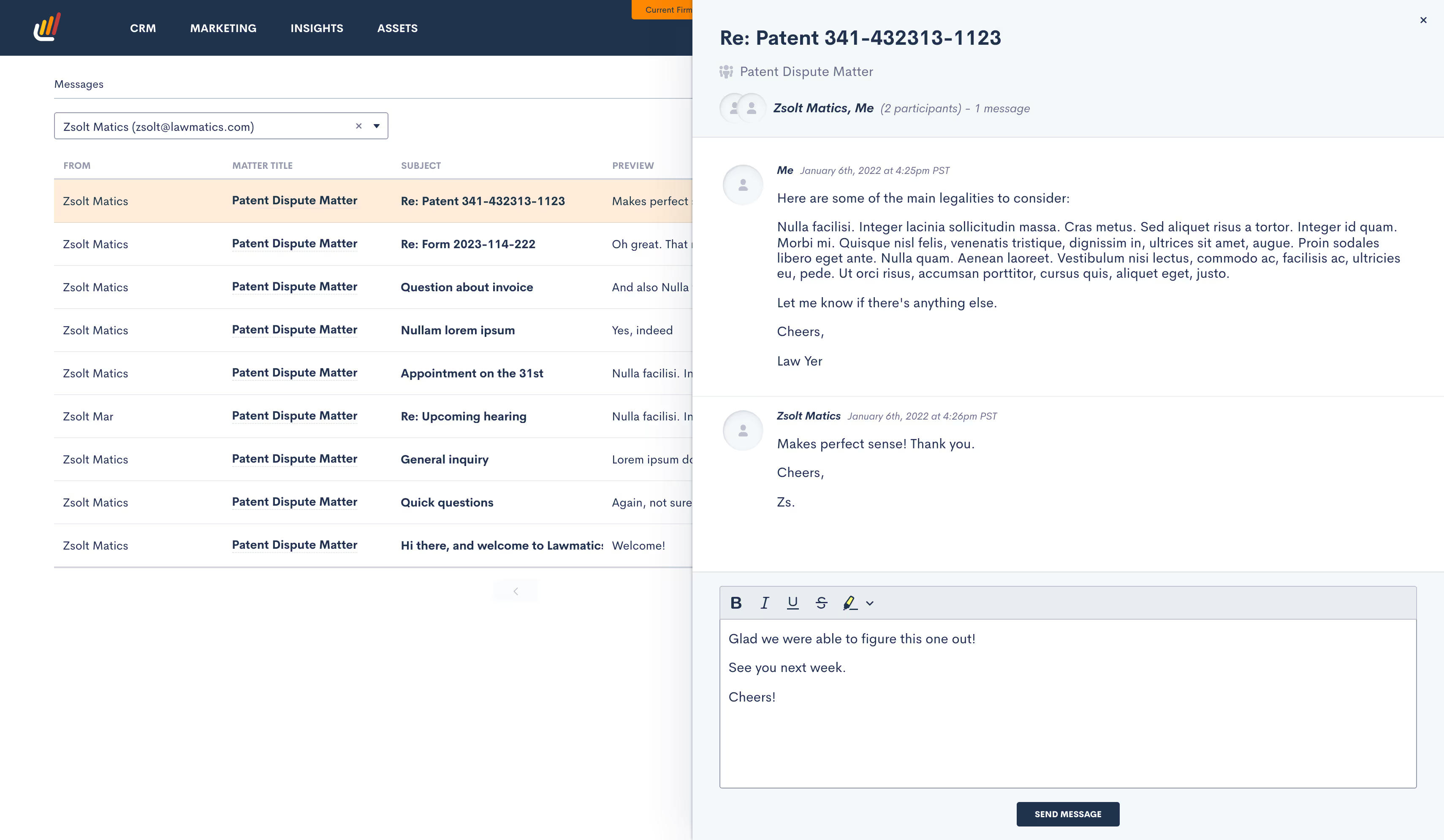
Late last year we took a huge leap forward in releasing our Client Portal for document and calendar event sharing. This year, we’ve made the Client Portal even more powerful by adding a new way to interact with your clients in Lawmatics using our fully secure, encrypted messaging feature.In lieu of flooding your inbox with client emails containing sensitive case information, 2-way messaging via the Client Portal conveniently centralizes all your client communications in one easily accessible place. All incoming and outgoing messages are stored in your account as part of a message thread, automatically generating a historical record of any interaction for future reference. In other words, you won’t need to comb through your texts and emails anymore to find who sent you what, when, and for which matter.
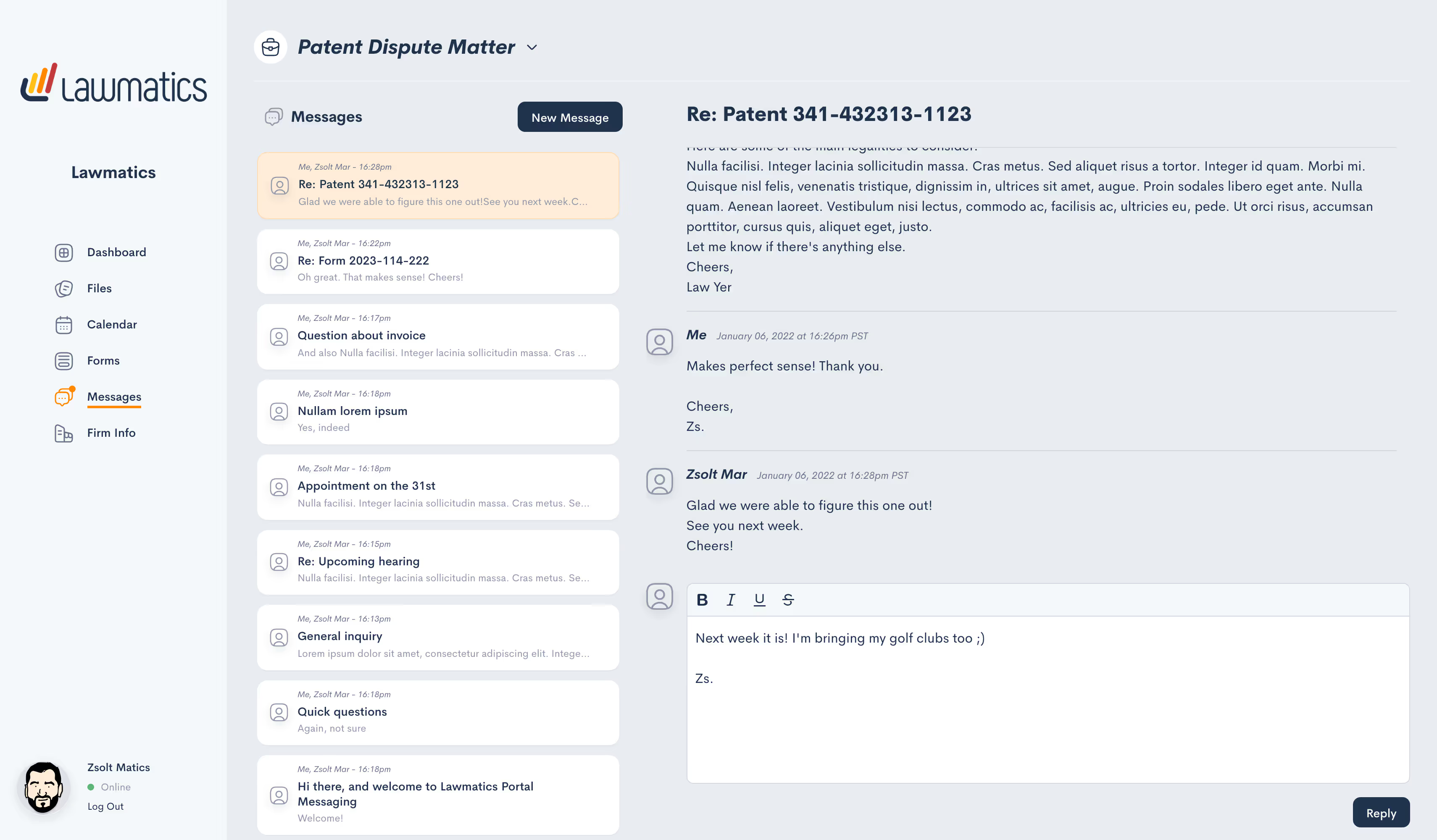
Creating and replying to a message thread in Lawmatics is also easy for both you and your clients. A new “Messages” menu item gives you a top-down view of all message threads wherein you can see all incoming and outgoing communications as well as the manner associated.On the client end, their unique Client Portal now features a “Messages” section to easily correspond with firm members assigned to their case. And to ensure no messages slip through the cracks, you can activate email or text notifications to be alerted about any incoming client message(s).The addition of Messaging takes the Client Portal to a whole new level in that you can keep your clients fully updated on their cases without ever leaving Lawmatics. The faster you move away from messaging via email or your personal cell phone, the better.We are slowly rolling out Client Portal Messaging over the next week. For early access, please shoot us an email at support@lawmatics.com.
Scheduled Email Sends
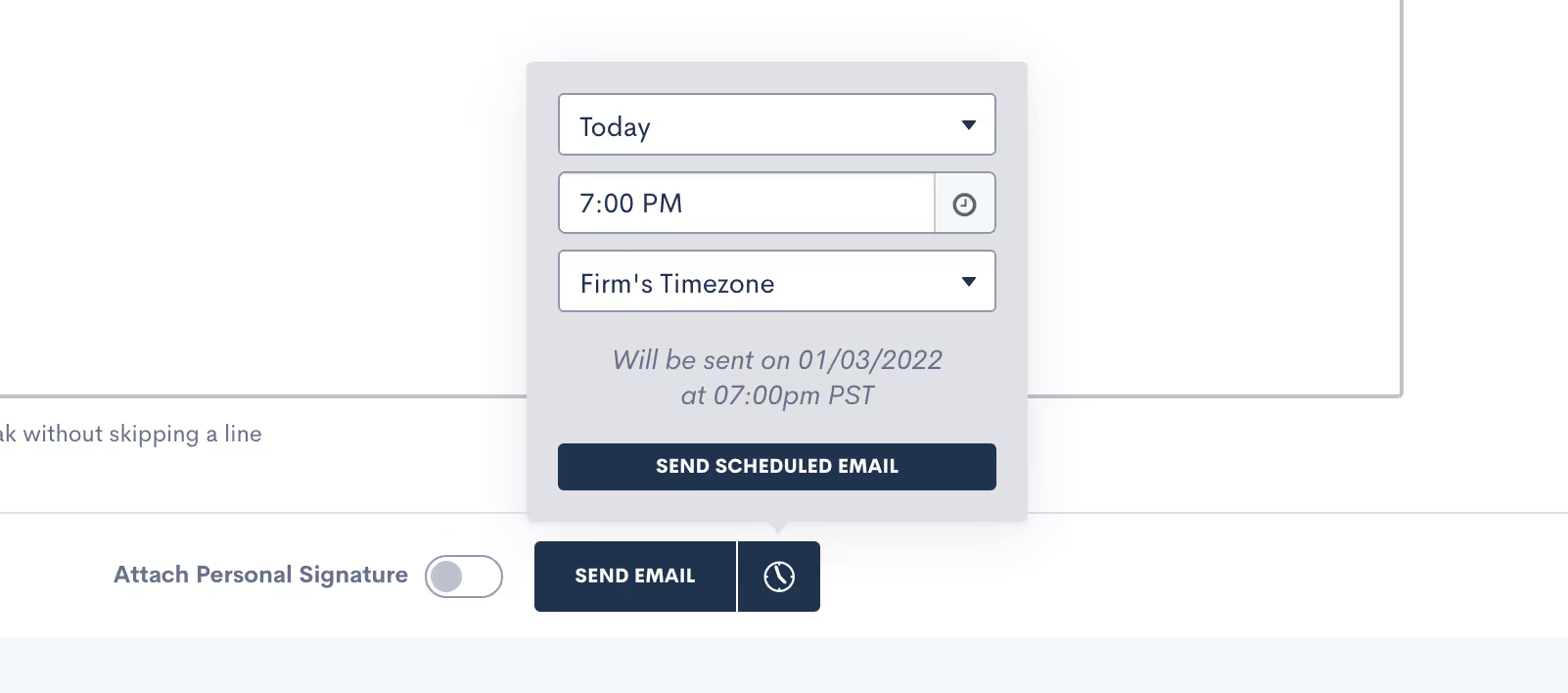
By popular demand, you now have the ability to control when your email messages are sent and arrive in your recipient’s inbox. In addition to sending automated and immediate one-off emails to matters, any email created either from a template or from scratch can now be scheduled to go out at a future date and time. Support documentation along with instructions on how to use Email Templates can be found here.When preparing your next message, take note of the new clickable clock icon situated next to the ‘Send Email’ button. Here you can specify a date, time, and timezone for your upcoming email send — all in a matter of seconds. And should you need to cancel a queued send for any reason, you can do so quickly and easily from within the individual matter.So let’s say it’s 11 PM and you just finished drafting a not-so-urgent case update for a client or a conflict of interest notice to a prospect. You no longer need to wait until the next morning to manually send that message (or risk sending it unseen outside of business hours). Just set it and forget it.
Resend Expired Signature Documents
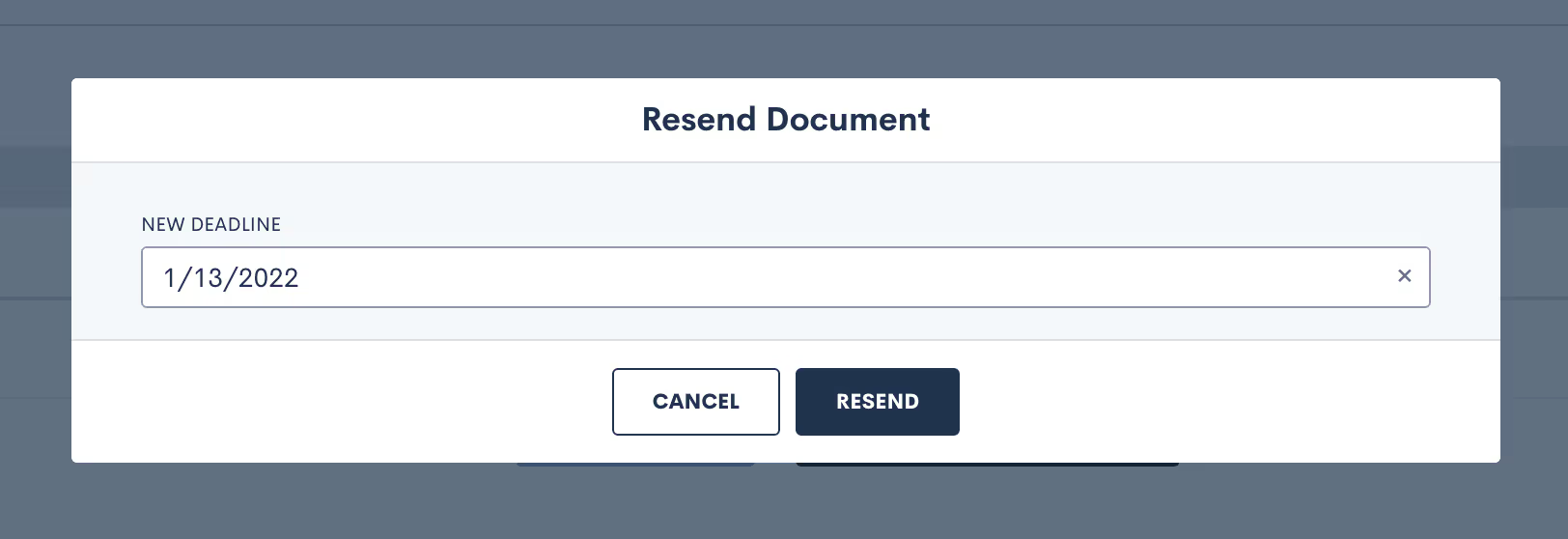
Delays happen; it’s the nature of the business. What you don’t want is for those delays to translate into lost time for you or your staff. For that reason, we’ve rolled out a new shortcut in Lawmatics that allows you to resend any expired documents requiring e-signature with the click of a button.For instance, should a prospect fail to sign a fee agreement within the allotted time, you can simply send them a duplicate copy from the Documents tab of your Lawmatics account. Any document with a status of “Expired” is eligible for a resend, with the added option to extend the e-signature link deadline. No need to send a new e-signature required document from scratch. Further information on utilizing documents in Lawmatics can be found here.Ultimately, this update offers additional control and convenience when it comes to documents that require e-signature and is part of a growing list of time-saving features on our docket for 2022.Stay tuned for more updates and improvements from the Lawmatics team later this month! Not using Lawmatics yet? There’s no better time to start than the beginning of a new year. Book a personalized demo to learn how we can help your firm reach peak efficiency in 2022!