



The Lawmatics Blog
Insights on legal marketing, automating the law practice, and legal tech in general


Last month, we walked through how to set up custom matter views. But building views is only half the equation — the real value comes from putting them to work. When intake staff, attorneys, and admins are all looking at the same long list of fields, it's easy to miss what matters, waste time hunting for the right information, or forget to fill out a field before firing off a contract.
In this Deep Dive webinar, Devon Butler, product manager at Lawmatics, and Clare Struzzi, who leads the account management team, showed how firms can use custom matter views to trigger automations, surface reporting fields, and tailor layouts by role and practice area.
Time stamps of key takeaways
5:53 – Why customize your Matter pages
Devon kicked off with four reasons to invest in custom matter views: cutting through the noise so each role only sees what they need, supporting cleaner reporting, strengthening team handoffs between intake and attorneys, and working faster directly from the Matter page without having to search for fields.
9:48 – Building practice-area-specific views
Clare walked through an estate planning intake view built specifically for intake specialists, showing how organized sections replace the old starred-fields approach. She highlighted how a field like "Next Steps Pre-Consult" can live right at the top of the view so the intake team can trigger automations directly from the details page — no need to reopen a form.
14:58 – Creating role-specific views
Devon and Clare showed how the attorney view for the same estate planning practice area includes different fields at the top — like "Next Steps Post-Consult" and a dedicated contract fields section where merge fields for engagement agreements can be reviewed and completed before sending. Clare also pointed out that sensitive information like Social Security numbers can be placed in sections that default to a collapsed view.
25:00 – Triggering automations and managing contract workflows
Devon walked through a live example of building an automation that fires when the "Next Steps Post-Consult" field is updated — automatically moving the matter to the correct pipeline stage and sending the engagement agreement. She also showed how duplicating automations makes it simple to handle variations, like sending a single-signer versus a joint estate plan document.
35:09 – Surfacing fields for cleaner reporting
The session wrapped with a look at how the reporting fields on custom views — source, campaign, estimated value, actual value — feed directly into the analytics page and custom reports. Devon demonstrated grouping a report by source to quickly see which referral sources are converting and where data gaps need attention.
Webinar slide deck

Automations are key to building a powerful workflow that doesn’t exhaust your human resources – but how does an Automation know when to start and when to end? How does it know which actions should be taken on which items?Welcome to the world of Automation entry and exit conditions. These conditions create Automations tailored to your firm’s unique clientele and sales cycle.In this Deep Dive, you’ll learn how to harness an array of entry conditions to trigger automated workflows, and we’ll explore best practices for utilizing exit conditions effectively. By the end of this read, you'll be armed with the knowledge and tools to craft highly efficient, precise Automations that both save time and increase your firm's productivity.But first, let’s delve into essential background on how entry and exit conditions function in Lawmatics.
Automation entry and exit - the basics
Understanding each component of an Automation is key to building one that truly serves to save you time. Here’s what you need to know about each component and its function.
Automation types
When creating a new Automation, you will be prompted to select the Automation Type. The three options are as follows:
- Trigger: These Automations trigger when the entry condition is met, and will run all the way through unless exit conditions are met.
- Appointment: This type of Automation triggers when an appointment is scheduled, and allows you to create time-relative triggers within the Automation (done by clicking the orange button below).
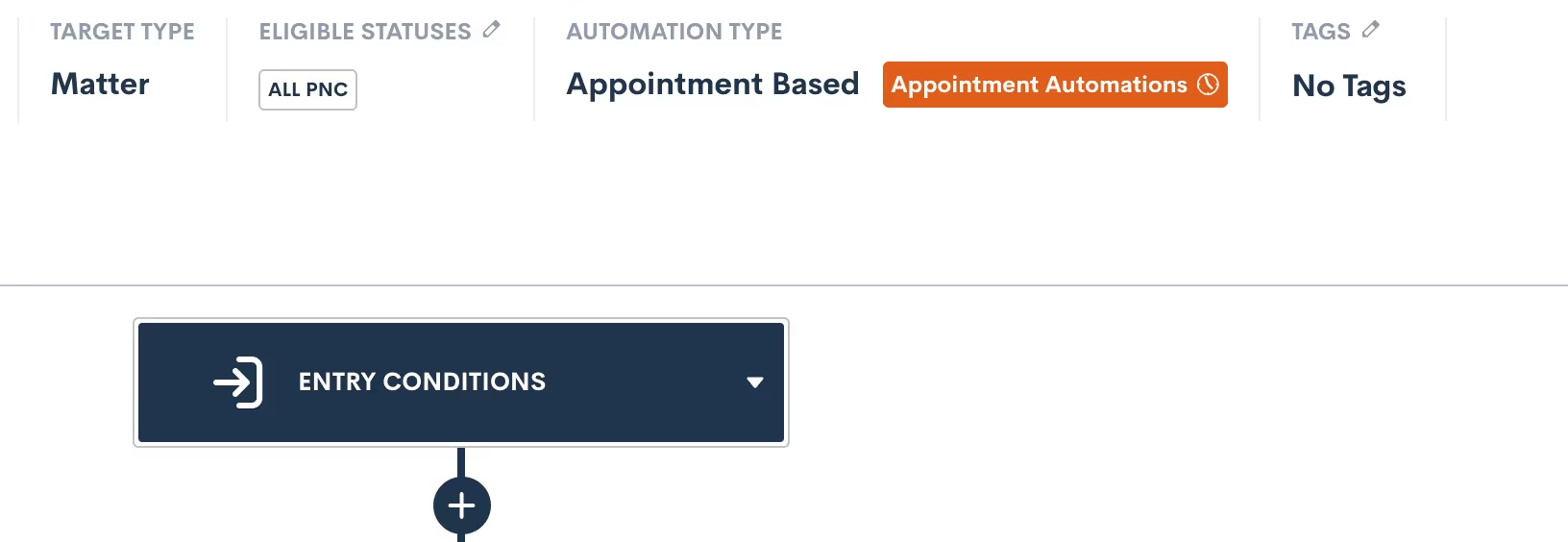
- Date Field: Will trigger when the selected date field is populated for a given matter, and allows you to create time-relative Date Automations, much like Appointment Automations shown above.
These three Automation types determine the manner in which your Automation entry conditions function at the very start of your Automation. We’ll dive further into each of these as we break down all entry conditions later in this article.
Target Type and Statuses
In addition to selecting your Automation Type, you must define whether your Automation will act on Contacts or Matters by selecting a Target Type. If you choose Matter as the Target Type, you must also choose Target Statuses.

For any Automations that are intake or client related, your Target Type will be Matter. Use Contact type for Automations that could run on any contact, such as referral partners, other attorneys, etc.When the type is Matter, you also must select which status(es) can run through this Automation. This is essentially an entry condition in itself, since only Matters of the selected status(es) can trigger the Automation.
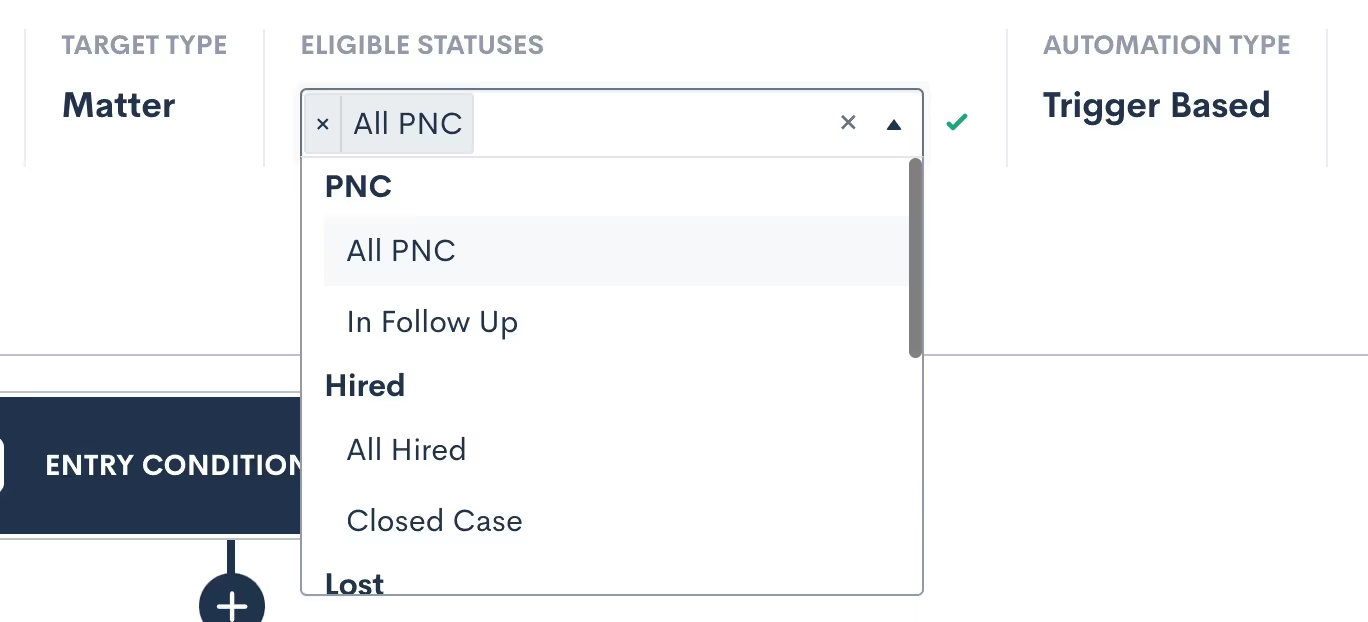
The eligible statuses can also be edited later after you create the Automation. Note: you can select more than one eligible status.
Activating and deactivating
In order to edit an Automation, it must be set to inactive. If you have already activated an Automation and wish to make further edits, simply deactivate it and make your edits. Any targets currently running in the Automation will stay exactly where they are in the workflow while the Automation is inactive, and only resume once it’s reactivated.Deactivating and reactivating an Automation will not cause targets to be re-run through that Automation from the start.When reactivating an Automation, you’ll receive a warning if any Matters who now meet the updated entry conditions will immediately run through the Automation upon activation.

Proceed with caution if you see this message — especially for Automations that you only want applied to new matches moving forward. To skip any current matches, simply click the Future Matches Only options.All Matters will only trigger into a given Automation once, with the exception of our Form Filled trigger (discussed later). While you can manually re-run a target through an Automation, that target will not trigger through the same Automation more than once.
Entry conditions
Entry conditions are arguably the most important part of your Automations, since they determine what will set the workflow in motion. Let’s walk through each available option for entry conditions.
Using multiple entry conditions
As we explore the various entry conditions, note that Automations can be further refined by combining multiple entry conditions with either an AND or an OR relationship.To use multiple entry conditions, first select your first entry rule. Then click the button labeled Add Entry Conditions, to add your second entry condition.
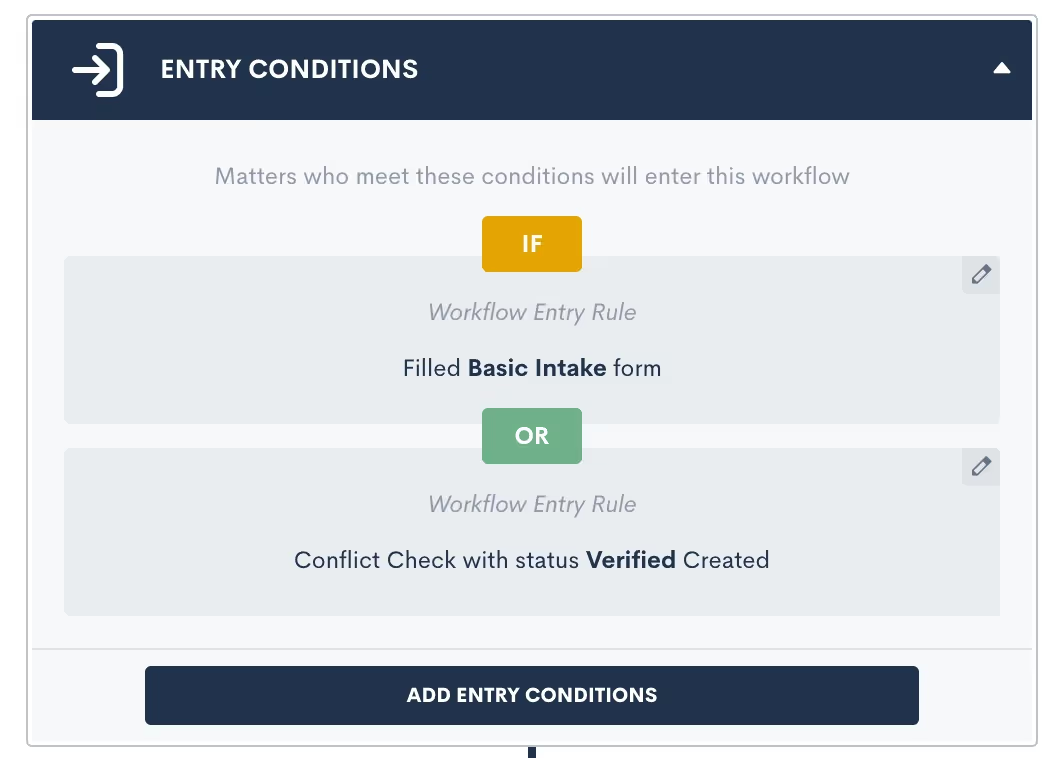
Once you have both (or all) entry conditions entered, simply click where it says OR in the image above to change to an AND relationship if desired.These entry conditions will be honored as they are selected. AND relationships require all the selected entry conditions to be fulfilled, whereas OR requires just one such condition to be fulfilled.OR ExampleA firm has multiple intake forms, one for each of their different practice areas. Once any one of these forms is submitted, an Automation should trigger to confirm the submission and follow-up with that prospect until they schedule a consultation. This Automation should be built with an entry condition for each form linked with an OR relationship.AND ExampleA firm requires a client to both fill out a form and submit a requested file in order to trigger the next action in the Automation. This Automation should be built with two entry conditions – one for the form and one for the file upload – linked with an AND relationship.
Match all
The first option you’ll see for setting an entry condition is also the most encompassing. Since your selected statuses also work as an entry condition, using the Match All entry condition will simply run the Automation on every possible target within the selected type and status.

In the example above, you’ll see that PNC was selected as the only eligible status. This means the Match All option will only match all Matters with the PNC status, and not ones with other statuses like Lost or Converted.While this entry condition can be useful, the most effective Automations are much more targeted.
Registered for event
Lawmatics has everything you need to manage mass events such as seminars, luncheons, and more. This includes the ability to trigger an Automation when someone registers for one of your events.
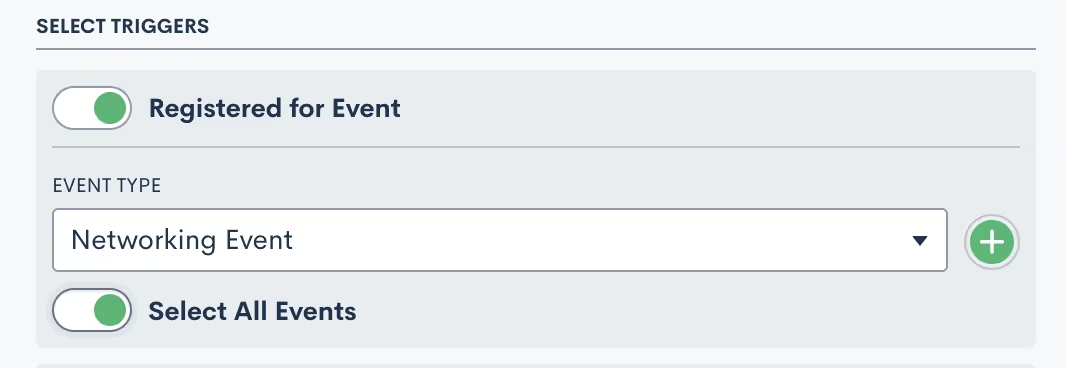
To automate different actions for different event types:
- Choose which event type should be the catalyst for each Automation
- Select a specific event within that type, or toggle Select All Events so that this Automation runs on any events of that type.
Custom email activity
Custom email appointment triggers in Automations are one of the most critical components of email marketing and automation. This trigger allows you to fire an Automation based on whether a specific email has been opened or clicked on (assuming there is a clickable link in the email).

- Select the email that you would like to base this Automation trigger on
- Select whether you want the Automation to trigger on the specific email being opened or clicked on by the recipient
Filled a form
This trigger allows you to select a specific form that, when submitted, will automatically trigger the Automation. If you wish to trigger an Automation on one of two or more forms, this can be accomplished by setting multiple entry conditions with an OR relationship.

As mentioned above, Lawmatics Automations only run once, meaning that if the condition is met multiple times the Automation will only run the first time the condition is met. The Filled a Form entry condition, however, gives you the option to have the Automation run every time the selected form is filled out.

If the latter is selected, then any given Matter will run through the Automation each and every time the selected form is submitted.
Requested files
Lawmatics file requests are a valuable tool, allowing you to easily send out templated file requests to your Matters. Use this entry condition to trigger an Automation based on the status of a particular File Request.

- Select a File Request template to base this Automation trigger on
- Select whether you want the status of the File Requested to be (IS) or not to be (IS NOT)
Note the following three status options:
- Pending: the File Request has been sent but no files have been submitted
- Submitted: some files have been submitted but not all the requested files.
- Completed: all requested files have been uploaded
Most commonly you will trigger an Automation when the status of a file request is Completed.
Signed a document
Lawmatics allows you to create an Automation trigger based on the signing of any particular e-signature document. A great example of this is fee agreements or retainers. Simply send one to a new client for signature, and then have an Automation that would only trigger once all parties have signed that fee agreement.

Select the document type, and then the specific document. Remember that you can always use multiple entry conditions to create an OR relationship with multiple documents.
Appointment created
When you use this trigger the Automation will become an Appointment Automation, discussed earlier in our Automation types. You can select this Automation type when you are first creating an Automation, or simply select this entry condition when choosing your trigger and it will change to that type automatically.

Appointment Automations allow you to create time relative Automations based on the date and time of your appointment. For example, you can trigger an Automation "one day before" or "two hours after" the appointment.The parent Automation (the part shown above) will trigger at the time the appointment is scheduled, whereas the Appointment Automations (shown below) will trigger based on their relative time selection.

Note that the Appointment Automations are activated and deactivated independently of the parent automation. If an appointment is rescheduled or canceled, the Appointment Automations will update accordingly.
Invoice paid
This entry condition is only available if you are using LMPay, Gravity Legal, or if you have a LawPay integration connected. This entry condition allows you to trigger an Automation when an invoice has been paid.

Task activity
While you can of course assign Tasks as an automated action, you can also trigger an Automation when a particular type of Task is either created or completed.

Select whether the creation or the completion of the Task should trigger your automation, and then select from your Task tags to determine which tag should trigger this specific automation.
Conflict check
Conflict checks are often a crucial part of your intake, so you may consider triggering an Automation based on the status of one of these checks.

Choose to create this entry condition when a conflict check is either Denied (conflict detected), Undecided (needs manual check), or Approved (no conflict). You may even end up creating a complete workflow where one Automation performs the conflict check, and another triggers upon the passed or failed check.
Match on fields
Last but not least, the Match on Fields trigger is one of the most powerful triggers, allowing you to create an entry condition based on the value of any fields in your CRM database.
- Select the target field. It’s common to use fields like Practice Area, pipeline stage (Stage), or Status with this trigger.
- Choose which condition should be evaluated
- Pick the value you are seeking a match on
The condition options will change depending on the type of the field that you select as your target. For example, a list type field will have Equals or Not Equals as condition options, whereas a number field will have Greater Than, Less Than, and other such options.
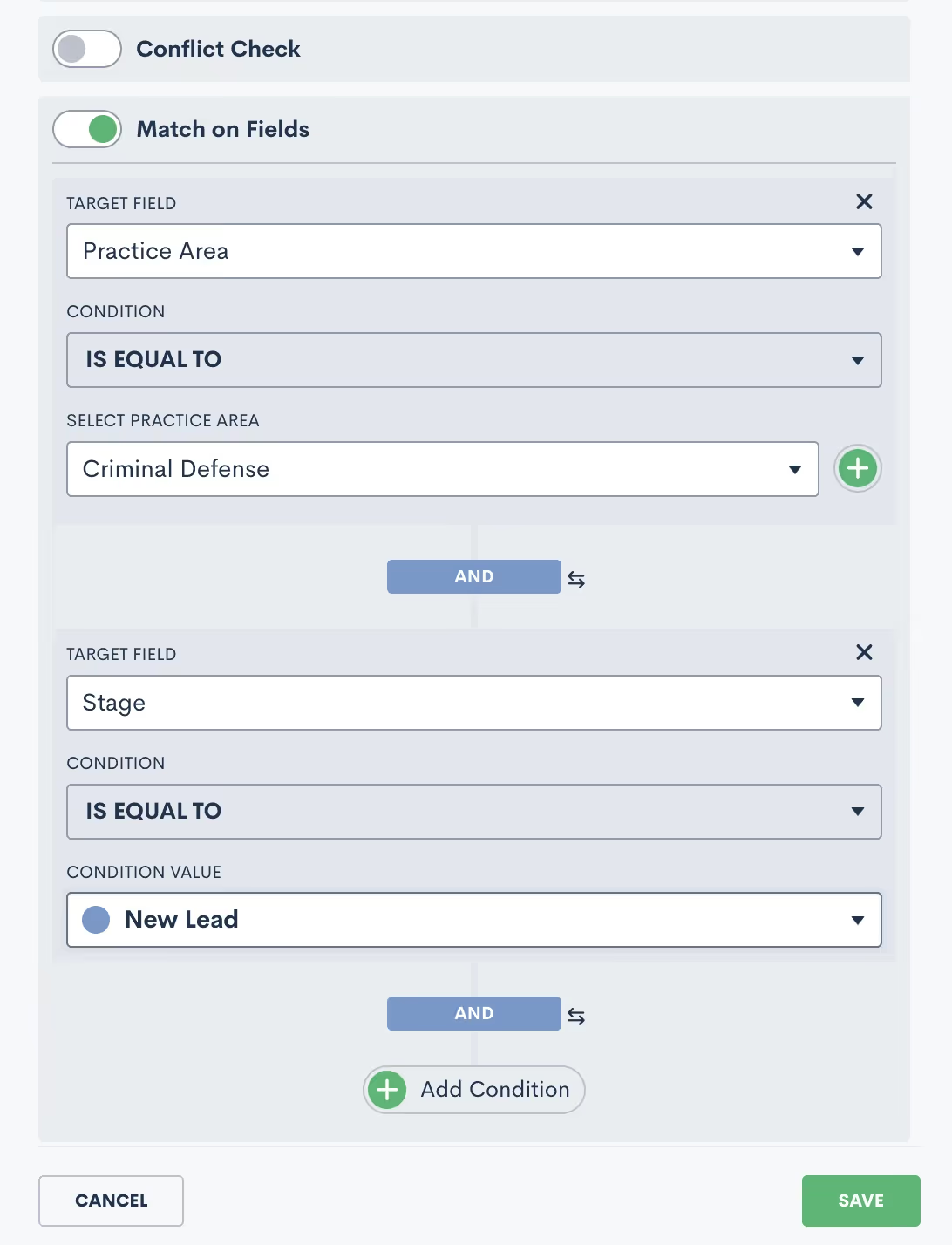
The Add Condition button allows you to add multiple conditions to the matching trigger, as shown in the image above. You can also give these conditions either an AND or OR condition. In the image above, you will see that they have an AND relationship. To change to OR, simply click on the word AND, and it will switch to OR.
Exit conditions
Guess what – the options for exit conditions are exactly the same as those for entry conditions!

While we won’t go through them all again, just remember that any of the conditions described above that can trigger an Automation are essentially used the exact same way to “trigger” a target to exit an Automation.ExampleWhile a filled form could be used to initiate an Automation, that exact same condition may be used in a different scenario to exit a target from the Automation. You might use this to stop an automated sequence of follow-up emails after a client has submitted the information your firm requires.As you set your Automation exit conditions, simply think of them as “triggers” in reverse.Exit conditions are checked at the start of each action in your Automation. If you happen to have an Automation with long time delays, the exit conditions are not taken into consideration while the target is within that delayed period.Instead, the exit condition will be checked once that time delay has run its course and the target starts to enter the next action in the Automation. At this point, that next action will not be run if the exit condition is met and the target will exit before any further actions occur.That being said, you typically want to select exit conditions that are more of a permanent condition rather than something static that may change by the time the next action is reached.
Exit vs. If/Else Conditions
One of the most common mistakes when it comes to exit conditions is to use an If/Else Condition branch instead of exit conditions. Ponder the following example:

The supposed goal of this Automation is to check if a Matter has filled out a form. If they have, we want to change a certain attribute, and if they have not, we want to re-send the form. This is an example of what NOT to do.The way this Automation is built with the If/Else Condition will NOT work. The condition will be checked at the time the target hits this branch in the Automation, not necessarily when the form is filled out.Instead, you need to have an Automation that sends out the form on spaced out intervals, with exit conditions of the form being filled. A separate Automation will trigger when the form is filled to perform the change attributes action. Read more below to see this example of what TO do.
Useful examples
Example: form reminders
When creating an Automation to send out a Basic Intake form (or any other form), your Automation should look similar this:

These actions can be repeated as many times and on any cadence that you would like. As you have the exit condition selected, as shown above, your target will stop getting reminders once they have submitted the form.Remember, if you want something to trigger once the form is filled out, make sure to use the filled form as your trigger for a separate Automation. Don’t try to use an If/Else branch to check for the status of the form.
Example: drip campaign
The same principle applies to creating a drip campaign within an Automation. Your drip campaigns could have any purpose you desire. For example, you may have one prompting a new lead to schedule an appointment, another following up with an old lead that has gone dark, yet another checking in with an ongoing client – or any other scenario you can think of.When it comes to exit conditions for these drip campaigns, you must think about what condition would cause this Automation to no longer be relevant for a given target. In other words, whenever the call to action (AKA the thing you’re trying to get them to do from this drip campaign) is accomplished, they should exit the Automation.The example below shows a hypothetical drip campaign set up to continue sending emails to a matter as long as they are in the New Lead stage of my pipeline.

Since I have set the exit condition to be “Stage is NOT New Lead”, this means that they will exit the Automation once they move to any other stage on the pipeline besides New Lead.
Conclusion
You now have the knowledge and tools to craft highly efficient, precise Automations that will not only save time, but also elevate your firm's productivity. You've gained a deeper understanding of these vital components. You've also learned to harness a diverse array of entry conditions to trigger automated workflows and to utilize exit conditions effectively.With these insights and relevant examples, you're well on your way to becoming an Automation maestro. Create the best possible client experience with Automations, and stay ahead of the curve to transform the way you approach automation in your firm.

Lawmatics is all treat and no trick when it comes to our brand new features, including appointment time zone selections, company matter add-ons, and much more. So grab a pumpkin spice latte and hunker down for this fresh new batch of features.
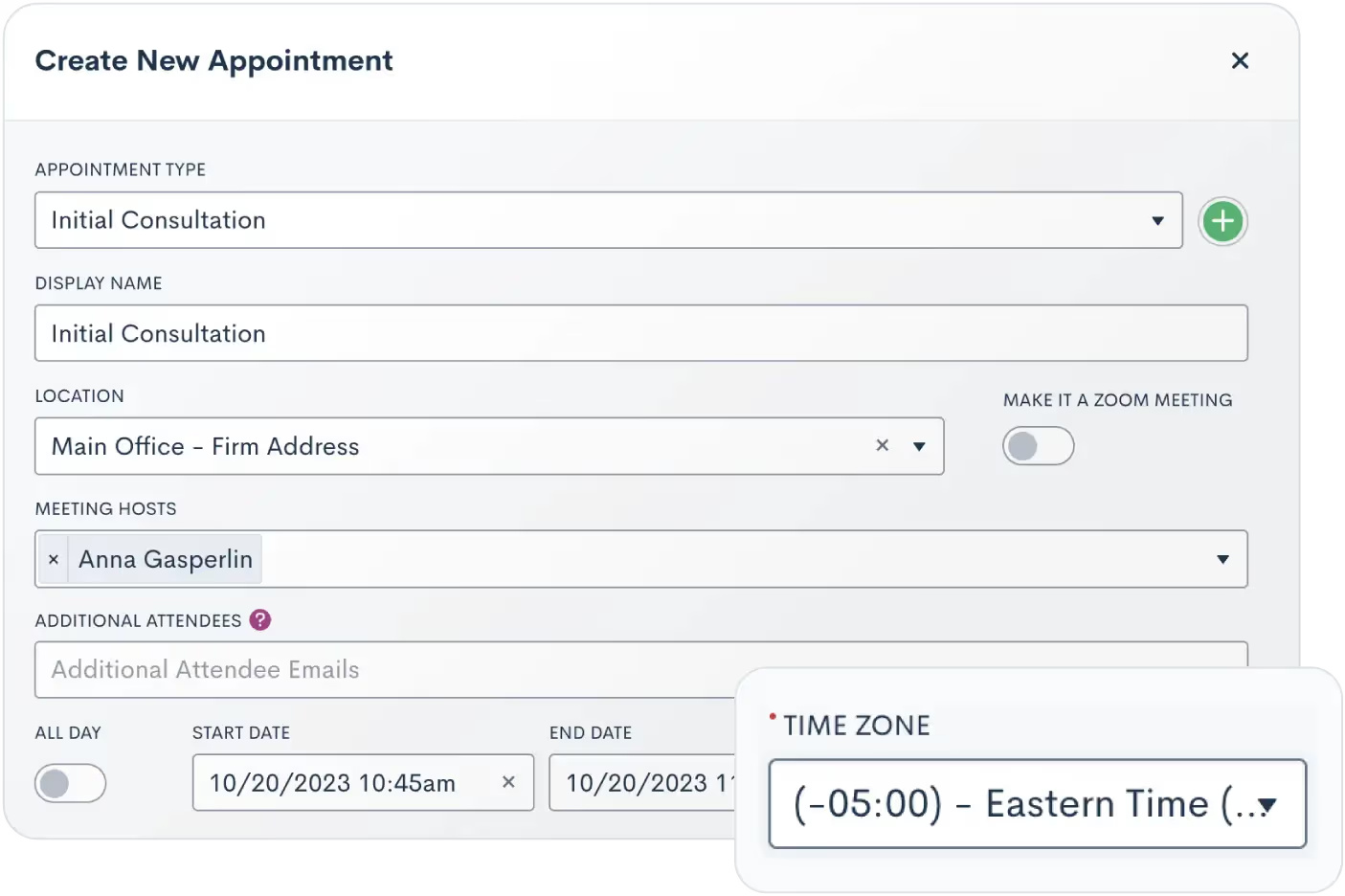
Simple scheduling for different time zones
Does your firm operate in multiple areas or with remote staff? We've simplified appointment and event coordination for you by introducing a new Time Zone field. Using said field, you can instantly select the appropriate time zone, ensuring that both you and your client don’t miss each other come meeting time. No more awkward rescheduling or mental math for your bookings.
Text clients like an old friend from home
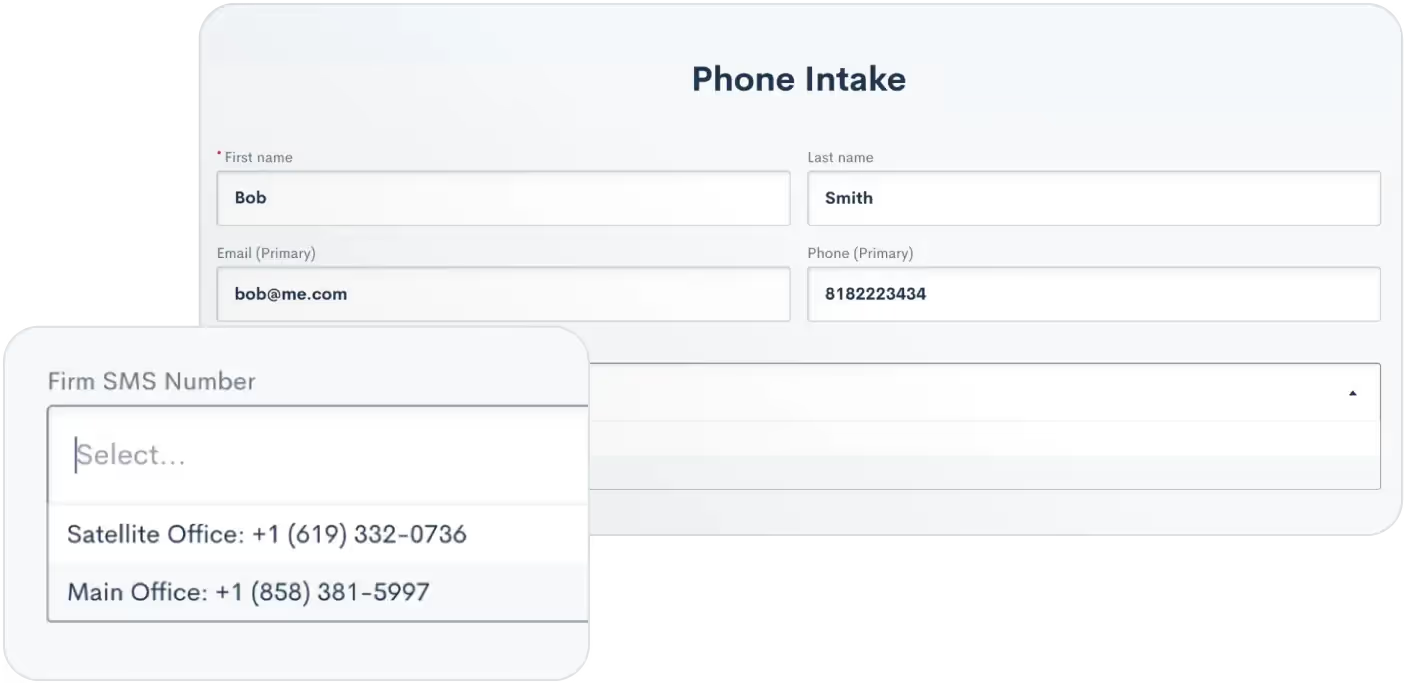
On the topic of regional communication – you can connect with clients in a way that feels personal. Users can now have multiple active phone numbers with varying area codes to send text messages from in Lawmatics. This release is accompanied by a new Firm SMS Number field, allowing you to manually select which phone number to use for each contact.
Refine Conflict Checks with multiple search terms
After introducing flexible search terms in our August release, we’re making your conflict check search even more dynamic and inclusive. Users can now use multiple search terms by creating an ‘Or’ relationship. This will include more relevant data in your search by significantly broadening your conflict check results. (Sneak peek: we're already working on adding an ‘And’ relationship for search terms, so stay tuned!)

Build more robust integrations with Zapier
Our new Lawmatics Zapier App enhancements can help you further redefine your workflows. Previously, users were limited to syncing Contacts and Matters through Zapier. Now, we're excited to introduce the syncing of Companies across applications. This update simplifies data management, ensuring uniformity and consistency throughout.

Don’t miss a company contact with new email fallback
Don’t have a personal email address for a Company’s point of contact? Don’t worry. Our system will now default to using the Company's email address for communicating with that Matter. One way or another, your emails always reach their destination. This feature is available for emails sent from the Matter profile, in Marketing Audiences, and also in Automations.
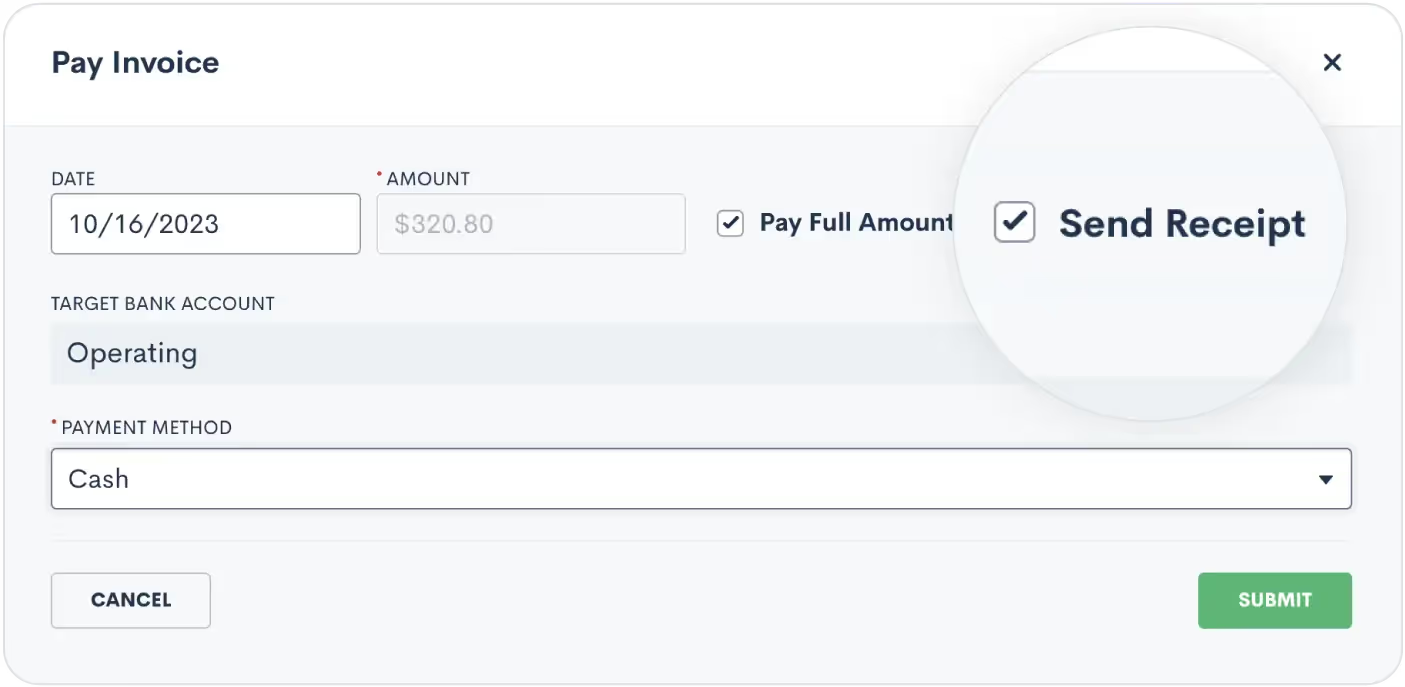
Receipt customization for manual payments
When dealing with a client’s bill, transparency is key. This new update helps our Time & Billing users deliver that transparency. Users now have the option of sending a receipt to the client whenever manually logging an invoice payment. This added flexibility ensures you can cater to the specific preferences and needs of your clientele.
As always, we welcome your feedback and encourage you to reach out with any questions or suggestions. Thank you for being a valued member of our community. Together, we continue to push the boundaries of what's possible for law firms.Sign In or Sign Up to get started with Lawmatics today

More than a resume, attorney biographies introduce the people behind the law firm. A thoughtfully crafted bio acts as a conversation starter, providing a window into an attorney's unique personality and passion for the law.Attorney bios are typically located within the law firm's About page and serve as a great opportunity to establish expertise and forge authentic connections. Generally, the About page is often one of the most visited pages on a law firm's website after the home page. And it's a key destination prospective clients go to learn more about the firm's attorneys, capabilities, and approach.Exceptional bios allow lawyers to effectively communicate their credentials while also highlighting approachability and genuineness nurturing meaningful relationships with clients that drive growth and engagement. Each bio introduces an attorney at the firm and highlights their credentials, experience, and passion for the law. In addition to those details, it may overview the law firm's history, mission, values, and areas of practice.Let’s take a look at how you can improve your law firm’s attorney bios.
Building trust and credibility in the digital age
Prospective clients are looking for more than just credentials (while still looking for credentials), they want to engage with the people at the law firm. This is where compelling attorney bios come in.Far more than a laundry list of accolades, an impactful bio becomes a story. A story that establishes expertise while also highlighting personality and values. The bio provides a platform to move beyond a resume and forge authentic connections. In essence, your bio is an opportunity to turn prospects into clients by connecting through engaging and strategic storytelling. Below are some of the key goals for a good biography.
Showcasing expertise and experience
A biography establishes competence and subject matter expertise. Highlighting credentials like academic qualifications, admissions, years of experience, ratings, certifications, and awards builds confidence. Clients want to assess their skills.For example, an Intellectual Property attorney can showcase:
- Computer science degree from MIT
- 15 years handling patent litigation
- Admitted to practice in New York and California
- AV Preeminent Peer Review Rating from Martindale-Hubbell
- Secured over $20M in infringement verdicts
This quickly conveys niche expertise and an accomplished background.
Connecting through personal details
While credentials are crucial, clients may also want a personal connection with their attorney. You can highlight personal details like:
- Hometown, family, interests outside law
- Passions, motivations, and experiences that shaped their career
- Military service, volunteer work, and charitable causes
Sharing these insights creates rapport. Clients get to know the real person behind the suit.
Converting prospects to clients
An exceptional bio serves as a pivotal conversion tool by compelling readers to take action. Strategic storytelling highlights achievements and expertise while personal anecdotes forge connections. This one-two punch nudges prospects to pick up the phone, submit an intake form, or contact the firm.Specifically, bios can motivate conversions by:
- Establishing subject matter authority and confidence in your capabilities
- Making expertise relatable through real-world examples and client impacts
- Using a warm, welcoming tone that builds rapport
- Providing social proof of results through client testimonials
- Ending with a clear CTA like requesting a consultation
When an attorney's credentials and personality resonate, prospects become clients. An optimized bio guides readers seamlessly through that conversion process.
Communicating firm values and approach
The attorney biography provides an opportunity to highlight the law firm’s values beyond just individual accomplishments. By thoughtfully showcasing community involvement, pro bono work, nonprofit boards, and other efforts, lawyers can illustrate the firm's core values and service philosophy.For example, an attorney bio might mention:
- Leading the firm's efforts to provide free legal aid to domestic violence victims. This communicates a priority on social justice.
- Securing millions in verdicts for small business clients. This conveys an emphasis on supporting entrepreneurs.
- Volunteering with the Innocence Project. This shows a passion for criminal justice reform.
- Chairing local nonprofits and bar associations. This illustrates a commitment to the community.
Through strategic details, readers gain insight into the principles, causes, and beliefs that shape the firm’s culture. They get a feel for "why we do what we do." The alignment between the firm's values and the prospect's own priorities can further drive engagement. Showcasing culture and character helps forge connections beyond credentials.
Enhancing visibility with SEO
With strategic keyword optimization and links to external content, an attorney bio enhances visibility during client searches. This establishes thought leadership presence by improving rankings and visibility in key practice areas. Optimized bios are a great place to link to when the attorney has written articles, been interviewed on podcasts or the news. These backlinks help increase Domain Authority but also can draw prospective clients from other website pages back to the attorney's bio to learn more.
Crafting compelling attorney bios: key elements
An exceptional attorney bio incorporates several critical elements to convey expertise, approachability, and authentic personality.Let’s break down the specific elements and their purpose.
Professional headshot
A high-quality professional photograph makes an immediate visual connection with site visitors. It should project confidence, competence, and authentic warmth. Attorneys should avoid overly stiff, staged photos and instead opt for a relaxed, genuine expression. The goal is to exude polished yet approachable professionalism.
Credentials and honors
Highlighting unique credentials, fellowships, certifications, and honors from reputable organizations helps establish niche expertise.For example:
- Fellow, American Academy of Appellate Lawyers (demonstrates appellate expertise)
- AVVO, Martindale-Hubbell, Best Law Firms (shows accomplishment in legal abilities and client ratings/reviews)
- National Trial Lawyers Top 100 (confirms litigation proficiency)
Pro tip: write out the acronym of associations or sunfamiliar honors that may confuse readers that aren’t familiar with the law.
Specializations and sub-specializations
Conveying focused practice areas and sub-specializations allows potential clients to assess fit.An attorney could showcase:
- Patent litigation with specific expertise in SaaS and blockchain technologies
- Chapter 7 bankruptcy and restructuring for small medical practices
- Concentration in high net worth divorce and complex asset division
This degree of specificity is powerful in competitive markets, especially when connected to client outcomes.
Inspiration and background
Build connection with prospective clients by thoughtfully sharing experiences that shaped their professional and personal journeys. Even small anecdotes about impactful mentors, internships, or childhood experiences can provide insights into passions and motivations.
Relatable insights on client pain points
Strategic bios present opportunities to relatably address common client concerns, fears, and emotions. This displays empathy and commitment to client service.For example, a family law attorney could validate feelings of uncertainty during divorce, or a personal injury attorney can address the feeling of humiliation after an accident.
Links to external content
Links to published articles, media mentions, speaking engagements, and other digital assets enhance subject matter expertise. Choose links selectively to avoid overwhelming readers.
Client testimonials
Specific videos or written testimonials from satisfied clients offer social proof of an attorney's successful track record. Client quotes should detail the attorney's positive impacts on their case and well-being.
Memberships and community involvement
Note professional associations, legal networks, boards, pro bono work, and community organizations. This highlights engagement with peers and dedication to service. Be specific about roles and contributions.
- President, Local Bar Association (demonstrates leadership and engagement with the legal community)
- Board Member, Women's Prison Association (highlights commitment to criminal justice reform)
Clear call-to-action
An effective call-to-action conclusion capitalizes on the bio's momentum to motivate prospects.Some options include:
- A warm invitation to request a free consultation or case evaluation
- Link to contact the attorney directly via email, online form, or phone
- Offer to provide a free guide, checklist, or other legal resource
- Invitation to sign up for a newsletter or connect on social media
- Promotion of an upcoming webinar, seminar, or speaking event
The key is motivating readers to engage instead of just exiting the page. Offering free resources or consultations encourages action.
Crafting compelling attorney bios: proven tactics
Writing exceptional attorney bios requires skill, planning, and collaboration. Follow these expert tips for optimizing impact.
Crafting compelling content
Hook readers immediately by highlighting an impressive achievement, an inspirational background, or an interesting career narrative. This establishes expertise and approachability upfront. Showcase specific legal expertise using concrete examples like case results and settlements.Use conversational language that steers clear of excessive jargon. Find strategic opportunities to naturally incorporate relevant keywords to boost client search visibility. But avoid awkward over-optimization. Maintain an authentic, genuine tone that builds trust. Let facts and reviews speak for themselves.
Optimizing structure
Establish a tone that makes sense for your practice area. Do your clients want empathy, aggression, or professionalism? Find your sweet spot and run with it.While there is some flexibility around word count, it is best to keep bios in the 300-500 words range. This provides enough space to showcase key credentials and accomplishments while maintaining a focused, scannable experience for site visitors. Anything significantly shorter than 300 words may seem too bare-bones and cursory. Anything over 500 words risks losing the reader's attention with excessive detail.
Strategies for consistent yet personalized team bios
When developing bios for a team of attorneys, law firms face a balancing act. Thoughtful collaboration, style guidelines, and creative license help achieve consistency while allowing each lawyer's unique strengths and personality to shine.
Collaboratively develop guidelines
To create a consistent baseline while allowing customization.Firms should involve key stakeholders to define foundational style guidelines around:
- Standard biography structure and sections to include
- Ideal word count or length parameters
- Overall voice, tone, and messaging
- Rules for branding elements like logos, colors, and fonts
Provide creative license thoughtfully
Within collaborative guidelines, attorneys should have reasonable creative license to express individuality. Bios can spotlight:
- Specific credentials, awards, and practice niches
- Tailored client successes, verdicts, settlements
- Community groups and causes personalized to the lawyer
Incorporate personalizing elements
Including unique elements make bios distinctive yet cohesive:
- Personalized headshots
- Links to media mentions
- Video introductions
- Testimonials speaking to working with that specific attorney
Updating achievements regularly
As lawyers grow and accomplish more, bios should be continuously updated to accurately reflect evolving expertise and contributions. Fresh, dynamic content keeps engagement high.
5 examples of real, compelling attorney bios
Now that we’ve covered best practices and tips for optimizing attorney bios, let’s examine how those techniques are applied through real-world examples. Analyzing bios across diverse law specializations reveals tangible takeaways for crafting resonant, trust-building bios.
1Brooks Derrick, Derrick Law Office

(Image: Brooks Derrick of Derrick Law Office)Derrick Law Office)Over at the Derrick Law Office in Simpsonville, SC, attorney Brooks Derrick starts by introducing himself in a friendly, conversational tone and emphasizing his passion for helping injured clients.Instead of focusing on credentials, Brooks shares an engaging story about personally experiencing a painful slip and fall injury in 2014. Derrick provides specific details about the humiliation, struggle, and long recovery process, showcasing a powerful way to relate to his client's experiences.The expertise derived from his injury experience allows Derrick to guide clients through gathering their strength and getting compensation compassionately. He ends by warmly inviting readers to contact him.Key insights:
- Uses emotion and personal experience to intimately connect with injury victims.
- Details of own injury and recovery establish deep empathy and comfort.
- Positions himself as an advocate who has walked in clients' shoes.
- Earns trust as a reliable, responsible advocate during difficult times.
2Brandon Dixon, The Law Office of Brandon Dixon, P. C.
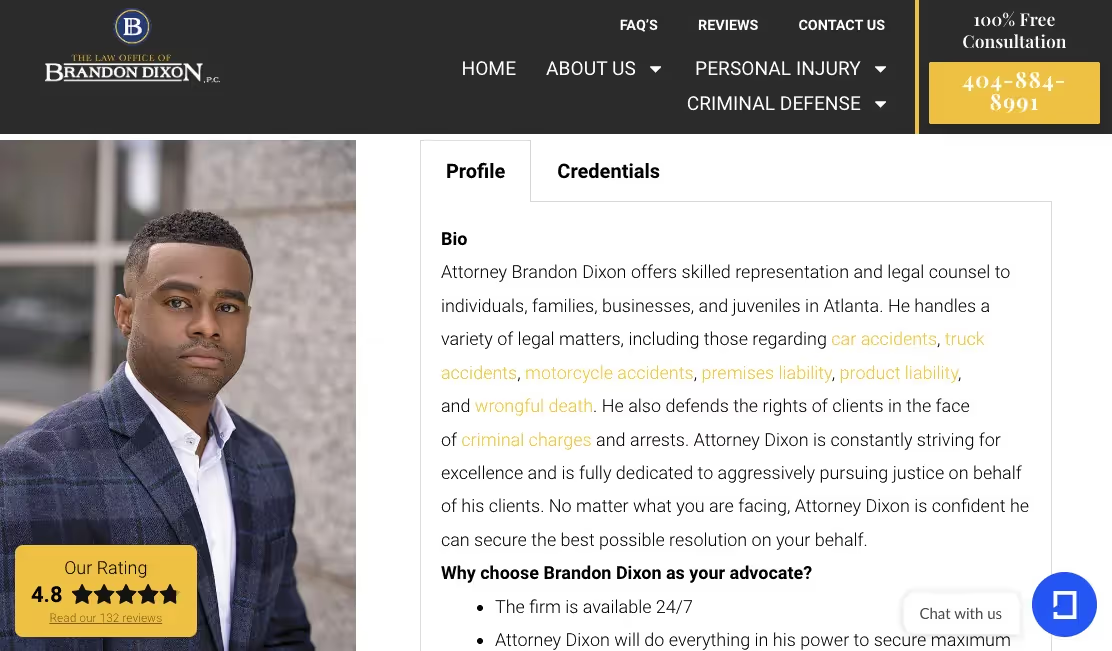
(Image: Brandon Dixon, The Law Office of Brandon Dixon, P. C.)The Law Office of Brandon Dixon, P. C.)Brandon Dixon’s bio of the Atlanta-based law firm, The Law Office of Brandon Dixon, P.C., highlights his focus on personal injury, criminal defense, and representing individuals, families, and businesses in Atlanta. Dixon uses this space to detail the types of matters that his law firm handles like car, truck, and motorcycle accidents, premises liability, product liability, and wrongful death.Something that stands out in this bio is the directness of the section titled “Why choose Brandon Dixon as your advocate?” It lists availability 24/7, fighting for maximum compensation, tireless advocacy in and out of court, free consultations and compassionate support as reasons to choose him. Dixon's bio conveys his constant striving for excellence and dedication to aggressively pursuing justice for his Atlanta-based clients.Key insights:
- Clearly states practice areas and niche specialties upfront, highlighting focus.
- Emphasizes dedication, passion and commitment to clients to build trust.
- Provides reasons to choose this firm/attorney to showcase value.
- Strong call-to-action and free consultation offer motivate conversions.
3Sarah LaRue, LaRue Law PLLC
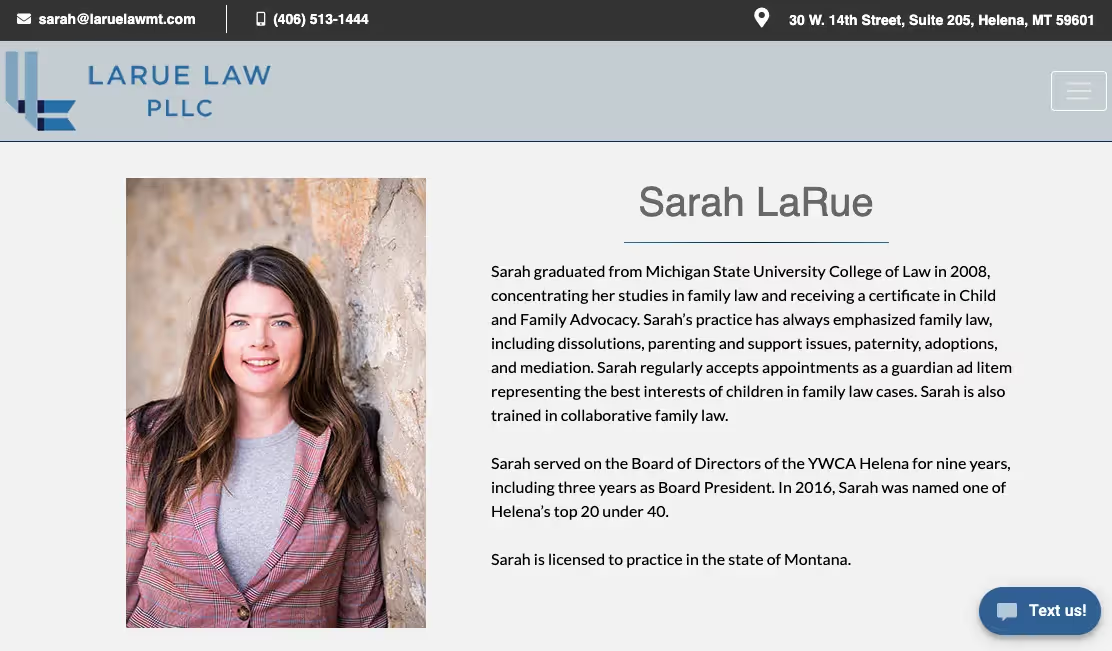
(Image: Sarah LaRue, LaRue Law PLLC)LaRue Law PLLC)In only a few paragraphs, Sarah LaRue's bio for LaRue Law PLLC accomplishes a lot efficiently. She immediately establishes her niche specialty in family law, signaling expertise to ideal clients.The bio highlights relevant credentials including her degree, certifications, and appointments as a guardian ad litem representing children's interests. This demonstrates her qualifications and commitment to clients.It also notes LaRue's community leadership with the YWCA Helena and award recognition among Helena’s top 20 under 40. Despite its brevity, the bio includes her education, experience, and community involvement. Most importantly, LaRue's bio conveys her commitment to providing personalized service and attention to clients. She focuses on how she can help readers, not just on qualifications.Key insights:
- Quickly establishes niche expertise in family law
- Efficiently highlights relevant credentials
- Demonstrates commitment to clients and children's interests
- Mentions leadership and awards, building credibility
- Emphasizes individualized client service and help
4Mary Ann Romero, Mary Ann Romero & Associates
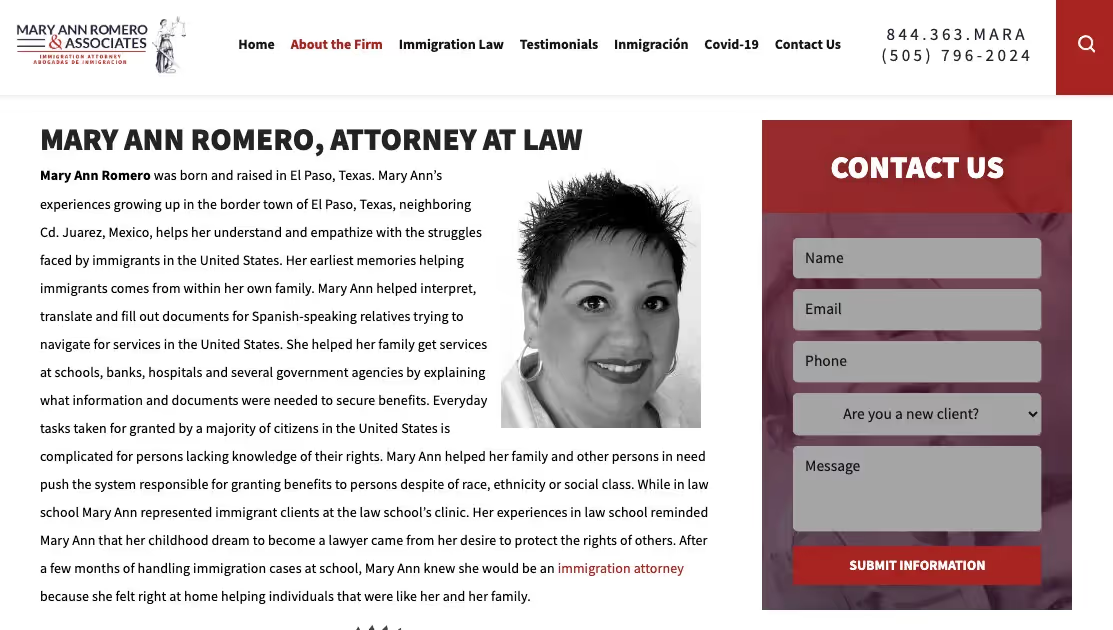
(Image: Mary Ann Romero, Mary Ann Romero & Associates.)Mary Ann Romero & Associates.)Mary Ann Romero is an immigration attorney at Mary Ann Romero & Associates based in Albuquerque, New Mexico. This biography is a storytelling master class and highlights Romero's lifelong passion for immigration law stemming from her upbringing in a border town assisting Spanish-speaking families and others navigate services.Over the course of Romero's career, she has secured permanent status for thousands of immigrants seeking family unity, business opportunities, and protection. She handles cases related to family visas, deportation defense, waivers, victims of trafficking/violence/abuse, and citizenship.The bio emphasizes Romero's creative advocacy in earning clients' trust and securing lawful status. It notes her memberships in American Immigration Lawyers Association (AILA), Hispanic bar associations, her appointment to the NM Access to Justice Commission, and honors like Top 100 Lawyers.Romero provides outreach by presenting on immigration law developments. As a native Spanish speaker, she strives to disseminate accurate information to the immigrant community struggling with legal complexities.Key insights:
- Establishes extensive experience in immigration law over 17+ years
- Conveys passion for helping immigrant community stemming from personal background
- Emphasizes creative advocacy and commitment to earning client trust
- Notes professional memberships, commissions, and accolades
- Highlights outreach providing resources to the immigrant community
Tips for legal marketers at big law firms for creating uniform yet unique attorney bios
- Create firm-wide criteria that all attorney bios should contain (e.g. credentials, photo, practice areas, and contact info.)
- Curate a visual library of high-quality professional headshots attorneys can select from to incorporate photos uniformly.
- Establish protocols for regularly reviewing and updating attorney bios to maintain freshness.
- Develop a standardized biography structure and template attorneys can follow to ensure consistency.
- Allow reasonable creative license within the template for attorneys to customize selected sections highlighting unique accomplishments, memberships, publications, etc.
- Showcase specific practice niches, specializations, and thought leadership activities like speaking engagements and articles authored.
- Note credentials, awards, ratings, and recognitions that differentiate each attorney and build credibility.
- Encourage including personalized elements like videos talking about current issues or highlighting causes they are passionate about.
Crafting compelling attorney bios: template and example
An excellent bio template incorporates all the elements discussed to convey expertise and personality and instill client confidence. Here is an effective checklist that an attorney can adopt:
Professional headshot
Include a high-quality, approachable headshot to connect visually with readers. Avoid overly formal photos.
Full Name and credentials
Prominently display your full name, JD, Esq., or other credentials near the top.
Hook / achievement
Hook readers immediately by highlighting an impressive achievement.
Practice area specializations
Clearly convey your niche practice areas and sub-specializations using targeted keywords.
Biography summary
Provide a paragraph summarizing your academic and professional background. Mention admissions, clerkships, firms worked at, and years of experience.
Awards and accolades
Showcase meaningful credentials, ratings, certifications, and recognizable awards. Keep concise.
Organization involvement
Note contributions to key legal and community organizations. Be specific.
Personal details
Share interesting personal or biographical details judiciously if appropriate to humanize your bio.
Call to action
Include a friendly call to action for readers to request a consultation or access free resources.
Contact information
Prominently display your phone number, email address, and office location.
Example bio:

Maria Rodriguez, Esq.Secured over $5 million for clients in landlord-tenant disputes and housing discrimination cases.Housing Law and Tenant Rights AttorneyMaria's practice focuses on representing tenants in disputes with landlords and property management corporations. She also handles litigation around housing discrimination.After graduating from Columbia Law, Maria clerked for Hon. Elizabeth Davis of the New York Housing Court. She then joined the prominent civil rights firm of Johnson & Associates, handling impact lawsuits and advocating for affordable housing policies before joining her current firm.Recent awards
- American Bar Association Award for Excellence in Affordable Housing
- Hispanic National Bar Association Top Lawyers Under 40
Outside work, Maria enjoys spending time with her daughter Gabriella, trying new recipes, and volunteering at the community center. As a longtime resident of Brooklyn, she is dedicated to empowering tenants and improving housing access.Contact Maria for a consultation if you need legal advocacy regarding landlord disputes, discrimination, or other housing concerns.123 Sesame Street, Apt 4C / New York, NY 12345(555) 867-5309 / maria@housingequityformuppetscom
Setting the foundation of trust
First impressions establish a reputation. A law firm's website presents that critical first handshake with prospective clients. But bios must be more than digital resumes. Exceptional bios artfully blend credentials with personality. They motivate action while demonstrating competence. Bios that resonate drive conversations and conversions. Legal professionals can craft bios that truly connect by incorporating compelling content, sharpening structure, boosting engagement, and ensuring quality.Cultivating an authoritative yet approachable online presence is essential. And it all starts with the bio. With strategic bios as their foundation, law firms can maximize website engagement and forge lasting client relationships through expertise, approachability, and authenticity.

In a competitive market, law firms require robust legal software to streamline their marketing and client intake processes. Email campaigns to nurture and follow-up with prospects are a necessity. However, when running a busy practice, writing compelling marketing copy from scratch can’t (and shouldn’t) be a firm’s top priority.Although many legal professionals have strong opinions regarding the use of legal AI tools, a recent survey of lawyers found a large majority (82 percent) believe that generative AI can be readily applied to legal work, while 51 percent said that generative AI should be applied to legal work.
How is AI being used in the legal field?
AI in the legal industry streamlines processes, enhances efficiency, reduces costs, and improves decision-making. Here are some examples of AI in the legal sector:
Legal document generation
AI legal writing can generate legal documents by customizing templates based upon user input to reduce the time and effort required for drafting legal documents.
Document review
AI-powered algorithms can quickly review and analyze large volumes of legal documents, contracts, and case law to obtain pertinent information, identify patterns, and flag potential issues.
Legal research
AI legal research tools can assist lawyers in retrieving applicable case law and statutes, by scanning through extensive databases of legal documents, saving time and effort.
Virtual assistants
AI legal assistants can provide legal information and answer common legal questions to help law firms handle routine inquiries and provide better customer service.
Legal chatbots
Chatbots on law firm websites can be used to gather initial information from potential clients, helping firms assess whether they can take on a case and reducing administrative tasks.
Compliance and risk management
AI systems can monitor and analyze regulatory changes to help organizations stay compliant with evolving laws and regulations, assess risks, and propose mitigation strategies.
Predictive analytics
AI can predict case outcomes based on historical data and legal precedents to help lawyers and clients make more informed decisions about litigation strategies, settlement negotiations, and risk assessment.
eDiscovery
AI can be used to sift through massive volumes of electronic data during the discovery process in litigation to identify relevant documents and information crucial for legal proceedings.While AI offers numerous benefits in the legal field, it also raises ethical and regulatory concerns, particularly regarding data privacy, bias in algorithms, and the potential displacement of certain legal jobs. Legal professionals must carefully consider these issues as they integrate AI into their practices.
How AI will change the legal industry
Artificial Intelligence (AI) is poised to bring significant changes to the legal industry, transforming various aspects of legal practice and operations. So what is the future of AI in the legal sector? What are the challenges? Here's how AI is likely to impact the legal field:
- Increased efficiency: AI can automate routine and time-consuming tasks like document review, legal research, and contract analysis, allowing legal professionals to focus on more strategic and complex aspects of their work.
- Reduced costs: By automating tasks and improving resource allocation, AI can help law firms and legal departments reduce operational costs, to legal services more accessible and cost-effective for clients.
- Improved accuracy: AI algorithms can analyze vast amounts of data with a high degree of accuracy, reducing the risk of human error in tasks like document review and data extraction.
- Empowered legal professionals: AI tools can act as valuable assistants, helping lawyers and legal professionals perform tasks more efficiently and effectively, ultimately enhancing their productivity.
Overall, AI is likely to reshape the legal industry by augmenting the capabilities of legal professionals, improving access to legal services, and transforming the way legal work is performed, making it more efficient and cost-effective. However, it will also require ongoing adaptation, training, and careful consideration of ethical and regulatory issues.
How can AI amplify efficiency in the legal industry?
Major breakthroughs in automation and AI are fundamentally transforming the business of law. Lawmatics' new tool, LM[AI], incorporates breakthrough technology to boost law firm efficiency. No more staring at a blank screen - with one click, LM[AI] can draft fresh and professional email copy for you to edit and review.Tech-savvy firms that embrace such technology will likely be defined by their seamless client experience, integrated tech stack, and data-driven strategic approach, while those continuing to rely on legacy processes will be in danger of being left behind by firms on the cutting-edge of technology. To learn more about the power of LM[AI], request a demo today.

There’s a lot of talk (and confusion) around law firms these days about customer relationship management (CRM) systems. Is law firm automation the same as law firm marketing automation? Or is it a function of sales? What does it do? Do we need it? This blog aims to answer some of your most pressing questions about CRM.
What is a CRM?
A CRM is a type of technology that manages all of an organization’s relationships with current and potential clients. Law firms manage vast volumes of client data; manually tracking it is time-consuming and error-prone. However, legal CRM software helps law firms manage this data in a centralized and organized manner so that it can be accessed to improve their customer service and business processes.There are generally three types of CRM strategies:
- Collaborative. Collaborative CRM systems focus on customer service to bridge the gap between teams and departments, enabling various groups or areas within an organization to share customer data to make decisions and manage customer relationships.
- Analytical. Analytical CRM leverages customer data into trends and insights that enable organizations to improve customer experience. Analytical CRM systems are good options for mid to large-size organizations that collect vast amounts of data and want to condense it into actionable information.
- Operational. Operational CRM, the most common type, streamlines the various processes utilized when building customer relationships and applies them to the central business process. These platforms help companies generate leads, convert them into contacts, and provide the infrastructure necessary to retain customers.
Today's streamlined CRM systems allow lawyers to manage client data more efficiently than ever before.
Is CRM a marketing or sales tool?
It’s actually both – and much more. CRM tools manage relationships across the entire customer lifecycle, including marketing, sales, digital commerce, and customer service interactions. A CRM solution helps an organization focus on its relationships with people – customers, colleagues, vendors, and suppliers — throughout their interactions with them, including locating and engaging new customers, securing their business, and offering support and additional services throughout the relationship.CRM also helps pinpoint and track leads and provides valuable insights to facilitate a greater understanding of your client procurement process. These insights might include demographic intelligence, pain points, and communication preferences, among other things. With this information, firms can craft content that specifically addresses their target audience's needs and interests, increasing the likelihood that the content will resonate with them and lead to an inquiry.
Is marketing automation only for email?
Marketing automation tools help firms target customers with automated messages across email, web, social, and text, putting numerous tedious tasks on autopilot, such as:
- Client intake. An all-in-one legal CRM helps seamlessly move leads through the client intake process with custom, automated workflows to simplify the process, eliminate confusion, and make a positive impression on future clients.
- Drip campaigns. CRM enables lawyers to build repeatable processes, with standard tasks and checklists, to ensure consistent service delivery at each step of the client journey.
- Pipeline management. Marketing automation platforms provide customizable workflows to manage, prioritize, and nurture your prospective clients from initial inquiry to paying client and beyond.
- Audience segmentation. With client list segmentation, firms can deliver tailored messaging and personalized content to distinct groups of people based on their acual needs and challenges.
- Analytics. Marketing automation enables lawyers to measure the success of their automated marketing efforts, thanks to the visual analytics feature built into the software.
Marketing a law firm has never been so simple. With the help of CRM, firms can create an email marketing template that goes out whenever they want, and as a result, prospects receive timely and personalized messaging. Automate the leg work of your marketing efforts with a legal CRM that will drive growth and allow you to focus on your clients.
What’s the best marketing automation tool?
The best marketing automation tools allow organizations to communicate effectively, avoid missed opportunities, stay on track, save time, and lower costs. In addition, when marketing automation is integrated into a CRM platform, firms can track, monitor, and engage with prospective customers.Lawmatics legal CRM was designed specifically for law firms to attract more prospects, win more clients, automate the leg work of their marketing efforts. Our platform drives growth to help growing law firms seize every new client opportunity with targeted messaging and impeccable timing to guide leads through a seamless journey from potential lead to happy client. For more information on how Lawmatics can streamline your marketing efforts and improve your firm’s bottom line, request your free demo today.
If you’re in the legal field, you’re well acquainted with the ways in which a good (or bad!) reputation can have an enormous impact on your practice’s success. Email deliverability is no different; mailbox providers (MBPs) use a variety of factors to determine what kind of reputation should be associated with your emails. Let’s break it down:
IP reputation
An IP address is like a home address for your computer on the internet or local network, ensuring data sent from your computer reaches the correct destination and that data sent to you arrives at your computer.When it comes to email, the IP address from which it originates is not just a technical detail—it carries a distinct reputation with it, much like a credit score. Just as lenders use credit scores to gauge the financial reliability of a person, MBPs evaluate an IP's history to determine its trustworthiness. This reputation is shaped by different variables including:
- Email volume and its consistency (or lack thereof)
- Frequency of those emails being marked as spam
- Bounce rates
If an IP address consistently sends out high-quality, relevant emails that recipients engage with, it’s much more likely to enjoy a positive reputation. On the flip side, its reputation can quickly plummet if it becomes associated with behaviors such as:
- Sending large quantities of unsolicited email
- High bounce rates
- High frequency of spam complaints
A damaged IP reputation can have significant consequences that lead Email Service Providers (ESPs) to filter or block emails from that IP. This affects the sender's ability to reach their intended audience effectively.
How we manage IP reputation at Lawmatics
Fortunately, if you’re sending email through Lawmatics, IP reputation isn’t something you have to worry about managing. We have a team dedicated to monitoring the ins and outs of IP reputation behind the scenes and quickly resolving any issues that arise.From time to time, you may see this team reach out to you about a high bounce rate, spam complaints, or other issues. Don’t panic if this happens! We’re strong believers in being proactive and we try to touch base as soon as we notice an issue or opportunity to improve your deliverability. Our goal is always to work with you to make sure you’re getting the most out of email sent through our platform.
Domain reputation
A domain, often recognized as a website or the web address, is a unique name that identifies a website or email address on the internet.Every domain that sends email carries its own reputation, akin to a business's standing in the community. This reputation is shaped by various behaviors and practices associated with the email you send:
- Engagement
- Mailbox providers want to see that your subscribers are engaged
- They rely on hundreds of different signals to filter email, but engagement is heavily weighted.
- Any time your subscribers show strong interest or engagement in your content, it’s a big win for your overall deliverability
- Permission
- Sending unsolicited email is a surefire way to harm your domain's reputation
- Unsolicited email is highly likely to result in spam complaints or even a spamtrap hit
- Any domain associated with large numbers of spam complaints raises serious alarms for mailbox providers
- Bounces
- Large numbers of bounces can decrease trust in your domain
- Because of this, it’s important to regularly curate and update your email lists Sending emails to old, unengaged, or invalid addresses often results in high bounce rates
- List hygiene practices such as removing inactive subscribers or those who haven't engaged in a long time are an effective preventative measure
- History
- Your domain's email-sending history plays a significant role in its reputation
- A consistent track record of sending high-quality, engaging emails can enhance your domain's standing while any past transgressions, like sending to purchased lists or being flagged by spam traps, can linger and affect future deliverability
- MBPs have a long memory, so it’s important to avoid these problems wherever possible
- Authentication
- Many inbox providers won’t accept your mail if it isn’t able to pass email authentication protocols like SPF (Sender Policy Framework) and DKIM (DomainKeys Identified Mail)
- If you have a sending domain validated within Lawmatics, SPF and DKIM are automatically implemented when you add our CNAME records to your domain
- However, if you remove or alter those records, there’s a good chance that authentication will fail and your mail will bounce
- Blocklists
- Having your domain listed on a blocklist can have a major effect on your deliverability
- That being said, it’s worth noting that anyone can create a blocklist and not all of them are reputable or affect your email delivery
- If you have any doubts or concerns, it’s always a good idea to reach out to us about it; we’re happy to investigate or help you create a plan of action to remediate
How we manage domain reputation at Lawmatics
Wherever possible, we take action to safeguard your domain’s reputation. Some examples include: continuously monitoring for anomalies, setting up authentication measures on your behalf, and managing dedicated feedback loops established with major mailbox providers to mitigate abuse issues. We do everything we can to take care of and automate the technical aspects so that you can focus on the bigger picture.Ultimately, you and your firm play a major role in your domain’s reputation. Being mindful of the content you send, maintaining updated email lists, and engaging with your subscribers in a meaningful way aren’t just strategies to maintain a strong domain reputation; they’re essential steps to elevate your firm's credibility. They also serve to enhance client engagement and secure consistent deliverability for your communications.
Up next
Confused about SPF and DKIM? And where does DMARC fit into all this? Join us in our next segment as we take a deep dive into these terms and take a holistic look at email authentication.Have a question or want to share an experience? We'd love to hear from you! Reach out to us at mail@lawmatics.com.
Subscribe to get our best content in your inbox
Law firms love Lawmatics
Our customers give their clients the client-focused experience they deserve. Learn how they do it all with Lawmatics.
.avif)
.avif)

.avif)

Ready to grow your law firm with Lawmatics?
Schedule a demo of legal’s most trusted growth platform.
