



The Lawmatics Blog
Insights on legal marketing, automating the law practice, and legal tech in general


Last month, we walked through how to set up custom matter views. But building views is only half the equation — the real value comes from putting them to work. When intake staff, attorneys, and admins are all looking at the same long list of fields, it's easy to miss what matters, waste time hunting for the right information, or forget to fill out a field before firing off a contract.
In this Deep Dive webinar, Devon Butler, product manager at Lawmatics, and Clare Struzzi, who leads the account management team, showed how firms can use custom matter views to trigger automations, surface reporting fields, and tailor layouts by role and practice area.
Time stamps of key takeaways
5:53 – Why customize your Matter pages
Devon kicked off with four reasons to invest in custom matter views: cutting through the noise so each role only sees what they need, supporting cleaner reporting, strengthening team handoffs between intake and attorneys, and working faster directly from the Matter page without having to search for fields.
9:48 – Building practice-area-specific views
Clare walked through an estate planning intake view built specifically for intake specialists, showing how organized sections replace the old starred-fields approach. She highlighted how a field like "Next Steps Pre-Consult" can live right at the top of the view so the intake team can trigger automations directly from the details page — no need to reopen a form.
14:58 – Creating role-specific views
Devon and Clare showed how the attorney view for the same estate planning practice area includes different fields at the top — like "Next Steps Post-Consult" and a dedicated contract fields section where merge fields for engagement agreements can be reviewed and completed before sending. Clare also pointed out that sensitive information like Social Security numbers can be placed in sections that default to a collapsed view.
25:00 – Triggering automations and managing contract workflows
Devon walked through a live example of building an automation that fires when the "Next Steps Post-Consult" field is updated — automatically moving the matter to the correct pipeline stage and sending the engagement agreement. She also showed how duplicating automations makes it simple to handle variations, like sending a single-signer versus a joint estate plan document.
35:09 – Surfacing fields for cleaner reporting
The session wrapped with a look at how the reporting fields on custom views — source, campaign, estimated value, actual value — feed directly into the analytics page and custom reports. Devon demonstrated grouping a report by source to quickly see which referral sources are converting and where data gaps need attention.
Webinar slide deck

Lawyerist Podcast Episode Recap: A Discussion on the Importance of Common Sense and Legal CRM SoftwareAt first glance, it seems like a no-brainer to have common sense as a key focus when growing your law firm’s team. Everyone inherently has some level of common sense that helps them navigate the world—even during this often confusing and strange time.However, common sense isn’t as...common...as you think. And it turns out a lack of common sense can have a major impact on your business.In a recent episode of The Lawyerist Podcast, hosts Laura Briggs and Stephanie Everett chat with best-selling author and brand expert, Martin Lindstrom, about his tips for helping leaders build a team with common sense.As Martin walks through how a breakdown in common sense happens, he starts out by pointing out that all too often things lacking common sense start out with good intentions.In business, it’s easy to slip into a very insulated focus, losing sight of external inputs—most importantly being your customer. What might make sense internally from many, many conversations with people well-versed in your industry ends up losing sight of the very thing you’re actually trying to solve, helping your customers with a specific problem.[oxygen-template id="6130"]It boils down to losing sight of your customers, and forgetting to stay in contact with them as they inevitably evolve. The remedy to this, as Martin puts it, is the correlation between empathy and common sense. When you focus on having empathy for your customers, you start questioning ideas and strategies from a new point of view—which brings you back to focusing on common sense. And this concept of empathy starts at the top, and ends up impacting every role at the company.Martin covers many great examples of how common sense is lost, and provides tips for keeping common sense at the core of a business. Listen to the full episode, here (#312).
Bonus: a conversation on legal CRM software with Lawmatics CEO, Matt Spiegel
Before getting into the episode’s main topic, our very own Co-Founder and CEO, Matt Spiegel, joined in for a special conversation with Lawyerist’s legal tech advisor, Zach Glaser. The two had a great discussion on Legal CRM software. Their conversation starting around the five-minute mark covered:
- The features and functionalities Legal CRM software needs to have in order to help lawyers and law firms be successful
- The importance of keeping the customer relationship at the core of everything you do
- How Legal CRM software, like Lawmatics, can help maintain the relationship with a client throughout the entire lifecycle.
There’s a lot of great discussions in this episode of The Lawyerist Podcast. Listen to the full episode below!

The client intake process is a critical part of running your law firm. Think of the intake process as a waiter showing the menu to a dinner guest. If presented carelessly, the guest may only order a starter and ask for the check. Or worse, leave altogether and grab a burrito to-go down the street.However, if done the right way, your guest will order a five-course meal, a bottle of your finest Cabernet, and come back for repeat business. It’s all about following the right steps to convert a prospect into a paying client.Despite its importance for turning leads into clients, a poorly executed legal intake process is more common than you might think. Many law firms fail to optimize the client experience throughout the intake process, and as a result, have low conversion rates.In order to improve client satisfaction and boost your firm’s revenue, a solid intake process is essential. So, what exactly happens in an effective “client intake process?”
What an optimized client intake process looks like
1 A lead gets acquired
The client intake process begins the moment a lead expresses interest in your firm. In some scenarios, a potential new client will come to your website as a result of a client referral, website traffic, or via an advertising campaign. They’ll often fill out a contact form on your law firm’s website asking for information. If they fill out a client intake form, they’ll be asked to provide their contact details and a summary of the services they’re inquiring about. In other cases, a client may call your firm directly, hoping to gather the information they need. If they’re lucky, someone will answer, they’ll take their information down and answer any questions about whether the firm is the right fit. The less than lucky ones will reach voicemail.This is the moment a lot of law firms get it wrong. Studies show that one of the most common complaints about law firms is poor client communication. A receptionist may write down a potential client’s information on a Post-it for someone to follow up with “later.” Maybe it even gets entered into a spreadsheet that gets looked at once in a while. Or worse, maybe whoever answered the phone gets distracted on another call, and the lead is forgotten altogether. The result is a poor reputation for your law firm and lost revenue. To eliminate the risk of leads getting lost, it’s essential to optimize your lead management process with a legal CRM. A proper customer relationship management tool will ensure that your lead’s information is recorded correctly with an effective questionnaire experience. Rather than losing your potential client’s interest with unnecessary questions that may cause them to click away, you can customize a beautiful and complex questionnaire with only the questions you need to ask.A law firm software like Lawmatics makes it easy to control when certain fields are visible to whoever is filling it out by building custom forms.Easily ask the questions you need to ask with the style you want to ensure you get the information you need, all with the power of a robust client intake software.
2 The lead is nurtured
Once you’ve captured your potential client’s information, a legal CRM inputs the information into a centralized database where the client journey is meticulously tracked. Since it’s critical to strike while it’s hot to avoid them slipping through the cracks, they’ll need to be followed up with as soon as possible. But let’s be frank about it, getting back to a lead right away isn’t always convenient when you’ve got a law firm to run. Following up with potential clients when you’ve got paying clients to do work for can seem like less of a priority. Results from a recent study show that a startling majority of law firms deliver disappointing follow-ups. Leads in the study reported that only 40% of law firms responded to emails, and a whopping 70% of them were considered unsatisfactory. When it came to phone calls, just over half were answered, and the rest were answered by voicemail. Over half of the law firms took over 72 hours to respond to voicemails.First impressions are critical for client conversion, so it goes without saying that unsatisfactory follow-ups are a missed opportunity. With a legal CRM, you never have to worry about losing time on billable work to get back to a lead. An effective legal software like Lawmatics will send an automated email to the client immediately to keep them engaged. Custom fields make it possible to tailor automated emails to the client’s specific needs and contact information for a more personalized greeting. A lead is then given an invitation to take the next steps in becoming a client with your law firm.[oxygen-template id="6131"]
3 A consultation gets scheduled
When a lead gains your trust, the next step to turning them into a paying client is scheduling a consultation. It’s an opportunity to learn what your client needs, pitch why you’re the best choice, and ultimately win their business. Converting leads into customers is a tricky process in any industry. When running a law practice, you must have a good strategy in place for setting these consultation appointments. If handled poorly, people show up late or don’t show at all, costing your law firm time and money lost. An example of an ineffective scheduling process is going back and forth in emails, trying to find the best time that works for everyone. As a busy lawyer, you have more important matters to focus on than email-tag. CRM software takes the hassle out of appointment setting so you can focus your energy on revenue-producing work rather than menial administrative tasks.The right legal calendaring software sends an email to your client linking to a calendar with your availability. By syncing your Outlook or Google calendar to your CRM calendar, leads will see only the time slots you want them to see. They can choose an appointment time that works for them all with a few clicks. You’re one step closer to converting them into a client.
4 Everyone receives reminders
Recent studies show that the rate of client no-shows has risen 5% since early August 2020. Because of this higher missed appointment rate, it’s more important than ever to stay on top of reminding clients about their appointments.This reminder should come in two stages.
Stage one
As soon as the appointment is booked, a client receives an email confirming the appointment. It should include all of the necessary information- from your contact information to your law firm’s address and any important details like access codes.Think about including relevant information about your law firm in the email to warm clients up. Plugging in client testimonials and educational resources builds a sense of trust with your lead and boost your chances of gaining their business.
Stage two
The day before or several hours leading up to the consultation with your potential client, they should receive an email reminder. While some firms leave this step to an office administrator, a CRM can automate the reminder for you, saving your firm money on tasks you’d be paying staff to do.
5 Secure the client
Assuming the consultation goes as planned, you’ll verbally secure the client’s business. In order to finalize the attorney-client relationship, you’ll need them to sign the paperwork and agreements. As any lawyer knows, drafting up contracts is a lengthy process that takes time to ensure there are no errors. To streamline the process and eliminate the risk of errors, you can use automation software like Lawmatics. Lawmatics does the tedious work for you, so you can sweep through creating the documents with ease. Document templates can easily be filled with data imported from fields in your legal CRM coupled with easy e-signatures. You can seamlessly input information using a template, eliminating unnecessary fields, saving you and your client time. No more risks of missing critical steps or time lost on tedious tasks. Technology makes it simple to onboard your client by making it easy for them to send you whatever you need from the palm of their hand. By clicking a link from their mobile phones or laptop, they can effortlessly download and email documents back without having to bother with printers or scanners. In short, what could have taken hours or even days happens in a matter of seconds, all thanks to an effective client intake process.
Optimize your firm’s client intake process with a complete CRM like Lawmatics
Specifically designed for law firms, Lawmatics streamlines each step of the client intake process all the way to the legal onboarding process. Built on a cloud-based platform, it’s easy to access whatever you need from anywhere at any time.No more worrying about leads slipping through the cracks or losing clients’ trust due to lack of follow-ups. Easily view each stage of your client’s journeys, so you know who needs to be contacted when. Your law firm can customize each stage as you see fit for your practice, delivering optimal customer satisfaction and ultimately boosting your revenue by optimizing your intake and client onboarding process.

Welcome to the February 2021 Feature Release! As always, our team has been hard at work improving many aspects of the Lawmatics platform to help you win more business, impress your clients, and increase efficiency at your firm.
This month, we’re excited to share some of the latest and greatest enhancements to the platform that will help you grow your law firm including some improvements to our tagging functionality and a new Download All button.
Keep reading to learn how you can start taking advantage of these features!
Tagging Improvements: Speed Up Your Efficiency When You Search by Tags and Add Tags to Companies
We’re thrilled to see that tagging has become a fast favorite since we launched it a few weeks ago. We’ve added some additional functionality to this feature to make it even more helpful.
Search by Tags
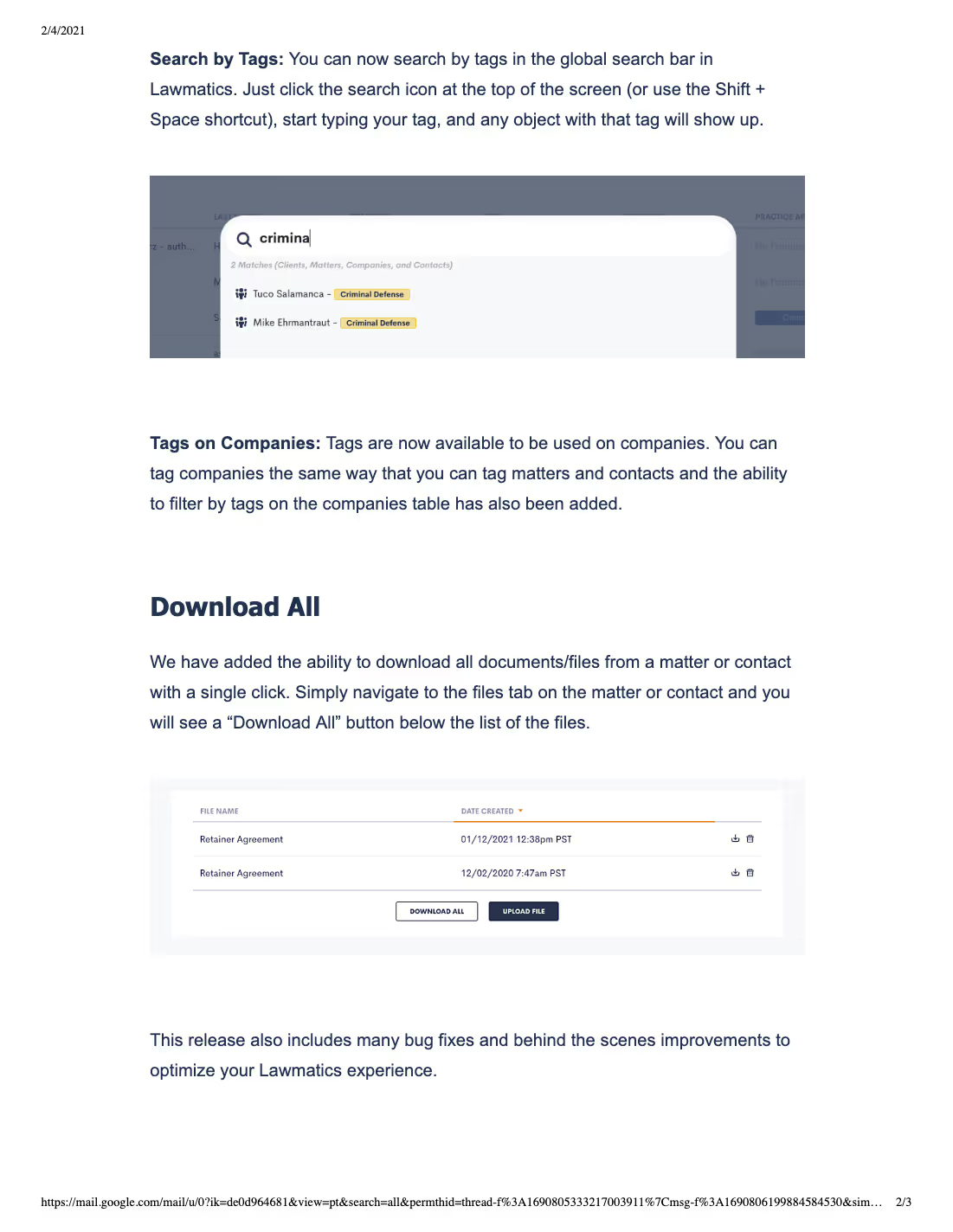
Using the global search bar in the Lawmatics platform, you can search by tags. Just click the search icon at the top of the screen (or use the Shift + Space shortcut), start typing your tag, and all objects with that tag will show up in the search results.
Tags on Companies
You can now add tags to companies just like how you tag matters and contacts. You also have the ability to filter by tags on the companies table.
New: Save Time Gathering Documents and Files with Our Download All Button
With a single click, you can now download all documents and files from a matter or contact. Simply navigate to the files tab on the matter or contact and click the “Download All” button below the list of files.
Bonus: Tips From the Lawmaticians
Our team of experts is sharing their shortcuts and tips to help you get the most out of your experience with the Lawmatics platform!
“I love Tags. Love them. So much better than post-it notes as an attorney recently told me. ;) They are hooked into every part of the system which makes them a great organizational tool. My recommendation, use them.” - Bobby Orozco, Account Executive
“If you can invest a little extra time in getting your email templates, drip campaigns, and automation set up, it will end up not only saving you mountains of time down the road but also result in more business and happier clients..” - Anna Gasperlin, Client Success Specialist
“Because we are fanatical about finding ways to speed up our users' workflows, we have keyboard shortcuts to accomplish common actions in Lawmatics from anywhere in the app. All you have to do is hover over the “?” icon in the top bar to get more details.” - Roey Chasman, Co-Founder & CTO
Got any tips and tricks of your own? We’d love to hear about them! Contact the team at mail@lawmatics.com. Looking forward to hearing from you!
Check in next month for more updates and improvements from the Lawmatics team! Not using Lawmatics yet? There’s never been a better time to start. Book a personalized demo to learn how we can help you grow your law firm!

We are living through an unprecedented time. As I write this article, I am quarantined in my house, going on day 11. I never expected this to be the way that I would work from home. I never expected this to be the way our economy would be brought to the brink of complete collapse. However, we are here, and this will be short lived in the grand scheme of things. We will come back from this, and we will do so stronger than ever.So much of our everyday lives have changed. Whether it’s working from home, becoming your children’s teacher, or simply keeping yourself isolated in your home, we have all significantly changed our daily lives. As a law firm, you have likely been forced to work from home, or at the least, you’ve stopped meeting with prospects or clients in person.Many of these changes we’ve made will be short lived. They will be quickly and happily forgotten once we get over this hill. However, not all of the practices we’ve been forced to adopt are bad. Not everything is something we should rush to “put back to normal”. No. Some things might actually be changes which can improve your firm. A silver lining is indeed there.You have likely been forced, as previously mentioned, to move all communications with your prospects/leads and clients to remote. Phone calls, emails, text messages — all are likely your new tools in servicing your contacts. With existing clients, this probably isn’t much different than usual — however, for your leads, this is likely new territory. Your intake process and signup percentage might be suffering as a result. It doesn’t have to. This is an opportunity to streamline your intake process, perfect a touchless intake, which can end up being a competitive advantage once things go back to normal.Here are our 4 steps to a perfect, automated, touchless intake. Follow this framework and you will have a sustainable, pandemic proof intake process that will be well suited for beyond the virus as well.
- Engage: Whether a prospect is calling your firm or filling out a form on your website, you must engage that person right away. Set up an automated text message to go to them as soon as they contact your firm — assuming you are unable to answer their call at that moment.
- Keep attention: It is critical to continue to keep the attention of your prospect. If they are not engaging with you, they are just contacting the next lawyer on google. Follow up after your engagement text with an email that contains a form for them to fill out. Gather some critical information about their case, but more importantly, keep them engaged so they won’t call the next firm on the list.
- Schedule: A good system will allow you to send out a link to your calendar, letting a prospect select a time for a consultation that will work for both of you. The consultation can be a phone consultation or in person, that part isn’t critical. What is critical is getting them scheduled as quickly as possible, without requiring you to do it manually.
- Nurture: As good as you are at closing a prospect, not every one of them hires you immediately after a consultation. It is critical to your process to have a good, automated follow up flow of emails and phone calls that are designed to ease the prospect into signing with your firm.
During this pandemic, we are all forced to put new processes into place. Your intake process should be able to handle an unprecedented situation like this with ease. Give this automated intake process a try now. Use this time to perfect the process — tweaking it to suit your needs. Once we are back to business as usual, you might just find that a legal workflow software is your secret weapon.

What is a CRM?
Ever since I started Lawmatics the question I get asked the most, just after ‘What do you do?’, is what exactly is a law firm CRM. It is a common acronym that almost everyone in the business and legal worlds have in their everyday vocabulary. However, if you ask 10 people for their definition of a CRM you will get 10 different answers. They will all have a theme of managing contacts but, as you dig deeper into the details, they will vastly differ, and it is these details that matter the most.CRM specifically stands for Customer Relationship Manager and is a tool used to manage a company’s relationship with its customers. This is a very broad definition and could certainly encompass a lot of concepts and functionality. Perhaps the most widely known example of a CRM, and what comes to mind for most tech minded people when they hear CRM, is Salesforce. Salesforce certainly is a CRM, however, in many ways, the contact app in your mobile phone is also a CRM. It allows you to keep a list of contacts and maintain notes on those contacts. At its most basic level it too is a CRM.
A more robust definition
My definition of a CRM is a bit more robust. I agree that a CRM should be all about maintaining great custom relationships, I just think that extends far beyond keeping data on your contacts and notes on the interactions you have with them. To me, a CRM must allow you do anything and everything to enhance that relationship, to help foster its growth. This means actions like sending emails, communications, even marketing emails to your contacts and/or customers. It isn’t just collecting data, it is fostering the relationships for you.A good legal CRM is as much about providing a great customer experience as it is about managing the relationship. A great customer experience starts from the very first interaction that a possible new client has with your firm and continues all the way through the intake process, active case stage, and continues after their case is over. A good law firm CRM will maintain and foster the relationship from the moment of first contact and continue through all stages of a client’s life cycle.
Do I need a CRM for my law firm?
So do you need a CRM? If you agree with my definition of a CRM then yes, you absolutely need to have a good CRM. You should always be mindful of the customer experience a client is receiving from start to finish. Too many firms focus just on one or two aspects. In my years of working with law firms I have seen many put so much care into the service they provide while a case is active, fewer who put the same focus on the client intake process, and virtually none who focus on the post case life cycle stage, perhaps the lowest hanging fruit.A proper CRM can help you provide excellent customer service at EVERY stage of the client life cycle. What’s more is that a good CRM will also allow you to automate most of these customer relationship managing actions. So not only will you provide a better customer experience, but you will also save yourself time and effort along the way. Providing an excellent experience takes a lot of thought and time. Attempting to do it on your own using a multitude of solutions duct taped together is not only expensive, but also likely to cost you valuable time, resources and will sacrifice some of that experience.
Intake
Something a bit more unique for law firms is the intake process. Lawyers have a specific process for bringing on a client have more requirements than many businesses. It is critical that this intake process is seamless and designed to usher a potential client from first contact all the way through to hiring you. One of the most important features of a good law firm CRM is intake. Many CRMs out there do not address this concept of intake at all, let alone with enough focus to be viable for a law firm.
Tips for finding a good CRM for your law firm
Below are some of the important functions to look for in a CRM for your law firm.
1. Not just contact management
Make sure your CRM is not just a glorified rolodex. You are better off with a legal CRM that allows you to actually nurture and grow your relationships. The intake is an important part of the life cycle and you want a tool that will give you complete intake management and automation.
2. Email marketing tools
Email marketing is a critical part of any business' marketing plan. While there are many email marketing tools out there, it is important to have your email marketing fully built into your CRM. This is the only way to ensure data seamless flows into your personalized emails.
3. Marketing Source Tracking
As you start to marketing your law firm more and more, it is very important to know where your leads are coming from. If you do not know what source your leads are coming from then you are effectively flying blind. I don't recommend doing any marketing until you are set up to track where your leads are coming from. Typically, this comes in the form of website and phone number tracking to ensure that all leads are properly sourced. A good CRM and intake management platform will take care of this for you.
4. Custom Reporting
What you put into a legal CRM and intake management platform is only as good as what you can get out. It is important that your law firm's CRM, intake and marketing automation platform allows you to report on any aspect of the data that keep on the platform. Metrics like sales numbers, ROI, lead source attribution, and pipeline value are critical to your law firm. Make sure that your CRM is up to par.Solutions like Lawmatics are designed to eliminate the guesswork and manual labor associated with providing an amazing customer experience. Look for not just something that refers to themselves as a CRM, but also as a marketing automation platform. This is the solution that you need for your firm if providing a great customer experience at every stage of the customer life cycle is a priority for you, and if you are in the business of being a lawyer, it absolutely must be.
Subscribe to get our best content in your inbox
Law firms love Lawmatics
Our customers give their clients the client-focused experience they deserve. Learn how they do it all with Lawmatics.
.avif)
.avif)

.avif)

Ready to grow your law firm with Lawmatics?
Schedule a demo of legal’s most trusted growth platform.
