



The Lawmatics Blog
Insights on legal marketing, automating the law practice, and legal tech in general



Last month, we walked through how to set up custom matter views. But building views is only half the equation — the real value comes from putting them to work. When intake staff, attorneys, and admins are all looking at the same long list of fields, it's easy to miss what matters, waste time hunting for the right information, or forget to fill out a field before firing off a contract.
In this Deep Dive webinar, Devon Butler, product manager at Lawmatics, and Clare Struzzi, who leads the account management team, showed how firms can use custom matter views to trigger automations, surface reporting fields, and tailor layouts by role and practice area.
Time stamps of key takeaways
5:53 – Why customize your Matter pages
Devon kicked off with four reasons to invest in custom matter views: cutting through the noise so each role only sees what they need, supporting cleaner reporting, strengthening team handoffs between intake and attorneys, and working faster directly from the Matter page without having to search for fields.
9:48 – Building practice-area-specific views
Clare walked through an estate planning intake view built specifically for intake specialists, showing how organized sections replace the old starred-fields approach. She highlighted how a field like "Next Steps Pre-Consult" can live right at the top of the view so the intake team can trigger automations directly from the details page — no need to reopen a form.
14:58 – Creating role-specific views
Devon and Clare showed how the attorney view for the same estate planning practice area includes different fields at the top — like "Next Steps Post-Consult" and a dedicated contract fields section where merge fields for engagement agreements can be reviewed and completed before sending. Clare also pointed out that sensitive information like Social Security numbers can be placed in sections that default to a collapsed view.
25:00 – Triggering automations and managing contract workflows
Devon walked through a live example of building an automation that fires when the "Next Steps Post-Consult" field is updated — automatically moving the matter to the correct pipeline stage and sending the engagement agreement. She also showed how duplicating automations makes it simple to handle variations, like sending a single-signer versus a joint estate plan document.
35:09 – Surfacing fields for cleaner reporting
The session wrapped with a look at how the reporting fields on custom views — source, campaign, estimated value, actual value — feed directly into the analytics page and custom reports. Devon demonstrated grouping a report by source to quickly see which referral sources are converting and where data gaps need attention.
Webinar slide deck

Santa made his list, checked it twice, and decided to bring everyone a batch of stellar new features courtesy of the Lawmaticians. Read on to learn all about the sleighload of goods coming your way – no coal, just digital cheer.
Collect e-signatures directly from your client’s phone
Lovers of SMS and automation rejoice! This feature merges the best of both worlds: effortlessly automate e-signature requests via SMS alone, no email address validation needed. When you trigger a signature request via an Automation with the Send as Text option, your client will receive their document as an SMS. This way you can be sure you’re getting documents signed, even if the client doesn’t have an email address.
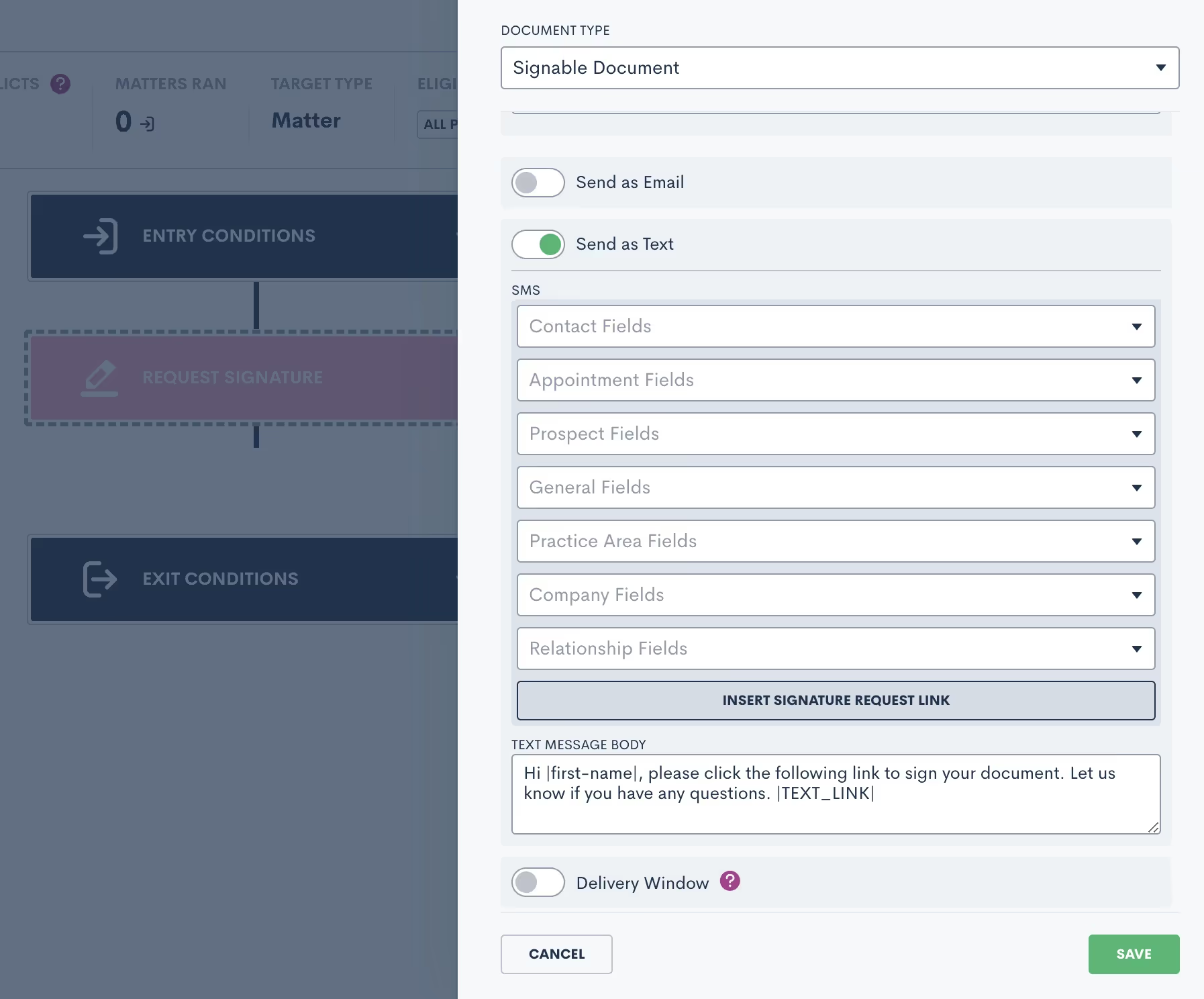
Learn more about e-signature here.
Optimized conflict checks (yet again!)
After other recent updates to conflict checking – including multiple conditions and flexible search terms – we’re taking conflict checking up another notch. Users can now refine each individual search to results that are either an exact match of the search terms or simply contain the search terms. In addition, conflict checks that yield more than 50 results can be downloaded as a CSV file for easier review. Lawmatics is on a mission to make your conflict checks as efficient and simple as possible, and this latest update does just that!

Beef up your custom reports by adding trust balance fields
For our Time & Billing users: you can now easily view trust balance fields directly in your custom reports. Create the exact report you need to see with a variety of fields to choose from, such as Matter Total Trust Balance, Allocated Trust Balance, and Unallocated Trust Balance. As with all Lawmatics custom reports, they can be exported and/or automatically emailed to you on a set interval.

Maintain detailed trust account records with new Withdraw from Trust option
Another new feature for our Time & Billing system: your trust accounts now come with the ability to log withdrawals. Simply navigate to a particular trust account – either from a Matter or the Trust Accounts page – and click the Withdraw from Trust button. The activity will be logged and the trust balance updated. Now, your records are even more precise.

Not using LMPay yet? Email us at support@lawmatics.com to get started.
Keep clients in the loop with trust fund payment receipts
On the heels of our recent update allowing customized invoice receipts, you can now do something similar with trust fund payments. When requesting trust funds via manual input or online payment, simply click the Send Receipt button to make sure your client receives a record of their transaction, creating a more convenient experience for both you and your client.

As always, we love your feedback and encourage you to reach out with any questions or suggestions. Thank you for being a valued member of our community. Together, we continue to push the boundaries of what's possible for law firms.Sign in or sign up to get started with Lawmatics today.

Artificial intelligence (AI) seems to be everywhere these days, and it's definitely becoming a regular part of legal software, presenting law firms with advantages and risks that require consideration. Legal AI tools can significantly enhance law firm efficiency by rapidly analyzing document sets, automating workflows, and knocking out tedious tasks. Though not without some risks, AI thoughtfully deployed can prove transformative, allowing your firm to work more efficiently and deliver great client service.
What is the role of AI in the legal profession?
As AI capabilities progress, these tools promise to bring greater efficiency, speed, and optimization to law firms. By automating time-intensive tasks, AI enables staff to focus on high-value strategic work.Law firms can leverage AI while establishing clear boundaries around its application. With proper training and oversight, legal professionals can harness AI to optimize operations and research while upholding rigorous professional and ethical standards. The smart approach is to view AI as a tool that can supplement, but not replace, skilled legal expertise.
Advantages and disadvantages of AI in your law firm
Integrating AI into legal practice presents opportunities and risks that require careful evaluation. Collaborative AI tools, like LM[AI], are designed to augment and manage office workflows. These AI tools can streamline client relations, billing, and back-office functions, enhancing service delivery without ethical concerns. Tools like this present a lower risk profile as they have work based on feedback from your team in setting it up.Extractive AI tools, which are applied to legal research and eDiscovery, carry inherent risks due to their reliance on the data they analyze. If the underlying data is biased, the AI's outputs could potentially perpetuate these biases. For tools like this, your team needs to have high engagement in validating the output for accuracy.Generative AI tools pose the highest risk, especially when producing sensitive legal documents. The confidentiality of client information and the integrity of the content generated can be concerning. Errors or biases in generated documents could have significant legal and ethical ramifications. Therefore, generative AI requires meticulous scrutiny and a robust framework to safeguard against data misuse and maintain client confidentiality.
Rethinking AI’s impact on legal roles
With all of the media attention and fearmongering around AI, it's natural to worry if it threatens to automate legal jobs, making us wonder: will AI eventually replace lawyers? But the reality is that AI empowers legal services - it doesn't replace them.AI excels at tackling repetitive tasks, enabling workers to focus on relationship-building with clients, crafting persuasive arguments, and exercising judgment and strategy.Okay, so will AI replace paralegals? Well, again, AI is transforming legal work itself, freeing up skilled paralegals into strategic roles. With knowledgeable guidance, AI can work in tandem with legal teams - not displace them.
How can lawyers use AI ethically and effectively?
As artificial intelligence tools become increasingly prevalent in the legal industry, lawyers and law firms must implement comprehensive strategies for the responsible adoption and utilization of these technologies. A prudent approach entails thorough risk assessment, extensive training and education, and the development of clear policies and oversight procedures.
1Risk assessment and due diligence
- For collaborative AI systems that seek to enhance workflow and productivity, firms must thoroughly evaluate each tool's security features, ability to safeguard sensitive client information, and potential operational risks. Careful scrutiny is necessary to ensure these technologies integrate smoothly into daily operations without compromising confidentiality or legal ethics.
- When utilizing extractive AI for legal research or eDiscovery, the provenance and quality of the underlying data sources and algorithms require careful vetting to avoid introducing bias or other defects into the legal work product.
- Given the associated risks, using generative AI to produce legal documents warrants the highest due diligence level. Training data and algorithms should be meticulously examined for quality and bias. Ongoing auditing of generative AI outputs is essential to guarantee accuracy, maintain confidentiality, and align with professional ethics and obligations.
2Training staff and knowledge building
- All staff who touch the software must receive training on that software. In addition, it may make sense to train staff on foundational concepts underlying the technologies. Developing this knowledge is key to identifying potential issues, and enabling the judicious use of AI.
- Work with staff to seamlessly integrate current workflows while retaining the human touch in client interactions.
- Create validation tests for any extractive or generative AI tool so that your team is testing and sampling batches of results.
3Policy development and ethical oversight
- Law firms should create clear policies governing the appropriate applications of AI technology within the organization to promote quality control and client confidentiality.
- Policies should be comprehensive and provide guidance on the appropriate uses of AI, ensuring that the technology supports rather than supersedes lawyers' professional judgment.
AI stewardship is paramount. With deliberate adoption strategies centered on risk assessment, education, and policy development, lawyers can leverage AI to enhance legal services while adhering to professional duties. Any potential disadvantages of AI in a law office can be mitigated
What is the future of AI in law
While AI has the potential to transform the legal industry by automating tasks and increasing efficiency, legal professionals must invest time in understanding and leveraging these technologies.If you're ready to explore how AI tools like Lawmatics LM[AI] can transform your firm's operations and marketing, contact us today for a demo.

The investment in the legal technology market has profoundly impacted the legal industry over the last few years. The use of tech in law firms has increased from advances in AI-powered solutions to the proliferation of practice-specific tools like contract lifecycle management tools or practice management software to operational tools like CRMs and billing software.The market size of legal tech is ballooning, underscoring the demand for innovative legal software and its growth potential. This growth signifies a pivotal shift towards the future of legal technology, reshaping client engagement, business operations, and delivery of legal services. Working smarter, not harder, means embracing technological advancements.
What is the legal tech industry?
Technology has profoundly impacted how legal professionals operate, transforming workflows and processes across the board. This rapidly expanding market includes the following:
- Practice management software: Solutions for centralizing client data, calendars, tracking deadlines, documents, tasks, and details for legal matters in one platform.
- Document automation: Tools that generate customized legal documents like contracts, briefs, and forms from templates.
- eDiscovery platforms: Systems for efficiently searching, analyzing, and producing electronic information relevant to legal cases and discovery requests.
- Legal research databases: Comprehensive case law repositories, statutes, verdicts, filings, and other legal data to inform legal strategy.
- Contract lifecycle management: End-to-end platforms for streamlining contract drafting, editing, signing, validating, and monitoring processes.
- Legal billing software: Tools for time tracking, invoice generation, trust accounting, and getting paid faster.
- eSignature applications: Tools for secure, legally binding digital signing of official legal documents.
- Client intake software: Solutions to simplify client onboarding, communication, and client relationship management.
Additional legal technology
- IP management software: Tools to manage intellectual property like trademarks and patents
- Legal holds software: To automate the preservation of information for litigation
- Trial presentation software: For exhibits and documents in trials
- Litigation support software: For document and transcript management
How big is the legal tech industry?
The legal tech industry is a powerhouse, valued at around $23.45 billion globally in 2022. Fundamental shifts in delivering services fueled this growth. AI-driven tools, cloud platforms, and applications have transformed the landscape for legal professionals.And this market influence reaches beyond attorneys and law firms. It's democratizing access to justice through online dispute resolution, DIY tools, and legal advice apps.It's also transforming the justice system through streamlining court processes and making legal information more accessible for the public.
How big is the legal tech market in the US?
As tech continues transforming legal practice and public access, the US legal tech market appears poised for continued dynamic growth while currently representing around 7% of the total legal services marketLawyers are increasingly adopting new tools to manage the rising complexity of legal matters and client demands. Legal tech solutions like practice management software, eDiscovery platforms, and document automation provide greater efficiency and productivity. The automation of repetitive tasks enables lawyers, and legal professionals, to focus on higher-value work.
Is legal tech a growing industry?
Yes, legal tech isn't just growing—it's booming. The US exhibits remarkable growth trends and increasing tech adoption and innovation as legal professionals shift to AI-driven tools, cloud platforms, and legal software solutions. Here are 3 key trends that illustrate this legal tech surge in the US:
- The demand for tools that can automate repetitive tasks and workflows is high. Lawyers are seeking efficiency through legal technology.
- Integrating AI tools like natural language processing, predictive analytics, and machine learning into legal practices is accelerating. AI adoption is transforming how legal professionals approach research, analysis, and strategy.
- The usage of Legal Operations (Legal Ops) to centralize and optimize legal delivery is growing. Ops teams are leveraging technology and processes for enhanced coordination and oversight.
What are the benefits of technology in the legal field?
Legal technology offers transformative benefits that improve efficiency, insight, and access to legal services. Document automation, CRMs, and invoicing tools streamline firm processes. Client portals and mobile apps expand client communication and transparency. Remote collaboration technology facilitates flexible working and seamless client connections.Overall, the right solutions enable law firms to deliver better service quality and productivity, with 70% of clients preferring technologically-enabled offerings like online payments.
How much do law firms spend on tech?
According to the same ABA TechReport 2022, which analyzes findings from the ABA Legal Technology Survey, law firms are investing more in technology, but investment percentages vary.Law Firm SizeAverage Annual Hardware SpendOverall Tech Budget TrendSmall Firms (2-9 lawyers)$1,000 - $4,90056% increased budget in 2022Mid-Sized Firms (10-49 lawyers)17% spend $10,000 - $20,00013% spend $20,000+65% decreased budget in 2022. However, budgets are still rising overallAll Firms$11,514 average in 2022, up from $10,433 in 2021Tech budgets have increased over the last few yearsThe ABA report found that law firms have been steadily increasing their overall technology budgets in recent years, with this trend likely to continue as hardware costs rise and new legal tech emerges. However, the level of tech investment correlates to firm size, as small and mid-sized firms have different budgetary needs and capabilities when spending on technology.
Bringing your legal tech strategy into the future
The legal technology market continues to evolve rapidly, bringing innovations that boost efficiency and access for legal professionals and clients alike. As law firms increasingly embrace new tools and solutions, their tech investments and spending reflect this digital transformation.To future-proof your firm, leverage legal tech that goes beyond point solutions and provides an integrated approach. Lawmatics delivers a robust, all-in-one client relationship manager. Book a demo of Lawmatics today to learn how its legal-specific automation and workflows can propel your firm ahead.

Lawmatics announced today that its game-changing AI tool – LM[AI] – has won the LegalTech Breakthrough Award for LegalTech AI Innovation of the Year. The LegalTech Breakthrough Awards recognize the top technology companies, solutions and products in the legal technology industry today.LegalTech Breakthrough is part of the Tech Breakthrough organization, a leading global market intelligence and recognition platform for today’s most competitive categories of technology. Founded in 2014, Tech Breakthrough creates market intelligence and industry recognition programs for companies ranging from Fortune 500 to early-stage startups in today’s most competitive technology sectors.“As an attorney, my vision for Lawmatics is to create the tools I needed when I ran my own practice,” said Lawmatics CEO and Co-Founder Matt Spiegel. “LM[AI] is just one example of the way we’re innovating a new era of legal experience. We feel this award recognizes our team’s unyielding drive to refocus lawyers from executing mundane tasks to providing exceptional legal services for their clients.” LM[AI] was launched in June 2023 as an intuitive generative text tool to fundamentally transform how law firms execute marketing strategies and allocate resources. The email-drafting assistant writes suggested copy for plaintext emails, seamlessly incorporating personalized details. Users can easily refine the tone, choosing between a more formal or friendly approach. LM[AI] saves legal professionals valuable time and jumpstarts their creativity. Cutting-edge developments like AI are a cornerstone of Lawmatics’ vision for the future at the intersection of technology and the legal client experience. The #1 made-for-legal CRM has established its leadership of the smartfirm revolution with major milestone features, including automated conflict checking, event management, email and SMS message center, a scheduling payment gateway, and robust integrations with the tools legal professionals use every day. “We’re incredibly proud of what our engineering team has accomplished in streamlining workflows for legal professionals,” said Lawmatics CTO and Co-Founder Roey Chasman. “By marrying the power of AI and automation, Lawmatics is modernizing legal operations with an all-in-one CRM that automates archaic processes.”Lawmatics was previously recognized by the Breakthrough Awards as the Overall Case Management Company of the Year in 2022. Lawmatics has also been named as a 2023 Inc. Power Partner, and was awarded Product of the Year by Business Intelligence Group at the 2023 Sales and Marketing Technology Awards.

Legal software is technology specifically designed to assist legal professionals in managing the various aspects of their work – document management, case management, time tracking, billing, and more.The main purpose of legal software is to enhance the efficiency and accuracy of legal processes, allowing legal professionals to meet client expectations by focusing more on the substantive aspects of their work rather than administrative tasks. Let’s look at some frequently asked questions about legal software:
What are the types of legal software?
There are numerous types of legal software programs tailored to various user needs. Here are some common types:
- Practice management software: Helps law firms manage cases, clients, documents, appointments, and billing in a centralized system.
- Document management software: Focuses on organizing and storing legal documents securely, often with version control and collaboration features.
- Case management software: Manages and tracks the details of legal cases, including key dates, contacts, and case-related documents.
- Time and billing software: Automatically tracks billable hours and expenses and generates client invoices.
- Litigation software: Provides access to legal databases, statutes, case law, and other legal resources to aid in research.
- Legal calendaring software: Focuses on managing deadlines and important dates, helping to avoid missed court dates and filing deadlines.
- Legal accounting software: Specifically designed for accounting and financial management within law firms to ensure compliance with accounting regulations.
- Client relationship management (CRM) software: Helps law firms manage client interactions, track communications, and build better relationships.
The choice of legal tech products depends on the specific needs and focus areas of the legal practice. Some platforms may combine several functionalities to offer comprehensive solutions for law firms.
Why use legal software?
Legal software offers numerous benefits for law firms and legal departments. How can technology help lawyers? Here are some common reasons why legal professionals need legal software:
- Efficiency: Legal software automates many time-consuming tasks, allowing lawyers to focus more on legal research and case strategy.
- Organization: Legal software organizes and manages vast amounts of information, reducing the risk of error and oversight.
- Compliance: Legal software often includes features to ensure that legal practices comply with regulations and deadlines, reducing the risk of malpractice disputes.
- Collaboration: Many legal software solutions facilitate collaboration among team members with centralized access to case information, documents, and communications.
- Cost savings: Automation can result in cost savings for law firms by allowing them to spend less time on non-billable administrative tasks.
- Client service: Legal software with CRM features provides a systematic approach to managing client interactions, communications, and expectations.
- Security: Legal software often includes robust security features to protect sensitive and confidential client information.
- Competitive edge: Firms that leverage legal software often gain a competitive edge by offering more efficient and streamlined services, potentially attracting more clients.
In summary, legal software helps lawyers enhance productivity, reduce errors, and navigate the complexities of legal work to help ensure success.
What is the best law firm software?
When evaluating a solution, law firms should consider the following to find the best legal software:
- Functionality: Assess whether the software platform offers the specific features and functionalities needed for your law firm's practice areas.
- Ease of use: Choose software that is user-friendly and requires minimal training since a steep learning curve might lead to resistance from staff and deter adoption of the software.
- Integration: Ensure that the software can integrate seamlessly with existing tools and systems used by the firm, including email, calendar, and accounting software.
- Customization: Define the level of customization the software allows to be adaptable to specific needs.
- Scalability: The software should be scalable to accommodate an increasing number of users, expanding data, and increasing document volumes.
- Security: Ensure that the software has robust security measures in place to protect sensitive client information and maintain compliance with data protection regulations.
- Support and training: Evaluate the level of customer support and training provided since access to comprehensive training resources and responsive support can significantly impact the successful implementation of the software.
- Cost: Study the software’s pricing structure, including any additional costs for implementation, training, and ongoing support, to determine the long-term return on investment.
- Compliance: Ensure that the software complies with legal and industry regulations, particularly regarding features related to billing, trust accounting, and document management.
- User feedback: Involve potential users and key stakeholders in the evaluation process to ensure that the software meets the diverse needs of various organizational roles.
Lawmatics offers best-in-class tools for client intake, workflow and marketing automation, invoicing and billing, document management, and much more—all in one easy-to-use legal software system. Ready to streamline your operation and focus your attention where it’s needed most? Request a demo today.

Subscribe to get our best content in your inbox
Law firms love Lawmatics
Our customers give their clients the client-focused experience they deserve. Learn how they do it all with Lawmatics.
.avif)
.avif)

.avif)

Ready to grow your law firm with Lawmatics?
Schedule a demo of legal’s most trusted growth platform.
