



The Lawmatics Blog
Insights on legal marketing, automating the law practice, and legal tech in general


Last month, we walked through how to set up custom matter views. But building views is only half the equation — the real value comes from putting them to work. When intake staff, attorneys, and admins are all looking at the same long list of fields, it's easy to miss what matters, waste time hunting for the right information, or forget to fill out a field before firing off a contract.
In this Deep Dive webinar, Devon Butler, product manager at Lawmatics, and Clare Struzzi, who leads the account management team, showed how firms can use custom matter views to trigger automations, surface reporting fields, and tailor layouts by role and practice area.
Time stamps of key takeaways
5:53 – Why customize your Matter pages
Devon kicked off with four reasons to invest in custom matter views: cutting through the noise so each role only sees what they need, supporting cleaner reporting, strengthening team handoffs between intake and attorneys, and working faster directly from the Matter page without having to search for fields.
9:48 – Building practice-area-specific views
Clare walked through an estate planning intake view built specifically for intake specialists, showing how organized sections replace the old starred-fields approach. She highlighted how a field like "Next Steps Pre-Consult" can live right at the top of the view so the intake team can trigger automations directly from the details page — no need to reopen a form.
14:58 – Creating role-specific views
Devon and Clare showed how the attorney view for the same estate planning practice area includes different fields at the top — like "Next Steps Post-Consult" and a dedicated contract fields section where merge fields for engagement agreements can be reviewed and completed before sending. Clare also pointed out that sensitive information like Social Security numbers can be placed in sections that default to a collapsed view.
25:00 – Triggering automations and managing contract workflows
Devon walked through a live example of building an automation that fires when the "Next Steps Post-Consult" field is updated — automatically moving the matter to the correct pipeline stage and sending the engagement agreement. She also showed how duplicating automations makes it simple to handle variations, like sending a single-signer versus a joint estate plan document.
35:09 – Surfacing fields for cleaner reporting
The session wrapped with a look at how the reporting fields on custom views — source, campaign, estimated value, actual value — feed directly into the analytics page and custom reports. Devon demonstrated grouping a report by source to quickly see which referral sources are converting and where data gaps need attention.
Webinar slide deck


Register for upcoming Monthly Deep Dives here.Step into the paperless revolution with Lawmatics, where document drafting and e-signature requests are made easy and efficient. Say goodbye to the tedious tasks of physical document handling, printing, scanning, and mailing, and embrace a seamless and modern approach to legal processes. With Lawmatics, your firm's lawyers and clients can sign documents electronically from anywhere, at any time, making the whole experience hassle-free and convenient.Document templates allow for increased consistency and accuracy with your document drafting. Let Lawmatics handle the intricacies of merge fields, conditional logic, and fillable text fields, saving you time and hassle. Our document templates are versatile and highly customizable, ensuring that you’ll be able to set up your documents exactly how you need them.
PDF Document Templates
The first of our three types of document templates is PDF Upload. With this type of template, you will begin by uploading a base PDF file, and then you’ll drag and drop any merge fields or signature fields over the base file. For that reason, this is a great option for:
- Court documents
- Authorizations
- Forms from external organizations
- And more
This will help you create documents that are identical to the original base version provided.
How to create a PDF Document Template
- Navigate to the Documents page under the Assets tab
- Click the button to create a new document
- Select Upload PDF
- Give your document a name,
- Select Matter as the type (for anything client/case related)
- Select a practice area if desired (or leave blank)
- Drop a PDF file in the box to upload
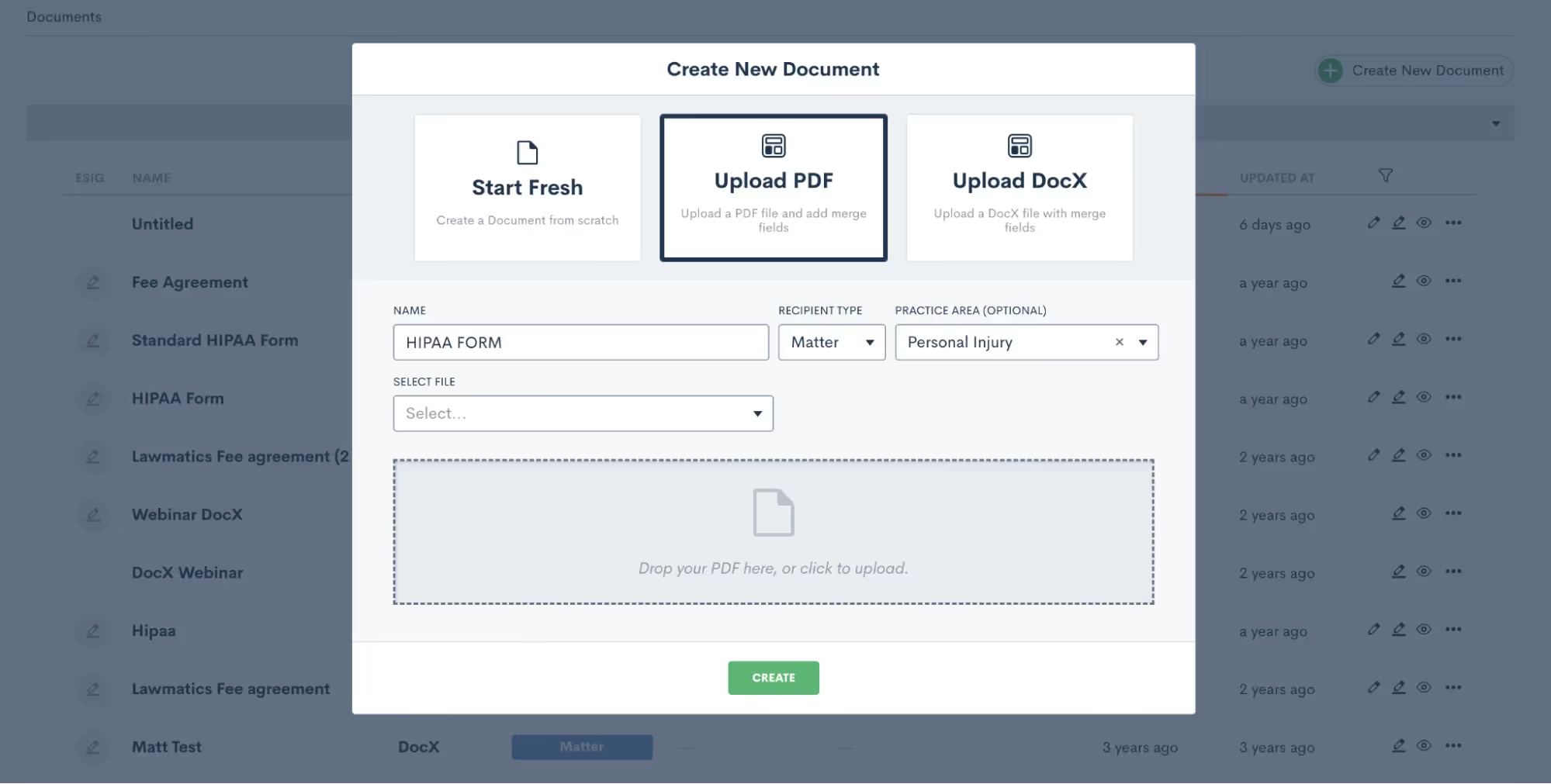
Again, it’s important to note that the PDF file will remain as-is when it is uploaded. So be sure to leave the appropriate amount of space for blanks, fields, etc.
How to merge data from the matter into your Document Templates
Once the document is uploaded, you will see field elements on the left sidebar that can be dragged and dropped into the document. These fields can be used to merge data from the matter, or as open text fields for the client to type in.Start by merging in the client’s name. Your first step is to drag a Text field onto the document wherever you would like it, then click on it to set the properties as shown below.

To merge data, such as the client’s name, simply select Merged from Matter in the dropdown for Field Set By, and then select which Field should be merged there.If this document requires e-signature, scroll down on the left sidebar to the section labeled ESignature Settings. Here you can feel free to add as many signers as you need, whether on the client or the firm side.

Once you have added your signer roles, you can now add e-signature fields into the document. You’ll see options for signature and initials as well as text. Text fields prompt the signer to simply type in information, such as social security number or date of birth. Select what you need and drag it onto the document. Then, in the section labeled Field Set By, select the signer role who needs to fill in that field, “Client” in the example below.
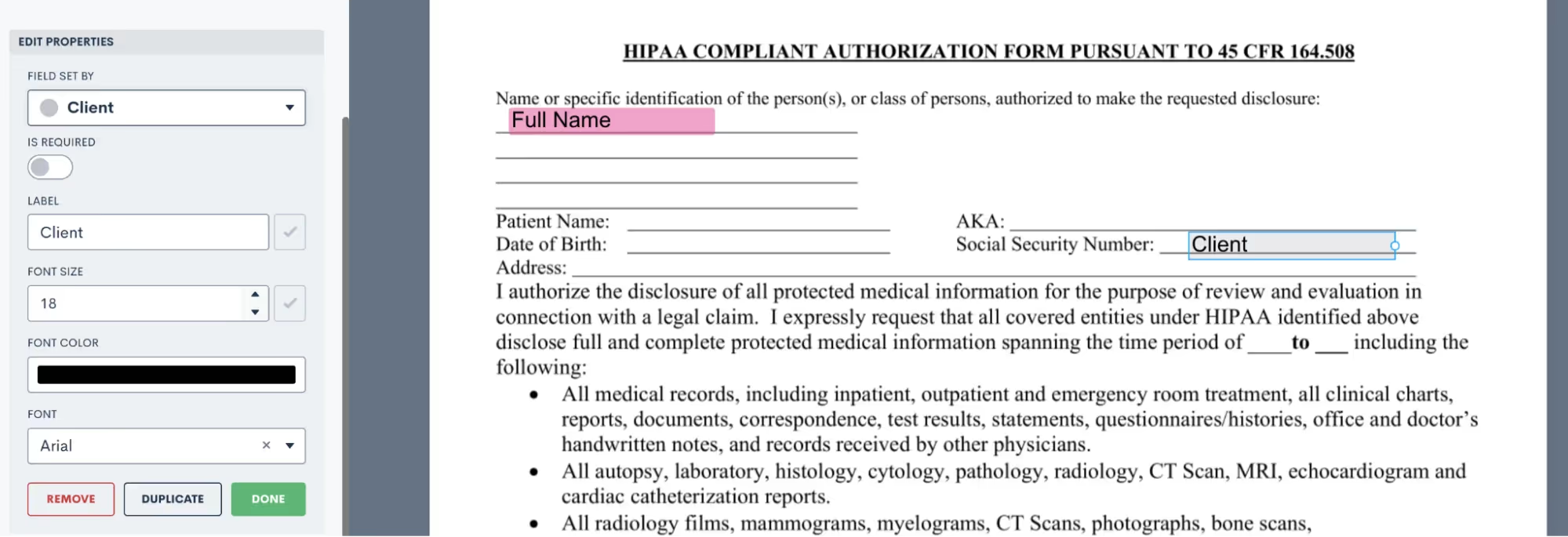
Now when this document is sent, it will prompt the Client signer to fill in that field accordingly.Take your time dragging and dropping all of your fields onto the document, then preview the document to see what it looks like with a particular matter’s information merged in.
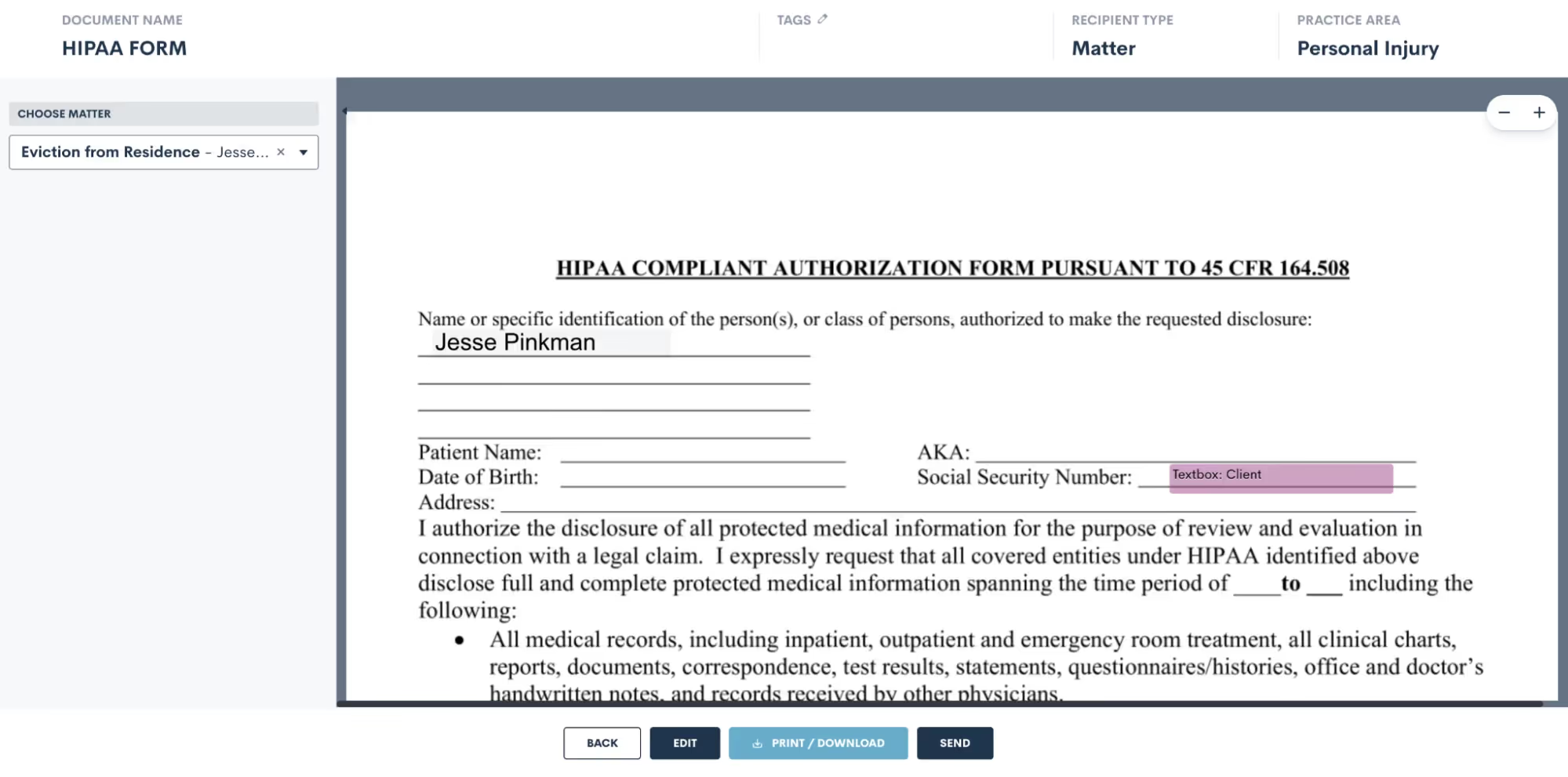
Use the selection drop down on the left to choose a matter, and then that matter’s fields will be filled into the document template for previewing. Easily send or download from there.
DOCX Document Templates
Create and edit DOCX documents seamlessly outside of Lawmatics using your preferred word processor. Just like our other document templates, you can easily merge fields and utilize conditional logic with these templates.While crafting DOCX templates might require a bit more effort, they offer unique advantages not found in our other options. These versatile documents can serve various purposes such as:
- Fee agreements
- Internal firm documents
- External court documents
- And authorizations
How to create a DOCX Document Template
To get started with this type of document, we recommend opening the DOCX Field Reference guide. You can access this guide by simply hovering over the question mark icon near the top right of your Lawmatics window.
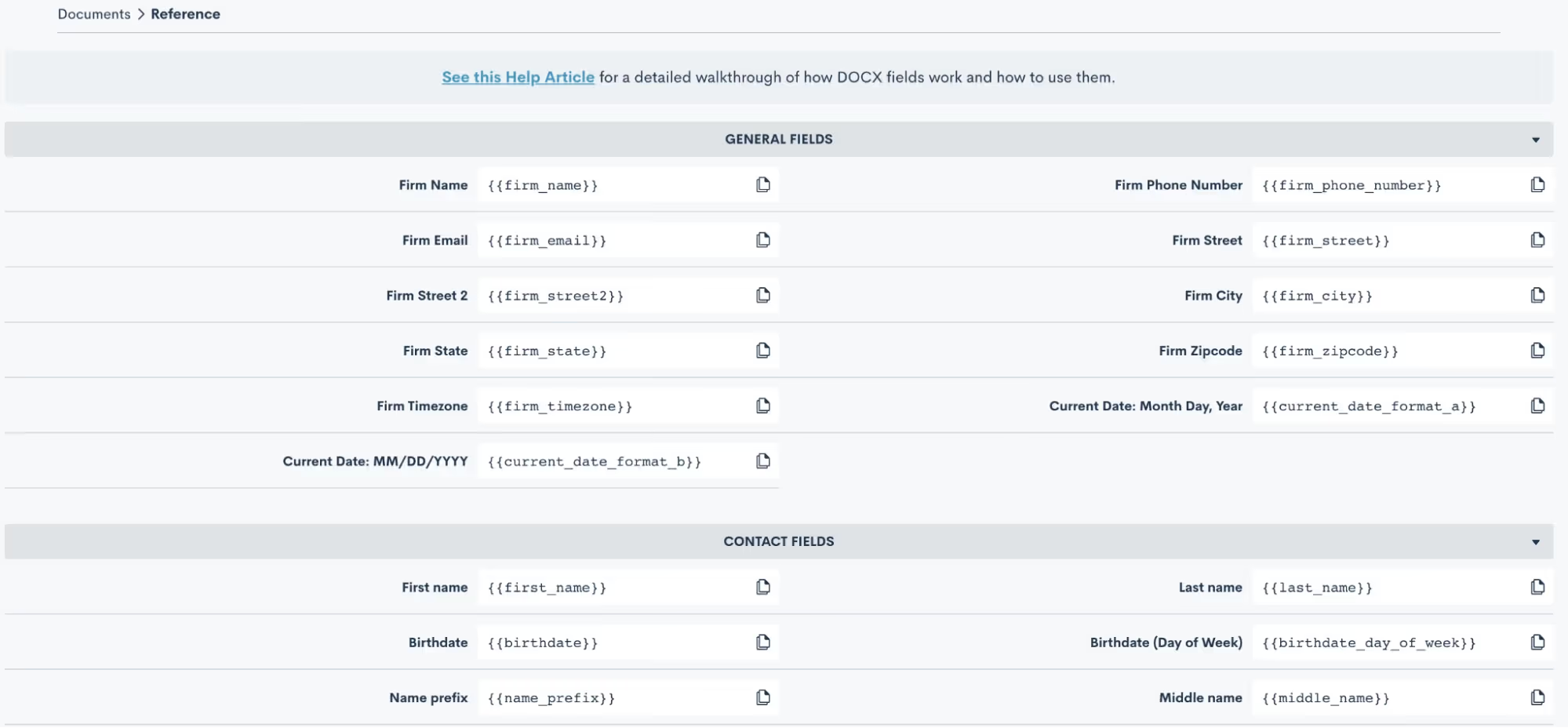
Here you will find the codes for all of your fields, including custom fields. Copy and paste these codes into your word document, and when the document is uploaded back into Lawmatics the field will merge in accordingly.
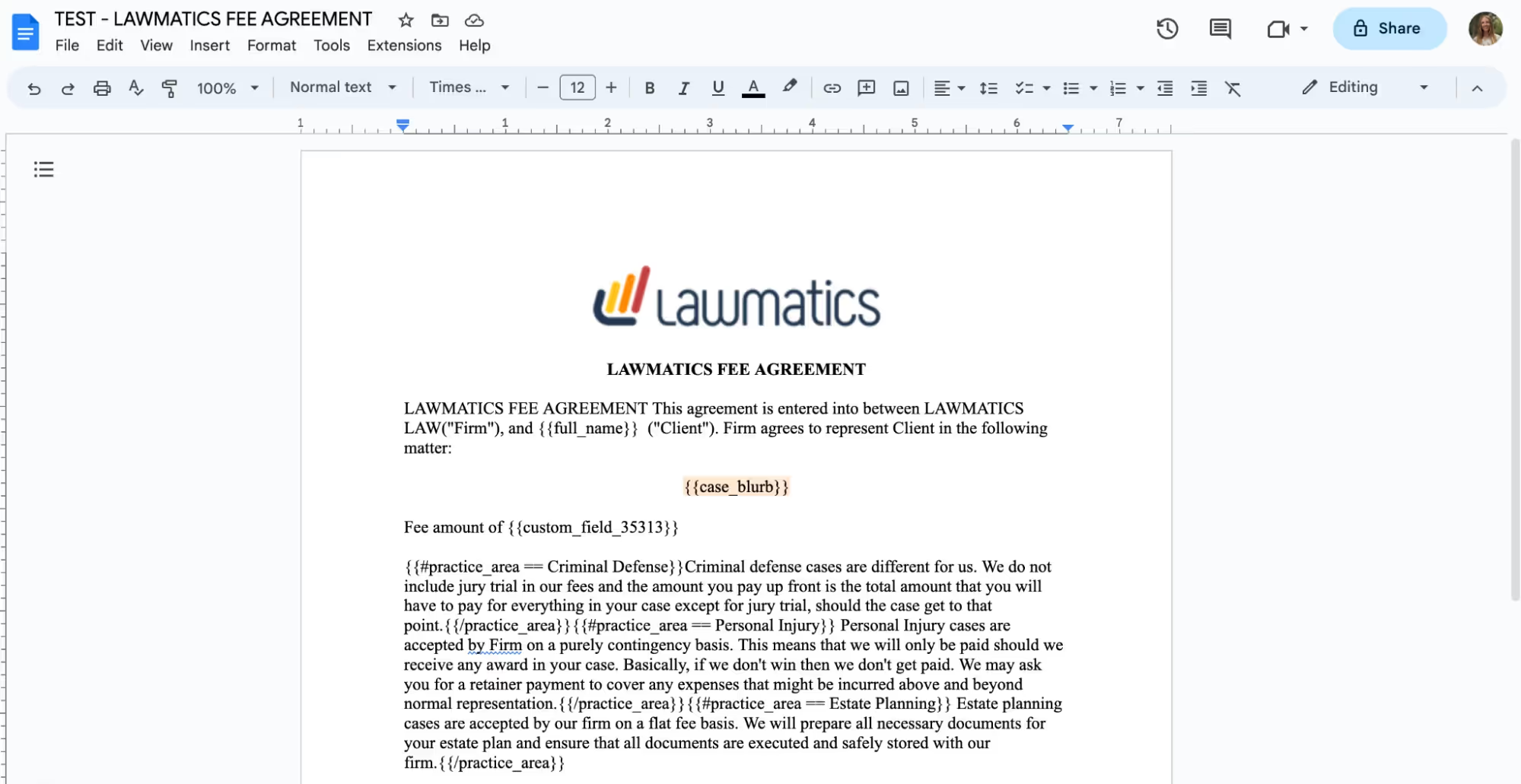
You can also add e-signature to these documents. When you go to the DOCX Field Reference page, mentioned above, scroll all the way down to the bottom and you will find a guide for using signature fields. Simply follow the guide provided to copy and paste signature fields into your document just like you would do with merge fields.

Once you have made all of your edits in your word processor, it is time to save the document as a .docx file and upload it into Lawmatics. At this point, do make sure you have made all necessary edits to the document base including grammar, merge fields, page numbers, header/footer, etc, because you cannot edit the content once it is uploaded into Lawmatics.After you have uploaded the file, it will appear in Lawmatics exactly as it did in your word processor. You’ll now have the option to preview the document by matter by simply selecting a matter from the drop down menu in the top right, shown below, and you will then see your fields merged.

From here you can always send the document manually, or preview and download it back as a .docx file with the fields merged in.
Start fresh custom Document Templates
Last but not least, our third option for creating document templates is the Start Fresh option, also referred to as Custom Documents. With this template, you will be using the Lawmatics built-in word processor to build your document right in Lawmatics.To get started you can either type your text right in, copy and paste text in, or use the Word import button to import the text right from a word document. You’ll then see something like this:
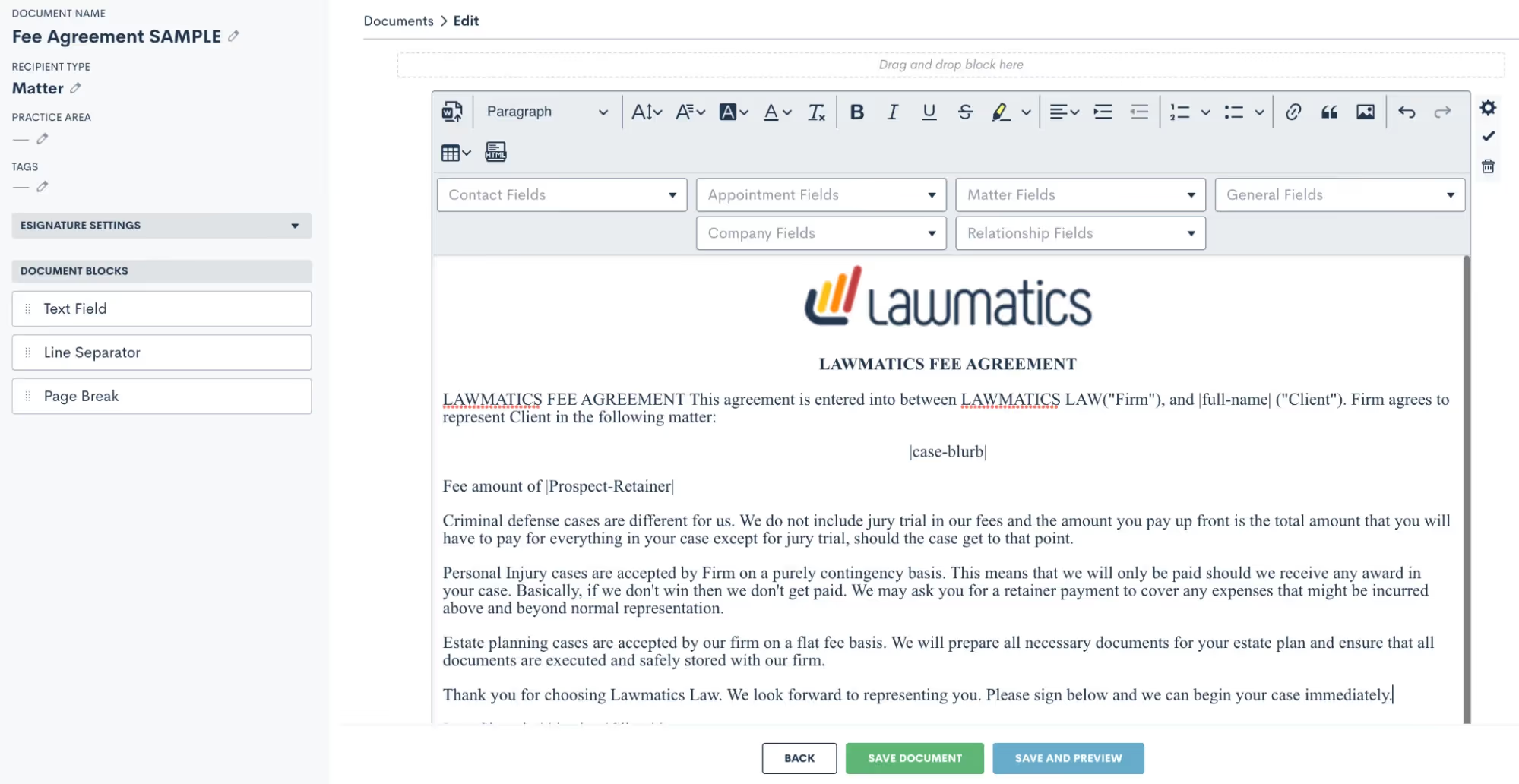
Above you’ll see some fields merged into the document. This template option makes merging fields very easy, because you’ll simply select them from the drop down boxes shown above and the fields will be merged right into the template.
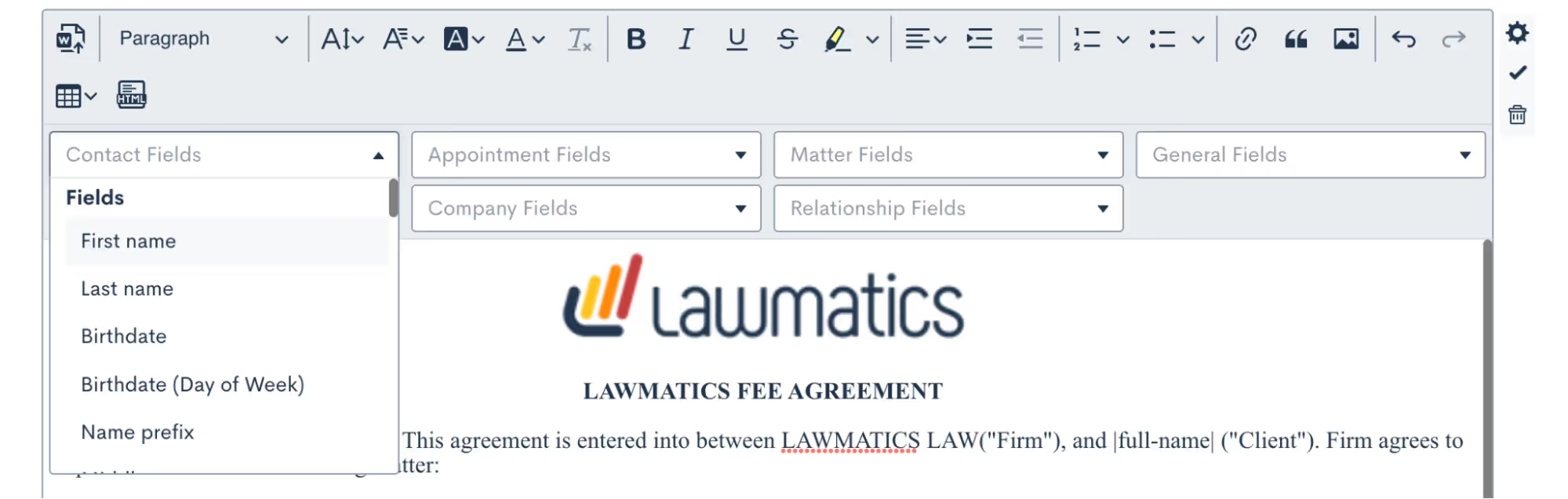
Conditional logic is also a key part of this template type. You may have certain paragraphs or sections of your document that should only apply conditionally, to make this happen you’ll drag over additional text fields (from the left sidebar menu), put the conditional text inside, and then set the conditional logic using the gear icon on the far right. You’ll set your logic like so:
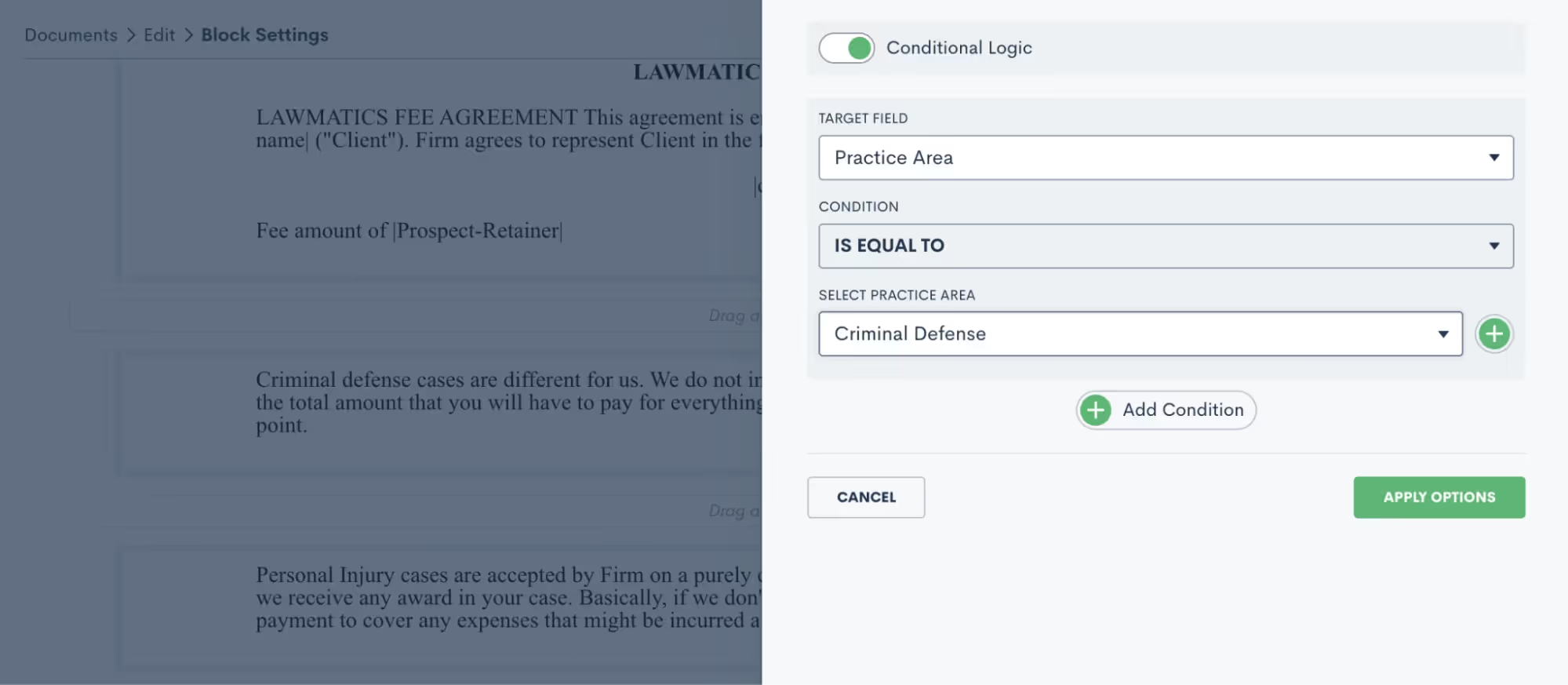
Practice area is a common field for setting conditional logic, but feel free to use any field in your CRM including custom fields.You’ll often want to add e-signature to this document. To do so, click to expand the e-signature settings section on the left sidebar and add as many signers as you need. Remember, your signers could be from the firm or on the client side. You’ll then use the signature fields drop down to add in any signature fields such as initials, date, signature, etc.

Be sure to save your document, and then it’s ready to go!Review a more in-depth comparison of the three Lawmatics document template types here.
Using document templates in Automations
Each of the above three templates can always be previewed for a particular matter and sent out manually when desired. More often than not, you will opt to build your documents into Automations so that they can be sent and signed automatically.Before we move onto Automations, let’s also take a look at your options for Custom Email Templates for documents as well as e-sign reminders. Go to your Documents page under the Assets tab, and then click the … icon on the far right for any document. You will see the options shown below.
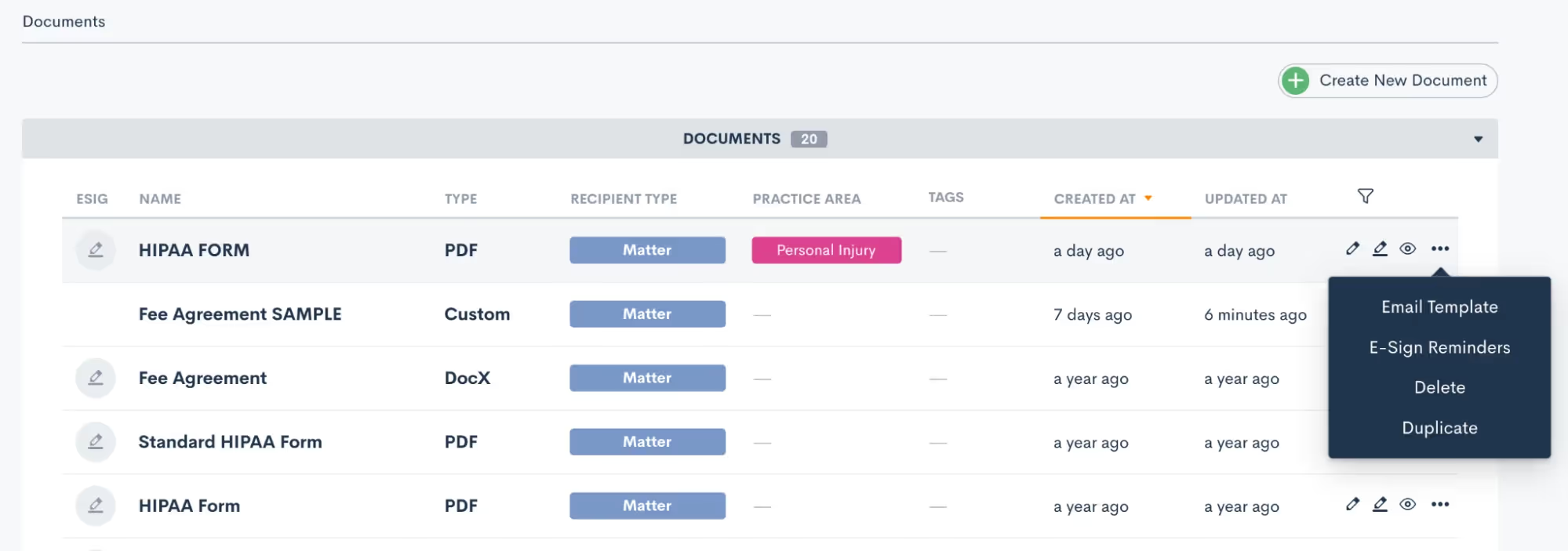
The email template gives you the ability to create your custom email that can be easily accessed any time this particular document is sent. E-sign reminders allow you to create custom built-in reminders for signature at any timing of your choice. Both of these options are great ways to not only add customization, but also to keep your templates highly functional. Both of the options above can be utilized when the document is sent manually or via automation. Now let’s take a look at sending documents automatically.Navigate to the Automations page found under the Marketing tab. When adding action items to an Automation you’ll see the options for both Send Document as well as Request Signature:
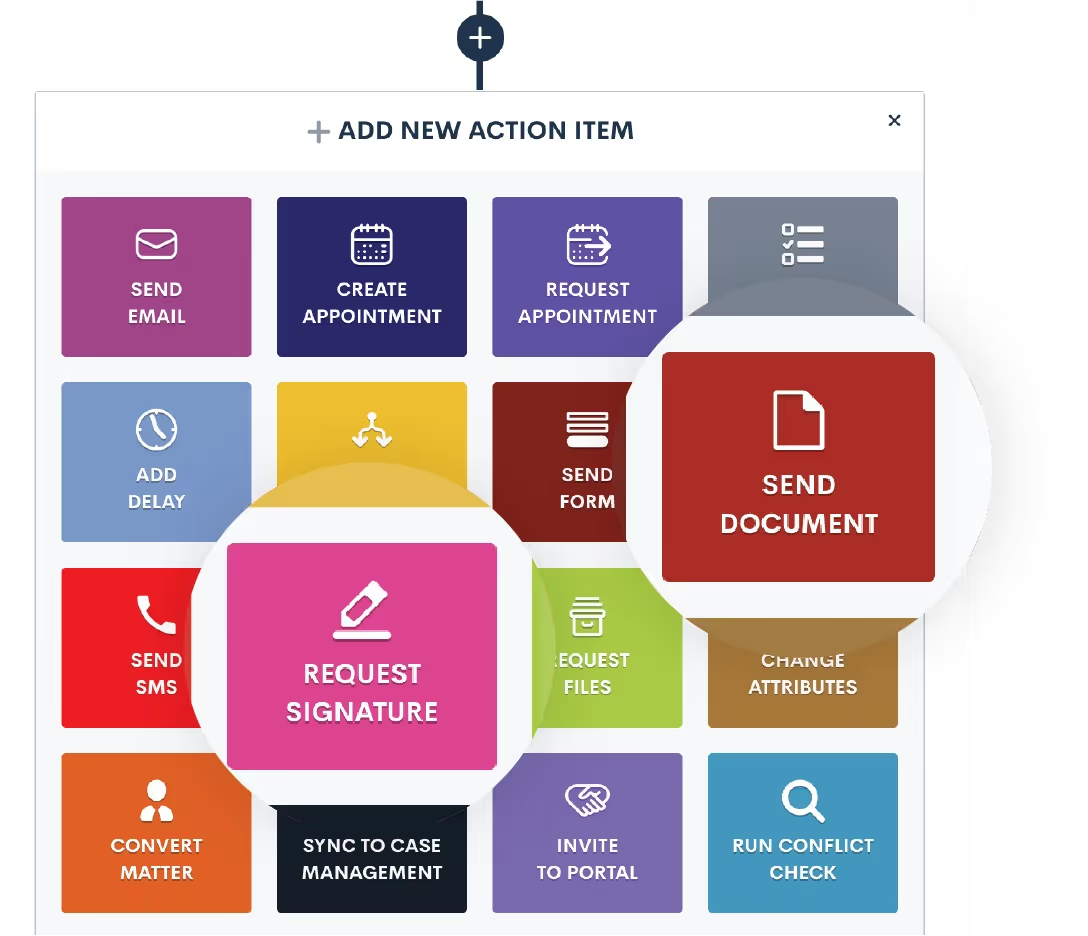
When you use the Send Document action, this will email the document (with fields merged in appropriately) as an email attachment. It does not include e-signature.Any time you want to send a document out for e-signature you will use the Request Signature action item. Once you select Request Signature in your automation you will then make selections for all the options shown below:
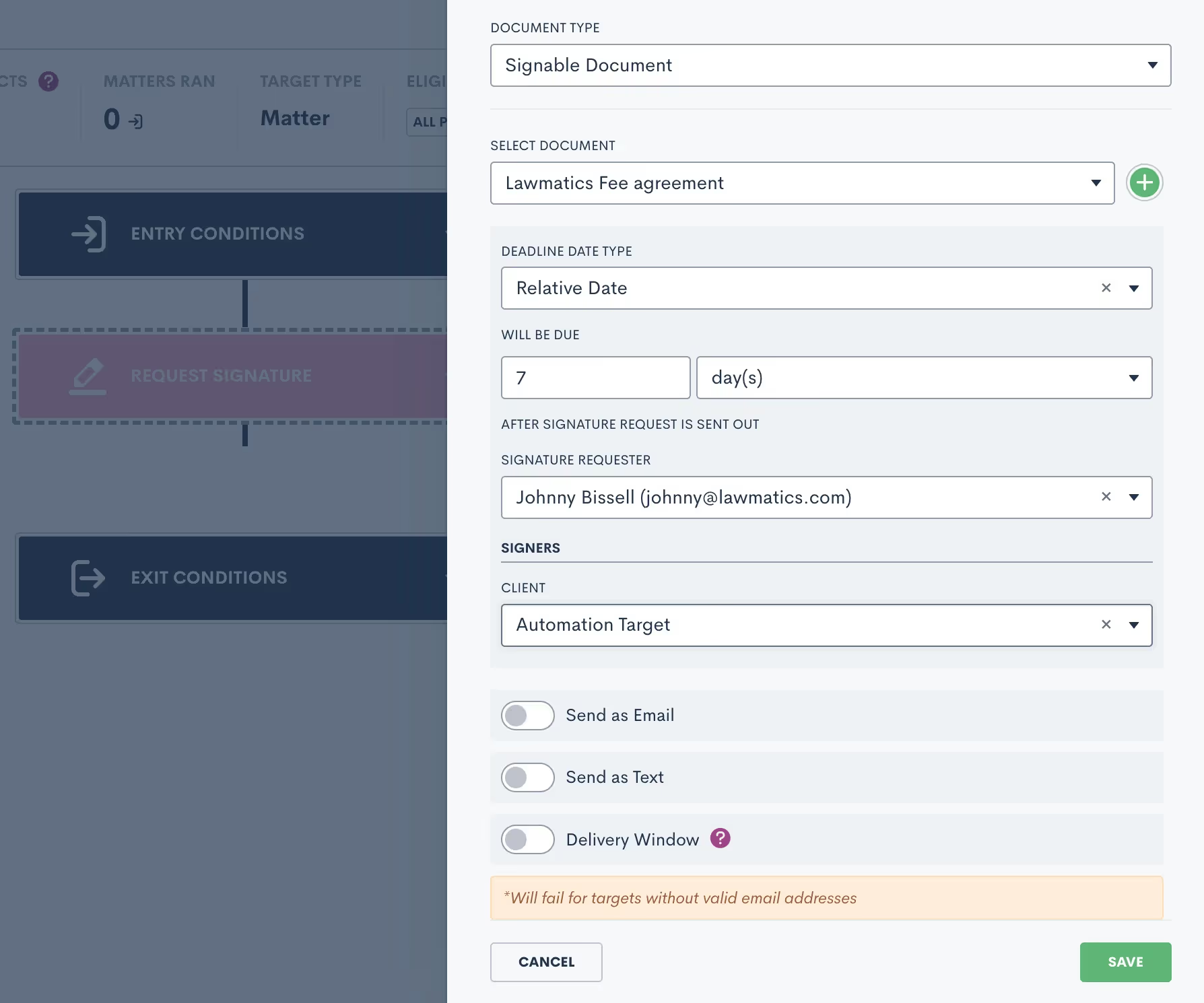
Select a due date if you would like, knowing that the signature request will automatically expire if it is not signed before the due date. You’ll also have options to send this document as an email, text message or both. When sending as an email you’ll have the opportunity to select your custom template for this document.You’ll also notice the option for Delivery Window shown above. We strongly recommend using this feature to make sure that important document are only sent during the hours of your choosing, in case you’re working on cases after hours.In addition to sending documents via Automation, you can also trigger an Automation when a document is signed. Add this as an entry condition by clicking the Signed a Document option, and then select your specific document.
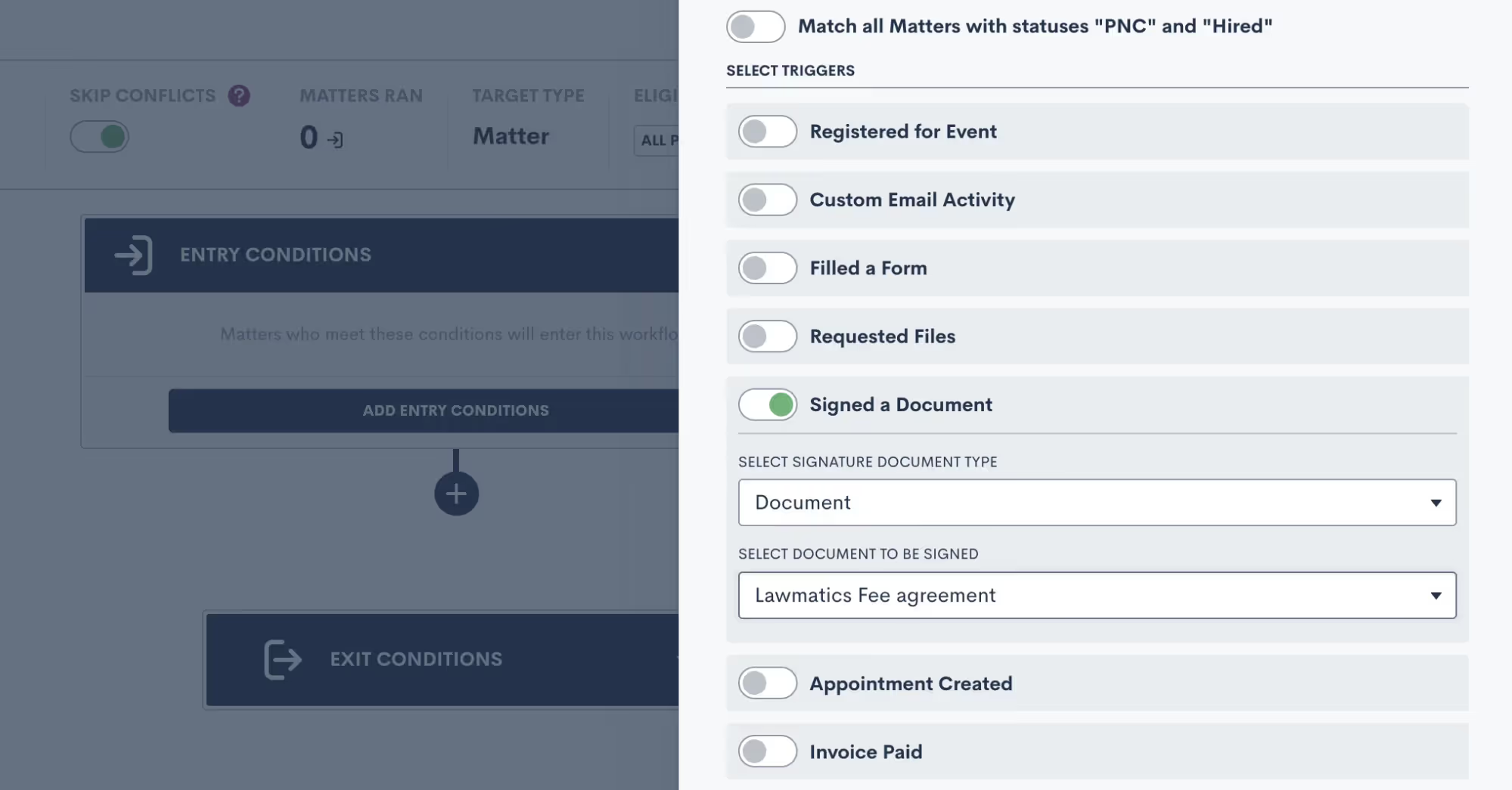
Managing e-signature requests
Once you have all of your document templates built out in Lawmatics, and have maybe even set up Automations to send them out for signature, you’ll want to be familiar with some of the ins and outs of managing your e-signature requests.Begin by navigating to the Documents page, and scroll down to the section labeled Documents Sent for Signature. Here you will see a summary of all signature requests that have been sent, including the current status, the document name, the primary matter, a list of all document signers, and more.
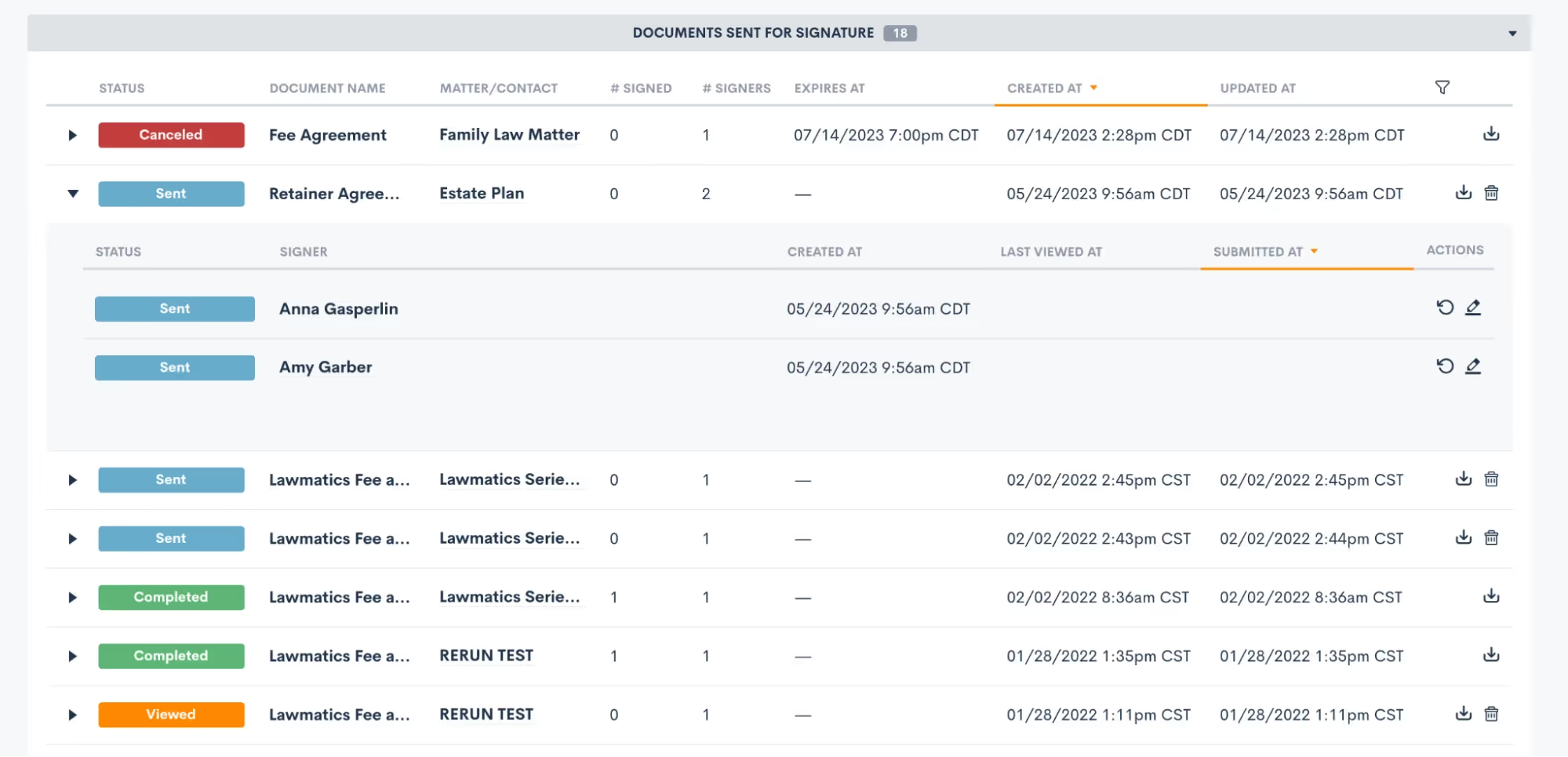
Expand a signature request, as shown above, to view the specific signer details. You can also manually resend a signature request to a specific signer when needed by clicking the circular arrow icon (shown above on the right) for the signer who needs it resent.You’ll also notice that for any documents with an expiration date you will see that clearly stated on this page too. Signers can no longer access and sign a document after its expiration date has passed, but you can manually reactivate and resend it here on this page if needed.Remember that if a document has multiple signers, the status for each signer may be different.
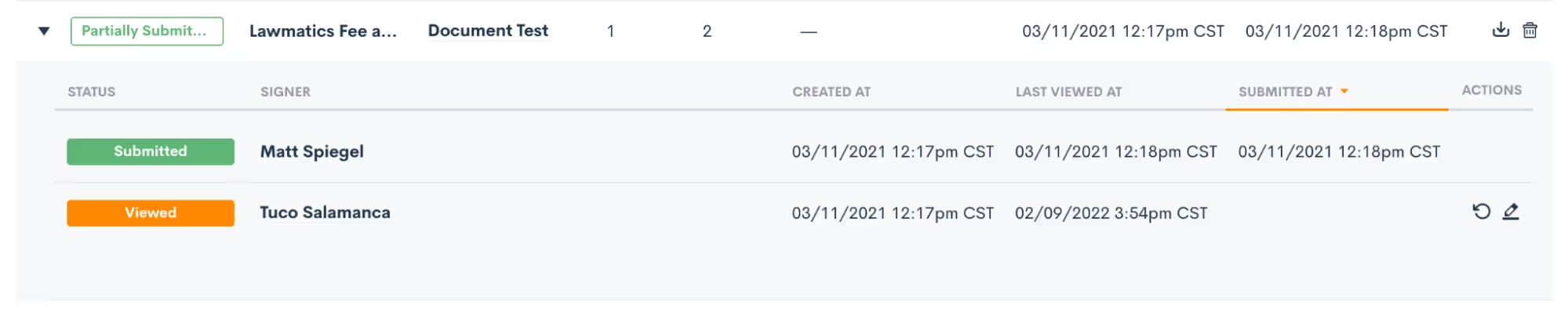
Here in this section you can also download and view a document or cancel one as needed.Any time you send out a signature request, whether manually or via Automation, you’ll be prompted to select one of your users as the signature requester. This person will automatically be copied on an audit trail of the document, receiving email notifications when signature requests are viewed and signed by each signer.To help ensure security and accuracy, you have the option to include the signer’s GPS location as well as IP address on this audit trail. These two options can be enabled or disabled as desired in your Firm Settings page.

Conclusion
Harnessing the power of document templates and e-signature solutions can truly revolutionize the way your law firm handles paperwork and interactions with clients. By streamlining document creation, improving accuracy, and enhancing security, Lawmatics helps empower you to focus more on delivering exceptional legal services.Our Document Templates allow you to create documents automatically. Instead of starting from scratch each time, simply use your pre-built template that tailors itself to each matter’s specific legal needs. E-signatures offer unparalleled convenience, speed, and compliance, making the signing process seamless for clients and attorneys alike.Embracing these technologies not only boosts efficiency but also showcases a commitment to innovation and client-centricity. As the legal landscape continues to evolve, adopting document templates and e-signature solutions is undoubtedly a forward-thinking step towards becoming a smart firm. So, embrace the future of legal document management and elevate your firm to new heights with these indispensable tools.

Generative AI can be a transformative tool in the context of legal marketing and client engagement. But it also presents a variety of challenges.In this webinar Lawmatics CEO and Co-Founder Matt Spiegel is joined by Gyi Tsakalakis, President and Co-Founder of AttorneySync. Gyi brings his vast experience leading a digital legal marketing agency to explore 20 innovative ways lawyers can use AI to improve both client development and engagement.
Time stamps of key takeaways
0:00 — Introductions
If you’ve never met Matt or Gyi before, this is your chance! Both are lawyers-turned-entrepreneurs who live at the intersection of technology and the legal client experience.
7:02 — Warnings about AI
Generative AI and large language models (LLM) like ChatGPT have some important limitations. Before diving into what AI can do for your firm, review some functions it can’t do. Here you can also find some notes on best practices for employing AI.
10:34 — AI and information sharing
The first group of ways firms can implement AI has to do with keeping clients in the loop. Gyi covers how AI can support the generation of law firm content like blog posts, follow-up emails, video sharing, and more.
19:29 — AI and content ideation
The next bunch of AI suggestions involve bolstering marketing content. How can you find frequently asked questions to answer on your firm’s website? How could you effectively summarize dense technical language in a way that clients can understand? ChatGPT might actually have the answer.
26:02 — AI and building smarter strategies
Next, Gyi discusses how AI can make both your marketing content and marketing strategy smarter. Beyond ChatGPT, tools like Orginality.ai and Flourish.studio can assist with plagiarism detection and data visualization. AI chatbots can also provide potential clients with immediate engagement and answer some common simple questions.
34:06 — AI and content optimization
In this final section, learn how to use AI to make your content more accessible for your audience. From text-to-speech generation to search engine optimization (SEO) research, AI can help make your content easier to find and consume.
45:50 — Debrief and Q&A
Matt and Gyi close out the session with a free flowing discussion about the overall role they envision for AI in law, including in their own day-to-day functions in legaltech. Stick around as they discuss some common concerns and take questions from the webinar’s live chat.
Webinar slide deck
The dog days of summer are here, as are the latest new features from Lawmatics! Soak in some rays and revel in a host of powerful new tools and capabilities designed to help your law firm soar to new heights. Read on as we unveil the lineup of this month’s brand new features and enhancements.
Enhance data analytics with Invoice and Time Custom Reporting
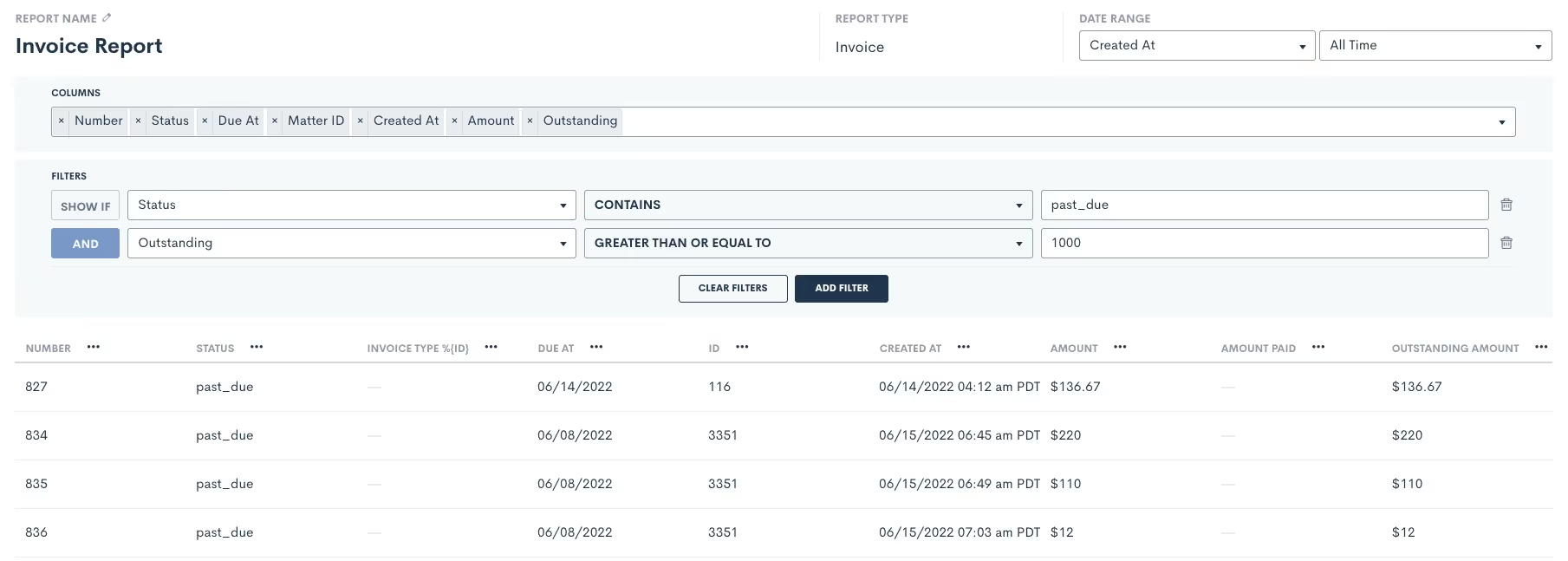
On top of our existing reporting capabilities, you can now effortlessly create Custom Reports for Invoices and Time Entries. Now when you create a Custom Report, you’ll see new options for Report Type: Time Entries and Invoices. After building your report like normal, you can save it and come back to view it at any time. This new addition will help drive decisions backed by data on where and how your firm’s staff are spending their time. Having said Matter ROI on demand will support the development of your business strategy.Learn more here.
Repeat automated workflows each time a Form is filled
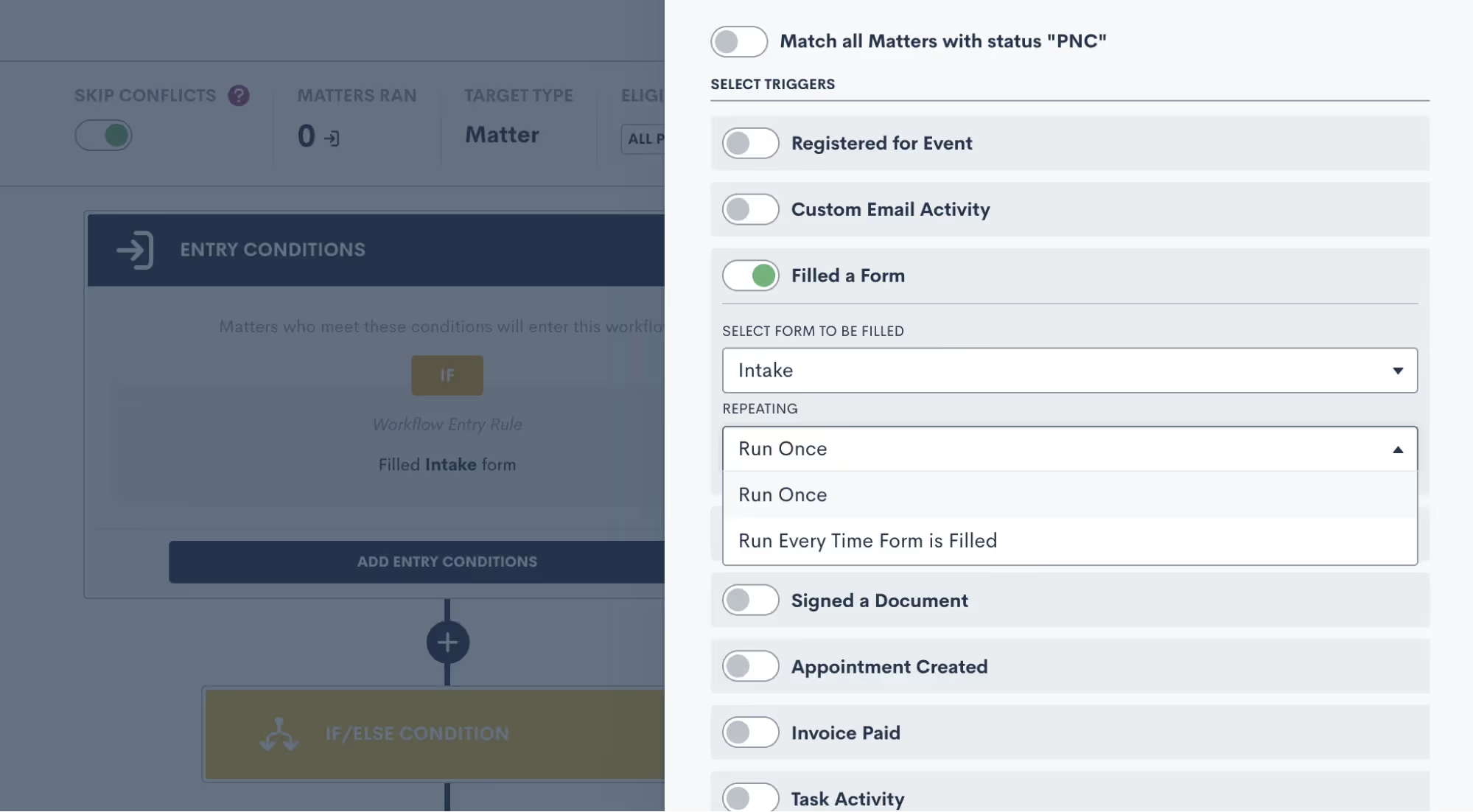
By default, Lawmatics Automations only run once – meaning that if the condition is met multiple times, the Automation will only run the first time the condition is met. You now have the option to allow the Automation to run every time the selected form is submitted. Use this new option for any scenario where you expect a lead or client to fill out a particular form multiple times, and you want the necessary workflow to trigger each and every time.Click here to read more about this feature.
Keep precise records with Email Assigning Inbox
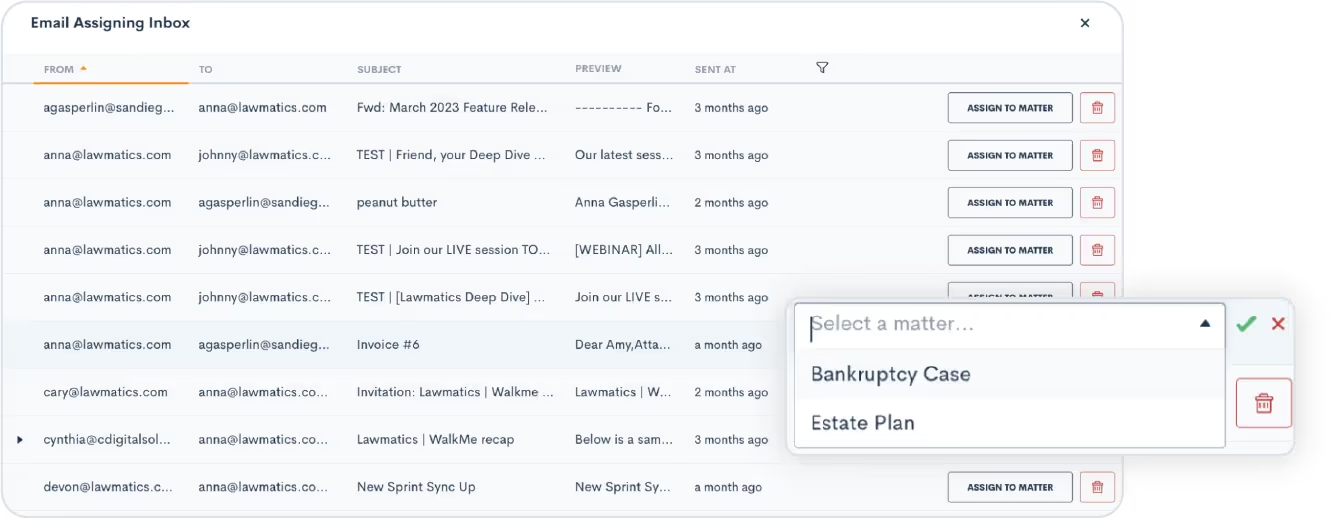
Managing multiple matters for a single contact used to be a challenge, but not anymore! The Email Assigning Inbox is your new go-to tool for effortlessly assigning specific email exchanges to the appropriate matter. Our intelligent system already automatically matches an email communication with its corresponding Matter in Lawmatics, but you can now manually assign emails that might pertain to multiple Matters. Keep your records precise and your workflows seamless.Get started here.
Real-time sales cycle duration metrics
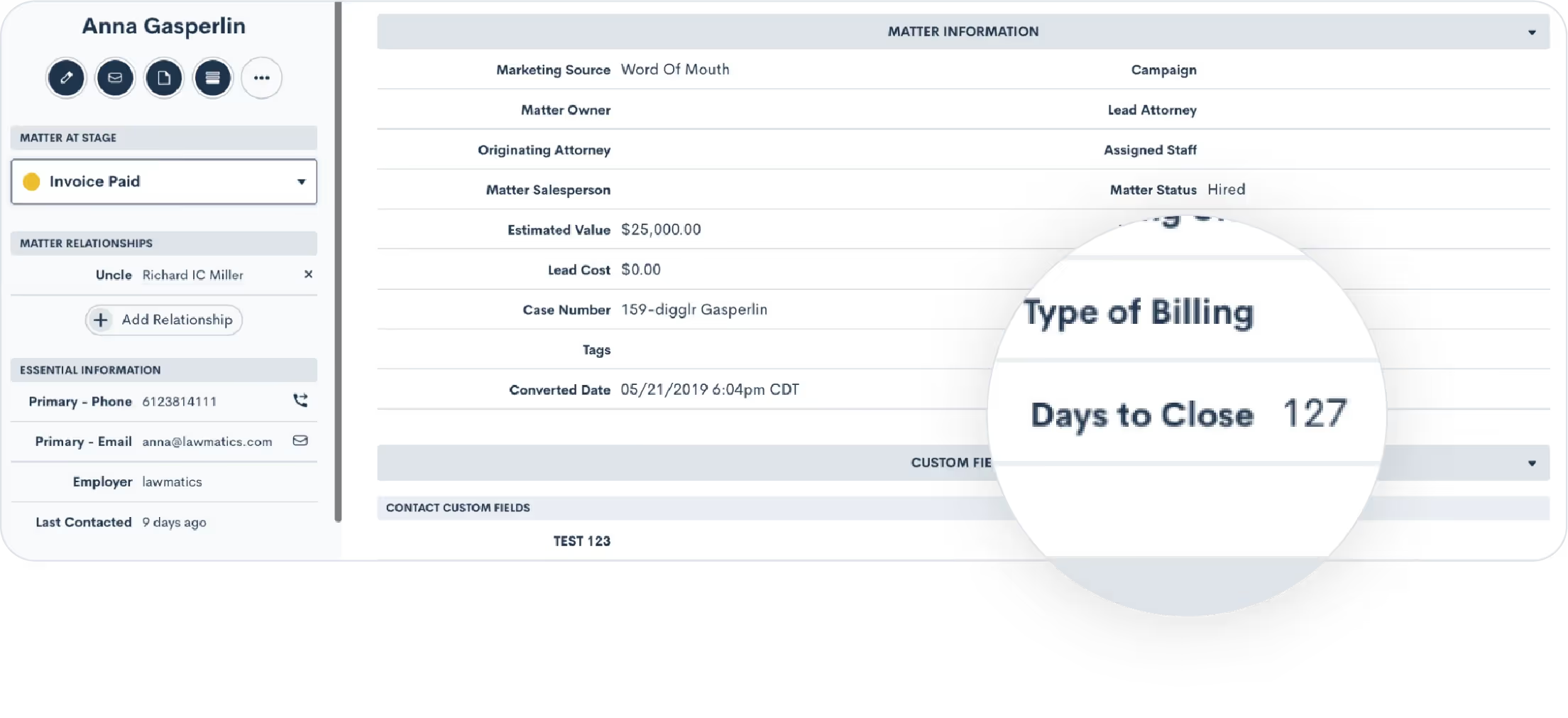
Say hello to Days to Close, a powerful addition that automatically tracks the number of days from when a Matter is created to the day it converts. With this data at your fingertips, your law firm will have greater access to real-time metrics that provide a clear picture of your sales cycle duration. Easily view this field on a Matter’s profile, or use it directly in your custom reports to help make data-driven decisions, optimize your workflows, and enhance the efficiency of your Matter handling.Click here to learn all about Matter conversion.
Eliminate duplicate work by Resubmitting Forms
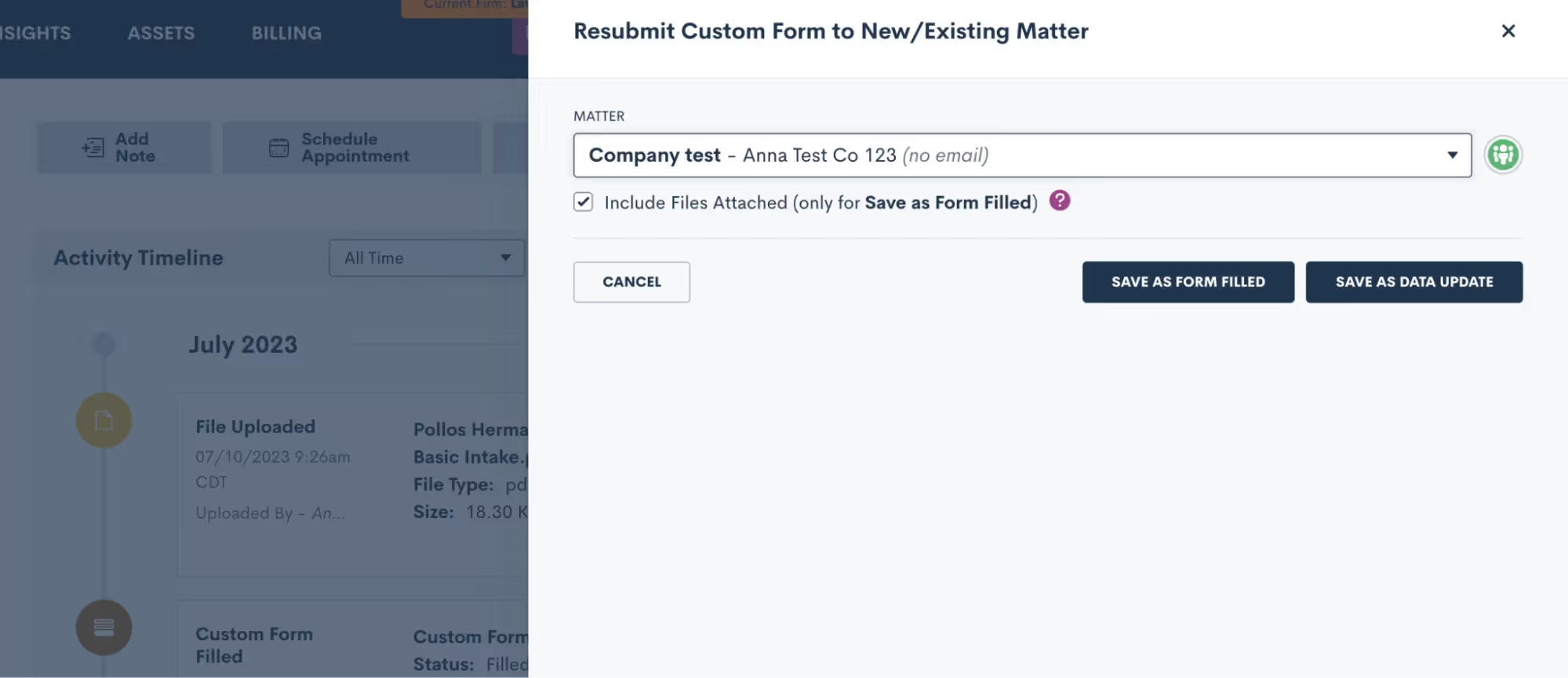
You can now use our new Resubmit feature to effortlessly transfer and repurpose form submissions with just one click. When you click the Resubmit button, you can seamlessly associate that Form data with an existing Matter or use it to create a new Matter. If your clients have multiple Matters, this new feature will eliminate wasteful duplicate work each time.Learn more.
Stay in the loop on Task progress

This new Tasks feature logs a comprehensive record of all activity associated with a particular Task. Navigate to the Task – whether it's from the Tasks dashboard or within the Matter profile – and instantly unlock a detailed timeline of all updates and changes made to said Task. Stay in the know, eliminate guesswork, and gain complete visibility into the Task's evolution.See how to track your Task progress.As always, thanks for checking out this latest update from Lawmatics. Stay tuned for even more exciting features to come as the summer continues to heat up!

A law firm marketing manager oversees a law firm’s promotional efforts, including both traditional and digital strategies. For example, conventional methods might include print, billboard, radio, and television advertising. Digital efforts, on the other hand, involve managing the firm’s website, keeping its blog updated, maintaining its social media presence, and overseeing lawyer biographies and other information posted on law firm review sites. Many of these duties can be streamlined through the use of law firm marketing automation, which provides many benefits to law firms and those who direct their marketing efforts.
Do lawyers need marketing?
Yes, lawyers need marketing! Whether a law firm is large or small, marketing is a critical way to bring in new clients and expand the business. A comprehensive law firm marketing plan should include information about marketing goals, target audience, market analysis, competitor evaluation, promotion strategies, and core messaging. A strong marketing manager understands both the firm goals and the benefits of marketing automation, and has the experience to offer or implement strategies to help make goals attainable.
What are the 5 key responsibilities of a marketing manager?
A marketing manager handles a law firm’s communication and business development to make the most efficient use of the budget allocated for marketing and advertising. To accomplish this, the chief duties of a marketing manager typically include:
- Directing marketing efforts. A marketing manager understands how to advertise through multiple mediums and is responsible for designing, overseeing, and assessing marketing campaigns.
- Planning events. Law firms and attorneys frequently host, attend, or speak at events to draw attention to the firm, connect with local businesses, and engage potential clients.
- Interacting with the media. Law firm marketing managers understand how to build a business by working with the media to help shed light on firm activities that may be newsworthy and of interest to those seeking legal representation.
- Conducting market research. Understanding a law firm’s client base and where to look to grow the business is critical. Marketing managers are responsible for analyzing market trends, conducting research on competitors, and increasing brand awareness. They frequently rely on visual reporting and analytics to make data-driven decisions and measure progress toward long-term goals.
- Interacting with colleagues. Marketing managers collaborate with colleagues to generate client interest and often oversee the communications between a law firm and its client base.
Effective marketing managers know that their job entails more than just advertising. They must “sell the firm” to potential clients to develop the business and free up attorneys to handle substantive legal work.
What does a marketing manager do on a daily basis?
Marketing managers oversee all law firm marketing campaigns on a daily basis. To accomplish this, they must schedule and attend meetings, brainstorm ideas for new campaigns, coordinate with the sales team and other departments to produce effective strategies, stay within their allocated budgets, and monitor the success of their efforts – an arguably demanding position to be in.However, when law firm marketing managers utilize automation software to capture incoming leads, they can increase efficiency and boost conversion rates. Rather than personally addressing each lead at every stage, automation technology allows them to set up custom templates and let the software do the heavy lifting. Marketing automation allows marketing professionals to create, schedule, and send automated client communications to improve organization, streamline workflow, and account for every detail from lead to conversion.Some of the marketing tasks that can be performed through automation include:
- Email campaigns – The automated creation, scheduling, and distribution of customized email communications to engage leads.
- Timely and personalized marketing materials – Messages sent automatically with a legal CRM triggered by specific criteria, such as thank you messages sent to clients after an initial consultation.
- Automated intake – Legal intake management software helps managers configure visual pathways, step-by-step templates, timed trigger client action campaigns, and segmented follow-up messages – with the click of a mouse.
- Appointment scheduling – Clients can book an appointment by syncing with your firm’s Outlook or Google Calendar to choose a meeting time that accommodates your schedule.
Marketing automation concentrates on leads by nurturing and engaging them at every step of the client journey. Often a simple follow-up or reminder is all it takes to stay on the minds of prospects. Lawmatics marketing automation software allows law firm marketing managers to put the leg work of marketing efforts on autopilot to drive firm growth while attorneys stay focused on clients.Are you ready to give your marketing manager the tools to win more business and impress clients? Sign up for a product demo today.

Imagine this: instead of manually collecting and processing client information, your firm can implement automation software. Setting up online forms or questionnaires on your website, potential clients can easily provide essential details. The automation software seamlessly captures and organizes this information, eliminating manual data entry and storing it in a centralized database. The benefits of marketing automation? Time saved, reduced errors, and prompt responses to potential clients, enhancing the overall client experience.From automated intake processes to seamless integration capabilities, embracing marketing automation holds the key to propelling your firm to unprecedented success. Discover how this innovative tool can unlock efficiency and fuel your firm's growth.
What is marketing automation?
Marketing automation software automates repetitive marketing tasks, nurtures leads, and enhances customer engagement. So, let’s pick up with the example above of a potential new client (PNC) submitting the form on your website, the automation software automatically captures their details and stores them neatly in a centralized database. No more manual data entry or deciphering scratchy writing on intake sheets.Once you have these leads, the software helps you stay connected with them. It can send personalized and timely emails, such as a welcome message or a series of informative emails to nurture their interest. It's like having a virtual assistant that automatically follows up with your potential clients, keeping them engaged and increasing the chances of converting them into actual clients.Marketing automation makes your life easier, saves time, and ensures that potential clients receive the attention they deserve. It's a powerful tool that brings your law firm's marketing efforts to life in a tangible and efficient way.
Focus on core business functions
A marketing automation strategy should automate redundant tasks like lead nurturing, email marketing, and appointment scheduling. Instead, law firms can redirect their time and energy toward serving their clients and growing their practice.
Customer tracking and analysis
Create a targeted automated marketing strategy. Marketing automation platforms provide valuable data and insights on clients' online activities, allowing law firms to understand their clients' preferences, behavior, and engagement patterns.
Data-driven decisions
Automation platforms offer analytics and reporting features that provide actionable data on marketing performance. Law firms can track the effectiveness of their campaigns, measure ROI, and gain invaluable insight into how to optimize their marketing strategies.
Task simplification
Automation eliminates the need for manual and repetitive tasks, such as sending follow-up emails, birthday reminders, and survey requests. Reduce the risk of errors and streamline workflows while deploying marketing campaigns.
What are marketing automation platforms?
Marketing automation platforms are powerful tools that assist law firms in their digital marketing efforts. These are the best marketing automation tools on the market, and they offer a range of features and functionalities designed to automate marketing tasks, nurture leads, and improve client engagement.
- Lawmatics is a specialized marketing automation platform designed explicitly for law firms. It offers a comprehensive range of automation features tailored to meet legal professionals' and marketing teams' unique needs. From automated drip campaigns and email marketing sequences to lead generation and client tracking, Lawmatics empowers law firms to streamline their intake processes and enhance client engagement.
- HubSpot is a comprehensive marketing automation platform that provides businesses with many tools to automate marketing workflows. From lead generation and email marketing to CRM integration and analytics, HubSpot offers a holistic solution for managing and optimizing marketing campaigns.
- Mailchimp is a user-friendly marketing automation platform enabling organizations to automate email marketing efforts. It offers features like email scheduling, segmentation, and personalized content creation, allowing firms to engage with their audience in a targeted and efficient manner.
- Hootsuite is a social media management platform enabling companies to automate their marketing processes. With Hootsuite, firms can schedule and publish content across multiple social media channels, monitor engagement, and analyze performance, all from a single dashboard.
- Marketo is a powerful marketing automation platform that provides businesses with advanced lead management and nurturing capabilities. It allows companies to create marketing campaigns, track and analyze customer behavior, and measure the effectiveness of their marketing efforts.
The best marketing automation tool for law firms
We’re a little biased here, but Lawmatics is an all-in-one Attorney-Client Relationship Management (CRM) platform with marketing automation designed explicitly for law firms. It offers a comprehensive range of features and functions tailored to meet the unique needs of legal professionals.Here are 7 marketing automation examples that law firms can use marketing automation in their practice:
1Automated intake process
Streamline the client intake process by automating lead capture, qualification, and follow-up. Customizable intake forms and automated workflows enable law firms to gather client information efficiently, assign tasks to team members, and trigger personalized follow-up communications.
2Drip campaigns and email marketing
Create and automate personalized drip campaigns and email marketing sequences for your law firm. You can nurture relationships, educate clients, and drive conversions by delivering targeted content to prospects and clients at the right time. These campaigns help build strong client relationships through consistent communication.
3Appointment scheduling
Integrate your CRM and marketing automation with popular scheduling tools, allowing law firms to automate appointment scheduling. Clients can conveniently book appointments directly from the firm's website, and the system automatically syncs with the firm's calendar, reducing the need for manual scheduling and back-and-forth communication.
4Document automation
Simplify the process of generating legal documents by offering document automation capabilities. You can create templates for standard legal documents and automate filling in client-specific information, saving time and ensuring accuracy. This feature streamlines document creation and increases efficiency.
5Client communication and tracking
Have a centralized platform for managing client communication. Law firms can send personalized emails, track email opens and clicks, and manage client responses, all within the Lawmatics interface. This allows for efficient client communication and better engagement tracking, helping firms stay connected with their clients.
6Analytics and reporting
Use analytics and reporting features, providing law firms valuable insights into their marketing strategy and client engagement efforts. Firms can track key metrics, measure the effectiveness of campaigns, and make data-driven decisions to optimize their marketing strategies. This data-driven approach enables firms to improve their marketing efforts continuously.
7Integration capabilities
Integrate your CRM and marketing automation with popular legal software and tools like practice management software. This ensures smooth data transfer and provides a more comprehensive view of client information across different systems. Integration capabilities give law firms a unified view of client data, enhancing efficiency and collaboration.While other marketing automation platforms offer general features, Lawmatics is the top choice for law firms due to its specialized functionalities and focus on the legal industry. Additionally, Lawmatics provides excellent customer service and support, ensuring that law firms receive the assistance they need to optimize their marketing automation efforts.
Enhance client engagement with law firm marketing automation
Marketing automation is a game-changer for law firms, streamlining their intake processes and enhancing client engagement in the digital age.Lawmatics was designed for the unique needs of law firms. With its comprehensive suite of features, Lawmatics empowers law firms to streamline their intake processes, nurture leads effectively, and deliver personalized communications. We can help you implement marketing automation at your law firm. Our platform's focus on the legal industry ensures that law firms receive tailored solutions that align with their needs and requirements. Get a demo today to improve your marketing.

Legal specialty software is a digital platform that helps attorneys retain clients with law firm marketing automation and manage client contact information, case notes, appointments, communications, billing, and more in one secure, central location. We'll explore the capabilities of this transformational technology in this brief guide. Let's get started!
What does legal software do?
Legal case management software performs numerous functions for lawyers and law firms, such as:
- Track time. Legal time-tracking software allows lawyers to capture more billable hours. According to American Bar Association (ABA) research, over half of all law firms recorded additional time after implementing legal time tracking software, and nearly 10 percent billed a minimum of 15 extra hours each month.
- Automate routine tasks. Irrespective of practice area, nearly every attorney spends a significant portion of their time on administrative tasks that are a tedious yet vital part of running a practice. Law firm automation handles these tasks so attorneys and legal teams can focus on clients.
- Streamline intake. Legal specialty software automates intake with customizable client intake forms, document request templates, automated appointment scheduling and follow-ups, and e-signature capabilities to take the headache out of client management tasks.
- Document management. Legal document automation software allows legal teams to use custom fields to merge data from matters and contacts and then auto-fill directly into your boilerplate legal forms to save hours on document creation, minimize errors, and help ensure the accuracy of all completed forms.
- Put marketing on autopilot. Lawyers want to spend their time practicing law, not marketing to prospective clients. Legal software solutions systems help them focus on engaging and nurturing leads with targeted messaging visual pathways, step-by-step templates, timed trigger action campaigns, and segmented follow-up messages.
- Manage billing. Generating invoices and accepting payments are among the most time-consuming tasks performed in a law firm. However, legal invoicing software automates billing to save time, allow for more consistent billing, and create a better client experience.
When equipped with software for lawyers, legal teams can work more efficiently, capitalize on new ways to create value from data, and provide superior service to clients.
How can software make law more effective?
Even if your law firm has a system in place, cutting-edge legal technology provides many benefits. Here are some reasons why firms should invest in legal specialty software:
- Better customer service. With easy access to contact information, documents, notes, and other data, lawyers can build stronger relationships with clients.
- Stronger data security. Law firms must keep confidential client information secure. Specialty legal software safely contains sensitive data in one secure system – online and on-premises.
- Targeted marketing. Law firm marketing automation allows firms to Identify target markets and send automated communications to help them engage with potential clients.
- Valuable insights. When law firms can access analytics from a single platform, they can comprehensively view their operations and make data-driven decisions.
With legal software, legal teams can more efficiently conduct business – without letting anything slip through the cracks.
What kind of software do lawyers use?
The most successful law firms use technology to work more efficiently and securely in an increasingly remote workplace. Some of the most common legal software systems for lawyers include:
- Lawmatics. The #1 legal software for growing law firms, the Lawmatics platform offers client intake, legal CRM, marketing automation, invoicing, document creation, and more in one straightforward system.
- Microsoft 365. Software as a service (SaaS) program Microsoft 365 includes essential business tools like Word, Excel, OneNote, Outlook, PowerPoint, SharePoint, Teams, and more.
- Google Workspace. Google Workspace provides a word processor similar to Microsoft Word, which is a good option for attorneys whose work requires collaboration.
- LawPay. Lawyers utilize software solutions like LawPay to send out invoices and facilitate credit card and other online payments.
- RingCentral. All-in-one platforms for voice, video meetings, team messaging, and collaboration, like RingCentral, are popular with attorneys who favor click-to-dial functionality and one-click video conferencing capabilities.
- DocuSign. Electronic signature platforms like DocuSign makes document signing faster, easier, and more secure for lawyers and clients.
Lawmatics: your partner for specialized legal software
All-in-one legal specialty software is an indispensable tool that helps law firms maximize operational efficiency, improve customer service, improve marketing results, and gain valuable insights into business operations to make data-driven decisions.How do you keep track of your legal cases? Lawmatics is the best legal case management software available on the market. Are you ready to learn more about how Lawmatics legal specialty software will transform your law firm? Schedule your product demo today.
Subscribe to get our best content in your inbox
Law firms love Lawmatics
Our customers give their clients the client-focused experience they deserve. Learn how they do it all with Lawmatics.
.avif)
.avif)

.avif)

Ready to grow your law firm with Lawmatics?
Schedule a demo of legal’s most trusted growth platform.
