



The Lawmatics Blog
Insights on legal marketing, automating the law practice, and legal tech in general


Last month, we walked through how to set up custom matter views. But building views is only half the equation — the real value comes from putting them to work. When intake staff, attorneys, and admins are all looking at the same long list of fields, it's easy to miss what matters, waste time hunting for the right information, or forget to fill out a field before firing off a contract.
In this Deep Dive webinar, Devon Butler, product manager at Lawmatics, and Clare Struzzi, who leads the account management team, showed how firms can use custom matter views to trigger automations, surface reporting fields, and tailor layouts by role and practice area.
Time stamps of key takeaways
5:53 – Why customize your Matter pages
Devon kicked off with four reasons to invest in custom matter views: cutting through the noise so each role only sees what they need, supporting cleaner reporting, strengthening team handoffs between intake and attorneys, and working faster directly from the Matter page without having to search for fields.
9:48 – Building practice-area-specific views
Clare walked through an estate planning intake view built specifically for intake specialists, showing how organized sections replace the old starred-fields approach. She highlighted how a field like "Next Steps Pre-Consult" can live right at the top of the view so the intake team can trigger automations directly from the details page — no need to reopen a form.
14:58 – Creating role-specific views
Devon and Clare showed how the attorney view for the same estate planning practice area includes different fields at the top — like "Next Steps Post-Consult" and a dedicated contract fields section where merge fields for engagement agreements can be reviewed and completed before sending. Clare also pointed out that sensitive information like Social Security numbers can be placed in sections that default to a collapsed view.
25:00 – Triggering automations and managing contract workflows
Devon walked through a live example of building an automation that fires when the "Next Steps Post-Consult" field is updated — automatically moving the matter to the correct pipeline stage and sending the engagement agreement. She also showed how duplicating automations makes it simple to handle variations, like sending a single-signer versus a joint estate plan document.
35:09 – Surfacing fields for cleaner reporting
The session wrapped with a look at how the reporting fields on custom views — source, campaign, estimated value, actual value — feed directly into the analytics page and custom reports. Devon demonstrated grouping a report by source to quickly see which referral sources are converting and where data gaps need attention.
Webinar slide deck

Bankruptcy law firms face mounting competition and pressure to stand out. With a few dominant players controlling a large share of the bankruptcy market, niche practices must get creative and strategic with their marketing to attract clients and grow their business.This article provides practical tips and techniques to help bankruptcy law firms enhance their efforts across key areas - from understanding the shifting bankruptcy law landscape and changing consumer behaviors to implementing targeted niche marketing leveraging their unique expertise, crafting compelling, unique value propositions, streamlining intake through optimized digital touchpoints and automation, choosing the right digital marketing and advertising platforms to connect with potential clients, and creating data-driven PPC campaigns optimized for ROI.With the right approach, firms can level the playing field, carve out their niche, and boost quality leads. By implementing the strategies outlined in this guide, firms can set themselves apart, improve client conversions, and build a thriving bankruptcy law practice.The insights here aim to empower legal marketers and firms with actionable tips to help them navigate the competitive landscape. Let's dive in and explore how thoughtful positioning, streamlined processes, and calculated digital marketing can drive growth even in a concentrated market.
Understanding the bankruptcy law landscape
The bankruptcy law industry has undergone major shifts in recent years. Changes in bankruptcy legislation, the rise of dominant national firms, and evolving economic conditions have significantly impacted bankruptcy filings and the competitive landscape. As a result, firms must adapt their marketing approach.For instance, recent data indicates that while overall bankruptcy filings decreased in 2021, many bankruptcy practices are preparing for potential liquidity crises as pandemic aid runs out. This unpredictability means firms must stay nimble and adjust their outreach accordingly. Additionally, industry consolidation has resulted in a few prominent law firms holding a majority share of the bankruptcy services market. National powerhouses like Kirkland & Ellis and FTI Consulting handle high-profile restructuring cases across the country.Smaller firms can compete with the dominant national players by tracking market trends and continuously honing their online presence. Standing out requires strategic positioning and optimizing your website and digital marketing, It can be done!
Targeted niche marketing in bankruptcy law
Given the concentrated nature of the industry, niche marketing can provide smaller firms with a competitive edge.Potential clients actively research to find expertise specific to their needs. Targeted search terms like "small business bankruptcy lawyer" or "Chapter 7 bankruptcy help" present lucrative opportunities for firms specializing in these areas.However, niche focus should be balanced with flexibility. Specializing too narrowly could mean missing out on wider opportunities. Firms should determine key practice areas based on their strengths and local market needs. For example, a firm could build a niche in bankruptcy services for restaurants and hospitality businesses, a sector struck by the pandemic. But they also need to serve other struggling companies in their region.The key is in-depth expertise positioning coupled with adaptability. This empowers firms to attract clients seeking specific guidance while also meeting broader market needs.
Crafting a compelling unique value proposition
With few firms dominating the adviser space, clearly communicating what makes your bankruptcy practice unique becomes critical.An effective unique value proposition (UVP) should answer the following:
- Who is your target clientele?
- What specific problems can you help clients solve?
- How does your firm's approach stand out in a crowded market?
The defined UVP should feature prominently across all marketing materials, website pages, and communications platforms. This ensures your differentiating strengths are conveyed consistently to potential clients. A firm could position itself as specializing in personalized Chapter 7 and Chapter 13 bankruptcy protection for consumers and families. Their UVP would then showcase their expertise in navigating personal bankruptcy, their focus on customized debt relief solutions, and a compassionate approach during a vulnerable time.A compelling UVP empowers firms to get precise with their positioning. When underpinned by niche expertise and delivered consistently, a unique value proposition is a cornerstone for standing out even amongst dominant national players.
Streamlining intake for bankruptcy law firms
An efficient and empathetic intake process is a cornerstone of success for bankruptcy law firms. How potential clients are greeted and onboarded during those critical first interactions sets the tone for the relationship. Firms implementing a streamlined, understanding intake approach see higher conversion rates, reduced loss of leads, and improved productivity.
Optimizing digital touchpoints for seamless client acquisition
A law firm's website and online intake platforms are often the first touchpoints for potential clients. An intuitive, easy-to-navigate website and contact page are crucial for connecting with website visitors and capturing leads.Here are some tips for optimizing online intake:
- Simplify contact forms. Remove any unnecessary fields and only gather essential information like name, contact details, and a brief background of their situation. Keep forms short and concise to encourage completion.
- Assure confidentiality. Communicate that user data entered into online forms will be kept fully confidential. This helps provide reassurance, especially when sharing sensitive financial details.
- Mobile optimization. Many users access firm websites from their phones. Ensure forms are mobile-friendly with tap-to-call features, legible fonts, and minimal data fields to quicken completion.
- Live chat functions. Consider adding live chat support on your website to immediately address visitor queries and guide them on the next steps.Payment integration. Allow users to secure partial payments or deposits through your intake forms to begin securing their business.
- Thank You landing pages. After form submission, provide an automated thank you/confirmation page detailing the following steps and contact timelines.
Also, effective call handling requires staff knowledgeable in bankruptcy specifics and can field inquiries accurately yet empathetically. Some best practices include:
- Answering calls quickly and responding to web queries within the hour. This quick response can reassure clients you are reliable, and- remember- if you aren't answering quickly, these potential new clients are calling other law firms.
- Having trained staff well-versed in bankruptcy options who can answer common questions or direct calls properly.
- Collecting only essential information and summarizing the next steps before ending a call. Follow up promptly.
Have the marketing team or firm owner listen to call recordings periodically to monitor quality and identify any areas for improvement to use in training. Call handling is an important touchpoint, so ensuring calls are fielded properly and empathetically is key.
Leverage client portals and tools to automate intake
Automating intake processes through secure client portals can revolutionize client onboarding. These portals allow clients to self-enter their case details and documents seamlessly transferred to the firm's systems. This eliminates tedious manual entry and minimizes errors.Automation enables attorneys to spend less time on administrative tasks and more time crafting a customized legal strategy for clients.But personalization should still be prioritized through:
- Client segmentation to send tailored communications based on case specifics.
- Scheduling follow-ups and check-ins as critical junctures.
- Customized questions or client questionnaires to account for unique situations.
- Adding personal touches to automated emails like name, case details, special instructions, etc.
Optimizing their intake process for firms struggling with bottlenecks in capturing and converting leads can significantly amplify qualified leads, reduce losses, and streamline operations. In an increasingly concentrated market, efficient onboarding processes are imperative for competitive advantage and client retention.
Digital marketing strategies to connect with clients
In today's digital era, embracing online marketing is non-negotiable for bankruptcy firms looking to attract clients and maximize ROI. But with countless platforms and strategies to choose from, it can get overwhelmingly fast.The key is to avoid shotgun approaches and carefully select channels that align with your audience. Meet clients where they already are online. Provide value through educational content that speaks to their pain points. And remember - employ data, not guesswork, to guide your efforts.Let's break down actionable ways modern bankruptcy practices can up their digital marketing game.
Track and optimize marketing efforts with data
They say you can't manage what you don't measure. That's why constantly monitoring and analyzing performance data is crucial for bankruptcy law firms looking to refine their digital marketing strategy. Leverage tools like Google Analytics and Lawmatics to extract key visitor and customer metrics. Review website traffic sources, audience demographics, content engagement, lead conversions, and more.Pay attention to your website's bounce rate, which indicates the percentage of visitors leaving quickly. High bounce rates often mean your content or pages aren't resonating. Test different elements like page layouts, calls-to-action, email subject lines, and ad variations to see what performs best.Essentially, let data guide your marketing decisions - not guesses or assumptions. Look for patterns and insights that reveal opportunities to improve results. Perhaps a landing page isn't converting well, or an ad campaign exceeds your cost-per-acquisition target.Continuous optimization based on real data is the key to cost-effective marketing. Tweak campaigns, allocate budgets to what works, and eliminate what doesn't. The numbers don't lie - so let them direct your strategy to the greatest success.
Establish yourself as a leading authority with a strong online presence
Your law firm's website is the anchor of its marketing strategy and critical for attracting clients. A modern, polished website with compelling content shows you're a credible, tech-savvy firm ready to partner with clients.Ensure your website is mobile responsive, easy to navigate, focused on your unique value proposition, and contains client testimonials that build trust.
Develop a content strategy that shows thought leadership
Alongside a well-designed website, create and distribute content that provides value and establishes your bankruptcy expertise.
- Blog regularly with topics addressing common client concerns and questions.
- Produce engaging content like videos explaining complex processes or podcast interviews with experts.
- Share and repurpose content across platforms - email newsletters, social media posts, and more.
- Make content easily scannable for readers with headers, lists, visuals, and more.
- Promote content consistently to widen your reach over time.
This value-driven content positions your firm as a trusted leader clients can rely on.
Employ SEO best practices for greater discoverability
Leveraging search engine optimization (SEO) helps maximize online visibility and discoverability.On-page optimization
- Target relevant bankruptcy-related keywords in titles, headers, content, etc.
- Craft meta descriptions that engage searchers and boost click-through rates.
- Use proper alt text and image optimizations.
Technical SEO
- Ensure mobile responsiveness and fast site speeds.
- Build quality backlinks from reputed sites to boost domain authority.
- Leverage local SEO and schema markup for better local rankings.
Monitoring search results and traffic sources provides insight to refine SEO efforts further.With an authoritative website, strategic content, and SEO best practices - firms can become the go-to resource clients turn to in times of financial distress.
Social media for bankruptcy law firms: a calculated approach
Every business today needs some presence on social media. It's like a big, shiny "OPEN" sign that says we're here, we're real, and we care about our community. For law firms, especially those in the bankruptcy space, juggling every social media out there feels like a never-ending task. And the truth? Only some platforms may be worth the time and effort, especially when the marketing team is juggling a lot already. While you can be everywhere, why not try to be where it matters most?
Reddit: navigating the communities of shared experiences
Reddit, often termed 'the front page of the internet,' is home to communities discussing almost everything. For those grappling with bankruptcy, subreddits like r/personalfinance and r/smallbusiness become sanctuaries to discuss financial troubles and seek advice.
- Anonymity & empathy: Reddit provides users a veil of relative anonymity, allowing for open discussions about personal financial struggles without the fear of judgment. A law firm can make an impact by participating in these candid discussions.
- Engage & educate: Hosting AMAs (Ask Me Anything sessions) or simply being proactive in answering questions can position a law firm as a supportive entity. It's not about immediate client acquisition but building trust and offering genuine assistance.
TikTok: quick tips in cool clips
TikTok's algorithm, often praised for its precision in content delivery, provides an excellent platform for firms to reach a wider audience.
- Quick informative videos: Start with bite-sized informational clips. For instance, a 30-second video explaining a particular aspect of bankruptcy or a myth-busting session can resonate well.
- Engage & personalize: As the engagement grows, pivot to community-driven content. Answer questions, host quick Q&A sessions, and, most importantly, let the human side of the firm shine through. Clients don't just buy services; they invest in people. Showing off the personality behind the legal facade can create deeper connections.
Leveraging PPC ads to reach motivated clients
Pay-per-click (PPC) advertising allows bankruptcy law firms to connect with potential clients already searching for legal help online. With PPC, you only pay when someone clicks your ad. Well-targeted Google/Bing ads can put the front and center of your service for searchers seeking terms like "file chapter 7" or "debt relief attorney."
Determine potential value and ROI goals
The average bankruptcy case earns a firm $1,250. Lower-quality leads may cost $30-60 each, while high-quality leads run over $200. To determine potential value, estimate your average client lifetime value based on your typical fees. Then establish a target ROI - for example, aiming to earn 50% over your ad spend. If 4 in 10 leads convert to clients, you may need to spend $2,000 in advertising to acquire 4 clients and hit your ROI goal.
Set an optimized budget
Calculate your marketing budget based on target revenue, projected conversion rates, and desired ROI. While the math can get complex, the concept is simple - spend enough on advertising to meet your ROI and revenue goals based on your expected conversion rate.For example, if you aim for $10,000 in revenue and expect a 40% conversion rate based on your historical data, then you estimate you will need 25 leads to achieve that revenue goal (25 leads x 40% conversion rate = 10 clients).If your data shows your cost per lead is around $200, then you would need $5,000 in advertising spend to generate those 25 leads (25 leads x $200 cost per lead = $5,000 in ad spend).This $5,000 spend would achieve your $10,000 revenue goal at a 100% ROI. Any additional conversions above the 40% rate would further increase your ROI.So, in summary:
- Define your revenue goal.
- Estimate conversion % based on data.
- Calculate the number of leads needed to achieve the revenue goal at that conversion rate.
- Determine the ad spend required to generate those leads based on cost per lead.
Tools to track performance
Analytics like Google Ads and Google Analytics provide data on clicks, conversions, costs, and ROIs. Review frequently, and make data-driven decisions to optimize efforts. Improve performing ads and pause less effective ones.
The power of optimized PPC
With the right messaging, targeting, bids, budget, and optimization, PPC flexibly fills the gaps around organic traffic and builds your client pipeline. Treat it as an investment into your firm's growth and revenue.
The road ahead - ongoing optimization for bankruptcy firms
More than just driving leads, marketing done right builds trust and lasting client relationships. So regularly test new platforms and strategies - but keep a firm handle on ROI. Measure data and double down on what works. Be willing to pivot away from poor performers.While great marketing brings in clients, an efficient intake process truly sets firms apart. From user-friendly web forms to compassionate call handling, ensure each touchpoint makes clients feel understood and supported. Automate intelligently to scale operations without losing personalization.The best marketing and intake processes work hand in hand. Firms willing to test new approaches, focus on ROI, and optimize based on data will gain a competitive advantage. They'll forge genuine connections with clients while positioning themselves for sustainable growth.To learn more about streamlining your bankruptcy marketing and intake processes, contact Lawmatics for a demo. Our dedicated team can help firms modernize client acquisition and onboarding.
Effective communication lies at the heart of every successful law practice. From providing timely updates to ensuring seamless collaboration, staying connected with clients is a must. While email can be a necessity, text and Portal messages can take direct and customized communication to the next level.That's why we're excited to delve into the realms of texting and Portal messaging, and unveil our brand new Message Center that's set to transform how you engage with clients.
SMS text messaging
Text messages are delivered (and usually read) almost instantly, making them a fantastic tool for communicating with your prospects and clients. Most people have their cell phones with them 24/7, and often view texts with much more frequency and urgency than emails.Lawmatics empowers your firm to send and receive text messages right from your CRM. When following SMS best practices, texting can result in an excellent client experience and increased conversion rate while also making things easier for your team.
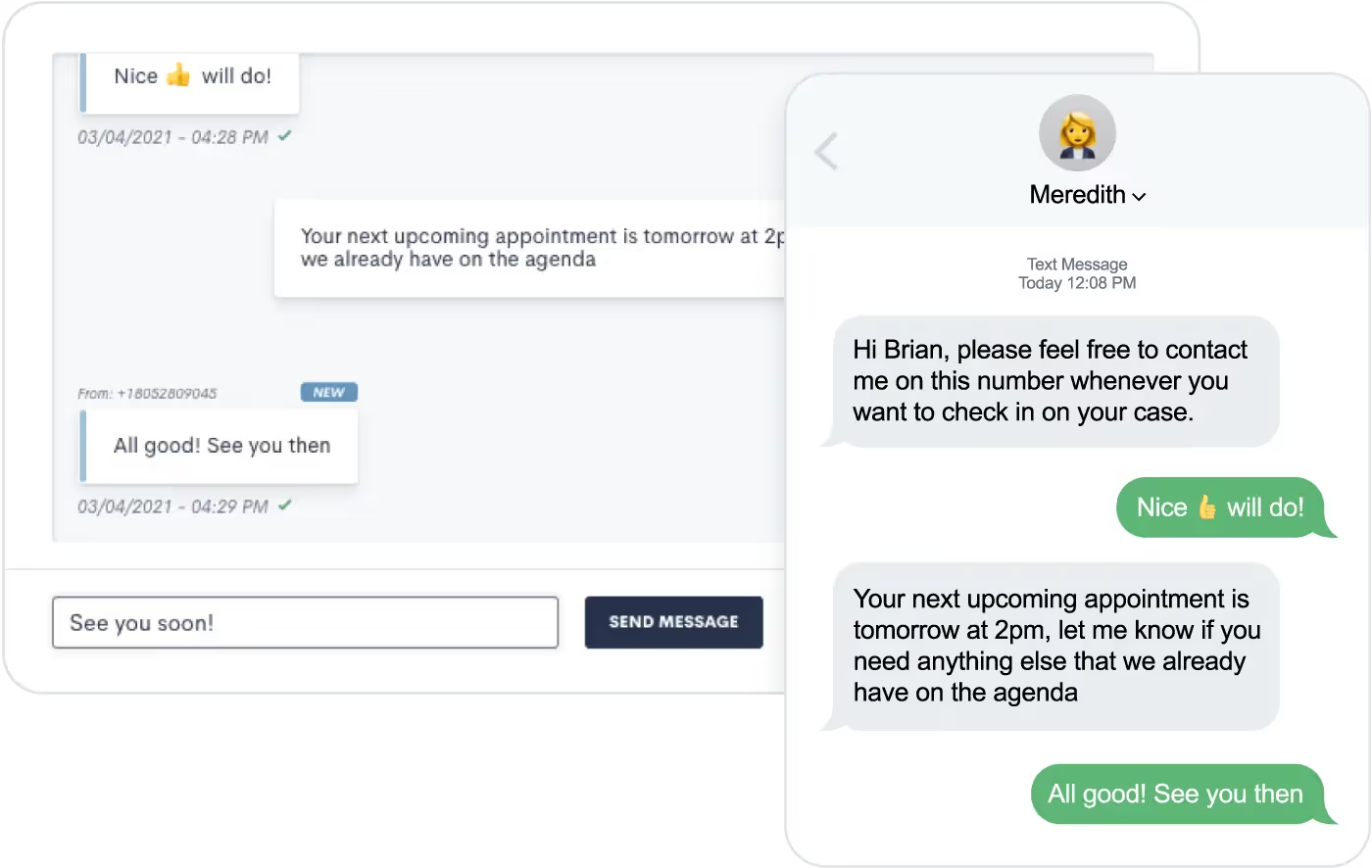
Text messages sent via Lawmatics will not come from your firm’s phone number. Instead, they’ll send from a randomly generated phone number with the area code of your choosing. This number will remain the same so clients will be able to save it as a contact in their phone.At this time Lawmatics offers SMS (short message service) texting, but not MMS (multimedia message service) texting. SMS allows you to send text-only messages, which can include hyperlinks. This means that you cannot share images or other media via text message.If you aren’t using Lawmatics for texting yet, feel free to email us at support@lawmatics.com to get started with this feature. Simply share your firm’s zip code and our team will activate a texting phone number for your account with no additional charge. (Note: only U.S. phone numbers available at this time.)
Automating text messages
You might choose to send texts instead of emails for client communication, or you may use a combination of both. Lawmatics makes it easy to send templated text messages directly from your automated workflows.To send an automated text message:
- Navigate to your Automations page
- Create an Automation
- Select the Send SMS action item
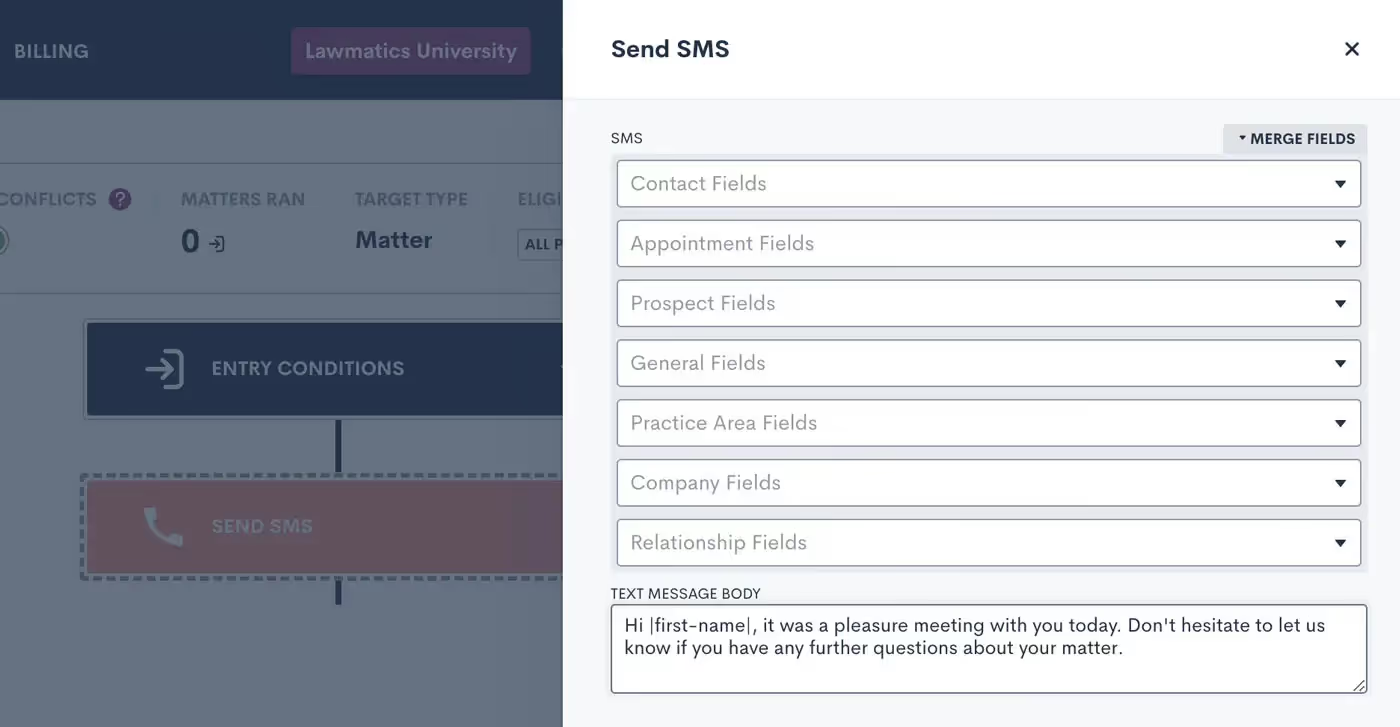
When composing your text message body, as shown above, you’re encouraged to use Merge Fields to address the recipient by name and include any other pertinent information, such as appointment time or other Matter-specific details. This text will function as a template, with each specific target’s information merged in if and when they run through this Automation.When writing your text message template, you also have the option to skip sending the text if the target doesn’t have a valid phone number saved on their Contact in Lawmatics. Enable this selection to avoid causing a failed Automation due to an absent phone number. The workflow will just skip the text and proceed with the rest of your Automation.

Above, you’ll see the Skip toggle as well as the option to set a Delivery Window. Whenever you are using automated text messages, it’s best practice to set a Delivery Window to make sure texts are sent at a time when they are most likely to be seen (and to prevent your texts from sending at inappropriate times).In addition to the Send SMS action item, you also have the option to send many of your assets as a text and/or email. For example, when sending a Form via Automation you’ll see the option to Send as Text or Send as Email.
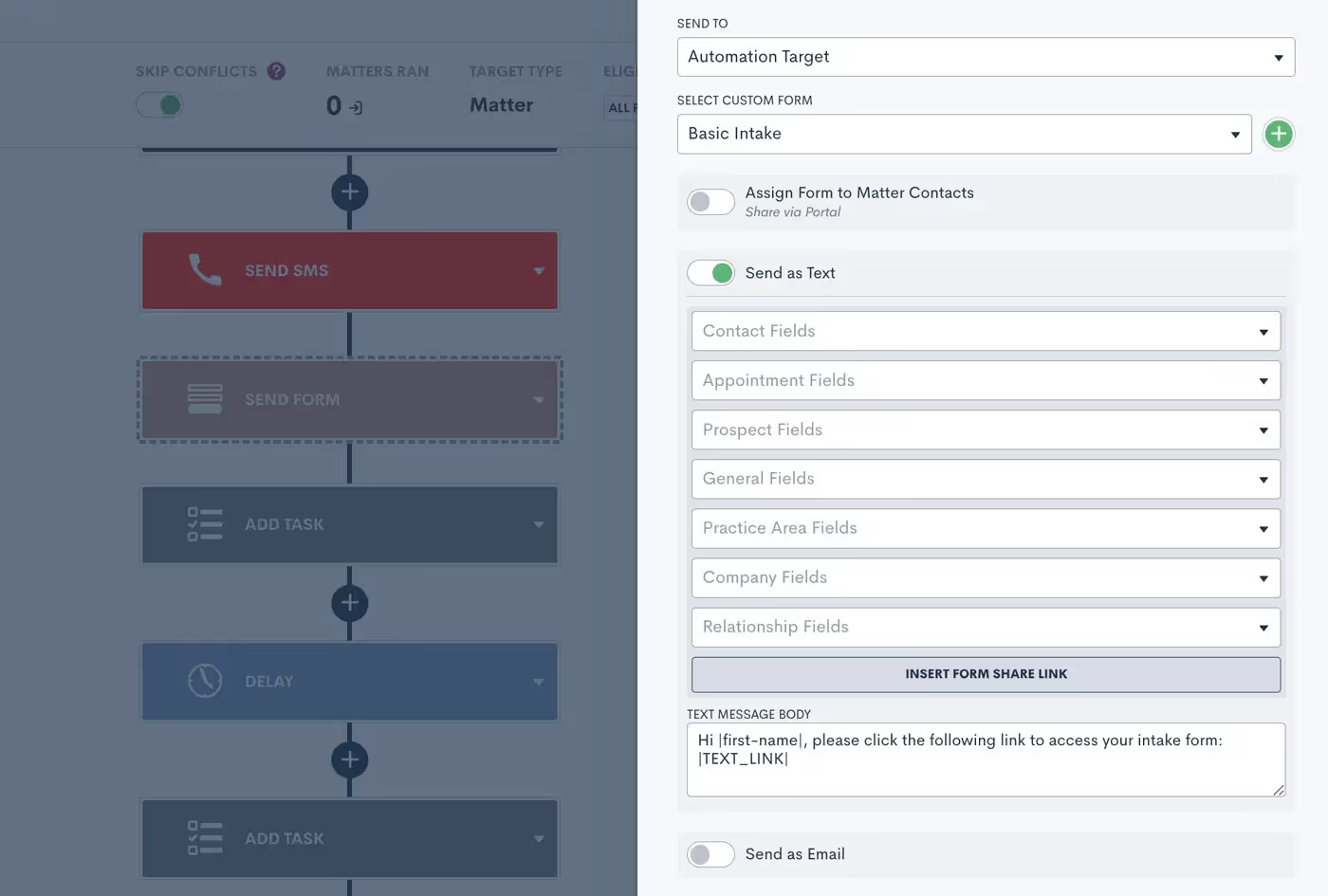
When sending an asset as a text, you’ll still have the option to create your custom text message body template using Merge Fields.In addition to forms, this also works for automated documents, e-signature requests, appointment requests, and more.
Two-way texting
Now that you know how to send automated text templates, let’s dive into our optional two-way texting add-on. This feature allows you to engage in back-and-forth text message exchanges right from Lawmatics. It also gives you the ability to initiate a one-off text to a client rather than relying solely on automated templates.Whether or not you opt for two-way texting, we suggest turning on your email notification for SMS Received in your Settings page.

Without the two-way texting add-on, this notification will let you know that someone has responded to an automated text. You can then call, email, or manually text them from outside of Lawmatics.With two-way texting — in addition to receiving this notification — you’ll be able to engage with the conversation directly from the appropriate Matter (and the new Message Center) in Lawmatics.
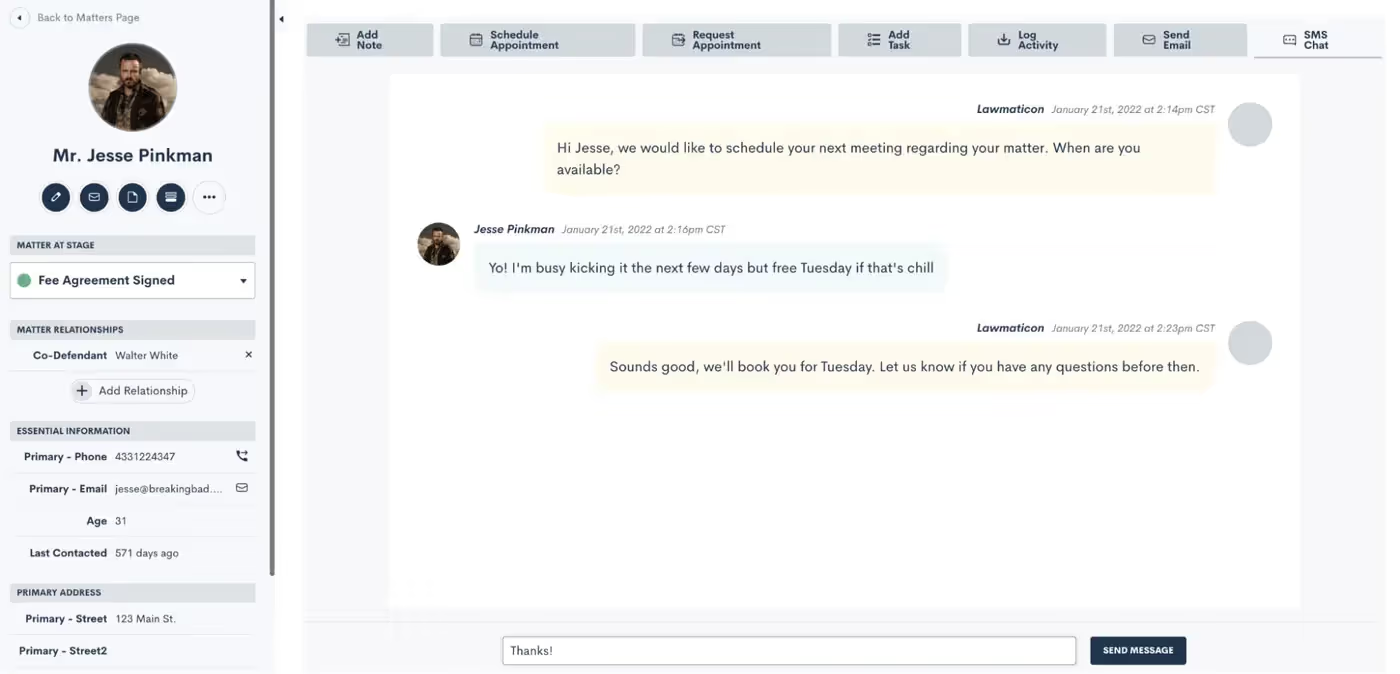
For firms with two-way texting, all text message threads are saved on the SMS Chat tab found on the Matter’s profile.
Client Portal Messaging
In addition to text messaging, Lawmatics also has a messaging function within our Client Portal. (If you’re not yet familiar with the Client Portal, review our past Deep Dive session to learn all the ins and outs of using the Portal.)The Portal is a powerful tool that lets your clients login to view their Matter details such as Forms, Appointments, Documents, and, of course, messages.Remember that you can invite Contacts to the Portal either via Automation…
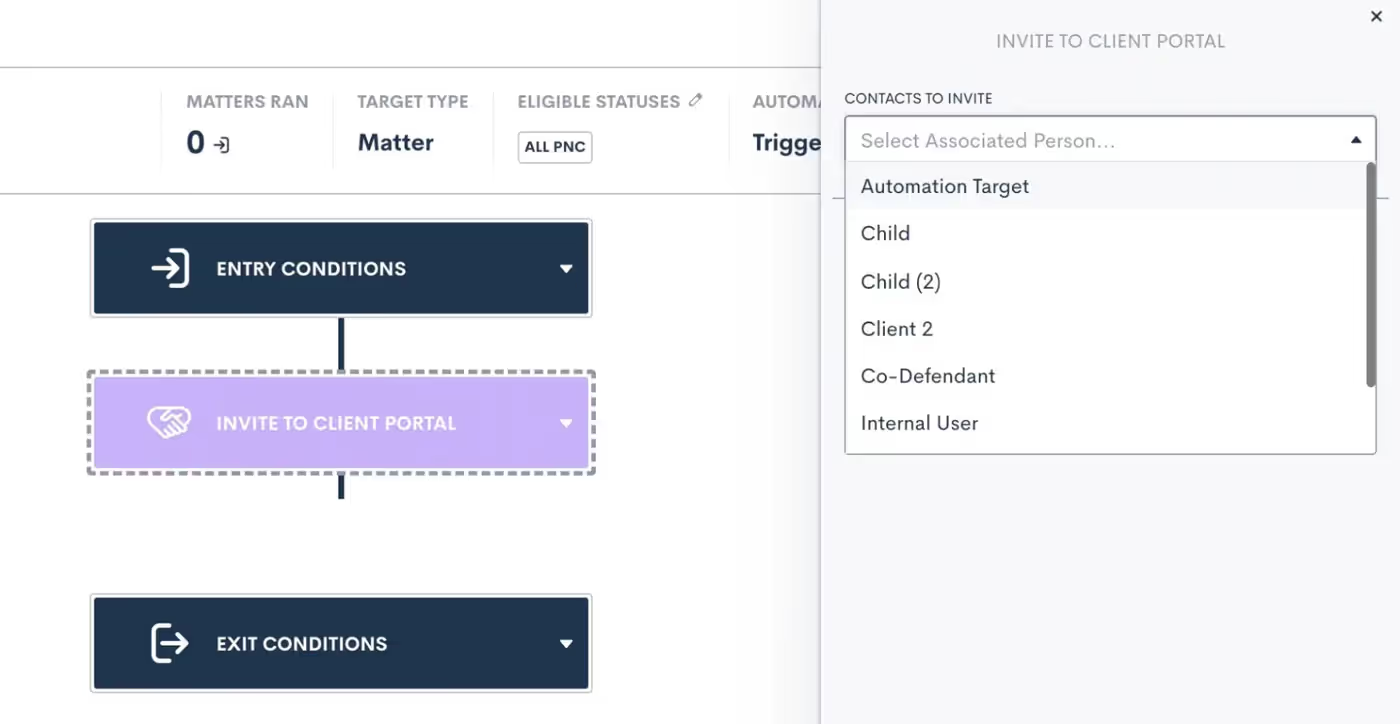
…or by manually clicking the Portal button on their Matter profile:
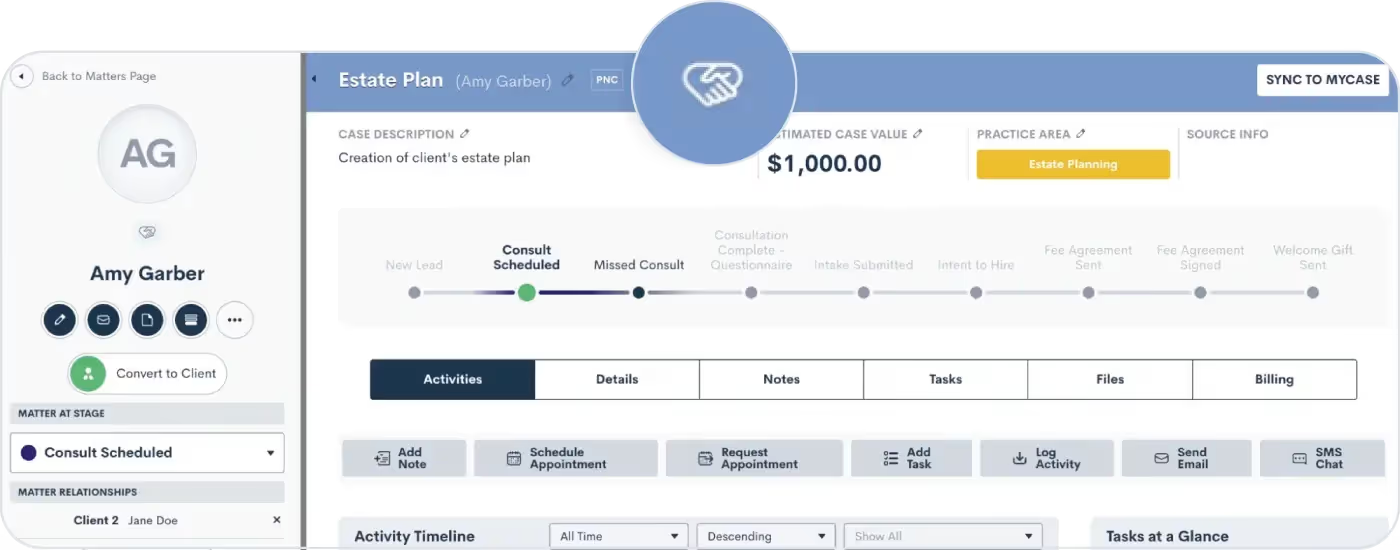
Once a Contact has been invited to the Portal, you can then share any important items with them via Portal, including messages.
Portal Messaging 101
Use our Portal messaging feature to send a message directly into a client's Portal. They can easily view it within their Portal and reply if needed.Unlike our SMS Texting feature, Portal messages do not send to the recipient’s phone as a text message. Rather they can only be viewed within the client’s Portal, as shown below.
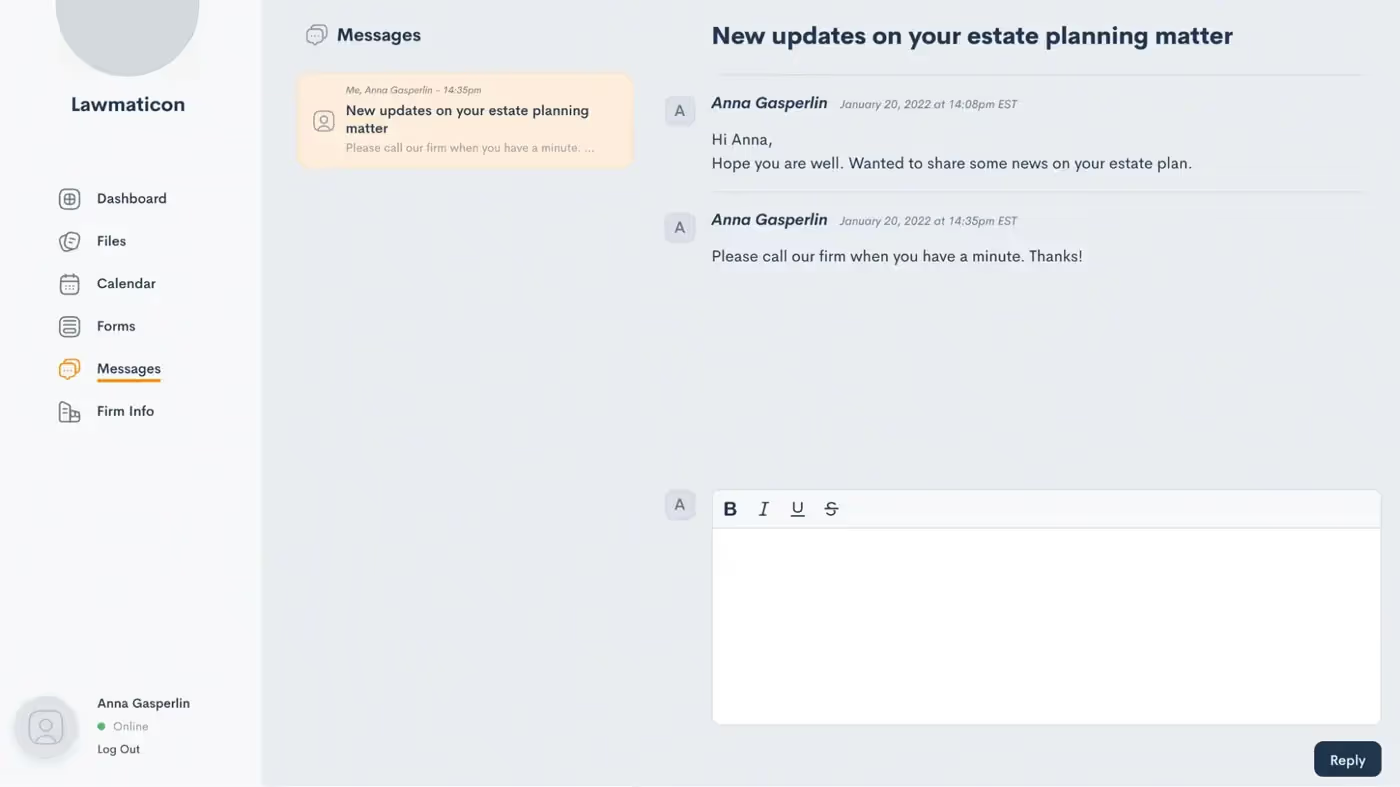
This can be a great option for clients who don’t use texting, opt out of text messages, or just prefer to be more hands off when it comes to their Matter.Previously, Portal messages could be viewed on their own designated page under the CRM tab in Lawmatics. They can now be found in our brand new Message Center.
Introducing the Message Center
The Message Center is your new hub for viewing both SMS text messages and Portal messages across your whole firm. With this powerful feature, staying connected with your clients has never been more seamless.Let’s set off on a guided tour of the Lawmatics Message Center, demonstrating how it centralizes all client communications into a single organized space.To access the Message Center:
- Hover your mouse on the CRM tab near the top left of your screen
- Click Message Center
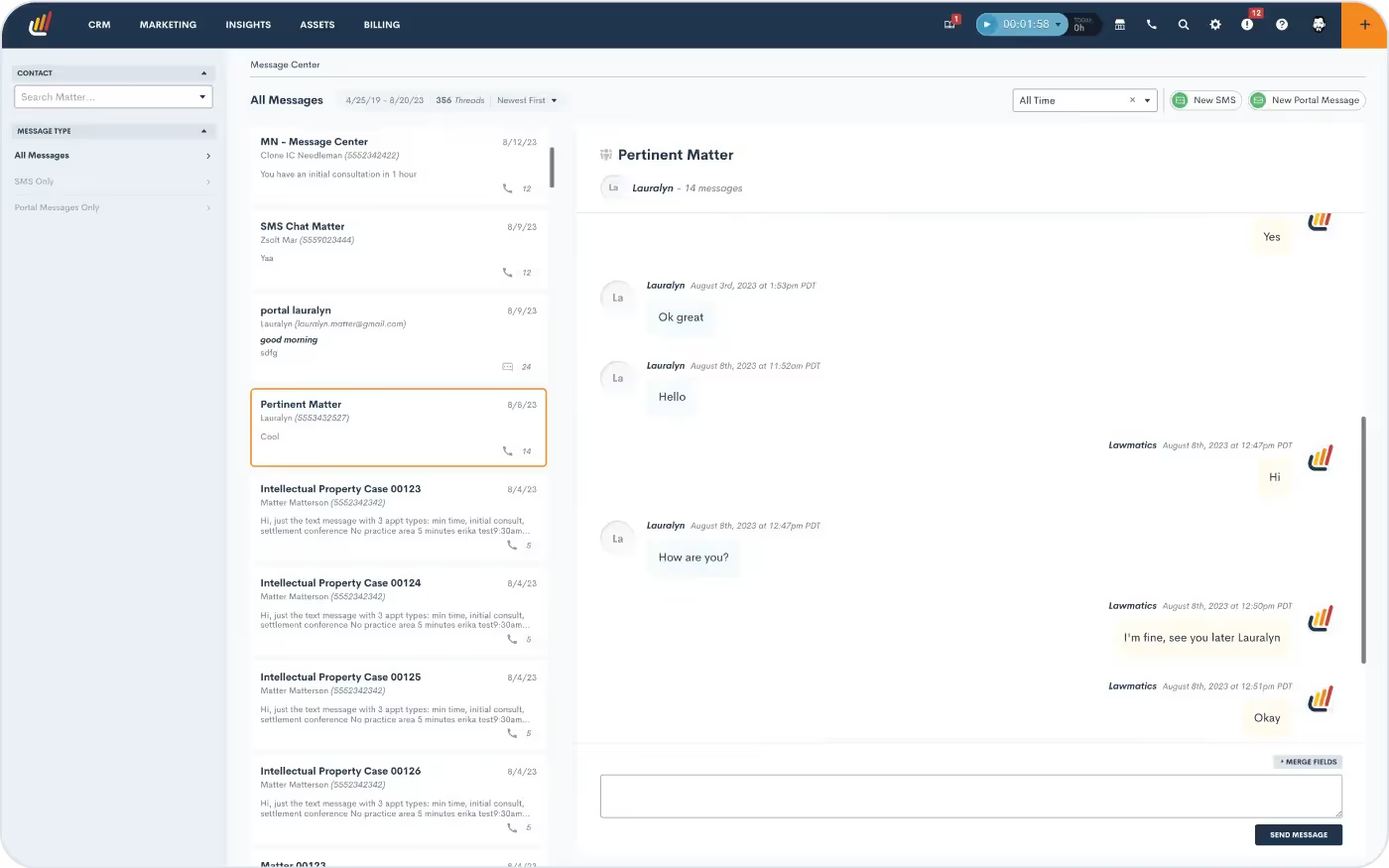
Here you will see a dashboard of all of your firm's messages with clients, tailored to your user's specific access level (read more below about setting users’ access levels).If your firm is using the Client Portal, you’ll be able to view all messages sent and received via the Portal. Note that you can use the button at the top right to create a new Portal message.You can also manage SMS text messages via the Message Center. All text messages sent via Lawmatics will be visible here. If your firm utilizes two-way texting, then you’ll also see message threads exchanged between your firm and the client.
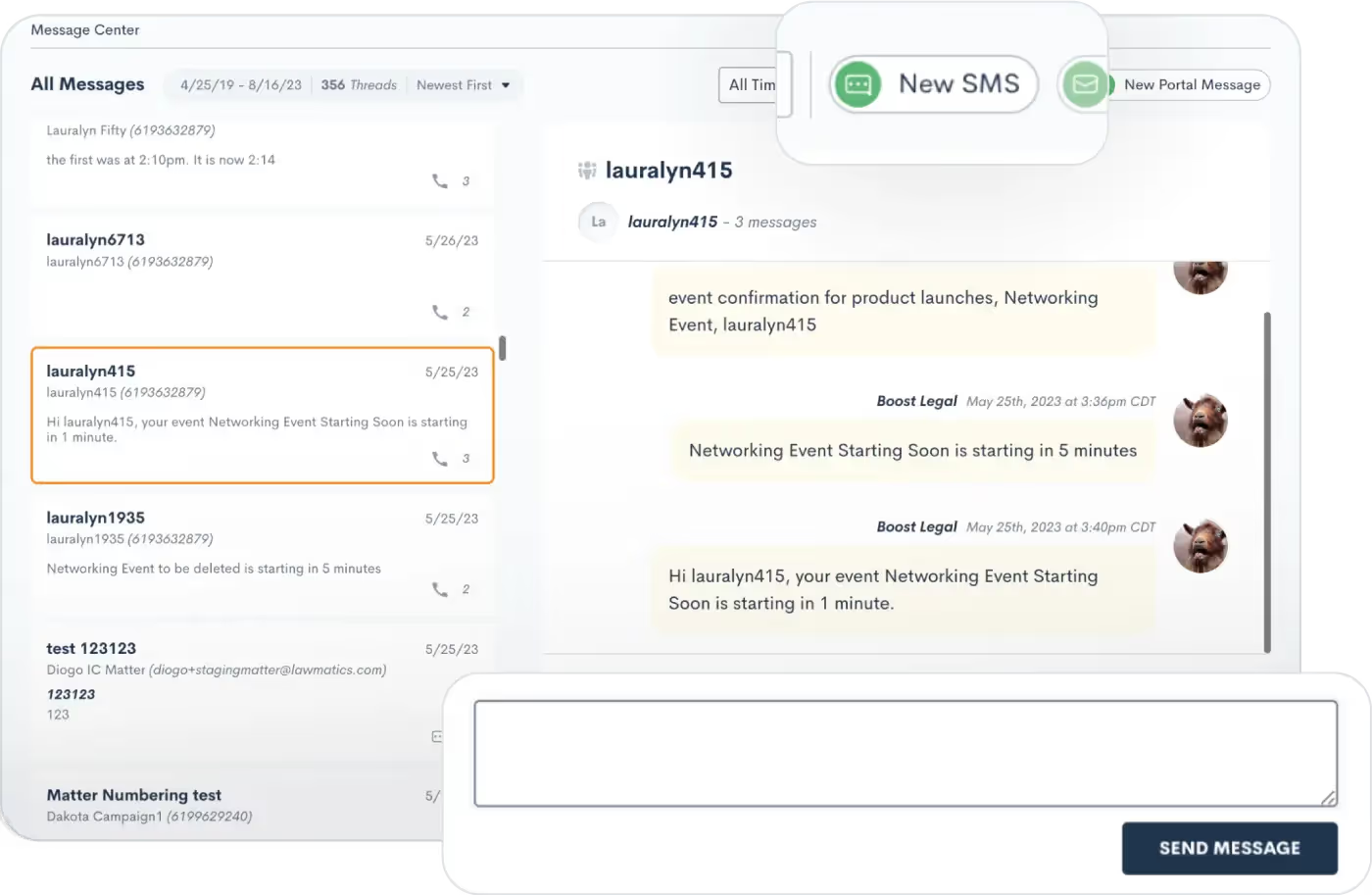
With two-way texting you’ll also have the ability to send out new text messages and reply to threads from the Message Center.
User viewing permissions
As mentioned briefly above, your firm's various users will only be able to view messages in the Message Center for Matters that they have access to. Each firm’s admin will define user roles on the User Management page in Settings.
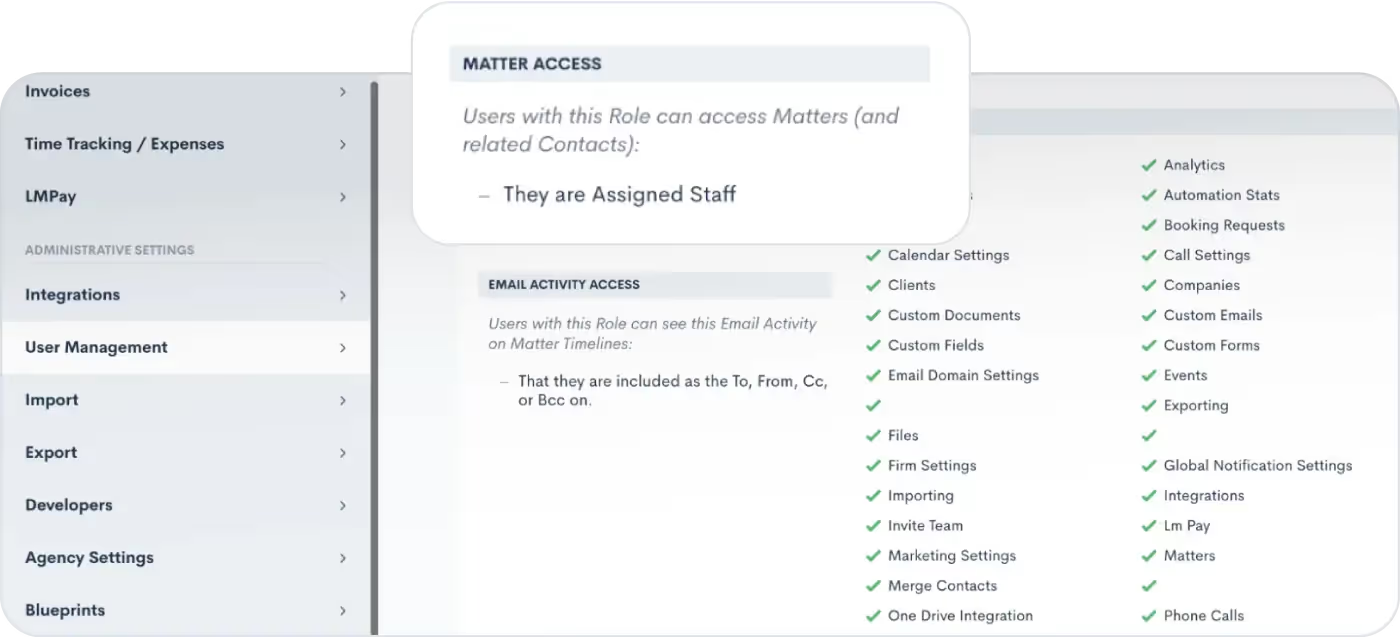
When editing your roles, you can choose the Matter Access level for each role, highlighted above.Whether you have chosen to give certain users access to only Matters that they own, created, etc, or if you wish to give them access to all Matters, this selection will also be reflected in their viewing capabilities for the Message Center. Any user roles that have been granted access to all Matters will be able to view messages exchanged with all Matters in the Message Center.
Filtering and sorting messages
By default, each user will see all messages for Matters that they have access to. However, the left sidebar of the Message Center provides options for filtering messages. You can use this menu to view only:
- SMS messages
- Portal messages
- Messages for one particular Contact
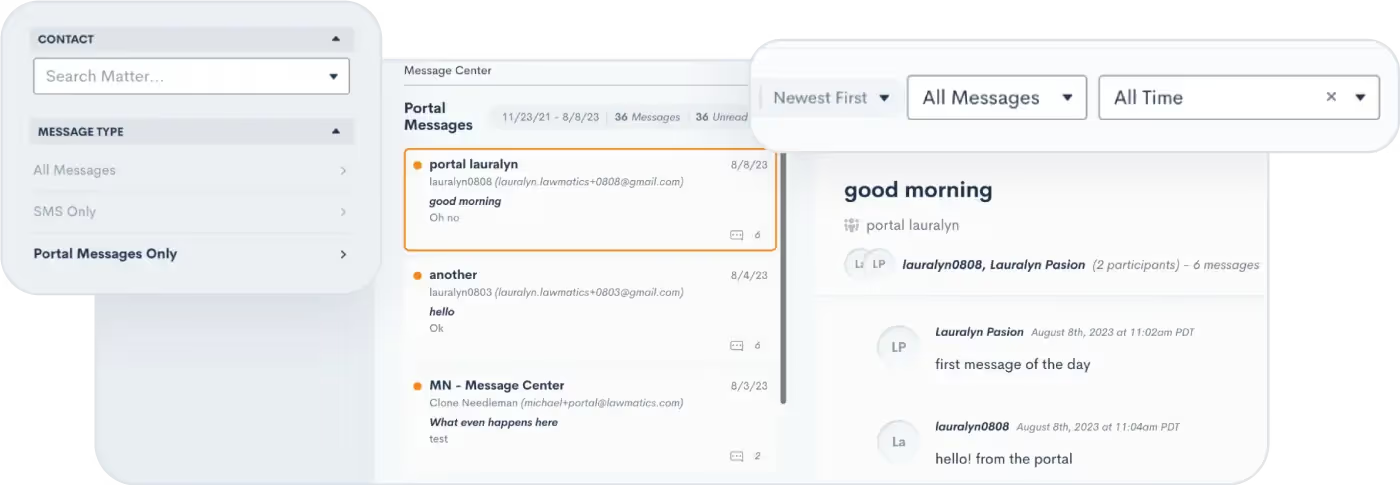
The options on the top right will filter messages by date or message status (i.e. unread vs. read), as well as sort your messages by either newest or oldest first.
Conclusion
As you navigate the landscape of client messaging and communications, know that you are not alone. Lawmatics is here to help you maximize benefits of text messaging and Portal interactions, including the innovative capabilities of our new Message Center feature.As you adopt this new feature, brace yourselves for streamlined communication strategies that can take your law firm's client relations to unprecedented heights.Get started with the Message Center today to dive in and discover the latest tools from Lawmatics that are reshaping the future of client communication in the legal world.

We are thrilled to bring you the latest bountiful harvest of fresh features and enhancements from the Lawmaticians! This latest release is ready to be plucked off the vine and enjoyed, so get ready to feast your eyes on a variety of enhancements that will cultivate efficiency, nurture collaboration, and help your law firm flourish.
Simplify client communication with the Message Center
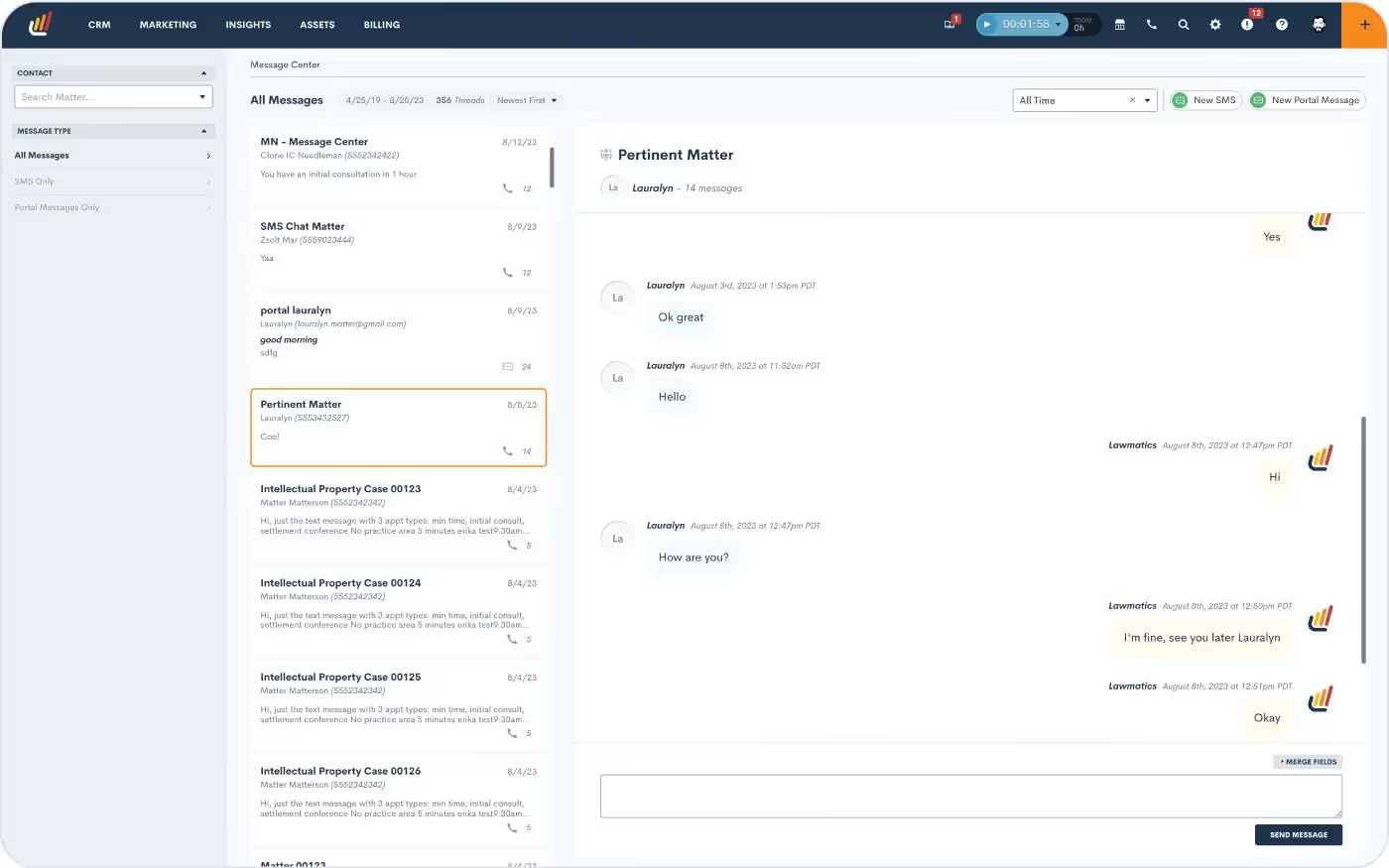
Say hello to the Lawmatics Message Center, your all-in-one dashboard for tracking and managing client communication. Stay on top of your inbox with centralized client messages — spanning texts and Client Portal interactions — in a single organized hub. You’ll be able to filter and sort messages, and even set permission levels for which messages your staff can view. With this powerful feature, staying connected to your clients is hassle-free.Learn how to get started with the Message Center.
Unlock internal visibility with User Activity Timelines
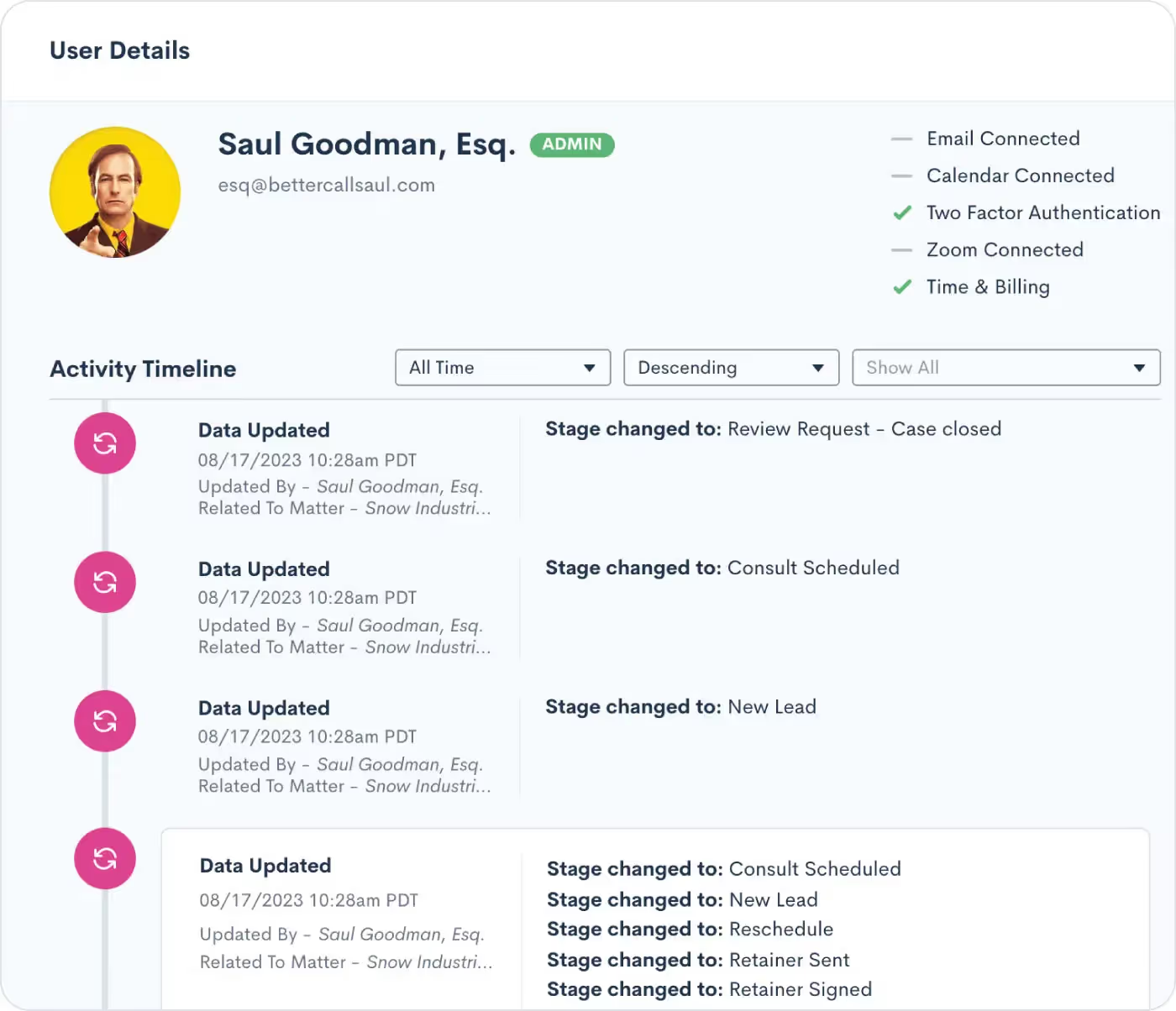
Meet the User Activity Timeline, a dynamic tool that brings enhanced oversight and collaboration to your law firm. With this exciting addition, administrators can now access a comprehensive view of each user’s activities, presented in a timeline format. From Matter updates to Task completions, client interactions to internal collaborations, this feature empowers administrators to stay informed and ensure optimal productivity across the board.Learn how to use the User Activity Timeline.
Fine-tune your sales cycle by tracking Time in Stage

Tracking time isn’t just for billing — it’s instrumental in unlocking the power of data-driven decision making. Our new Track Time in Stage feature allows you to automatically log the duration of time each of your leads spends in each stage of your firm’s Pipeline(s). With this new capability, you can now easily identify bottlenecks or delays in your sales cycle. Armed with these insights, you’ll be able to fine-tune your processes and make informed changes that simplify your client journey, ultimately accelerating conversions.Learn how to start tracking time in a stage here.
Streamline Conflict Checking even further
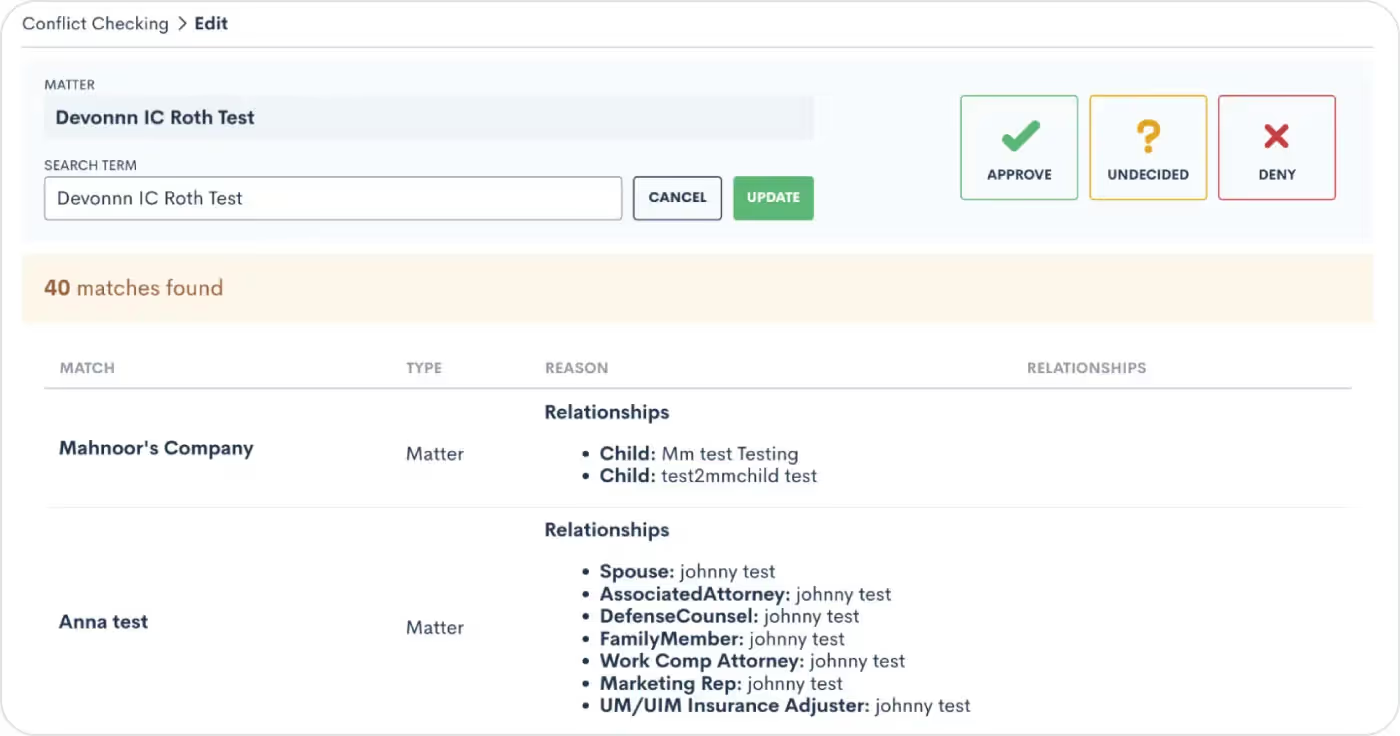
We understand that exact matches are just the tip of the iceberg when it comes to conflict identification. That's why our enhanced system now closely examines flexible search term matches as well as Contact relationships on Matters, ensuring that you have a holistic view of potential conflicts. Seamlessly navigate the complexities of your clients' networks, uncover connections, and make informed decisions that safeguard your firm's reputation and ethics. Say goodbye to missed connections and hello to a more comprehensive approach to identify potential conflicts that may have been overlooked previously.Learn how to conduct more thorough conflict checks here.
Delegate your to-do list with Email Assigning Inbox update

Our newly released Email Assigning Inbox feature is now even more robust, as you can now select another user(s) or role(s) to assign your incoming emails for you. Remember that most emails will automatically attach to the appropriate Matter. For Contacts with more than one Matter, the Email Assigning Inbox allows you (or your delegate) to manually assign emails to the proper Matter. When your delegate goes to their Email Assigning Inbox, they will see your emails in addition to their own. This flexibility allows you and your staff to prioritize and focus on the matters at hand.Not using the Email Assigning Inbox yet? Learn how to get started here.
And more!
- If you’ve opted to show the ‘No Stage’ column on your Pipeline, it will remain visible when you return to the Pipeline page after leaving
- Custom Sub-Statuses can be edited and/or removed in the Matters Settings page
- When using appointment-based Automations, choose to send an automated email from the Appointment host (and likewise for Events)
- Access email marketing campaign stats in your own custom integrations with the latest addition to our Open API
From elevated client interactions to improved behind-the-scenes firm functions, we've cultivated a collection of updates that will make your legal practice thrive even more. We hope you indulge in the richness of this month’s release!

As lawyers, although we might like to believe clients will come from just hard work and success, the truth is that word of mouth only goes so far. A recent survey concluded that 43% of participants relied on word of mouth to find their lawyer. So where does that other 57% go? In the highly competitive legal industry, marketing is a must. In today's evolving legal market you'd be doing yourself a disservice not to take advantage of law firm marketing automation software as 98% of legal firms say that intake software helps them make better decisions about marketing.Creating a successful marketing plan requires a diverse mix of marketing tactics, from blogging, to video content, to networking with other legal professionals. And while this may sound simple, the truth is that attracting clients to your law firm comes with many different challenges.Marketing a law firm is challenging for attorneys for several reasons:
- Legal services can be complex and specialized, making it difficult to communicate value to potential clients.
- Due to the strict ethical rules governing legal advertising, lawyers' marketing strategies may be limited.
- Attorneys often lack the time, resources, and expertise needed to develop and execute effective marketing campaigns.
- The legal industry is a competitive place, making it difficult for smaller firms and solo practitioners to stand out.
So how do lawyers attract more clients while still finding time to actually be a lawyer? In this guide we'll go over some of the best legal practice marketing tactics, and how automation can help.
What is marketing for a law firm?
Law firm marketing is the process of promoting your legal services with the intent of attracting new clients and ultimately generating more revenue. The end goal is to establish credibility and increase your visibility, ultimately persuading potential clients to choose you over the competition.Typically, the most popular law firm marketing tactics include:
- Content marketing
- Search engine optimization (SEO)
- Paid advertising
- Social media marketing
- Networking
For any of these tactics to work, you must have a deep understanding of your target market, who your competition is, and what unique experience your law firm can offer that no one else can.
Why do law firms need marketing?
Regardless of whether you sell cheese graters or legal services, the importance of marketing cannot be expressed enough. Marketing brings awareness to your legal services, engages your potential customers, and ultimately persuades them to hire you as their lawyer. Furthermore, an ongoing and effective marketing strategy doesn't just help maintain the demand for your legal services, but it will also boost your relevance, increase your reputation, and set you apart from the competition.Think of it this way— how do people find lawyers? They usually do a Google search or ask for referrals from friends and family. Irrespective of being the best lawyer in the world, your marketing plays a pivotal role in how many times your name will come up. You can bet your money that even if you’re a small law firm, you will generate more clients than the best lawyer in the world if you have a stronger marketing plan than them— it's really that simple.
How do you promote a legal practice successfully?
Successful law firm promotion starts with tools like marketing automation, referrals, social media, and blogging. Since marketing can take up a substantial amount of time and money, and lawyers already have enough on their plates as is, it's critical that they learn how to be more efficient with their workflow and processes. Recent statistics show that 95% of firms agree that since marketing is considered “non-billable” it’s a greater spending risk. As such, more and more lawyers are putting their marketing dollars where they can be sure they’ll produce the most results. Over the past few years, we've seen major developments in the ways that lawyers operate in order to be as efficient as possible.Some of the most effective ways lawyers promote their legal practice are:
Marketing automation
Thanks to the help of tools that specialize in process automation, lawyers can put the administrative aspect of their law firm, like marketing, on autopilot so they can focus their attention on billable work. Tools like drip email marketing allow lawyers to schedule personalized and targeted emails that don't just generate new business but also encourage repeat business.This hands-off approach means lawyers can build repeatable processes that automatically send themselves each time a lead or client moves from one stage of the client journey to the next. In other words, lawyers can engage clients consistently without stepping away from their legal work.Choosing a client intake software like Lawmatics with built-in marketing automation will save your firm more time, close more clients, and ultimately grow your law firm.
Referrals
Relying on word of mouth from former clients, professionals in your network, and colleagues is one of the most effective ways to bring in new business. In general, a personal recommendation is considered amongst most to be the most reliable way to find legal services,
Social media
Social media is a great place to build credibility for your law firm by generating a following. 84% of law firms generate their leads through organic social media traffic. Growing a following on platforms like Facebook is a great way to market your firm since it gives your audience the opportunity to directly interact with you. By sharing content, commenting and interacting, you can significantly drive your engagement, and ultimately drive more traffic to your law firm website.Yet it's important to note that not all social media platforms are suited for lawyers. And yet while there are no official rules regarding where lawyers can and can't be present on social media, you're probably not going to see a lot of lawyers on a platform like Snapchat. The best social media platforms for lawyers are:
- YouTube
- TikTok
Make sure you check out our post where we show you 9 attorney TikTok accounts you need to follow for marketing inspiration
Blogging
Surprisingly, only about 27% of lawyers have a blog. Yet smart marketers know how important having your own blog is. Although a presence on social media is useful, it's still rented space. Ultimately, you're at the mercy of an algorithm you can't control.A blog is your own piece of land where you get to establish your authority on what you know best— law! By creating regular content that resonates with your audience, you'll be more likely to generate recurring visitors that turn to you as the go-to person for their legal questions. Not to mention with a solid SEO strategy in place, your blog will help your legal website appear higher on Google search results.
Website
A well-constructed website makes it possible for clients to find your law firm online and establishes credibility for your business. The more SEO you incorporate into your website, the higher your page will rank in Google search results, giving you increased visibility on a larger scale. A website also allows you to track visitor behavior such as click-through rates, website traffic, and conversions, allowing you to measure the effectiveness of your marketing.
Networking
Attending industry events is an essential method for networking with other legal professionals and potential clients and building your reputation as an expert in your field. Good old fashioned face-to-face interactions will always be one of the most reliable ways to find new clients.
How does a firm set up a marketing plan?
Setting up a marketing plan for your law firm that will yield results requires 8 key steps.
1Define your target audience
Who are you trying to market to and what kind of marketing appeals to them?
2Research your competition
Analyze what your competitors are doing to attract and convert new prospects into clients and determine how you can do it even better.
3Determine what you can offer that’s unique
Establish what your unique selling point is and how you can set yourself apart from the competition with unique positioning.
4Decide which marketing channels you’ll use
Decide which marketing channels you believe will be the most lucrative for your business, from e-mail marketing, to starting a blog, to creating your social media strategy.
5Set specific goals
A marketing plan is useless without specific goals in mind. The more specific you can be about what it is that you hope to achieve, the more you can fine tune your marketing efforts.
6Determine your budget
Have a specific number in mind about how much you can afford to spend on your marketing.
7Implementation
Dive in and get started. Start executing what it is that you set out to do and measure the results
8Consistent evaluation
An effective marketing plan for your law firm is one that should consistently be revisited and evaluated so that you can make whatever changes necessary to get the results you want.
How to promote a law firm? With Lawmatics
Lawmatics, the number one legal software, was built to make marketing effortless. From responding to new leads automatically to sending out the right email to the right person at the right time, Lawmatics is here to help your growing law firm grow even more.Are you ready to see why Lawmatics legal intake, law practice CRM, marketing automation, and legal billing software is what everyone is talking about? Sign up for a free demo today!
Your to-do list seems unending, right? The contract review, the case analysis, the unanswered emails. The legal profession has always been synonymous with hefty workloads and long hours. But what if you could relegate these time-intensive tasks to a digital ally, paving the way for more strategic work and a better work-life balance?Generative AI isn’t just a trendy buzzword—it's your new associate. Many law firms have already adopted tools to fortify their expertise. Generative AI is an efficient team player, assisting with everything from drafting legal documents to conducting comprehensive research.
The AI disclaimer
The legal profession tends to resist technological advancements, such as generative AI tools like ChatGPT and Google Bard, with immediate talk of bans and warnings of ethical violations. Despite initial restrictions, like those imposed by US District Court judges and law schools like Berkeley and the University of Michigan, legal tech evangelist Nicole Black argues that these technologies should be embraced as valuable tools to streamline work and increase efficiencies. She suggests that legal professionals have an ethical duty to learn about and make informed decisions about these technologies, mirroring a historical pattern of initial resistance followed by eventual acceptance in the legal field.And we’ve already seen bad lawyering play out with ChatGPT, as some legal professionals have relied heavily on ChatGPT for legal research without verifying the accuracy of the information provided, leading to sanctions.Generative AI holds immense promise for the legal industry, but this also warrants careful attention to ethical considerations and challenges, including:
- Accuracy and accountability: Legal professionals must critically evaluate the AI-generated advice, always corroborating its validity.
- Data privacy and confidentiality: Legal professionals are responsible for ensuring robust data privacy, and security measures are in place.
- Transparency and explainability: Legal professionals must unravel the "black box" of AI and ensure the reasoning behind AI-generated legal analysis is clear and understandable.
- Liability and professional responsibility: Professionals need to navigate the landscape of liability for errors or omissions in AI-generated content. Legal professionals should delineate the boundaries of AI usage, managing client expectations to avoid potential legal and ethical issues.
With some guardrails, AI can help legal professionals get through dense workloads. The results ended in a tie in a casual study comparing the abilities of AI ChatGPT and a human IP lawyer in drafting articles on the legal issues of using generative AI at work. The AI came out ahead in terms of efficiency and readability. At the same time, the human excelled in depth and avoidance of repetition. The experiment highlighted potential practical applications of AI but also emphasized the necessity for clear guidelines.
The power of generative AI: transforming efficiency and unleashing potential in the legal practice
Generative AI, harnessing the might of deep learning models like neural networks, is not merely influencing the legal profession—it's poised to redefine it. The transformative potential of generative AI in legal practice transcends task automation, shaping the profession at its core.Data processing and research quality: One of the core advantages of AI is its ability to rapidly and accurately process vast amounts of data. This not only economizes time but dramatically enhances the quality of research, providing legal professionals with an in-depth, comprehensive understanding of the multifaceted legal landscape.Pattern recognition: AI shines in its pattern recognition capabilities. Through machine learning algorithms, AI can detect patterns and correlations in substantial datasets that may elude human analysis, offering critical insights. These insights prove invaluable for predicting case outcomes, assessing risks, and formulating potent legal strategies.Cost savings: Incorporating AI in legal practice can save significantly. By automating tasks and boosting efficiency, law firms can optimize their resources and concentrate on services that add more value—yielding benefits to the firms and their clientele.But what does this AI revolution look like in action? Many AI applications are already being put to work in daily law firm operations.
Legal drafting & case review
Take, for instance, Harvey AI. This ground-breaking fusion of natural language processing and machine learning aids firms with contract analysis, due diligence, and regulatory compliance. Meanwhile, Auto-GPT technology combines OpenAI's text-generating AI models with a companion bot for autonomous decision-making, accelerating contract review and summarizing specific clauses effectively.
Legal research
AI has made its mark in legal research as well. Platforms like Casetext harness AI to help legal professionals locate pertinent case law, statutes, and regulations swiftly.CoCounsel, a product of OpenAI and Casetext collaboration, is a reliable legal assistant tailor-made for lawyers' needs. Blue J L&E reconsiders legal research and analysis, using AI to predict case outcomes and probe complex legal issues—analyzing factors and outcomes, not merely keywords.
Marketing & intake
On the client interface side, LM[AI] incorporated into Lawmatics provides an all-in-one CRM solution, saving valuable time by generating professional email copy with a single click. Similarly, Smith.ai leverages AI-integrated virtual receptionists to ensure timely responses. At the same time, Gideon streamlines client intake and document automation for a more effective process.Generative AI's application is no longer a technological novelty; it's a strategic game-changer. As legal professionals increasingly embrace AI, they lead the profession into a transformative era of heightened efficiency, innovation, and strategic edge. Law practice is set to be redefined, with generative AI leading the charge.
Harnessing generative AI with prompt engineering
The significance of prompt engineering in the legal industry can't be understated. Those who master the art of prompt design will stand above their peers. But, prompting is not a one-size-fits-all solution. There are certain limitations to the generative AI tools, such as the inconsistent output of the same prompt and the inability to resolve hallucinations and bias in the datasets.Here are the essential elements you need in a successful prompt:
- Define the role: "You are an expert legal research assistant..."
- Establish clear intentions: "...and your task is to summarize the key holdings and legal principles from the following court cases related to employment discrimination."
- Provide context and background: "The cases are 'Smith v. XYZ Corp.,' 'Johnson v. ABC Inc.,' and 'Doe v. MNO LLC.' These cases are from different jurisdictions but share a focus on age discrimination in employment.
- Insist on specificity: "Note that 'Smith v. XYZ Corp.' is from the 9th Circuit Court, 'Johnson v. ABC Inc.' is a Supreme Court decision, and 'Doe v. MNO LLC.' is from the New York State Court. Please identify the jurisdiction for each case in your summaries."
- Direct the format: "Provide the summaries in bullet points for each case, highlighting key points of law, the court's reasoning, and the implications of each ruling."
- Use examples or references: "I appreciate a clear, concise writing style similar to that found in the 'Legal Information Institute' case summaries."
Here's how the entire prompt might look when you put it all together:
You are an expert legal research assistant, and your task is to summarize the key holdings and legal principles from the following court cases related to employment discrimination: 'Smith v. XYZ Corp.,' 'Johnson v. ABC Inc.,' and 'Doe v. MNO LLC.' These cases are from different jurisdictions but share a focus on age discrimination in employment. Note that 'Smith v. XYZ Corp.' is from the 9th Circuit Court, 'Johnson v. ABC Inc.' is a Supreme Court decision, and 'Doe v. MNO LLC.' is from the New York State Court. Please identify the jurisdiction for each case in your summaries. Provide the summaries in bullet points for each case, highlighting key points of law, the court's reasoning, and the implications of each ruling. I appreciate a clear, concise writing style similar to that found in the 'Legal Information Institute's case summaries.
You may have to supply the AI with the primary text source for a prompt like this. To avoid bad practices, remember that the AI's responses should be validated for accuracy.
Tips for structuring prompts:
- Use the first prompt to state your purpose clearly.
- Ask one question at a time.
- For complex requests, break it down into a series of simpler prompts.
- Use straightforward language and avoid legalese.
- Check the accuracy of the AI’s outputs.
Practical use cases of generative AI at a law firm
Generative AI is reshaping traditional tasks and processes that once monopolized legal professionals' time. From contract drafting to case reviews, AI capabilities can streamline and optimize operations, liberating lawyers to focus their expertise on higher-value tasks.Here are 6 prompts you can introduce to your law firm today:
1Drafting legal documents with precision and efficiency
Prompt: “As an experienced contract attorney, I need you to refine our standard Mutual Non-Disclosure Agreement (NDA). The agreement between two software development companies must comprehensively address intellectual property concerns. Please pay special attention to sections X, Y, and Z, where we've received feedback about clarity and comprehensiveness."Why it works: By clearly defining the role and task, this prompt allows you to leverage AI in optimizing your standard contracts, particularly those with recurring revisions. This prompt could be a significant time-saver in your contract drafting and review process.
2Enhancing case review competence
Prompt: "Imagine a fictional case, 'Doe v. Alpha Enterprises,' where Doe, a small tech startup, alleges that Alpha Enterprises infringed on its software patent. Summarize the facts, claims, defenses, and the hypothetical court's decision. Also, identify any real-world legal precedents or principles this case might establish."Why it works: This prompt provides context and specificity, enabling AI to help with initial case review, preliminary legal research, and identification of potential precedents. It's a valuable tool during the case analysis phase, providing the groundwork for your litigation strategy.
3Simplifying statutory research
Prompt: "As an AI legal research assistant, summarize the key differences between GDPR (General Data Protection Regulation in the EU) and CCPA (California Consumer Privacy Act). Highlight the essential compliance requirements for businesses in each jurisdiction."Why it works: The defined role, clear intentions, and specific references in this prompt set the stage for efficient statutory research, helping you keep abreast of compliance requirements across different jurisdictions. It's ideal for general legal research or when updating client advisory materials.
4Streamlining case law research
Prompt: "Summarize the following recent Federal Circuit Court rulings on the Fourth Amendment search and seizure doctrine, focusing on decisions involving digital privacy issues. This will help us update our client advisory templates."Why it works: This prompt encourages AI to condense complex legal rulings into concise summaries, keeping your firm updated on vital legal developments. It's useful when preparing briefs, memoranda, or client advisories on recent case law.
5Optimizing legal marketing
Prompt: "As a content creator for a law firm specializing in personal injury law, write a compelling blog post outlining the steps to take after a car accident. Our firm tells clients to take the following x, y, and z steps. Ensure it is empathetic, informative, and inspires action. Include a Call-to-Action reader to contact our firm for a consultation."Why it works: Using AI in content creation can produce engaging, informative articles that help establish your firm's authority and client engagement. This prompt can be used whenever you need to create content for your firm's blog or social media platforms.
6Streamlining the client intake process
Prompt: "As an AI intake assistant for an employment law firm, design a script for an initial phone call with a potential client who believes they have been wrongfully terminated. The script should gather key details about their case without delving into specifics that could breach confidentiality. It should also reassure them of our firm's extensive experience and expertise in employment law."Why it works: The detail-oriented nature of this prompt allows AI to assist in crafting an efficient and empathetic client intake process, improving the client experience right from the first call. It's beneficial in refining the initial client intake process.
The power of role-playing in legal practice: preparing for real-life scenarios
1Anticipating opposing counsel strategy
Prompt: "Assume you're a seasoned criminal defense attorney representing a client accused of insider trading. Given the charges and public information, what arguments and strategies might the prosecutor employ?"Why it works: This prompt enables lawyers to think from the prosecution's perspective and anticipate potential strategies. It can be applied while strategizing defense for criminal cases, giving you a leg up in your preparation.
2Enhancing client interview skills
Prompt: "Role-play as a potential client seeking representation for a complex family law issue involving international child custody laws. Respond with high emotional distress and confusion about the legal process to help our attorneys practice empathetic and clear client communication."Why it works: This prompt helps attorneys improve their skills in handling emotionally charged client interactions, which is critical in family law and other sensitive legal issues. It's ideal for training sessions focusing on improving client interaction skills.
3Preparing for witness cross-examination
Prompt: "Imagine being a hostile witness in a personal injury case, avoiding responsibility for a workplace accident. Provide evasive or combative responses to my questions to help our team practice managing difficult witnesses."Why it works: Using AI for role-play can equip lawyers with effective techniques to extract useful information from uncooperative witnesses. It's a great tool during the preparation phase for depositions or trials.
4Honing negotiation skills
Prompt: "Take the role of a mediator in a contentious divorce case where assets and child custody are in dispute. Provide potential solutions and compromises to help resolve the deadlock."Why it works: Engaging with AI in this manner can expose lawyers to new perspectives and solutions they may not have considered, ultimately making them more effective negotiators. It can be utilized in preparation for mediation or negotiation sessions.While AI offers a non-judgmental space to practice and refine legal strategies, its outputs should always be reviewed and vetted by competent legal professionals before being used in real-case scenarios. By understanding and employing the right prompts, you can harness the power of generative AI to revolutionize your legal practice.
5Developing interrogatory questions
Prompt: "You're a personal injury attorney investigating a complex multi-vehicle accident. Draft focused interrogatory questions to unravel the chain of events and identify all parties involved and potentially responsible."Why it works: This prompt helps lawyers prep and formulate precise, purposeful questions. Practicing the craft of effective interrogatories equips lawyers to prepare thoroughly for the discovery process in personal injury cases, ensuring comprehensive fact-gathering.
Continuing the dialogue with AI
Embracing the rise of AI in the legal profession is no longer an option but a strategic necessity. Generative AI technologies such as ChatGPT can significantly enhance efficiencies in drafting legal documents, case reviews, statutory research, and client intake processes. AI role-playing scenarios provide an innovative approach to improving legal strategy. This technology has proven itself a proficient 'associate,' capable of executing tasks accurately and quickly.AI is not about replacing the human element of legal practice but about augmenting it. By taking over mundane, time-intensive tasks, AI enables legal professionals to focus on what matters the most: their clients, their strategy, and high-value work that requires their unique expertise.

Marketing automation software: the best investment for law firm growth
Staying ahead of the competition requires more than just legal expertise for law firms. Law firms must leverage tools to streamline marketing operations – like automating repetitive marketing tasks and finding ways to enable personalized client interactions at scale.
Why invest in marketing automation software?
Investing in marketing automation software offers law firms numerous advantages that can transform their marketing processes, enhance lead engagement, and analyze campaign performance. What are the benefits of marketing automation? Automation allows for personalized client journeys, delivering the right message to the right audience at the right time. Data-driven insights are a goldmine for optimizing marketing strategies. Marketing automation software collects valuable metrics such as email open rates, click-through rates, and conversion rates, enabling law firms to refine underperforming campaigns and identify successful strategies.With marketing automation software, law firms can optimize marketing processes, enhance lead engagement, and analyze campaign performance. This strategic decision empowers the marketing team, delivers personalized experiences, and maximizes return on investment.
Optimize marketing processes
Marketing can be a time-consuming and resource-intensive endeavor. Manual marketing processes can be overwhelming, from managing email campaigns to tracking leads and analyzing data. Marketing automation software offers a solution by automating these tasks, freeing up valuable time for your marketing team.Automated workflows within marketing automation software allow you to create personalized client journeys, delivering the right message at the right time. You can tailor your marketing campaigns to resonate with potential new clients (PNCs) by segmenting your audience based on demographics and engagement behaviors (e.g., downloading a free eBook).
Enhance lead engagement
Clients and PNCs expect personalized and timely interactions. Marketing automation software empowers law firms to deliver just that. You can use features like email automation, personalized content recommendations, and chatbots to create seamless client experiences during legal matters.Imagine a potential client visiting your website to research a specific legal issue. With marketing automation software, you can automatically deliver relevant content and resources to their inbox, accomplishing two key goals: 1) showcasing your expertise and 2) nurturing the relationship. You can create soft-touch nurture campaigns that stay highly informative without soliciting leads.
Analyze campaign performance
Data is a goldmine for any marketing strategy, and a marketing automation tool excels at collecting valuable data points. You can gain insights into the effectiveness of your campaigns by tracking metrics such as email open rates, click-through rates, and conversion rates.Any marketing automation platform worth its salt will offer comprehensive reports to provide a holistic view of your firm's marketing performance. This data-driven approach allows you to identify successful strategies, refine underperforming campaigns, and allocate your marketing budget more effectively.
How to choose a solution: evaluating which marketing automation is best
Let's look at how you can evaluate the right marketing automation capabilities for your law firm's growth.
1User-friendly interface
A user-friendly interface is paramount when considering marketing automation software. Your team should be able to navigate the software intuitively. Look for tools that offer a clean and organized dashboard, easy-to-use drag-and-drop editors, and straightforward workflows. The software should empower your team to create and manage campaigns efficiently without extensive technical knowledge.
2Integration capabilities
To leverage the full potential of marketing automation software, it should seamlessly integrate with your existing systems. Evaluate whether the software integrates with your customer relationship management (CRM) software, practice management software, email marketing platforms, and other tools crucial to your tech stack. Syncing data across platforms ensures a unified view of your clients. It facilitates efficient communication between your marketing and sales teams.
3Personalization and segmentation options
Marketing automation software should enable you to create personalized experiences at scale. Look for software that offers robust personalization and segmentation capabilities. The tool should allow you to segment your audience based on various criteria such as demographics, behavior, and interests. This segmentation enables you to deliver targeted and relevant content to specific client segments, increasing the chances of conversion.Additionally, the software should support dynamic content, allowing you to customize messages and offers based on individual client attributes. By delivering tailored content, you can create a personalized experience that resonates with your clients and fosters a deeper connection.
4Automate workflows
The heart of marketing automation software lies in its ability to… well–automate tasks. Evaluate the software's automation capabilities, such as email automation, lead nurturing, and follow-up sequences. Look for a visual workflow builder to map out your marketing processes easily.Automation workflows should be customizable and flexible, enabling you to set triggers, conditions, and actions that align with your firm's needs. Whether automating lead scoring, sending targeted emails, or assigning tasks to your team, the software should empower you to streamline your marketing efforts and maximize efficiency.
5Generate reports
Look for software that provides in-depth reports of key metrics such as open rates, click-through rates, conversion rates, and engagement levels. The tool should offer real-time reporting dashboards that visualize data clearly. Interactive charts, graphs, and customizable reports allow you to drill down into specific campaign performance and identify areas for improvement.
6Great customer support
Responsive customer support can significantly impact, and improve, your experience with the tool. Look for providers that offer timely and knowledgeable support, whether it's through email, chat, or phone. A reliable support system ensures that you can resolve any issues quickly and maximize the value of the software.As your law firm grows, your marketing automation needs will evolve. Marketing automation tools can future-proof your law firm, help it grow, and will scale with your firm.
Embracing marketing automation for law firm growth
When choosing the best marketing automation software for law firms, Lawmatics is an excellent option because it was built for the legal industry. Lawmatics' automation capabilities are designed to address the unique needs of law firms. The software automates repetitive tasks, consolidates data, improves internal communication, and eliminates human errors.Investing in marketing automation software like Lawmatics is not just a technological upgrade; it's a strategic decision that can transform your law firm's growth. Through Lawmatics, law firms can run efficient marketing campaigns and seize every new client opportunity with targeted messaging and impeccable timing.
Subscribe to get our best content in your inbox
Law firms love Lawmatics
Our customers give their clients the client-focused experience they deserve. Learn how they do it all with Lawmatics.
.avif)
.avif)

.avif)

Ready to grow your law firm with Lawmatics?
Schedule a demo of legal’s most trusted growth platform.
