



The Lawmatics Blog
Insights on legal marketing, automating the law practice, and legal tech in general


Last month, we walked through how to set up custom matter views. But building views is only half the equation — the real value comes from putting them to work. When intake staff, attorneys, and admins are all looking at the same long list of fields, it's easy to miss what matters, waste time hunting for the right information, or forget to fill out a field before firing off a contract.
In this Deep Dive webinar, Devon Butler, product manager at Lawmatics, and Clare Struzzi, who leads the account management team, showed how firms can use custom matter views to trigger automations, surface reporting fields, and tailor layouts by role and practice area.
Time stamps of key takeaways
5:53 – Why customize your Matter pages
Devon kicked off with four reasons to invest in custom matter views: cutting through the noise so each role only sees what they need, supporting cleaner reporting, strengthening team handoffs between intake and attorneys, and working faster directly from the Matter page without having to search for fields.
9:48 – Building practice-area-specific views
Clare walked through an estate planning intake view built specifically for intake specialists, showing how organized sections replace the old starred-fields approach. She highlighted how a field like "Next Steps Pre-Consult" can live right at the top of the view so the intake team can trigger automations directly from the details page — no need to reopen a form.
14:58 – Creating role-specific views
Devon and Clare showed how the attorney view for the same estate planning practice area includes different fields at the top — like "Next Steps Post-Consult" and a dedicated contract fields section where merge fields for engagement agreements can be reviewed and completed before sending. Clare also pointed out that sensitive information like Social Security numbers can be placed in sections that default to a collapsed view.
25:00 – Triggering automations and managing contract workflows
Devon walked through a live example of building an automation that fires when the "Next Steps Post-Consult" field is updated — automatically moving the matter to the correct pipeline stage and sending the engagement agreement. She also showed how duplicating automations makes it simple to handle variations, like sending a single-signer versus a joint estate plan document.
35:09 – Surfacing fields for cleaner reporting
The session wrapped with a look at how the reporting fields on custom views — source, campaign, estimated value, actual value — feed directly into the analytics page and custom reports. Devon demonstrated grouping a report by source to quickly see which referral sources are converting and where data gaps need attention.
Webinar slide deck

Many lawyers spend their workdays performing non-billable administrative, financial, or marketing tasks instead of serving clients. So how can busy lawyers keep their offices running, serve their current clients and keep new ones coming in – without sacrificing quality and work-life balance? One way is through law firm automation.
What does automation mean in law?
Automation involves the creation of computer software and automated systems that can complete repeatable processes and reduce the need for human intervention. Legal automation (or Law Firm Automation) automates the routine manual tasks and workflows that lawyers and legal teams perform. According to data compiled by McKinsey, roughly 23 percent of an attorney’s work can be automated using existing technology.
What legal processes can be automated?
Although automation is possible in many legal areas, some tasks are more suited to automation than others, like those with clearly defined rules and processes, relatively simple manual tasks, and frequent workflows. Here are some of the processes that can be completed via law firm automation:
- Appointment scheduling. Automated scheduling software takes the back and forth out of setting up appointments by enabling clients to schedule their own meetings.
- Document creation. Automation allows you to merge the data you need from your custom fields and auto-fill directly into boilerplate legal forms to generate documents.
- Document execution. Secure, universally-recognized electronic signature for law firms provides added convenience and efficiency for lawyers and clients.
- Legal workflows. Automation allows legal teams and law firms to automate numerous manual processes, including client intake, to streamline routine workflows.
- Time and expense tracking. Legal time tracking software provides an accurate and efficient way to track your time, whether you bill hourly, fixed fee, or contingency.
- Billing management. Law firm billing software will automate every stage of the billing process, including invoice creation, billing, collection, and provide payment status.
- Online payments. Want to make it easier for your clients to securely pay their invoices online? Payment processing software does the job, allowing you to get paid faster.
- Lead management. With the help of automated pipeline management, law firms can manage, prioritize, and nurture prospective clients every step of the way.
- Marketing campaigns. Why reinvent the wheel when you can build repeatable processes with email marketing drip campaigns that initiate an automatic response?
Automation is transforming the law profession. However, firms must partner with the right provider to access the necessary tools.
What are the different types of legal technology?
Lawyers utilize various technologies to do their jobs. Here are some common types of legal technology used by lawyers:
- Online file storage. Platforms that protect files from internal and external threats with end-to-end, zero-knowledge encryption.
- Document management. Document automation tools streamline document creation by utilizing information previously collected to populate standard letters and forms.
- eDiscovery tools. Most discovery is now electronic and relies on technology to streamline the eDiscovery process.
- Practice management. Practice management software enables attorneys to manage court dates, automate workflows, calendar events, and more.
- Cloud-based office suites. Cloud-based platforms allow attorneys to access, share, and edit documents, files, and other data from anywhere in the world.
- Legal CRM. Legal client relationship management (CRM) software provides an overview of matters, documents, communications, transactions, and billings – through one secure client portal.
Technology simplifies attorneys’ jobs by increasing the access and value of legal services while helping lower the associated costs.
Will lawyers be automated?
Some speculate that lawyers will be replaced by tech. However, artificial intelligence (AI) cannot automate every aspect of every job, particularly the responsibilities of a lawyer. After all, the human brain can associate concepts and identify solutions to complicated problems that will meet client needs and mitigate risk while a robot, no matter how intelligent, is incapable of processing and relating concepts independently.While AI can pinpoint irregularities and provide feedback, it’s not yet capable of conceptually determining a solution to complex legal issues without human assistance. Instead, technology can automate laborious, time-consuming administrative tasks and allow attorneys to reallocate their time to focus on serving clients and bring more critical thinking and analysis to their cases.
Lawmatics: technology as a tool to make lawyers better
Legal technology is not a replacement for people. Rather, it is a tool to make humans better lawyers. Lawmatics legal software works behind the scenes to bring you more business and keep your clients happy, so you can focus your attention on what you do best. Our system offers:
- Legal client intake
- Law practice CRM
- Document management
- Time and expense tracking
- Legal billing
- Online payments
- Marketing automation
And much more into one convenient, easy-to-use platform. No wonder Lawmatics is widely considered the best legal document automation software for growing law firms! Are you ready to try legal technology that saves time on legal operations, such as document and task management, by automating processes that typically take hours or even days? Sign up for a Lawmatics product demo today.

Register for upcoming Monthly Deep Dives
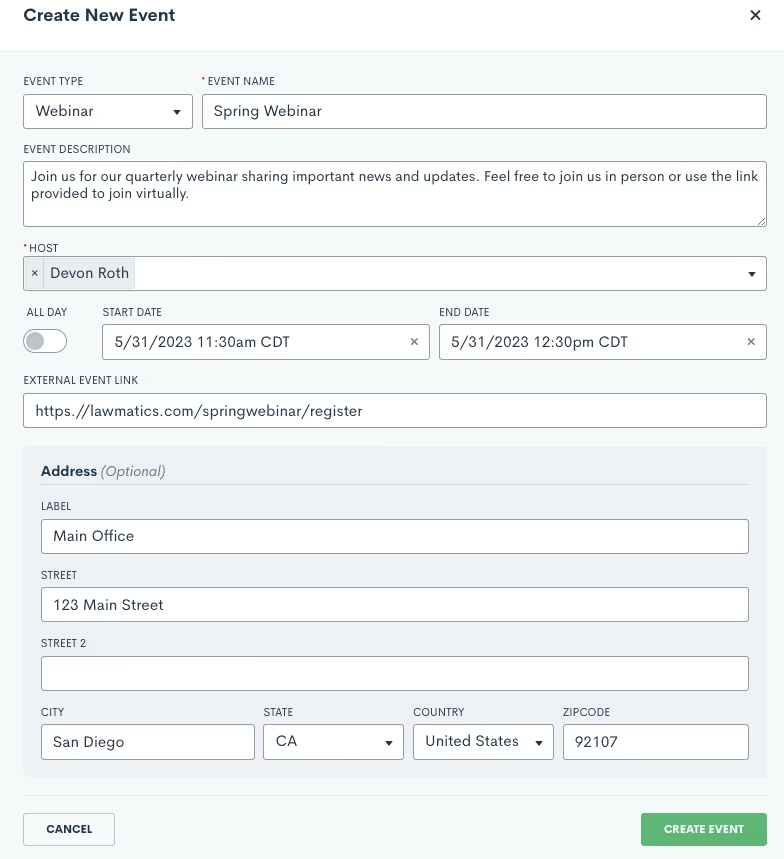
- Select the event type and give your webinar a name and a description. Remember that the event type is more broad, such as Webinar, whereas the event name is specific to this event, such as Summer 2023 Webinar.
- Continue making selections for the host and the date and time.
- You will also need to enter a location for the event, either an external link or a physical address. If this is a virtual event, simply put the external link in the box provided, and this will automatically be added to the description of the calendar invite that is sent to registrants for this event.
- Your virtual event may be held via Zoom, Teams, or some other platform, simply copy and paste the meeting link.
- For in person events, enter in the physical address. This will also be added to the event invite when applicable.
.Engaging events such as webinars, seminars, luncheons, are a great way for attorneys to fortify relationships with new and existing clients. If event management has been a technical roadblock for you up to this point, we’ve got great news: Lawmatics now allows you to effortlessly manage all such events without the hassle of integrating with other tools or relying on Zaps.With our Event Management feature, Lawmatics users can configure various event types (webinars, networking events, etc.), easily create and promote an event, and collect registrants. We’ve also added the following:
- A setting for built-in confirmation and reminder emails.
- A new entry condition for Automations to trigger a custom workflow upon an event registration.
Whether you are already a master event organizer or just looking to start implementing events into your firm, Lawmatics is your one stop shop for event management.
Event settings
Before diving into the world of event management with Lawmatics, let's get those essential event settings sorted out. Simply locate the gear icon in the top right corner of your Lawmatics window, and then navigate to Appointments/Events on the left sidebar.Now, let's take a quick moment to distinguish between appointments and events. In Lawmatics, appointments are reserved for a single matter or contact, like consultations, strategy sessions, or lunch meetings. On the flip side, events can accommodate anywhere from one to thousands of enthusiastic registrants and aren't tailored to individual attendees. Let the distinction sink in and get ready to unleash the power of Lawmatics for your event management needs!When you first arrive on the Appointments/Events page in settings, you will first see your settings for appointments, scroll down on the page until you land on the Events section.
Event types
To ensure seamless automation and precise triggers, you’ll need to first establish distinct event types for your diverse range of gatherings. These event types hold the key to orchestrating specific actions based on registrations. For instance, you might want to kickstart an automated drip campaign when someone signs up for a webinar, while reserving a different response for those joining a networking event. By setting up event types, you unlock the power to customize and optimize your automation game plan. Let Lawmatics do the heavy lifting while you effortlessly navigate the realm of tailored event experiences.
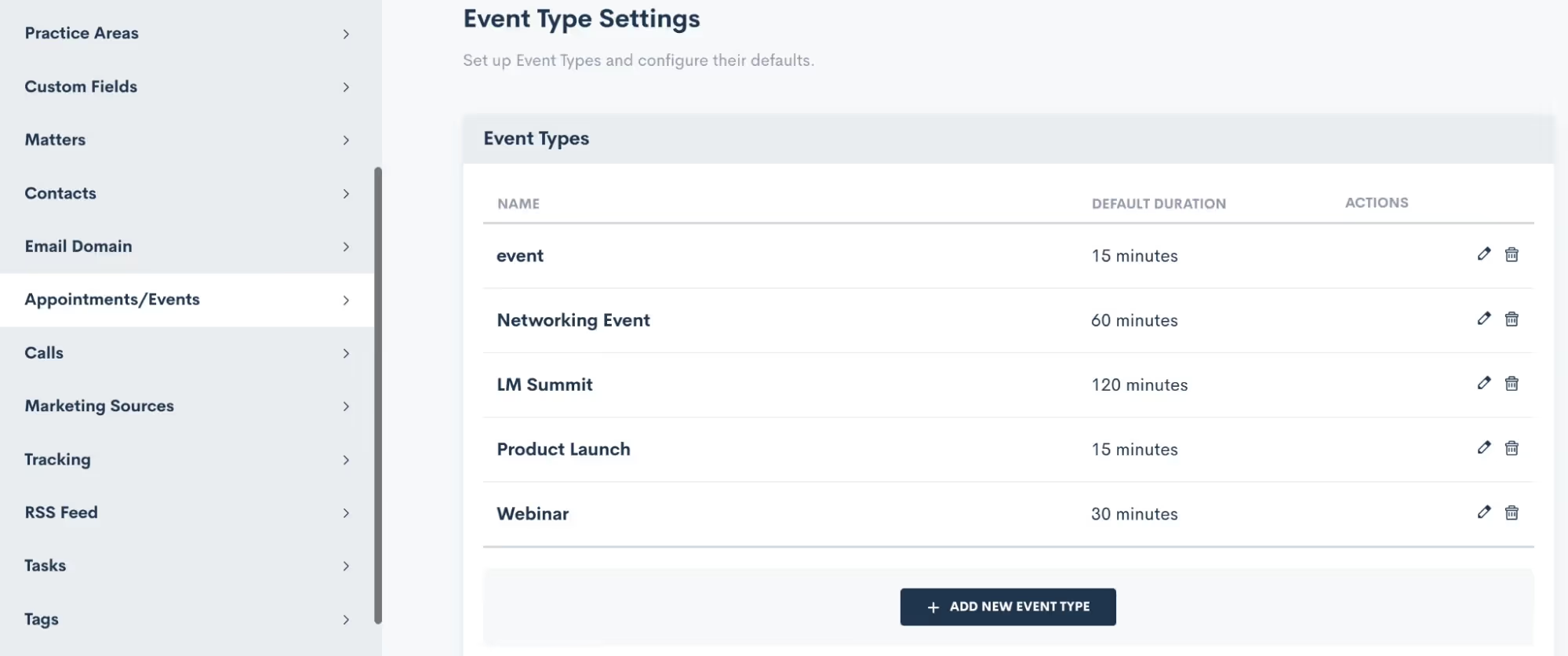
You also have the freedom to craft unique confirmation and reminder sequences for each event type according to your preferences, and we'll delve into that soon. Feel free to create as many event types as you desire, knowing that you can always return to add, modify, or delete existing ones. When crafting your event types, you even have the option to set a default duration, if that suits your needs.
Confirmation
Lawmatics offers built-in confirmation and reminder settings for your events, no need to build a custom email template and automation for each event. This confirmation will be sent to the registrant as soon as they have signed up for the event.Simply click the setting option for Add Confirmation, and you can then build out your own email template and/or text message as shown below.
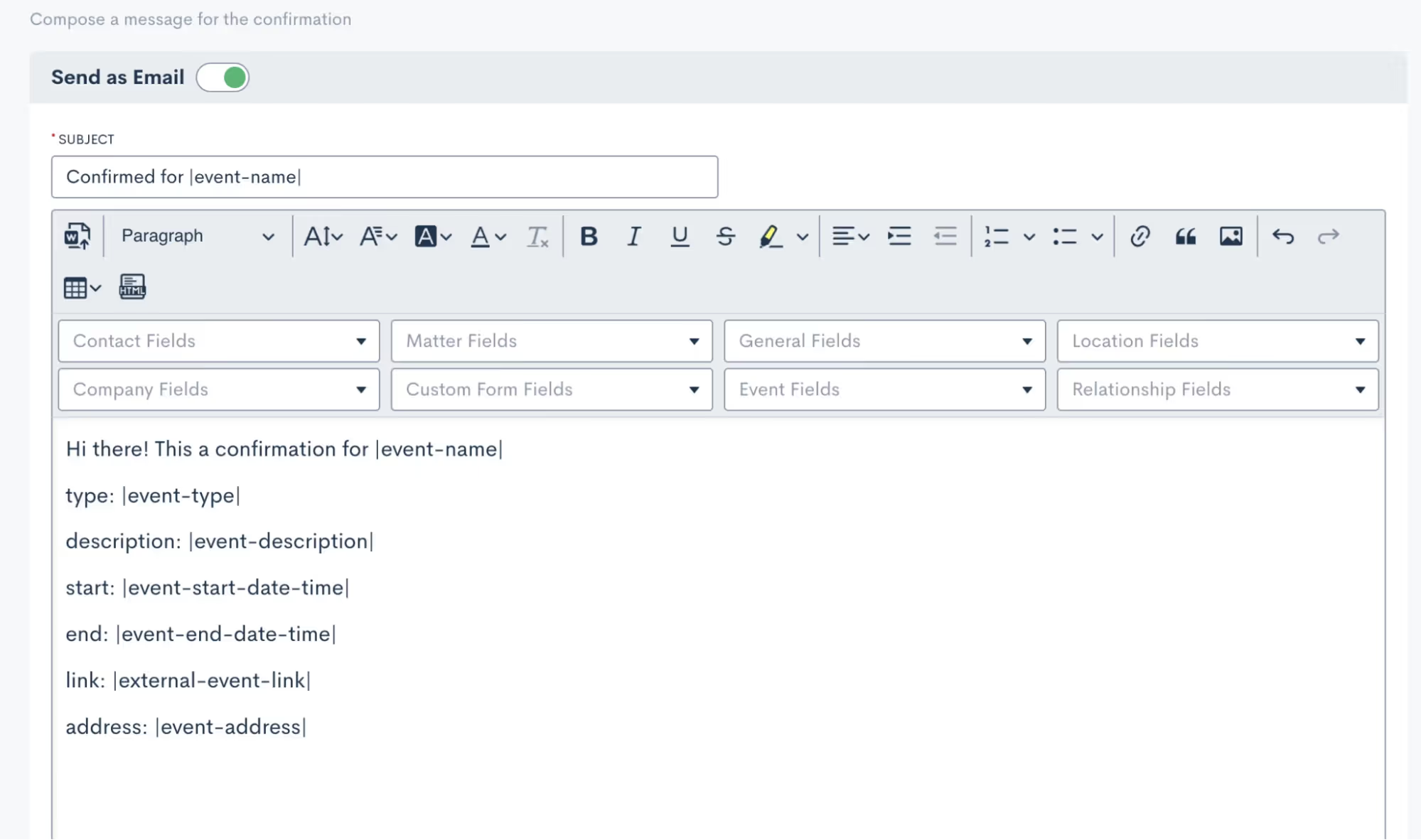
You’ll see that you can merge in fields as needed, including event fields to input the unique event date, description, link, etc for each respective event.It is then important to select which of your event types this confirmation email applies for. Depending on the nature of your events, you may use a generic confirmation for all of your event types or perhaps you’d like to create something more specific for each.
Reminders
As with event confirmations, reminders are built into Lawmatics although they are optional. However, we highly recommend utilizing them to ensure your event registrants stay on top of upcoming gatherings.
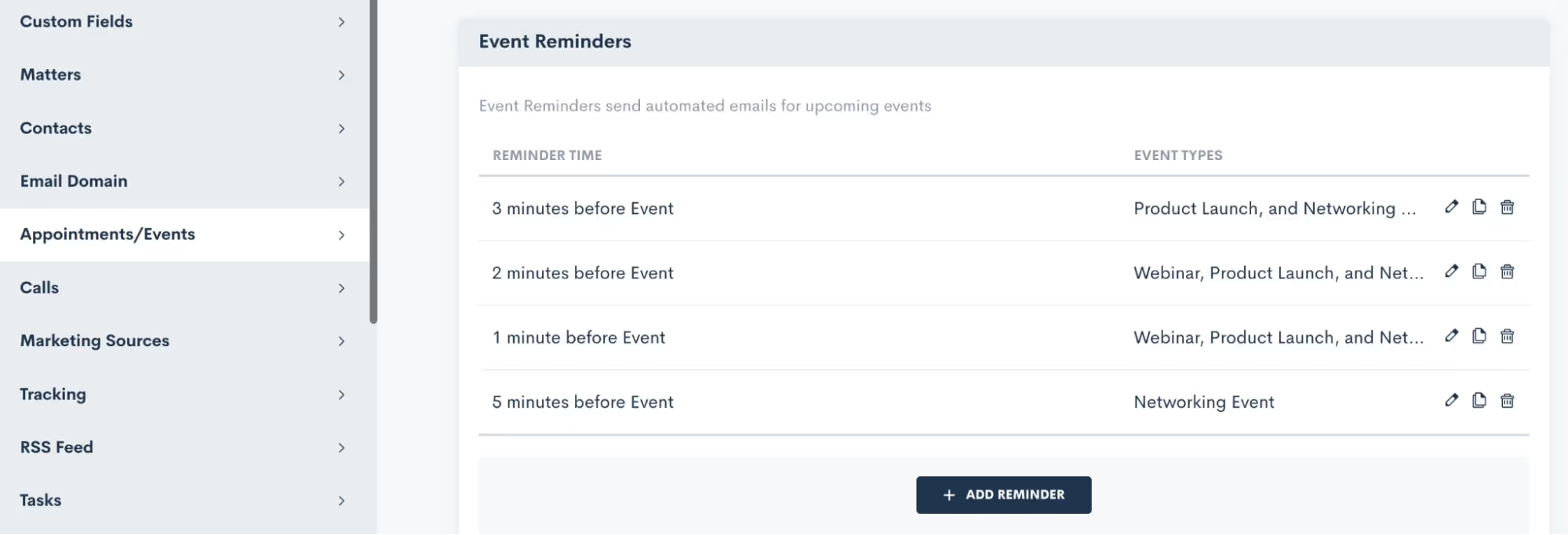
Feel free to create as many reminders as you desire, and once again, you have the power to apply them to any or all of your event types. It's all about keeping your attendees engaged, informed, and excited about the events they've signed up for.
Creating an Event
Now that you have finished setting up this groundwork, you are ready to create an event:
- Hover your mouse on CRM and select Event Management to navigate to the Events page. Here you will see all past and upcoming events with the option to add a new event. When adding an event, you will see various options as shown below:
Event registration
And now for the fun part: collecting registrants for your event! There are several ways you can go about doing this, we’ll break them down here.
Custom Form
In addition to using Custom Forms for collecting leads or contacts, utilizing a form is an excellent method for gathering event registrants. With the introduction of the Event Management feature, we've incorporated an event registration field that seamlessly integrates into your custom forms. You have the freedom to incorporate this field into your existing forms or even create a brand new registration form from scratch.
- When editing your Form, add any fields to the form as you normally would.
- Click the Advanced section on the left sidebar.
- Drag and drop the Event Registration field wherever you would like it on the form.
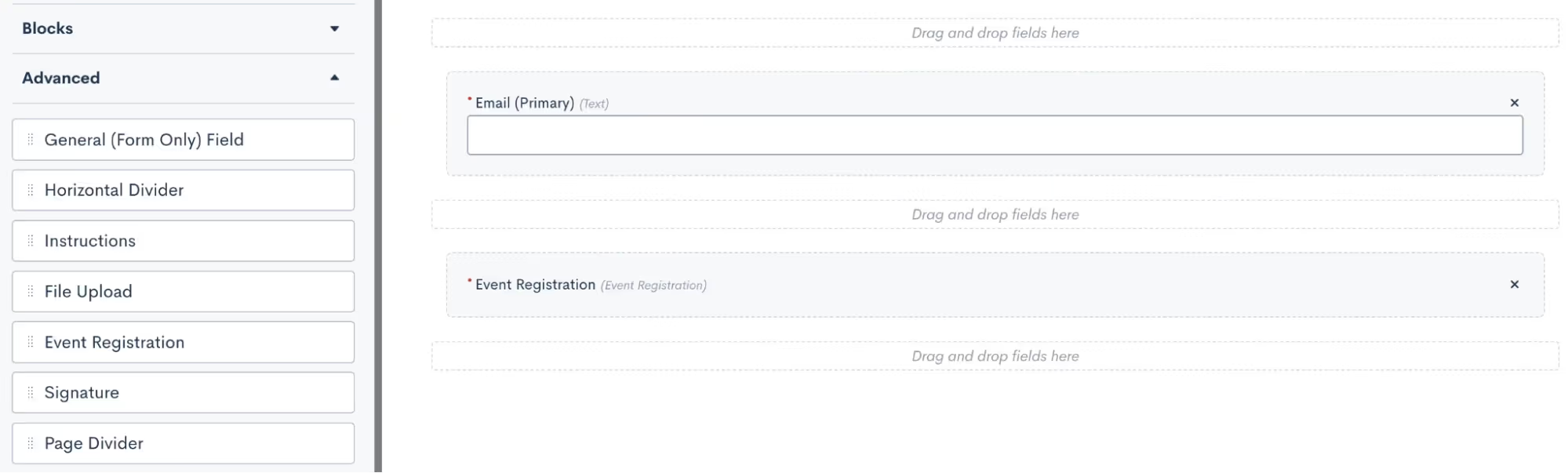
- Once you have this field in the form, click on it to make additional selections. In the options for this field, as shown below, you will select what label you want for the registration option, and then select which of your events can be registered for from this form.
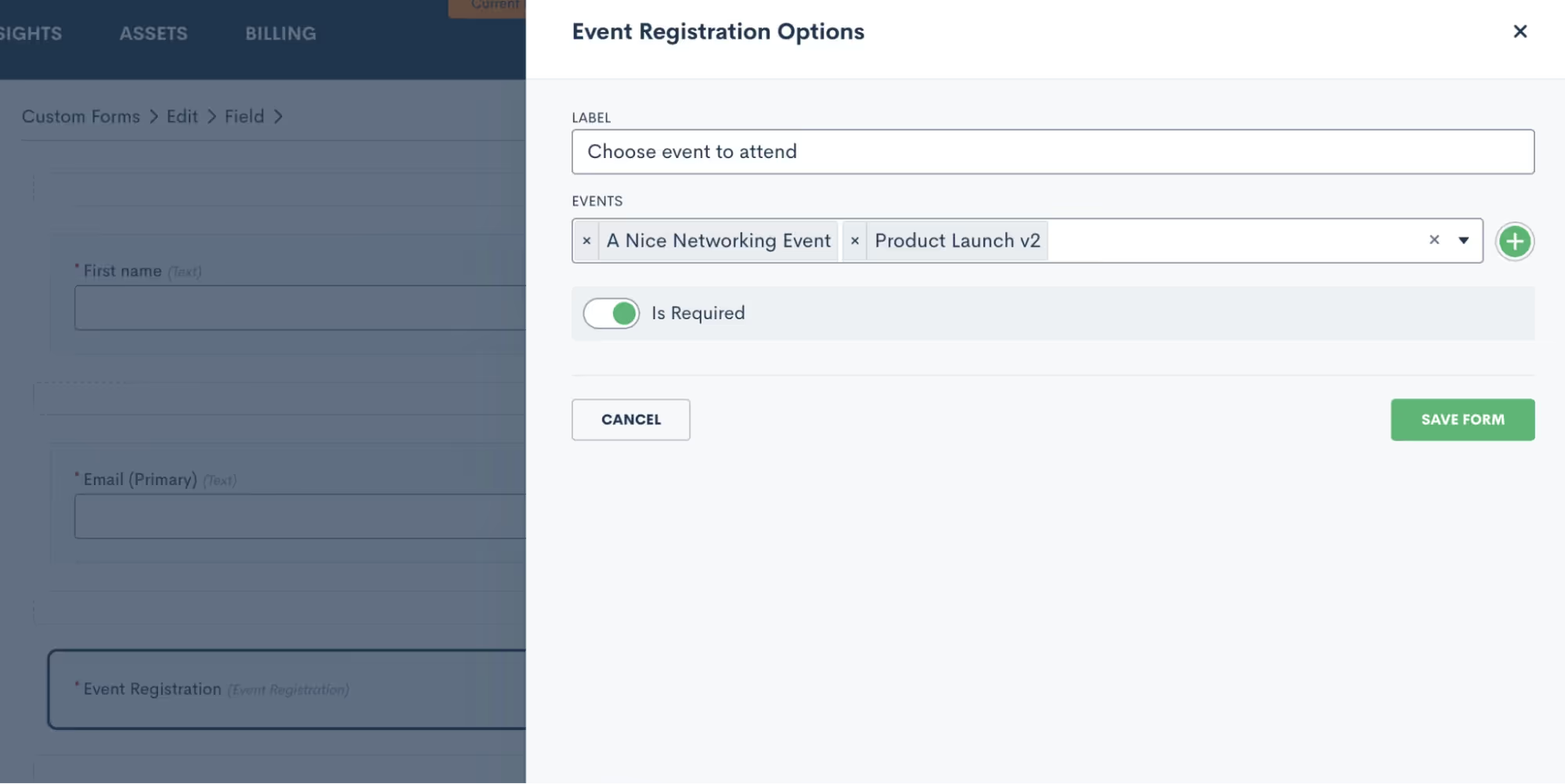
- You may choose to have just one event per form, and market that form specifically as a sign-up for that particular event. Alternatively, you can opt to include multiple events on a form so that potential registrants can register for any or all of them.
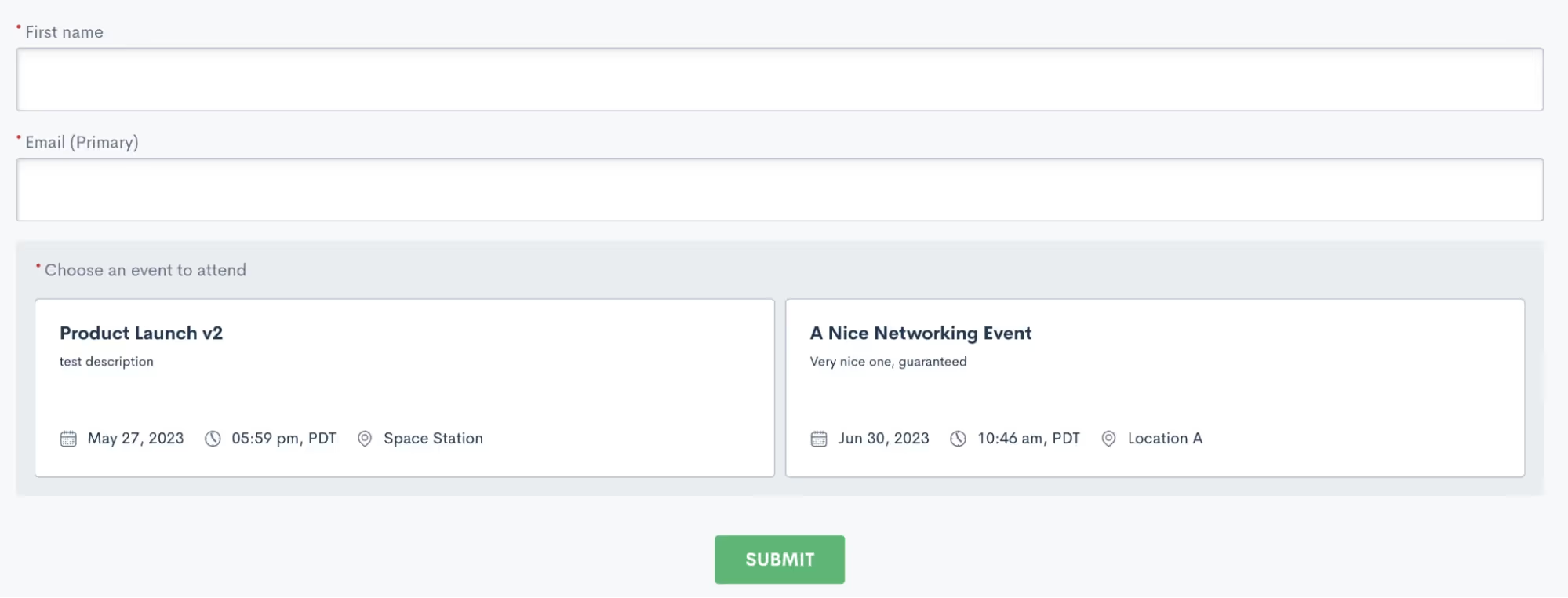
In the sample shown above, a registrant would simply enter their name and email, then click on both or either event to register respectively.Just like any other custom form, this form can be embedded on your site, shared via hyperlink, or even sent via automation.
Manual registration
Your other option for registering event attendees is to do so manually. This method is certainly not as efficient or automatic, so we definitely recommend using this as a contingency method to the Custom Form.To manually register an attendee, go to the Event Management page and click the plus sign icon. You can then search from existing contacts in your CRM or add a new one to be registered for the event.
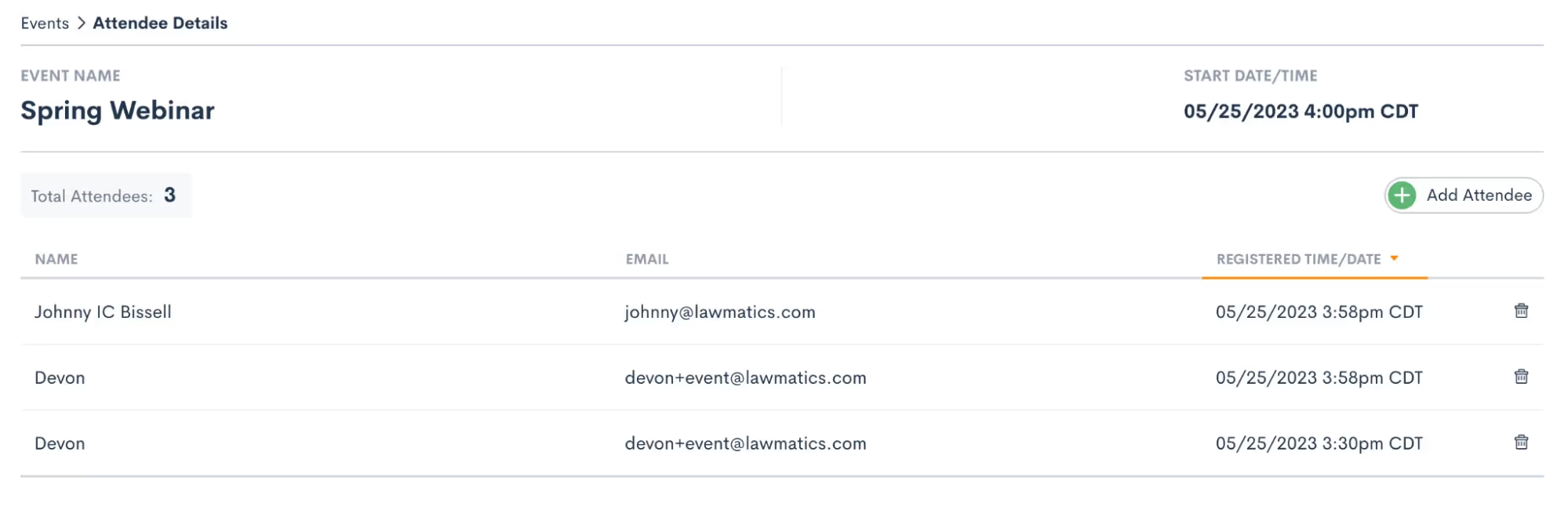
Regardless of the method you opt for to register individuals for your event, they will be seamlessly added to the registrant list. Once added, they will receive the confirmation and reminders you have set up in your settings. To conveniently view all event registrants, head over to the Event Management page and click on the specific event you're interested in. There, you'll find a comprehensive list displaying each attendee's name, email address, as well as the date and time of their registration. It's a hassle-free way to stay informed and organized throughout your event planning journey.
Events & Automation
As with all Lawmatics features, Event Management can also be included in your Automations. With the introduction of this new feature we have added a new Automation Trigger: Registered for Event.
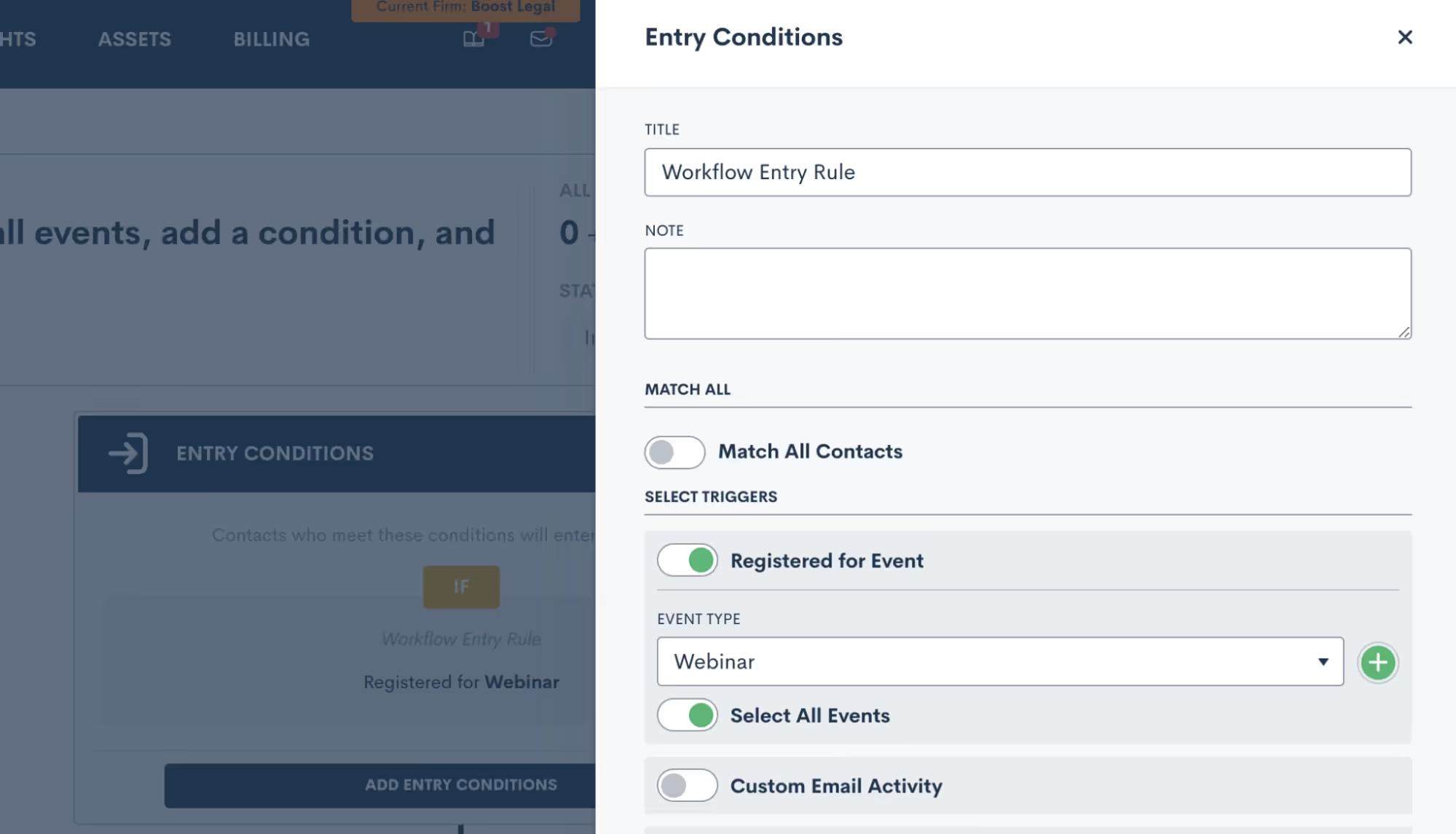
- Simply select the “Registered for Event” trigger, and then select an event type to trigger the automation. This goes all the way back to the first section regarding your Event Settings, it is very important to set up your event types so that you can trigger Automations appropriately for different events.
- Once you have selected an Event Type, you then have the option to let this Automation run for all individual events within that type, or you can select a specific event so that the automation only runs for that event.
- Now add in your various action items and build out your automated workflow. Whether you’re creating a drip campaign, internal tasks, data updates like tagging, or whatever else you wish to automate, simply select the action items to add them into the automation.
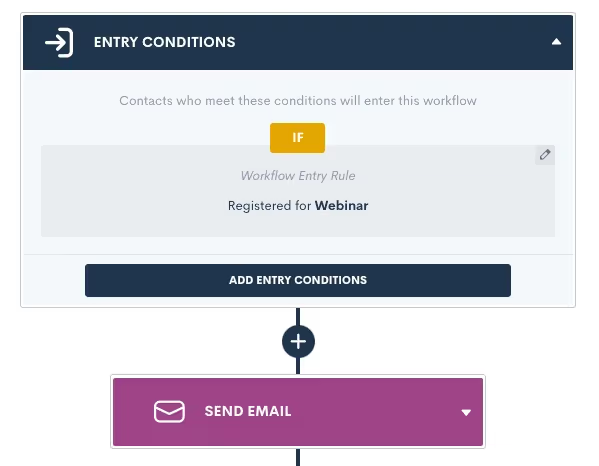
Remember that your event confirmation and reminders are built-in on the Settings page, so no need to create an Automation for those.Creating an Automation for event registrants is a great way to automate long term follow up with a goal of increasing conversion, or just to stay in touch and top of mind with that audience.
Conclusion
We’ve got all the tools you need to manage your major events such as webinars, luncheons, and networking events, all under the roof of Lawmatics.Set up custom event types and confirmation emails in Settings, then easily create an event, start promoting it, and collect registrants. Plus don’t forget that you’ll also find a new entry condition in Automations to trigger a custom workflow when someone registers for your event.Events are a great way to create new lead channels and bring in more business for your firm without having to spend big money on marketing campaigns. Whether you are a seasoned expert at event management or planning out your first event, Lawmatics is just the tool for incorporating events seamlessly into your firm’s marketing efforts.**Event Management is available to users on the Pro Tier and above**

What is your role at Lawmatics, and what does your job entail?
I'm a Software QA Engineer, and I test new features developed by our engineering team to ensure quality standards are met and goals are aligned with our product team. I write test plans and report failed scenarios to the developers so they can quickly reproduce issues. Recently, I've been working more with writing code and test automation to prevent code regressions.
How did you end up working for Lawmatics?
A fellow engineer first joined the engineering team who then recommended me. We were both junior full stack engineers at our previous company, working on different projects. I worked on a small mobile app, and was involved in every part of the development process, from planning to deployment. I found testing and debugging to be pretty tedious, yet the most rewarding parts of the whole process. So in my initial interview with Lawmatics, I asked about testing, and we went from there.
What’s the best part of your job?
I really enjoy supporting my team with identifying bugs in the code and reproducing them. When something strays from the happy path of usability (i.e. an edge case), it's satisfying to squash that bug during the development phase. 100% bug free code can be hard to achieve, so coming to terms with what's acceptable or not and working with our product team is another part of the equation that keeps my job engaging.
Where are you from, and how did you end up in San Diego?
I was born and raised in San Diego while my parents are both from the Philippines. I lived in Tucson, AZ for about 5 years though and it was the hardest decision to leave a small town, surprisingly.
What do you like to do when you aren’t working?
My 4-year-old daughter brings me so much joy in life. We play with Legos and she does most of the building. Sometimes we'll play hide and seek. We take turns and hide in the exact same spot every time. Laughing about it never gets old.

What is a fun fact most people may not know about you?
I have 5 older brothers! Playing video games, helping with house renovations, and in general, just growing up with a bunch of boys made being a woman engineer easier. Wish it was easier on my mom though, it was like she had a 6th son in a way.
Tell us about an unforgettable experience that you’ve had?
When I was 12, my mom and I visited my older brother in Japan. He taught English to junior high school students out in the countryside. It was an amazing experience to see cherry blossoms in the spring. But the memory that sticks with me the most is our tour of the Hiroshima Peace Memorial Museum. It evoked so many emotions to see scenes and displays of the magnitude and devastation of the event.
What is the one thing you can’t live without and why?
Yoga. It's my water in life and it brings me balance.
Do you have a favorite saying, quote, or personal mantra and if so, what is it and why?
You are exactly where you are meant to be. This phrase reminds me to stay present, focus on the progress I've made, and embrace where I am today. Showing compassion for myself is important and helps me to have more compassion for others.
What is your favorite thing about working for Lawmatics?
That's so hard to pick! There's the people! The work! And of course, the kitchen snacks! Avocados, peanut butter, trail mix... yet at the end of the day, I really enjoy being challenged, growing, and working with everyone here... and talking about who ate the last apple.
What’s your go-to hype song?
I love a good pop song. My go to is Lights Follow - Live Your Beautiful Life.
Based on your experience, what words of wisdom or advice do you have for legal professionals looking to help their law firms win more business, impress clients, and be more efficient?
Our Automations are so powerful and they can help automate a workflow by triggering off a Custom Form that was filled, then moving on to send an email or a document to the user or contact. So many or’s and and’s here. I highly recommend double or triple checking entry conditions, the logic used, and getting in touch with us if there's ever any doubt when building out your Automations.
Summer just got a whole lot hotter with our sizzling new feature lineup. So set down your BBQ tongs and beach ball and check out our latest batch of Lawmatics feature releases.
Google AdWords Integration

We're excited to announce the addition of Google AdWords to our integration lineup. Now, syncing your AdWords account with Lawmatics is a breeze. Simply head to the Integrations page in your Lawmatics Admin settings, and Lawmatics will automatically import your marketing spend and campaign data from AdWords, logging these respectively in your Lawmatics marketing sources and campaigns. This integration allows you to make the most of our built-in source reporting and ROI tracking like never before by bringing your AdWords data into the CRM automatically.Learn more about using this exciting new feature here.
LM[AI]
![LM[AI]](https://cdn.prod.website-files.com/688005f0c89682201c6776e9/68d1d9f2787b622cdf0fcdcc_68a8d836ad8fd8078b63d6e8_LMAI_Newsletter_EML.avif)
Earlier this month, we made a groundbreaking announcement: the launch of LM[AI], our very own artificial intelligence text generative tool. With LM[AI], drafting client emails has never been easier — you can do it in seconds. Simply click on the AI button, provide a prompt, and watch as LM[AI] composes a complete email, complete with merge fields. You have full control over the generated text, as you can manually edit it to your liking. Additionally, you can instruct LM[AI] to make edits itself, whether it's adjusting the tone to be friendlier or more formal, or rephrasing the content. From nurturing leads to check-ins and promotions, LM[AI] will ensure your email campaigns are engaging and captivating.Click here to learn more about LM[AI].
Bulk Select & Update Companies
As with our Matters and Contacts pages, we've now added the bulk editing capability to the Companies page. Simply check the box next to the companies you want to include, click the Update Companies button in the top menu, choose the field you want to update, enter the new value, and save. Say goodbye to tedious individual editing, as you can now make updates in bulk with just a few clicks.

Learn more about managing company matters in Lawmatics here.
‘Assigned By’ Field on Tasks
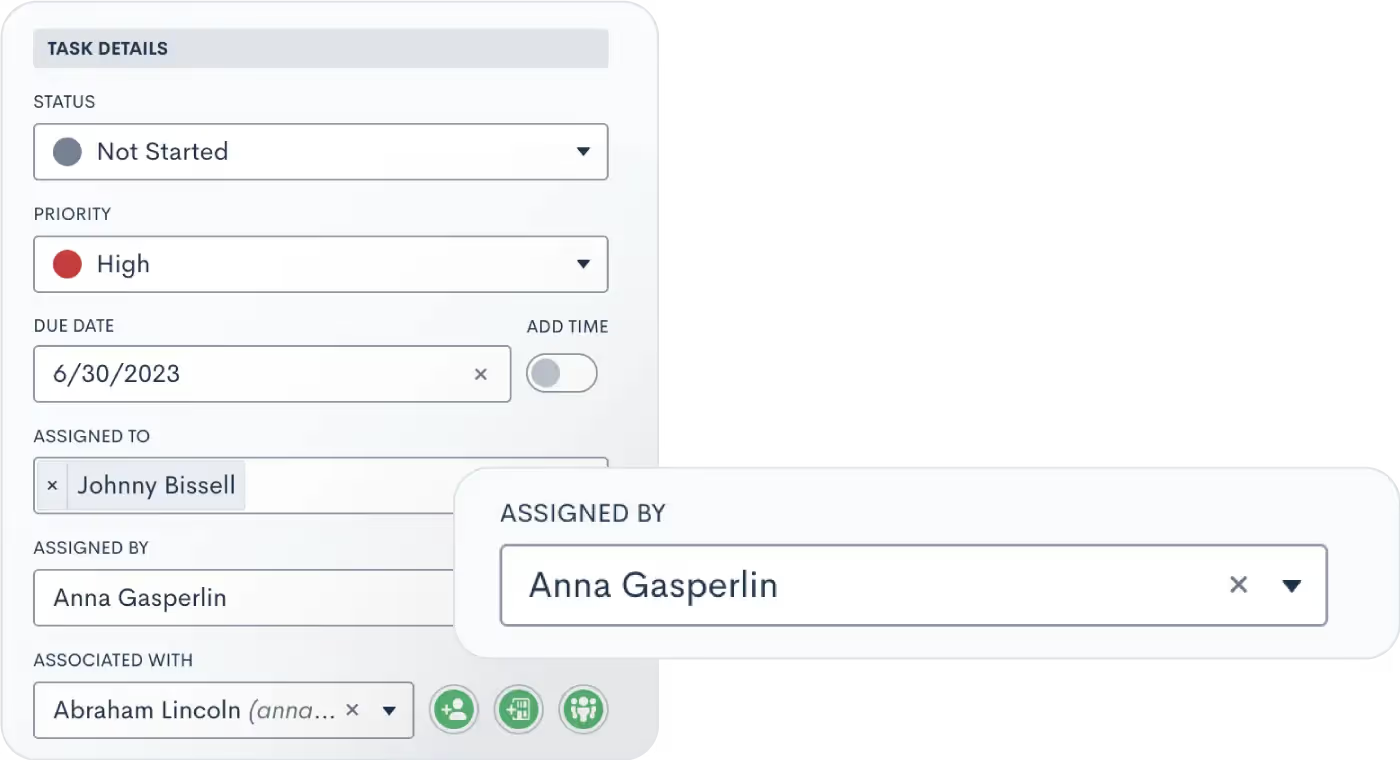
Lawmatics has always been your trusted platform for managing tasks, whether they're assigned to clients or internal staff. To enhance collaboration and clarity, we've introduced a new feature: the "Assigned By" field. Now, when your staff members receive a new Task, they'll immediately know who assigned it. This makes it easier for them to seek clarification or additional information, ensuring smooth task execution. Alongside this addition, we've made several other improvements to our task functionality, such as comments and mentions. Don't forget to explore these enhancements as well!Learn all about Tasks here.
Create From Within Updates
Check out the latest additions to our revolutionary user experience improvements, with even more still to come!
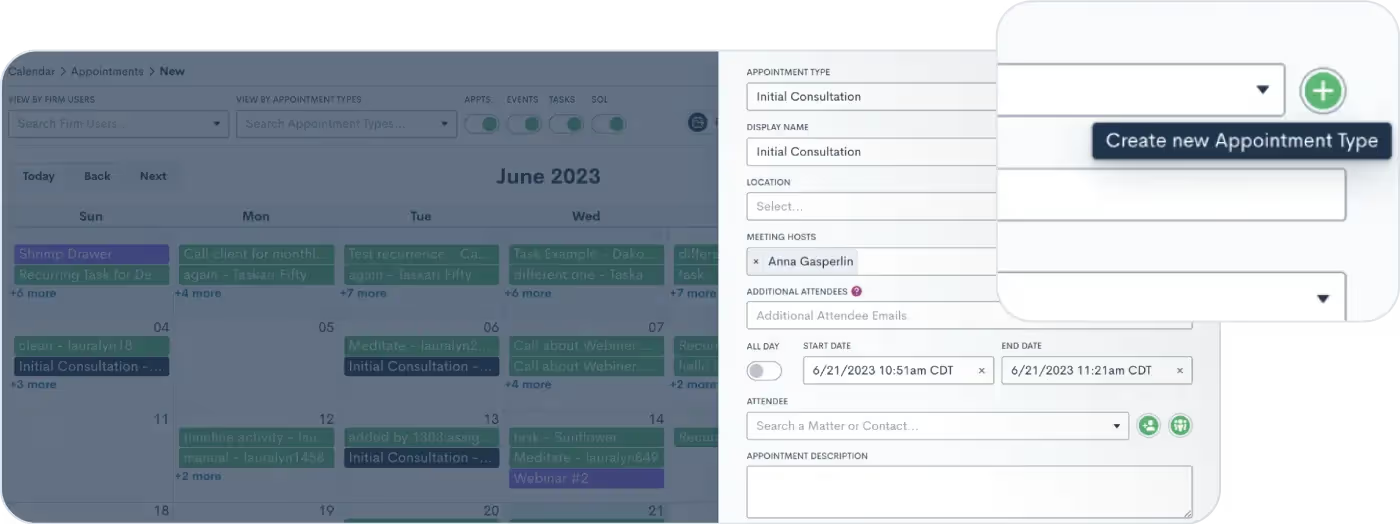
Create a new appointment type from any internal booking module
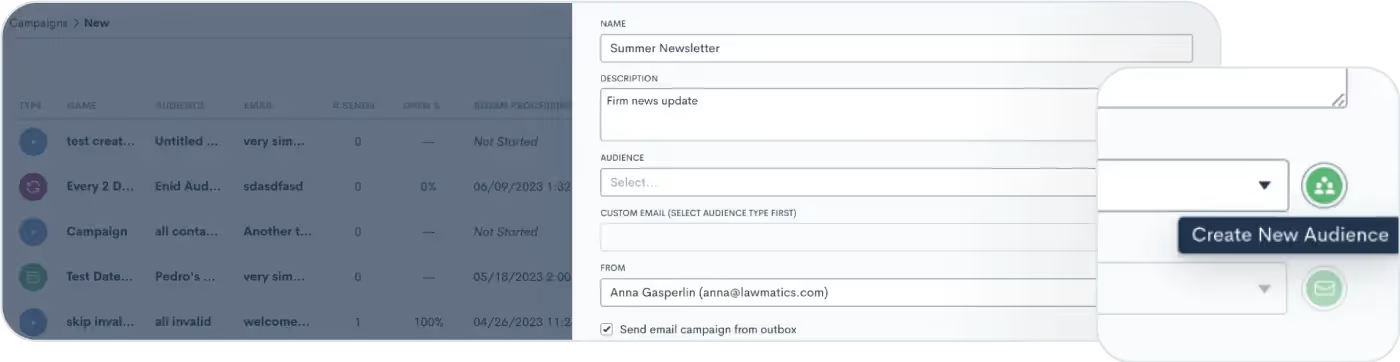
Create a new marketing audience from within an email campaign
As always, thanks for checking out this latest update from Lawmatics! Stay tuned for even more exciting features to come!


Register for upcoming Monthly Deep Dives here.We are so thrilled to announce LM[AI], the brand new artificial intelligence text generative tool from Lawmatics, making us the first legal CRM to launch its own AI.For anyone who has had the experience of staring at a blank email draft not knowing what to write, this feature is for you.
What is LM[AI]?
Intuitive, easy-to-use, and found directly within the Lawmatics platform, LM[AI] is our brand new text generative artificial intelligence tool. LM[AI] allows you to turn a simple prompt into a fully developed email within a matter of seconds.This feature is available to users on the Pro Tier and above.
Why use LM[AI]?
First and foremost, LM[AI] will save you precious time. You’re a law firm, not a marketing agency, you don’t want to spend your time writing attention grabbing, actionable email content. LM[AI] does all that work for you.In addition to saving time, use this powerful tool to jumpstart your creativity and put your best foot forward in marketing your law firm. Whether you use it for nurturing, checking in, promoting, or anything else, LM[AI] will help keep your email campaigns robust and interesting.
How to use LM[AI]
When drafting a plain text email, you now have the option to let artificial intelligence write the email for you. Simply click on the Help Me Write button, provide a prompt, and LM[AI] will draft a complete email, including merge fields.
![UI showing the popout box for the Help Me Write button in Lawmatics using LM[AI]](https://cdn.prod.website-files.com/688005f0c89682201c6776e9/68d1bde3abf1236abcce48e9_68a8d834c86f5492edc669f6_image1.avif)
You can then manually edit the generated text as needed, or instruct LM[AI] to edit its own content by making it more friendly or formal, or just by rephrasing the text.
![LM[AI] Feature Zoom](https://cdn.prod.website-files.com/688005f0c89682201c6776e9/68d1bde3abf1236abcce48e2_68a8d834c86f5492edc669ef_Product_LMAI-Recap_BLOG.avif)
Conclusion
Breakthroughs in automation and AI are fundamentally transforming the business of law. By making this cutting-edge AI technology accessible and intuitive, this development bolsters Lawmatics’ position as the leader of the smartfirm revolution.Cheers to better emails in the future with LM[AI]!

As an estate planning attorney, you understand that precision and attention to detail are paramount. You strive to provide exceptional service to your clients, but manual processes can create inefficiencies and challenges that can negatively impact your productivity, profitability, and client satisfaction. Automation is no longer just a buzzword in the legal industry; it is a necessary tool for law firms to remain competitive and thrive in today's market.In this article, we will explore the benefits of implementing automation solutions in estate planning law firm practices. We will discuss the four administrative processes that all estate planning lawyers should automate, and the impact automation can have on your practice's efficiency, accuracy, and client experience.
Why it’s time to start automating at your firm
While it may be tempting to resist change and stick with the status quo, the reality is that relying on manual processes can lead to several inefficiencies and challenges. Missed deadlines, higher error rates, and inconsistent service delivery can impact your practice's reputation and bottom line. Clients expect efficient, streamlined processes in today's fast-paced business environment. Failure to meet these expectations can lead to a negative reputation for the practice, ultimately causing you to lose clients to competitors who have embraced automation.Automation solutions can help you and your team work more efficiently and effectively, enabling you to focus on high-value tasks like research, drafting, and client interactions. Automating repetitive tasks such as document creation, data entry, and appointment scheduling can save time and resources, reduce errors, and increase profitability. Additionally, automation can help free up resources and employee time that can be allocated to generate new business and increase revenue opportunities.Throughout this book, we will provide captivating stories, imaginative examples, and data-driven insights to support our main points. We will discuss intriguing and counterintuitive ideas that challenge the status quo and help you think about your law firm's operations and processes in new ways.Whether you're just starting to explore the possibilities of automation or ready to take your estate planning practice to the next level, this book will provide you with the guidance and knowledge you need to succeed. So, let's get started and explore the benefits of implementing automation in estate planning law firm practices.
How to start setting up Automation
Automation can transform your law firm's processes, making them more streamlined, accurate, and time-efficient. But implementing automation can be overwhelming, especially if you need help figuring out where to start. Here's a short guide for setting up automation at your law firm.
Step 1: Discover your blueprint
Discovering your blueprint is the first step toward automating your law firm's processes. You and your team should identify the processes that can be automated. This step is critical because it sets the foundation for everything that follows. By understanding how automation can transform your law firm's current processes, you can plan for automated workflows to make your team more productive. You can confidently move forward and decide which automation solutions are right for you.You need to understand how automation can help you achieve your goals and improve efficiency. This step is about feeling empowered to take control of your law firm's processes and ensuring that they work for you, not against you.
Step 2: Design your vision
After discovering your blueprint, it's time to select the right automation processes or solution that fits your unique needs and aligns with your law firm's vision. With so many options available, it can be overwhelming to choose the right one. Create a shortlist of potential automation solutions and compare the options to find the best fit for your law firm. Consider cost, ease of use, compatibility with your existing software, and customer support.Many case management systems and CRMs integrate with tools like email, calendar, or document management systems. Remember when shopping for new software or solutions, everything in your tech stack should be integrated, so you can automate workflows and reduce manual effort.
Step 3: Build your structure
Now that you know what processes you will automate and have your chosen solution ready, it's time to implement and integrate it into your law firm's existing software systems.For this step, create a project plan that outlines the implementation process, including the resources and timeframe needed and training materials for your team. Work with the team to ensure the automation solution is fully integrated and easy to use.Disruption to daily operations is a concern, so take every step to minimize it. By building your structure, you'll feel relieved that the automation solution is running smoothly, saving your team time and increasing efficiency. You'll have peace of mind knowing that you've made the right choice and that your law firm is on track for greater success.
Step 4: Refine your design
Implementing automation is not a one-time deal. It's iterative. Test and refine the automation process to make sure it's working for your team (not against your team). During this time, create space for feedback from team members, look at performance reports and analysis, and refine the process.
Step 5: Create your masterpiece
You need to monitor automation's impact on your law firm's operations, productivity, profitability, and client satisfaction. With ongoing data analytics reports on key metrics such as time saved, error rate reduction, and increase in revenue, you'll be able to see the positive impact that automation has had on your firm.
1 From friction to flow: automating your law firm's client intake process
You understand how important it is to provide personalized and efficient services to your clients. However, the client intake process can often become a major bottleneck, causing frustration for potential clients and your staff. Call answer rate tends to be lower than law firms realize, leaving potential clients primed to keep looking for other legal services. Consider implementing a call-tracking software to make sure your calls are being answered.
Using resources like chatbots, online forms, and- even- virtual receptionists, you can quickly answer frequently asked questions and schedule appointments without manual intervention. This reduces friction for potential new clients and saves your staff valuable time, allowing them additional bandwidth.It's important to note that automation doesn't mean replacing human interaction entirely. Instead, it's about using technology to augment and improve the client intake process. You can free up your staff to focus on building relationships with potential clients and providing more personalized and strategic services when you automate the more routine aspects of the process.
Friction for leads to contact you
Your website is often one of the first points of contact for potential clients. Chatbots are a very popular integration on law firm websites and social media channels as they provide quick and helpful answers to frequently asked questions, such as where you practice, what types of legal services your firm offers, or how to schedule an appointment. Chatbots can help potential clients get the information they need quickly and easily, reducing the likelihood that they'll bounce off your website and look elsewhere.
Online intake or contact forms effectively collect important information about potential client's legal needs and backgrounds. Potential new clients can fill out a form on your website, give your team critical information upfront, and reduce the time it takes to get to the heart of their legal needs. Online forms can also help you weed out leads who may not be a good fit for your firm, such as those with conflicts of interest or those who cannot afford your services.Reducing friction is critical to making it easy for potential clients to engage with your firm. We want to see an increase in sign-ups and filter out the bad leads after.
From lead to client: using automated screening questions to streamline your intake process
The goal for leads isn't quantity but quality. Only some leads will be a good fit for your law firm, and investing time and resources into a client who isn't the right fit can be draining for your team.Adding a series of questions to your online intake forms lets you quickly weed out potential clients who may not be a good fit for your firm.Focus on the following:
- Where are they located, and can your law firm assist them in that geography?
- Think about the client's financial situation. Will they be able to afford your services, or will they be unlikely to pay their bills?
- Ensure the client's needs align with your firm's practice areas.
With a good CRM, you can automate conflict checks. Automating the screening process saves you time and resources, ensuring you only invest in the most promising leads. You can avoid misunderstandings or miscommunications by setting clear expectations with potential clients from the outset.
Automate nurturing leads
As a law firm, you know how important it is to generate new leads. However, getting those leads to convert into clients can be a challenging task. Automated email campaigns can be an effective way to nurture leads and turn them into estate planning clients. You can build trust and establish your firm's expertise by sending automated emails that provide valuable information.Here is a campaign idea to get you started nurturing leads that aren’t quite ready for your services:
The "Estate Planning Checklist" campaign
Estate planning can be overwhelming for new clients. By creating an automated email campaign that provides a step-by-step checklist of various estate planning processes, you can help ease their worries and guide them through the process. This campaign can include emails that cover topics such as creating a will, selecting a guardian, and choosing a power of attorney. Social proof is a powerful motivator, so include client testimonials throughout this campaign. Show potential clients the positive experiences others have had with your firm.
2 Automate client communication
Automating your communication can help you streamline communication, reduce errors, and improve efficiency. However, some law firms may worry that automation will reduce the human touch and lead to a less personalized experience for their clients. But here's the thing: automation doesn't have to mean less human touch. It's about alleviating additional work for your client-facing staff.
Automate consultation scheduling
Use appointment scheduling software to automate the scheduling of client appointments based on your availability. It can also automatically send reminders and confirmations to you and the client, decreasing the chance of no-shows.
Increase proactive communication
You can set up automatic emails and text messages that integrate with your case management system Using tools like automated workflows in your CRM- keeping your clients informed and building trust and confidence in your services.Automated email templates and text messaging can also be customized to match your brand voice, ensuring your clients feel like they're receiving personalized communication from your firm.With a centralized system, you can access valuable information about each client's communication history, preferences, and feedback, which can be used to tailor your interactions with them. By providing more personalized and attentive service, you can set yourself apart from other law firms and establish a reputation as a trusted advisor.
Outsource help and hire a virtual receptionist
A virtual receptionist can help you automate client communication in various ways, including answering calls and directing them to the appropriate staff member, scheduling appointments, sending reminders, screening calls, and providing basic information to clients.
3 Benefits of automated workflows
As an estate planning lawyer, you are no stranger to the demands of a busy practice. Between managing clients, drafting documents, and navigating complex legal requirements, keeping up with everything on your plate can be challenging. This is where the concept of automated workflows comes in.Automated workflows are designed to help you streamline your processes and automate repetitive tasks, freeing up your time and energy to focus on high-value work. You can save time and boost productivity by automating routine tasks such as document assembly and filing, calendaring, scheduling meetings, setting follow-up reminders, and time tracking.
Efficiency
Efficiency is key to running a successful estate planning law firm, and workflows can boost your efficiency. Automating repetitive tasks and streamlining processes can free up your time and energy to focus on high-value work. This can help you accomplish more in less time, leading to increased productivity and a greater sense of accomplishment.For example, you can use the automated workflow engine to set up task reminders for specific tasks or deadlines, ensuring they are completed on time. You can also use it to automate task assignments, ensuring that tasks are assigned to the most appropriate team member based on their expertise or availability. This can help improve efficiency and productivity while ensuring that tasks are completed correctly.
Seamless collaboration
Collaboration is essential in any law firm, and the Automated Workflow Engine can help ensure that everyone is working towards a common goal. Using collaborative workflows, you can assign tasks to the right people at the right time, reduce confusion and misunderstandings, and easily share ideas and feedback with your colleagues.For example, you can use automation to assign tasks to specific team members, set up notifications for completed tasks, and track progress on a shared dashboard. This can help ensure everyone is on the same page and working towards a common goal.
Scalability for law firms
As your estate planning law firm grows, it can be a challenge to keep up with the demands of your expanding client base. This is where automation can help. By automating repetitive tasks and implementing scalable workflows, you can create a flexible system that grows with your business, allowing you to maintain high standards while increasing your capacity to take on new clients.For example, you can set up workflows that can be easily scaled up or down based on your business needs. You can also use it to automate client intake and onboarding processes, ensuring that new clients are seamlessly integrated into your system.
4 Automate invoicing and make it easier to get paid
To make invoicing less of a hassle, use software designed for invoicing, the invoicing process can be automated. Invoice templates can be created to reduce the time and effort required to create invoices from scratch. Setting up recurring invoices and integrating payment processing with invoicing software makes collecting payments and tracking outstanding invoices easy. Look for invoicing software also includes features that track the status of invoices, such as whether they have been paid or are overdue, so you can easily follow up with clients and ensure timely payments.Here are some steps your team can take to automate the invoicing process:
- Choose an invoicing software: Several invoicing software options are available to help law firms automate their invoicing process.
- Create templates: Your team can create invoice templates that can be used for different types of services, reducing the time and effort required to create invoices from scratch.
- Set up recurring invoices: For clients who require regular invoicing, your team can set up recurring invoices that are automatically generated and sent to the client on a specific schedule.
- Integrate payment processing: Many invoicing software options integrate with payment processing platforms, such as PayPal or Stripe, making collecting payments and tracking outstanding invoices easy.
- Use invoice tracking: Invoicing software often includes features to track the status of invoices, such as whether they have been paid or are overdue, which can help your team follow up with clients and ensure timely payments.
Get clients to pay on time
Law firms can automate payment reminders to clients via email or text message to encourage clients to pay on time. Try using a payment portal to make it easy for clients to pay online using payment options like credit cards, ACH, or PayPal.Automating the process of adding late payment fees to invoices not paid on time can incentivize clients to pay on time. For clients who may not be able to afford your services outright, offer flexible payment options, such as payment plans, payment methods, or different payment frequencies. Payment plans alleviate financial stress of your clients, you can be certain that your bills will be paid.
Start automating at your law firm
Automating administrative tasks can streamline your workflow and increase your firm's efficiency. With Lawmatics, you can capture new leads and collect relevant information from potential clients. You can also generate documents using pre-defined parameters such as geographic location and case agreement terms. Lawmatics provides a secure way to share documents with clients while also providing features such as automated reminders & notifications to ensure maximum efficiency throughout the entire process quickly & easily.One of the most popular features of Lawmatics is its billing solution. Lawmatics' billing software can help firms make timekeeping, invoicing, and client payment seamless. Whether your law firm bills hourly, fixed-fee, or on contingency, Lawmatics' time and billing software offers the easiest way to seamlessly record billable hours, meaning more revenue for your firm. Get a demo today.
Subscribe to get our best content in your inbox
Law firms love Lawmatics
Our customers give their clients the client-focused experience they deserve. Learn how they do it all with Lawmatics.
.avif)
.avif)

.avif)

Ready to grow your law firm with Lawmatics?
Schedule a demo of legal’s most trusted growth platform.
