



The Lawmatics Blog
Insights on legal marketing, automating the law practice, and legal tech in general



Last month, we walked through how to set up custom matter views. But building views is only half the equation — the real value comes from putting them to work. When intake staff, attorneys, and admins are all looking at the same long list of fields, it's easy to miss what matters, waste time hunting for the right information, or forget to fill out a field before firing off a contract.
In this Deep Dive webinar, Devon Butler, product manager at Lawmatics, and Clare Struzzi, who leads the account management team, showed how firms can use custom matter views to trigger automations, surface reporting fields, and tailor layouts by role and practice area.
Time stamps of key takeaways
5:53 – Why customize your Matter pages
Devon kicked off with four reasons to invest in custom matter views: cutting through the noise so each role only sees what they need, supporting cleaner reporting, strengthening team handoffs between intake and attorneys, and working faster directly from the Matter page without having to search for fields.
9:48 – Building practice-area-specific views
Clare walked through an estate planning intake view built specifically for intake specialists, showing how organized sections replace the old starred-fields approach. She highlighted how a field like "Next Steps Pre-Consult" can live right at the top of the view so the intake team can trigger automations directly from the details page — no need to reopen a form.
14:58 – Creating role-specific views
Devon and Clare showed how the attorney view for the same estate planning practice area includes different fields at the top — like "Next Steps Post-Consult" and a dedicated contract fields section where merge fields for engagement agreements can be reviewed and completed before sending. Clare also pointed out that sensitive information like Social Security numbers can be placed in sections that default to a collapsed view.
25:00 – Triggering automations and managing contract workflows
Devon walked through a live example of building an automation that fires when the "Next Steps Post-Consult" field is updated — automatically moving the matter to the correct pipeline stage and sending the engagement agreement. She also showed how duplicating automations makes it simple to handle variations, like sending a single-signer versus a joint estate plan document.
35:09 – Surfacing fields for cleaner reporting
The session wrapped with a look at how the reporting fields on custom views — source, campaign, estimated value, actual value — feed directly into the analytics page and custom reports. Devon demonstrated grouping a report by source to quickly see which referral sources are converting and where data gaps need attention.
Webinar slide deck

Referrals are a goldmine for successful law practices. Why? Referred clients are more inclined to trust you, sign a fee agreement, and spread the word about your service, effectively marketing your firm for you. But good service alone isn’t enough to secure a steady stream of referral-based business in today’s competitive landscape.For this presentation, President of AttorneySync Gyi Tsakalakis and Lawmatics CEO Matt Spiegel joined forces to reveal how successful law practices are growing their referral relationships and client base in 2022. Watch the full webinar above!
Webinar slide deck
Use the accompanying Google Slide Deck to follow along with the webinar to get the most out of the presentation. (Any interactive features of the webinar are no longer active)To view Webinar Slide Deck on a different page: Click Here

We just released a surprise feature in Lawmatics that you didn’t see coming: significant enhancements to our appointment booking platform.
We pride ourselves on the value of Lawmatics being an all-in-one platform for all your legal CRM needs. To that end, we work hard to develop new modules that are intended to fully replace stand-alone, third party services offering the same functionality. Appointment booking is one of those modules.
That said, we are very proud to announce a number of changes to our appointment booking system that now put us exactly on par with, if not ahead of, other leading stand alone booking products. If you are still using a separate tool to manage bookings, we highly recommend giving Lawmatics appointment scheduling a try…it could save you some money. :)
Buffer Times
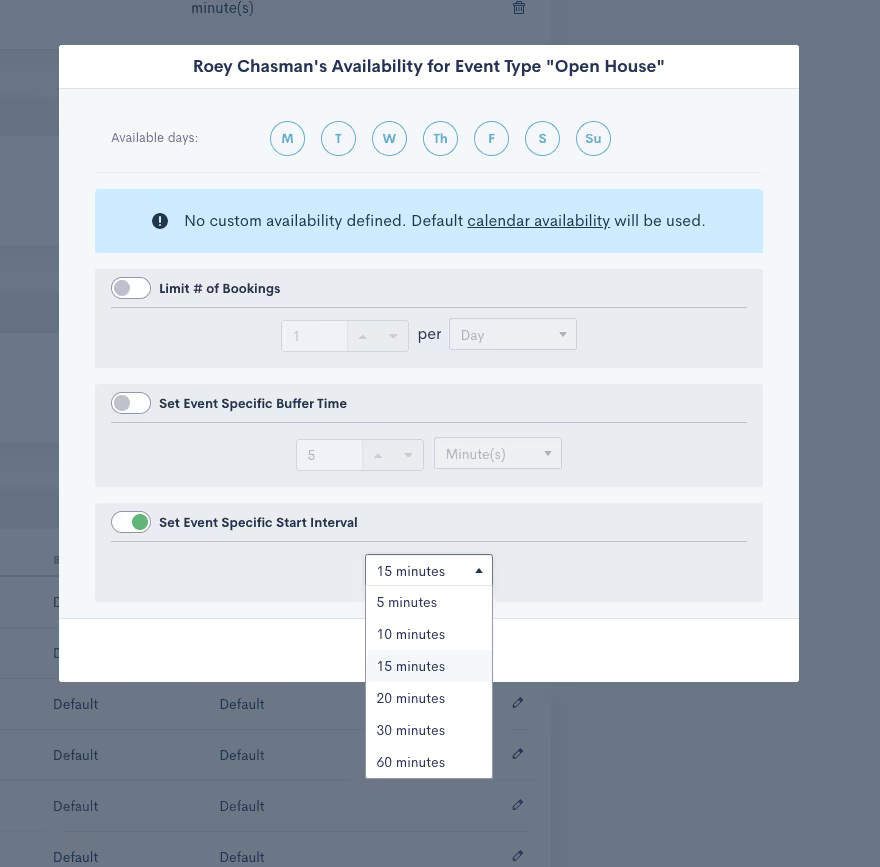
Buffer times now function exactly as expected. Instead of buffer times being included on available time slots by default, they’re now only added to meetings upon appointment booking. Calendar availability is thereupon immediately updated with the buffer time included.
Meeting Intervals

Perhaps the biggest addition that we could have made to our booking system is meeting intervals. This upgrade allows you to specify at which intervals you’d like to be available for people to book a meeting with you. For instance, if you select 15-minute intervals, people are able to book you at 9:00, 9:15, 9:30, 9:45, etc, based on your availability.
Learn how to configure your appointment booking calendar in Lawmatics here.
These feature updates should significantly improve the booking experience on your end and that of your clients. Furthermore, if you’re able to cut down on the list of systems you use as a result of this release, that’s a big win. As always, stick with us for many more exciting announcements coming down the pipe real soon.

In the legal industry, your contacts are one of your most precious assets since they are fundamental for creating a steady stream of business, and referrals. You would never throw your diamonds in a junk drawer and forget about them would you? So why would you treat your prized legal contacts any differently? Because contacts are key to your law firm’s business development, organizing them is a must.Read on for practical law firm management advice for managing and tracking your contacts and eliminating “contact chaos” in your law office.
1 Start things off on the right foot
Whether you’re organizing legal contacts or putting together a 1,000-piece puzzle, the logic remains the same: it’s much easier if you have a systematic organizational process from the start. Going back and trying to put the pieces together later with no system in place doesn’t just take longer, it will test your sanity.The minute someone contacts your law firm or submits their contact information through your website, collect as much information as you can. Even if they’re not hiring you at this very moment, they’re still a future prospect — hang on to their information!This is where a legal CRM is an indispensable resource for storing your contacts' details.Enter your contacts’ names, phone numbers, emails, and any other important details like their job title. The more specifics you can gather, the better. From that point on, a law firm CRM will store any important notes and contact details that you can refer back to later. Once a contact decides to hire your firm, your CRM can seamlessly populate their existing information directly into important contracts, eliminating the risk of errors, and boosting your efficiency.
2 Ditch spreadsheets and redundant systems
One of the biggest culprits of chaos in a law firm is spreading out your processes in multiple locations. Your law firm should have one single database to work with, that doesn't require digging through your email inbox, or scrolling through a long spreadsheet. Store your contacts in one single cloud-based location, in a CRM.That way, you can access your contact details no matter where you are, as long you have an Internet connection. This makes it much easier for everyone in your staff to stay on the same page, and eliminate the risk of confusion and errors. Not to mention the additional costs and logins associated with managing multiple systems at once.
3 Make it easy to send and receive important documents
Gathering important documentation is a routine process for onboarding new clients. Real estate clients may need to send you property contracts, criminal defense clients may have to send you waivers of appearances, and so on. It's easy for everything to become chaotic when gathering these essential documents from your clients requires them to jump through hoops.Instead of asking your clients to print, scan, and sign important documents — or worse, go to the post office, allow them to directly upload using a digital file request builder.Attorneys can find and receive files within a matter of seconds while also collecting an electronic signature, implementing a much more streamlined workflow into their practice. The end result doesn’t just make things easier for your clients, but also for everyone on your team. With everything all in one place, you can save yourself hours of tracking down the files that you need. Centralized storage will modernize your practice, and take on the labor of keeping your contacts' and important documents organized neatly.[oxygen-template id="6130"]
4 Make automation your friend
Automation accelerates your data collection and makes managing and nurturing your prospective and paying clients painless. No more manually analyzing your leads and scrambling to figure out who needs to take what action when. A pipeline management tool organizes your contacts into segmented lists so you can categorize and add tags in a way that makes the most sense for your practice. From case type to former clients, to current clients, your pipeline allows you to effortlessly analyze how each contact is progressing through your workflow and what needs to be done next.Automation tools make sure that the right email goes out at the right time, guaranteeing that your contacts receive personalized attention throughout each phase of the client journey, from client intake to billing.Whether it’s an email welcoming them as a new client, or a drip marketing email to a lead keeping them engaged and one step closer to becoming a paying client, automation takes care of it for you.
5 Integrate your tools
Running your practice across multiple platforms can quickly start to become chaotic. When workflows across softwares begin to overlap, your processes have become inefficient, and you can easily make mistakes. The best way to organize your contacts is to sync everything across all of your different programs. A law firm CRM and client intake software like Lawmatics easily integrates with a wide variety of apps that you likely use in your law practice every day.Integrations allow you to automate your tasks, and build a tech stack that will modernize and streamline your practice. You can integrate your CRM with your legal practice management software, your billing software, Zoom, and more.
There's no such thing as organized chaos when it comes to your contacts
26% of legal professionals fail to track their leads in any capacity. This is a huge missed opportunity for organizing leads and retaining clients. And while a spreadsheet of potential clients is certainly a start, it’s hardly the most efficient way to ensure that your marketing methods are getting you the kinds of results you need.If you want your law office to be a success, then organizing your contacts and tracking them throughout the client journey is essential. Implementing a CRM for lawyers into your law practice will accelerate your growth by meticulously tracking and labeling each of your contacts in the best way that works for your law practice. The end result isn't just a smarter and more flexible solution for you, you'll wow your clients with your modern and organized approach. Are you ready to see how Lawmatics, the number one client management and marketing automation for lawyers to help you manage the client journey step by step? Sign up for a free product demo today!Sources CitedMartindale, The State of Online Marketing in the Legal Industry, 2014, http://www.martindalenolo.com/sites/default/files/MHN%20Whitepaper.pdf

Billing can be a time-consuming and frustrating process, but it is necessary for your firm's success. To control your billing workflow, you need to step back and consider the whole billing cycle from an organizational standpoint. Review your billing cycle for opportunities to increase efficiencies, identify roadblocks or obstacles, and strategize how to simplify your legal time and billing system.
The typical law firm billing systems
Logging billable time and expenses, creating a draft bill, and sending the final bill to clients are the three main elements of a profitable billing process for a law firm. Usually, law firms will bill clients at the end of each month or even bi-weekly, but this may vary depending on the type of case and the amount of time involved.When a new client onboards, attorneys will track and log their billable time throughout the case matter. The attorney's activities are compiled into a draft bill at the end of the billing period. Attorneys, or additional stakeholders, will review the invoices, add notes and adjust costs as needed before approving the invoice. Once approved internally, the bill's final version is sent to the client for payment.Most law firms offer multiple payment methods (e.g., check, credit card, or wire transfer). Clients may set up a payment plan in some cases, but that is at your firm's discretion. Once payments are received, the accounting team will send out follow-up reminders regarding any late payments.While this legal billing process is relatively succinct, there's plenty of room for bottlenecks on implementation. Let's walk through how to streamline your billing processes.
Write a billing policy that works for your law firm
The goals of a billing process are to provide a system for tracking time and expenses, ensure that bills are accurate and timely, and provide a clear and concise explanation of services offered to clients. Having a standardized billing policy in place helps to achieve these goals.
Visualize the entire billing workflow
Write out all of the steps that need to happen during your billing process. Be as detailed as possible. When you write out the entire flow of your billing cycle, it becomes much easier to identify any bottlenecks or areas where time is wasted. You can also see which steps can be streamlined or automated. Having a standardized billing policy in place will also help to ensure that bills are accurate and sent out on time.
Include templates & guides for your staff
There's no need to reinvent the wheel each time. Your billing policy should include templates and billing guidelines to make the process easier to automate — bonus points if your legal billing software automates and formats your invoice templates.There are a few reasons why it's important to have a standard invoice format:
- It makes it easier for your clients to get familiar with your time entries, legal fees, and outstanding payment. They know what to expect using the same format every time and can easily compare invoices.
- It helps you keep track of your expenses. When all your invoices are in the same format, it's easier to see where you're spending your money and identify any patterns.
- It helps ensure that your invoices are accurate.
Invoice elements
All invoices should include a few key elements to make them as straightforward as possible:
- Include the name and contact information of both the law firm and the client for easy reference if any questions or concerns.
- Include a detailed description of the services rendered to help avoid any misunderstandings about what was billed for and why.
- Make sure to include the total amount due, as well as the date by which it should be paid.
By having all of this information, you can ensure that your invoices are clear and concise, making them easy to understand and pay.
Invoice review guidelines
When thinking about invoice review, you can create billing guidelines or a checklist for the attorneys who need to review the invoices before sending them to clients. This way, every person is checking and assessing the invoices is referencing the same rubric.
Set standard rates & billing structure
When setting rates and fees for your law firm, there are many things to think about, like the type of legal practice, what other lawyers are charging for similar services, the overhead costs of your firm, and the experience and qualifications of your lawyers.The most common fee structures are:
- Hourly billing — This fee structure is the most common for lawyers who typically bill in increments of one tenth of the hour.
- Flat rate billing — This fee structure charges clients a set price for every case, regardless of how much work is involved, which can be an excellent option for clients who want absolute certainty about how much they will owe.
- Contingency fee — A contingency fee is a fee that you only have to pay if you win your case. This fee is often used in personal injury and medical malpractice cases where there is high risk and a high potential payoff.
One of the most important aspects of billing is consistency with your rates. A good invoicing solution will have the option to set rates per attorney.
Implementing an efficient legal billing practice
A plan is only so good without implementation. There are a few low-hanging practices that can make your office run smoother than before.
Bill for all the time you spend on a case
When you're billing for your time, make sure to bill for all the time you spend on a case. This includes meeting with clients, researching, drafting documents, and appearing in court. Keep track of your time contemporaneously whenever possible, and bill your clients accordingly. This will help ensure that you're getting paid for all the work you're doing and significantly improve your bottom line.
Providing multiple ways of payment
To make it as easy as possible for your clients to pay their bills, you should offer multiple ways of payment. This could include online payment options, such as PayPal or credit card processing, and offline payment methods, such as checks or money orders.Offering little to no flexibility when it comes to method of payment can be bad for your business because it makes it harder for your customers to pay you. If you only accept cash or check, for example, odds are slim that each of your clients has access to those. The less you limit the ways in which you can be compensated, the less likely clients are to default on payment.
The importance of being consistent with invoicing
Sending invoices out at regular intervals and using the same format for each invoice will help ensure that there is no confusion about what is being billed for, and it will make it easier for your clients to keep track of the balance they’ve paid and the balance they still owe.
Explain your billing process in your fee agreement
When drafting a fee agreement, you should clearly outline two things: your payment procedures and the payment requirements. Make sure the client knows your billing procedures & payment conditions. Be straightforward about your rates and explain when they can expect to receive the bill.The agreement will also contain other important information, such as the scope of work. This is an excellent opportunity to set expectations for the case matter.Be sure to explain how you will bill them, what type of billing system you will use, and how often they can expect to receive invoices. You should also let them know what your policy is for late payments.As you proceed with a case, it's essential to keep clients updated on the status of their bills. If there are any changes to the amount they owe, be sure to let them know as soon as possible. The last thing you want is for a client to be surprised by a large bill at the end of the month. By communicating with your clients about billing from the start, you can avoid any misunderstandings or conflicts down the road.
The importance of communication in billing
It's vital to maintain clear and open communication with your clients about outstanding payments.Here are some tips for effective communication during the billing cycle:
- Be clear and concise — When sending an invoice to a client, be sure to include all the pertinent information, including the amount due, date due, and any applicable late fees or penalties. Be sure to use clear and concise language to avoid confusion about what is being requested.
- Be prompt — Invoices should be sent out in a timely manner so that clients are not surprised by a large bill at the end of the month. If you are running behind on invoicing, be sure to communicate this to your clients so they can budget accordingly.
- Keep records — Be sure to keep accurate, meticulous records of all communications with clients, including invoices sent and payments received. This will come in handy if there are any disputes later on.
Reducing friction for your clients is a great way to provide high-quality service. A straightforward billing system makes it easier for clients to understand what they owe and more likely to pay on time. This focus on quality and convenience makes the law firm appear more professional and capable, building trust and strengthening relationships.
Using financial reporting to identify opportunities
Having accounting knowledge that is relevant for your business will help you determine the growth potential for your organization. Byproducts of good law office accounts provide valuable insights into firm performance. The data you collect can help you make better business decisions.Businesses need to review their financials to understand how well they are doing. This information can help businesses decide where to invest their money and how to improve their operations.Keep a close eye on outstanding debts, payments, and profits to keep your billing procedure on track. The following reports might assist you in maintaining the financial health of your legal practice and keeping your billing procedure running smoothly:
- The Accounts Receivable Report gives an overview of open and past due invoices on a per-user, per-client, and per-matter basis. You can see amounts owed for approved outstanding invoices and partial payments made towards those balances.
- The Accounts Receivable Aging Report classifies past due accounts receivables by age (e.g., bills that are unpaid more than 30 days old, less than 31 days old, and so on).
- The Billing History Report provides a comprehensive record of your clients' billings: open invoices, past-due invoices, and paid bills.
- The Matter Balance Summary Report is a report that displays outstanding debts, as well as how much work in progress and continuing expenses there are on a per-matter or per-client basis.
- The Trust Applied or Trust Transfer Reports the money that has to be physically transferred from trust to operating account. The Trust Transfer report can also act as an audit log, or backup, of the trust history and dollar amounts that have been transferred at the bank.
- Trust Replenishment Report shows the current trust account balance, amount of minimum required, and how much a client is below their minimum requirement.
- The Invoice Payments Report shows payments on individual cases for particular service and item expenses. It also identifies the people who are responsible for those line items.
- The Revenue Report is a tool that allows your company to see and measure key performance indicators for each user, client, and matter on a per-user, per-client, and per-matters basis. The report details unbilled, billed, and collected amounts in terms of hours, expenses, and taxes.
These reports can help you keep track of your law firm's billing procedure and identify any areas where improvement might be needed. By monitoring your accounts receivable, payments received, and profits, you can stay on top of your finances and ensure that your billing process is running smoothly.
5 things to look for in billing software
Using billing software is one of the best ways to keep your law firm organized and efficient. Good billing software will allow you to track your expenses, bill clients for those expenses, and keep track of payments received. It can also help you generate reports that give you a better understanding of your firm's finances.When it comes to finding the best legal billing software for your law firm, it's important to keep in mind the specific needs of your business. Here are 5 things to look for when choosing a billing solution:
- Ease of use — The software should be easy to learn and use, with a user-friendly interface.
- Flexibility — The software should be customizable to meet the unique needs of your law firm and those of your clients.
- Scalability — The software should grow with your business, as your needs change over time.
- Security — The software should be secure, with features that protect your data from theft or unauthorized access.
- Reporting — The software should include robust reporting capabilities so that you can track billing and payments activity.
An efficient billing cycle will help increase law firm profitability and build successful relationships with your clients. Good billing practices include communication, consistency, providing multiple ways of payment, and keeping accurate billing records. By evaluating any billing software using the aforementioned criteria, you can facilitate the best possible billing experience for you and your clients.
Make your billing process work for your staff & your clients
If you're struggling with invoicing, billing, and collecting payments from your clients, it might be time to invest in a cost-effective solution. Lawmatics' billing software is an excellent way for law firms to simplify their billing process and increase profitability. The software is easy to use and customizable for your billing rates to meet the unique needs of any law firm. Additionally, the software includes robust reporting capabilities to track billing and payments activity. This information can help firms improve their billing practices and better serve their clients.Finally, automated workflows in the software mean that lawyers can spend less time on administrative tasks and more time practicing law. If you're struggling with invoicing, billing, and collecting payments from your clients, Lawmatics' software is a cost-effective solution that can help your business grow.
Frequently asked questions
What forms of payment do law firms accept?
Most law firms accept major credit cards, checks, and wire transfers. Some law firms also offer financing options for their clients. This can be a great way to help them pay for your services. You should always be willing to work with your clients to find a payment option that works for them.
What to look for in legal billing software?
The best invoicing software options for law firms are those built with legal compliance in mind. Legal billing software will be able to help you track your time to a matter, automate and batch invoicing and keep track of payments.When it comes time to find legal billing software, there are a few key features to look for: ease of use, flexibility, scalability, security, and reporting capabilities. The software should be easy to adopt and implement user-friendly. It should be customizable to meet the unique needs of your law firm and able to grow with your business as your needs change over time.Billing software should also be secure, with features that protect your data from theft or unauthorized access. Finally, it should include robust reporting capabilities so that you can track billing and payments activity. By keeping these features in mind, you can be sure to find the best billing software for your law firm.
What are some common mistakes law firms make when billing?
One of the most common mistakes law firms makes when billing clients is not being clear or transparent about what they are charging for in their time entries. This can lead to confusion and frustration, and even stall the case..Another common mistake is not being consistent with invoices. The top way to keep yourself from getting paid is by surprising your clients. The final mistake that is all too common is not keeping track of expenses, which leads to inaccurate invoices and overcharging. Be sure to track all of your expenses to avoid any potential billing conflicts.
What does a legal billing specialist do in a law firm?
Legal billing specialists control billing activities within an organization. It can include billing, collecting payments, or preparing and presenting financial reporting for scrutiny.A billing specialist typically does the following in a law firm: billing, collecting payments and preparing/presenting financial reports for scrutiny. They are responsible for maintaining an orderly system of accounts and ensuring that all financial obligations are met on time. In addition, billing specialists may be involved in contract negotiations with clients or other legal professionals.Sources CitedBowman, D. (2021, January 16). Law Firm Billing: Five Ways To Ensure Your Clients Pay On Time. The National Law Review.https://www.natlawreview.com/article/law-firm-billing-five-ways-to-ensure-your-clients-paytime#:~:text=Many%20attorneys%20prefer%20to%20bill,your%20bill%20in%20one%20paymentMedice, M. (2022, February 16). 2022 Profitability Strategy Checklist. JD Suprahttps://www.jdsupra.com/legalnews/2022-profitability-strategy-checklist-2115538/Mann, A. (2021, February 11). Why Modern Law Firms Must Use Electronic Payment Solutions. LawPayhttps://www.lawpay.com/about/blog/electronic-payment-solutions-law-firms/Uniform Task-Based Management System. American Bar Association https://www.americanbar.org/groups/litigation/resources/uniform_task_based_management_system/2021 Report on the State of the Midsize Legal Market. Thomas Reuters https://legal.thomsonreuters.com/en/insights/reports/2021-state-of-the-midsize-legal-market-report/thank-you

You may have thought that all of our attention has been on our new Time and Billing release announced two weeks ago, however, we are extremely proud to release several new highly requested features to the Lawmatics platform.While Time and Billing is a focus of ours and has already been an extremely popular feature in the platform, we remain fixed on making Lawmatics the leading CRM in the legal market. This means listening to our customers and developing features and functionality that make their day-to-day easier. The features we’re announcing today go a long way towards that goal. So, without further ado, here’s what we’ve been up to!
Multi-Condition Automation Rules
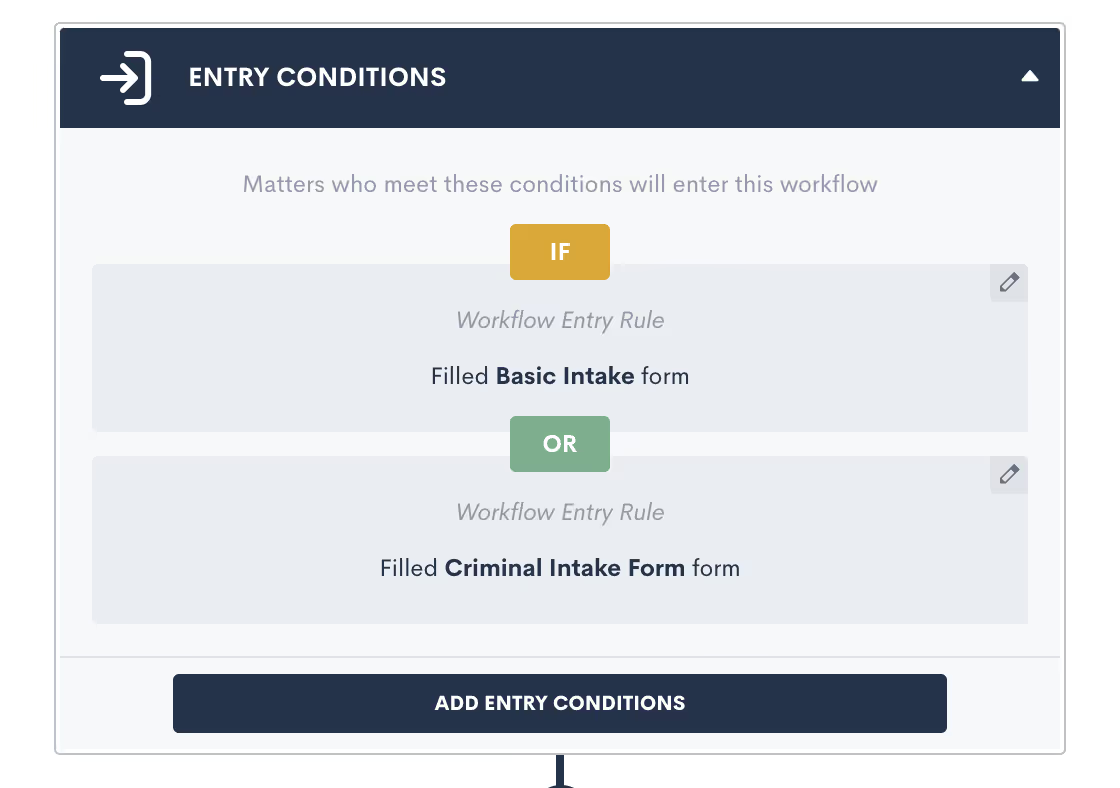
New customization options for Automations in Lawmatics, make building new automated workflow in your law firm CRM even faster and easier. You can now designate multiple entry conditions (or triggers) that add contacts to an Automation workflow, automatically. Using AND or OR logic, triggers such as form fills and eSignature completions can be paired or conditional.Suppose you have a single intake workflow in your law firm that’s applicable to multiple practice areas. You can now tie each of your various intake forms to a single automation workflow in lieu of creating redundant automations for each existing intake form.Entry conditions can be added easily within Automations in Lawmatics by clicking on and toggling the AND /OR labels, after which you can select your Workflow Entry Rules.
Custom Form Conditions (Multiple)
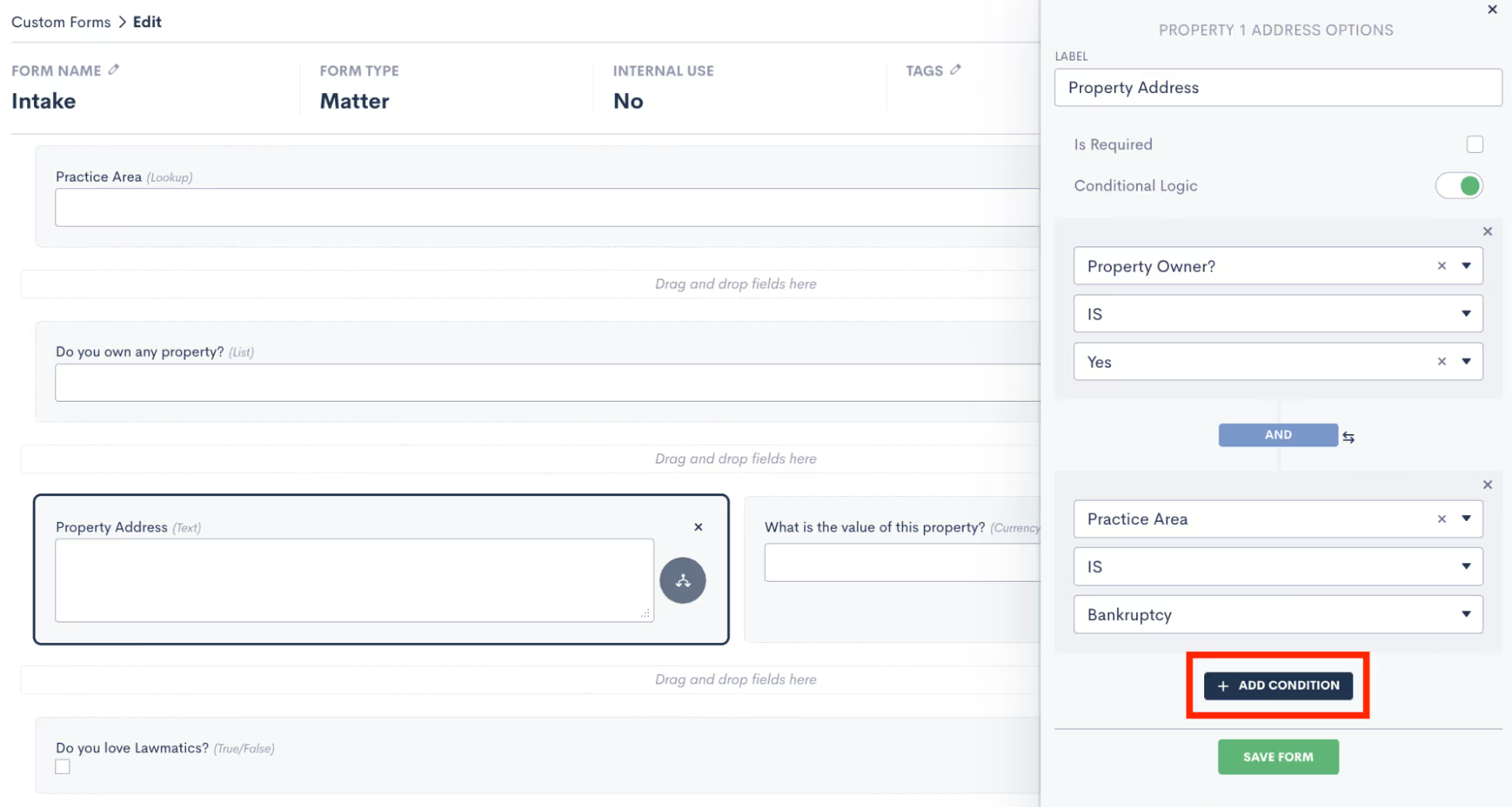
Onboarding should be a seamless process for all prospective clients, regardless of the circumstances of their inquiry. A recent update in Lawmatics allows you to add multiple conditional fields to your intake forms using AND or OR logic. These fields then only appear based on the responses entered into previous fields.Suppose a property owner intends to sue a tenant for damages. As a real estate attorney, you could easily build a ‘Property Address’ field into their intake form that appears only if the prospective client indicates that they’re a property owner . Said intake form can also be used internally by your staff to add prospective clients into Lawmatics without delay.Suppose a spouse seeking divorce intends to sue for custody. As a law firm that spans multiple practice areas, I could easily build a custody dispute field into my intake form that appears only when divorce is selected as a practice area and the prospect indicates that they have children who are minors. Said intake form can also be used internally by your staff to add prospective clients into Lawmatics without delay.
Update Contacts & Matters Via Import
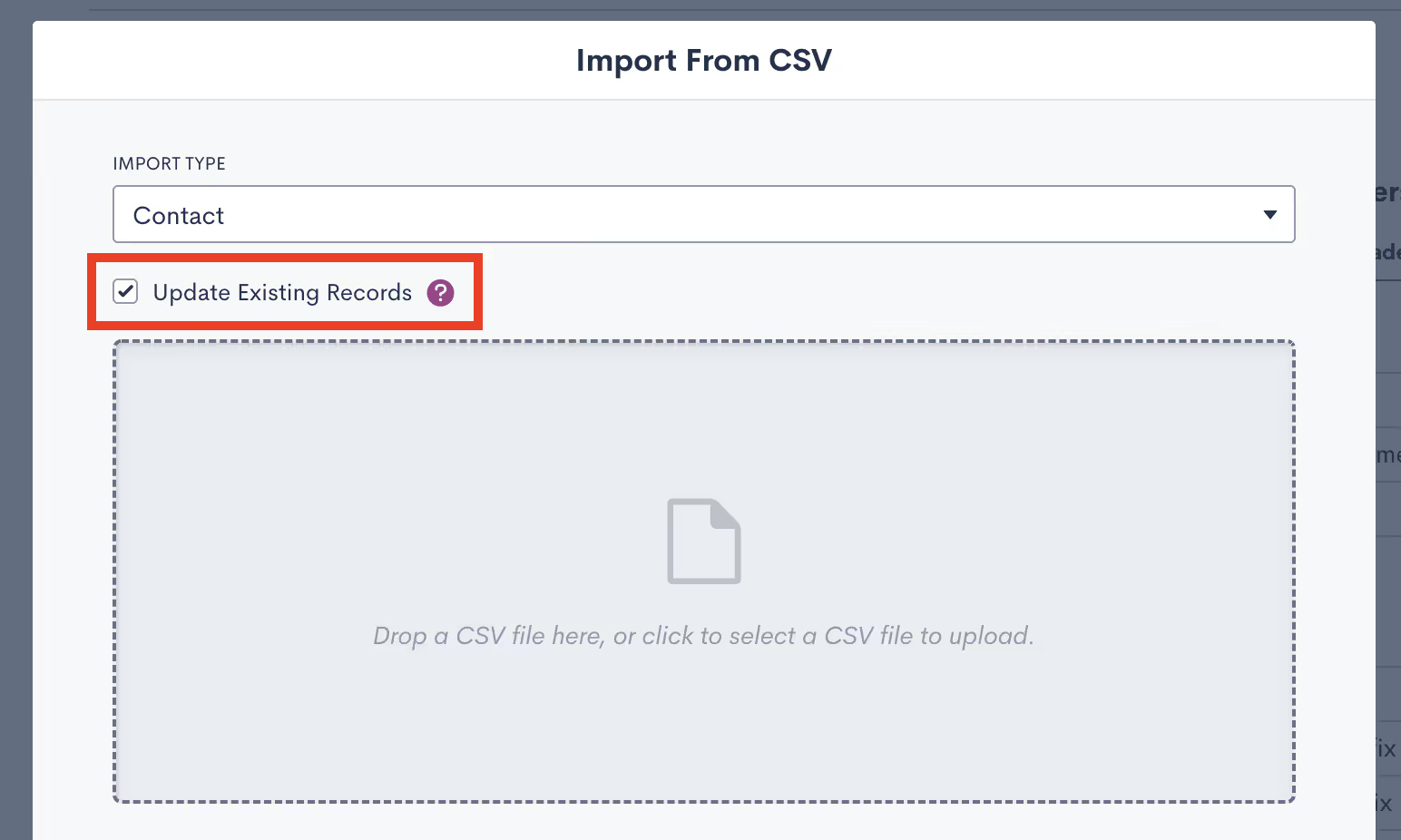
With Lawmatics' powerful reporting, the more complete your contact database in the platform regarding your firm's contacts, clients, past clients, old leads, friends & family, referral partners, etc, the better equipped you are to work your cases.In addition to importing contacts and clients into your Lawmatics database for the purpose of data migration, you can now use imports to update existing records in Lawmatics with new information. This is especially useful if you are migrating data from multiple software solutions or if you erroneously imported a contact list with missing information.When importing a list of contacts into Lawmatics, a new option appears to Update Existing Records in your database. Simply select .CSV file to upload, check the box, and all existing records with matching email addresses will be populated with any new field information.
Custom Email Template Tags
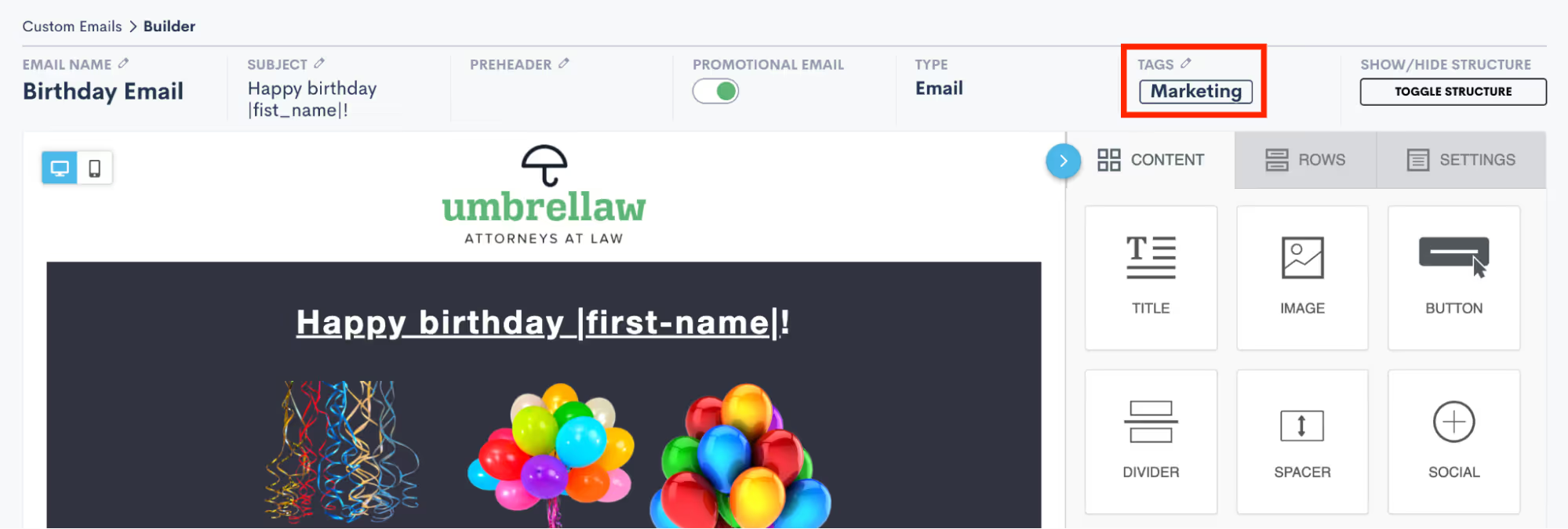
Email organization in Lawmatics just got more sophisticated. You can now easily filter all new and existing emails based on tags of your choosing. Tag your emails as a particular type, such as marketing, intake, follow up, scheduling, internal, etc, or specify the target audience for easy reference. Once tagged, it’s easy to track down and make copies of important emails as templates rather than depending on naming conventions to do so.When editing an email in Lawmatics, simply navigate to the Tags section to either select from existing tags or start typing to create a new tag. That email can then be filtered by the chosen tag. Easy.
Custom Invoice Email

When using our new Time & Billing feature, you can now create a custom email template for sending invoices to your clients. Simply enter your own custom message with a unique greeting or information pertaining to your billing process to be delivered with your attached invoice. If, for instance, you’d like to include the contact information of your billing person and/or thank the client for their business you can do so here. The added personal touch serves as an opportunity to offer additional detail and let your firm’s personality shine through, increasing client affinity to your brand.If you’re not yet using Time & Billing in Lawmatics, get started here.
Plain Text Emails Appear in Matter Timeline

When working a matter for a client, a paper trail of contact communications is absolutely critical to protect yourself from any accusations of malpractice or negligence. And the more meticulous your records, the better.To that end, anytime a plain text email is sent to your prospects or clients via Lawmatics, the exact email content will automatically appear in their activity timeline, as seen by the recipient. This will let you view at-a-glance precisely what was sent to a contact and when.—As always, this release also comes with many bug fixes and performance improvements to the platform. There’s plenty more to come so buckle up and stay tuned for more releases and enhancements to come. ;)

There's no doubt about it — lawyers are some of the hardest working people. It's important to note, however, that behind every great lawyer is often a great legal assistant. To the untrained eye, legal assistants and paralegals are often falsely perceived as interchangeable. But despite some shared duties, their responsibilities and education differ significantly.
The distinction between a legal assistant and a paralegal
From appointment setting, to legal document preparation, to billing and invoicing, it takes a lot to run a law practice. A legal assistant — sometimes referred to as a legal office assistant — is someone who works closely with attorneys, helping shoulder the brunt of their administrative work. In doing so, attorneys can focus on their substantive legal work.According to the American Bar Association, a paralegal is defined as someone qualified by education training or work experience who is employed or retained by a lawyer, law office corporation, governmental agency, or other entity and who performs specifically delegated substantive legal work for which a lawyer is responsible. Unlike legal assistants, they spend more time doing work like researching laws and helping prepare and brief attorneys for their actual trials. Some might even say a paralegal is practically a lawyer, they just can’t represent clients in court, or provide legal advice.
Education
Unlike legal assistants, a paralegal must receive special training and certification in most states with some exceptions. Although the requirements can vary, typically legal assistants may only be required to have a high school diploma.That said, a career in legal support is fast-paced and competitive. Legal assistants hoping to stand out amongst applicants may opt to become certified accredited legal professionals. (CLP) Although it is not technically required to be a legal assistant, it can demonstrate your eagerness and commitment to supporting the busy and demanding world of a lawyer. Some attorneys will only consider certified legal assistance when going through resumes, so it certainly puts candidates at an advantage.
Duties of a legal assistant
Client communication
One of the most critical aspects of finding and retaining clients is being communicative. With lawyers having much on their plates, building and researching their cases, being responsive and timely is challenging. This is where legal assistants can be incredibly convenient. They can get back to prospective clients via email, providing more information about the law firm, sifting through voicemails, and making follow-up calls. Although they can't offer any legal advice, they can answer basic questions about the law firm, which can significantly lighten a lawyer's workload.
Scheduling
The scheduling aspect of running a law firm can be a hindrance to your workflow. Your clients have busy lives of their own, so agreeing to a time that works for both you and them can result in perpetual email back and forths. Busy lawyers don't always have the time to get stuck in an email vortex trying to schedule a simple consultation. Not only can legal assistants handle the scheduling aspect of appointment setting, but they can also help avoid client no-shows and mix-ups by sending out appointment reminders.
Billing
Billing is a tremendous undertaking unto itself. In the absence of law firm time and billing software, lawyers may opt for a legal assistant to do their invoice preparation and billing tasks for them to free up hours of their week. Any invoices that are left unpaid, will usually be followed up on by legal assistants, attempting to collect payment and accommodate clients by offering flexible payment options.
Document organization
It goes without saying that there are a lot of documents that go into each matter. Legal assistants may help gather requested documents that lawyers need for a case and help organize files between clients.[oxygen-template id="6129"]
Essential skills of a legal assistant
1Organization
Legal professionals operate in a fast-paced environment. A great legal assistant is there to help bring order to the chaos, and clarity to the confusion. Someone with great structure and a natural ability to take on piles of documents and files and organize them accordingly is a key component to getting everything done fast enough.Prioritization is of equal importance: knowing what work is urgent, and what can wait. Because lawyers work with such tight deadlines, a legal assistant serves to keep attorneys on track with their deadlines, appointments, and court appearances.
2Lead management
It's critical to know where each of your prospective clients stand to avoid any missed opportunities. Ideally, a law firm should have a law firm CRM in place to ensure that information about clients and cases is easily communicated between legal assistants and attorneys. Since a CRM stores everything in one central location, you never have to wonder what tasks need to be done next or who has been followed up with. Pipeline management makes it easy for everyone in your law firm to stay on top of how new clients are progressing, and what needs to be followed up with next.
3Interpersonal skills
In most law firms, lawyers don't have the bandwidth to answer the phone every time it rings, nor should they. A legal assistant is there to provide basic information about the law firm and answer any questions that don't require legal advice. It helps if a legal assistant has great interpersonal skills, and is able to maintain an accommodating and pleasant demeanor. In addition to handling phone calls, legal assistants are frequently in charge of responding to emails and greeting clients when they come into the practice, so a basic understanding of legal terminology is a big plus.
4Technology skills
Technological skills are one of the most important attributes of a legal support professional. More and more modern law firms depend on legal technology such as CRM, legal client intake software, and case management software, so it’s necessary to know your way around them. Even in the absence of legal software, traditional firms on a manual system will still require some technical knowledge as they will be expected to use a word processor and spreadsheets. Not to mention, as e-filing becomes more ubiquitous in the courts, one must know how to electronically file a document.Simply put, it’s important for any legal assistant to be tech savvy, and ideally familiarize themselves with the most common software frequently used in law firms, so they can apply their knowledge of the programs if they're hired.
5Time management
In a law office, time equals money. The faster attorneys can complete their tasks, the faster they can get paid, and take on more clients. In reality, a large portion of a lawyer's to-do list is administrative tasks that eat up a significant portion of their day. That's why they need to rely on a legal assistant to help complete their tasks so they can focus on their clients. Therefore, legal assistants must be extremely punctual and capable of effectively prioritizing their time. A legal assistant with a quick turnaround and the ability to meet deadlines with ease is an asset to any law firm.
Legal assistants vs CRM software
Legal assistants can find themselves with a substantial amount of tasks on their plate. A legal CRM can help lighten their load by automating and streamlining tedious manual processes. However, some law firms may choose to opt for one or the other. There are some things a CRM can do that a legal assistant can't, and vice versa. Knowing the differences can help you decide whether you'd like one over the other or both.
A CRM captures your leads
A legal CRM can capture your leads automatically, and help you manage their status in one central location. Suppose a lead goes to your website and fills out a client intake form. Your CRM will instantly capture that information and push it into your database without requiring manual entry - this is the first step in law firm contact management. From that point on, CRM can systematically fill out forms and contracts with all of the acquired contact information into the right fields. That means, rather than having to ask an assistant to fill out a lengthy contract for you, potentially risking errors, a CRM can generate something like an attorney-client agreement within a matter of seconds by simply taking the information directly from your database.
A CRM nurtures on autopilot
A CRM follows up automatically when it matters most. Choosing a CRM with advanced automation features not only streamlines your law firm's communication, but it gives your clients the impression that they're being tended to at each stage of the client journey, when in fact it's your CRM communicating on autopilot.Modern AI makes it possible to send out personalized, and targeted emails that make each lead and client feel like you're talking directly to them rather than a generic blanketed email. While an assistant can certainly follow up on your calls and emails for you, manually communicating is much more laborious with greater risks of errors.In many cases, the period of time between a contact shifting into a client from a lead takes a significant amount of time. Relying on your legal assistant to follow up month after month may not be realistic. A CRM allows you to put together a drip campaign to continue nurturing leads from month to month increasing your chances of them becoming hired clients.
A CRM automates your onboarding
Every time you onboard a client you usually follow the same steps regardless of the case type. Estate planning lawyers require forms on their clients' assets. Real estate lawyers usually need photos of the title. Criminal defense lawyers might need wavers of appearance — you get the idea. Relying on an assistant to send the same email and form out and go over the same steps every time you onboard a client, can be a waste of energy when A CRM can automate all this for you.
A CRM automates appointment setting and follow-ups
With a CRM, there's no need for a legal assistant to call leads and clients to ask what time works best for an appointment. Automated appointment scheduling takes the hassle out of finding a time that works for everyone. It's as simple as sending a link with only the available time slots that you want your leads and clients to see. Clients can self-schedule with ease, and you'll receive an appointment confirmation. Your calendar is then auto-populated with appointments that have been scheduled around your availability. Not only does a CRM allow clients to self-schedule, but it also sends out automated appointment reminders significantly decreasing your chances of no-shows or mixups.
A CRM helps you make data-driven decisions
Your CRM can give you real-time insights thanks to legal reporting software directly built-in. Comprehensive reports can help you pinpoint what's working and what's not in your law firm, from where your best leads are coming from, to who your most productive staff members are. A CRM can be a game-changer for making better business decisions based on real data.
Efficiency: the primary goal
Ultimately, a legal assistant is there to help lawyers stay more organized and on top of their administrative work. Although at first glance, a legal assistant may seem like enough to streamline your administrative tasks alone, a closer look at what a CRM can do may help you realize that an assistant can only do so much with the number of hours they're given a day. And although a legal assistant can be incredibly helpful, a CRM like Lawmatics can save your firm so much time and money that you are actually losing money by not relying on automation software to boost your productivity.Lawyers looking to simplify and facilitate their legal assistant's administrative tasks should seriously consider a CRM as a supplemental tool. Alternatively, since not every lawyer's budget allows for paying a full-time staff member, a CRM can be a practical substitute to perform the duties of a legal assistant.One thing is for sure, if you're serious about growing your law practice, then you'll need to deliver an exceptional client journey from intake to closed matter, and you need all the help you can get. Are you interested to hear more about how Lawmatics CRM, client intakemarketing automation for lawyers can put your efficiency on hyperdrive and optimize the client experience? Sign up for a free product demo today!Sources CitedABA, Educational Information for Paralegals, Paralegal vs. Legal Assistant: Differences and Similarities, americanbar.org, November 08, 2021https://www.americanbar.org/groups/paralegals/profession-information/educational-information-for-paralegals/Lindsey Dean, 7 Ways eFiling Benefits Your Law Firm (and Boosts Your Success) onelegal.com/, August 3, 2017https://www.onelegal.com/blog/7-ways-efiling-benefits-your-law-firm/Online Master of Legal Studies Programs, Paralegal vs. Legal Assistant: Differences and Similarities, onlinemasteroflegalstudies.com, February 2021 https://onlinemasteroflegalstudies.com/career-guides/become-a-paralegal/paralegal-vs-legal-assistant/
Subscribe to get our best content in your inbox
Law firms love Lawmatics
Our customers give their clients the client-focused experience they deserve. Learn how they do it all with Lawmatics.
.avif)
.avif)

.avif)

Ready to grow your law firm with Lawmatics?
Schedule a demo of legal’s most trusted growth platform.
