



The Lawmatics Blog
Insights on legal marketing, automating the law practice, and legal tech in general


Last month, we walked through how to set up custom matter views. But building views is only half the equation — the real value comes from putting them to work. When intake staff, attorneys, and admins are all looking at the same long list of fields, it's easy to miss what matters, waste time hunting for the right information, or forget to fill out a field before firing off a contract.
In this Deep Dive webinar, Devon Butler, product manager at Lawmatics, and Clare Struzzi, who leads the account management team, showed how firms can use custom matter views to trigger automations, surface reporting fields, and tailor layouts by role and practice area.
Time stamps of key takeaways
5:53 – Why customize your Matter pages
Devon kicked off with four reasons to invest in custom matter views: cutting through the noise so each role only sees what they need, supporting cleaner reporting, strengthening team handoffs between intake and attorneys, and working faster directly from the Matter page without having to search for fields.
9:48 – Building practice-area-specific views
Clare walked through an estate planning intake view built specifically for intake specialists, showing how organized sections replace the old starred-fields approach. She highlighted how a field like "Next Steps Pre-Consult" can live right at the top of the view so the intake team can trigger automations directly from the details page — no need to reopen a form.
14:58 – Creating role-specific views
Devon and Clare showed how the attorney view for the same estate planning practice area includes different fields at the top — like "Next Steps Post-Consult" and a dedicated contract fields section where merge fields for engagement agreements can be reviewed and completed before sending. Clare also pointed out that sensitive information like Social Security numbers can be placed in sections that default to a collapsed view.
25:00 – Triggering automations and managing contract workflows
Devon walked through a live example of building an automation that fires when the "Next Steps Post-Consult" field is updated — automatically moving the matter to the correct pipeline stage and sending the engagement agreement. She also showed how duplicating automations makes it simple to handle variations, like sending a single-signer versus a joint estate plan document.
35:09 – Surfacing fields for cleaner reporting
The session wrapped with a look at how the reporting fields on custom views — source, campaign, estimated value, actual value — feed directly into the analytics page and custom reports. Devon demonstrated grouping a report by source to quickly see which referral sources are converting and where data gaps need attention.
Webinar slide deck
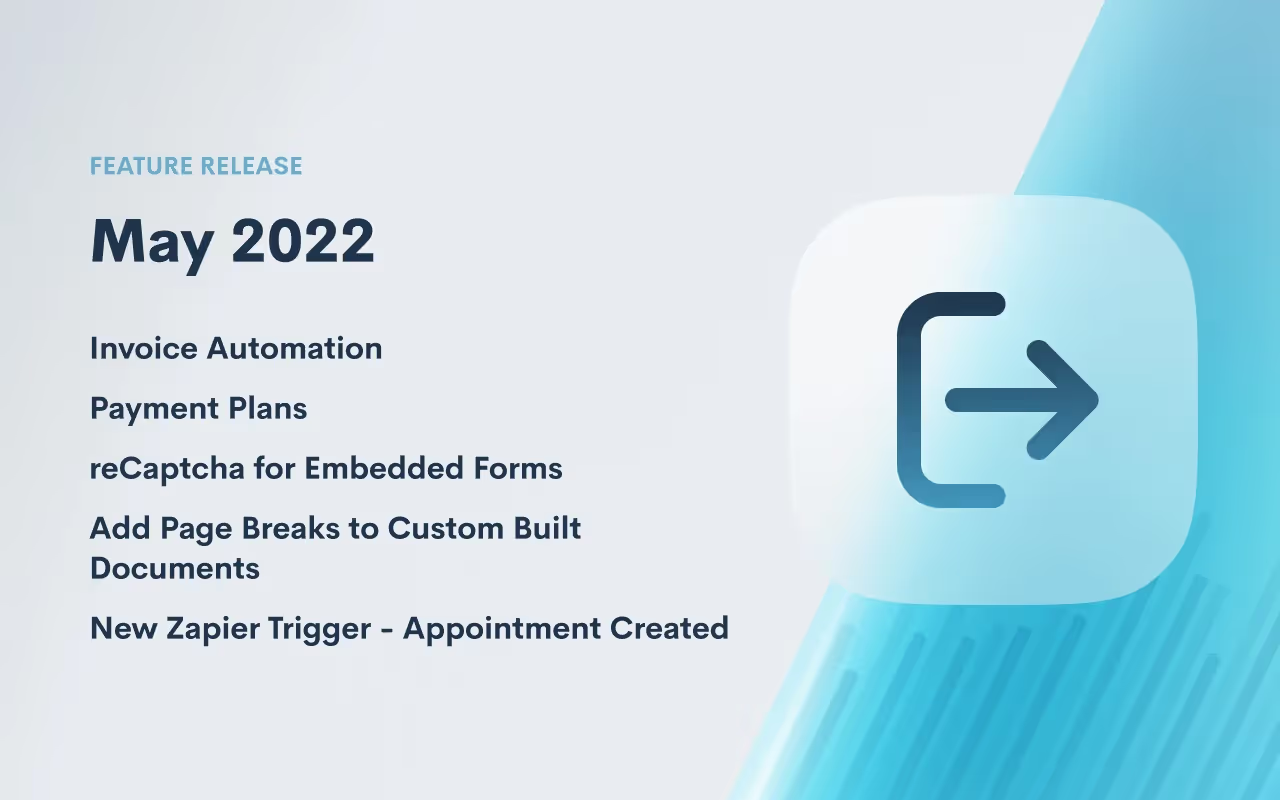
Announcing our second round of Lawmatics feature releases this May — we can’t be stopped! 🔥 This collection of product updates introduces new capabilities for automating Lawmatics Payments, our suite of billing & payments features, as well as added functionality to two of our most-beloved features: Custom Forms and Documents.
Invoice Automation
We are delighted to announce the most recent enhancement to Lawmatics Payments. You can now automate the delivery of your flat fee invoices! Automations in Lawmatics feature a new Create Invoice automation action that generates an invoice for any matter with a balance due that it runs on. Doing so enables you to accelerate your billing process in a manner that gets you paid faster while freeing up time to focus on other priorities needing your attention.

To learn more about how to use our brand new Invoice Automation feature, click here.Not yet using Lawmatics Payments? Email us at support@lawmatics.com to add these features to your active Lawmatics account.
Payment Plans
Payment Plans are an incredibly useful and time-saving addition to Lawmatics Payments. For firms who want to offer their clients more flexibility of payment, use this new feature to set up invoice installments to be paid over time on a fixed cadence.Of course we’ve made this feature highly customizable, allowing you to create unique terms for each individual payment plan as needed. This includes setting an initial payment amount, interval length, and the number of installments.
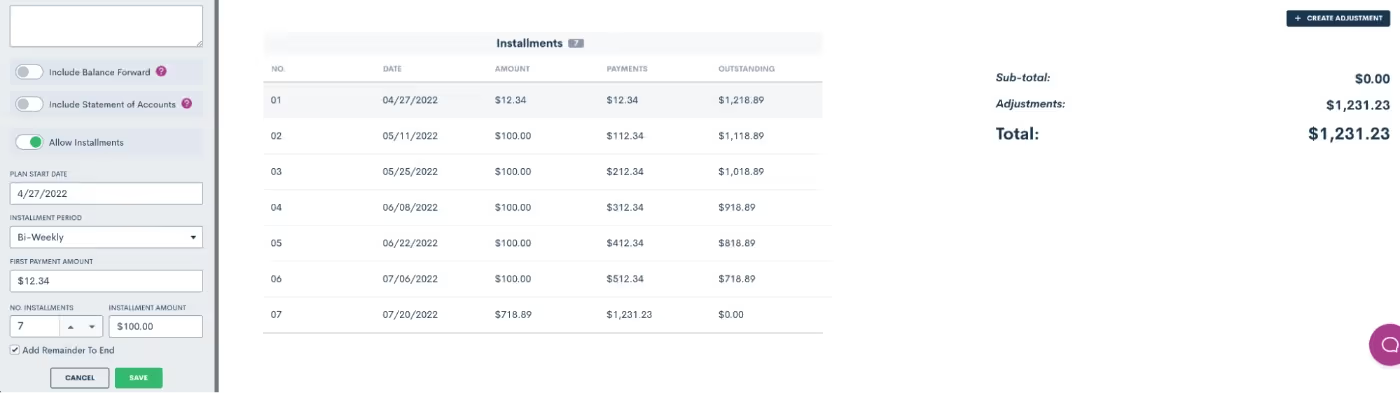
Should a client decide to submit a payment larger than the balance due per installment, the difference will be applied towards the total invoice amount and be reflected in the final installment(s).Any payments towards a Payment Plan can be entered manually, or collected via Lawmatics Pay.Not yet using Lawmatics Payments? Email us at support@lawmatics.com to add these features to your active Lawmatics account.
reCaptcha for Embedded Forms
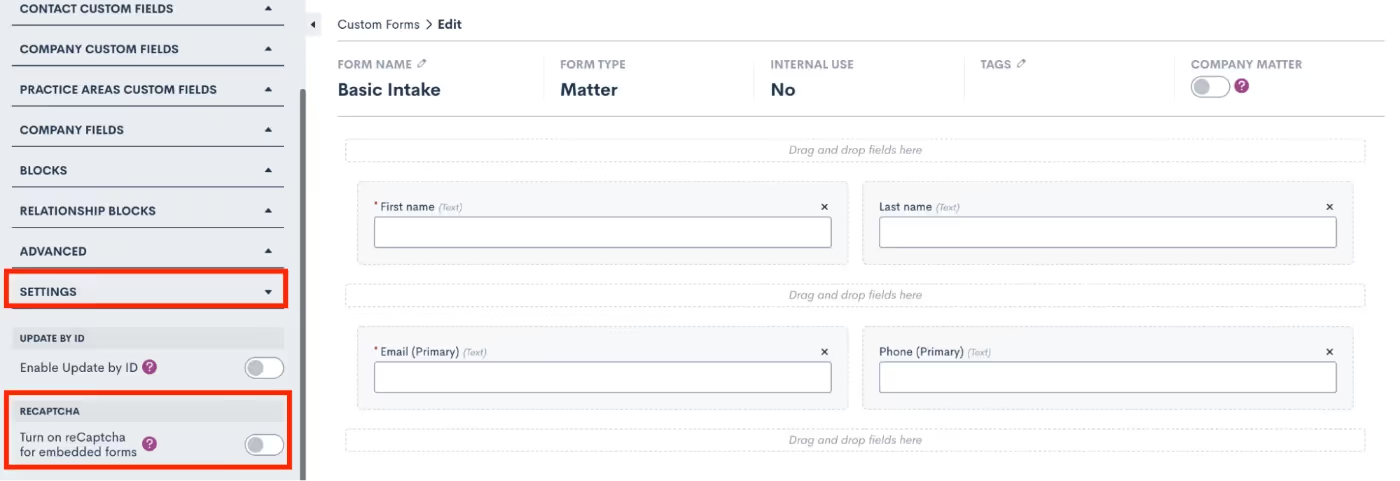
Lawmatics Custom Forms make it easy to capture new prospective client inquiries from your website, and we’ve now made this feature even better with the addition of reCaptcha. This technology prevents spam bots from entering your Lawmatics contact database via the ‘Contact Us’ form embedded on your website, ensuring that your account is protected against disruptive spam leads.reCaptcha can be added to any embedded form via the form Settings menu in the left sidebar. Simply toggle on the reCaptcha option the reCaptcha will be activated anywhere this form is embedded - no further steps need to be taken.
Add Page Breaks to Custom Built Documents
Custom Documents, with their conditional logic and dynamic e-signature capabilities, have long been a Lawmatics staple for fee agreements and other important firm documents. With the new addition of page breaks, we’ve made it much easier to maintain the look and layout of your new and existing document templates.To add a page break, simply edit the document, and drag over a page break from the Standard Blocks menu. Any text below the page break will automatically be placed at the start of a new page when the document is previewed and/or sent.
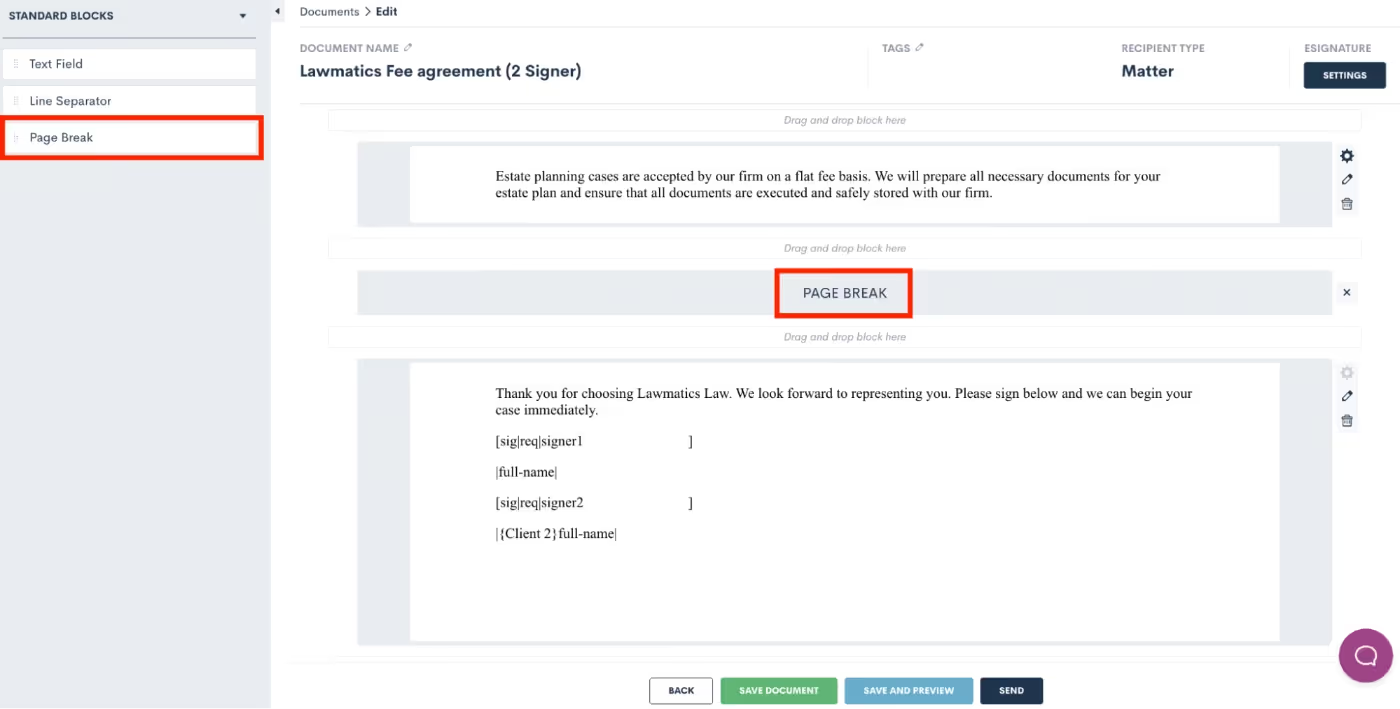
This simple but important addition is a game changer for sending out automated documents maintaining both a professional yet personalized look for each client.Need a refresher on how to create custom documents? We’ve got you covered!
New Zapier Trigger - Appointment Created
Lawmatics features a suite of direct integrations with many of your favorite legal technologies. And for software Lawmatics doesn’t directly integrate with, there’s Zapier. This powerful third party tool enables you to connect the robust features of Lawmatics to any of the thousands of other applications available within the Zapier platform.While you may already know and love our popular Zapier triggers such as ‘Matter Converted’, ‘Filled Out a Form’, among many others; we are happy to add yet another trigger, ‘Appointment Created’.This new trigger adds yet another tool to your automation toolbox, by allowing you to initiate actions in other software systems upon the creation of a calendar appointment using Lawmatics. The possibilities are endless. Use this trigger to “Zap” the appointment to another platform, or take any other action available to you from your other Zapier apps.
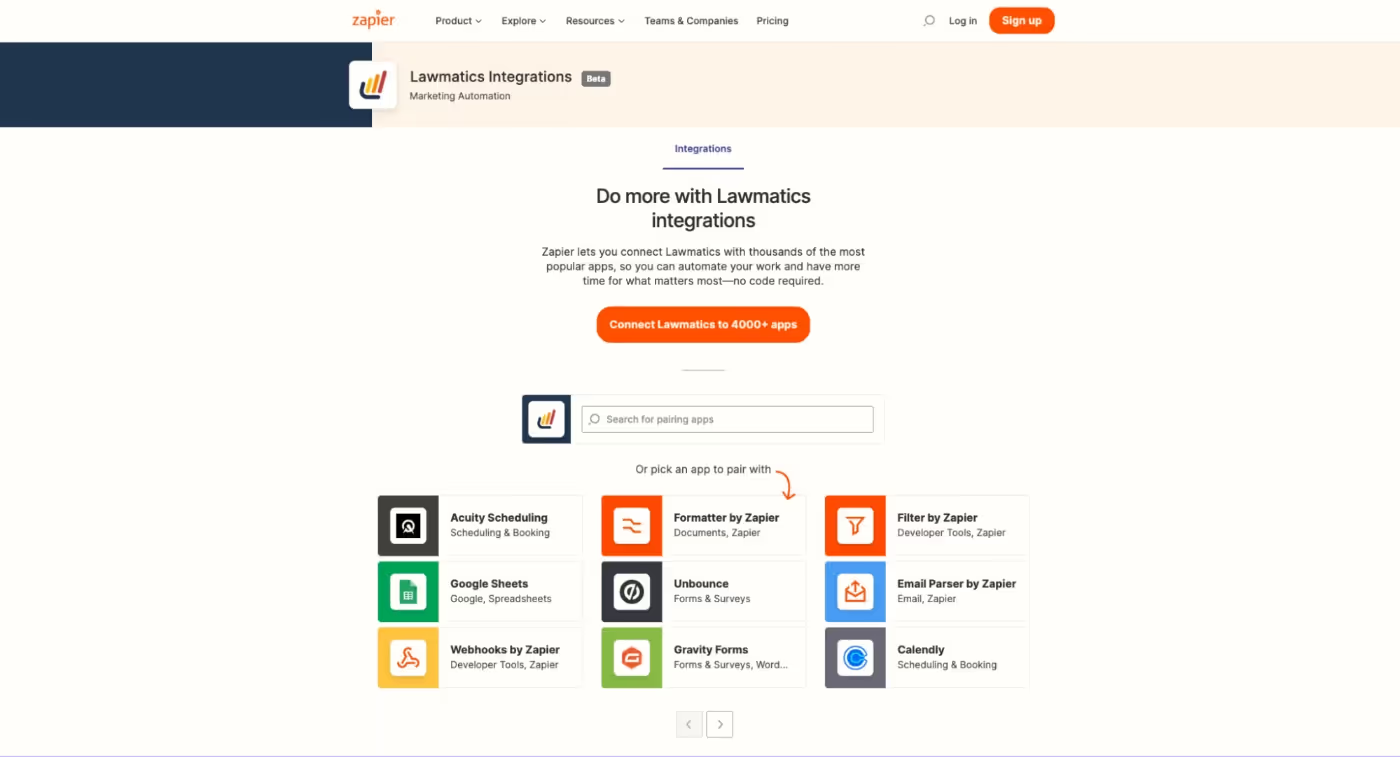
Ready to start integrating your favorite tech tools with Lawmatics? Access our Zapier app here.—Thanks for checking out our latest features and stay tuned for more exciting updates to come!

Criminal law is a complex and ever-changing field. Every case is different, making it difficult to create a one-size-fits-all marketing strategy. However, there are some basic principles that all criminal defense attorneys can follow to grow their practice. In this post, we will discuss some of the most effective ways to market your criminal defense practice. We will also offer some tips on how to stay competitive in this challenging industry. So if you are looking to expand your criminal law practice, keep reading!
What does a criminal defense lawyer do?
In criminal law, a lawyer defends an individual who has been accused of a crime. The lawyer's job is to provide a strong defense for their client and ensure their rights are protected. Criminal defense lawyers are known for their tenacity, empathy, and advocacy for their clients. Additionally, criminal lawyers will honestly advise their clients of the potential consequences and advise on the best outcome they can achieve. A criminal defense attorney must have an in-depth knowledge of their jurisdiction's complex criminal justice system.
Why marketing for criminal defense attorneys is unique
Criminal defense lawyers often face an uphill battle when marketing their services due to a few factors: financial limitations and the competitive market.
Financial limitations of prospective clients
Due to financial limitations, accused criminals may choose to represent themselves in court or use a public defender. Often, public defenders are handling large caseloads and may not be able to give the personal attention needed to represent their clients. Because of the lack of financial resources or access to court-appointed attorneys, it may be difficult to convince prospective clients that the value of personalized representation would pay off.Overcome this by highlighting your experience with the criminal justice system, and include educational content or videos on your website.
Standing out in the competitive market
Criminal Defense is a saturated practice area, so you may find that you need to do something to appear distinct. You can do this by focusing on niche areas of criminal defense (such as assault, DUI, etc.) or highlighting connections to the local legal community. Your reputation and their reputation and involvement in the local community will set you apart from your competition. You can highlight your involvement by getting testimonials and other social proof from previous clients and colleagues.
Tighten your intake best practices
You can invest all the money into legal marketing efforts, but you will lose out on those well-earned leads unless you have a tight intake process. The first step in your marketing plan is enhancing the firm's lead intake management system and processes to ensure that you can capture and track all of the leads through your various marketing channels. It will also help you qualify those leads and determine which ones are most likely to convert into paying clients.
Answer the phone
More than any other legal practice, it's imperative for a criminal defense firm to have someone answering the phone 24/7. If you can't personally staff this, many services, like Smith.ai, can help you outsource phone intake.
Use call tracking
If you are investing in marketing, then consider call-tracking a non-negotiable. Call tracking is vital for capturing leads because it lets you see how many calls are coming in and getting answered. This information can help you determine which marketing channels are most effective in generating leads. Call tracking can help you qualify those leads and decide which ones are most likely to convert into paying clients.
Use a CRM to track leads and follow up with clients
A customer relationship management (CRM) is a software or app that manages your law firm's relationships and interactions with customers and potential customers. CRMs assist you in keeping track of the leads that come into your firm and manage contacts who have already converted to clients. Using a CRM such as Lawmatics can help you track leads and follow up with clients.Many criminal defense firms use SMS texts to communicate with leads and clients. Choose a CRM that has texting capabilities, so you can connect with your client in a way that is comfortable for them.
Have a well-designed and responsive website
A criminal defense law firm should have a well-designed and responsive website. The website should be easy to navigate and provide information about the law firm, the services offered, and the team of attorneys. Update your website regularly with news and blog posts about criminal defense law.
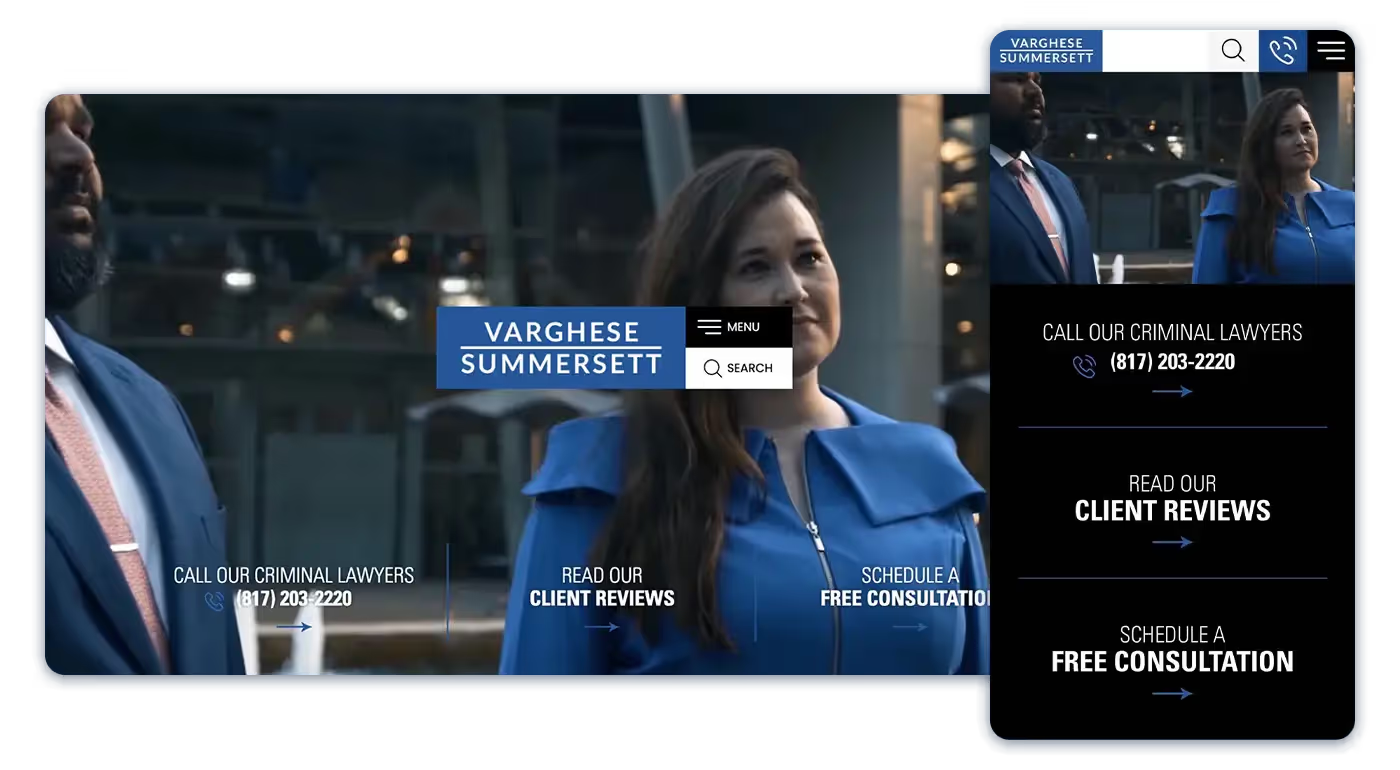
The website for Varghese Summersett PLLC Fort Worth Criminal Defense Attorneys is sleek, fully responsive, and easy to navigate on all devices. It also features educational content detailing criminal law & various offenses.
The website should be designed with a responsive layout, meaning it will adjust to fit any screen size. Many people will be accessing your website from a mobile device. People who have been accused of a crime are usually anxious and spend a significant amount of time looking for educational material online.
Write content that speaks to your client
Creating videos, blog posts, and podcasts that discuss legal changes and answers to the most frequently asked questions are just a few examples of how you can relate to your client. Consistently creating informative material that demonstrates your authority and experience in criminal defense is an easy way to increase your reputation.
Practice area pages & FAQs
You want to have both practice area pages and educational blog content or resources when building your marketing content. Practice area content consists of substantial overviews of specific areas of law. For example, if you target DUI cases, you may have a DUI overview page and the following sub-pages: Chemical BAC Tests, Commercial Driver DUI, and Marijuana DUI. The sub-pages should answer frequently asked (or Googled) questions such as "What to do if I have to take a chemical BAC test?" or "What are the penalties for DUI while high?"Note that those frequently asked questions can also be used as blog topics, but consider adding these FAQs and answers about 150 words to the appropriate practice area page.
Create pages explaining penal codes or ticket codes
When looking to create competitive content for your criminal defense website, you may consider building out pages that explain specific penal codes or ticket types. These codes are typically less competitive but can serve as educational pages for searchers, especially if they are facing a minor charge like a misdemeanor. You'll see this content tactic used by firms that defend speeding and driving tickets.
Blogging with authority
Once you have a foundation of practice area pages that speak to your services and clients, you can turn your attention to blogging. When thinking about topics for your blog, you want to get more specific about answering frequently asked questions or commenting on changes to laws. You can also highlight your firm's advocacy in the community.
Highlight bi-lingual staff
If you have staff that can speak another language, highlights it! Have the staff person translate your main pages and create a section of your website that helps that demographic. Having bi-lingual staff will help you connect with potential clients who may not speak English as their first language.
Online directories & reputation management
As a criminal defense attorney, you will want to make sure your law firm is listed in several online directories to attract new clients. Online directories also allow you to control your business listing and add additional information on your website, practice areas, and contact information.
Google My Business
Every brick & mortar business should have a Google My Business profile. It's free, and it is the absolute best way for Google to start serving your firm as a recommended business.You will want to fill out your Google My Business profile with as much detail as possible for your criminal defense law firm. Use your registered business name, and resist the temptation to keyword stuff your firm name. While you may see competitors in your area with fake firm names like "Criminal Defense Lawyer Saul Goodman," this is not allowed on Google. Unless good old Saul registered his business name like that, Google would flag his profile.To increase your firm’s appearance in local search results, you may consider having your office hours open longer than the standard 9 - 5 office hours. Google prefers to recommend relevant businesses that are still open when someone is searching. You can also add photos, videos, and posts to your account to help improve your firm's online visibility.
Get listed in directories
Law firms use online directories to list their practice areas and contact information. They can also use these directories to claim their business listings and add customer reviews. Claiming your business listing is important because it allows you to control the information displayed about your firm. You can also use online directories to highlight your firm's online reputation by getting customer reviews.Some popular online directories for law firms include:
- FindLaw
- LegalZoom
- Justia
- HG.org
- Superlawyers.com
- Martindale.com
- Lawyers.com
- Yelp
Many directories provide customers with a wide range of services with ratings to support them.
Reputation management: make the ask for reviews
In addition to online directories, you will also want to focus on reputation management, which monitors and improves your firm's online reputation. To start managing your online reputation, you will want to actively manage your social media accounts, respond to reviews, and monitor what is being said about your firm online.Not every client will be comfortable leaving a review on Google or any other website, even if they loved your service, but you and your staff need to make the ask for a review. Many lawyers resist asking clients for a review because it makes them feel icky (a technical term). Think of asking for a review as part of your process as you end your case. Include language asking for a review in your final communications with your client, and make sure to follow up at least once after the initial ask. You'll be surprised that more people are willing to evangelize good service.
Ask your colleagues to leave reviews
Due to the sensitive nature of Criminal Defense, you may find that more of your clientele is less than excited to write about how you got their drivers' license reinstated after their multiple DUIs. One way to increase your social proof online is to have colleagues and people in the community leave reviews for you that talk about how great you are. Do not have these people pretend that you helped them with a criminal case; instead, they can relay how they know you and why you would be an excellent person to work with.
Respond to negative reviews
A negative review or two is not the end of the world (or your rankings). A few negative reviews show that you run a normal practice and didn't buy 382 5-star reviews like your shady competitor. A negative review can feel like a personal blow, but you can turn this into an advantage.Once you cool off, find every brilliant lawyerly argument why your firm provided the best service and write it out. Have someone else review your response to edit for tone and professionalism. Grade.us has helpful scripts for responding to negative reviews.
Incorporate videos into your marketing strategy
Criminal defense law is a complex and ever-changing area of the law. You can use videos to answer questions about the law, provide information on changes in the law, and even ask clients to give video testimonials. You can use social media platforms to share your videos and get in front of your potential clients.
Start recording videos
One of the best ways to showcase your personality and passion is to record videos. Videos are a great way to show off your skills and explain complex legal concepts so that everyone can understand them. You can also use videos to answer frequently asked questions from potential clients.When it comes to video creation, perfect is the enemy of good. You do not need a whole recording kit. You can simply begin by recording videos with your smartphone or built-in computer camera.If you create video content, make sure to upload it to YouTube with searchable keywords. You can also embed your videos on your law firm's website.
Testimonial videos from satisfied clients
Video testimonials can help potential clients get a feel for what it would be like to work with you and your firm. To produce a testimonial video, ask your client to talk about their experience working with you. What did they like about your services? Would they recommend you to others in need of a criminal defense lawyer?Remember to keep the testimonial video short, sweet, and to the point. A few minutes is all you need.
Create short videos to address FAQs
There is a reason why the TikTok short video platform has become wildly popular. Its short-form videos are easy to digest. You don't have to be on the TikTok platform or any specific social media platform, but you should consider filming 30 - 60 second videos that directly answer questions for your potential clients. Focus on one question and provide a clear and concise answer. By creating short videos that address frequently asked questions, you can help potential clients learn more about your practice and your services.In addition to FAQ videos, you can also create short educational videos that explain complex legal concepts in layman's terms. These types of videos can be helpful for potential clients who want to learn more about the law and how it applies to their situation.By adding videos to your marketing strategy, you can show potential clients that you are knowledgeable about the law and up to date on the latest changes.
Advertising, giveaways & sponsorships
If you have a budget to play with to generate leads and build brand exposure, advertising and sponsoring are great ways to get your firm's name out in the community.
Google Local Services Ads for Law Firms
Create short videos to address FAQs
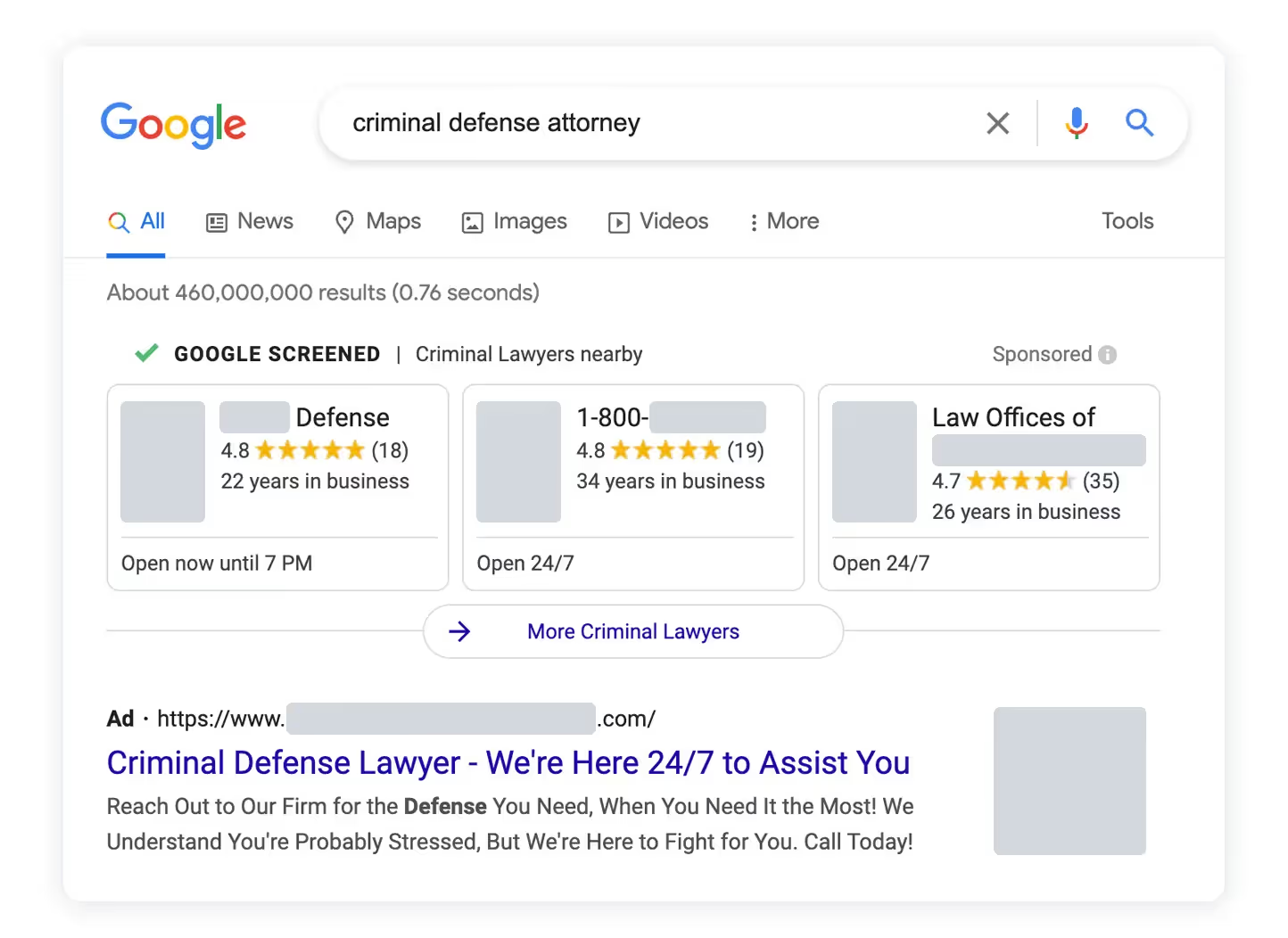
Indeed you've seen competitors appearing above everyone else in Google with their Google Screened Service Ads. These ads appear at the top of the search engine results page (SERP) and are specifically designed to help people find local services. Google Local Services is a pay-per-lead advertising platform that puts above the pay-per-click listing and the map pack. That's not a shabby investment.There are a few things to keep in mind if you decide to use Google Local Services Ads:
- You will need to create a Google My Business profile for your law firm.
- You will need to have a physical location in the city or town where you want to advertise.
- You will need to have a phone number associated with your law firm.
When someone is looking for a criminal defense attorney, time is of the essence. You want to be right at the top and ready to receive that call.
Special promotions
Some criminal defense firms will look down on this tactic, but a way to get your firm's name out in the community is to run special promotions. It's not uncommon to see DUI Defense Attorneys giving away up to $500 of free uber rides on big drinking holidays like St. Patricks Day or Independence Day. The added perk of these promotions is to gain some press and, ideally, backlinks to your website.
Sponsoring local teams or 5ks with good causes
Another way to get involved in the community and generate brand goodwill is to sponsor a local team or run a 5k race with a good cause. This type of sponsorship allows you to put your name and logo on event marketing materials, T-shirts, and websites. Sponsorships like this show that you're an active member of the community, which can make a difference if someone is looking to hire you.
Get (and convert) more leads with Lawmatics
Some of the most effective marketing strategies for a criminal defense practice include creating short videos to address FAQs, sponsoring local teams or events, and getting customer reviews. It’s important to keep up with marketing law firm trends whether that’s criminal defense or family law marketing. As a lawyer, these strategies can help you reach potential clients and show them that you are an active community member. Utilizing these strategies, like marketing automation for lawyers, can help grow your criminal defense practice.Lawmatics can help criminal defense attorneys with automating intake and communications. Automated intake enables you to collect the necessary information from potential clients as quickly and efficiently. By using a law firm CRM, you can generate personalized communication templates, which will help you stay in touch with potential clients and keep them updated on the status of their cases. Lawmatics also offers a case management system that can help you keep track of all aspects of your practice, from client contact information to court dates and deadlines.
FAQs
?What are the best lawyer directories?
Getting your firm listed on a legal directory is a worthwhile strategy for increasing your law practice's visibility and backlinks and growing your client base. An online directory is where people can find information about law firms. A lawyer must create an account and list their firm to be found. Lawyers can list their website, contact information, and practice areas in their profile.The top directories for law firms are:
- Avvo
- FindLaw
- Martindale-Hubbell
- SuperLawyers
- Lawyers.com
- LegalZoom
- Yelp
By listing your law practice in an online directory, you make it easy for potential clients to find information about your firm. Additionally, adding reviews to your legal directory listing can help you build trust with potential clients.
?What is an effective way to respond to negative reviews?
There's no one-size-fits-all answer to this question, as the best way to respond to a negative online review will vary depending on the situation. However, some tips on how to handle a negative online review include:
- Respond quickly and politely, thanking the reviewer for their feedback.
- Address any issues brought up in the review.
- Do not attack or respond defensively to the reviewer.
- Offer a solution if possible.
If you follow these tips, you can help mitigate any damage done by a negative online review and show potential clients that you are willing to address and resolve any issues they may have.
?How should criminal defense lawyers use video to market their firm?
Video can be an effective way to market a criminal defense law firm. Creating short videos that address FAQs can help potential clients learn more about your practice. Videos do not need to be perfect production quality to be practical marketing tools. Many potential clients may prefer videos that are more informal and less polished.Creating short, informative videos that address some of the most common questions potential clients have about criminal defense law can help potential clients learn more about your practice and feel more comfortable hiring you. Additionally, videos can show potential clients that you are an active member of the community.Sources CitedRegina Edwards, Smith.ai. Master Class: How to Improve Your Law Firm Intake. https://smith.ai/blog/master-class-how-to-improve-your-law-firm-intakeHager & Schwartz, P.A. The Qualities to Look for in a Criminal Lawyer. https://www.defendyourcase.com/criminal-defense-blog/2020/september/the-qualities-to-look-for-in-a-criminal-lawyer/ September 04, 2020Adam Gingery, CallRail. How to localize your content strategy in 2022. https://www.callrail.com/blog/how-to-localize-your-content-strategy-in-2022/February 16, 2022.Jonathan M. Pyzer, Clio. Guide to Marketing for Criminal Defense Lawyers. https://www.clio.com/blog/marketing-for-criminal-defense-lawyers/Owen Jones, Grade.us. How To Deal With Negative Reviews On Google. https://blog.grade.us/negative-reviews-on-google/ May 2020

Spring is here and so is the latest new feature release from the Lawmaticians! We’re excited to deliver some incredibly powerful new functionality that will surely brighten your day.
Conflict Checking

We are thrilled to announce that you can now use Lawmatics to perform your firm’s conflict checks. Simply select the matter you wish to check a conflict for, enter your search terms, and Lawmatics will handle the rest. The system will search against all data entered into your law firm CRM, including fields and notes, and instantly alerts you if it finds a match.From there, you’re able to review any possible matches, and choose to approve, flag, or fail the conflict check.
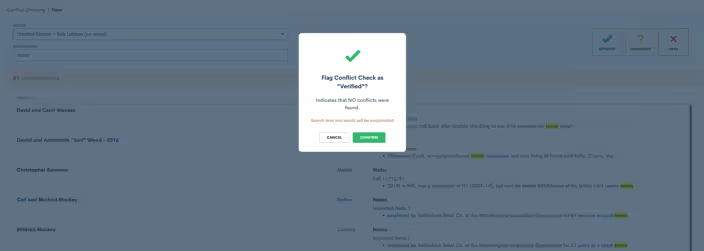
In addition to manual Conflict Checking, we’ve also added this action item to Automations. Now you can be out enjoying time away from the office while Lawmatics handles this tedious task for you.All you need to do is configure your Automations to auto-approve the conflict check when no match is found, or opt to review them yourself at a later time.

To learn more about how to use our brand new Conflict Checking feature, click here.
Hidden Form Fields
Did you know that you can now trigger automatic updates to a client’s contact information, matter information or even stage in your sales pipeline whenever they fill out a form? You can now do just that all with hidden form fields.
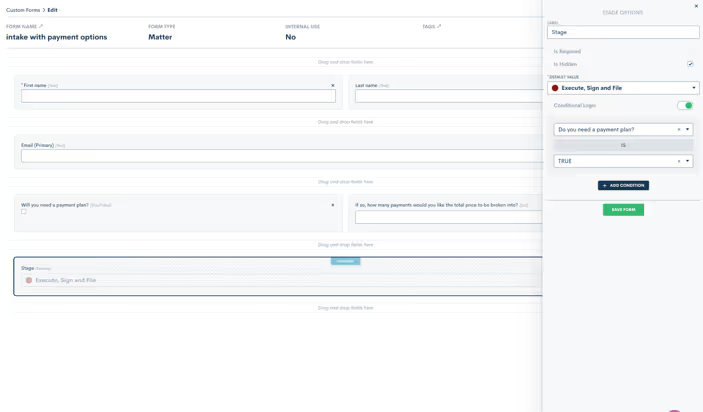
This feature allows you to set form defaults by making any field on a custom form ‘hidden’. You will add the field to your form, select the “Is Hidden” option, and then enter your default value. Your lead or client will not see that field on their form, but when the form is submitted it will auto-submit the hidden value along with the rest of their information to trigger any actions or changes to their information in your Lawmatics account.This helps you efficiently track your intake pipeline as simply as possible while eliminating the need for certain Automations previously set to update default values, the sales pipeline stage of a matter, their tag, practice area, etc.But we didn’t stop there. We also made sure you can access this feature when using conditional logic, as well as within blocks and relationship blocks.Learn more about Hidden Form Fieldshere.
Form Field Default Values
Hidden fields with default values isn’t the only form enhancement we have made. We figured why not also give you the ability to create default values for any field that you have on a form!We are happy to announce that you can now set a default value for all fields on Custom Forms, whether they are hidden fields or not. These default values will show up as pre-populated values on the form when the user opens it to fill out.
Event Type Settings Enhancements
A new upgrade to one of our most beloved time-saving features, booking links, helps you further customize your calendar availability so that you can ensure you and your staff are booked automatically and appropriately for each of your firm's event types.You can now customize your “time before” as well as your “rolling period” for all custom event types. “Time Before” refers to how soon you can be booked by someone whereas your “rolling period” refers to how far in advance you can be booked, allowing you to specify an ideal booking window per lead or client.For instance, should you want a prospective client to book you no sooner than 1 day out but no later than 2 weeks in advance, these two settings allow you to create that booking window.
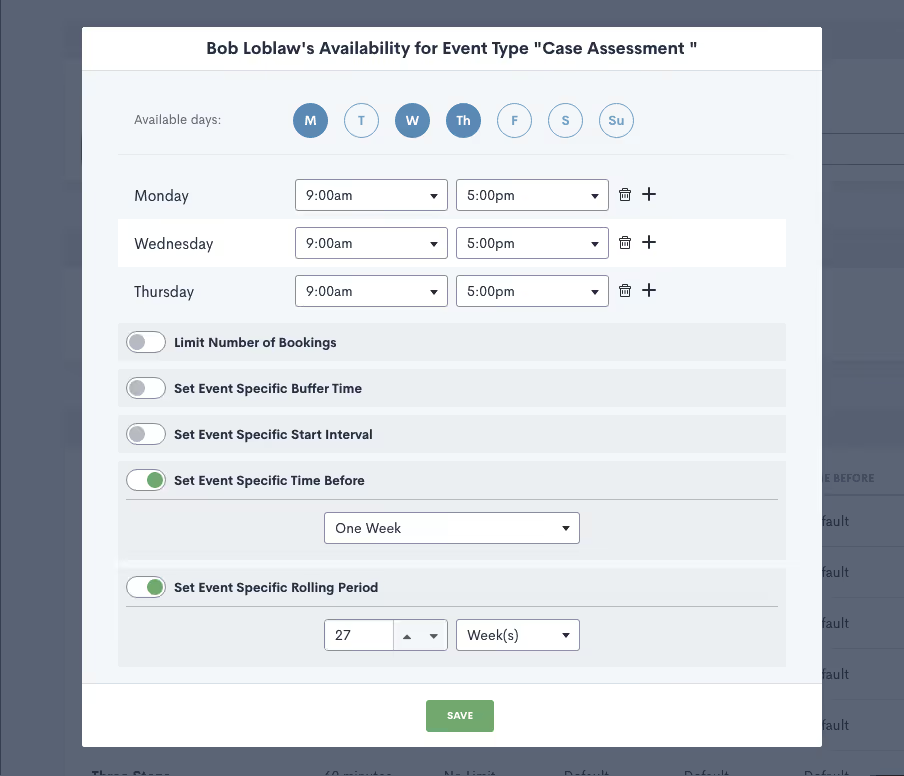
Since you may have different specifications for different event types, such as consultations or signing meetings, we are happy to now give you the ability to customize these settings for each unique event type.Learn more about these new event type settings here.—Nothing makes us happier here at Lawmatics than delivering features that allow you to spend more time with your feet in the sand and sunshine in your face (or whatever else it is you enjoy most) and less time bogged down by menial tasks. We hope that we’ve done just that with our Spring 2022 feature releases. As always, there’s much more in the works so keep your eyes peeled for loads of new releases and enhancements just around the corner.
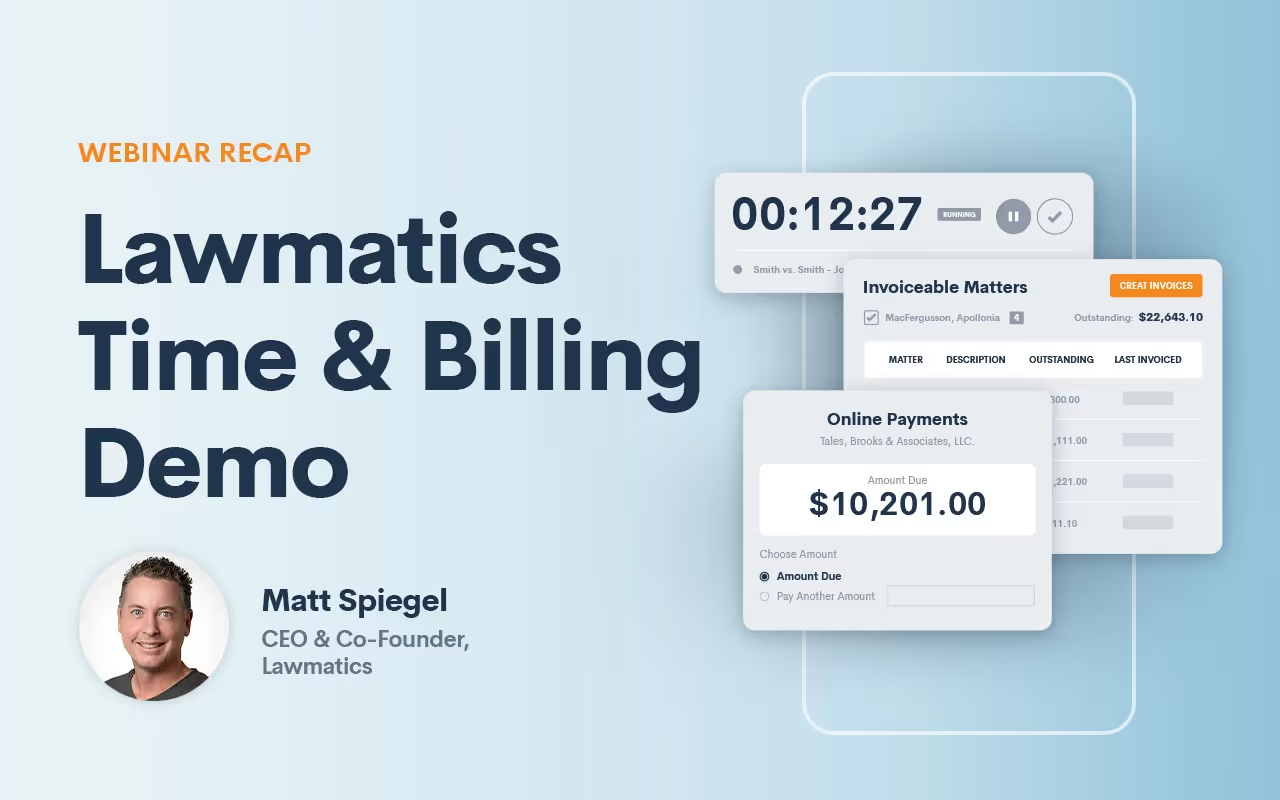
Lawmatics Time and Billing software is officially here! Whether you have an hourly or flat fee structure, our platform doesn’t just make tracking time, logging expenses, and invoicing clients easy— it can be a total game changer for your law practice.Earlier this week Lawmatics CEO, Matt Spiegel hosted a demo webinar with a full tour of the platform’s new features. For those of you who weren’t able to make it, here is a recap of what the webinar covered:
How to track all of your time and log expenses
One of the most exciting features of Lawmatics new Time & Billing software is the timer function. Whenever you start a billable activity, simply launch the timer and select an activity type, from a consultation to a phone call. The timer will continue to run in the background until the task is complete, and once completed will be added to your matter’s time entry list.Logging your expenses is equally as simple. It’s as easy as clicking on the expenses tab and choosing an item from the drop-down menu and adding the cost accordingly.
How to generate invoices fast, and in bulk
Easily track all of your unpaid balances due in one simple and condensed view. From there you can create invoices individually or in bulk by selecting as many as you want and clicking on “create invoice.” Create invoices with criteria of your choosing from date range to lead attorney, batching however you see fit. Once created, adjust your invoice as needed: Add discounts, include balances forwarded, and specify which columns of information you’d like to appear on the final bill, making it easy to bill your way.
How to manage and track all trust account fund transactions
Tracking and reconciling trust account transactions has never been more straightforward. Whether you want to see a matter-by-matter trust balance or your firm’s overall trust balance, you can see it all in one easy-to-read layout giving you total peace of mind. Paying invoices from trust accounts deduct funds from your overall balance, after which your total trust balance is updated accordingly.
All-new Automations to make invoicing even more seamless
Automations are the core of what we do. Over the next coming weeks, Lawmatics is rolling out a new feature allowing you to automatically bill from the trust account. The instant an invoice is sent, it will automatically be paid from any available balance.We’re also excited to announce that you’ll soon be able to automate flat fee invoices, and allow clients to pay invoices directly from a payment link. Doing so will trigger further automations post-payment. Not only will you be able to trigger automations but also create invoices and send them out. Note: Digital payment options in Lawmatics will require you to use Lawmatics’ own payment processing service, LM Pay. With Lawmatics payments you will receive free ACH, and there are no monthly fees, making credit card processing more affordable for your law firm.
Coming soon: payment plans
Lawmatics users will soon be able to add payment plans to their invoices to bill on a weekly, bi-weekly or monthly cadence. Simply select your preferred cadence, the number of installments, amount billed, and first payment amount — the rest happens behind the scenes.
Coming soon: accounting software integration
Stay tuned for integration with Quickbooks accounting software which should be available to you over the next coming weeks, helping you keep your books accurate without hassle. As you can see we are only scratching the surface of all of the exciting new features that will continue to emerge from Lawmatics' powerful platform. Stay tuned for more exciting updates!

Although some might describe legal project management as a fad, more and more law firms are starting to recognize it asan indispensable business function for increasing your law firm’s all-around performance.So what is it? Legal project management, also known as LPM, defines the framework of a matter early on, solidifying whateveryone can expect throughout the client journey. It involves planning out the entire legal matter using anyinformation initially on hand with the goal of staying on schedule, staying within your budget, and ultimatelyevaluating how well the plan was carried out from both the lawyer’s perspective and that of the client.
The 4 elements of legal project management
1.Define your plan
The first step to managing a new project — or an end-to-end process for your matters in this instance — is defining whatyou’ve set out to do. All projects require a beginning, a middle and an end. So it helps to envision and define exactlywhat it is that you hope to achieve. Be as specific as you can so that you know exactly what it is you want to do, whyyou want to do it, how you plan on executing, and any challenges that may arise along the way.
2.Identify project requirements
In the legal world, efficiency is paramount to staying competitive. Once you’ve defined your project, answer thefollowing questions to help keep everything on track and members of your staff accountable:
– What action items are involved in getting this done?
– What are the deliverables for each action item?
– What are the deadlines for each deliverable?
– What is the order of priority of all action items?
– What is the total allocated budget for expenses?
– What are the possible outcomes for each action item and the project as a whole?
Doing this will help you nail down the project scope and inform who to charge with managing everything from start tofinish.
3.Appointing a project manager
Although it's not necessarily a must, it's certainly a plus to appoint someone on your staff as your law firm’s legalproject manager. Qualifications for said project manager should be a thorough understanding of your legal team’sdynamics in that that appointee is capable of delegating the right projects to the right people per their bandwidth andskills. This ensures that your project isn't merely completed on time but executed as efficiently as possible. Onceappointed, your project manager will keep your team more disciplined and encourage a unified, systematic execution ofmatter management, while allowing for process improvement. They should not only act as a point of contact for members ofthe team, but also keep track of deliverables, manage the allocated budget, and prioritize task importance foroperations.
4.Evaluation
Once you've mapped out your process of handling matters/projects from beginning to end, it's time to execute. Followingcompletion, project management principles encourage an assessment of how the process went compared to expectations.Gather your team and ask the following questions:
- What could go smoother next time?
- Where do you see room for continuous improvement in your execution or project management skills?
- How can you make the process go even faster in the future?
Feedback collected based on these questions will help you improve your internal workflows, client experiences and giveyou a better sense of what to anticipate the next time.
Tips for legal project management
>Prioritize time management in your matters
Time is money yadda yadda yadda… you know the saying. Whether it's your onboarding process or generating documents, it'simportant that you stay accountable for every minute that passes throughout the course of a matter. Stay on top of yourtime, and manage it wisely; the foundation of legal project management is greater efficiency. Create a roadmap of howmuch time you think that each action item and workflow in the matter should take. Prioritizing your timeline upfrontwill eliminate common bottlenecks, and help you avoid rework and delays.
>Use the right tools
Using a cloud-based solution is the best way to manage all projects (or matters) of your firm in one single location.Whether you need to access case details,manage your contacts,send/receive important documents, or communicate and collaborate with clients, a software solution with anywhere,anytime access may be the answer.The latest trends report shows that growing firms are 46%more likely to use client intake andCRM solutions, so if growth is a priority, the right tools for legal project/matter management are a must.
>Effectively communicate with fellow staff
In the absence of effective communication, your staff has no idea who should be working on which task, you find yourselfwith scattered documents, delayed follow-ups, mixed-up dates, and missed deadlines. When you have multiple peopleaccessing a case in your law firm, from lawyers to paralegals tolegal assistants to officemanagers, it's critical that everyone is on the same page about what steps need to be taken next on a matter. Effectivecommunication principles include:
- Concise language
- Positive interactions
- Timely responses
- Effective tools for sharing important dates and client details
A CRM is your all-in-one storehouse with all the information everyone on your team requires for matter details. From allclient communications to important documents, to upcoming dates, a CRM is a centralized platform that ticks off each boxas you go.
>Know your strengths and weaknesses
The overall success of any legal work project plan ultimately relies on the success of your team as a whole. Yourproject manager should have a clear understanding of all of your team's strengths and weaknesses so they can delegate asneeded. From attention to detail, to IT skills, to a flair for personal interaction, assigning the right element to theright team member will significantly affect your overall delivery during a matter. For instance, attorneys andparalegals shouldn’t be touching anythingmarketing related when on a deadline,whereas office assistants shouldn’t be dedicating time to tasks that can be easily automated in a pinch. If you canmanage to tap into the strengths of every one of your staff members then you’ll not only see your efficiency skyrocket,but you’ll find your overall team morale will increase.
>Assess and make improvements wherever necessary
Setting goals alone isn’t enough to ensure that you’ll reach them. Data can help you pinpoint which activities areyielding the results you want, and where you need more work. Tracking your goals is made simple by running reports withlaw firm reporting software. Law reporting software can track KPIs like:
- Number of billable hours
- Number of open matters
- Monthly revenue billed, vs collected
- Individual staff productivity and more
Knowing internal analytics such as these make it simple to reach your objectives. Lawmatics CRM and client intakesoftware comes with powerful reporting software built in, so you don’t have to use multiple programs to get theinformation you need. The data is presented in an easy to read format with personalized insights into how well yourcurrent strategies are working, giving you a better understanding of your performance as a whole. Visual reporting runsreports on key metrics to help measure how close your law firm is to where it wants to be in a way that’s easy todigest.
Benefits of effective project management
>Better planning
When you can manage to map out an execution plan, it makes it much easier to accomplish. With a plan set in place, youhave greater predictability overall of what to expect, and how long each process will take to achieve. Above all, youcan plan for and anticipate any risks and issues that could come up along the way.
>Smoother processes
Planning things out, and monitoring each step as you go means a smoother process overall. Standardizing how you runthings in your law firm is the best way to ensure that nothing slips through the cracks, and no important steps getmissed.
>Less time wasted
Setting deadlines, goals, and planning for the future means less time squandered spreading your energy out in multipleplaces. When you start valuing time the same as you value revenue, you realize how important it is to stay accountablefor each minute of your day. Planning, anticipating, and implementing new initiatives means making the most out of everysecond.
>Happier clients
When you implement legal technology like Lawmatics that tracks every stage of the client process, ensures you stay ontop of your most important deadlines, dates, and communications, and better anticipates your costs, you increase youroverall client satisfaction. By delivering a consistent, effortless, and modern approach to delivering legal services,your clients will give you raving reviews, and refer you to their friends and family.
>Accountability
Staying on top of your most important tasks means remaining accountable for what's working and what's not to becomecloser to your goals. When each member of your project has their duties clearly defined, it becomes easy to measure whocompleted their assigned tasks and who did not. Accountability ultimately differs from responsibility since thecompletion of tasks aren’t just reliant on staff members— they additionally ultimately bear any consequences of failingto carry out tasks. In short, by assuming accountability, you reduce your chances of missing important deadlines andgoals and as such boost your overall performance.
>Money saved
Lawyers who standardize their processes are able to budget more effectively — plain and simple. The end result is morebudget that you can apply to your payroll and overhead. The more efficient your processes, the less time is spentspinning your wheels, and more time taking on more clients and increasing your revenue.
Grow your law firm with Lawmatics
Recent studies showthat implementing law project management into their law firms improves client communication, reduces the chance ofunpleasant surprises, and promises delivering more matters on time and within their budgets. Ultimately, you keep yourlaw firm on track, and exceed your client expectations by standardizing your operations in the most efficient waypossible If you're ready to start introducing legal project management into your law firm, thenLawmatics all in one legal CRM,legal client intake software, andmarketing automation solution can help. Sign up for a freeproduct demo today!
Sources Cited
Clio, 2021 Legal Trends Report, 2021Susan Lambreth, The Latest Trends and Data Points on Legal Project Management, March 2, 2022

As Abraham Lincoln once said, “A lawyer’s time and advice are his stock in trade.” Attorneys provide their clients with their knowledge of the law, and in turn, clients pay them. Unlike buying something from the store which is a simple transaction, paying for legal services come with much more detailed line items. And although many lawyers are turning towards alternative billing methods like a flat-rate billing system, plenty of lawyers still bill by the hour. As you well know, legal advice doesn’t always come in neat one-hour slices. Sometimes it can be a 37 second phone call, or a 17-minute consultation. A client’s final bill must break down these intervals of legal counsel into an easy-to-read, detailed format so that the client knows exactly what they’re paying for.While this may sound simple in theory, billing clients can be extremely lengthy and exasperating for lawyers. From preparing the invoices to sending them out to getting paid, the entire process can take weeks to complete. And unfortunately, since administrative tasks like billing are non-billable, lawyers find themselves dwindling precious time and resources that they could be dedicating to billable work.There’s a better way. Say hello to Lawmatics' new legal time and billing systems.
Spend less time on billing and more time on billable work
Every second counts when increasing your law firm’s profitability and Lawmatics is committed to providing the tools that make it possible to focus on the bigger picture of your practice. Instead of losing time on the time-draining administrative side of your job, our legal invoicing technology makes it possible to turn your attention towards what you do best — practicing law.Lawmatics’ new Time & Billing software refines your billing technique in ways that result in less work for you and make a lasting impression on your clients. Easily create beautiful customized invoices that deploy within minutes and wow your clients with your modern and swift approach to accepting payments.
Batch invoices
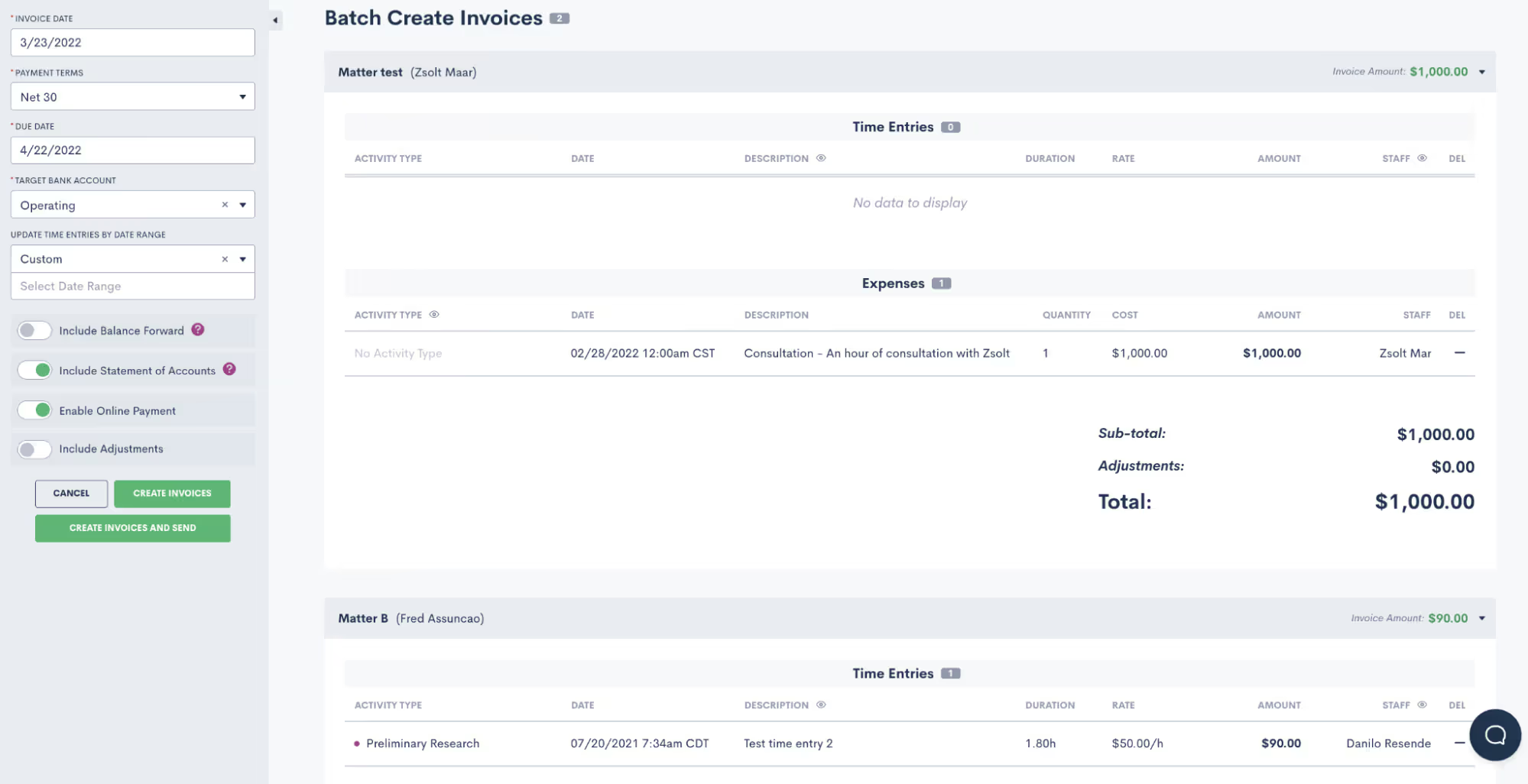
Generating bills one by one is as time-consuming as it gets. With Lawmatics, you can batch create invoices for multiple clients simultaneously. All you need to do is select clients from your list of matters whose statuses show as ‘unpaid.’ In a few clicks, all selected clients with balances due receive a digital invoice. You can also create invoices based on criteria of your choosing from date range of a matter to lead attorney, selecting and batching clients as needed.All of your invoices can go out in one sitting instead of having to prepare and send out individually, significantly saving your law firm time. Cue angelic voices singing!
Deliver polished, customizable invoices

Not only can you customize branded invoices with your law firm’s unique look, feel, and logo but you can also customize which columns of information you want to appear on the final bill. Add your own activity and expense types, whether it’s trial prep or copies and faxes, non-billable activity, or forwarded balances. Should you want to apply a discount or make a tax adjustment, It’s easy to make changes to the final invoice as needed — in other words, you can create your bill your way. You can even set your own default billing rates per user and per activity type, which means less time lost on data entry — simply click, select, and send.
Easily track your time
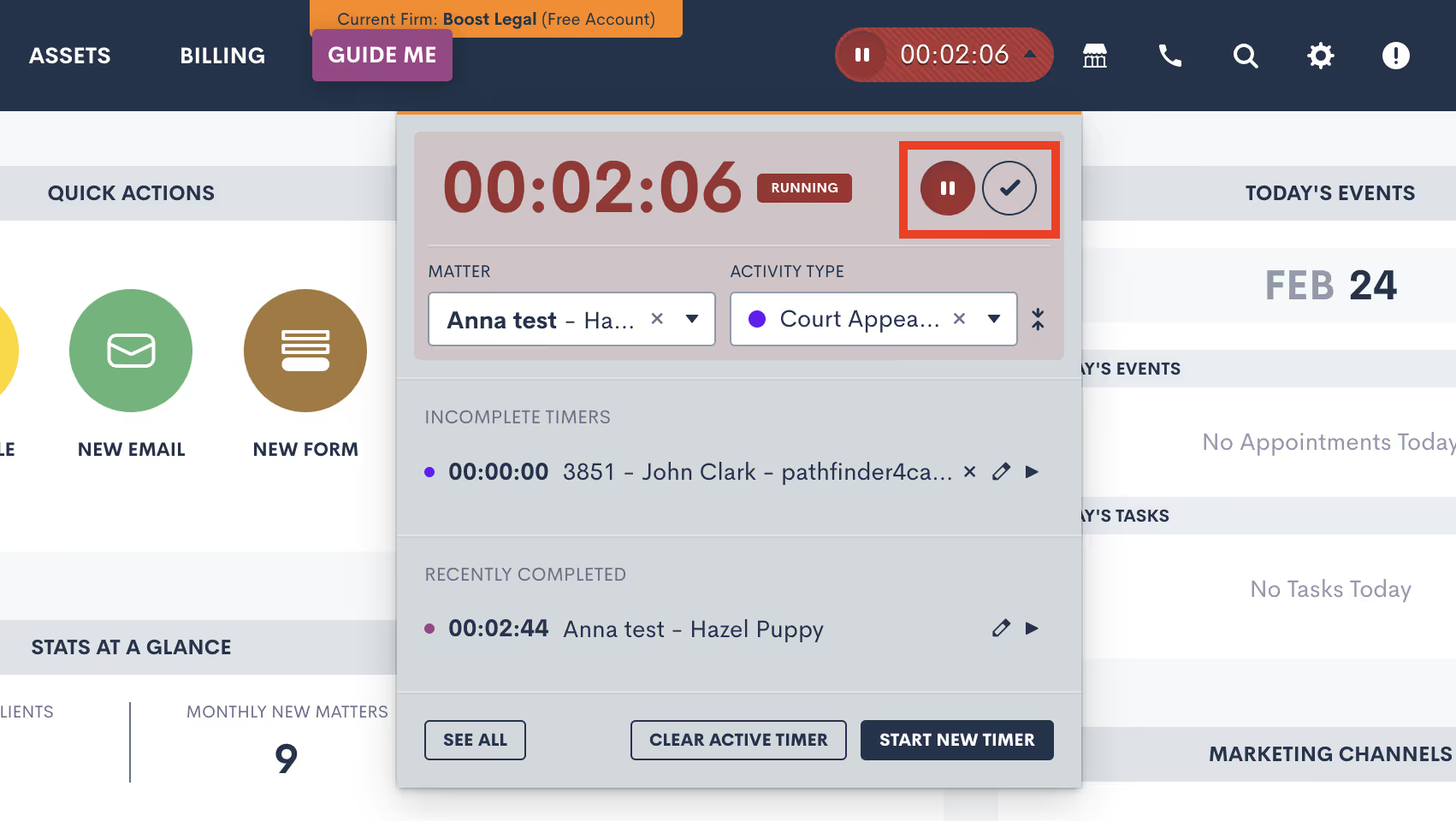
Perhaps one of the most exciting parts of Lawmatics' new Time & Billing software is the timer function that makes it easy to track your time. The minute you start a billable activity, simply launch a timer in one click and select an activity type from the drop-down menu. Whether you’re on a call or in a consultation, the timer will continue running in the background as you navigate the platform as you complete the task, ensuring you never miss a second of billable work.Once your activity is finished, simply mark it as complete and it will neatly file itself into your time entry list within the matter. How’s that for simplicity?
Makes it easy to track client trust accounts
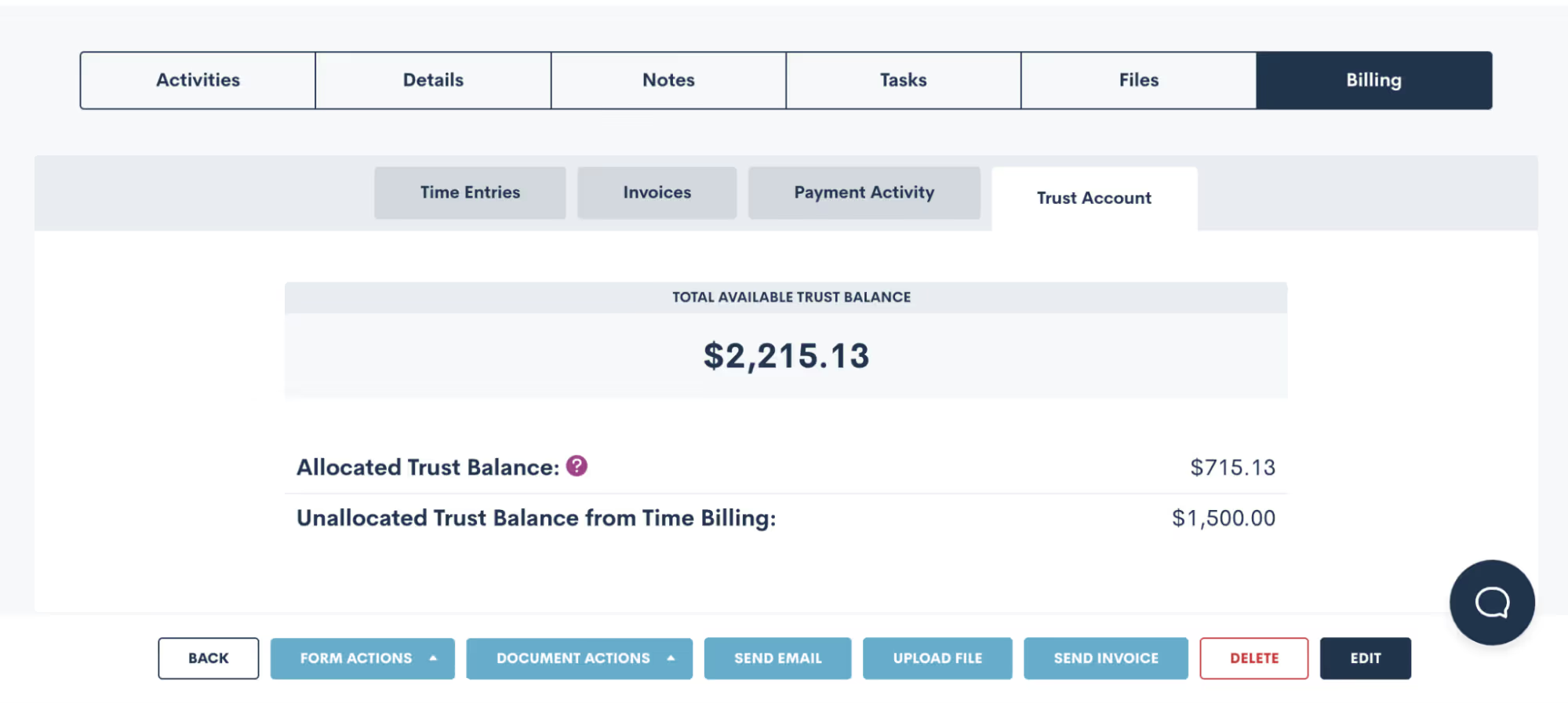
A lawyer’s worst nightmare is facing potential disbarment as a result of a mismanaged attorney trust account. Yet tracking incoming and outgoing trust account transactions isn’t always easy with non-legal-specific software. With Lawmatics, which was made for lawyers by lawyers, you can sleep peacefully knowing that all funds submitted into trust and transferred to your operating account are carefully tracked and reconciled with detailed notes.Easily run reports by matter to verify that your total balance matches your IOLTA account for the same time range. If you’re ever audited, you can be confident that Lawmatics can produce your trust balances matter by matter in a clean and easy-to-read format.
Get paid faster
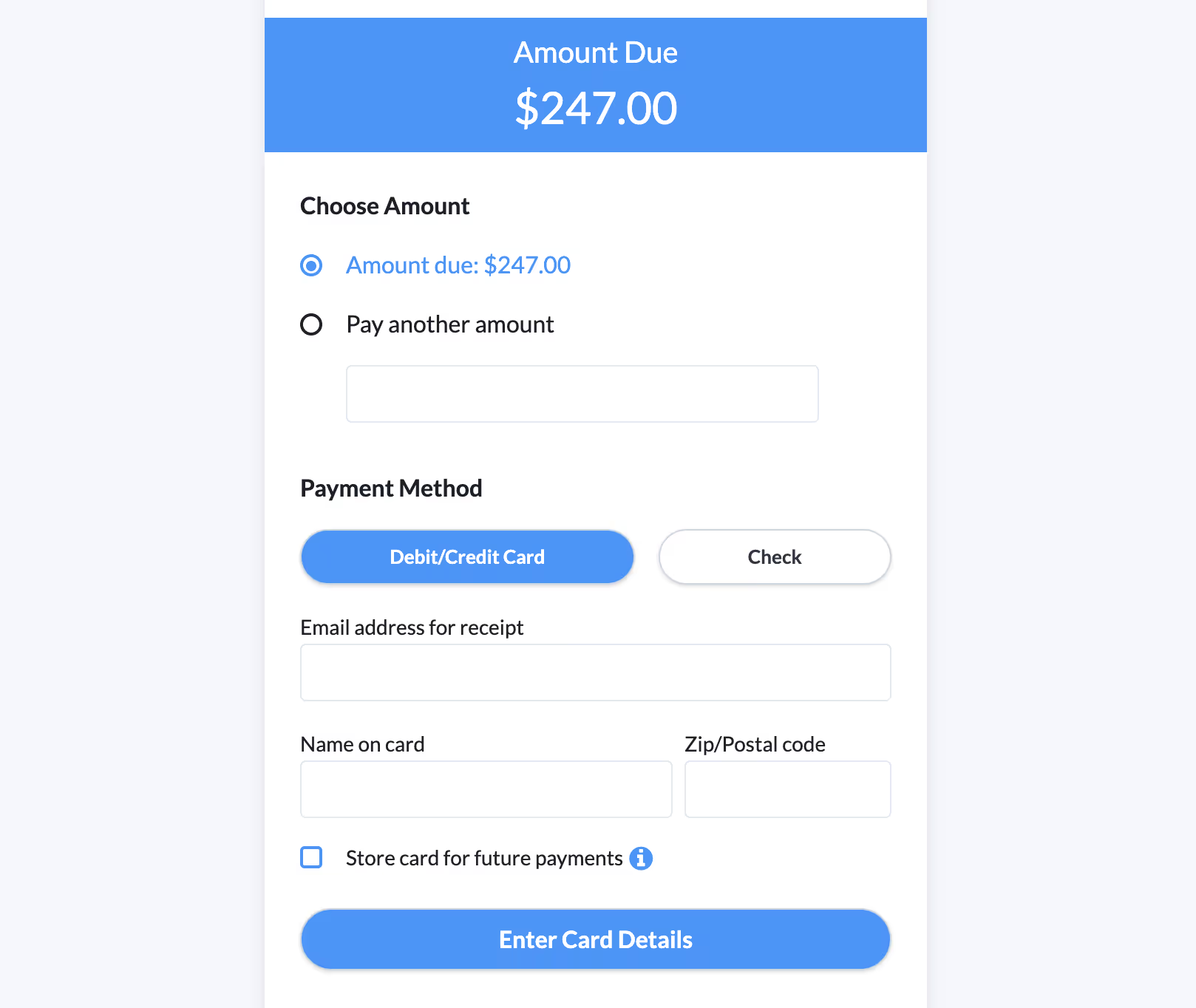
Outstanding balances can be an issue when you’re relying on an outdated billing system. Lawmatics lets your clients access a payment link directly from their invoice and pay instantly. No more bothering with checks, or mailing out paper bills — with Lawmatics you can streamline your billing and collect your money faster.Clients can pay with their preferred form of payment, whether by credit card, debit, or ACH, all from the palm of their hand. When you make it so easy for your clients to pay you, the less you have to worry about being paid.
Run data-driven reports
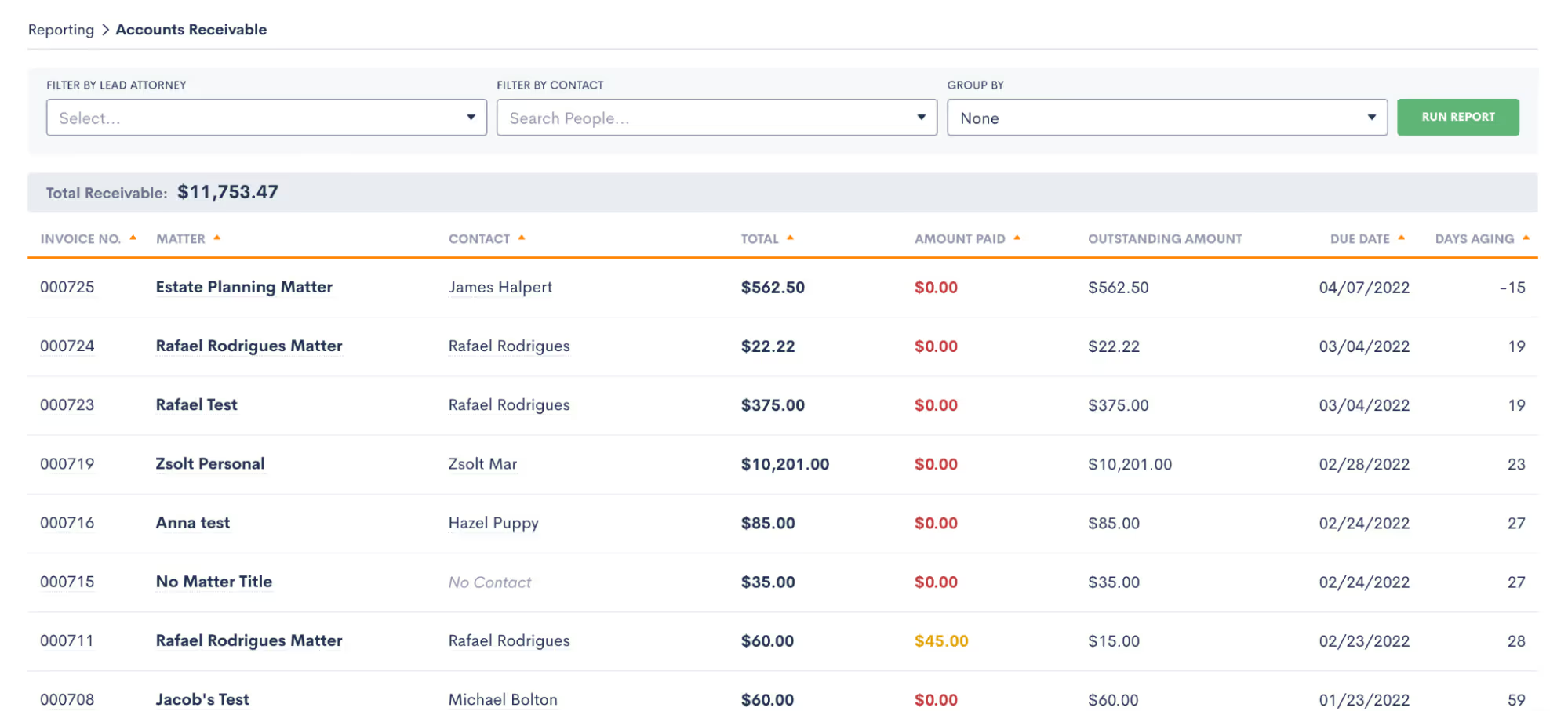
Keeping your finances on track is easy thanks to data-driven reports that show your law firm’s most important insights. Rather than bouncing around between multiple programs that conflate your financial data, Lawmatics is your all-in-one solution. See who your most profitable clients are, which attorneys among your legal team are the most productive, and track your balance collected versus balance billed. You can even monitor your average fee per matter, and make better-informed decisions based on data, not guesswork.
Tips for streamlining your law firm’s billing process
Create a standardized billing process
A 2019 Trends Report found that 14% of hours invoiced to clients never get paid. While there are a few factors that contribute to this statistic, it usually boils down to the same core problem: a lack of a standardized billing process.To avoid wasted time and other billing bottlenecks, it helps to get everyone on your team thoroughly acquainted with this process. Create a standardized billing process that specifies everything from when invoices are deployed, what expenses and activities should be billed for, and any additional communications and reminders that should go out with invoices and post-delivery.The more thorough your document around your billing process, the higher the accountability and lower the chances of human error. Regardless of the size of your law firm, a well-documented billing process facilitates a better understanding and recollection of your workflow to the benefit of your entire practice.
Be as specific as possible in your billing descriptions
Billing descriptions can be a lawyer’s catch 22 — create too brief of a billing description and you could find yourself with a dissatisfied client that feels cheated. However, add an overly verbose description that takes up three pages of an invoice, and you'll have your office manager working overtime. Instead, it’s considered a best practice to aim for a specific, detailed, yet concise description that leaves your client feeling satisfied with the number they're paying.Ideally, your activity descriptions should look something like “met with client to go over real estate assets” or “ telephone call from opposing counsel” — keep it short and sweet, yet anything but vague.
Be forthright and transparent about your billing process
One of your first action items upon initial consultation is confirmation from your clients that they understand your fee agreement and billing process. Consider this an essential component of lawyer billing ethics. The best way to do this is to put it all in writing to assure that you and your client understand each other. You should go over the total amount of money you charge, your hourly rates, anyone else on your team who will be working on the case, when your invoices will be sent out, a detailed description of an estimate of total expenses, and when you expect to be paid.Putting this in writing doesn't just make this easier for you and your team, but it also helps your clients better plan for paying their bill. Better planning means less likelihood of having to chase your clients around to settle up.
Formally train your team to use your billing software
Whether you're a small firm, or you're a larger one with an office manager and paralegals handling your billing, it's important that everyone on your team fully understands the inner workings of your billing software to get the most out of it. Appoint someone in your firm — whether that be you yourself or a team member — to take point on getting all staff members trained on your billing solution. This person will be in charge of communicating with onboarding representatives of your billing platform and schedule training sessions with your staff as time permits.Lawmatics' full platform comes with a thorough onboarding program designed to help your firm get off to a running start. At the end of the Lawmatics onboarding program, your team will be well versed on every feature of the Lawmatics law firm CRM, client intake marketing automation and billing platform. Following onboarding, your team will continue to have access to our knowledgeable support team to answer any questions and concerns.
Track time contemporaneously
If you hope to keep a steady cash flow, you must stay on top of your time tracking. Doing so contemporaneously — or as billable work happens — is a method experienced attorneys swear by to hit your billable hours goals. With so many things going on at once in your law practice, it’s easy to forget to log your billable work later on, or worse, overestimate the length of an activity on your invoice and infuriate your clients, leading to billing disputes. Use the Lawmatics timer function to ensure that you stay on top of every minute of billable work, and you might just be surprised to find that you’ve been working more than previously estimated.
Consider alternative billing methods
More and more lawyers are turning towards alternative billing arrangements given the stigma of the term “billable hour” and its frequent association with astronomical and unaffordable legal bills. Consideration of alternative billing arrangements may help you tap into a greater legal market of clients that may not have otherwise hired you on an hourly billing system. On top of that it can also create a more straightforward billing process for you and your team.Flat fees, for instance, are easy to invoice, and rarely result in billing disputes. If you haven't at least begun to consider introducing alternative billing methods into your law firm, now may be a great time to start. Since more and more lawyers are charging for their legal services in alternative ways, failing to keep up could put your competition at an advantage.
Use automation whenever possible
Automating your law firm’s routine tasks is the best way to streamline your practice, and dedicate your time to what can’t be automated — like strategizing or attending hearings. Above all, automation helps boost your law firm's productivity, so your workday isn't bogged down with administrative tasks like invoice preparation, or data entry.By harnessing the power of legal technology like Lawmatics you can make time for your law firm's most valuable work, and let automation handle the rest. From invoice reminders to generating a fee agreement in a matter of seconds, automation is here to make your billing process go much smoother.
The future of legal billing technology is here
A recent report shows that the average legal professional logs less than 3 billable hours a day on average since they're so inundated with non-billable administrative work like billing clients.Legal technology is evolving every minute, so there's no reason why your billing system shouldn't evolve alongside it in pursuit of your profitability goals. And when it comes to profitability, time is your most important asset. Not only in billing but law firm performance management and new client intake can all be streamlined to give you more time. The more you can accelerate day-to-day processes with modern solutions, the higher your caseload allotment, and the more revenue you can generate.Whether your law firm bills hourly, on contingency, or by fixed fee, Lawmaticslegal billing software is a clear-cut billing solution for thorough invoicing that makes it easy to get paid. Are you ready to see how Lawmatics’ new time and billing feature can level up your billing process? Sign up for a free demo today!Sources CitedClio, 2019 Legal Trends Report, 2019https://www.clio.com/resources/legal-trends/2019-report/Clio, 2021 Legal Trends Report, 2021https://www.clio.com/resources/legal-trends/
Subscribe to get our best content in your inbox
Law firms love Lawmatics
Our customers give their clients the client-focused experience they deserve. Learn how they do it all with Lawmatics.
.avif)
.avif)

.avif)

Ready to grow your law firm with Lawmatics?
Schedule a demo of legal’s most trusted growth platform.
